
Tutorial - Using Zonemaster
Learn how to analyse the DNS configuration of a domain name with Zonemaster and identify the elements to correct or improve
Information regarding OVHcloud service administration and how to find appropriate assistance
When using OVHcloud guides, please be aware of the following conditions:
- User instructions aim to provide as many details as possible but cannot cover individual use cases. You might need to adapt the pertinent actions to your requirements.
- The OVHcloud ecosystem is built for flexibility and freedom of choice. Customers are therefore responsible for the secure and proper configuration of their services. To prevent data loss, we strongly recommend to apply backup strategies to all your important data.
- Our guides and tutorials may reference third-party software or services in combination with OVHcloud solutions. The technical support provided by OVHcloud does not include the configuration of systems or products outside of our responsibility. This includes but is not limited to:
- Operating systems and user interfaces (Windows, Debian, Plesk, etc.).
- Any other third-party software (FTP clients, email software, etc.).
- Services offered by other providers (DNS, APIs, user interfaces, etc.).
To receive the appropriate assistance for any issues you might experience, follow these guidelines:
- You seek personalized advice or you would like to discuss a topic that is not covered in detail by our documentation?
Join the OVHcloud Community to search for your topic and reach out to other users. - You need to report an incident regarding your OVHcloud service or you are experiencing difficulties in the OVHcloud Control Panel?
Create a support request in our Help Centre. - You require professional assistance for your project or you need help with tasks outside our support scope?
Visit our partner portal to search for experts who are familiar with OVHcloud solutions. - You are looking for more detailed information regarding our support levels and Professional Services?
Please visit our web pages for OVHcloud support levels and OVHcloud Professional Services.
You can participate in improving our documentation:
- You would like to share feedback to improve a guide page or you want to report insufficient information on a specific page?
Use the "Was this page helpful?" buttons at the bottom of the page to let us know. - You would like to propose a specific documentation update?
Use the "Edit this page" function, available at the bottom of the page and in the sidebar.
Objective
Zonemaster is a tool created through the collaboration between AFNIC (the French registry) and The Swedish Internet Foundation (the Swedish registry). It lets you analyse the DNS (Domain Name System) configuration of a domain name and identify the elements that can be improved or corrected.
For a better understanding of the DNS concept, please refer to our guide "Everything you need to know about DNS zone".
Requirements
- Have a domain name
Instructions
Input field
The Zonemaster tool lets you check a DNS configuration already in place on a domain name, or test a DNS zone preconfigured on future DNS servers.
To check the current configuration of a domain name, enter your domain name then click Run test
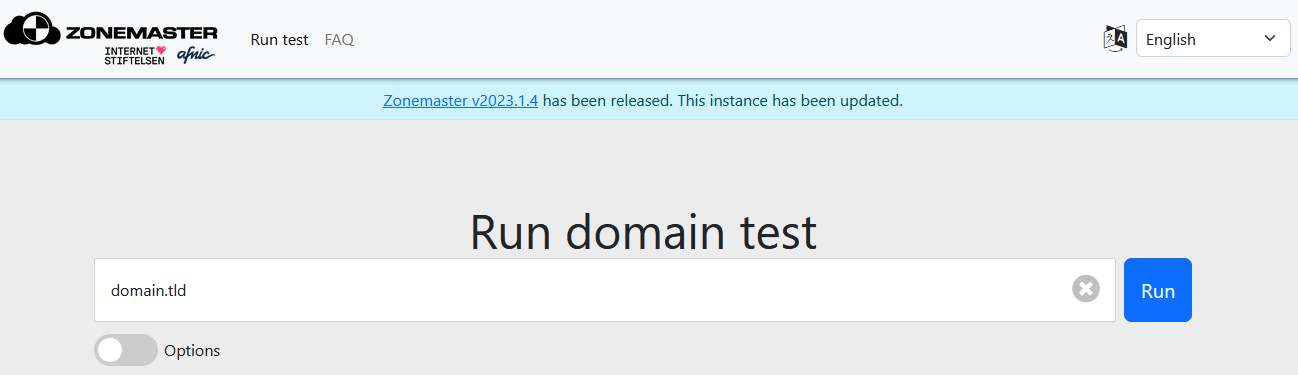
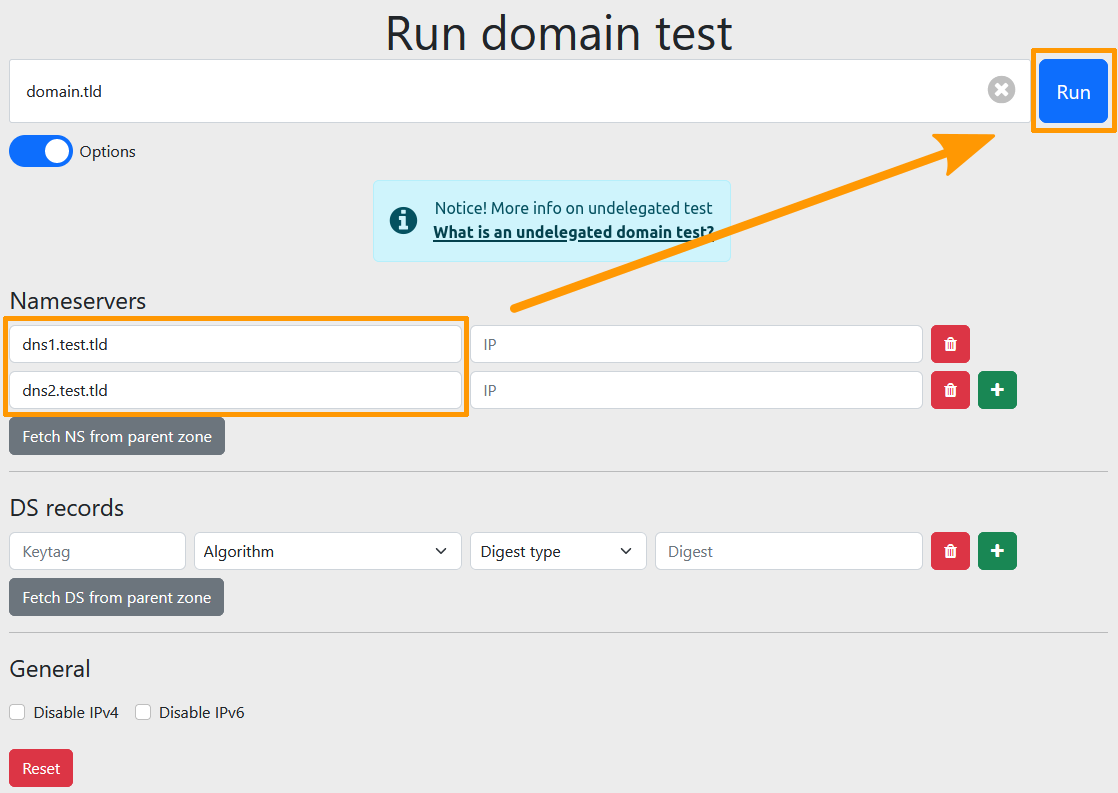
To check a DNS configuration that you have prepared but not yet applied to the domain name concerned, tick the Show options box, then enter the following information:
- Nameservers: enter the details of the name server associated with a domain name. A new
Nameserverblock appears automatically as soon as the previous one is filled in, so you can declare several. Entering an IP address is optional. - DS records: as part of DNSSEC protection, enter the details of the DS record. A new
DS recordblock appears automatically as soon as the previous one is filled in. If the DNS servers do not use the DNSSEC protocol, you can leave these fields empty. In the case of a zone signed with DNSSEC, this function lets you check that the zone works correctly with a validating resolver, using the DS records you are about to publish, prior to their publication.
You can also force the checks on a specific IP protocol with the IPv4 and IPv6, IPv4 only and IPv6 only options
Example:
You are the holder of the domain name "domain.tld", which currently uses the DNS servers "dnsXX.ovh.net" and "nsXX.ovh.net".
You have configured a DNS zone for this domain name on the DNS servers "dns1.test.tld" and "dns2.test.tld".
Before changing the DNS servers, you can perform an advanced search using the
Show optionsbox by entering "dns1.test.tld" and "dns2.test.tld" in theNameserversboxes.Zonemaster will run a test as if you were using the servers "dns1.test.tld" and "dns2.test.tld" on "domain.tld".
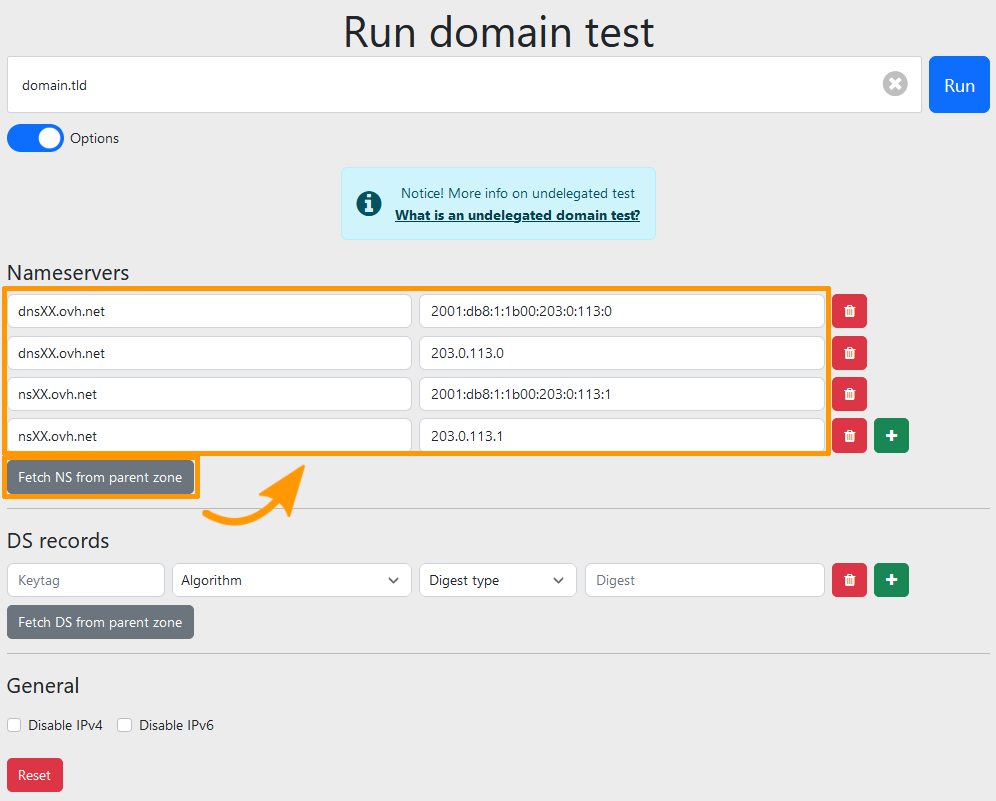
When you enter a domain name and click the Fetch nameservers from parent zone and Fetch DS from parent zone buttons, the DNS servers associated with the domain name will appear, along with the details of the DS record (DNSSEC) if one has been configured.
Result
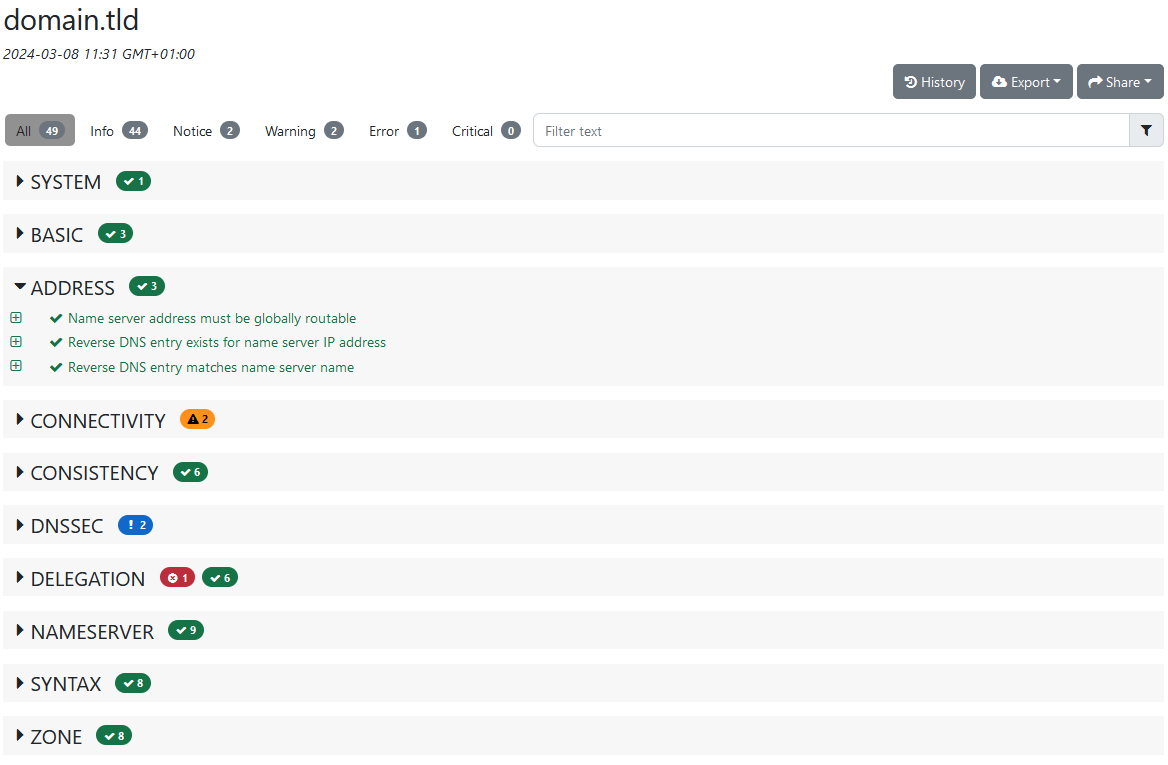
Once the form has been submitted, the results are displayed in groups of tests. The tests are sorted by severity level.
- Error: this part shows errors or missing elements that may cause a malfunction.
- Warning: this part is functional but deserves particular attention. The tool has detected that a parameter does not meet the standard of its category, without this blocking its operation.
- Notice: this is simply information, with no particular consequence on the operation of the domain name.
- Info: this part is functional and meets the standard criteria in its category.
For each test, it is possible to obtain more details, for example to understand the error in the event of a malfunction, or simply for information.
Useful information
If you have any further questions about Zonemaster, refer to the FAQ section on https://zonemaster.net/.
Go further
Everything you need to know about DNS servers.
Protect your domain name against Cache Poisoning with DNSSEC.
For specialised services (SEO, development, etc.), contact OVHcloud partners.
If you would like assistance using and configuring your OVHcloud solutions, please refer to our support offers.
Join our community of users