
MX Plan - Configure your email account on Mail for iPhone and iPad
Find out how to configure an MX Plan email address on iPhone and iPad
Objective
You can configure MX Plan email addresses on email clients and applications, if they are compatible. By doing so, you can use your email address through your preferred device.
This guide explains how to configure an MX Plan email address on iPhone and iPad, via the Mail app.
Information regarding OVHcloud service administration and how to find appropriate assistance
When using OVHcloud guides, please be aware of the following conditions:
- User instructions aim to provide as many details as possible but cannot cover individual use cases. You might need to adapt the pertinent actions to your requirements.
- The OVHcloud ecosystem is built for flexibility and freedom of choice. Customers are therefore responsible for the secure and proper configuration of their services. To prevent data loss, we strongly recommend to apply backup strategies to all your important data.
- Our guides and tutorials may reference third-party software or services in combination with OVHcloud solutions. The technical support provided by OVHcloud does not include the configuration of systems or products outside of our responsibility. This includes but is not limited to:
- Operating systems and user interfaces (Windows, Debian, Plesk, etc.).
- Any other third-party software (FTP clients, email software, etc.).
- Services offered by other providers (DNS, APIs, user interfaces, etc.).
To receive the appropriate assistance for any issues you might experience, follow these guidelines:
- You seek personalized advice or you would like to discuss a topic that is not covered in detail by our documentation?
Join the OVHcloud Community to search for your topic and reach out to other users. - You need to report an incident regarding your OVHcloud service or you are experiencing difficulties in the OVHcloud Control Panel?
Create a support request in our Help Centre. - You require professional assistance for your project or you need help with tasks outside our support scope?
Visit our partner portal to search for experts who are familiar with OVHcloud solutions. - You are looking for more detailed information regarding our support levels and Professional Services?
Please visit our web pages for OVHcloud support levels and OVHcloud Professional Services.
You can participate in improving our documentation:
- You would like to share feedback to improve a guide page or you want to report insufficient information on a specific page?
Use the "Was this page helpful?" buttons at the bottom of the page to let us know. - You would like to propose a specific documentation update?
Use the "Edit this page" function, available at the bottom of the page and in the sidebar.
Requirements
- an MX Plan email address (included in the MX Plan solution and in OVHcloud Web Hosting plans)
- being up-to-date in the payments and renewals of related services (domain name and web hosting plan)
- the Mail app installed on your iOS device
- login credentials for the email account to be configured
Instructions
Adding an account
On your device’s home screen, go to Settings (cogwheel icon). There are several ways you can add an account, depending on your iOS version:
-
For iOS 7, 8, 9 and 10: Go to
Mail, Contacts, Calendar, thenAdd account. ChooseOther, thenAdd Mail Account. Then proceed to step 5 of the table below. -
For iOS 11, 12 and 13: Go to
Accounts and passwords, thenAdd account. ChooseOther, thenAdd Mail Account. Then proceed to step 5 of the table below. -
For iOS versions 14 and above: Follow the instructions in the table below.
1. In Settings, go to Mail. 2. Tap Accounts.3. Tap Add Account.4. Choose Other at the bottom. | |
5. Tap Add Mail Account.6. Enter your name, email address, password and account description. 7. Press Next. | 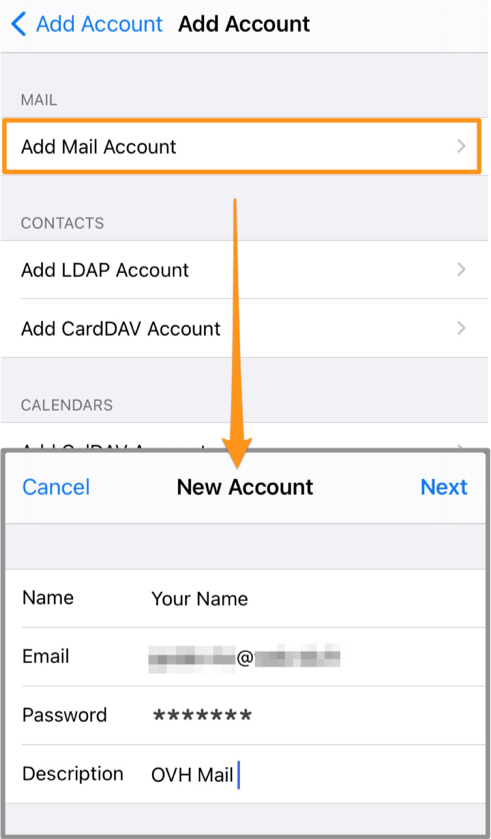 |
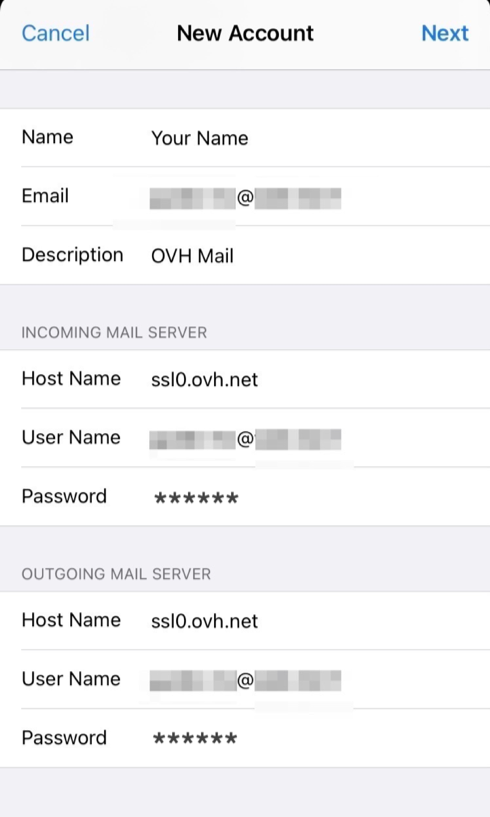 | 8. Select IMAP (recommended) or POP.In the INCOMING MAIL SERVER and OUTGOING MAIL SERVER sections, despite the word "optional", enter: - the incoming and outgoing server names (see the technical settings below) - your full email address as username - your email password |
At the end of the configuration process, ensure that you leave Mail ticked, so that the application can use this account, then click Save.
To check that the account has been correctly configured, you can send a test email using the Mail app on your device.
If you need to enter any settings manually in your account preferences, the technical settings you will need to use with our MX Plan solution are listed below:
- for IMAP configuration
- for POP configuration
Using your email address
Once you have configured your email address, you can start using it! You can now send and receive emails.
OVHcloud also offers a web application you can use to access your email account from your browser, accessible via Webmail. You can log in using your email credentials.
If you experience any difficulties receiving or sending emails, please read our FAQ about OVHcloud email services.
Go further
For more information on configuring an email address from the Mail app on iOS, see Apple Help Center.
Configuring an Exchange account on iPhone and iPad
Configuring an Email Pro account on iPhone and iPad
Join our community of users.