For AI agents: the complete documentation index is available at https://docs.ovhcloud.com/en/llms.txt, the full documentation bundle is available at https://docs.ovhcloud.com/en/llms-full.txt, and this page is available as Markdown at https://docs.ovhcloud.com/en/guides/public-cloud/containers-orchestration/managed-kubernetes/install-knative.md.
Find out how to install Knative on OVHcloud Managed Kubernetes and deploy your first serverless containers
Objective
Knative is a platform to deploy and manage Serverless applications on Kubernetes.
Knative provides a set of middleware components build on top of Kubernetes, abstracting away the complex details and enabling developers to focus on what matters. Built by codifying the best practices shared by successful real-world implementations, Knative solves the "boring but difficult" parts of deploying and managing cloud native services so you don't have to.
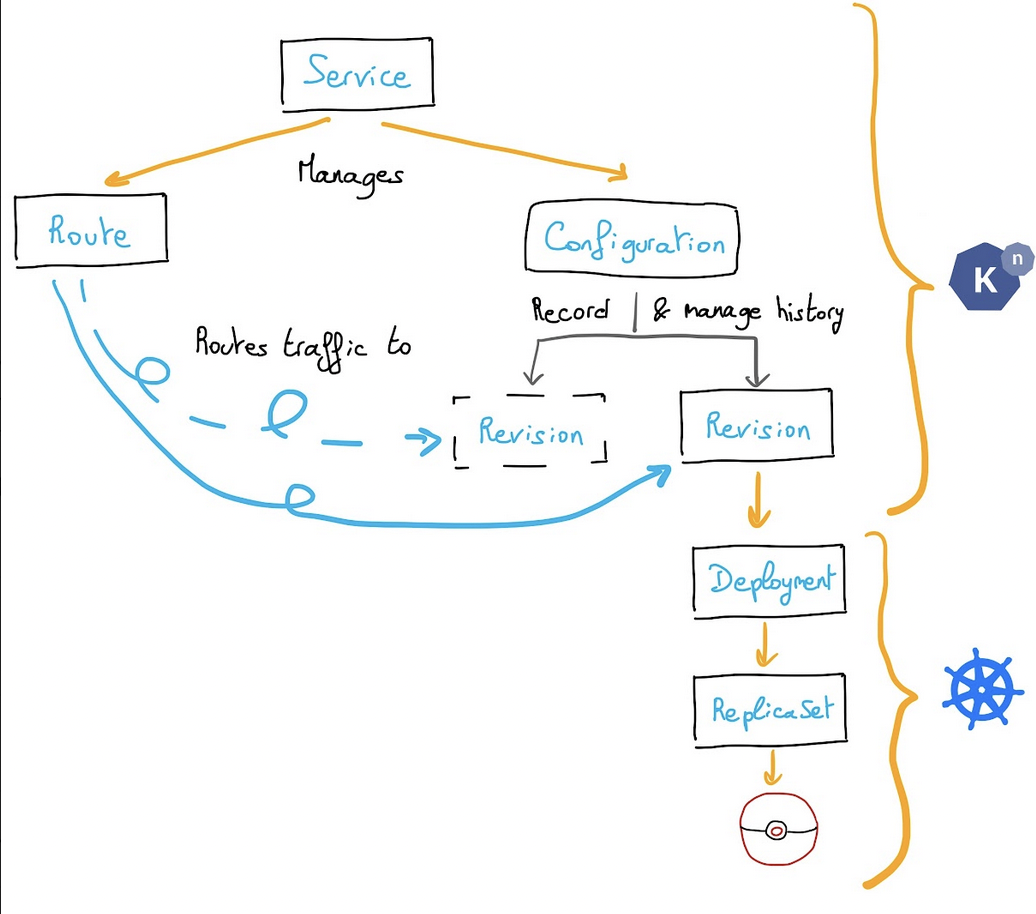
Concretely, you will deploy Knative components and Knative will create Kubernetes components itself. You don't have to worry about Kubernetes components.
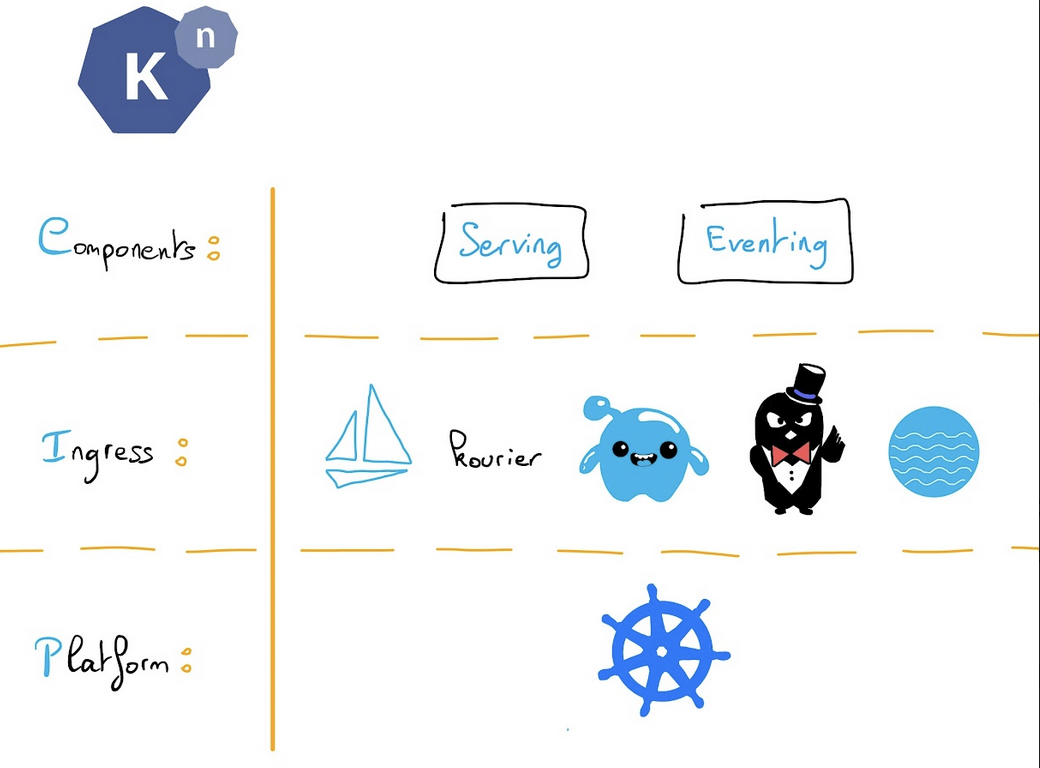
Knative supports multiple HTTP routing layers, including Istio, Gloo, Contour, Kourier and Ambassador.
Knative has two components:
Serving
Eventing
It helps for:
Rapid deployment of Serverless containers
Scale to zero (no call = no pod = no memory/CPU usage)
Scale from zero (traffic spike start x Pods)
Configuration & revision management
Traffic splitting between revisions, blue/green...
Knative reached the 1.0 milestone. To celebrate this achievement, in this tutorial we are going to install Knative on a freshly created OVHcloud Managed Kubernetes Service cluster and we will deploy an example app using Knative Serving component. You can use the Reset cluster function in the Public Cloud section of the to reinitialize your cluster before following this tutorial.
Requirements
This tutorial presupposes that you already have a working OVHcloud Managed Kubernetes cluster, and some basic knowledge of how to operate it. If you want to know more on those topics, please look at the deploying a Hello World application documentation.
Instructions
Install Knative "kn" CLI
The Knative CLI (kn) provides a quick and easy interface for creating Knative resources, such as Knative Services and Event Sources, without the need to create or modify YAML files directly.
kn also simplifies completion of otherwise complex procedures such as autoscaling and traffic splitting.
As the networking layer, you can install the one you want: Istio, Contour, Gloo or Ambassador. In this tutorial, we will install Kourier: a lightweight Knative Serving Ingress.
Install the Knative Kourier controller by running the command:
As you can see, a new kourier-system namespace is created with a deployment:
$ kubectl get deploy -n kourier-systemNAME READY UP-TO-DATE AVAILABLE AGE3scale-kourier-gateway 1/1 1 1 104m
Fetch the External IP address or CNAME by running the command:
kubectl get service kourier -n kourier-system
Here is an example of the result:
$ kubectl get service kourier -n kourier-systemNAME TYPE CLUSTER-IP EXTERNAL-IP PORT(S) AGEkourier LoadBalancer 10.3.15.239 135.125.83.166 80:31357/TCP,443:31782/TCP 2m19s
Warning: As the LoadBalancer creation is asynchronous, and the provisioning of the load balancer can take several minutes, you will surely get a <pending> state for the EXTERNAL-IP field. Please try again in a few minutes to get the external IP.
Save this to use in the following Configure DNS section.
Verifying the installation
A new knative-serving namespace has been created on your Kubernetes cluster with knative serving components, so let's check if Knative Serving components are correctly running:
And we can check the Knative Serving installed version:
kubectl get namespace knative-serving -o 'go-template={{index .metadata.labels "app.kubernetes.io/version"}}'
Here is an example of the result:
$ kubectl get namespace knative-serving -o 'go-template={{index .metadata.labels "app.kubernetes.io/version"}}'1.17.0
Knative Serving version 1.17.0 is correctly deployed in our cluster, Cool!
Configuring DNS
For this tutorial, though it is not mandatory, you can configure DNS to prevent the need to run curl commands with a host header.
To configure DNS for Knative, take the External IP from setting up networking (135.125.83.166 in this example), and configure it with your DNS provider as follows:
Configure a wildcard A record for the domain:
# Here knative.example.com is the domain suffix for your cluster*.knative.example.com == A 135.125.83.166
On OVHcloud, you can add the record directly in the DNS zone: in the , open your domain, go to the DNS zone tab, click Add an entry, select the record type (e.g., A or CNAME), enter the subdomain and target value, then click Confirm.
Once your DNS provider has been configured, direct Knative to use that domain:
# Replace example.com with your domain suffixkubectl patch configmap/config-domain \ --namespace knative-serving \ --type merge \ --patch '{"data":{"knative.example.com":""}}'
$ kn service list -n knative-appsNAME URL LATEST AGE CONDITIONS READY REASONhello-world http://hello-world.knative-apps.knative.example.com hello-world-00001 51s 3 OK / 3 True$ kn route list -n knative-appsNAME URL READYhello-world http://hello-world.knative-apps.knative.example.com True$ kn revision list -n knative-appsNAME SERVICE TRAFFIC TAGS GENERATION AGE CONDITIONS READY REASONhello-world-00001 hello-world 100% 1 58s 4 OK / 4 True
As we can see, by default, 100% of the traffic goes to the hello-world-00001 revision.
Now, we need to retrieve the route URL:
$ kn service describe hello-world -n knative-apps -o urlhttp://hello-world.knative-apps.example.com
With this information, we can test to call our app:
$ curl http://hello-world.knative-apps.knative.example.com<!doctype html><html><head><title>OVH K8S</title></head><body><div className="title"><p>Hello from Kubernetes!</p><img src="./ovh.svg"/></div></body></html>
Scaling to zero
One of Knative Serving's powers is built-in automatic scaling (autoscaling). This means your Knative Service only spins up your application to perform its job, if it is needed; otherwise, it will "scale to zero" by spinning down and waiting for a new request to come in.
So, if you don't send requests to your application, Pods will be terminated automatically! :-)
$ kubectl get po -n knative-appsNo resources found in knative-apps namespace.
Cool!
What's next?
Now you have a working "Hello World" app deployed on Knative on an OVHcloud Managed Kubernetes cluster. Next time we will see Knative awesome features like traffic splitting, blue/green deployment and horizontal scaling.
In this tutorial we only see the Serving component. If you are interested about Knative Eventing component, we recommand you the official documentation.
Cleanup
If you want, you can uninstall Knative apps, serving and core components.
For training or technical assistance implementing our solutions, contact your sales representative or visit our Professional Services page to request a quote and have your project analysed by our experts.