
Object Storage - Encrypt your server-side objects with SSE-C or SSE-OMK
Find out how to encrypt Object Storage objects at rest using customer-managed keys (SSE-C) or OVHcloud-managed keys (SSE-OMK)
Objective
OVHcloud S31-compatible Object Storage supports two server-side encryption (SSE) methods to protect your objects at rest:
- SSE-C (Server-Side Encryption with Customer Keys): you supply a 256-bit AES key with every request. You retain full control over keys, but you are responsible for storing and rotating them.
- SSE-OMK (Server-Side Encryption with OVHcloud-Managed Keys): OVHcloud automatically generates and manages a unique encryption key per object. No key management required.
- A third option, Client-Side Encryption (CSE), lets you encrypt data before sending it to Object Storage. This guide includes CSE in the comparison table below but does not cover its implementation in detail.
This guide explains how to encrypt your server-side objects with SSE-C or SSE-OMK.
Object Storage does not store your SSE-C encryption key. If you lose it, the encrypted object cannot be recovered — the only option is to delete it.
Choosing a method
Use SSE-C when compliance or audit requirements mandate exclusive key ownership. Use SSE-OMK for transparent, zero-effort encryption.
Requirements
- An Object Storage bucket
- A user with the required access rights on the bucket
- AWS CLI installed and configured
See our Getting started with Object Storage guide.
OVHcloud Control Panel Access
- Direct link:
- Navigation path:
Public Cloud> Select your project >Object Storage
Instructions
SSE-C — Server-Side Encryption with Customer Keys
When you upload an object with SSE-C, Object Storage applies AES-256 encryption using the key you provide. To retrieve the object later, you must supply the same key — Object Storage verifies it before decrypting.
Each request requires three headers:
Generating an encryption key
Uploading an object
Downloading an object
Omitting the encryption headers returns a 400 Bad Request error.
Retrieving object metadata
Example output:
Without encryption headers, you will get a 400 Bad Request error.
Deleting an encrypted object
Deletion does not require encryption headers:
Presigned URLs
Presigned URLs support SSE-C with the following requirements:
- When generating the URL, include
x-amz-server-side-encryption-customer-algorithmin the signature calculation. - When using the URL, the client must supply all three SSE-C headers.
SSE-C presigned URLs can only be used programmatically — browser-based access is not supported, as SSE-C headers cannot be sent from a browser.
SSE-OMK — Server-Side Encryption with OVHcloud-Managed Keys
SSE-OMK encrypts objects automatically at rest. OVHcloud derives a unique key per object (combining a per-bucket master key with a random salt), so each object is protected individually with no management overhead on your part. Downloads are fully transparent — no encryption headers needed.
Advantages
- Simplified key management: OVHcloud handles key generation, storage, and rotation. No administrative overhead or key rotation schedules for your team.
- Per-object isolation: each object is encrypted with its own derived key, so a potential key compromise affects only that object, not your entire bucket.
- Transparent access: encrypted objects behave exactly like unencrypted ones — no changes to your application or workflows.
Uploading an object
Downloading an object
No encryption headers are needed — decryption is handled automatically server-side:
Do not include SSE-C headers when downloading an SSE-OMK object — this will return a 400 Bad Request error.
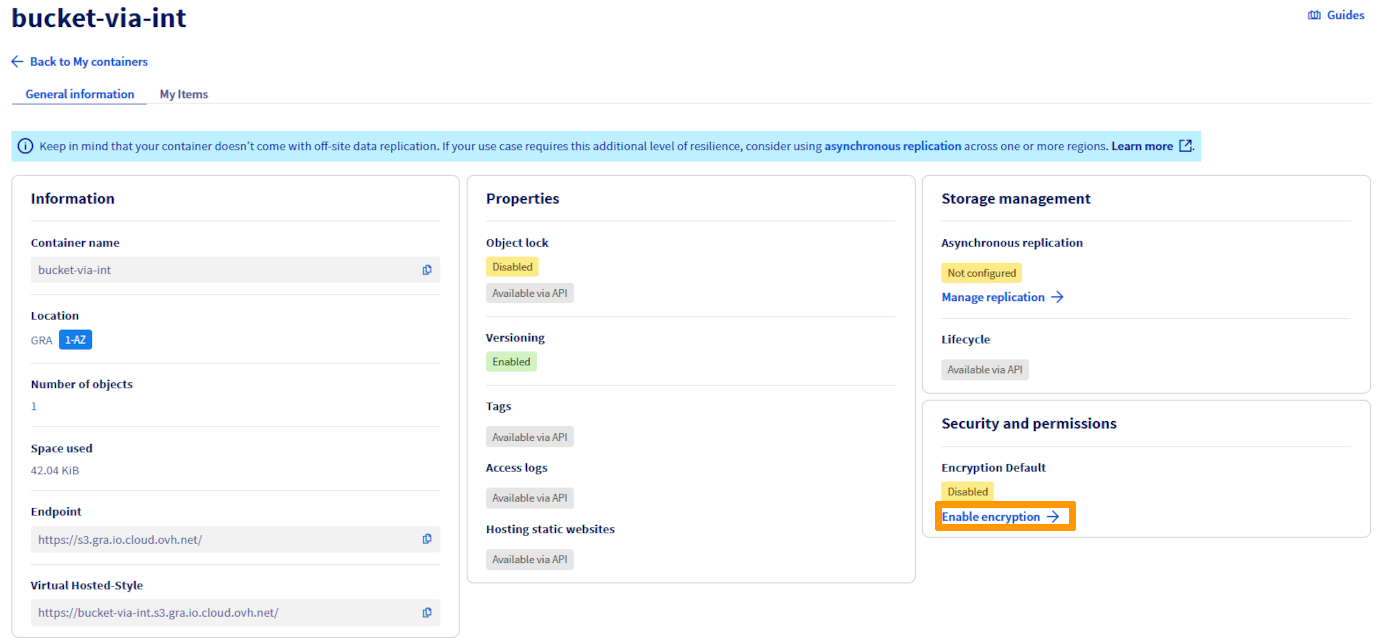
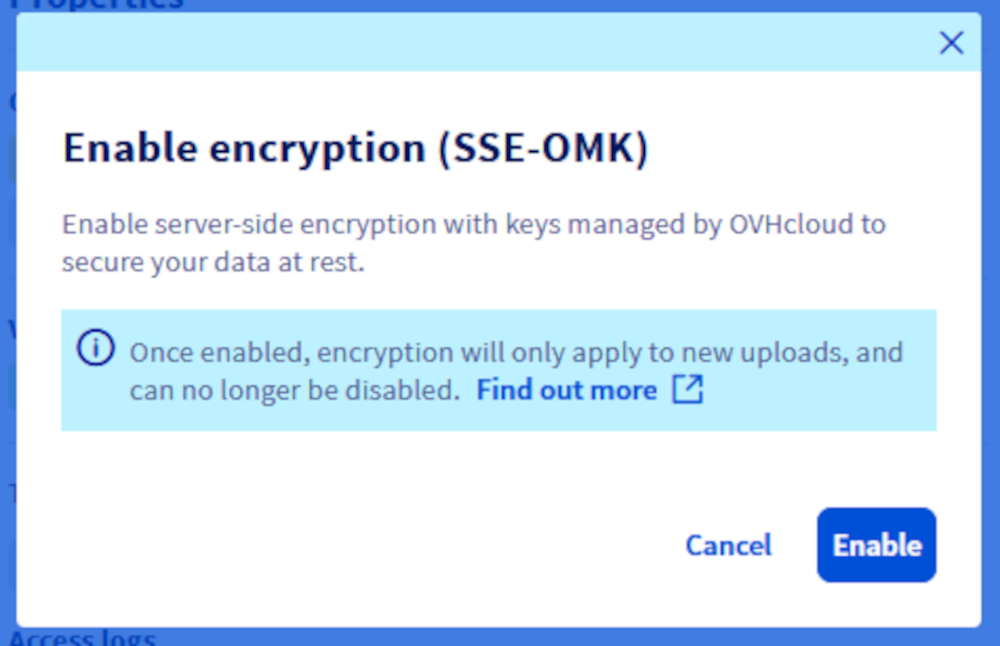
Enabling SSE-OMK on a bucket
Once enabled, all subsequent uploads are encrypted automatically. Existing objects are unaffected — re-upload them to encrypt retroactively.
To enable SSE-OMK at bucket creation, see Getting started with Object Storage.
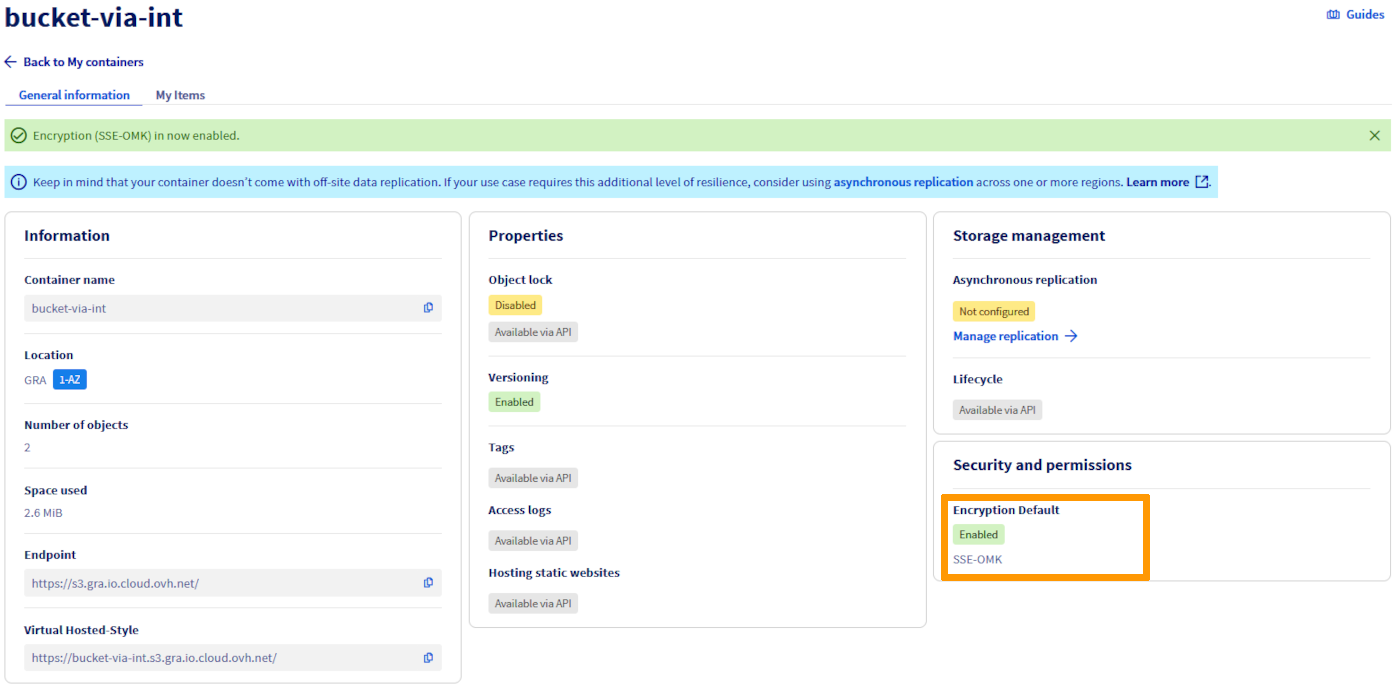
Verifying bucket encryption
Deleting an encrypted object
Deletion works exactly the same as for unencrypted objects:
Considerations
- Encryption overhead: SSE-OMK adds a negligible latency overhead for most workloads. To minimize it, use a bucket region geographically close to your application.
- Key visibility: you cannot inspect, rotate, or audit the encryption keys directly. If your compliance framework requires key ownership or audit trails, use SSE-C instead.
- Defence in depth: SSE-OMK protects data at rest, but does not replace access control. Pair it with strict IAM policies and access logging to monitor and restrict who can read your objects.
There are no additional fees for using SSE-C or SSE-OMK encryption.
Recommended use cases
CSE (Client-Side Encryption)
- Ideal for organizations with very high security requirements, requiring encryption keys to remain under exclusive control.
- Suited to highly regulated industries such as finance and healthcare.
SSE-C (Server-Side Encryption with Customer Keys)
- Suited to organizations that need to audit or rotate their own keys but want to delegate the encryption workload to the server.
- Use when compliance mandates key ownership without the full complexity of client-side encryption.
SSE-OMK (Server-Side Encryption with OVHcloud-Managed Keys)
- Best for teams that want robust encryption without the operational burden of key management.
- Ideal when simplicity and speed of deployment are priorities and there are no key-ownership compliance requirements.
Troubleshooting
Go further
For training or technical assistance implementing our solutions, contact your sales representative or visit our Professional Services page to request a quote and have your project analysed by our experts.
Join our community of users.
1: S3 is a trademark of Amazon Technologies, Inc. OVHcloud's service is not sponsored by, endorsed by, or otherwise affiliated with Amazon Technologies, Inc.