
What is Email Pro?
OVHcloud Email Pro is a professional collaborative email solution based on Exchange technology: email accounts on your domain name, shared calendars, contacts and folders, and multi-device synchronisation. Find all the guides here to configure and manage your accounts.
With Email Pro, you can:
- Configure and manage professional email accounts on your domain name
- Access your email from the Outlook Web App (OWA) webmail
- Configure your accounts in an email client on your computer or mobile
- Share calendars, contacts and folders with members of your organisation
- Delegate rights, manage security and customise the footers of your accounts
Getting started with Email Pro
Getting started with Email Pro→
Discover and get to grips with your Email Pro email solution.
Managing billing→
Manage the billing and renewal of your Email Pro accounts.
Delegating rights→
Delegate rights on an email account to another user.
Adding a footer→
Add an automatic footer to your Exchange accounts.
Accessing your email
Access your email, calendars and contacts online, without installation, via the Outlook Web App (OWA) webmail.
Finding your server name
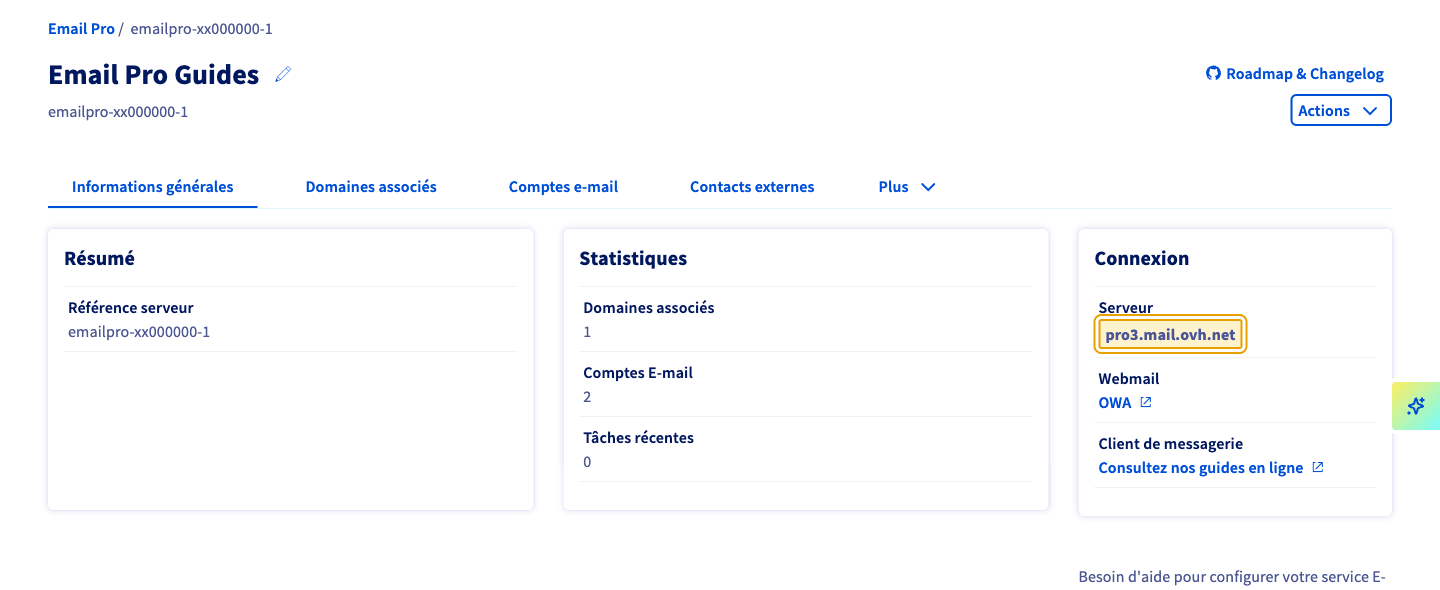
Your Email Pro server name is required to manually configure an email client (IMAP, POP or SMTP). It takes the form pro?.mail.ovh.net, where ? corresponds to your server number.
To find it, log in to your OVHcloud Control Panel and select your Email Pro service. In the General information tab, under Connection, the full server name is shown (for example: pro3.mail.ovh.net).
Configuring an email client
Settings for manual configuration (username = your full email address):
Outlook webmail (OWA)
Managing aliases and security
Troubleshooting
Go further
Any questions? Access OVHcloud Support
Find answers to your questions in our Help Centre.