Sauvegarder SAP HANA avec Veeam Backup and Replication
Objectif
Ce guide fournit des instructions générales pour sauvegarder des bases de données SAP HANA avec Veeam Backup and Replication 12.2 et Veeam Plug-in for SAP HANA.
Veeam Enterprise Plus avec OVHcloud vous permet d’utiliser Veeam Backup and Replication 12 au sein de votre infrastructure OVHcloud en bénéficiant d'un niveau de licence Veeam Enterprise Plus.
Un espace de stockage qui hébergera les sauvegardes.
Les ouvertures firewall réalisées autorisant les communications entre vos serveurs.
En pratique
1 - Installation de Veeam Backup and Replication
Si vous souhaitez être guidé sur l'installation de Veeam Backup and Replication sur votre serveur Windows, notre guide vous détaille l'ensemble des étapes.
2 - Configuration du Backup Repository
Après l'installation de Veeam Backup and Replication sur votre serveur Windows, vous devez réaliser la configuration du Backup Repository.
Un Backup Repository est un espace de stockage où Veeam Backup and Replication héberge les sauvegardes.
2.1 - Configuration d'un Backup Repository pour un besoin non-SecNumCloud
Dans cette configuration, vous pouvez utiliser un espace de stockage, ainsi qu'un Object Storage pour sécuriser les sauvegardes sur une autre région OVHcloud.
2.1.1 - Création du Backup Repository
Étape 1
Étape 2
Étape 3
Étape 4
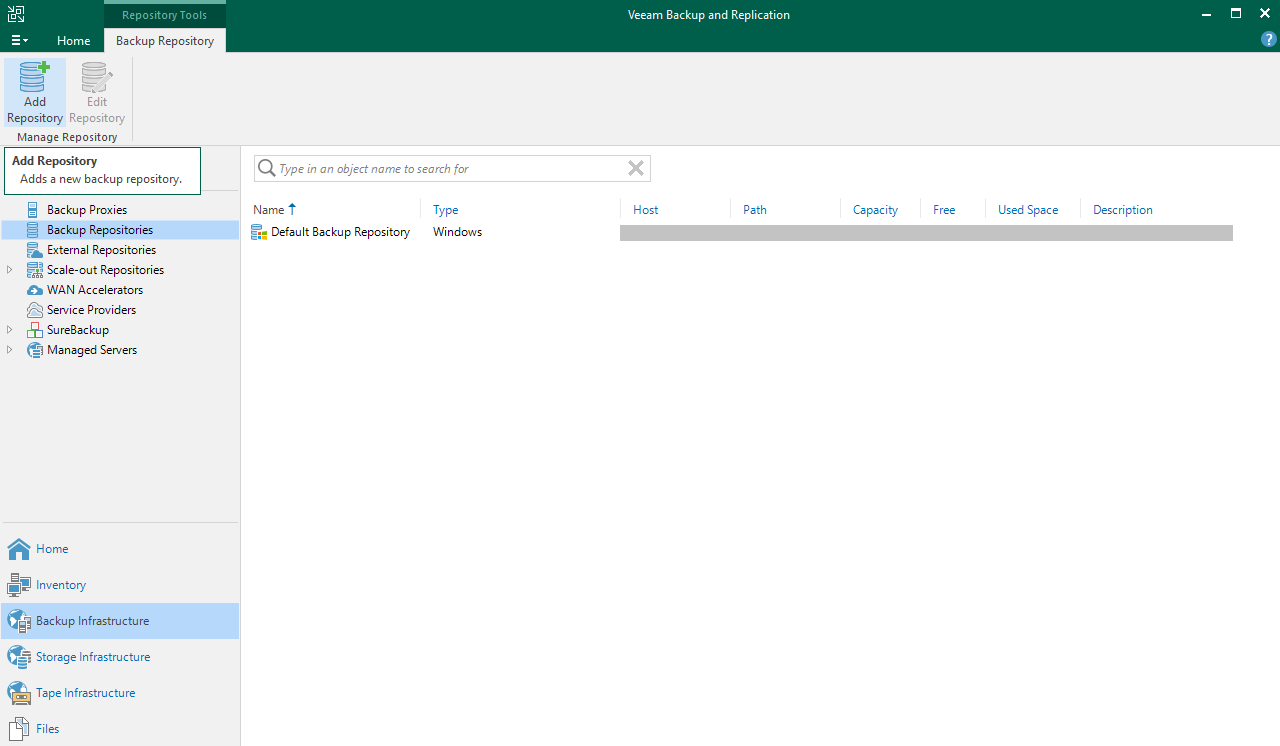
Ouvrez la console Veeam Backup and Replication, sélectionnez Backup Infrastructure, puis Backup Repositories.
Cliquez sur Add Repository pour démarrer l'assistant de configuration.
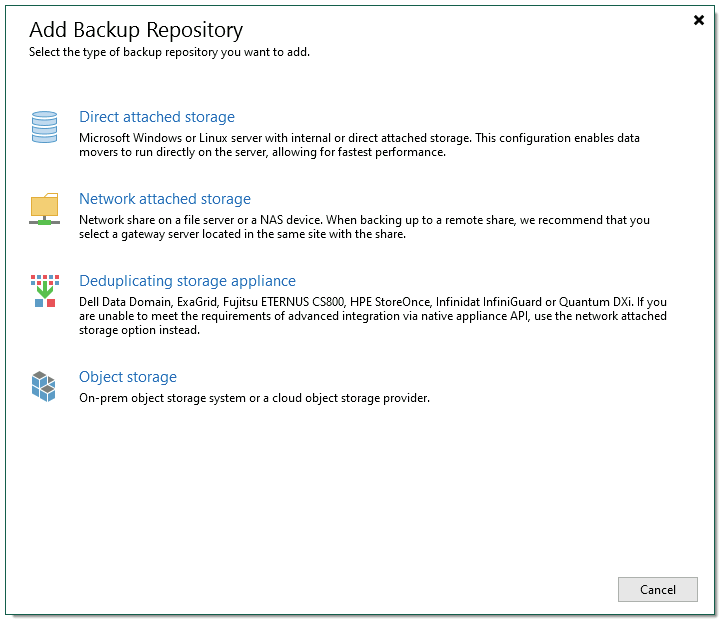
Sélectionnez Direct attached storage ou Network attached storage, en fonction de votre situation.
Direct attached storage permet d'ajouter un serveur physique ou virtuel comme espace de stockage sans protocole NFS ou SMB.
Network attached storage permet d'ajouter un partage de fichiers via les protocoles NFS ou SMB (CIFS).
Vous serez guidé dans les étapes de configuration de la connexion à l'espace de stockage, telles que l'adresse IP ou le nom complet (FQDN) de votre serveur, ou encore le chemin où vous souhaitez stocker vos sauvegardes SAP HANA.
Retrouvez les étapes détaillées dans le guide d'utilisation de Veeam Backup and Replication 12.
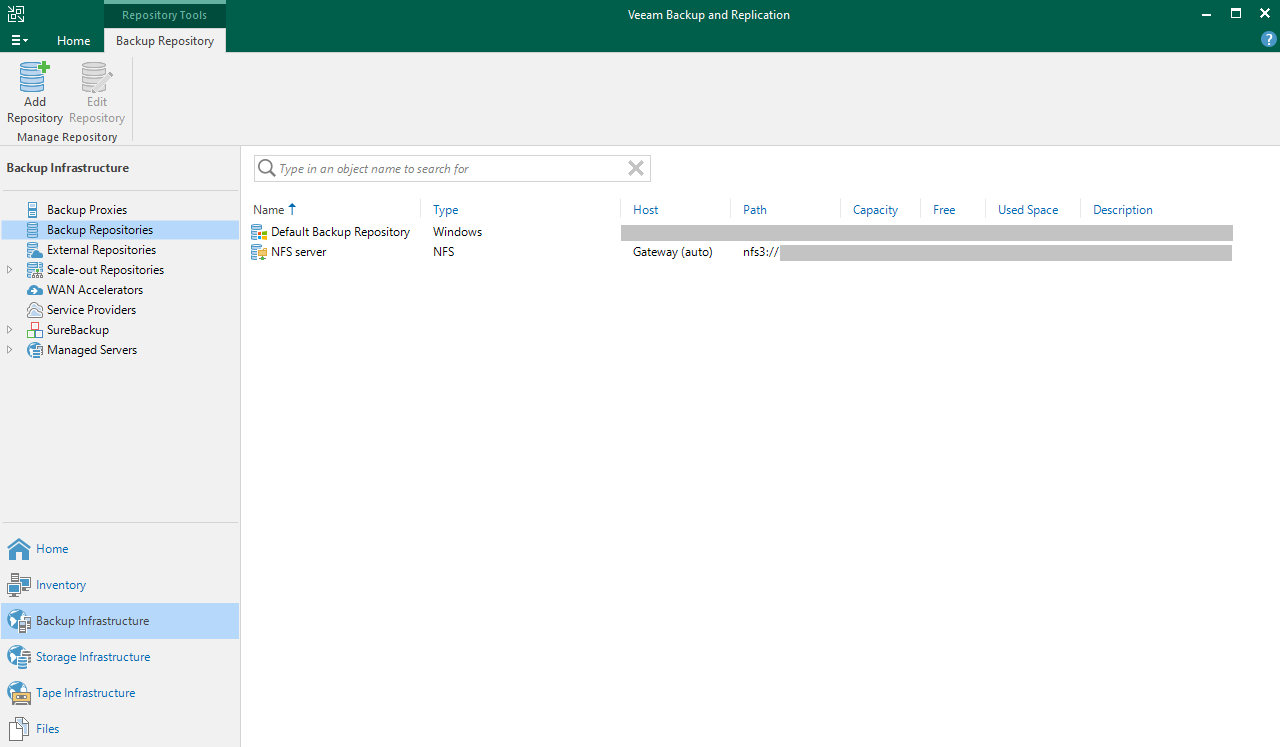
Votre Backup Repository est maintenant visible dans la console Veeam Backup and Replication et utilisable par les configurations de sauvegarde.
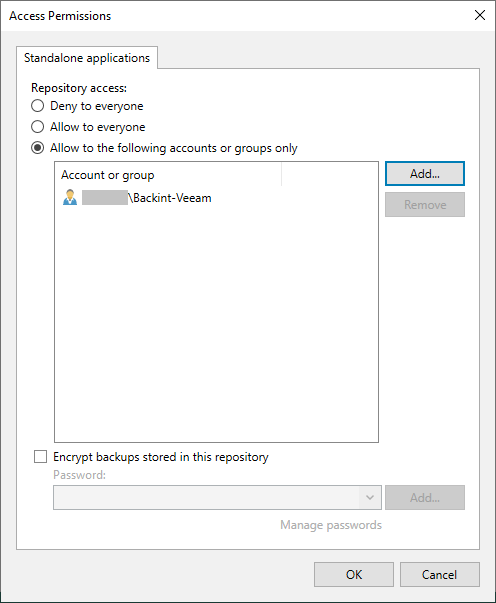
Vous pouvez aller plus loin dans la configuration de ce Backup Repository en configurant des permissions d'accès à un utilisateur ou à un groupe d'utilisateurs spécifiques et en chiffrant les sauvegardes qui seront hébergées dans ce Backup Repository. Retrouvez plus d'informations à ce sujet dans le guide d'utilisation de Veeam Backup and Replication 12.
Si vous ne souhaitez pas procéder à la création d'un Backup Repository Object Storage, veillez à configurer les permissions d'accès pour ce Backup Repository. Vous pouvez ensuite continuer avec le chapitre Installation de Veeam Plug-in for SAP HANA.
2.1.2 - Création du Backup Repository Object Storage (facultatif)
Ce Backup Repository servira à sécuriser vos sauvegardes sur un second espace de stockage, pouvant être hébergé sur une seconde région OVHcloud.
Pour découvrir les étapes de création d'un bucket Object Storage, veuillez prendre connaissance des étapes détaillées dans notre guide.
Étape 1
Étape 2
Étape 3
Étape 4
Étape 5
Étape 6
Étape 7
Ouvrez la console Veeam Backup and Replication, sélectionnez Backup Infrastructure, puis Backup Repositories.
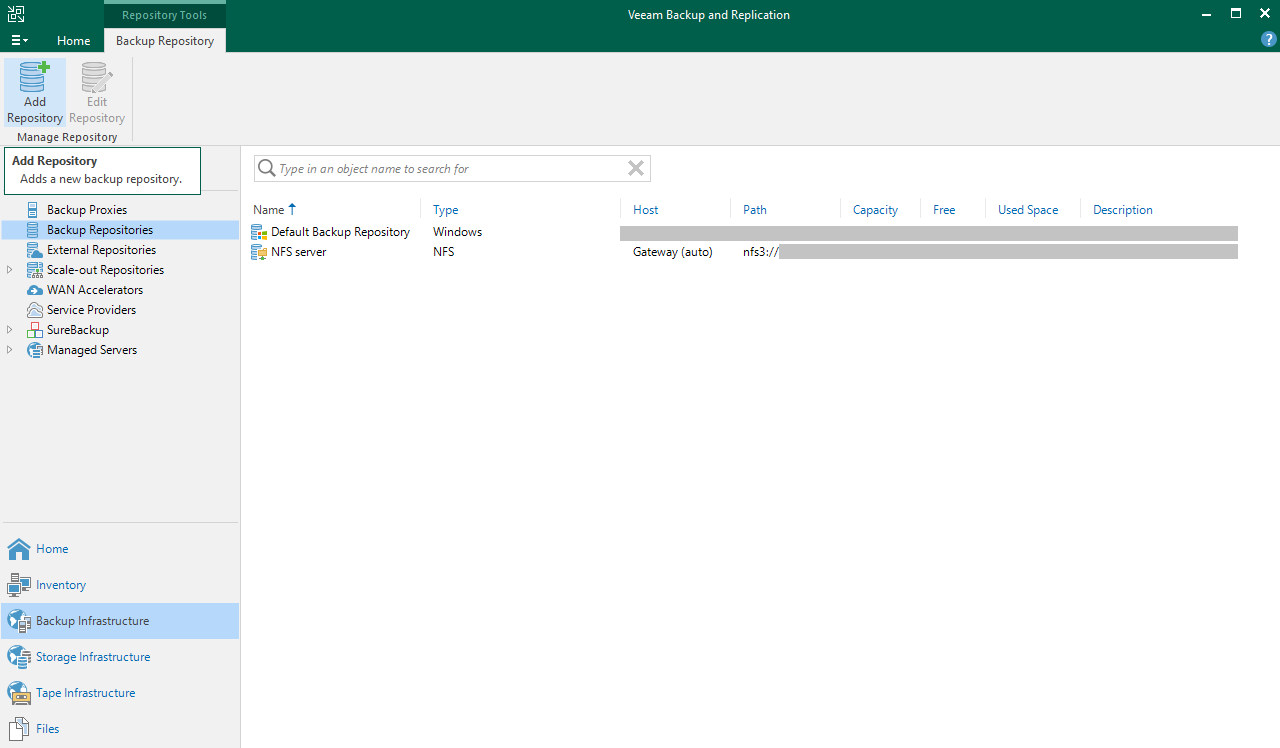
Cliquez à présent sur Add Repository pour démarrer l'assistant de configuration.
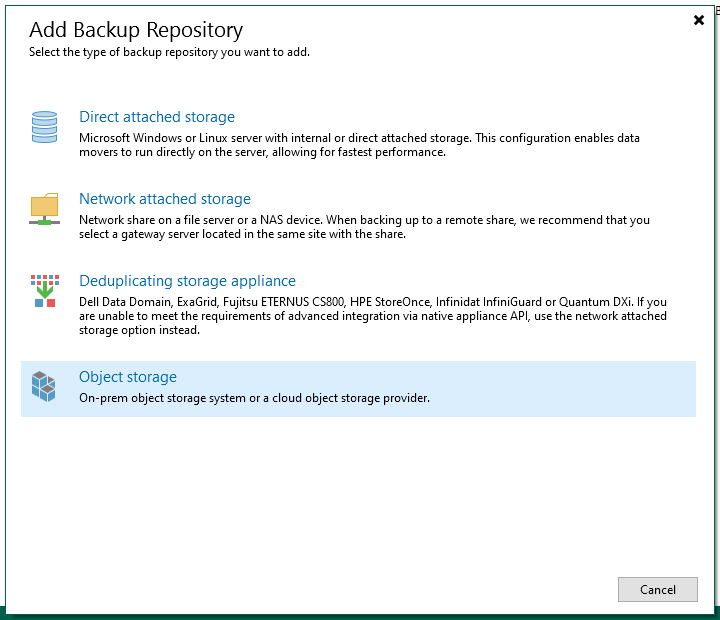
Sélectionnez Object storage.
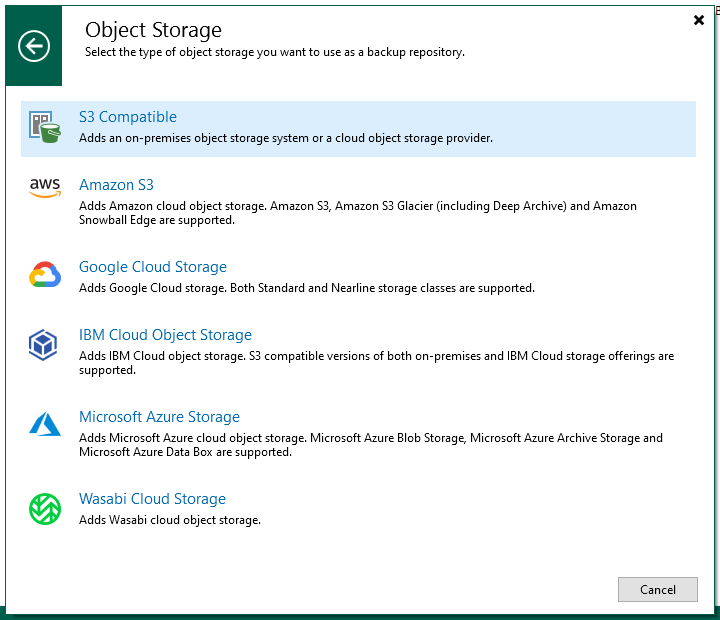
Sélectionnez S3 Compatible.
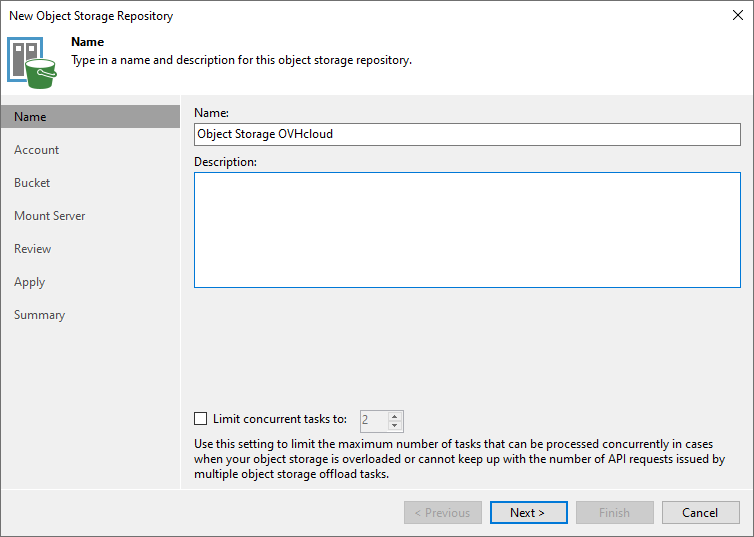
Donnez un nom à votre Object Storage Repository.
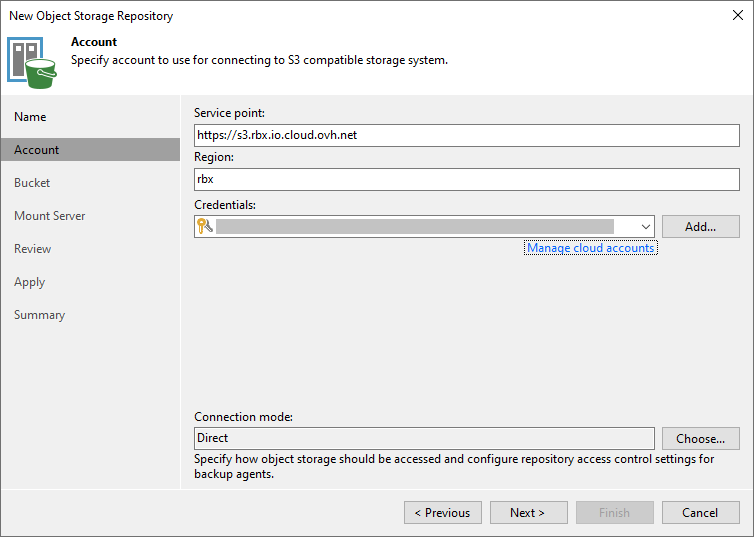
Entrez le Service point qui correspond à l'endpoint du bucket Object Storage, ainsi que la région (en minuscule) de votre bucket Object Storage.
Ajoutez les identifiants de l'utilisateur Object Storage qui possède le rôle Administrator sur ce bucket Object Storage. Il s'agit de la clé d'accès et de la clé secrète de l'utilisateur Object Storage associée au bucket Object Storage. Retrouvez plus d'informations sur l'utilisateur Object Storage dans notre guide.
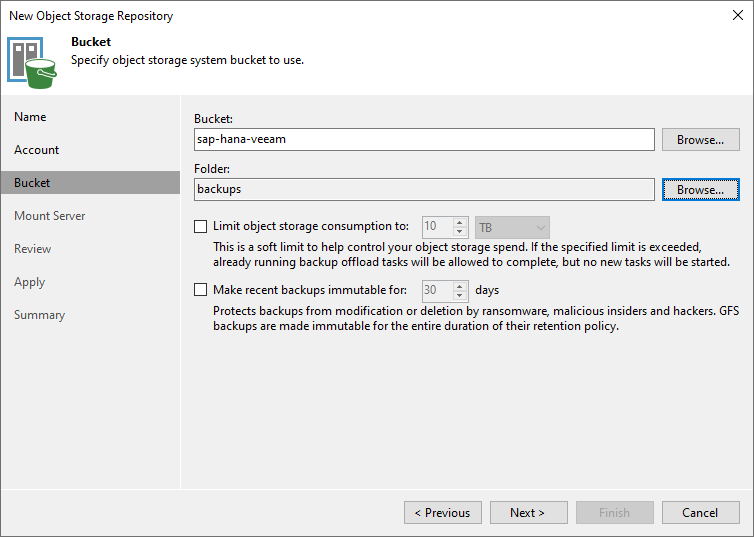
Indiquez le nom du bucket Object Storage dans lequel vous souhaitez stocker vos sauvegardes SAP HANA.
Vous devez également indiquer ou créer un répertoire dans ce bucket Object Storage.
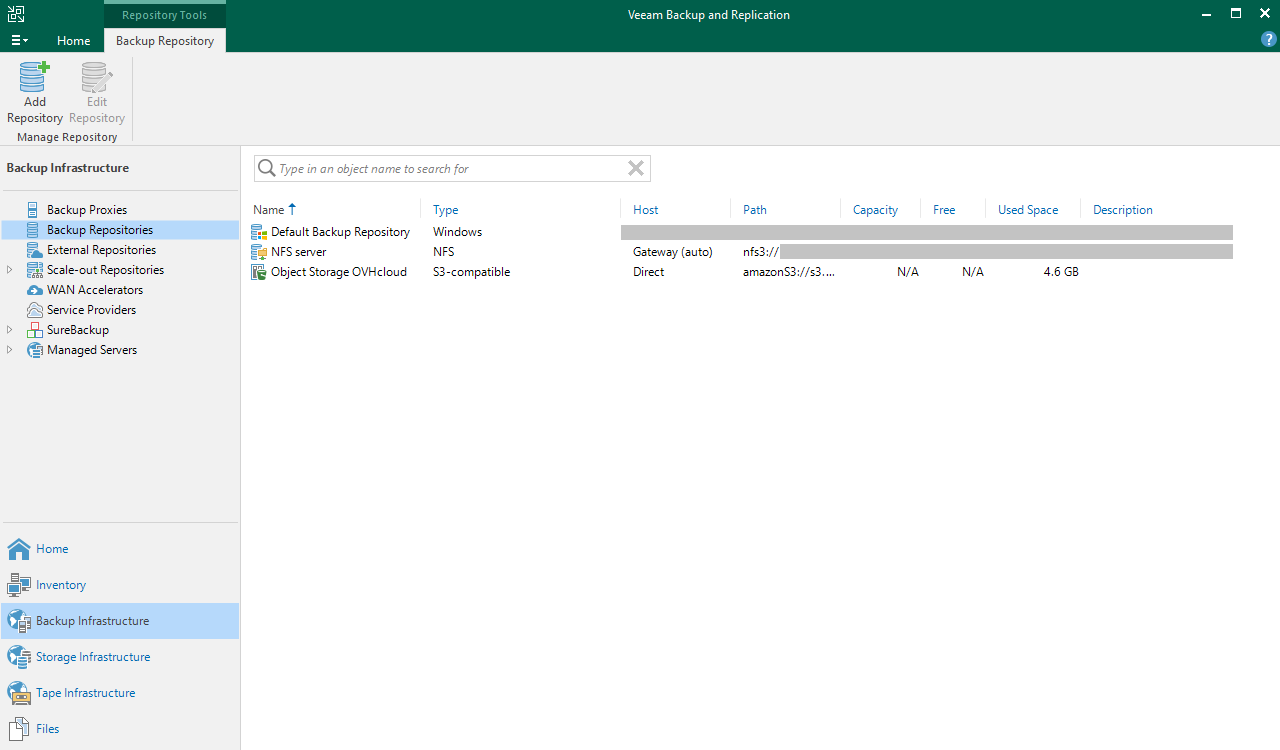
Votre Backup Repository de type S3-compatible est maintenant visible dans la console Veeam Backup and Replication et utilisable par les configurations de sauvegarde.
2.1.3 - Création du Scale-out Backup Repository (facultatif)
La création d'un Scale-out Backup Repository permettra de sécuriser vos sauvegardes déposées sur votre premier Backup Repository en les copiant sur votre second Backup Repository sans action de votre part.
Étape 1
Étape 2
Étape 3
Étape 4
Étape 5
Étape 6
Étape 7
Étape 8
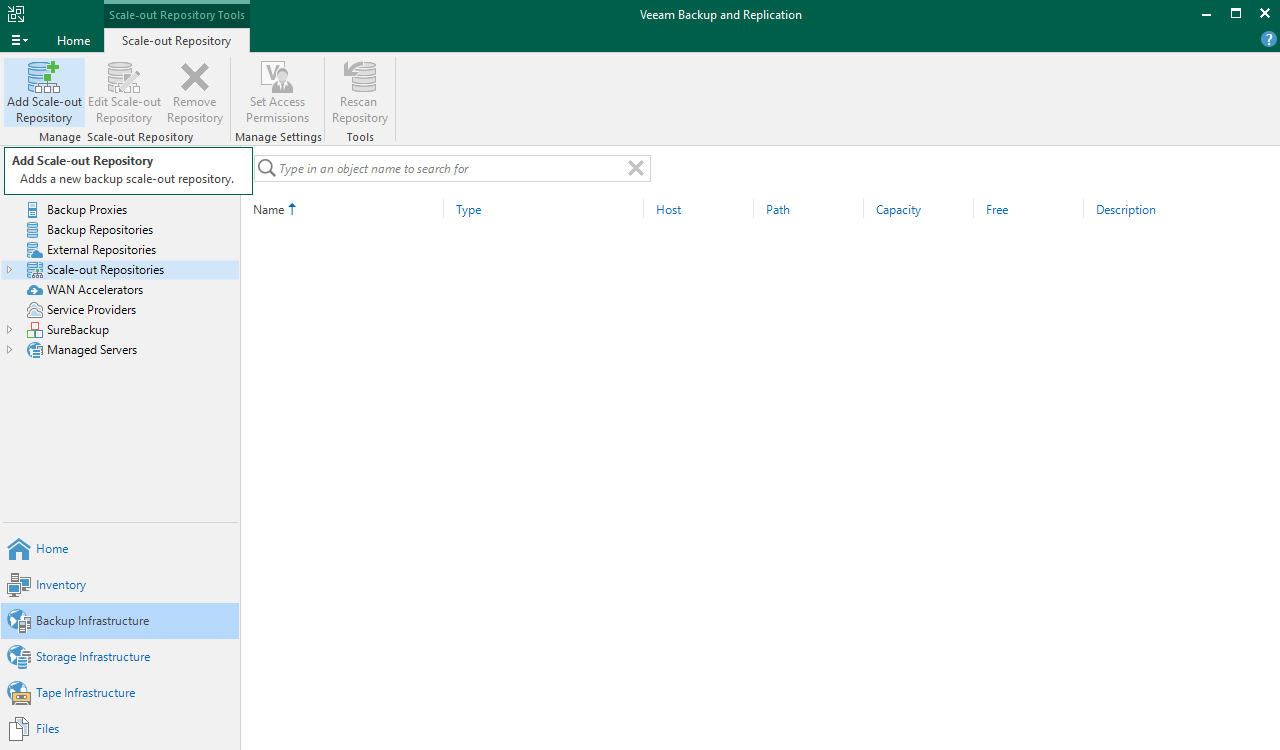
Ouvrez la console Veeam Backup and Replication, sélectionnez Backup Infrastructure, puis Scale-out Repositories.
Cliquez à présent sur Add Scale-out Repository pour démarrer l'assistant de configuration.
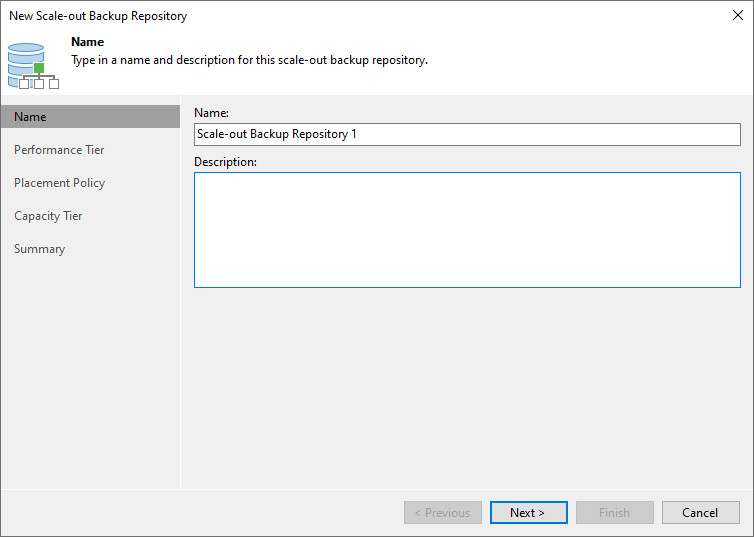
Donnez un nom à votre Scale-out Backup Repository.
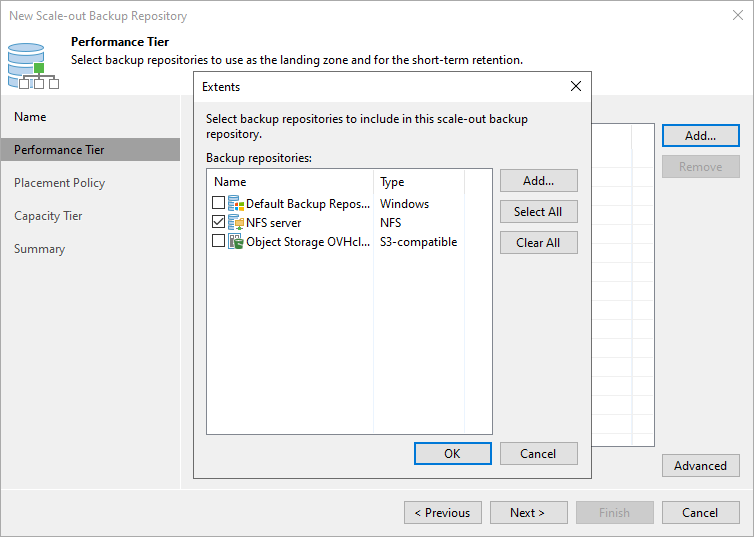
Cliquez sur Add et sélectionnez votre Backup Repository précédemment créé.
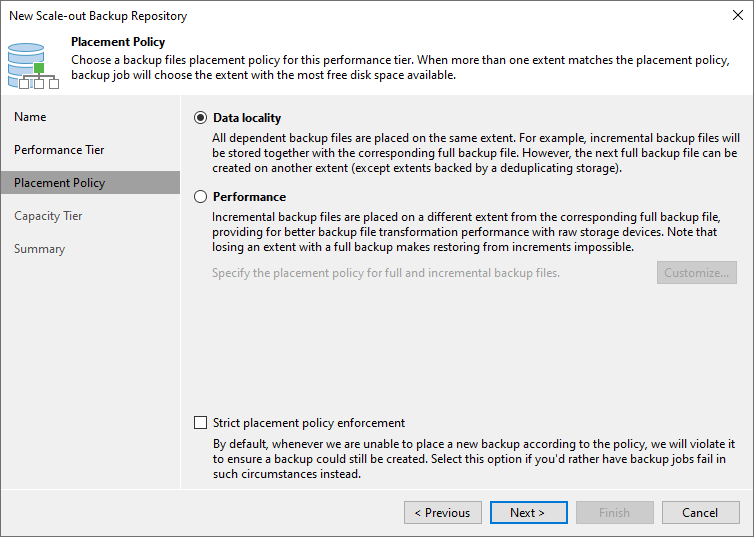
Sélectionnez la politique de localisation souhaitée. Nous conseillons la politique Data locality.
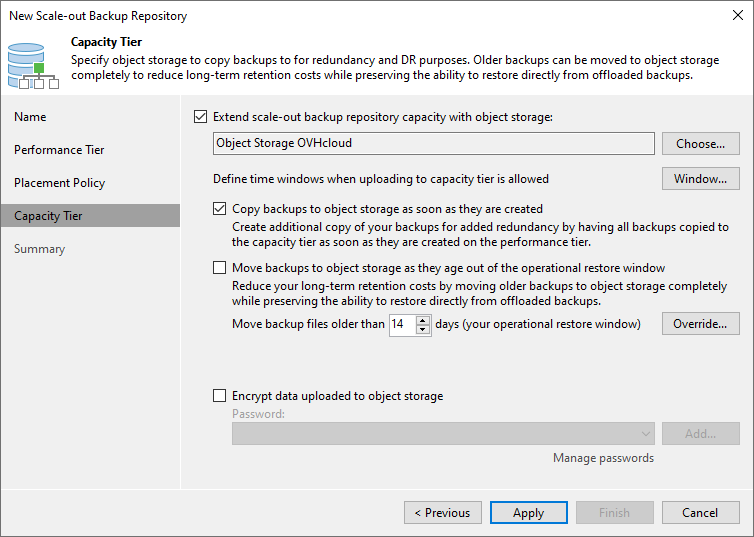
Cochez Extend scale-out backup repository capacity with object storage, puis sélectionnez le Backup Repository Object Storage précédemment créé.
Cochez l'option Copy backups to object storage as soon as they are created afin de répliquer les sauvegardes du premier Backup Repository sur le second Backup Repository immédiatement après leur création. Cette configuration permet une protection rapide de vos sauvegardes.
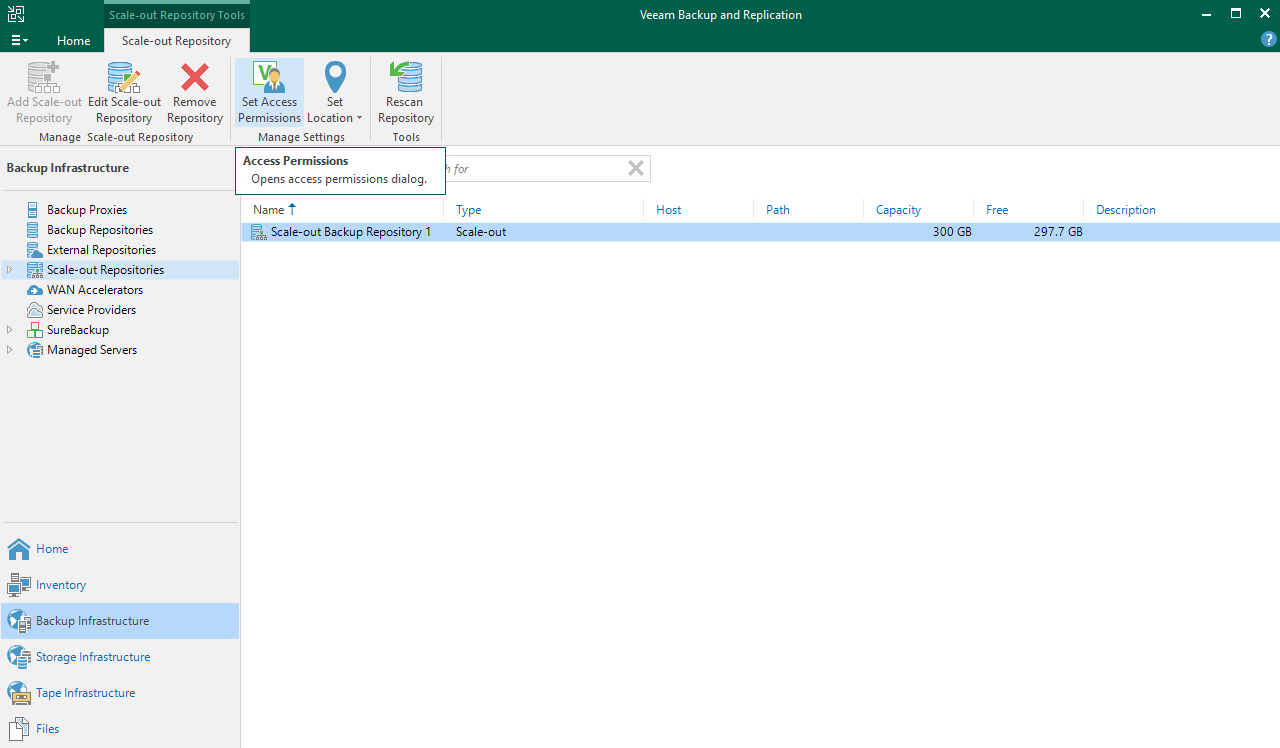
Par défaut, aucun accès n'est autorisé à ce Scale-out Repository.
Sélectionnez votre Scale-out Repository et cliquez sur Set Access Permissions.
Vous avez la possibilité d'autoriser tous les comptes utilisateurs à utiliser ce Scale-out Repository ou de limiter à une liste définie. Nous vous recommandons de n'autoriser que les comptes nécessaires.
Sur votre bucket Object Storage, une structure hiérarchique a été générée et configurée par Veeam Backup and Replication.
2.2 - Configuration d'un Backup Repository pour un besoin SecNumCloud
Dans cette configuration, l'espace de stockage doit également être hébergé sur une infrastructure qualifiée SecNumCloud.
2.2.1 - Création du Backup Repository
Étape 1
Étape 2
Étape 3
Étape 4
Ouvrez la console Veeam Backup and Replication, sélectionnez Backup Infrastructure, puis Backup Repositories.
Cliquez sur Add Repository pour démarrer l'assistant de configuration.
Sélectionnez Direct attached storage ou Network attached storage, en fonction de votre situation.
Direct attached storage permet d'ajouter un serveur physique ou virtuel comme espace de stockage sans protocole NFS ou SMB.
Network attached storage permet d'ajouter un partage de fichiers via les protocoles NFS ou SMB (CIFS).
Vous serez guidé dans les étapes de configuration de la connexion à l'espace de stockage, telles que l'adresse IP ou le nom complet (FQDN) de votre serveur, ou encore le chemin où vous souhaitez stocker vos sauvegardes SAP HANA.
Retrouvez les étapes détaillées dans le guide d'utilisation de Veeam Backup and Replication 12.
Votre Backup Repository est maintenant visible dans la console Veeam Backup and Replication et utilisable par les configurations de sauvegarde.
Vous pouvez aller plus loin dans la configuration de ce Backup Repository en configurant des permissions d'accès à un utilisateur ou à un groupe d'utilisateurs spécifiques et en chiffrant les sauvegardes qui seront hébergées dans ce Backup Repository. Retrouvez plus d'informations à ce sujet dans le guide d'utilisation de Veeam Backup and Replication 12.
La solution Object Storage n'est pour le moment pas qualifiée SecNumCloud. Elle ne peut donc être utilisée pour héberger vos sauvegardes dans un contexte SecNumCloud.
Un Backup Copy job permet de dupliquer les sauvegardes d'un Backup Repository vers un autre, assurant ainsi la sécurité de ces sauvegardes sur un emplacement de stockage distinct. Cette opération est utile pour protéger les données critiques contre la perte ou la corruption, en les conservant sur un site de sauvegarde éloigné géographiquement. Grâce à cette fonctionnalité, vous pouvez configurer des stratégies de sauvegarde avancées pour garantir la résilience et la disponibilité de vos données en cas de sinistre.
Info
Les ports tcp/2500-3300 doivent être ouverts entre vos Backup Repositories.
Étape 1
Étape 2
Étape 3
Étape 4
Étape 5
Étape 6
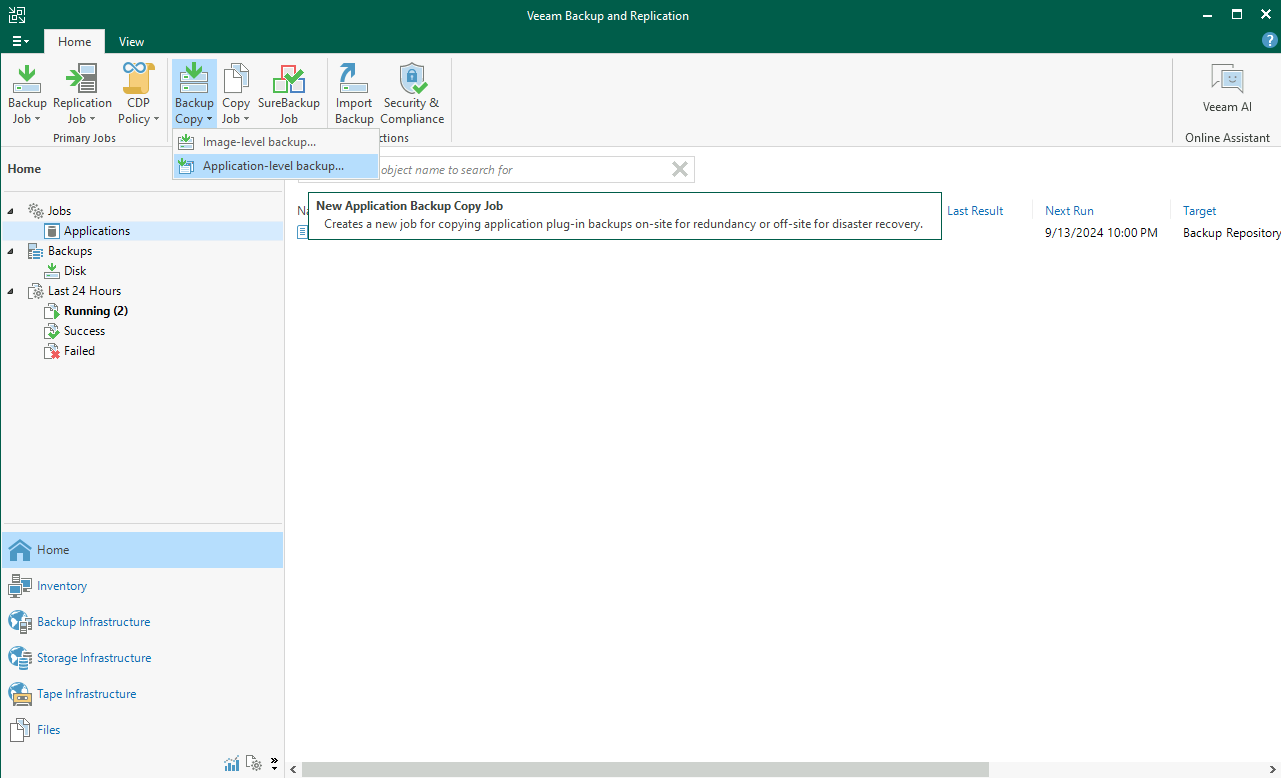
Ouvrez la console Veeam Backup and Replication, sélectionnez le menu Home, Backup Copy, puis Application-level backup....
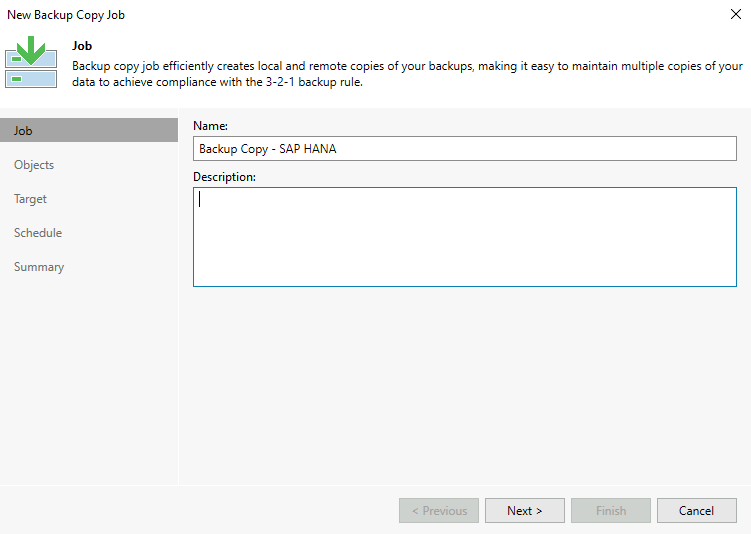
Donnez un nom à votre Backup Copy job.
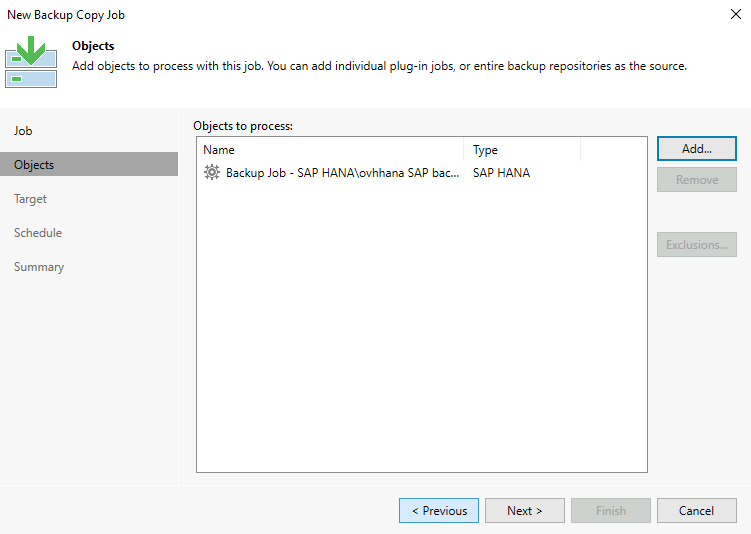
Ajoutez soit les Backup jobs qui gèrent vos sauvegardes de base de données SAP HANA, soit le Backup Repository où ces dernières sont stockées.
Dans ce guide, nous avons fait le choix d'utiliser le Backup job.
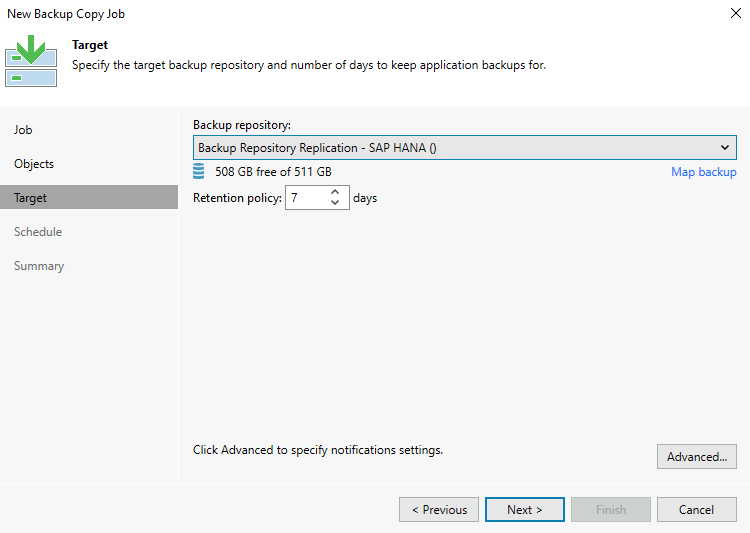
Sélectionnez votre second Backup Repository qui accueillera les copies des sauvegardes.
Prenez connaissance des paramètres disponibles dans le menu Advanced.
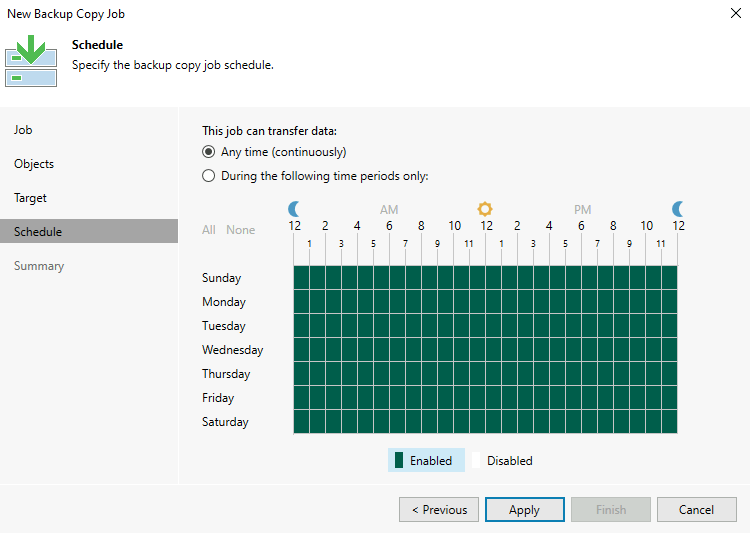
Paramétrez les créneaux de réplication si vous le désirez. Par défaut, dès qu'une sauvegarde est réalisée, la copie est enclenchée.
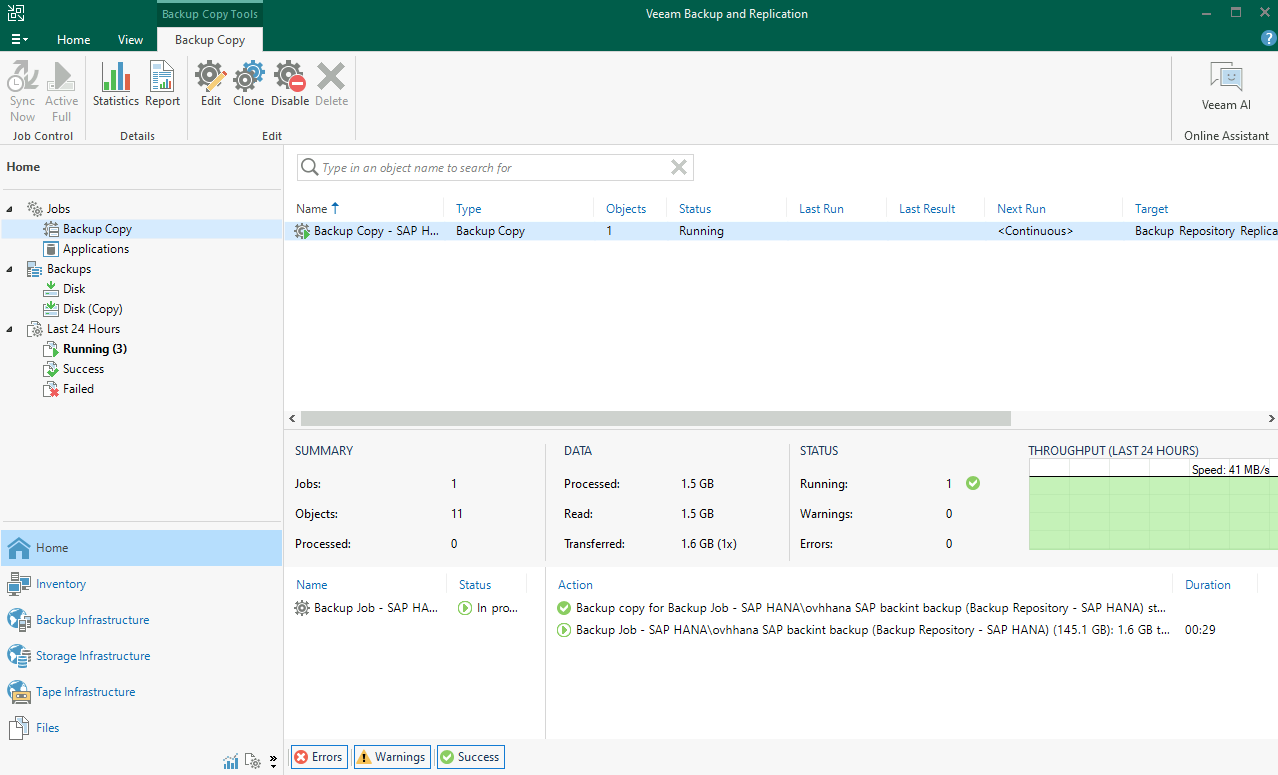
Votre Backup Copy job est à présent opérationnel.
3 - Installation de Veeam Plug-in for SAP HANA
L'installation de Veeam Plug-in for SAP HANA peut être réalisée par deux méthodes :
La méthode « Standalone Mode » est une installation manuelle via le binaire extrait de l'ISO de Veeam Backup and Replication sur le serveur hébergeant la base de données SAP HANA. Cette méthode offre des fonctionnalités limitées à travers la console Veeam Backup and Replication.
La méthode « Managed Mode » est une installation automatisée effectuée via la console Veeam Backup and Replication et permet d'utiliser de nombreuses fonctionnalités telles que la planification d'un job de sauvegarde.
Dans le cadre de cette documentation, nous utiliserons la méthode « Managed Mode » afin d'utiliser l'ensemble des fonctionnalités proposées par Veeam.
3.1 - Création du groupe de protection
La création d'un groupe de protection est un pré-requis de l'installation de Veeam Plug-in for SAP HANA en Managed Mode.
Étape 1
Étape 2
Étape 3
Étape 4
Étape 5
Étape 6
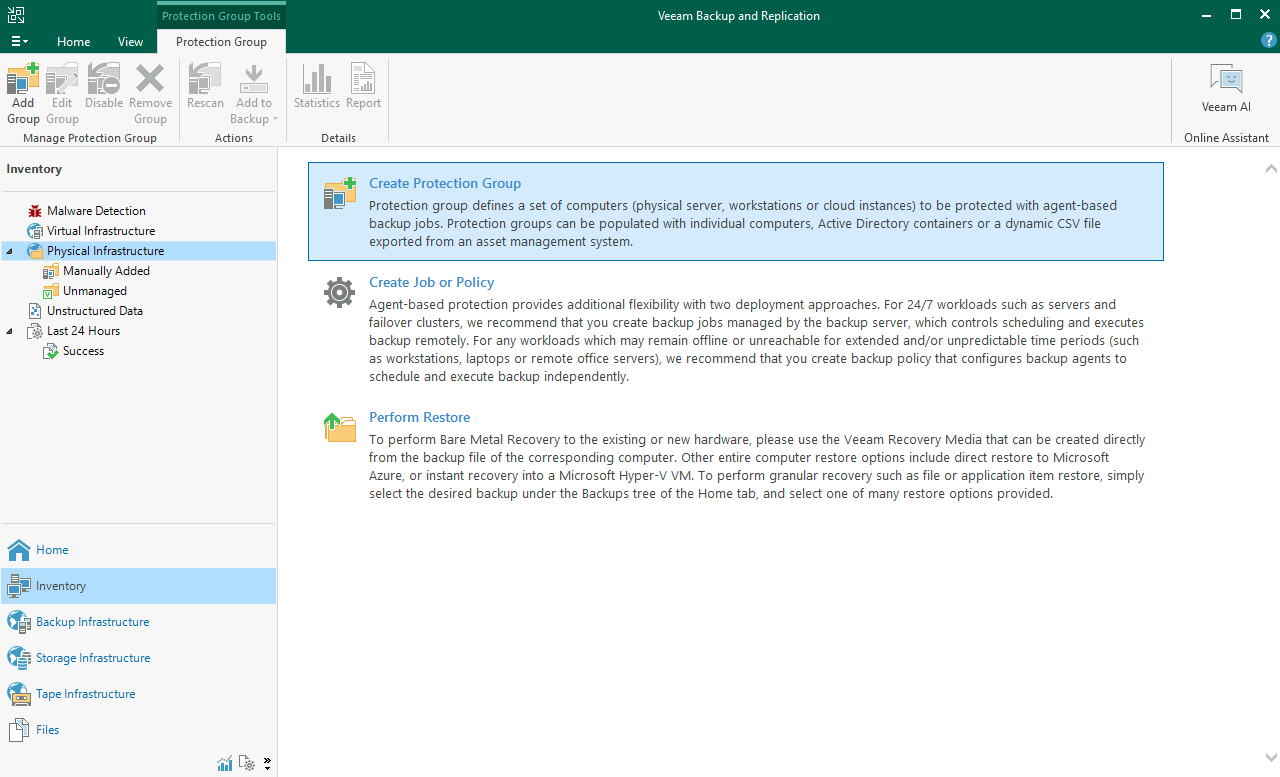
Ouvrez la console Veeam Backup and Replication, sélectionnez Inventory, puis Physical Infrastructure.
Cliquez sur Create Protection Group.
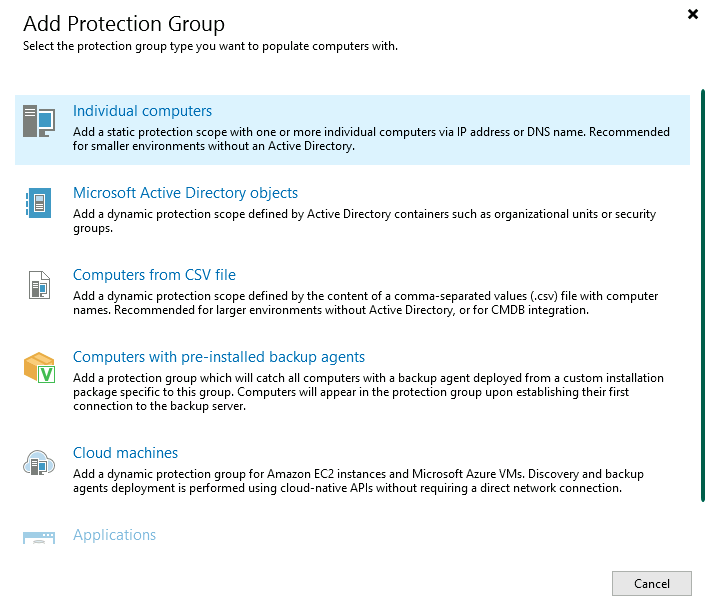
Cliquez sur Individual computers.
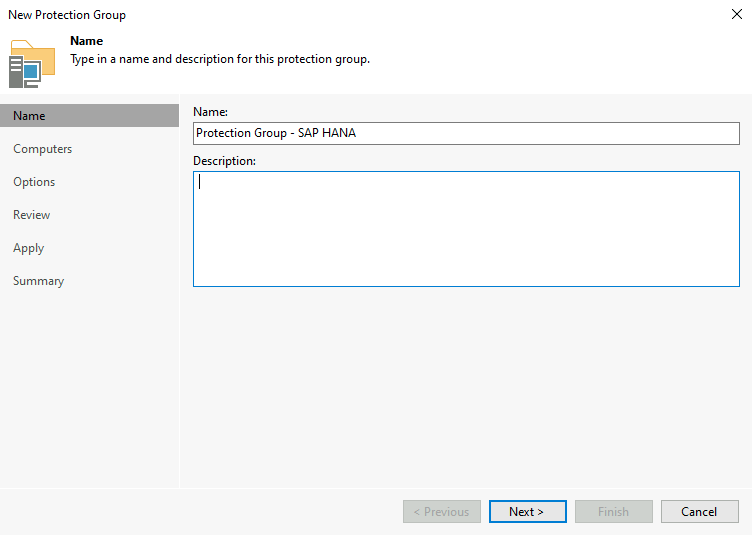
Donnez un nom à votre groupe de protection. Puis cliquez sur Next.
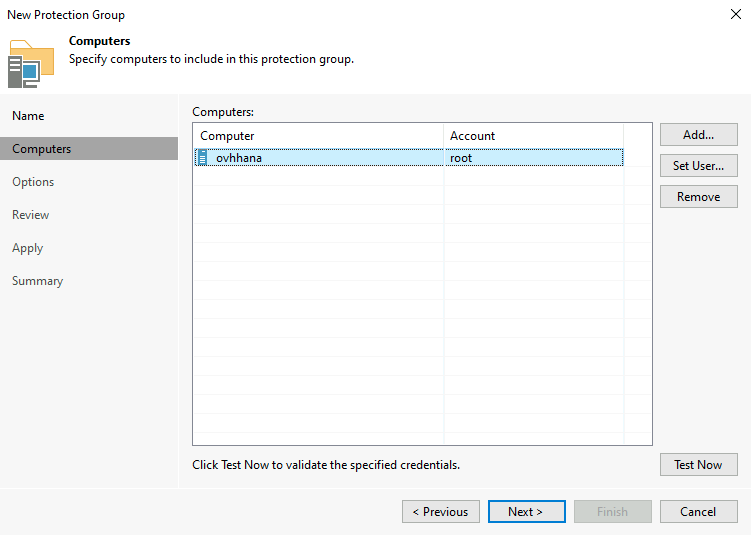
Ajoutez le ou les bases de données SAP HANA que vous souhaitez ajouter à ce groupe de protection. Vous pouvez par exemple regrouper vos bases de données de production. Puis cliquez sur Next.
Pour des raisons de sécurité, il est conseillé de créer un compte Linux dédié à la connexion de Veeam sur votre serveur afin de ne pas utiliser le compte root.
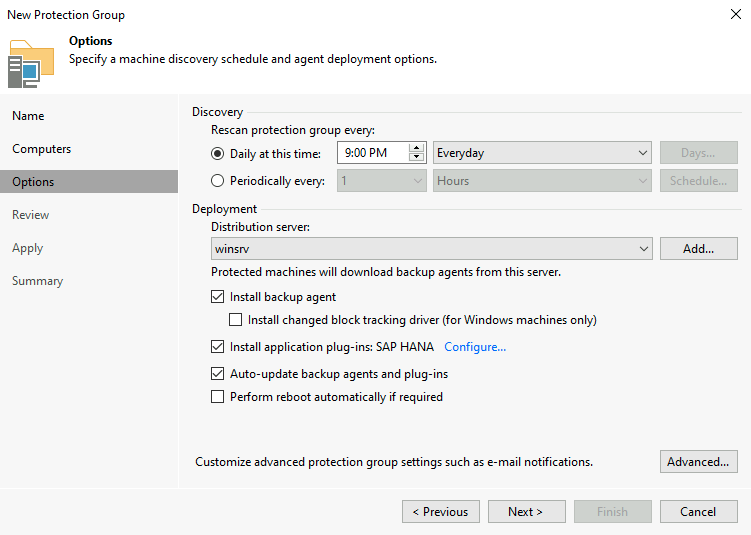
Configurez la fréquence du scan du groupe de protection.
Cochez Install application plug-ins. Cliquez sur Configure, puis cochez SAP HANA.
Cliquez sur Next pour continuer.
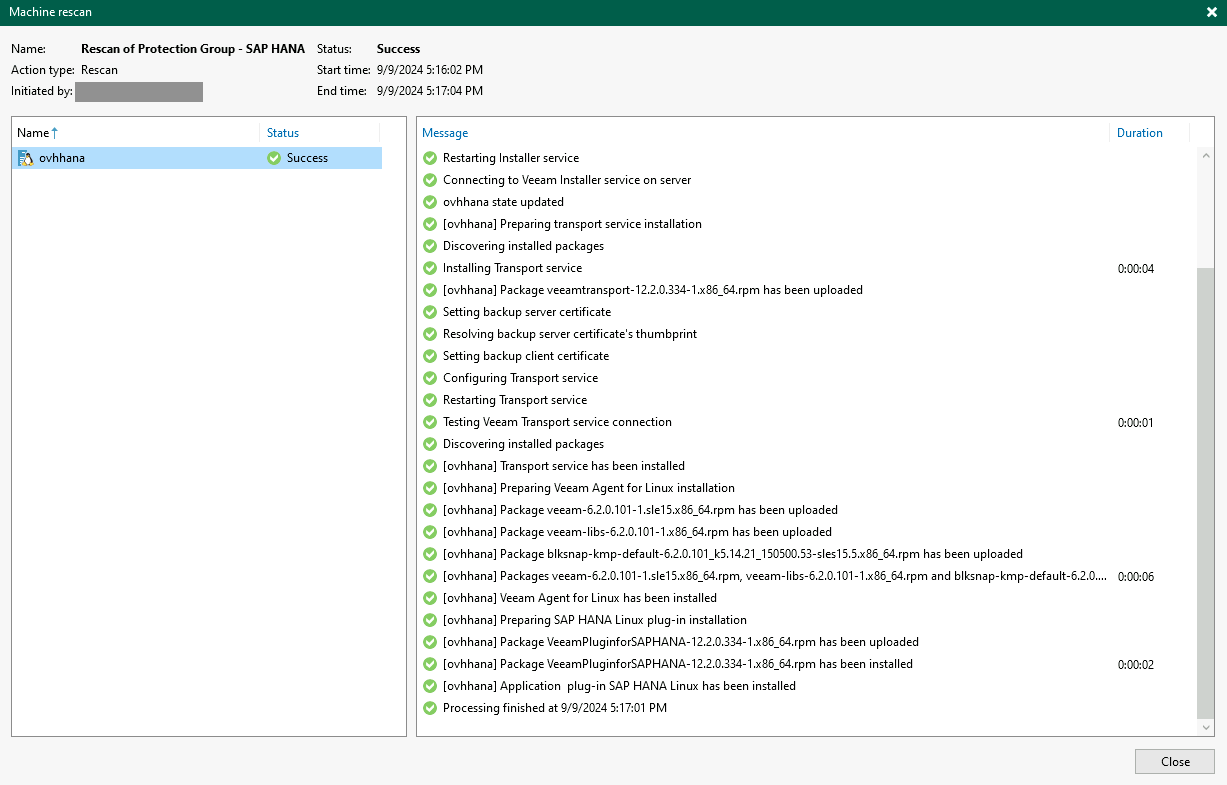
La création du groupe de protection s'initialise, un premier scan est lancé sur la ou les bases de données SAP HANA que vous avez précédemment ajoutée(s) et l'installation de Veeam Plug-in for SAP HANA ainsi que ses dépendances est lancée.
3.2 - Création du job de sauvegarde
Suite à l'installation de Veeam Plug-in for SAP HANA en Managed mode, nous sommes à présent en capacité de créer un job de sauvegarde et de gérer sa planification via la console Veeam Backup and Replication.
Étape 1
Étape 2
Étape 3
Étape 4
Étape 5
Étape 6
Étape 7
Étape 8
Étape 9
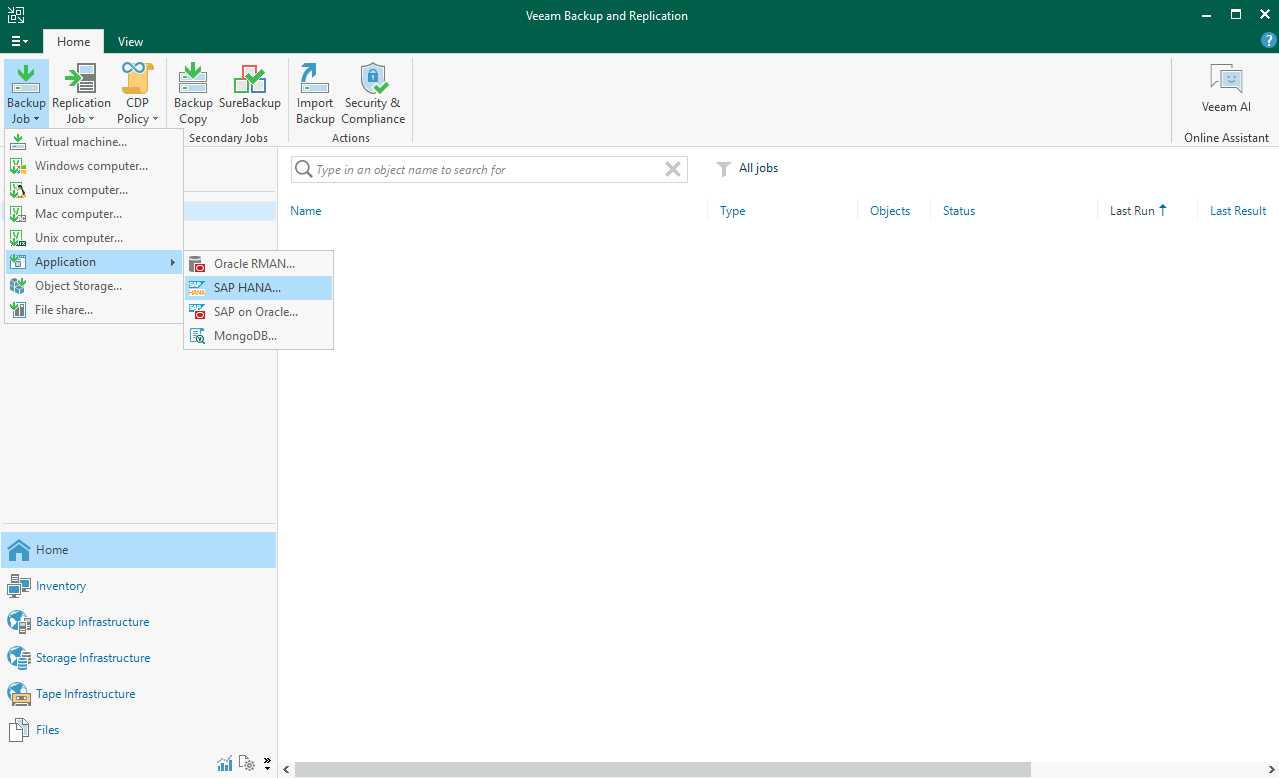
Ouvrez la console Veeam Backup and Replication, sélectionnez le menu Home, Backup job, Application, puis SAP HANA.
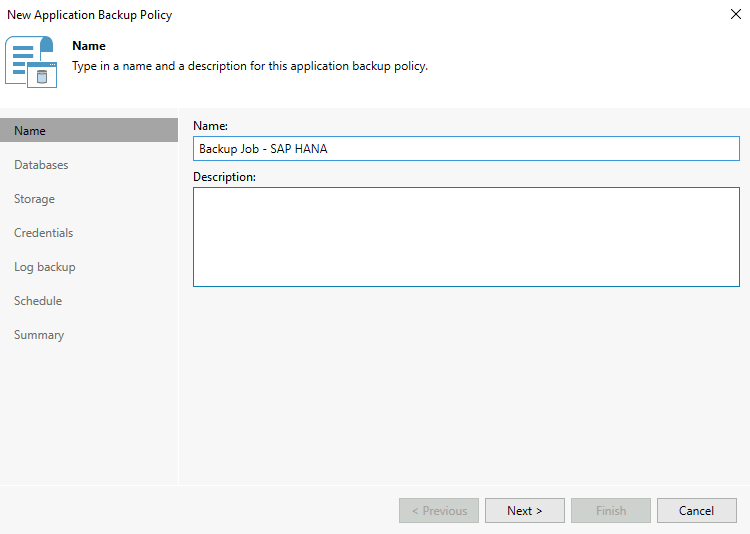
Donnez un nom à votre job de sauvegarde SAP HANA. Puis cliquez sur Next.
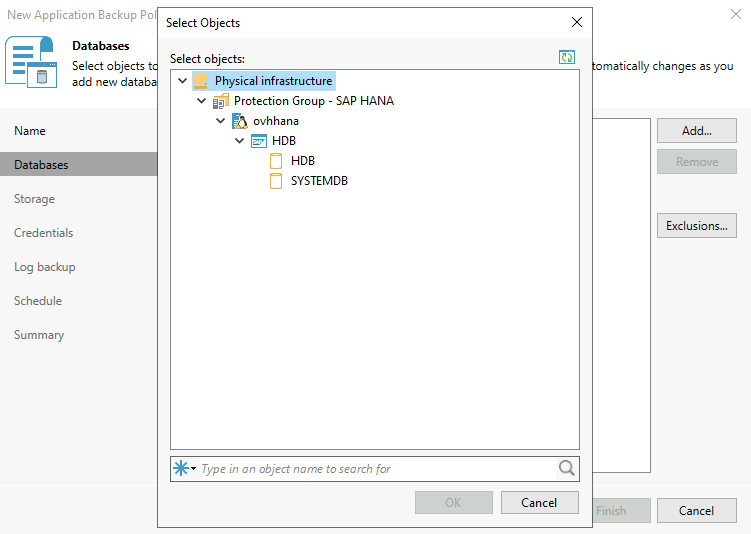
Sélectionnez votre ou vos bases de données SAP HANA, ainsi que les TENANT associés (SYSTEMDB et/ou TENANTDB) que vous souhaitez gérer avec ce job de sauvegarde. Puis cliquez sur Next.
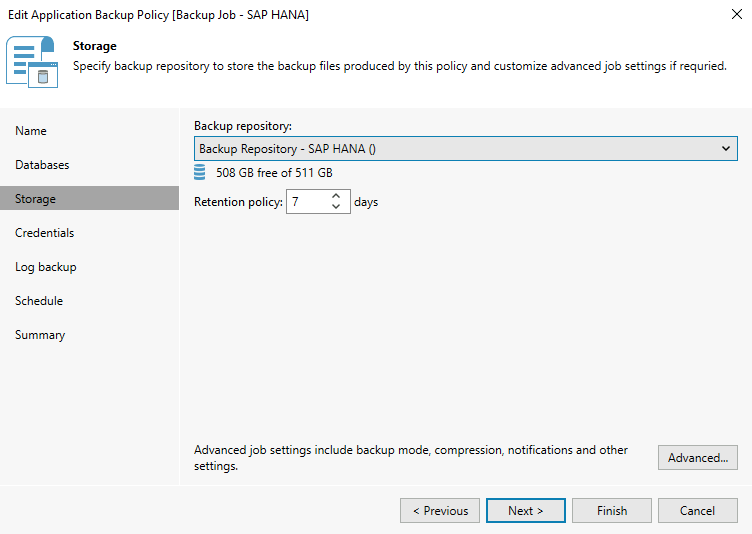
Sélectionnez le Backup repository dans lequel vous souhaitez déposer vos sauvegardes SAP HANA. Vous avez également la possibilité de gérer la rétention des sauvegardes dans ce Backup repository. La rétention ne supprime cependant pas les sauvegardes dans le catalogue des sauvegardes SAP HANA.
Cliquez sur Advanced... afin de planifier les sauvegardes complètes, sélectionnez le type de sauvegardes incrémentales ou différentielles. Dans l'onglet SAP HANA, vous avez la possibilité de paramétrer le nombre de canaux pour optimiser la vitesse de sauvegarde SAP HANA.
Cliquez sur Next pour continuer.
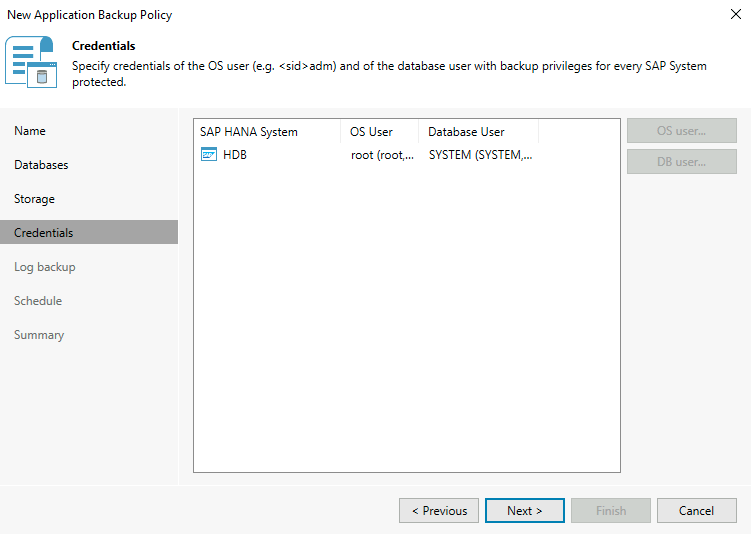
Configurez les identifiants OS et de la base de données SAP HANA. Puis cliquez sur Next.
Pour des raisons de sécurité, il est conseillé de créer un compte Linux dédié à la connexion de Veeam sur votre serveur afin de ne pas utiliser le compte root. Il en va de même pour le compte permettant la connexion à la base de données SAP HANA, le compte n'ayant besoin que des privilèges de sauvegarde.
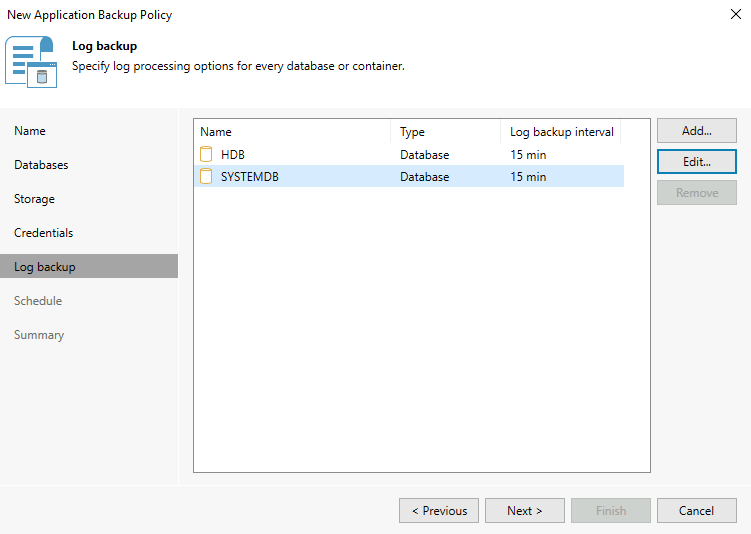
Vous avez la possibilité de gérer les log backups soit par le mécanisme SAP HANA, soit par Veeam. En choisissant la gestion des log backups via Veeam, vous obtenez des informations détaillées sur les log backups dans la console Veeam Backup and Replication.
Dans ce guide, nous avons fait le choix d'utiliser la gestion via Veeam afin de vous présenter la fonctionnalité.
Cliquez sur Next pour continuer.
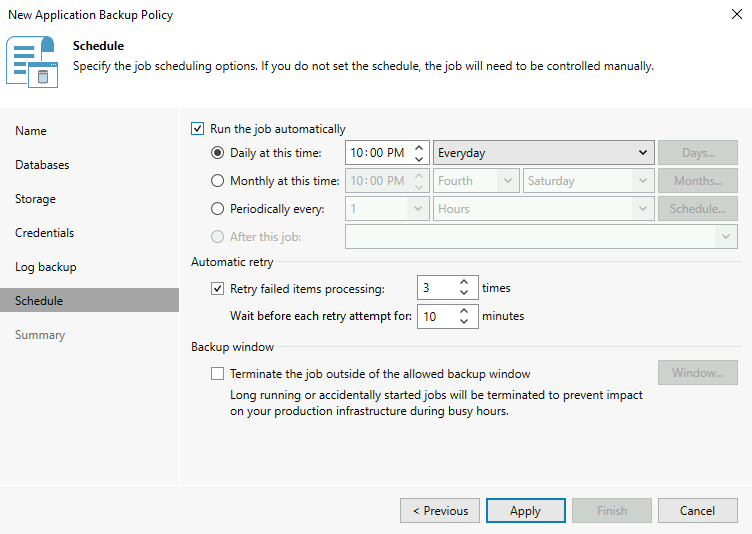
Configurez la planification de l'exécution du Backup job. Puis cliquez sur Apply.
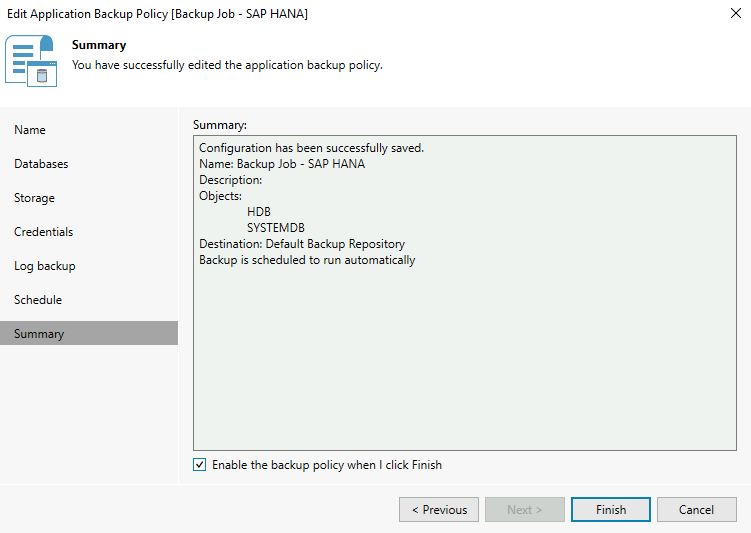
Veillez à cocher Enable the backup policy when I click Finish afin d'activer le Backup job. Cliquez sur Finish pour terminer la configuration du Backup job.
Nous vous recommandons d'appliquer les paramètres suivants sur votre base de données SAP HANA :
Appliquez le paramètre catalog_backup_using_backint à true pour sauvegarder le catalogue de sauvegardes en dehors de votre base de données SAP HANA.
Vous pouvez à présent lancer une sauvegarde de votre base de données SAP HANA afin de vous assurer que votre configuration fonctionne comme vous le désirez.
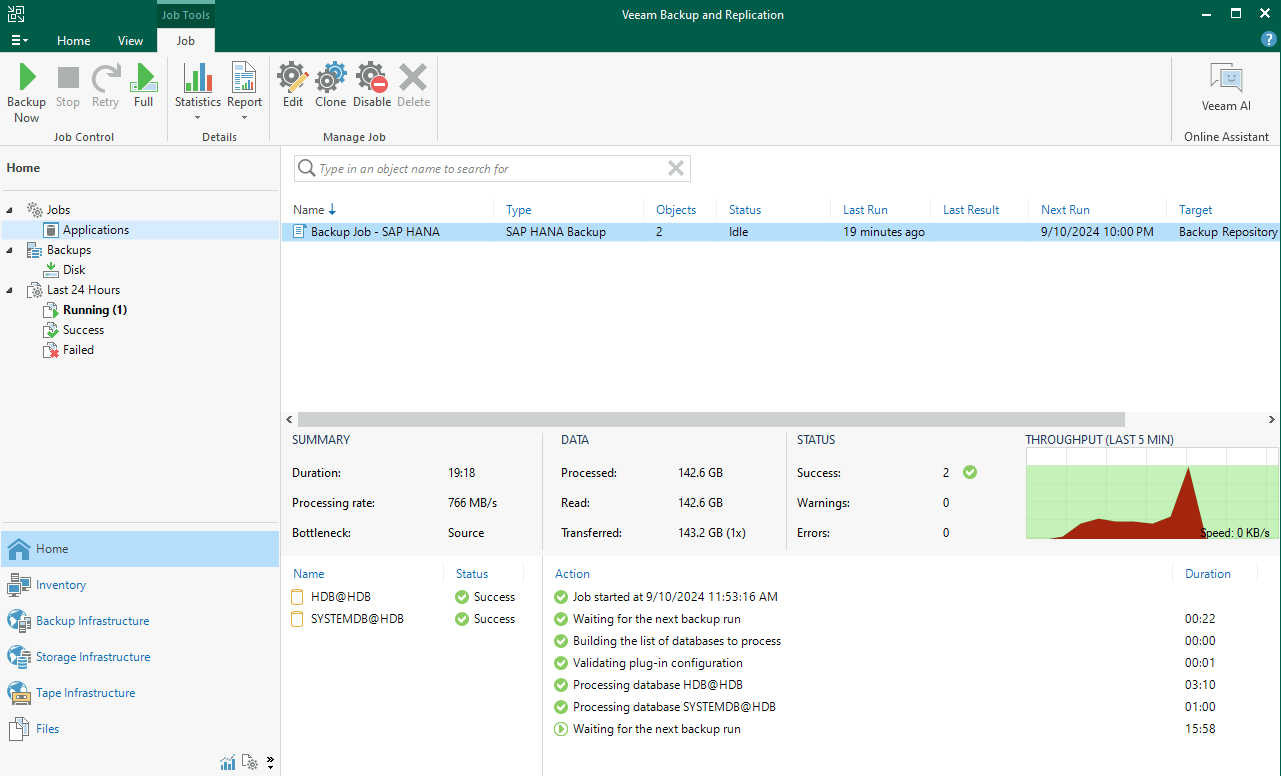
Pour cela, il suffit de vous rendre dans le menu Home, de sélectionner Jobs puis Applications, puis de sélectionner votre Backup job et de cliquer sur Full. Cela aura pour effet de lancer une sauvegarde complète sur la ou les bases de données SAP HANA configurées dans ce Backup job.
Vous pouvez suivre la progression du Backup job.
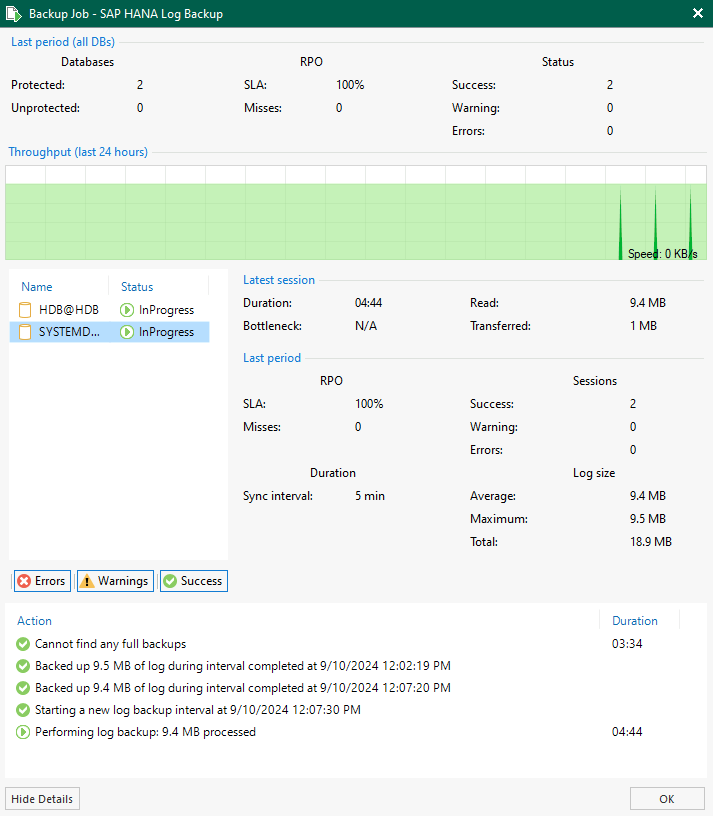
Lors de l'exécution des log backups, vous avez la possibilité d'accéder à des informations détaillées.
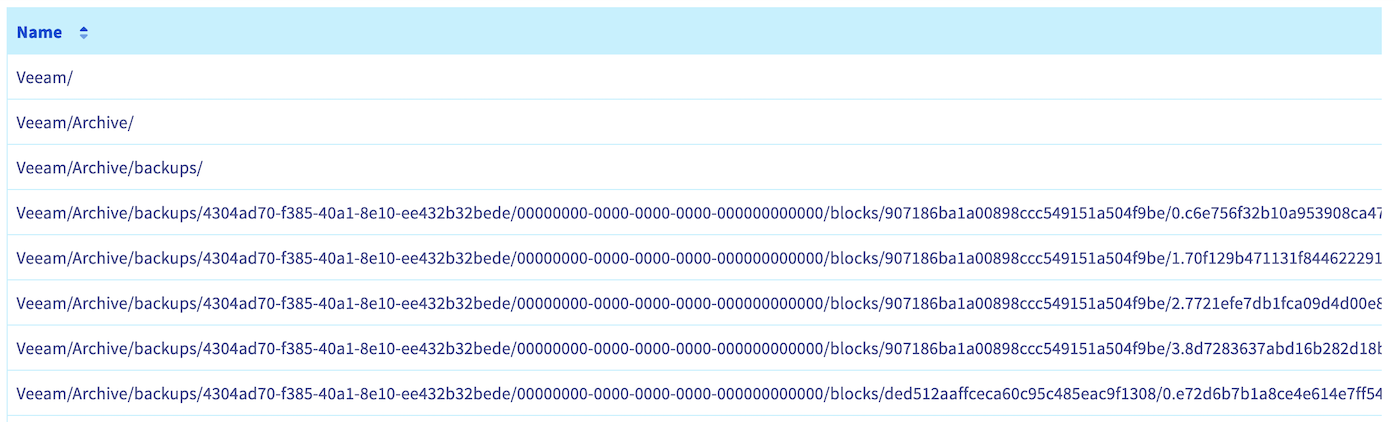
Si vous avez configuré un Scale-out Repository avec un bucket Object Storage, vous pouvez observer vos sauvegardes sur votre bucket Object Storage.
Si vous êtes dans un contexte SecNumCloud et que vous souhaitez sécuriser vos sauvegardes sur un second Backup Repository, configurez un Backup Copy job.
Si vous souhaitez découvrir toutes les possibilités avec Veeam Plug-in for SAP HANA, nous vous conseillons de prendre connaissance de la documentation Veeam.
4 - Restauration
Pour restaurer votre base de données SAP HANA depuis une sauvegarde réalisée avec Veeam Backup and Replication, vous pouvez réaliser les étapes suivantes depuis la console Veeam Backup and Replication et Veeam Explorer for SAP HANA.
Info
Les ports suivants doivent être ouverts entre votre serveur Veeam Backup and Replication et votre base de données SAP HANA :
SAP Host Agent HTTP – tcp/1128
SOAP HTTP - tcp/5<NN>13
Si vous désirez effectuer la communication via le protocole HTTPS, les ports sont :
SAP Host Agent HTTPS - tcp/1129
SOAP HTTPS - tcp/5<NN>14
Étape 1
Étape 2
Étape 3
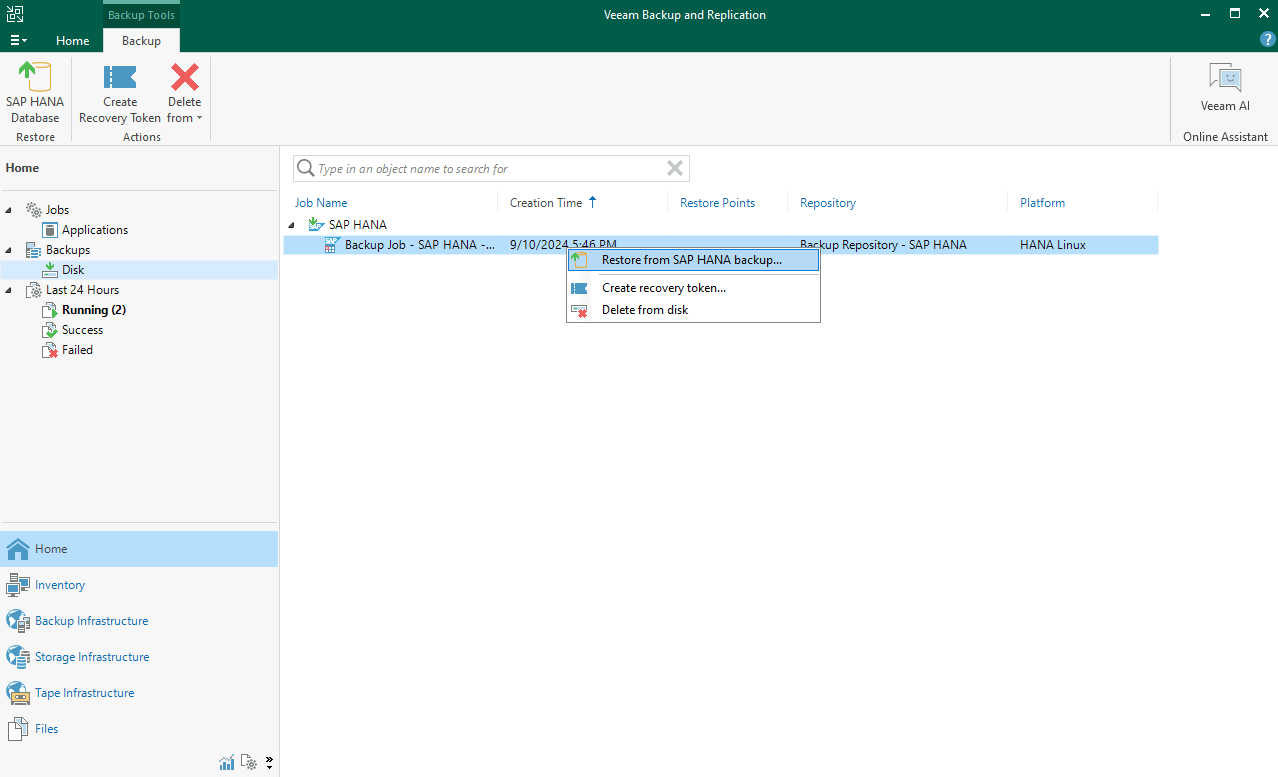
Ouvrez la console Veeam Backup and Replication, sélectionnez Home, Backups, Disk, puis cliquez sur Restore from SAP HANA backups... en faisant un clic droit sur la sauvegarde de votre base de données SAP HANA.
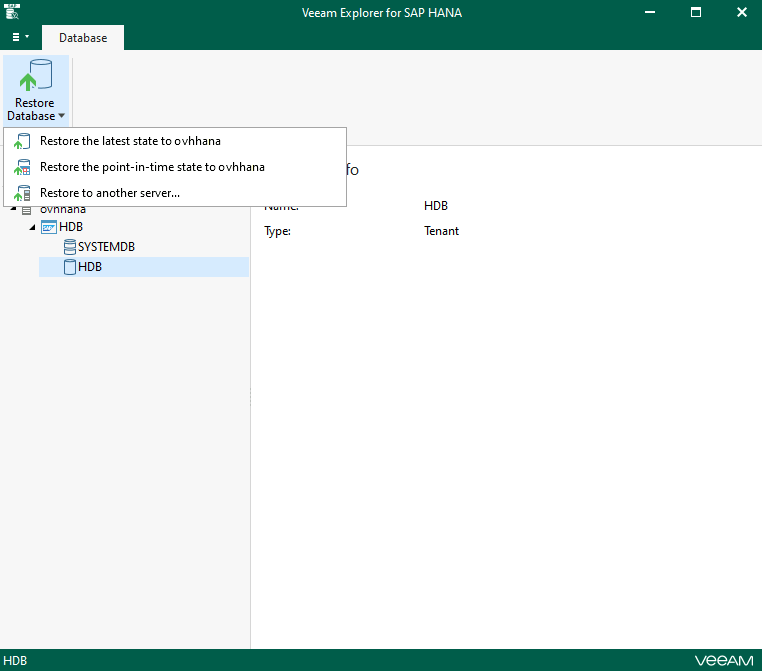
L'application Veeam Explorer for SAP HANA s'ouvre et vous permet de restaurer soit le SYSTEMDB, soit le TENANTDB de votre base de données SAP HANA. L'ensemble des modes de restauration sont disponibles :
Vous serez guidé dans les étapes pour la restauration en fonction du mode sélectionné.
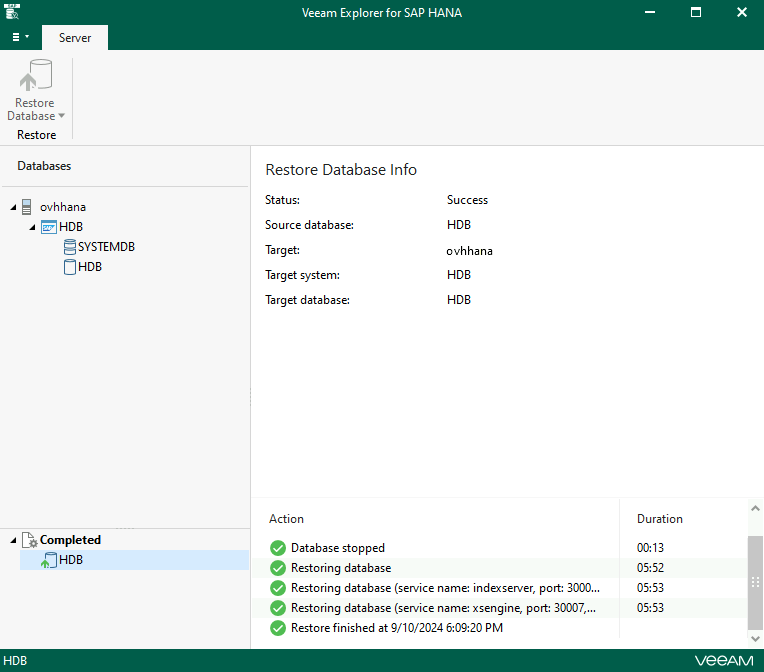
La restauration de votre base de données SAP HANA s'exécute. Vous avez la possibilité de suivre la progression de la restauration via Veeam Explorer for SAP HANA.
Une fois la restauration effectuée avec succès, votre base de données est démarrée.
Aller plus loin
Si vous avez besoin d'une formation ou d'une assistance technique pour la mise en oeuvre de nos solutions, contactez votre commercial ou cliquez sur ce lien pour obtenir un devis et demander une analyse personnalisée de votre projet à nos experts de l’équipe Professional Services.
Your feedback helps our teams improve your experience.
2 minutes · Anonymous
Sauvegarder SAP HANA avec Veeam Backup and Replication
Webmail My account Support 🇬🇧 English Theme Languages 🇬🇧 English 🇫🇷 Francais 🇬🇧 English 🇩🇪 Deutsch 🇪🇸 Espanol 🇮🇹 Italiano 🇵🇱 Polski 🇵🇹 Portugues Menu On this page Search ⌘K Documentation Beta API Reference Product changelog E-Learning & certifications Migration Bare Metal Cloud Dedicated Servers Overview Key Concepts Bare Metal 3-AZ Region - Service presentation Kimsufi and So you Start customers - Get to know the OVHcloud Control Panel Shared responsibility for Dedicated Servers Understanding the dedicated server boot process Getting Started How to get started with a dedicated server How to get started with a Kimsufi, So You Start or Rise dedicated server How to get started with SSH connections How to create and use authentication keys for SSH connections to OVHcloud servers How to store public authentication keys in the OVHcloud Control Panel How to use the IPMI console with a dedicated server How to obtain the carbon footprint of your OVHcloud services Configuration System How to configure user accounts and root access on a server How to change a Windows Server product key Changing the admin password on a Windows dedicated server How to reset the Windows Administrator password with the Windows customer rescue system How to manage Intel SGX on a dedicated server Hardware upgrade on a High Grade or Scale dedicated server How to assign a tag to a Bare Metal server How to install VMware ESXi 8 on a dedicated server Storage Managing and rebuilding software RAID on servers using legacy boot (BIOS) mode Managing and rebuilding software RAID on servers using UEFI boot mode Managing hardware RAID Hot Swap - Hardware RAID Hot Swap - Software RAID Configuring MegaRAID for RAID Level 0 Configuring a software mirror (RAID) on Windows OVHcloud API and Storage Configuring the storage on a HGR-STOR-2 server Creating a Windows partition on a server with hardware RAID Advance Dedicated Servers - Upgrading your Samsung NVMe PM9A1 firmware High Grade Dedicated Servers - Upgrading your SSD SAS Western Digital SS300 firmware High Grade Dedicated Servers - Upgrading your SSD SAS Western Digital SS530 firmware Dedicated Servers - Upgrading your SSD Solidigm D7-P5520 firmware Dedicated Servers - Upgrading your Micron 7500 PRO firmware How to verify the BMC firmware version on a dedicated server Network Configuring OVHcloud Secondary DNS on a dedicated server Installing an OVHcloud SSH key Configuring OVHcloud Link Aggregation in the OVHcloud Control Panel How to configure your NIC for OVHcloud Link Aggregation in Debian 9 to 11 How to configure Link Aggregation with LACP in Debian 12 or Ubuntu 24.04 How to Configure Your NIC for OVHcloud Link Aggregation in Windows Server 2019 How to Configure Your NIC for OVHcloud Link Aggregation in SLES 15 How to set up a web server (LAMP) on Debian or Ubuntu Manage your server reboot with the OVHcloud Link Aggregation feature Configuring IPv6 on dedicated servers Configuring an IPv6 address on a virtual machine Moving an Additional IP Configuring Additional IPs in bridge mode on your virtual machines What are the IP addresses of the OVHcloud monitoring? Configurer son adresse IP en alias How to configure reverse DNS for your server (PTR record) How to determine if your dedicated server supports virtual MAC addresses Assigning a Virtual MAC to an Additional IP Configuring the network on Windows Server with Hyper-V Configuring the network on Proxmox VE on the High Grade, Scale & Advance ranges Upgrade and downgrade Bandwidth via the OVHcloud API Improving Network Resilience on Bare Metal servers vRack Configuring the vRack on your dedicated servers Configuring Jumbo Frames in vRack Configuring an Additional IP block in a vRack Configuring an Additional IPv6 block in a vRack Change the announcement of an IP block in vRack Creating multiple vLANs in a vRack Setting up a Virtual Machine using Additional IPs and Hyper-V over a vRack Configuring the vRack between the Public Cloud and a Dedicated Server Upgrade and downgrade private bandwidth (vRack) via the OVHcloud API Deployments OVHcloud API and OS Installation Bring Your Own Image (BYOI) / Bring Your Own Linux (BYOLinux), a comparison sheet Bring Your Own Image (BYOI) Bring Your Own Linux (BYOLinux) Configure a custom iPXE script to boot your server from the OVHcloud API Migration Migrate data from one dedicated server to another Copying data from one dedicated server to another using rsync Tutorials How to use PuTTY for SSH connections and authentication Tutorial - Configuring pfSense network bridge How to set up a web server (LAMP) on Debian or Ubuntu Activating Windows Machines using Hyper-V on an OVHcloud licensed Windows Server Installing CUDA on a dedicated GPU server Backing up data and databases on a Storage Server How to use SFTP to transfer files How to create a Palworld compatible server How to install a web development environment on a VPS or a dedicated server How to deploy and verify an OpenNebula Hosted Cloud on Bare Metal servers How to install CloudPanel on a VPS or a Dedicated Server How to install WordPress with Docker on a VPS or a dedicated server How to install WordPress with WP-CLI on a VPS or a dedicated server How to install ISPmanager on a VPS or Dedicated Server How to prevent your emails from being marked as spam Security Hardening How to secure a dedicated server Securing a server with a Memcached service How to mitigate the Zenbleed vulnerability How to mitigate the Downfall vulnerability How to mitigate the Inception vulnerability Find your patch for Meltdown and Spectre Information about Meltdown and Spectre vulnerability fixes AMD SME/SEV on Ubuntu 20 Dedicated Server Security Specifications Manage and secure your ESXi dedicated server from the outset ESXi Dedicated Servers - FAQ Backup Preparing a Bare Metal Server backup with Veeam Enterprise Backing up a Bare Metal Linux Server with Veeam Enterprise Backing Up a Bare Metal Windows Server Using Veeam Agent for Windows Restoring a Bare Metal Server with Veeam Enterprise How to use the backup storage on a dedicated server Network OVHcloud AntiSpam - Best Practices and Unblocking an IP Configuring the firewall on Linux with iptables Configuring the firewall on Windows Enabling and configuring the Edge Network Firewall How to protect a Game server with the application firewall Monitoring DDoS attacks with the Network Security Dashboard How to configure the Anti-DDos Infrastructure for Solana Troubleshooting How to recover server access if your user password is lost How to activate and use rescue mode How to activate and use Windows rescue mode How to replace an SSH key pair Replacing a defective disk How to perform server hardware diagnostics in rescue mode Finding the serial number of a hard disk Finalise a maintenance intervention on your dedicated server Uninstalling the RTM v2 monitoring system How to retrieve databases in rescue mode Network - Fixing slow downloads problems inside containers and VMs running on Proxmox VE servers with Broadcom BCM57502 NICs Virtual Private Servers Overview Getting started Getting started with a VPS VPS - Management from the OVHcloud Control Panel OVHcloud VPS FAQ How to configure user accounts and root access on a server How to get started with SSH connections How to create and use authentication keys for SSH connections to OVHcloud servers How to store public authentication keys in the OVHcloud Control Panel How to upgrade the resources of a VPS Repartitioning a VPS after a storage upgrade First steps with pre-installed applications How to use the KVM console to access a VPS Managing a legacy VPS Configuration Backup options How to use snapshots on a VPS Comment utiliser les sauvegardes automatisees sur un VPS How to configure an additional disk How to increase the size of an additional disk Network and IP management How to configure IPv6 on a VPS How to configure reverse DNS for your server (PTR record) How to configure IP aliasing Configuring OVHcloud Secondary DNS on a VPS Advanced usage How to deploy cPanel on a VPS Automated Backup - Kernel panic (cPanel) Migration How to migrate a website from a VPS to a Dedicated Server or a Public Cloud instance How to migrate an n8n configuration between two VPS Tutorials How to use PuTTY for SSH connections and authentication How to use SFTP to transfer files How to retrieve databases in rescue mode How to create a Minecraft server on a VPS How to create a Palworld compatible server How to set up a web server (LAMP) on Debian or Ubuntu How to install a web development environment on a VPS or a dedicated server How to install CloudPanel on a VPS or a Dedicated Server How to install WordPress with Docker on a VPS or a dedicated server How to install WordPress with WP-CLI on a VPS or a dedicated server Automating the deployment of your website on your VPS via GitHub Actions Automating the deployment of your website on your VPS via GitLab CI/CD How to install n8n on an OVHcloud VPS How to migrate an n8n configuration between two VPS Automate SMS sending with n8n via the OVHcloud API How to create and import a Lovable website on an OVHcloud VPS How to install an AI agent on an OVHcloud VPS How to install ISPmanager on a VPS or Dedicated Server How to install Docker and Docker Compose on a VPS How to install Nextcloud on an OVHcloud VPS with Docker How to install Nextcloud on an OVHcloud VPS with Docker and Traefik How to install OpenClaw on a VPS How to Automate Server Backups with Plakar Security Securiser un VPS How to install an SSL certificate on a VPS Configuring the firewall on Linux with iptables Configuring the firewall on Windows Troubleshooting Checking the file system on a VPS VPS - Enable Windows boot logs Displaying boot logs in the KVM How to use rescue mode on a VPS How to recover server access if your user password is lost Changing the admin password on a Windows server How to replace an SSH key pair How to prevent your emails from being marked as spam Additional resources Public Cloud & VPS - Image and OS life cycle and end of life/support announcements End of Plesk and cPanel support for VPS - Ensuring continuity of your services Managed Bare Metal Overview OVHcloud services and options Setting up a VPN for OVHcloud Zerto DRP Restoring backups via the OVHcloud API Activating and using Veeam Managed Backup Modifying the vCenter access policy Authorising IP addresses for vCenter access FAQ Technical capabilities OVHcloud features Adding an IP block OVHcloud hourly snapshots Changing the User Password VLAN creation Using Managed Bare Metal within a vRack Spare host delivery and return Removing a host server Removing a datastore Changing user rights Adding hourly resources Associating an email with a vSphere user Using the OVHcloud Network plugin How to cancel your Managed Bare Metal offer Getting started Introduction to the Managed Bare Metal Control Panel Configure an IP address on a virtual machine Keeping your vSphere web client secure Logging in to the vSphere interface Migrating an infrastructure to a new vDC Migrating an infrastructure to a Managed Bare Metal solution Managing virtual machines Modifying virtual machine resources Creating a snapshot Creating an alert Cloning a VM Choosing a disk type Installing VMware tools Deploy an OVF Linux, Windows Server and Windows SQL Server template Deploying a virtual machine Avoiding the read-only switch of your VM disk on Linux VMware vSphere features VMware vMotion VMware Storage vMotion VMware HA (High Availability) VMware Fault Tolerance VMware DRS (Distributed Resource Scheduler) Enabling Virtual Machine Encryption (VM Encrypt) Using the vSphere SDK Hosted Private Cloud Public VCF as-a-Service Overview Key Concepts Technical capabilities Hosted Private Cloud VMware Lifecycle Policy Hosted Private Cloud VMware Lifecycle Policy - Determine actions to be taken Responsibility sharing for the VMware on OVHcloud service Datamotive - Introduction Public VCF as-a-Service - The fundamentals of Public VCF as-a-Service Technical capabilities and limitations of Public VCF as-a-Service Getting started Introduction to the Hosted Private Cloud Control Panel Log in to the vSphere web interface Connexion a l'API OVH Public VCF as-a-Service - Logging in to your organization Public VCF as-a-Service - How to use the Public VCF as-a-Service user interface Configuration How to connect an ISO image to a VM How to disconnect an ISO image from a VM Configure an IP address on a virtual machine Public VCF as-a-Service - Network concepts and best practices Public VCF as-a-Service - Creating network components from the Public VCF as-a-Service control panel Public VCF as-a-Service - Linking a public IP block with vRack Public VCF as-a-Service - Declaring the public IP gateway in VCD Migration Migrating a PCC to Hosted Private Cloud Migrating an infrastructure to a new vDC End-Of-Life management for LV1 and LV2 storage Public VCF as-a-Service - Migrate from VMware vSphere on OVHcloud Public VCF as-a-Service - Setting up your network after vSphere to Public VCF as-a-Service migration Reversibility Policy for the Managed Mutualized Virtualization product Tutorials Public VCF as-a-Service - Creating a new virtual machine Public VCF as-a-Service - Backups with Veeam Data Platform Security Troubleshooting Additional resources Hosted Private Cloud FAQ How to obtain the carbon footprint of your OVHcloud services Public VCF as-a-Service - FAQ Managed VMware Key Concepts SPN Concept Concepts overview Getting started Getting started with NSX Activer NSX-T dans un Hosted Private Cloud VMware on OVHcloud Introduction to vRealize Operations - vROPS Getting started with your SecNumCloud vSphere Configuration Virtual Machines Deploying a virtual machine Installing VMware tools Choosing a disk type Modifying virtual machine resources Avoiding the read-only switch of your VM disk on Linux Enabling promiscuous mode on a Virtual Machine Changing the MTU size for machines reaching the OVHcloud Gateway SSL Deploy an OVF template through content libraries Deploy an OVF Linux, Windows Server and Windows SQL Server template OVF Tool Storage and Resources How to add storage? How to add a host? Removing a datastore Removing a host server Uploading an ISO in a datastore Network and Connectivity How to create a VLAN vRack compatibility with Hosted Private Cloud Enable the Private Gateway Adding an IP block Spare host delivery and return Segment management in NSX DHCP Configuration in NSX Configuring DNS Forwarder in NSX Adding a new Tier-1 Gateway in NSX vSphere Features Using the vSphere SDK Managing granular rights on vSphere objects Cluster creation and EVC activation Backup and Replication Activating and using Veeam Managed Backup Setting up Zerto Virtual Replication between two OVHcloud data centres Setting up Zerto multi-site replication on OVHcloud Managed vSphere Using Zerto between OVHcloud and a third-party platform Encrypting backup jobs with Veeam and OKMS Avoiding VM freeze with the Veeam Managed Backup option Migration Migrating OmniOS datastores Move2Cloud - Migrating VMware Workloads to OVHcloud Hosted Private Cloud with Veeam Replication Move2Cloud - Migrate VMware workloads to OVHcloud Hosted Private Cloud with Zerto Move2Cloud - Migrating VMware Workloads to OVHcloud SecNumCloud with Veeam Replication Move2Cloud - Migrate VMware workloads to OVHcloud SecNumCloud Hosted Private Cloud with Zerto Tutorials Virtual Machines Taking a snapshot Cloning a VM Reregister VMs in a new PCC Checking a slow machine Creating an alert VMware vCenter Converter Storage and Replication OVHcloud hourly snapshots Zmotion Restoring backups via the OVHcloud API Delete VM replica from Zerto recovery site Veeam Cloud Connect - How to migrate data from Veeam Cloud Connect to Object Storage Network and NSX Using the OVHcloud Network plugin Using Private Cloud within a vRack Using the OVHcloud plugin in vSphere Configuring NAT for port redirections with NSX Load Balancing configuration in NSX vSphere Features Understanding vScope VMware DRS (Distributed Resource Scheduler) VMware Storage vMotion Using VMware Hyperconvergence with vSAN Adding an ESXi server to a vSAN cluster Updating the vSAN disk format Managing vSAN fault domains VMware vMotion High Availability and Resilience VMware HA (High Availability) VMware Fault Tolerance Security Identity and Access Management IAM for VMware on OVHcloud - Presentation and FAQ IAM for VMware on OVHcloud - How to activate IAM IAM for VMware on OVHcloud - How to create an IAM vSphere role IAM for VMware on OVHcloud - How to associate a vSphere role with an IAM policy IAM for VMware on OVHcloud - How to associate a user with a global IAM policy How to use IAM policies with vSphere Changing the User Password Associating an email with a vSphere user Encryption and Key Management vNKP - Enabling virtual machine encryption Enabling VM encryption with an external KMS KMS for VMware on OVHcloud - VM encryption use case scenarios KMS for VMware on OVHcloud - Configuring VM encryption Mise en route du KMS CipherTrust Manager Network Security (NSX) Distributed Firewall Management in NSX Gateway Firewall Management in NSX Setting up an IPsec Tunnel with NSX Configure BGP between two PCCs via NSX-T System Hardening and Vulnerabilities Keeping your vSphere web client secure Using the secure interface Using two-factor authentication (2FA) on your Private Cloud infrastructure Authorising IP addresses for vCenter access Checking and blocking the L1TF vulnerability Checking and applying patches for Spectre/Meltdown vulnerabilities on your hosts Utiliser le protocole SSLv3 sur Private Cloud Compliance and SecNumCloud Partage de responsabilite sur le service Hosted Private Cloud by VMware sous la qualification SecNumCloud VPN-SPN Concept SPN Connector Concept Troubleshooting Maintenance and Updates VMware on OVHcloud maintenance operations Rescheduling a maintenance on your Hosted Private Cloud Updating hosts using vSphere Lifecycle Management (vLCM) VMware Update Manager Extend Volume in vSphere and in OS Testing a temporary host loss by enabling resilience mode Monitoring and Logs Configuring a vROps alert via the SMTP protocol Logs Data Platform - Collect VMware on OVHcloud logs NSX-T: retrieving logs How to read and filter NSX-T logs Compliance Monitoring Healthcare (HDS) or payment services (PCI DSS) compliance activation How to manage Windows licences for virtual machines on your Hosted Private Cloud infrastructure How to change a Windows Server product key Additional resources NSX - FAQ Pricing and Management of OVHcloud NSX Edges FAQ SecNumCloud Connectivity SNC Cloud Platform Getting started Mise en route de votre projet SNC Cloud Platform Comment sauvegarder une instance SNC Cloud Platform Comment sauvegarder un bucket Object Storage SNC Cloud Platform Bare Metal Pod Getting started Getting started with your Bare Metal Pod SecNumCloud On-Prem Cloud Platform Getting started Getting started with your OPCP Lifecycle of an OPCP Node OPCP - How to use the APIs and obtain the credentials OPCP - How to install an instance from the Horizon interface OPCP - How to Deploy an Instance via OpenStack APIs OPCP - How to setup LACP on a Node OPCP - How to set up Trunk ports on a Node OPCP - How to configure a software RAID on a node OPCP - How to see the node inventory Additional resources OPCP - Object Storage features and specifications Building a custom OpenStack Image on OPCP OPCP - Ceph RBD Block Storage - Performance, Resilience and Scalability with OpenStack Nutanix on OVHcloud Key Concepts Nutanix on OVHcloud - High-level documentation Nutanix hardware compatibility - OVHcloud configurations Nutanix AOS versions supported by OVHcloud List of included licences Disaster Recovery Plan in Nutanix Responsibility sharing - Nutanix on OVHcloud Nutanix on OVHcloud - Lifecycle Policy Getting started Getting started with your Nutanix cluster Nutanix Hyperconvergence Customised redeployment of your Cluster Storage overview on Nutanix Importing ISO images Managing virtual machines Events and alerts management Managing licences for a Nutanix on OVHcloud BYOL offer Networking and security OVHgateway documentation Adding a public IP address to a new VM Upgrading your Nutanix cluster Updating your Nutanix cluster firmware Configuration Changing the vRack of a Nutanix cluster Isolating management machines from production Configure Nutanix Flow Replacing the OVHgateway with a dedicated server Replacing OVHgateway KMS configuration with Nutanix on OVHcloud Configuring HYCU Backup Configure Veeam Backup for Nutanix Migration Migrating to Nutanix via the Nutanix Move tool Tutorials Advanced tools Activate Windows VMs installed on Nutanix by OVHcloud Add or Remove Nodes in a Nutanix Cluster (Scale In/Out) Replacing Prism Central from Small Mode to X-Large Mode Setting up NCM Self Service (CALM) Setting up Nutanix Objects Security Securing Prism Central Web access IPsec interconnection between two sites Interconnect clusters through the vRack Troubleshooting Retrieving your Nutanix installation status information Additional resources Asynchronous or NearSync replication through Prism Element Advanced replication with Leap Configuring Disaster Recovery with Metro Setting up Multicloud Snapshot Technology (MST) on a Nutanix on OVHcloud infrastructure Configuring Prism Central Point-in-Time Backup to OVHcloud S3-compatible Object Storage SAP on OVHcloud Concepts SAP HANA on Bare Metal and SAP Application Servers on VMware on OVHcloud SAP infrastructure with VMware on OVHcloud solution SAP infrastructure with SecNumCloud-qualified SAP HANA on Private Cloud Getting started Install SAP HANA on Bare Metal with SLES 15 for SAP Deploy a virtual machine with SAP HANA and OVHcloud Backint Agent pre-installed Deployer un SAProuter avec NSX Shared responsibility for SAP on OVHcloud solutions Automated deployments Deploy virtual machines of SAP Application Server on VMware on OVHcloud solution with Terraform Deploy virtual machines of SAP HANA database on VMware on OVHcloud solution with Terraform Deploy an SAP system infrastructure on VMware on OVHcloud solution with Terraform SAP pre-installation wizard Resilience SAP HANA cluster with SLES on VMware on OVHcloud Backups Install and use OVHcloud Backint Agent for SAP HANA Use OVHcloud Backint Agent with several Object Storage buckets OVHcloud Backint Agent versions Sauvegarder SAP HANA avec Veeam Backup and Replication Observability SAP logs on OVHcloud Logs Data Platform - Configuration SAP logs on OVHcloud Logs Data Platform - Analysez et exploitez vos logs SAP logs on OVHcloud Logs Data Platform - Index des logs SAP Public Cloud Public Cloud - General Information Overview Key concepts Public Cloud Glossary Public Cloud API Rate Limits Comparison and resilience of Deployment Modes - Understanding 3-AZ / 1-AZ / Local Zones 3-AZ resilience: Mechanisms and reference architectures How do Savings Plans work? Getting Started All you need to know to get started with Public Cloud How to use the Public Cloud interface Creating your first OVHcloud Public Cloud project Getting started with OVHcloud Shell Getting Started with OVHcloud CLI Configuration Billing management How to increase Public Cloud quotas Comment gerer un Savings Plan Public Cloud project management Best Practices for securing & structuring OVHcloud Public Cloud Projects Deleting a Public Cloud project Delegating projects Migration Public Cloud IaaS Migration - Steps and Best Practices Architecture Reference - Building a Landing Zone with OVHcloud Public Cloud Tutorials Managing from Horizon Introducing Horizon Access and security settings in Horizon Managing from OpenStack Preparing an environment for using the OpenStack API Setting OpenStack environment variables How to use OpenStack tokens Managing tokens How to use service accounts to connect to OpenStack Managing OpenStack users Managing firewall rules and port security on networks using OpenStack CLI Managing from Terraform How to use Terraform Security Healthcare (HDS) compliance activation Troubleshooting FAQ Public Cloud OVHcloud Additional resources Information regarding Public Cloud billing options Proper Usage and Limitations of Classic Multi-Attach Block Storage in 3AZ Regions Understanding Landing Zones Understanding metrics in OVHcloud Public Cloud Compute Overview Key Concepts Public Cloud Instances - Key concepts Getting started Adding cloud credit How to create a Public Cloud instance and connect to it Managing your Public Cloud instances How to start a Public Cloud instance on a bootable volume Shelve or pause an instance Activating a Windows licence for an instance in private mode First steps with pre-installed applications Configuration Project management Changing project contacts Public Cloud Instances - Switching from hourly to monthly billing Instance management Backing up an instance Using instance backups to create or restore an instance Changing the hostname of a Public Cloud instance Comment activer le mode rescue sur une instance Public Cloud Putting a Metal instance in rescue mode How to replace an SSH key pair on a Public Cloud instance Deploying a GPU instance How to configure reverse DNS for a Public Cloud instance Resize an instance via the OVHcloud Control Panel Creating and using a Server Group in Horizon and CLI Instance management using Horizon Creating an Instance via the Horizon interface Managing your Public Cloud Instances in Horizon Creating and configuring a security group in Horizon Managing snapshots of an instance in Horizon Creating, launching and deleting images in Horizon Resize an instance via Horizon How to revert a flex instance Instance management using OpenStack Getting started with the OpenStack API Getting started with managing volumes in the OpenStack API Uploading your own image Resize a Public Cloud instance using the OpenStack CLI Downloading and transferring an instance backup from one OpenStack region to another Launching a script when an instance is created Sharing an object via a temporary URL Sharing images between Public Cloud projects Migration Migration of instances between different regions Tutorials How to use PuTTY for SSH connections and authentication Using OVHcloud Object Storage as Terraform Backend to store your Terraform state Using OVHcloud Object Storage as Pulumi Backend to store your Pulumi state Create a custom OpenStack image with Packer How To Install ownCloud on a Public Cloud Instance Installing Plesk on an instance Installing WordPress on an instance Installing Prometheus Agent on a Public Cloud instance How to deploy the 3CX IPBX automatically on OVHcloud Public Cloud How to set up a web server (LAMP) on Debian or Ubuntu Local Zone VPN-as-a-Service (VPNaaS) with Tailscale integration Enterprise File Storage - Connect a Public Cloud instance to an EFS Volume via vRack Private Network Security How to create and use authentication keys for SSH connections to Public Cloud instances How to configure additional SSH keys on an instance Changing the admin password on a Windows server Upgrading your operating system Troubleshooting Forensics: How to deal with Public Cloud instances Repairing the GRUB bootloader Resizing the file system in FreeBSD 12 How to retrieve databases in rescue mode FAQ - Change of monthly billing method Additional resources Public Cloud Instances - Shared responsibilities Public Cloud & VPS - Image and OS life cycle and end of life/support announcements Local Zone Compute - Features, Capabilities and Limitations How to obtain the carbon footprint of your OVHcloud services How to prevent your emails from being marked as spam Storage and Backup Object Storage S3 compatible Key Concepts Object Storage - Choosing the right storage class for your needs Object Storage - Endpoints and Object Storage geoavailability Comparison of Object Storage Deployment Modes - Understanding 3-AZ / 1-AZ / Local Zones Cold Archive - Overview Getting Started Object Storage - Getting started Cold Archive - Getting started with Cold Archive Object Storage - Identity and access management Configuration Object Storage - Getting Started with Versioning Object Storage - Smart Storage Management with Lifecycle Rules Object Storage - Master asynchronous replication across your buckets Object Storage - Server Access Logging Object Storage - Setting up CORS on Object Storage Object Storage - Bucket ACL Object Storage - Hosting a static website in an Object Storage bucket Object Storage - Restoring an archived object from Cold Archive storage class Object Storage - Enabling HTTPS on a static website using a custom domain Object Storage - How to connect Object Storage buckets with other resources in a vRack Migration Object Storage - How to migrate from an S3-compatible object storage provider to OVHcloud Object Storage Object Storage - How to migrate from OVHcloud Swift Object Storage to OVHcloud S3-compatible Object Storage Tutorials Object Storage - Use Object Storage with Rclone Object Storage - Use Object Storage with S3cmd Object Storage - Use Object Storage with WinSCP Object Storage - Use Object Storage with Veeam Object Storage - Use Object Storage with Nextcloud Object Storage - Use Object Storage with Owncloud Object Storage – Use Object Storage with Cohesity NetBackup Object Storage – Use Object Storage with Pure Storage Flashblade Object Storage - Manage an Object Storage bucket with Terraform Object Storage – How to share an object or file externally Security Object Storage - Encrypt your server-side objects with SSE-C or SSE-OMK Object Storage - Managing object immutability with Object Lock (WORM) Object Storage - Identity and access management Troubleshooting Object Storage - FAQ Cold Archive - FAQ Object Storage - Local Zones specifications Object Storage - Compliance Object Storage - Technical Limitations Object Storage - Optimising Performance Object Storage - Optimise the sending of your files to Object Storage Additional Resources Object Storage - Shared Responsibility Cold Storage - Shared Responsibility for archive and restoration services Object Storage - Third-party applications compatibility Swift Getting Started Object Storage Swift - Creating an Object Storage container Object Storage Swift - Getting started with the Swift API Object Storage Swift - Getting started with the Swift S3 API Configuration Object Storage Swift - Configure a domain name on your Object Storage container Object Storage Swift - Syncing object containers Object Storage Swift - Configure automatic object deletion Object Storage Swift - Setting up CORS on Object Storage Cloud Archive Swift - Manage your archives with an SFTP/SCP client Cloud Archive Swift - Creating a Public Cloud Archive container Cloud Archive Swift - Unfreezing your data stored in the Public Cloud Archive Cloud Archive Swift - Set up an Access Control List on Public Cloud Archive Migration Object Storage - How to migrate from OVHcloud Swift Object Storage to OVHcloud S3-compatible Object Storage Tutorials Object Storage Swift - Synchronise Synology NAS with Object Storage Object Storage Swift - Use S3QL to mount object storage containers Object Storage Swift - Managing Object Storage with CyberDuck Object Storage Swift - Using Object Storage with Rclone Object Storage Swift - Configure ownCloud with Object Storage Cloud Archive Swift - Managing your archives with a Swift client (Cyberduck) Cloud Archive Swift - Managing your archives with Rsync Security Object Storage Swift - Set up an Access Control List on Object Storage Troubleshooting Object Storage Swift - S3/Swift REST API compatibility Object Storage Swift - Capabilities and limitations Cloud Archive Swift - Capabilities and limitations Object Storage Swift - Optimised method for uploading files to Object Storage Additional Resources Object Storage Swift - Curl Command Memo Object Storage Swift - Swift commands Memo Cloud Archive Swift - Curl Command Memo Cloud Archive Swift - Swift Command Memo Block storage Key concepts Choosing the Right Block Storage Class Proper Usage and Limitations of Classic Multi-Attach Block Storage in 3AZ Regions Getting Started How to create and configure an additional disk on an instance Creating a volume backup Creating a volume snapshot Configuration Creating a volume from a backup Increasing the size of an additional disk Test disk speed Migration Migrer un volume Block Storage vers un volume chiffre LUKS Change your block storage volume type Additional resources Public Cloud Block Storage - Shared responsibilities File Storage Key concepts Getting Started File Storage Service - Getting started (Beta) Public Cloud Network Services Key concepts Concepts - Public Cloud Networking Concepts - Additional IP or Floating IP Concepts - Load Balancer Public Cloud Network Services - Known limits Getting started Private Network Creating a private network with Gateway Configuring vRack for Public Cloud Configuring vRack for Public Cloud using OVHcloud APIv6 Configuring vRack for Public Cloud using OpenStack CLI Changing the DNS servers of Public Cloud instances Load Balancer Getting started with Load Balancer on Public Cloud Public IPs Attaching a Floating IP to a Public Cloud instance Configuration Private Network How to share a private network between 2 Public Cloud projects How to extend a private OVHcloud network across Public Cloud regions Update a subnet properties Changing the MTU size for existing networks using OpenStack CLI/API Load Balancer Deploying a Public Cloud Load Balancer Updating a Load Balancer size via the Horizon interface Using the weight feature on a Load Balancer member Public Cloud Load Balancer TCP / HTTP / HTTPS Logs Forwarding Public IPs Configuring an Additional IP Buying an Additional IP Importing an Additional IP Migrating an Additional IP Gateway L3 services SNAT configuration Configuring IPv6 on a Public Cloud instance Configuring a public IP block in a vRack on a Public Cloud instance Tutorials General Securing your OVHcloud infrastructure with Stormshield Network Security Securing your OVHcloud infrastructure with Ubika WAAP Gateway Private Network Local Zone VPN-as-a-Service (VPNaaS) with Tailscale integration Load Balancer Configuring a secure Load Balancer with Let's Encrypt Security Configuring a secure Load Balancer with Let's Encrypt Configuring a TERMINATED_HTTPS listener via CLI / Horizon Securing your OVHcloud infrastructure with Stormshield Network Security Securing your OVHcloud infrastructure with Ubika WAAP Gateway Troubleshooting Public Cloud Network Services - FAQ Additional resources How to create and manage a Health Monitor for OVHcloud Public Cloud Load Balancer How to create and manage Level 7 (L7) Policies and Rules for OVHcloud Public Cloud Load Balancers Public Cloud Load Balancer monitoring with Prometheus Containers & Orchestration Managed Kubernetes Service (MKS) Overview Key concepts Understanding OVHcloud Managed Kubernetes architecture Known limits Choosing the right OVHcloud Managed Kubernetes Plan: Free or Standard Available datacenters, worker nodes and persistent storage flavors Exposed APIs, Kubernetes configuration and Feature gates Getting started Creating a cluster Deploying an application Deploying a Hello World application Expose your app deployed on an OVHcloud Managed Kubernetes Service Installing the Kubernetes Dashboard on OVHcloud Managed Kubernetes Installing and using Helm on OVHcloud Managed Kubernetes Installing WordPress on OVHcloud Managed Kubernetes Deploying a GPU application on OVHcloud Managed Kubernetes Service Managed Kubernetes objects (services, deployments, pods...) Configuration Cluster Configuring kubectl on an OVHcloud Managed Kubernetes cluster Configuring the API server flags on an OVHcloud Managed Kubernetes cluster Resetting an OVHcloud Managed Kubernetes cluster Upgrading Kubernetes version on an OVHcloud Managed Kubernetes cluster Add IP restrictions on an OVHcloud Managed Kubernetes cluster Changing the security update policy on an OVHcloud Managed Kubernetes cluster Configuring the OIDC provider on an OVHcloud Managed Kubernetes cluster Customising IP allocation on an OVHcloud Managed Kubernetes cluster Nodepools & Nodes How to manage nodes and node pools on an OVHcloud Managed Kubernetes cluster Dynamically resizing a cluster with the cluster autoscaler Configuring the cluster autoscaler Adding Labels & Taint on Node Pool (Node Pool template) Cluster autoscaler example Deploy applications to specific Nodes and Nodes Pools Taint, cordon and drain specific Nodes and Nodes Pools Adapt your Inotify parameters for your Managed Kubernetes Service deployments Storage Persistent Volumes on OVHcloud Managed Kubernetes Service Resizing Persistent Volumes Configuring multi-attach persistent volumes with OVHcloud NAS-HA Configuring multi-attach persistent volumes with Enterprise File Storage Configuring multi-attach persistent volumes with OVHcloud Cloud Disk Array Formating NVMe disks on IOPS nodes Network Using vRack Private Network Using vRack - Communicating between different private networks Using a custom gateway on an OVHcloud Managed Kubernetes cluster Working with vRack example - Managed Kubernetes and Public Cloud instances Working with vRack example - Communicating between different private networks Using Floating IPs on Managed Kubernetes Service Customizing Kube-proxy on an OVHcloud Managed Kubernetes cluster Customizing CoreDNS on an OVHcloud Managed Kubernetes cluster Customizing Cilium on an OVHcloud Managed Kubernetes cluster Traffic Management Installing Nginx Ingress on OVHcloud Managed Kubernetes Expose your applications using OVHcloud Public Cloud Load Balancer Sticky sessions/Session Affinity based on Nginx Ingress on OVHcloud Managed Kubernetes Secure a Nginx Ingress with cert-manager on OVHcloud Managed Kubernetes Getting the source IP behind the LoadBalancer How to migrate from Load Balancer for MKS (IOLB) to Public Cloud Load Balancer (Octavia) Backup and Restore Backup and Restore OVHcloud Managed Kubernetes Cluster, Namespace and Applications using TrilioVault for Kubernetes Backing-up an OVHcloud Managed Kubernetes cluster using CloudCasa Backing up and restoring your Persistent Volume with Volume Snapshots on OVHcloud Managed Kubernetes Backing-up an OVHcloud Managed Kubernetes cluster using Velero Backing-up Persistent Volumes using Stash Monitoring & Observability Monitoring apps with Prometheus and Grafana on an OVHcloud Managed Kubernetes Service Collect metrics from Public Cloud instances with Prometheus on an OVHcloud Managed Kubernetes Service Distributed tracing with Jaeger on an OVHcloud Managed Kubernetes Service Pushing logs from a Kubernetes cluster to Logs Data Platform using Fluent Bit Managed Kubernetes Service Audit Logs Forwarding Monitoring GPU usage on OVHcloud Managed Kubernetes Service Managed Kubernetes Service Audit Logs Forwarding Operators Set up the Kubernetes operator for Public Cloud Databases Deploying a Kubernetes Operator based on Helm on OVHcloud Managed Kubernetes Deploying a Kubernetes Operator written in Golang on OVHcloud Managed Kubernetes Migration Migration Guide – Moving Your Kubernetes cluster to OVHcloud How to migrate from Load Balancer for MKS (IOLB) to Public Cloud Load Balancer (Octavia) Tutorials Installing Agones on OVHcloud Managed Kubernetes Installing Jenkins on OVHcloud Managed Kubernetes Using Codefresh with OVHcloud Managed Kubernetes cluster Deploying Apache Pulsar on an OVHcloud Managed Kubernetes cluster How to install OpenFaaS CE on OVHcloud Managed Kubernetes using OpenFaaS Run Serverless containers on OVHcloud Managed Kubernetes with Knative Deploying Artifactory on an OVHcloud Managed Kubernetes cluster Enforcing policy management on OVHcloud Managed Kubernetes with Kyverno Scan for vulnerabilities and misconfigurations of your OVHcloud Managed Kubernetes with Trivy Near real-time threats detection with Falco on OVHcloud Managed Kubernetes Sanitize your OVHcloud Managed Kubernetes with Popeye Installing cert-manager on OVHcloud Managed Kubernetes Installing Keycloak, an OIDC Provider, on OVHcloud Managed Kubernetes Installing Istio on OVHcloud Managed Kubernetes Traffic management with Istio on OVHcloud Managed Kubernetes Security Add IP restrictions on an OVHcloud Managed Kubernetes cluster Changing the security update policy on an OVHcloud Managed Kubernetes cluster Configuring the OIDC provider on an OVHcloud Managed Kubernetes cluster Encrypt your Secret for OVHcloud Managed Kubernetes with Sealed Secrets (Kubeseal) Using RBAC to handle limited access to an OVHcloud Managed Kubernetes cluster Troubleshooting ETCD Quotas, usage, troubleshooting and error Troubleshooting permission errors when enabling persistence Additional resources Managed Kubernetes End-of-Sale, End-of-Service and End-of-Life policies Managed Kubernetes - Responsibility model Orchestration product reversibility policy Recommended external resources for Kubernetes OVHcloud Managed Kubernetes - Features and roadmap Kubernetes Plugins (CNI, CRI, CSI...) & softwares versions and reserved resources Managed Private Registry (MPR) Overview Getting started Creating a private registry Creating a private registry (Harbor) through Terraform Creating a private registry with Pulumi Creating and using a Docker image stored in an OVHcloud Managed Private Registry Connecting to the UI Managing users and projects Configuration Using Private Registry with OVHcloud Managed Kubernetes Managing Helm charts in the OVHcloud Managed Private Registry Deploying a Helm chart from your private registry in Kubernetes Configuring Proxy Cache on an OVHcloud Managed Private Registry Migrate Helm Charts from Chartmuseum to OCI Security Configure the authentication via an OIDC provider on an OVHcloud Managed Private Registry Adding IP restrictions on an OVHcloud Managed Private Registry Sign OCI artifacts with Cosign on OVHcloud Managed Private Registry Scanning Docker images for vulnerabilities with OVHcloud Managed Private Registry Troubleshooting FAQ Managed Private Registry (MPR) Additional resources Managed Private Registry - Responsibility model Managed OCI artifact Registry Product Reversibility Policy Managed Rancher Service (MRS) Overview Getting started Getting Started with Managed Rancher Service Creating, updating and accessing a Managed Rancher Service Managing users and projects in Managed Rancher Service Importing an existing Kubernetes cluster in MRS Creating a Managed Kubernetes Service (MKS) cluster in MRS Creating a Kubernetes cluster based on OVHcloud Public Cloud Compute Instances in MRS Creating a Kubernetes cluster with existing nodes (Generic) in MRS Configuration Editing the configuration of a Kubernetes cluster in Managed Rancher Service Backing up and restoring a Kubernetes cluster in Managed Rancher Service Deploying a monitoring stack (Prometheus & Grafana) in a Kubernetes cluster in MRS Tutorials How to use Rancher CLI Additional resources Managed Rancher Service supported versions and lifecycle policy Orchestration product reversibility policy Public Cloud Databases Overview PostgreSQL Overview Key concepts Lifecycle policy for Public Cloud Databases FAQ for Public Cloud Databases Capabilities and Limitations of Public Cloud Databases Capabilities and Limitations of Public Cloud Databases for PostgreSQL Automated Backups for Public Cloud Databases High availability and failure scenarios for Public Cloud Databases for PostgreSQL Getting started Getting started with Public Cloud Databases Getting started with Public Cloud Databases APIs Getting started with Terraform for Public Cloud Databases Configure incoming connections of a Public Cloud Databases for PostgreSQL service Connect using the CLI for Public Cloud Databases for PostgreSQL Connect using PHP for Public Cloud Databases for PostgreSQL Connect using Python for Public Cloud Databases for PostgreSQL Connect using PgAdmin for Public Cloud Databases for PostgreSQL Configuration Create and use connection pools in Public Cloud Databases for PostgreSQL Maintenance operations for Public Cloud Databases Configurer le reseau prive des bases de donnees Public Cloud (EN) Configure the advanced parameters for Public Cloud Databases Advanced parameters for Public Cloud Databases for PostgreSQL Restore a backup of Public Cloud Databases Detect and terminate long-running queries of Public Cloud Databases for PostgreSQL Resize the storage of Public Cloud Databases Update the flavor of Public Cloud Databases Update the plan of Public Cloud Databases Mettre en place le transfert de logs des bases de donnees Public Cloud (EN) Set up the Kubernetes operator for Public Cloud Databases Set up service integration for Public Cloud Databases Fetch service metrics with Prometheus for Public Cloud Databases Enable deletion protection for Public Cloud Databases Migration Migrate to OVHcloud Public Cloud Databases Reversibility Policy for Managed Relational Database Product Tutorials Build a Strapi app connected to Public Cloud Databases for PostgreSQL Install and connect Wagtail to Public Cloud Databases for PostgreSQL Migrate an on-premises database to Public Cloud Databases for PostgreSQL Security Security Overview for Public Cloud Databases Responsibility model for Public Cloud Databases Troubleshooting Troubleshoot your Public Cloud Databases Handle 'Disk Full' situations for Public Cloud Databases Additional resources Available extensions for Public Cloud Databases for PostgreSQL MySQL Overview Key concepts Lifecycle policy for Public Cloud Databases FAQ for Public Cloud Databases Capabilities and Limitations of Public Cloud Databases Capabilities and Limitations of Public Cloud Databases for MySQL Automated Backups for Public Cloud Databases Getting started Getting started with Public Cloud Databases Getting started with Public Cloud Databases APIs Getting started with Terraform for Public Cloud Databases Configure incoming connections of a Public Cloud Databases for MySQL service Connect using the CLI for Public Cloud Databases for MySQL Connect using PHP for Public Cloud Databases for MySQL Connect using Python for Public Cloud Databases for MySQL Connect using Workbench for Public Cloud Databases for MySQL Configuration Maintenance operations for Public Cloud Databases Configurer le reseau prive des bases de donnees Public Cloud (EN) Configure the advanced parameters for Public Cloud Databases Advanced parameters for Public Cloud Databases for MySQL Restore a backup of Public Cloud Databases Resize the storage of Public Cloud Databases Update the flavor of Public Cloud Databases Update the plan of Public Cloud Databases Mettre en place le transfert de logs des bases de donnees Public Cloud (EN) Set up the Kubernetes operator for Public Cloud Databases Set up service integration for Public Cloud Databases Fetch service metrics with Prometheus for Public Cloud Databases Enable deletion protection for Public Cloud Databases Migration Migrate to OVHcloud Public Cloud Databases Reversibility Policy for Managed Relational Database Product Tutorials Connect Managed Kubernetes to Public Cloud Databases for MySQL Security Security Overview for Public Cloud Databases Responsibility model for Public Cloud Databases Troubleshooting Troubleshoot your Public Cloud Databases Handle 'Disk Full' situations for Public Cloud Databases MongoDB Overview Key concepts Why choose MongoDB? Cluster sizing for Public Cloud Databases for MongoDB Developer Best Practices with Public Cloud Databases for MongoDB Operational Best Practices with Public Cloud Databases for MongoDB Lifecycle policy for Public Cloud Databases FAQ for Public Cloud Databases Capabilities and Limitations of Public Cloud Databases Capabilities and Limitations of Public Cloud Databases for MongoDB Automated Backups for Public Cloud Databases Understand the connection strings URI format of Public Cloud Databases for MongoDB Getting started Getting started with Public Cloud Databases for MongoDB Getting started with Public Cloud Databases Getting started with Public Cloud Databases APIs Getting started with Terraform for Public Cloud Databases Deploy with Terraform for Public Cloud for MongoDB Configure incoming connections of a Public Cloud Databases for MongoDB service Connect using the CLI for Public Cloud Databases for MongoDB Connect using PHP for Public Cloud Databases for MongoDB Connect using Python for Public Cloud Databases for MongoDB Connect using Compass for Public Cloud Databases for MongoDB Developer Tools for Public Cloud Databases for MongoDB Cluster monitoring for Public Cloud Databases for MongoDB Configuration Maintenance operations for Public Cloud Databases Configurer le reseau prive des bases de donnees Public Cloud (EN) Configure the advanced parameters for Public Cloud Databases Restore a backup of Public Cloud Databases Backup and restore a service with the CLI for Public Cloud Databases for MongoDB Resize the storage of Public Cloud Databases Update the flavor of Public Cloud Databases Update the plan of Public Cloud Databases Mettre en place le transfert de logs des bases de donnees Public Cloud (EN) Set up the Kubernetes operator for Public Cloud Databases Set up service integration for Public Cloud Databases Fetch service metrics with Prometheus for Public Cloud Databases Enable deletion protection for Public Cloud Databases Migration Migrate to OVHcloud Public Cloud Databases Migrate to OVHcloud Public Cloud Databases for MongoDB Relational Migrator for Public Cloud Databases for MongoDB Reversibility Policy for Managed Document Database Product Tutorials Build and connect a Node.js application to Public Cloud Databases for MongoDB Security Security Overview for Public Cloud Databases Responsibility model for Public Cloud Databases Troubleshooting Troubleshoot your Public Cloud Databases Handle 'Disk Full' situations for Public Cloud Databases Additional resources Set up BI Connector for Public Cloud Databases for MongoDB Configure an Analytics node for Public Databases for MongoDB Set up a Kafka integration for Public Cloud Databases for MongoDB Understand readPreference and writeConcern of Public Cloud Databases for MongoDB Benchmark Public Cloud Databases for MongoDB Valkey Overview Key concepts Lifecycle policy for Public Cloud Databases FAQ for Public Cloud Databases Capabilities and Limitations of Public Cloud Databases Capabilities and Limitations of Public Cloud Databases for Valkey Automated Backups for Public Cloud Databases Getting started Getting started with Public Cloud Databases Getting started with Public Cloud Databases APIs Getting started with Terraform for Public Cloud Databases Configure incoming connections of a Public Cloud Databases for Valkey service Connect using the CLI for Public Cloud Databases for Valkey Connect using PHP for Public Cloud Databases for Valkey Connect using Python for Public Cloud Databases for Valkey Connect using RedisInsight for Public Cloud Databases for Valkey Configuration Maintenance operations for Public Cloud Databases Configurer le reseau prive des bases de donnees Public Cloud (EN) Configure the advanced parameters for Public Cloud Databases Advanced parameters for Public Cloud Databases for Valkey Restore a backup of Public Cloud Databases Update the flavor of Public Cloud Databases Update the plan of Public Cloud Databases Manage ACLs via API for Public Cloud Databases for Valkey Mettre en place le transfert de logs des bases de donnees Public Cloud (EN) Set up the Kubernetes operator for Public Cloud Databases Set up service integration for Public Cloud Databases Fetch service metrics with Prometheus for Public Cloud Databases Enable deletion protection for Public Cloud Databases Migration Migrate to OVHcloud Public Cloud Databases Reversibility Policy for the Managed In-Memory Database product Tutorials Boost your WordPress CMS with caching with Public Cloud Databases for Valkey Security Security Overview for Public Cloud Databases Responsibility model for Public Cloud Databases Troubleshooting Troubleshoot your Public Cloud Databases Common Key concepts Lifecycle policy for Public Cloud Databases FAQ for Public Cloud Databases Capabilities and Limitations of Public Cloud Databases Automated Backups for Public Cloud Databases Getting started Getting started with Public Cloud Databases Getting started with Public Cloud Databases APIs Getting started with Terraform for Public Cloud Databases Configuration Maintenance operations for Public Cloud Databases Configurer le reseau prive des bases de donnees Public Cloud (EN) Configure the advanced parameters for Public Cloud Databases Restore a backup of Public Cloud Databases Resize the storage of Public Cloud Databases Update the flavor of Public Cloud Databases Update the plan of Public Cloud Databases Mettre en place le transfert de logs des bases de donnees Public Cloud (EN) Set up the Kubernetes operator for Public Cloud Databases Set up service integration for Public Cloud Databases Fetch service metrics with Prometheus for Public Cloud Databases Enable deletion protection for Public Cloud Databases Migration Migrate to OVHcloud Public Cloud Databases Reversibility Policy for Managed Relational Database Product Reversibility Policy for Managed Document Database Product Reversibility Policy for the Managed In-Memory Database product Security Security Overview for Public Cloud Databases Responsibility model for Public Cloud Databases Troubleshooting Troubleshoot your Public Cloud Databases Handle 'Disk Full' situations for Public Cloud Databases Analytics ClickHouse Overview Key concepts Getting started Configuration Tutorials Kafka Overview Key concepts Lifecycle policy for Analytics Capabilities and Limitations of Analytics Capabilities and Limitations of Analytics with Kafka Capabilities and Limitations of Analytics with Kafka Connect Capabilities and Limitations of Analytics with Kafka MirrorMaker Automated Backups for Analytics Getting started Getting started with Analytics with Kafka Getting started with Analytics Getting started with Analytics APIs Getting started with Terraform for Analytics Configuration Maintenance operations for Analytics Configure the advanced parameters for Analytics Advanced parameters for Analytics with Kafka Advanced parameters for Analytics with Kafka Connect Restore a backup of Analytics Resize the storage of Analytics Update the flavor of Analytics Update the plan of Analytics Set up logs forwarding for Analytics Set up the Kubernetes operator for Analytics Fetch service metrics with Prometheus for Analytics Migration Reversibility Policy for the Managed Message Broker product Tutorials Create publisher and consumer applications with Analytics with Kafka Security Security overview for Analytics Responsibility model for Analytics Troubleshooting Troubleshoot your Analytics Handle 'Disk Full' situations for Analytics OpenSearch Guides OpenSearch - Capabilities and Limitations OpenSearch - Getting started OpenSearch - Monitor your infra (with Logstash or Fluent Bit) OpenSearch - Advanced parameters references Dashboards Overview Guides Dashboards - Capabilities and Limitations Dashboards - Configure your Dashboards instance to accept incoming connections Dashboards - Advanced parameters references Tutorials Dashboards - Tutorial - Expose your Dashboards instance in your private network via a reverse proxy NGINX Dashboards - Tutorial - How to use the Grafana® API Common Key concepts Lifecycle policy for Analytics Capabilities and Limitations of Analytics Automated Backups for Analytics Getting started Getting started with Analytics Getting started with Analytics APIs Getting started with Terraform for Analytics Configuration Maintenance operations for Analytics Configure the advanced parameters for Analytics Restore a backup of Analytics Resize the storage of Analytics Update the flavor of Analytics Update the plan of Analytics Set up logs forwarding for Analytics Set up the Kubernetes operator for Analytics Fetch service metrics with Prometheus for Analytics Migration Reversibility Policy for the Managed Message Broker product Reversibility Policy for the Managed Search Engine Software Platform product Reversibility Policy for the Managed Data Visualization product Security Security overview for Analytics Responsibility model for Analytics Troubleshooting Troubleshoot your Analytics Handle 'Disk Full' situations for Analytics AI & Machine Learning Overview General information Comparative tables - AI Notebooks, AI Training, AI Deploy AI Tools - Lifecycle policy Data - Concept and best practices Data - Compliance between AI Tools and S3 compatible Object Storage AI Dashboard - Getting started Users - Manage AI users and roles Registries - Use & manage your registries AI Tools - Remote SSH Connection AI Tools - Monitor your cloud resources AI Tools - ovhai SDK Reversibility Policy for the AI Managed Container product FAQ - AI Tools Command Line Interface CLI - Installation CLI - Cheat Sheet CLI - Launch an AI notebook CLI - Launch an AI Training job CLI - Manage access tokens CLI - Launch and share an AI Notebook with tokens CLI - Commands reference CLI - Commands reference for data CLI - Use your data in a notebook CLI - Launch an AI Deploy app AI Notebooks Overview Key concepts AI Notebooks - Notebook concept AI Notebooks - Features, Capabilities and Limitations Getting started AI Notebooks - Premiers pas (EN) AI Notebooks - Workspace Configuration AI Notebooks - Manage and use data in a notebook via UI AI Notebooks - Politique de reversibilite du produit Notebook Interface Tutorials Audio/Speech AI Notebooks - Tutorial - Audio analysis and classification with AI AI Notebooks - Tutorial - Use Speech-to-Text powers on audio and video Computer vision AI Notebooks - Tutorial - Train YOLOv5 on a custom dataset AI Notebooks - Tutorial - Train YOLOv7 for sign language recognition AI Notebooks - Tutorial - Train YOLOv8 to play rock paper scissors AI Notebooks - Tutorial - Use ResNet for image classification AI Notebooks - Tutorial - Brain tumor segmentation using U-Net AI Notebooks - Tutorial - Create and train an image generation model NLP AI Notebooks - Tutorial - Sentiment analysis on Tweets using Hugging Face AI Notebooks - Tutorial - Build your spam classifier Code assistant AI Notebooks - Using a code assistant (EN) Fine Tuning AI Notebooks - Tutorial - Fine-Tune and export an AI model to ONNX AI Notebooks - Tutorial - Create and train a Rasa chatbot AI Notebooks - Tutorial - Fine-tuning LLaMA 2 MLOps/Monitoring AI Notebooks - Tutorial - Use tensorboard inside notebooks AI Notebooks - Tutorial - Weights & Biases integration AI Notebooks - Tutorial - Track your ML models with MLflow inside notebooks Troubleshooting AI Notebooks - Troubleshooting Additional resources AI Notebooks - Billing and lifecycle AI Training Overview Key concepts AI Training - Job concept AI Training - Features, Capabilities and Limitations Getting started AI Training - Getting started AI Training - Start a job with a notebook Docker image AI Training - Tutorial - Build & use custom Docker image AI Training - Tutorial - Train your first ML model Configuration AI Training - Tutorial - Build & use custom Docker image Tutorials MLOps/Monitoring AI Training - Tutorial - Use tensorboard inside a job AI Training - Tutorial - Compare models with W&B for audio classification task NLP AI Training - Tutorial - Train a Rasa chatbot inside a Docker container Audio/Signal processing AI Training - Tutorial - Train a model to recognize marine mammal sounds Computer vision AI Training - Tutorial - Train YOLOv8 to play rock paper scissors AI Training - Tutorial - Turn a video into a 3D model using NVIDIA Neuralangelo Model export/Inference AI Training - Tutorial - Train a PyTorch model and export it to ONNX AI Training - Tutorial - Get started with NVIDIA Triton Inference Server and AI Training Troubleshooting AI Training - Troubleshooting Additional resources AI Training - Billing and lifecycle AI Deploy Overview Key concepts AI Deploy - App concept AI Deploy - Features, Capabilities and Limitations AI Deploy - Apps portfolio AI Deploy - Scaling strategies Getting started AI Deploy - Getting started Configuration AI Deploy - Accessing your app with tokens AI Deploy - Scaling strategies AI Deploy - Update custom Docker images Security AI Deploy - Accessing your app with tokens Tutorials AI Deploy - Tutorial - Build & use a custom Docker image AI Deploy - Tutorial - Build & use a Streamlit image AI Deploy - Tutorial - Deploy a simple app with Flask AI Deploy - Tutorial - Deploy an app for audio classification task using Streamlit AI Deploy - Tutorial - Deploy a web service for YOLOv5 using Flask AI Deploy - Tutorial - Deploy a Gradio app for sketch recognition AI Deploy - Tutorial - Deploy an app for sentiment analysis with Hugging Face and Flask AI Deploy - Tutorial - Deploy an interactive app for EDA and prediction using Streamlit AI Deploy - Tutorial - Deploy and call a spam classifier with FastAPI AI Deploy - Tutorial - Create and deploy a Speech to Text application using Streamlit AI Deploy - Tutorial - How to load test your application with Locust AI Deploy - Tutorial - Deploy a Rasa chatbot with a simple Flask app AI Deploy - Tutorial - Create a web service to recognize sign language with YOLOv7 AI Deploy - Tutorial - Deploy a brain tumor segmentation app using Streamlit AI Deploy - Tutorial - Deploy LLaMA 2 in a Streamlit application AI Deploy - Tutorial - Deploy an ONNX model using FastAPI AI Deploy - Tutorial - Create an application to play rock paper scissors with YoloV8 AI Deploy - Tutorial - Deploy Whisper Speech Recognition Model AI Deploy - Tutorial - Deploy Stable Diffusion WebUI AI Deploy - Tutorial - Deploy FLUX Text-to-Image Models Troubleshooting AI Deploy - Troubleshooting Additional resources AI Deploy - Billing and lifecycle AI Endpoints Overview Key concepts AI Endpoints - Features, Capabilities and Limitations AI Endpoints - Structured Output AI Endpoints - Function Calling AI Endpoints - Responses API Getting started AI Endpoints - Getting started Tutorials AI Endpoints - Create your own audio summarizer AI Endpoints - Create your own voice assistant AI Endpoints - Using Virtual Models AI Endpoints - Speech to Text Integrations AI Endpoints - Create a code assistant with Continue AI Endpoints - Build a Python Chatbot with LangChain AI Endpoints - Build a JavaScript Chatbot with LangChain AI Endpoints - Create your own AI chatbot using LangChain4j and Quarkus AI Endpoints - Create a Streaming Chatbot with LangChain4j and Quarkus AI Endpoints - Enable conversational memory in your chatbot using LangChain AI Endpoints - Create a Memory Chatbot with LangChain4j AI Endpoints - Build a RAG Chatbot with LangChain AI Endpoints - Build a RAG Chatbot with LangChain4j AI Endpoints - Using Structured Output with LangChain4j AI Endpoints - Using Function Calling with LangChain4J AI Endpoints - Model Context Protocol (MCP) with LangChain4j AI Endpoints - Integration in Python with LiteLLM AI Endpoints - Integration with Apache Airflow AI Endpoints - Integration with Hugging Face Inference Providers AI Endpoints - Integration with Pydantic AI Troubleshooting AI Endpoints - Troubleshooting Additional resources AI Endpoints - Billing and lifecycle AI Partners Ecosystem Overview Key concepts AI Partners Ecosystem - Voxist - Models concept AI Partners Ecosystem - Lettria - Models concept Getting started AI Partners Ecosystem - Lettria - Models features, capabilities and billing AI Partners Ecosystem - Voxist - Models features, capabilities and billing Quantum computing General information Quantum computing - Features, Capabilities and Limitations Quantum computing - Billing and lifecycle Quantum computing - Troubleshooting Emulators Guides Quantum computing - Getting started with Emulators Notebooks QPUs Guides Quantum computing - Getting started with QPUs Notebooks Integrations Prefect Prefect - Getting Started Prefect - Tutorial - Emails notification with blocks and automations Prefect - Tutorial - AI pipeline with training job Data Platform Data Platform documentation Sign-up to OVHcloud Data Platform Web Cloud Domains Overview API Overview Key concepts Introduction Getting started Order a Domain Name Configuration Tasks Management Manage Contacts of a Domain Name Managing Eligibility Rules Configure the Display of Contact Data in the Whois Configure the DNS of your Domain Name Migration Transfer a Domain Name Domain names Overview Getting started Domain name & DNS FAQ How to create a subdomain Redirecting a domain name managed by OVHcloud How to renew OVHcloud domain names How to get information about a domain name with WHOIS How do I configure the WHOIS display for a domain name? How to export the list of your domain names in CSV Configuration Domain names contacts management Domain name - How do I change the holder? Domain name holder contact management Changer le proprietaire d'un domaine avec une Demande d'Operation AFNIC (DOA) Troubleshooting Troubleshooting a domain name error Migration Incoming transfer to OVHcloud Transferring a domain name to OVHcloud Transferring a .uk domain name to OVHcloud Transferring a .pl domain name to OVHcloud Transferring a Hostinger domain name to OVHcloud Transferring a GoDaddy domain name to OVHcloud Transferring a home.pl domain name to OVHcloud Transferring a Ionos domain name to OVHcloud Transferring a O2Switch domain name to OVHcloud Transferring a Gandi domain name to OVHcloud Transferring a Wix domain name to OVHcloud Outgoing transfer from OVHcloud Transferring a domain name to another registrar Transferring a .uk domain name to another registrar Tutorials How to connect an OVHcloud domain name to a Google Site How to connect an OVHcloud domain name to a Shopify hosting plan How to connect an OVHcloud domain name to a SquareSpace hosting plan How to connect an OVHcloud domain name to a Wix hosting plan How to connect an OVHcloud domain name to GoDaddy How to connect an OVHcloud domain name to a Webflow hosting plan How to use an OVHcloud domain name with iCloud Mail DNS (Domain Name System) Overview Key concepts Everything you need to know about DNS servers Everything you need to know about DNS zone Everything you need to know about DNS records Configuration DNS servers Modifying an OVHcloud domain name's DNS servers List of IP addresses of OVHcloud DNS servers DNS zone Creating an OVHcloud DNS zone for a domain name Create an OVHcloud DNS zone for a subdomain Editing an OVHcloud DNS zone Managing a DNS zone's history How to delete an OVHcloud DNS zone? DNS records How to add a DNS A record for a domain name How to add a DNS AAAA record for a domain name How to add a CNAME record for a subdomain How to add a DNS TXT record for a domain name Configure an MX record for email management DNS options How to enable Anycast DNS for your domain name Customising a domain name's DNS servers (Hosts) Configure dynamic DNS (DynHost/DynDNS) for your domain name Security How to improve email security with an SPF record Ameliorer la securite des e-mails via un enregistrement DKIM How to improve email security with a DMARC record Securing your domain name with DNSSEC Tutorials Tutorial - Using Zonemaster Web Hosting Getting started Web Hosting - Activating the 100M free hosting plan How to get started with your web hosting plan Premiers pas avec un hebergement Cloud Web Premiers pas avec la solution Visibilite Pro View and manage all your websites from the OVHcloud Control Panel How to create a website - Carrying out your project in 5 steps Web Hosting FAQ Publishing a website on your Web Hosting plan Web Hosting - Activating email addresses included Web hosting - How to know your cluster and filer How to find the name of your web hosting offer Configuration Hosting multiple websites on your Web Hosting plan Configuring and using Git with an OVHcloud web hosting plan Web Hosting - How to modify a domain name already associated to a hosting plan Web Hosting - Environment, PHP version, .ovhconfig Configuring IPv6 for your website Managing Cloud Web runtime software applications Retrieving the backup of the FTP space on your Cloud Web hosting plan Web Hosting - How to change your solution Speeding up your website with CDN Web hosting - View website statistics and logs Web Hosting - View CDN statistics and logs How do I geolocate a website in a specific country? Optimising your website’s performance Using automated tasks on a Web Hosting plan How to create and manage a web application using the OVHcloud public API Databases Creating a database on your web hosting plan Changing the password for a Web Hosting plan’s database Duplicating the contents of one database to another Retrieving the backup of a Web Hosting plan’s database How to recover a deleted database backup How to identify your database server FTP and SSH Web Hosting - How to use FileZilla Web hosting - How to manage FTP users Logging in to your web hosting plan’s FTP storage space Web hosting - How to enable SFTP access Changing an FTP user password Managing your web hosting plan with Visual Studio Code via SFTP Tutorial - Using Cyberduck with a web hosting plan Restoring your Web Hosting plan’s storage space Web Hosting - How to use SSH access How to use PuTTY for SSH connections and authentication Using SVN Web Hosting - Copy files using SCP command CMS Setting up your website with a 1-click module (CMS) How to change the admin password of a CMS How to manage your 1-click module Migration How to migrate a website from a web hosting plan to a VPS Importing a backup into a Web Hosting plan database Exporting a website Migrating your website and associated services to OVHcloud Migrating your Xara website to OVHcloud Migrating your WordPress website to OVHcloud Tutorials Tutorial - Creating your personal webpage at OVHcloud Use cases - How to change the domain of an existing website Tutorial - Installation and configuration of Cecil, a static site generator (SSG) in PHP Tutorial - Add dynamic content to a static web page generated with Cecil Installing Composer on a Web Hosting plan Tutorials - WordPress Tutorial - Getting started with WordPress Tutorial - Backing up your WordPress website Tutorial - Using the htaccess file with WordPress Tutorial - Using WooCommerce with WordPress Managing multiple WordPress websites with the MainWP plugin Backing up your WordPress websites with MainWP Improving your website's security with the MainWP plugin for WordPress Managing customer information on your WordPress websites with MainWP Cloud Web hosting plan Tutorials Installing Ghost on a Cloud Web hosting plan Installer Etherpad sur son hebergement Cloud Web Comment installer Django CMS sur son hebergement Cloud Web Installer Camaleon CMS sur son hebergement Cloud Web Redirection and authentication Tutorial - Protect a directory or administration interface of your website with .htaccess and .htpasswd files Tutorial - Rewrite the URL for accessing your website using mod_rewrite via the .htaccess file Tutorial - How do I block access to my website for certain IP addresses via a .htaccess file? Tutorial - Operations achievable with a .htaccess file CMS Tutorial - Installing a CMS manually on your Web Hosting plan Tutorial - Installing WordPress manually Tutorial - Installing Joomla! manually Tutorial - Installing Pico manually Tutorial - Installing PrestaShop manually Tutorial - Installing Drupal manually Tutorial - Installing Grav manually Tutorial - Installing Typo3 manually Tutorial - Installing SPIP manually Security How to secure your website? Activating the application firewall Web Hosting - How to configure an SSL certificate Web Hosting - Switching your website to HTTPS Web Hosting - How to activate a free Let's Encrypt SSL certificate Web Hosting - Activate a Sectigo DV SSL certificate Web Hosting - How to activate a Sectigo EV SSL certificate Web Hosting - How to install a custom SSL certificate Common errors related to securing your website with SSL Troubleshooting Use cases - What to do if your Website is hacked How to mitigate the HTTP/2 Rapid Reset vulnerability What do I do if my website is down? My website is slow. What to do? Troubleshooting common 1-click module errors What to do if you get a "Your connection is not private" error? Troubleshooting common database errors Resolving a “Site not installed” error Fixing the 500 Internal Server Error Troubleshooting an "Index of" page What do I do if I have a 403 forbidden page? What should I do if the page “Your IP has been banned” appears? What should I do if the page “Your request has been blocked” appears? Monitoring and managing automated emails in your web hosting plan How to react to abnormal activity detected on your web hosting Web hosting - My database is full, what should I do? Troubleshooting recurring errors when using FTP software Additional resources Web Hosting - List of IP addresses by cluster Technical specifications of Web Hostings Hebergement web - Versions disponibles des langages Reversibility Policy for the Managed Web Hosting product SQL Database EOS and EOL announcements Migrating MySQL to Percona Server for MySQL Managed Hosting for WordPress Getting started Discover Managed Hosting for WordPress (Beta version) Video Center Getting started Video Center - Manage your videos online SSL Gateway Getting started How to order an SSL Gateway Using the SSL Gateway Web Cloud Databases Getting started Getting started with the Web Cloud Databases service Getting started with MySQL and MariaDB Getting started with PostgreSQL Configuration Web Cloud Databases - How to authorize an IP address? Creating databases and users on your database server Web Cloud Databases - Modifying a user's rights Web Cloud Databases - Connecting to a database Configuring your database server Web Cloud Databases - How to manage logs How to detach the Web Cloud Databases solution from a web hosting plan Migration Backing up and exporting a database on your database server Restoring and importing a database to your database server Additional resources Web Cloud Databases EOS and EOL announcements Managed databases EOL policy Reversibility Policy for the Managed Database System for Web Hosting product Email and Collaborative Solutions Common email features Managing the security policy of an email service Using email aliases and redirections Deleting an email account Using the Outlook Web App (OWA) webmail Using the Outlook Web App with an email account Creating inbox rules in OWA (MX Plan) Creating automatic replies in OWA Sharing folders in OWA Sharing calendars in OWA Migrating Migrating an MX Plan email account to an Email Pro, Exchange or Zimbra account Manually migrate your email address Migrate email accounts via OVHcloud Mail Migrator Migrating your email addresses from one OVHcloud email platform to another Troubleshooting Unable to send or receive emails What to do if your account is blocked for spam Retrieve an email header and .eml file Managing the storage space for an email account Restoring deleted items from your email account MX Plan Overview Getting started Getting started with the MX Plan solution Creating an email address with an MX Plan solution Changing the password of an email account Using your email account via the Roundcube webmail interface FAQ OVHcloud emails How to use Zimbra webmail OVHcloud Zimbra FAQ Email account features MX Plan - How to create an automatic reply on an email address Managing and using mailing lists Creating filters for your email addresses MX Plan - Delegating the management of your email accounts to another person Setting up an email application on your computer MX Plan / Zimbra Starter - Setting up your e-mail address on Classic Outlook for Windows MX Plan - Configuring your email address in Outlook for macOS MX Plan - Configure your email account on Mail for macOS MX Plan - Setting up your email account on Thunderbird for Windows MX Plan - Configure your email account on Thunderbird for macOS MX Plan / Zimbra Starter - How to add an email account to the New Outlook for Windows Setting up an email application on your mobile device MX Plan - Configure your email account on Mail for iPhone and iPad MX Plan - Configure your email account on Gmail for Android MX Plan / Zimbra STARTER - Configuring Outlook for Android MX Plan - Configuring your email account in Outlook for iOS Adding your email account to an existing email service MX Plan - Configuring an email address on the Gmail online interface Email Pro Overview Getting started Configuring your Email Pro solution Managing the billing for your Email Pro accounts Delegating permissions on an email account Creating automatic signatures Setting up an email application on your computer Email Pro - Configuring an email account in Outlook Classic for Windows Email Pro - Configure your email account on Outlook for macOS Email Pro - Configure your email account on Mail for macOS Email Pro - Configure your Email Pro account on the New Outlook for Windows Email Pro - Configure your email account in Thunderbird for Windows Email Pro - Configure your email account on Thunderbird for macOS Setting up an email application on your mobile device Email Pro - Configure your email account on Mail for iPhone and iPad Email Pro - Configure your email account on Gmail for Android Email Pro - Configuring your email address in Outlook for Android Email Pro - Configuring your email account in Outlook for iOS Adding your email account to an existing email service Email Pro - Configure your email account on the Gmail online interface Microsoft Exchange Overview Getting started Getting started with the Hosted Exchange service Getting started with the Private Exchange service Private Exchange - Backing up your email accounts with Veeam Backup for Microsoft 365 Managing the billing for Exchange accounts How to add a domain name to your Exchange service Creating a CNAME record to validate your domain name on your email solution Responsibility model for the product Managed Email Server on Mutualized Infrastructure Responsibility model for the product Managed Dedicated E-mail Infrastructure Exchange account features Exchange - How to create contact groups Delegating permissions on an email account Configuring two-factor authentication on an Exchange account Using resource accounts Creating and using a shared account Creating automatic signatures How to obtain an Outlook licence for Exchange Configurer un connecteur d'envoi sur votre plateforme Private ou Trusted Exchange Setting up an email application on your computer Exchange - Configure your email account on Outlook for Windows Exchange - Configuring your email address in Outlook for macOS Exchange - Configuring your email account on macOS Mail Exchange - Configure your email account on Courrier for Windows Exchange - Configure your email account on Thunderbird for Windows Exchange - Configure your email account on Thunderbird for macOS Setting up an email application on your mobile device Exchange - Configure your email account on Mail for iPhone and iPad Exchange - Configure an email address in Gmail for Android Troubleshooting Using Exchange error diagnostics Exchange - How to manage logs Microsoft Office How to manage Microsoft 365 licence groups at OVHcloud Managing a group of OVHcloud Office 365 Reseller licences (CSP2) Using Remote Desktop with Microsoft 365 apps Zimbra Overview Getting started Getting started with the Zimbra solution How to use Zimbra webmail OVHcloud Zimbra FAQ How to configure a Zimbra email address on an email client How to migrate an MX Plan email address to an OVHcloud Zimbra account Zimbra - How to configure your email account on the Zimbra mobile app Zimbra - Synchronise a CalDAV calendar in an application Zimbra - Set up a WebDAV folder on your computer Setting up an email application on your computer Zimbra Pro - Configuring your email account via ActiveSync in Outlook for Windows Zimbra Pro - Configuring your email account via EWS in Outlook for Mac Zimbra Pro - Configuring your email account via EWS in Mail on Mac Setting up an email application on your mobile device Zimbra Pro - Configuring your email account via ActiveSync in Outlook for iOS Zimbra Pro - Configuring your email account via ActiveSync on Mail for iPhone or iPad Zimbra Pro - Configuring your email account via ActiveSync on Outlook for Android Zimbra Pro - Configuring your email account via ActiveSync on Gmail for Android Internet Internet access Overview Key concepts La desserte interne Comprendre le cycle de vie des commandes FTTE et FTTO Getting started FAQ solutions Internet OVHcloud Obtenir les identifiants PPPoE Configuration Setting up your access Configurer sa box a partir de l'espace client OVHcloud Modification du profil de synchronisation Comment configurer le reverse DNS de ma connexion Internet OVHcloud Activer l'adresse IPv6 d'une connexion Internet OVHcloud Managing your offer Comment changer mon offre xDSL/Fibre Fin du cuivre - Comment migrer mon offre xDSL vers la Fibre ? Comment demenager mon acces xDSL/Fibre Comment resilier un acces xDSL/Fibre VoIP / Acces Internet - Deroulement d'un RMA Managing your options Comment activer mes lignes telephoniques ? (Offres ADSL/VDSL/FTTH) Activer les adresses e-mail incluses dans votre offre FTTH/xDSL Advanced setup Comment activer le mode bridge sur un modem Zyxel Comment reutiliser le WiFi d'un modem Zyxel avec OverTheBox Activer ou desactiver l'envoi d'e-mails depuis le SMTP OVHcloud Gerer et configurer un bloc IP /29 Comment changer le backend ACS du modem Getting started with the OVHcloud Connectivity API Configurer un routeur manuellement Troubleshooting Redemarrer ou reinitialiser une box OVHcloud Depanner son acces Internet fibre Resoudre une interruption ou des lenteurs de navigation Retablir la synchronisation d'une connexion suite a une coupure Retablir un acces a Internet suite a une coupure complete ou partielle Verifier si son lien xDSL est sature Verifier la stabilite de son acces OVHcloud via les logs radius Activer une alerte de monitoring OverTheBox Overview Getting started Premiers pas avec OverTheBox Comment installer OverTheBox ? FAQ OverTheBox Configuration Managing your offer Comment changer mon offre OverTheBox Initial setup Comment mettre a jour un appareil OverTheBox ? Comment acceder a distance a une OverTheBox Comment configurer IPv6 sur OverTheBox ? Comment reinitialiser ou restaurer la configuration d'une OverTheBox Comment configurer le pare-feu (firewall) sur OverTheBox ? Comment configurer le reseau local d'une OverTheBox ? Comment configurer une route statique sur OverTheBox ? Comment configurer la qualite de service (QoS) sur OverTheBox ? Comment configurer un lien 4G sur OverTheBox? Advanced setup Comment configurer une interface reseau ? Installer l'image OverTheBox sur votre appareil Configurer un ancien appareil OverTheBox v1 (Intel & IT v1) Phone and Fax VoIP - Presentation de la documentation Getting started FAQ VoIP OVHcloud Gerer vos services VoIP Gerer vos groupes de telephonie Renseigner les coordonnees d'une ligne ou d'un numero et les faire paraitre en ligne Administration Valider votre identite pour l'utilisation des services VoIP Valider votre identite pour l'exploitation d'un numero special SVA Gerer les reversements ou les couts de vos numeros speciaux Gestion du depot de garantie et de la limite hors-forfait Effectuer un changement de contacts pour vos groupes de telephonie Comment resilier un service VoIP ou une ligne Fax VoIP / Acces Internet - Deroulement d'un RMA Configuration Telephone lines Ligne SIP - commander, modifier, rattacher ou detacher un telephone OVHcloud Configurer et consulter le repondeur de sa ligne Configurer la presentation de son numero Filtrer et renvoyer ses appels Configurer des plages horaires et des fermetures exceptionnelles sur une ligne Installer et configurer Softcall Gerer un carnet de contacts sur une ligne SIP Creer des numeros abreges Modifier les musiques et sonneries de votre ligne Activer ou desactiver des services depuis le telephone Gerer et utiliser les appels simultanes Configurer les touches programmables de votre telephone OVHcloud Gerer le mode intercom de votre ligne Configurer et utiliser le Click2Call sur une ligne SIP Statistiques sur la QoS des appels Numbers and aliases Demander et suivre une portabilite de numero Demander et suivre une portabilite de numero belge Choisir et appliquer une configuration pour un numero Configurer une redirection d'appels Configurer une file d'appels Configurer un serveur vocal interactif (SVI) Configurer un Contact Center Solution Creer et gerer des conferences telephoniques POPC Installer le logiciel POPC Prise en main du logiciel POPC IPBX How to deploy the 3CX IPBX automatically on OVHcloud Public Cloud Asterisk - configuration et utilisation Comment modifier le temps d’enregistrement d’une ligne sur Asterisk 3CX - Configuration et utilisation Freeswitch - configuration et utilisation Computer Telephony Integration (CTI) Integration CTI de la telephonie OVHcloud aux CRM et ERP - exemple avec SugarCRM Documentation technique CTI Projet communautaire CTI Tutorials Ligne SIP - Configuration sur un softphone / telephone personnel Enregistrer une ligne SIP OVHcloud sur Zoiper Tutoriel - Utiliser une ligne SIP OVHcloud sur Linphone Security Securiser sa ligne SIP OVHcloud Modifier le mot de passe d'une ligne SIP Restreindre sa ligne SIP OVHcloud par IP Troubleshooting Tutoriel - Diagnostic du reseau local Depanner son telephone OVHcloud Additional resources Guides d'utilisation de nos precedentes gammes de telephones Utiliser le Cisco 8851 Utiliser le Cisco 7841 Utiliser le Yealink T4X Utiliser le Yealink W56P Utiliser le Yealink CP860 Branchements du C530 IP Utiliser le Gigaset C530IP Depannage C530 IP Branchements SPA112 Adaptateur SPA112 Depannage SPA112 Branchements SPA504G Fonctionalites SPA504G Depannage SPA504G Branchements IP5000 Depannage IP5000 Fax Overview Getting started FAQ sur la solution Fax OVHcloud Configuration de votre ligne Fax Utiliser son fax physique avec l'offre Plug & Fax Activation du repondeur Fax EcoFax Pro / Plug & Fax Configuration Sending and receiving faxes Envoyer des fax par e-mail Envoyer une campagne de fax depuis l'espace client OVHcloud Envoyer des Fax via l'imprimante virtuelle EcoFax - macOS X Envoyer des Fax via l'imprimante virtuelle EcoFax - Windows Comment resilier un service VoIP ou une ligne Fax Messaging SMS Overview Getting started OVHcloud SMS FAQ Launching your first SMS campaign Time2Chat, la messagerie conversationnelle par SMS pour les entreprises Configuration Sending SMS messages Sending SMS messages via the OVHcloud Control Panel Sending SMS messages via an email address Sending SMS messages with the OVHcloud API in PHP Sending SMS messages with the OVHcloud API in Node.js Sending SMS messages with the OVHcloud API in Java Envoyer des SMS avec l’API OVHcloud en c# Sending SMS messages to the USA Sending SMS messages via a URL - http2sms Managing your solution Managing SMS credits and enabling automatic re-crediting Manage your SMS history Everything you need to know about SMS senders Everything you need to know about SMS users How to create an SMS recipient list Managing SMS address books Envoyer des SMS permettant la reponse Advanced usage Tout ce qu'il faut savoir sur le HLR - SMS API SMS Cookbook Automate SMS sending with n8n via the OVHcloud API SMPP Managing an SMS SMPP account SMPP Technical Specifications Storage and Backup Object Storage Overview S3 compatible Key Concepts Object Storage - Choosing the right storage class for your needs Object Storage - Endpoints and Object Storage geoavailability Comparison of Object Storage Deployment Modes - Understanding 3-AZ / 1-AZ / Local Zones Cold Archive - Overview Getting Started Object Storage - Getting started Cold Archive - Getting started with Cold Archive Object Storage - Identity and access management Configuration Object Storage - Getting Started with Versioning Object Storage - Smart Storage Management with Lifecycle Rules Object Storage - Master asynchronous replication across your buckets Object Storage - Server Access Logging Object Storage - Setting up CORS on Object Storage Object Storage - Bucket ACL Object Storage - Hosting a static website in an Object Storage bucket Object Storage - Enabling HTTPS on a static website using a custom domain Object Storage - How to connect Object Storage buckets with other resources in a vRack Migration Object Storage - How to migrate from an S3-compatible object storage provider to OVHcloud Object Storage Object Storage - How to migrate from OVHcloud Swift Object Storage to OVHcloud S3-compatible Object Storage Tutorials Object Storage - Use Object Storage with Rclone Object Storage - Use Object Storage with S3cmd Object Storage - Use Object Storage with WinSCP Object Storage - Use Object Storage with Veeam Object Storage - Use Object Storage with Nextcloud Object Storage - Use Object Storage with Owncloud Object Storage – Use Object Storage with Cohesity NetBackup Object Storage – Use Object Storage with Pure Storage Flashblade Object Storage - Manage an Object Storage bucket with Terraform Object Storage – How to share an object or file externally Security Object Storage - Encrypt your server-side objects with SSE-C or SSE-OMK Object Storage - Managing object immutability with Object Lock (WORM) Object Storage - Identity and access management Troubleshooting Object Storage - FAQ Cold Archive - FAQ Object Storage - Local Zones specifications Object Storage - Compliance Object Storage - Technical Limitations Object Storage - Optimising Performance Object Storage - Optimise the sending of your files to Object Storage Additional Resources Object Storage - Shared Responsibility Cold Storage - Shared Responsibility for archive and restoration services Object Storage - Third-party applications compatibility Swift Getting Started Object Storage Swift - Creating an Object Storage container Object Storage Swift - Getting started with the Swift API Object Storage Swift - Getting started with the Swift S3 API Configuration Object Storage Swift - Configure a domain name on your Object Storage container Object Storage Swift - Syncing object containers Object Storage Swift - Configure automatic object deletion Object Storage Swift - Setting up CORS on Object Storage Cloud Archive Swift - Manage your archives with an SFTP/SCP client Cloud Archive Swift - Creating a Public Cloud Archive container Cloud Archive Swift - Unfreezing your data stored in the Public Cloud Archive Cloud Archive Swift - Set up an Access Control List on Public Cloud Archive Migration Object Storage - How to migrate from OVHcloud Swift Object Storage to OVHcloud S3-compatible Object Storage Tutorials Object Storage Swift - Synchronise Synology NAS with Object Storage Object Storage Swift - Use S3QL to mount object storage containers Object Storage Swift - Managing Object Storage with CyberDuck Object Storage Swift - Using Object Storage with Rclone Object Storage Swift - Configure ownCloud with Object Storage Cloud Archive Swift - Managing your archives with a Swift client (Cyberduck) Cloud Archive Swift - Managing your archives with Rsync Security Object Storage Swift - Set up an Access Control List on Object Storage Troubleshooting Object Storage Swift - S3/Swift REST API compatibility Object Storage Swift - Capabilities and limitations Cloud Archive Swift - Capabilities and limitations Object Storage Swift - Optimised method for uploading files to Object Storage Additional Resources Object Storage Swift - Curl Command Memo Object Storage Swift - Swift commands Memo Cloud Archive Swift - Curl Command Memo Cloud Archive Swift - Swift Command Memo File Storage Overview Enterprise File Storage Overview Key concepts Enterprise File Storage - Concepts Enterprise File Storage - Performance Concepts Enterprise File Storage - FAQ Getting Started Managing Enterprise File Storage from the OVHcloud Control Panel Managing Enterprise File Storage with OVHcloud Terraform provider Enterprise File Storage - API Quickstart Enterprise File Storage - Getting started with Trident CSI Configuration Enterprise File Storage - Manage your snapshot policies Enterprise File Storage - Hold an automatic snapshot Enterprise File Storage - Restore a volume using the snapshot revert API Enterprise File Storage - Managing volumes Enterprise File Storage - Managing volume ACLs Enterprise File Storage - Managing volume snapshots Enterprise File Storage - NFS Client considerations Enterprise File Storage - Connect a Public Cloud instance to an EFS Volume via vRack Private Network Enterprise File Storage - Private network configuration Migration Enterprise File Storage - Clone a volume Additional resources File Storage services - Responsibility model File Storage reversibility policy HA-NAS Overview Key concepts HA-NAS - Frequently Asked Questions Getting Started Getting started with a HA-NAS solution HA-NAS - API Quickstart Configuration Mounting HA-NAS via NFS share Mount your HA-NAS via a CIFS share HA-NAS - Managing ACLs via API HA-NAS - Managing partitions via API HA-NAS - Managing snapshots via API Migration Migrating data from one HA-NAS to another via NFS Additional resources File Storage reversibility policy File Storage services - Responsibility model Public Cloud File Storage Key concepts Getting Started File Storage Service - Getting started (Beta) Block storage Overview Block volume Key concepts Proper Usage and Limitations of Classic Multi-Attach Block Storage in 3AZ Regions Getting Started How to create and configure an additional disk on an instance Creating a volume backup Creating a volume snapshot Configuration Creating a volume from a backup Increasing the size of an additional disk Test disk speed Migration Migrer un volume Block Storage vers un volume chiffre LUKS Change your block storage volume type Additional resources Public Cloud Block Storage - Shared responsibilities Cloud Disk Array Key concepts FAQ Getting Started Cloud Disk Array - User creation Cloud Disk Array - Pool creation Cloud Disk Array - IP ACL creation Configuration Change user rights CephFS distributed filesystem How to upgrade a Cloud Disk Array (CDA) using the OVHcloud API Access the cluster using rbd client Tutorials Using Ceph with Proxmox Additional resources Cluster status Storage Benchmarking Backup and disaster recovery solutions Backup Agent Key concepts Backup Agent - Product Overview Backup Agent - How Vaults work Getting started Backup Agent - How to configure your first backup Backup Agent - Managing your backups and restores Backup Agent - Connect to VSPC Troubleshooting Backup Agent - Troubleshooting Backup Agent - Restore a Bare Metal server with Veeam Backup Agent Additional resources Backup Agent - Known Restrictions Backup Agent - Billing Backup Agent - Service updates Backup Agent - Deletion Procedure Veeam Enterprise Plus Getting started Setting up Veeam Backup & Replication Configuration Preparing a Bare Metal Server backup with Veeam Enterprise Backing up a Bare Metal Linux Server with Veeam Enterprise Backing Up a Bare Metal Windows Server Using Veeam Agent for Windows Restoring a Bare Metal Server with Veeam Enterprise Security Encrypting backup jobs with Veeam and OKMS Managed Veeam for Public VCF aaS Getting started Public VCF as-a-Service - Backups with Veeam Data Platform HYCU for OVHcloud Getting started Configuring HYCU Backup Managed Kubernetes - Data Protection Tutorials Backup and Restore OVHcloud Managed Kubernetes Cluster, Namespace and Applications using TrilioVault for Kubernetes Backing-up an OVHcloud Managed Kubernetes cluster using CloudCasa Backing up and restoring your Persistent Volume with Volume Snapshots on OVHcloud Managed Kubernetes Backing-up an OVHcloud Managed Kubernetes cluster using Velero Backing-up Persistent Volumes using Stash Network Additional IP Key concepts Concepts - Primary IP and Additional IP Configuration Moving an Additional IP Configuring an Additional IP block in a vRack Configuring an Additional IPv6 block in a vRack Product-specific guides Dedicated Servers Configuring the network on Proxmox VE on the High Grade, Scale & Advance ranges Configuring Additional IPs in bridge mode on your virtual machines Tutorial - Configuring pfSense network bridge Configurer son adresse IP en alias Configuring the network on Windows Server with Hyper-V Assigning a Virtual MAC to an Additional IP Setting up a Virtual Machine using Additional IPs and Hyper-V over a vRack Hosted Private Cloud Adding a public IP address to a new VM Adding an IP block Load Balancer How to route an Additional IP Managed Bare Metal Adding an IP block Public Cloud Concepts - Additional IP or Floating IP Configuring an Additional IP Buying an Additional IP Migrating an Additional IP Importing an Additional IP Virtual Private Servers How to configure IP aliasing Troubleshooting How to delist blocklisted IP addresses Cancelling an Additional IP service Bring Your Own IP How to use the Bring Your Own IP feature BGP Service Configuration du service BGP Content Delivery Network (CDN) Infrastructure Configuring a domain name for the first time Understanding quota on the CDN Adding an SSL certificate on the CDN List of IP addresses to authorize for your CDN Infrastructure Load Balancer Overview Key concepts Introduction to the OVHcloud Load Balancer OVHcloud Load Balancer FAQ Getting Started Gestion du service OVHcloud Load Balancer via l'espace client Order a free SSL certificate Load Balancer API Quick Reference OVHcloud Load Balancer TCP / HTTP / HTTPS Logs Forwarding Load balancing methods Configuration Infrastructure How to route an Additional IP Configuring the vRack on the load balancer How to configure the OVHcloud Load Balancer in multiple zones Traffic Configuring HTTP/2 on an OVH Load Balancer service Comment configurer le SMTP sur un service Load Balancer Configuration of an OVHcloud Load Balancer service - HTTP headers Configuring an OVHcloud Load Balancer with ProxyProtocol Configuration of probes on an OVHcloud Load Balancer service Configuring an OVHcloud Load Balancer service with redirects Configuring an OVHcloud Load Balancer with HTTP routes Tracking connections on the OVHcloud Load Balancer Deployments Configuration of an OVHcloud Load Balancer service with HTTP/HTTPS Deploying a blue-green infrastructure Additional resources Details of API functions Troubleshooting Retrieving server health status Network Security Enabling and configuring the Edge Network Firewall How to protect a Game server with the application firewall Monitoring DDoS attacks with the Network Security Dashboard OVHcloud Connect Overview Key Concepts Concepts overview Layer 2 mode Layer 3 mode Getting started Installation of OVHcloud Connect Direct from the OVHcloud Control Panel Installation of OVHcloud Connect Provider from the OVHcloud Control Panel How to initiate a diagnostic for OVHcloud Connect from the OVHcloud Control Panel OVHcloud Connect Logs Forwarding FAQ OVHcloud Connect Configuration Configuration of OVHcloud Connect using OVHcloud APIv6 Troubleshooting Troubleshooting common errors setting up OVHcloud Connect Additional resources Technical capabilities and limitations SecNumCloud Concepts overview SPN Concept VPN-SPN Concept FAQ SecNumCloud Connectivity vRack Private Network Overview Configuration Configuring an Additional IP block in a vRack Configuring an Additional IPv6 block in a vRack Configuring Jumbo Frames in vRack Creating multiple vLANs in a vRack Change the announcement of an IP block in vRack Upgrade and downgrade private bandwidth (vRack) via the OVHcloud API Product-specific guides Dedicated Servers Configuring the network on Proxmox VE on the High Grade, Scale & Advance ranges Configuring the vRack on your dedicated servers Configuring the network on Windows Server with Hyper-V Configuring the vRack between the Public Cloud and a Dedicated Server Setting up a Virtual Machine using Additional IPs and Hyper-V over a vRack How to configure your NIC for OVHcloud Link Aggregation in Debian 9 to 11 Hosted Private Cloud Nutanix on OVHcloud Interconnect clusters through the vRack Changing the vRack of a Nutanix cluster VMware on OVHcloud How to create a VLAN Using Private Cloud within a vRack vRack compatibility with Hosted Private Cloud Load Balancer Configuring the vRack on the load balancer Managed Bare Metal Using Managed Bare Metal within a vRack VLAN creation Public Cloud Containers & Orchestration Using vRack Private Network Working with vRack example - Communicating between different private networks Using vRack - Communicating between different private networks Working with vRack example - Managed Kubernetes and Public Cloud instances Network Services Configuring vRack for Public Cloud Configuring vRack for Public Cloud using OVHcloud APIv6 Configuring vRack for Public Cloud using OpenStack CLI Configuring the vRack between the Public Cloud and a Dedicated Server Configuring a public IP block in a vRack on a Public Cloud instance vRack Services vRack Services - Exposing a Managed Service on your vRack Enterprise File Storage - Private network configuration Enterprise File Storage - Connect a Public Cloud instance to an EFS Volume via vRack Private Network Troubleshooting How to troubleshoot your network using OVHcloud tools How can I find out if my IP address is managed by OVHcloud? Manage and Operate API Getting started First Steps with the OVHcloud APIs Exploring the OVHcloud APIs APIv6 OVHcloud API v2 - Principles of operation Manage services Manage payment and billing of OVHcloud services Create a OVH sub-account and a user account with OVH API Managing OVHcloud service accounts via the API How to use service accounts to connect to OVHcloud APIs Generating OVHcloud account logs with Logs Data Platform User management & Federation Getting started Presentation of identities that can interact within an OVHcloud account Creating and managing local users on an OVHcloud account Managing OVHcloud service accounts via the API Federation Enabling Active Directory Federation Services (AD FS) SSO connections with your OVHcloud account Enabling Google Workspace SSO connections with your OVHcloud account Enabling Entra ID SSO connections with your OVHcloud account Enabling Okta SSO connections with your OVHcloud account IAM How to use IAM policies using the OVHcloud API How to use IAM policies using the OVHcloud Control Panel List of permission groups managed by OVHcloud How to manage tags on resources Creating an IAM policy to allow users access to the OVHcloud Control Panel How to use IAM policies with vSphere How to use service accounts to connect to OpenStack How to analyse IAM policy results Generating OVHcloud account logs with Logs Data Platform Terraform Using Terraform with OVHcloud CLI Getting Started with OVHcloud CLI Observability Logs Data Platform Getting started Introduction to Logs Data Platform Quick start for Logs Data Platform Logs Data Platform - Responsibility model Reversibility Policy for the Managed Log Manager product OVHcloud Service Logs Generating OVHcloud account logs with Logs Data Platform Logs Data Platform - Collect VMware on OVHcloud logs Public Cloud Load Balancer TCP / HTTP / HTTPS Logs Forwarding Mettre en place le transfert de logs des bases de donnees Public Cloud (EN) Web Cloud Databases - How to manage logs Managed Kubernetes Service Audit Logs Forwarding Pushing logs from OVHcloud KMS to Logs Data Platform OVHcloud Connect Logs Forwarding IAM Ingesting your logs Field naming convention Mutualized Inputs Dedicated input - Logstash Mutualized input - OpenSearch API Pushing logs with a logging library - Python 2.x - Djehouty Pushing logs with a logging library - Python 3.x - logging-ldp Pushing logs with a logging library - Rust - gelf_logger and log4rs-gelf Pushing logs with a forwarder - Filebeat (Linux) Pushing logs with a forwarder - Syslog-ng 3.12.1+ (Linux) Pushing logs with a forwarder - NXLog (Windows) Pushing logs from software - Apache Pushing logs from a Kubernetes cluster to Logs Data Platform using Fluent Bit Generating OVHcloud account logs with Logs Data Platform SAP logs on OVHcloud Logs Data Platform - Configuration Logs Data Platform - Collect VMware on OVHcloud logs Visualizing, querying and exploiting your logs Exposing your logs to third-party tools via the OpenSearch API Using OpenSearch Dashboards with Logs Data Platform Using Grafana with Logs Data Platform CLI - ldp-tail, a tool to follow your logs in real-time CLI - bonfire, querying graylog from a CLI Alerting - Configuring alerts on your streams Alerting - Using ElastAlert 2 with Logs Data Platform OpenSearch Index as a service OpenSearch Index as a Service Security and conformity Archiving your logs - Cold-storage Encrypting your logs archives Securing Logs Data Platform's APIs with tokens Use cases Tracking slow MySQL queries with Logs Data Platform Supervising your HAProxy deployment with Logs Data Platform Pushing logs from a Kubernetes cluster to Logs Data Platform using Fluent Bit Handling roles and permissions when IAM is not enabled SAP logs on OVHcloud Logs Data Platform - Configuration Key Management Service (KMS) Getting started with OVHcloud Key Management Service (KMS) Using OVHcloud Key Management Service (KMS) Manage your OKMS access certificate OKMS Architecture overview OKMS - Shared responsibilities How to connect a compatible product using KMIP protocol How to Encrypt Kubernetes ETCD with OVHcloud KMS Pushing logs from OVHcloud KMS to Logs Data Platform Secret Manager Using the Secret Manager in the OVHcloud Control Panel Using the Secret Manager with the REST API Using the Secret Manager with the HashiCorp Vault KV2 compliant API Manage your OKMS access certificate OKMS Architecture overview OKMS - Shared responsibilities How to use Kubernetes External Secrets Operator with Secret Manager Account and service management Account Information Overview Getting started Creating an OVHcloud account Logging in to the OVHcloud Control Panel Setting and managing an account password Securing my OVHcloud account and managing my personal information Managing contacts for your services How to manage messages in your OVHcloud Control Panel Presentation of the new OVHcloud Control Panel navigation Sharing files with the Plik tool Users creation and management Presentation of identities that can interact within an OVHcloud account Creating and managing local users on an OVHcloud account How to use IAM policies using the OVHcloud API How to use IAM policies using the OVHcloud Control Panel Generating OVHcloud account logs with Logs Data Platform How to analyse IAM policy results List of permission groups managed by OVHcloud Creating an IAM policy to allow users access to the OVHcloud Control Panel Managing OVHcloud service accounts via the API Enabling Active Directory Federation Services (AD FS) SSO connections with your OVHcloud account Enabling Google Workspace SSO connections with your OVHcloud account Enabling Entra ID SSO connections with your OVHcloud account Enabling Okta SSO connections with your OVHcloud account How to use IAM policies with vSphere How to use service accounts to connect to OpenStack How to use service accounts to connect to OVHcloud APIs How-to add an ssh key in the OVHcloud Control Panel (generated by AI) FAQ OVHcloud account management FAQ OVHcloud Support FAQ Security and conformity Securing your OVHcloud account with two-factor authentication Restrict IP access to the OVHcloud Control Panel Phishing - How to recognise fraudulent emails Information System Security Policy (ISSP) Dedicated Server Security Specifications Security specification for Private Cloud by VMmare Block Storage security specifications Security specification for Private Cloud VMmare under SecNumCloud qualification OVHcloud products ISO27k certifications OVHcloud products HDS certification Representation des garanties de la certification d'Hebergement de Donnees de Sante (HDS) sur les produits OVHcloud Managing billing, payments and services Renewing a service How to renew OVHcloud services How to renew OVHcloud domain names Renewing your services via the OVHcloud API Managing services Best practices for managing your OVHcloud services and account How to obtain the carbon footprint of your OVHcloud services Invoices, billing and payments Managing OVHcloud orders Managing payment methods Managing OVHcloud bills Purchase Order (PO) Payer une commande en tant qu’administration publique Hosted Private Cloud Hosted Private Cloud Billing AI Notebooks AI Notebooks - Billing and lifecycle Public Cloud Adding cloud credit Public Cloud Instances - Switching from hourly to monthly billing Terminating a service How to cancel my OVHcloud services Hosted Private Cloud How to cancel your Private Cloud offer GDPR - How to immediately delete your OVHcloud services FAQ Billing and payment FAQ OVHcloud order tracking FAQ How can I find out if my IP address is managed by OVHcloud? API Ordering Public Cloud projects using the OVHcloud API Reversibility Reversibility policies Global Reversibility Policy Reversibility Policy for the Managed Web Hosting product Public Cloud Reversibility Policy Reversibility Policy for Managed Dedicated Cloud product Reversibility policy for the product Managed Dedicated Cloud - SecNumCloud Dedicated Servers Reversibility Policy Dedicated Servers 3-AZ Reversibility Policy Reversibility Policy for Managed Document Database Product Reversibility Policy for Managed Relational Database Product Reversibility Policy for the Managed Message Broker product Reversibility Policy for the Managed Data Visualization product File Storage reversibility policy Cold Storage product reversibility policy Object Storage product reversibility policy Politique de reversibilite du produit Object Storage 3AZ Orchestration product reversibility policy Managed OCI artifact Registry Product Reversibility Policy Reversibility Policy for the Managed Log Manager product Reversibility Policy for the Unified Data Platform product AI Notebooks - Politique de reversibilite du produit Notebook Interface Reversibility Policy for the AI Managed Container product Reversibility Policy for the Managed Search Engine Software Platform product Reversibility Policy for the Managed Mutualized Virtualization product Reversibility Policy for the Dedicated PoD-SecNumCloud product Reversibility Policy for the Managed Database System for Web Hosting product Reversibility Policy for the Managed In-Memory Database product Responsibility sharing Shared responsibility for Dedicated Servers File Storage services - Responsibility model Cold Storage - Shared Responsibility for archive and restoration services Responsibility sharing for the VMware on OVHcloud service Partage de responsabilite sur le service Hosted Private Cloud by VMware sous la qualification SecNumCloud Responsibility sharing - Nutanix on OVHcloud Shared responsibility for SAP on OVHcloud solutions Logs Data Platform - Responsibility model Public Cloud Instances - Shared responsibilities Responsibility model for Public Cloud Databases Public Cloud Block Storage - Shared responsibilities Object Storage - Shared Responsibility Managed Kubernetes - Responsibility model Managed Private Registry - Responsibility model Responsibility model for the product Managed Email Server on Mutualized Infrastructure Responsibility model for the product Managed Dedicated E-mail Infrastructure OKMS - Shared responsibilities Startup Program Overview General information Startup Program - How to apply to our newsletter? How to optimise your application to the Startup Program How to sign your Startup Program contract Support & Communication How to contact a Startup Program manager and/or request a technical consultation Credits & Billing How to check your Startup Program credits How to pay a bill with your Startup Program credits Which products are available to use with Startup Program credits? Technical resources How to increase Public Cloud quotas for a Startup Program member Security & Identity IAM Overview Key Concepts First steps Configuration Manage policies (UI) Manage policies (API) Permission groups Service accounts SSO / SAML Overview Key Concepts First steps Configuration Connect with ADFS Connect with Azure AD Connect with Google Workspace Connect with Okta Security certifications HDS certification Security policy Dedicated servers specs Block Storage specs Private Cloud VMware specs Private Cloud SNC specs Home › Hosted Private Cloud › Sap on ovhcloud › Sauvegarder SAP HANA avec Veeam Backup and Replication Sauvegarder SAP HANA avec Veeam Backup and Replication Copy Markdown Ask AI Objectif Ce guide fournit des instructions generales pour sauvegarder des bases de donnees SAP HANA avec Veeam Backup and Replication 12.2 et Veeam Plug-in for SAP HANA. Veeam Enterprise Plus avec OVHcloud vous permet d’utiliser Veeam Backup and Replication 12 au sein de votre infrastructure OVHcloud en beneficiant d'un niveau de licence Veeam Enterprise Plus. Prerequis Une base de donnees SAP HANA installee. Un serveur Windows qui hebergera la solution Veeam Backup and Replication . Un espace de stockage qui hebergera les sauvegardes. Les ouvertures firewall realisees autorisant les communications entre vos serveurs. En pratique 1 - Installation de Veeam Backup and Replication Si vous souhaitez etre guide sur l'installation de Veeam Backup and Replication sur votre serveur Windows, notre guide vous detaille l'ensemble des etapes. 2 - Configuration du Backup Repository Apres l'installation de Veeam Backup and Replication sur votre serveur Windows, vous devez realiser la configuration du Backup Repository. Un Backup Repository est un espace de stockage ou Veeam Backup and Replication heberge les sauvegardes. A cette etape, deux cas de figure se presentent : Votre infrastructure n'est pas une infrastructure qualifiee SecNumCloud . Votre infrastructure est une infrastructure qualifiee SecNumCloud . 2.1 - Configuration d'un Backup Repository pour un besoin non-SecNumCloud Dans cette configuration, vous pouvez utiliser un espace de stockage, ainsi qu'un Object Storage pour securiser les sauvegardes sur une autre region OVHcloud. 2.1.1 - Creation du Backup Repository Etape 1 Etape 2 Etape 3 Etape 4 Ouvrez la console Veeam Backup and Replication, selectionnez , puis . Cliquez sur pour demarrer l'assistant de configuration. Selectionnez ou , en fonction de votre situation. permet d'ajouter un serveur physique ou virtuel comme espace de stockage sans protocole NFS ou SMB. permet d'ajouter un partage de fichiers via les protocoles NFS ou SMB (CIFS). Vous serez guide dans les etapes de configuration de la connexion a l'espace de stockage, telles que l'adresse IP ou le nom complet (FQDN) de votre serveur, ou encore le chemin ou vous souhaitez stocker vos sauvegardes SAP HANA. Retrouvez les etapes detaillees dans le guide d'utilisation de Veeam Backup and Replication 12. Direct attached storage with Windows Direct attached storage with Linux Direct attached storage with Linux Hardened Network attached storage with SMB (CIFS) Share Network attached storage with NFS Share Votre Backup Repository est maintenant visible dans la console Veeam Backup and Replication et utilisable par les configurations de sauvegarde. Vous pouvez aller plus loin dans la configuration de ce Backup Repository en configurant des permissions d'acces a un utilisateur ou a un groupe d'utilisateurs specifiques et en chiffrant les sauvegardes qui seront hebergees dans ce Backup Repository. Retrouvez plus d'informations a ce sujet dans le guide d'utilisation de Veeam Backup and Replication 12 . Si vous ne souhaitez pas proceder a la creation d'un Backup Repository Object Storage, veillez a configurer les permissions d'acces pour ce Backup Repository. Vous pouvez ensuite continuer avec le chapitre Installation de Veeam Plug-in for SAP HANA . 2.1.2 - Creation du Backup Repository Object Storage (facultatif) Ce Backup Repository servira a securiser vos sauvegardes sur un second espace de stockage, pouvant etre heberge sur une seconde region OVHcloud. Pour decouvrir les etapes de creation d'un bucket Object Storage, veuillez prendre connaissance des etapes detaillees dans notre guide . Etape 1 Etape 2 Etape 3 Etape 4 Etape 5 Etape 6 Etape 7 Ouvrez la console Veeam Backup and Replication, selectionnez , puis . Cliquez a present sur pour demarrer l'assistant de configuration. Selectionnez . Selectionnez . Donnez un nom a votre Object Storage Repository. Entrez le qui correspond a l'endpoint du bucket Object Storage, ainsi que la region (en minuscule) de votre bucket Object Storage. Ajoutez les identifiants de l'utilisateur Object Storage qui possede le role sur ce bucket Object Storage. Il s'agit de la cle d'acces et de la cle secrete de l'utilisateur Object Storage associee au bucket Object Storage. Retrouvez plus d'informations sur l'utilisateur Object Storage dans notre guide . Indiquez le nom du bucket Object Storage dans lequel vous souhaitez stocker vos sauvegardes SAP HANA. Vous devez egalement indiquer ou creer un repertoire dans ce bucket Object Storage. Votre Backup Repository de type S3-compatible est maintenant visible dans la console Veeam Backup and Replication et utilisable par les configurations de sauvegarde. 2.1.3 - Creation du Scale-out Backup Repository (facultatif) La creation d'un Scale-out Backup Repository permettra de securiser vos sauvegardes deposees sur votre premier Backup Repository en les copiant sur votre second Backup Repository sans action de votre part. Etape 1 Etape 2 Etape 3 Etape 4 Etape 5 Etape 6 Etape 7 Etape 8 Ouvrez la console Veeam Backup and Replication, selectionnez , puis . Cliquez a present sur pour demarrer l'assistant de configuration. Donnez un nom a votre Scale-out Backup Repository. Cliquez sur et selectionnez votre Backup Repository precedemment cree. Selectionnez la politique de localisation souhaitee. Nous conseillons la politique . Cochez , puis selectionnez le Backup Repository Object Storage precedemment cree. Cochez l'option afin de repliquer les sauvegardes du premier Backup Repository sur le second Backup Repository immediatement apres leur creation. Cette configuration permet une protection rapide de vos sauvegardes. Par defaut, aucun acces n'est autorise a ce Scale-out Repository. Selectionnez votre Scale-out Repository et cliquez sur . Vous avez la possibilite d'autoriser tous les comptes utilisateurs a utiliser ce Scale-out Repository ou de limiter a une liste definie. Nous vous recommandons de n'autoriser que les comptes necessaires. Sur votre bucket Object Storage, une structure hierarchique a ete generee et configuree par Veeam Backup and Replication. Une fois ces etapes realisees, vous pouvez continuer ce guide avec le chapitre Installation de Veeam Plug-in for SAP HANA . 2.2 - Configuration d'un Backup Repository pour un besoin SecNumCloud Dans cette configuration, l'espace de stockage doit egalement etre heberge sur une infrastructure qualifiee SecNumCloud. 2.2.1 - Creation du Backup Repository Etape 1 Etape 2 Etape 3 Etape 4 Ouvrez la console Veeam Backup and Replication, selectionnez , puis . Cliquez sur pour demarrer l'assistant de configuration. Selectionnez ou , en fonction de votre situation. permet d'ajouter un serveur physique ou virtuel comme espace de stockage sans protocole NFS ou SMB. permet d'ajouter un partage de fichiers via les protocoles NFS ou SMB (CIFS). Vous serez guide dans les etapes de configuration de la connexion a l'espace de stockage, telles que l'adresse IP ou le nom complet (FQDN) de votre serveur, ou encore le chemin ou vous souhaitez stocker vos sauvegardes SAP HANA. Retrouvez les etapes detaillees dans le guide d'utilisation de Veeam Backup and Replication 12. Direct attached storage with Windows Direct attached storage with Linux Direct attached storage with Linux Hardened Network attached storage with SMB (CIFS) Share Network attached storage with NFS Share Votre Backup Repository est maintenant visible dans la console Veeam Backup and Replication et utilisable par les configurations de sauvegarde. Vous pouvez aller plus loin dans la configuration de ce Backup Repository en configurant des permissions d'acces a un utilisateur ou a un groupe d'utilisateurs specifiques et en chiffrant les sauvegardes qui seront hebergees dans ce Backup Repository. Retrouvez plus d'informations a ce sujet dans le guide d'utilisation de Veeam Backup and Replication 12 . Pour plus d'informations sur les configurations des Backup Repositories, nous vous invitons a consulter la documentation de Veeam Backup and Replication . La solution Object Storage n'est pour le moment pas qualifiee SecNumCloud. Elle ne peut donc etre utilisee pour heberger vos sauvegardes dans un contexte SecNumCloud. Si vous souhaitez securiser vos sauvegardes sur un second Backup Repository, veuillez repeter cette etape. Continuez ce guide avec l'etape Installation de Veeam Plug-in for SAP HANA , puis suivez le chapitre Creation du Backup Copy job . 2.2.2 - Creation du Backup Copy job (facultatif) Un Backup Copy job permet de dupliquer les sauvegardes d'un Backup Repository vers un autre, assurant ainsi la securite de ces sauvegardes sur un emplacement de stockage distinct. Cette operation est utile pour proteger les donnees critiques contre la perte ou la corruption, en les conservant sur un site de sauvegarde eloigne geographiquement. Grace a cette fonctionnalite, vous pouvez configurer des strategies de sauvegarde avancees pour garantir la resilience et la disponibilite de vos donnees en cas de sinistre. Info Les ports tcp/2500-3300 doivent etre ouverts entre vos Backup Repositories. Etape 1 Etape 2 Etape 3 Etape 4 Etape 5 Etape 6 Ouvrez la console Veeam Backup and Replication, selectionnez le menu , , puis . Donnez un nom a votre Backup Copy job. Ajoutez soit les Backup jobs qui gerent vos sauvegardes de base de donnees SAP HANA, soit le Backup Repository ou ces dernieres sont stockees. Dans ce guide, nous avons fait le choix d'utiliser le Backup job. Selectionnez votre second Backup Repository qui accueillera les copies des sauvegardes. Prenez connaissance des parametres disponibles dans le menu . Parametrez les creneaux de replication si vous le desirez. Par defaut, des qu'une sauvegarde est realisee, la copie est enclenchee. Votre Backup Copy job est a present operationnel. 3 - Installation de Veeam Plug-in for SAP HANA L'installation de Veeam Plug-in for SAP HANA peut etre realisee par deux methodes : La methode « Standalone Mode » est une installation manuelle via le binaire extrait de l'ISO de Veeam Backup and Replication sur le serveur hebergeant la base de donnees SAP HANA. Cette methode offre des fonctionnalites limitees a travers la console Veeam Backup and Replication. La methode « Managed Mode » est une installation automatisee effectuee via la console Veeam Backup and Replication et permet d'utiliser de nombreuses fonctionnalites telles que la planification d'un job de sauvegarde. Dans le cadre de cette documentation, nous utiliserons la methode « Managed Mode » afin d'utiliser l'ensemble des fonctionnalites proposees par Veeam. 3.1 - Creation du groupe de protection La creation d'un groupe de protection est un pre-requis de l'installation de Veeam Plug-in for SAP HANA en Managed Mode. Etape 1 Etape 2 Etape 3 Etape 4 Etape 5 Etape 6 Ouvrez la console Veeam Backup and Replication, selectionnez , puis . Cliquez sur . Cliquez sur . Donnez un nom a votre groupe de protection. Puis cliquez sur . Ajoutez le ou les bases de donnees SAP HANA que vous souhaitez ajouter a ce groupe de protection. Vous pouvez par exemple regrouper vos bases de donnees de production. Puis cliquez sur . Pour des raisons de securite, il est conseille de creer un compte Linux dedie a la connexion de Veeam sur votre serveur afin de ne pas utiliser le compte root. Configurez la frequence du scan du groupe de protection. Cochez . Cliquez sur , puis cochez . Cliquez sur pour continuer. La creation du groupe de protection s'initialise, un premier scan est lance sur la ou les bases de donnees SAP HANA que vous avez precedemment ajoutee(s) et l'installation de Veeam Plug-in for SAP HANA ainsi que ses dependances est lancee. 3.2 - Creation du job de sauvegarde Suite a l'installation de Veeam Plug-in for SAP HANA en Managed mode, nous sommes a present en capacite de creer un job de sauvegarde et de gerer sa planification via la console Veeam Backup and Replication. Etape 1 Etape 2 Etape 3 Etape 4 Etape 5 Etape 6 Etape 7 Etape 8 Etape 9 Ouvrez la console Veeam Backup and Replication, selectionnez le menu , , , puis . Donnez un nom a votre job de sauvegarde SAP HANA. Puis cliquez sur . Selectionnez votre ou vos bases de donnees SAP HANA, ainsi que les TENANT associes (SYSTEMDB et/ou TENANTDB) que vous souhaitez gerer avec ce job de sauvegarde. Puis cliquez sur . Selectionnez le Backup repository dans lequel vous souhaitez deposer vos sauvegardes SAP HANA. Vous avez egalement la possibilite de gerer la retention des sauvegardes dans ce Backup repository. La retention ne supprime cependant pas les sauvegardes dans le catalogue des sauvegardes SAP HANA. Cliquez sur afin de planifier les sauvegardes completes, selectionnez le type de sauvegardes incrementales ou differentielles. Dans l'onglet , vous avez la possibilite de parametrer le nombre de canaux pour optimiser la vitesse de sauvegarde SAP HANA. Cliquez sur pour continuer. Configurez les identifiants OS et de la base de donnees SAP HANA. Puis cliquez sur . Pour des raisons de securite, il est conseille de creer un compte Linux dedie a la connexion de Veeam sur votre serveur afin de ne pas utiliser le compte root. Il en va de meme pour le compte permettant la connexion a la base de donnees SAP HANA, le compte n'ayant besoin que des privileges de sauvegarde. Vous avez la possibilite de gerer les log backups soit par le mecanisme SAP HANA, soit par Veeam. En choisissant la gestion des log backups via Veeam, vous obtenez des informations detaillees sur les log backups dans la console Veeam Backup and Replication. Dans ce guide, nous avons fait le choix d'utiliser la gestion via Veeam afin de vous presenter la fonctionnalite. Cliquez sur pour continuer. Configurez la planification de l'execution du Backup job. Puis cliquez sur . Veillez a cocher afin d'activer le Backup job. Cliquez sur pour terminer la configuration du Backup job. Nous vous recommandons d'appliquer les parametres suivants sur votre base de donnees SAP HANA : Appliquez le parametre catalog_backup_using_backint a pour sauvegarder le catalogue de sauvegardes en dehors de votre base de donnees SAP HANA. Appliquez le parametre data_backup_buffer_size en suivant la methode suivante : 512 MB * le nombre de canaux (MAX: 4096 MB) Vous pouvez a present lancer une sauvegarde de votre base de donnees SAP HANA afin de vous assurer que votre configuration fonctionne comme vous le desirez. Pour cela, il suffit de vous rendre dans le menu , de selectionner puis , puis de selectionner votre Backup job et de cliquer sur . Cela aura pour effet de lancer une sauvegarde complete sur la ou les bases de donnees SAP HANA configurees dans ce Backup job. Vous pouvez suivre la progression du Backup job. Lors de l'execution des log backups, vous avez la possibilite d'acceder a des informations detaillees. Si vous avez configure un Scale-out Repository avec un bucket Object Storage, vous pouvez observer vos sauvegardes sur votre bucket Object Storage. Si vous etes dans un contexte SecNumCloud et que vous souhaitez securiser vos sauvegardes sur un second Backup Repository, configurez un Backup Copy job . Si vous souhaitez decouvrir toutes les possibilites avec Veeam Plug-in for SAP HANA, nous vous conseillons de prendre connaissance de la documentation Veeam . 4 - Restauration Pour restaurer votre base de donnees SAP HANA depuis une sauvegarde realisee avec Veeam Backup and Replication, vous pouvez realiser les etapes suivantes depuis la console Veeam Backup and Replication et Veeam Explorer for SAP HANA. Info Les ports suivants doivent etre ouverts entre votre serveur Veeam Backup and Replication et votre base de donnees SAP HANA : SAP Host Agent HTTP – tcp/1128 SOAP HTTP - tcp/513 Si vous desirez effectuer la communication via le protocole HTTPS, les ports sont : SAP Host Agent HTTPS - tcp/1129 SOAP HTTPS - tcp/514 Etape 1 Etape 2 Etape 3 Ouvrez la console Veeam Backup and Replication, selectionnez , , , puis cliquez sur en faisant un clic droit sur la sauvegarde de votre base de donnees SAP HANA. L'application Veeam Explorer for SAP HANA s'ouvre et vous permet de restaurer soit le SYSTEMDB, soit le TENANTDB de votre base de donnees SAP HANA. L'ensemble des modes de restauration sont disponibles : Restauration avec les sauvegardes les plus recentes . Restauration a une date et heure precise (Point-in-Time Recovery) . Restauration vers une autre base de donnees SAP HANA . Vous serez guide dans les etapes pour la restauration en fonction du mode selectionne. La restauration de votre base de donnees SAP HANA s'execute. Vous avez la possibilite de suivre la progression de la restauration via Veeam Explorer for SAP HANA. Une fois la restauration effectuee avec succes, votre base de donnees est demarree. Aller plus loin Si vous avez besoin d'une formation ou d'une assistance technique pour la mise en oeuvre de nos solutions, contactez votre commercial ou cliquez sur ce lien pour obtenir un devis et demander une analyse personnalisee de votre projet a nos experts de l’equipe Professional Services. Echangez avec notre communaute d'utilisateurs . Was this page helpful? Yes No Edit this page Last updated : 4/1/2026, 11:04:59 AM Previous page OVHcloud Backint Agent versions Next page SAP logs on OVHcloud Logs Data Platform - Configuration On this page Objectif Prerequis En pratique 1 - Installation de Veeam Backup and Replication 2 - Configuration du Backup Repository 2.1 - Configuration d'un Backup Repository pour un besoin non-SecNumCloud 2.2 - Configuration d'un Backup Repository pour un besoin SecNumCloud 3 - Installation de Veeam Plug-in for SAP HANA 3.1 - Creation du groupe de protection 3.2 - Creation du job de sauvegarde 4 - Restauration Aller plus loin Edit this page 🚀 Share your feedback on the new documentation Your feedback helps our teams improve your experience. 2 minutes · Anonymous No thanks Respond