
Everything you need to know about DNS servers
Find out what DNS servers do, what they contain, and how they work with a domain name
Objective
DNS means Domain Name System and is a set of elements (DNS servers, DNS zones, etc.) that map a domain name to an IP address.
This guide explains what DNS servers do, what they contain, and how they work with a domain name.
Instructions
Role of DNS servers
All the DNS servers together form what is called the DNS network.
This DNS network makes it easier for users to access the Internet and the various services associated with it (websites, online messaging services, etc.).
They allow you to use domain names to access your favorite website, without having to remember the IP address of the server that hosts it.
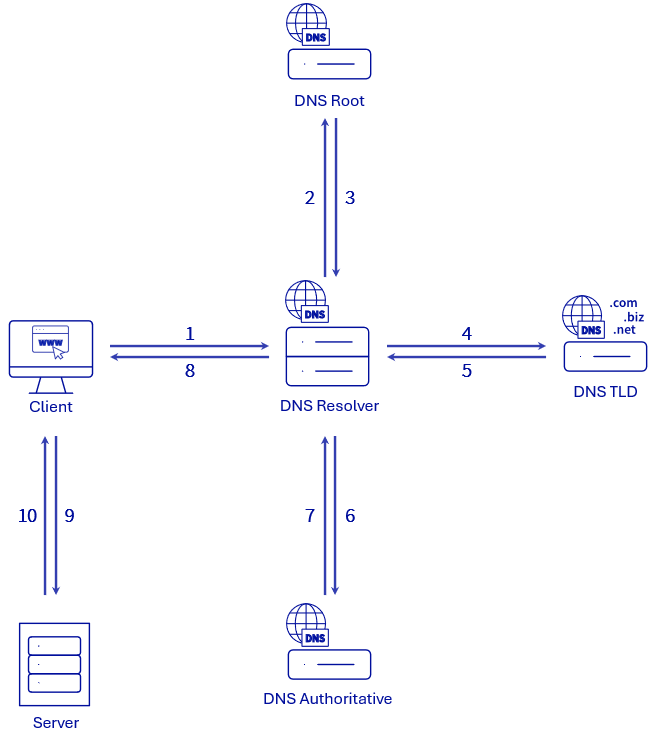
There are 4 types of DNS servers.
Below is a table showing these 4 types of DNS servers and how they interact. The examples given in the table will be based on a DNS request sent from a web browser to find the IP address of the website domain.tld.
Once the DNS resolver has retrieved the IP address of the server searched via the DNS request requested by the client, it returns this IP address to the client (step 8 of the diagram above).
The client then sends another request directly to the server associated with the IP address retrieved using the DNS resolution (step 9 of the diagram above). This allows them to connect to it or retrieve the elements they need to resolve this second request (step 10 of the diagram above). In our example, the client (web browser) queries the server with the IP address 203.0.113.0 to retrieve the content to be displayed for the domain.tld website.
Please refer to our guide on Modifying the DNS servers for an OVHcloud domain name if you need to perform this action for a domain name registered with OVHcloud.
Contents of a DNS server (Authoritative)
A DNS server (Authoritative) contains a domain name directory that can have different extensions (TLDs).
For each domain name in the directory, there is a DNS zone associated with it, which contains the DNS configuration to be applied to the domain name.
A DNS zone contains technical information, called DNS records.
- For more information on DNS zones, please refer to our guide "Everything you need to know about DNS zone".
- Then refer to our guide on DNS records for a better understanding of everything.
As a result, the DNS servers (Authoritative) must be registered (with a domain name registrar) in order to use the DNS zone they host.
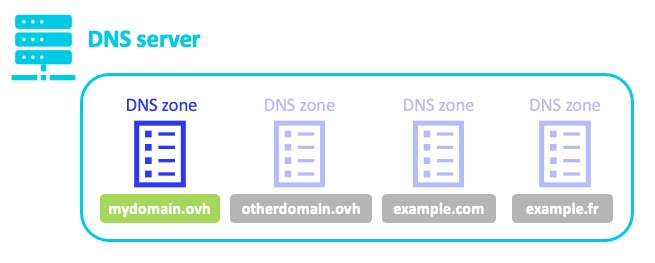
How an Authoritative DNS server works with a domain name
Declaring DNS servers (Authoritative) with a domain name registrar
For the DNS zone associated with a domain name in a DNS server's directory to be active, it is necessary for this DNS server to be declared to the domain name registrar.
As a precaution, we declare at least 2 Authoritative DNS servers (a primary DNS server and a secondary DNS server) with a domain name registrar. Both work in the same way. However, if one of them responds faster, it will be queried by the DNS resolvers as a priority. If one of them does not respond, the other DNS server will be there to respond to the DNS request.
Some DNS providers offer more than 2 DNS servers (Authoritative) to declare with your domain name. In this case, enter all of the DNS servers offered by your DNS provider.
Go further
Everything you need to know about DNS zone
Everything you need to know about DNS records
Modify the DNS servers of an OVHcloud domain name
For specialised services (SEO, development, etc.), contact OVHcloud partners.
If you would like assistance using and configuring your OVHcloud solutions, please refer to our support offers.
Join our community of users.