
Object Storage - Master asynchronous replication across your buckets
Learn how to automate and manage object replication across buckets for enhanced data availability, redundancy, and compliance
Introduction
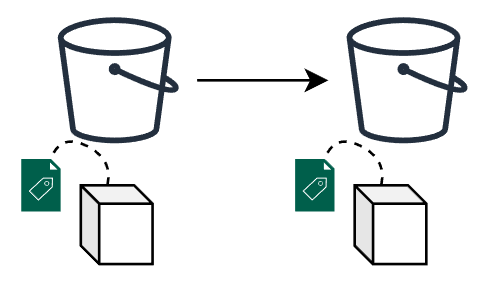
Object replication is a powerful feature that facilitates the automatic and asynchronous replication of objects within a source bucket to one or several destination buckets. This capability is crucial for maintaining data consistency, availability, and redundancy across different storage locations.
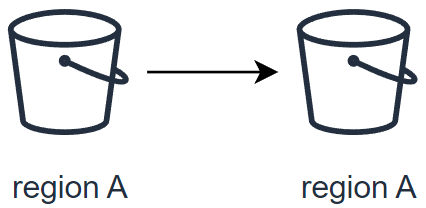
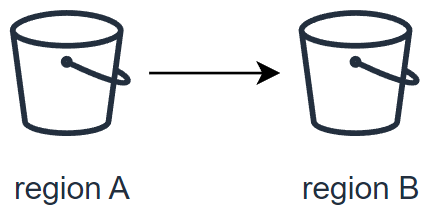
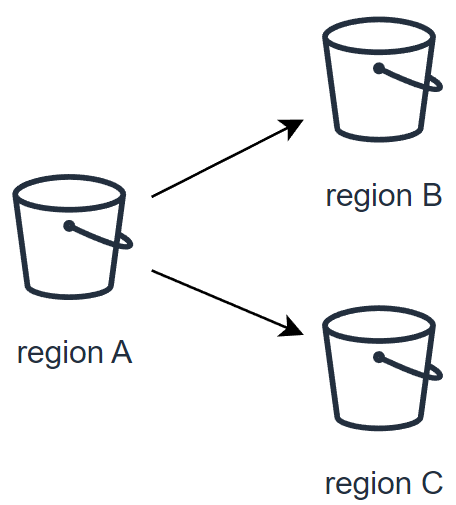
Destination buckets can reside within a single region or be dispersed across multiple regions, tailored to your specific requirements. This flexibility allows for strategic data placement and management across global infrastructure networks.
Objectives
This guide aims to equip you with the knowledge and skills to:
- Set up object replication: Learn to configure object replication across buckets for automated data duplication from a source to one or more destinations.
- Enhance data availability: Understand how object replication improves data resilience by creating copies in different regions or storage zones.
- Achieve compliance: Explore how replication aids in meeting regulatory requirements for data geo-redundancy and backup.
- Reduce storage costs: Discover strategies to lower storage expenses by replicating data to more cost-effective storage classes.
- Facilitate data sharing: See how object replication streamlines data sharing and synchronization across teams, boosting operational efficiency.
Requirements
- Cloud storage account: An active account with access to cloud storage services that support object replication.
- Buckets configured: At least two buckets set up within your cloud storage account, designated as the source and destination.
- Data backup: A recent backup of your data, particularly important if setting up replication for existing data to avoid accidental loss.
- Understanding of storage classes: Familiarity with the various storage classes offered by your cloud service, along with their cost and performance implications.
- Familiarity with cloud storage policies: Knowledge of the policies and permissions necessary for performing object replication.
- CLI tools or management console access: The ability to use your cloud provider's command line interface (CLI) tools or management console to set up and manage replication rules.
- Versioning enabled: Versioning must be activated on your buckets if required by your cloud service for object replication.
- Object Storage User: An Object Storage user account already created within your project.
- AWS CLI configuration: The AWS CLI installed and configured on your system. For a guide on configuring the CLI, refer to the OVHcloud documentation on "Getting started with Object Storage".
OVHcloud Control Panel Access
- Direct link:
- Navigation path:
Public Cloud> Select your project >Object Storage
Instructions
Key use cases for object replication
-
Exact object copies with metadata replication: Replication is not just about duplicating the object; it includes the replication of all associated metadata (e.g. object creation time, version ID, etc.). This ensures that the replicas are true copies of the source objects, maintaining integrity and consistency for critical applications.
-
Data synchronization across teams: This facilitates seamless synchronization of data across various teams, enhancing collaboration and data sharing based on predefined access controls and policies. It is crucial to note that while data synchronization is a significant advantage, storage options and configurations must be carefully managed to ensure they meet the specific needs of each team in terms of access and security.
-
Cost-effective data storage management: Organizations need to explore alternative strategies to optimize their backup and storage costs, considering the current limitations related to data replication. By default, replicas are created using the source object’s storage class. If you need replicas in a different storage class, set
Destination.StorageClass(where supported by the destination region and storage class availability). Nevertheless, organizations can still optimize their storage management by carefully assessing their needs and selecting the most suitable storage class from the outset to balance cost and performance without compromising data availability or durability. -
Enhanced data resiliency across regions: Enhance your data protection strategies by replicating critical data across multiple geographical regions. This increases resiliency against data loss and ensures business continuity in the face of regional disruptions.
-
Reduced latency for global access: Positioning your data closer to your end users minimizes access latency and improves the overall user experience. Replication allows for strategic data placement in OVHcloud regions nearest to your customer base.
-
Efficiency boost for computational workloads: By bringing your data closer to your OVHcloud compute resources, replication enhances the efficiency and performance of your workloads, facilitating faster data processing and analysis.
-
Compliance and regulatory fulfillment: Many compliance frameworks mandate that data be stored at a considerable distance from the primary location or require multiple copies of critical data. Object replication simplifies the process of meeting these requirements by enabling automatic replication across vast distances and into multiple storage mediums.
Implementing object replication ensures not only the safety and availability of your data but also enhances operational efficiency and compliance posture.
What is asynchronous replication?
Basic concepts
At its core, the asynchronous replication is designed to facilitate several key operations in the management and safeguarding of your data. This includes the following actions:
- Exact replica creation
- Replicate data within the same region
- Replicate data to a different region
- Replicate data to two different regions
What is replicated and what is not
The following table provides the default behavior of the OVHcloud Object Storage Asynchronous Replication feature:
1: To replicate objects that were uploaded before the creation of the replication configuration, use Batch Replication. Learn more about configuring Batch Replication at Replicating existing objects.
2: Learn how to activate the replication of delete markers at Delete marker replication.
Replication configuration
A replication configuration is defined through a set of rules within a JSON file. This file is uploaded and applied to the source bucket, detailing how objects are to be replicated. Each replication rule defines:
- A unique rule ID to identify the rule.
- Rule priority to determine the order of execution when multiple rules exist.
- Destination bucket where the replicated objects will be stored.
- Objects to be replicated: By default, all objects are eligible for replication. However, you can specify a subset of objects by filtering them with a prefix and/or tags.
Replication rule structure
The basic structure of a replication rule within the configuration JSON file is as follows:
Delete marker replication
IMPORTANT
If you specify a Filter in your replication configuration, you must also include a DeleteMarkerReplication element. If your Filter includes a Tag element, the DeleteMarkerReplication Status must be set to Disabled.
Understanding delete markers
When a delete object operation is performed on an object in a versioning-enabled bucket, it does not delete the object permanently but it creates a delete marker on the object. This delete marker becomes the latest and current version of the object with a new version ID.
A delete marker has the following properties:
- A key and version ID like any other object.
- It does not have data associated with it, thus it does not retrieve anything from a
GETrequest (you get a 404 error). - By default, it is not displayed in the Control Panel UI anymore.
- The only operation you can use on a delete marker is
DELETE, and only the bucket owner can issue such a request.
To permanently delete an object, you have to specify the version ID in your DELETE object request.
By default, OVHcloud Object Storage does not replicate delete markers nor replicate the permanent deletion to destination buckets. This behavior protects your data from unauthorized or unintentional deletions.
Replicate delete markers
However, you can still replicate delete markers by adding the DeleteMarkerReplication element to your replication configuration rule. DeleteMarkerReplication specifies if delete markers should or should not be replicated (when versioning is enabled, a delete operation is performed on an object it does not actually delete the object but it flags it with a delete marker).
Checking the replication status
The replication status can be used to determine the status of an object that is being replicated. To get the replication status of an object, you can use the head-object command via the AWS CLI:
The replication status only applies to objects that are eligible for replication.
The ReplicationStatus attribute can have the following values:
When you replicate objects to multiple destination buckets, the value of ReplicationStatus is "COMPLETED" only when the source object has been successfully replicated to all the destination buckets, otherwise, the attribute remains at the "PENDING" value.
If one or more destination fail replication, the value of the attribute becomes "FAILED".
Replication between buckets with object lock enabled
Object Lock can be used with replication to enable automatic copying of locked objects across buckets. For replicated objects, the object lock configuration of the source bucket will be used in the destination bucket. However, if you upload an object directly to the destination bucket (outside of the replication process), it will use the lock configuration of the destination bucket.
To replicate data in buckets with object lock on, you must have the following prerequisites:
- Versioning must be enabled on both source and destination buckets.
- Object Lock must be enabled on both source and destination buckets.
Replicating existing objects
By default, the Asynchronous Replication feature does not replicate objects uploaded before the setup of a replication configuration i.e existing objects. While Asynchronous Replication continuously and automatically replicates new objects across OVHcloud Object Storage buckets, Batch Replication occurs on demand on existing objects.
You can get started with Batch Replication by creating a new Batch replication job that will get executed on your source bucket.
Special considerations
Before creating your first job, please take into account the following considerations:
- Your source bucket and destination(s) bucket(s) must have versioning enabled.
- Your source bucket must have an existing replication configuration set up, as Batch Replication will create a job that will try to apply the existing replication configuration to ALL objects of the source bucket that have NOT been replicated yet.
- If you have a Lifecycle policy configured for your bucket, we recommend disabling your lifecycle rules while the Batch Replication job is active to ensure maximum consistency between buckets and data synchronization.
- You cannot create another Batch Replication job when there is a running job, this limitation helps us to protect our infrastructures from malicious and/or abusive uses.
- Batch replication does NOT support objects that are stored in the Cold Archive storage class.
- There are no SLAs on the job time to completion.
Checking the Batch Replication job status
Currently, there is no way to check or monitor the execution status of a job. We are actively working to implement this feature and deploy it very soon.
Getting started with Batch Replication
Use the following API route to initiate job creation:
Where:
serviceNameis the public cloud project idregionNameis the region where your source bucket is locatednameis the name of your source bucket
The API should return:
Where:
idis the unique identifier of the newly created Batch Replication job
Examples of replication configurations
Simple replication between 2 buckets
This configuration will replicate all objects (indicated by the empty Filter field) to the bucket destination-bucket.
Replication of delete markers
This configuration will replicate all objects that have the prefix "backup" to the bucket destination-bucket. Additionally, we indicate that deletion operations in the source bucket should be also replicated.
Replicating source to multiple regions
Suppose the source bucket, region1-destination-bucket and region2-destination-bucket are 3 buckets in 3 OVHcloud regions, this configuration will allow you to back up all objects in the source bucket to 2 different regions.
Replicating 2 subsets of objects to different destination buckets
This configuration contains 2 replication rules:
rule1will replicate all objects with prefix "dev" to bucketdestination-bucket1and additionally, will replicate also deletion operations.rule2will replicate all objects with prefix "prod" to bucketdestination-bucket2without replicating deletion operations.
Versioning must be activated in source bucket and destination bucket(s).
Step-by-step instructions
Create source and destination buckets
To create a bucket via the OVHcloud Control Panel, please refer to our guide Object Storage - Getting started with Object Storage
The source bucket is the bucket whose objects are automatically replicated and the destination bucket is the bucket which will contain your object replicas.
Example: Creation of a source bucket and a destination bucket
Activate versioning in source and destination bucket
To enable versioning in a bucket via the OVHcloud Control Panel, please refer to our guide Object Storage - Getting Started with Versioning
Example: Activation of versioning in previously created source and destination buckets
Apply replication configuration
Using the AWS CLI, replication configuration is applied on the source bucket.
Example: Replicate all objects with prefix "docs" to my-destination-bucket and replicate delete markers (i.e., objects marked as deleted in the source will be marked as deleted in the destination).
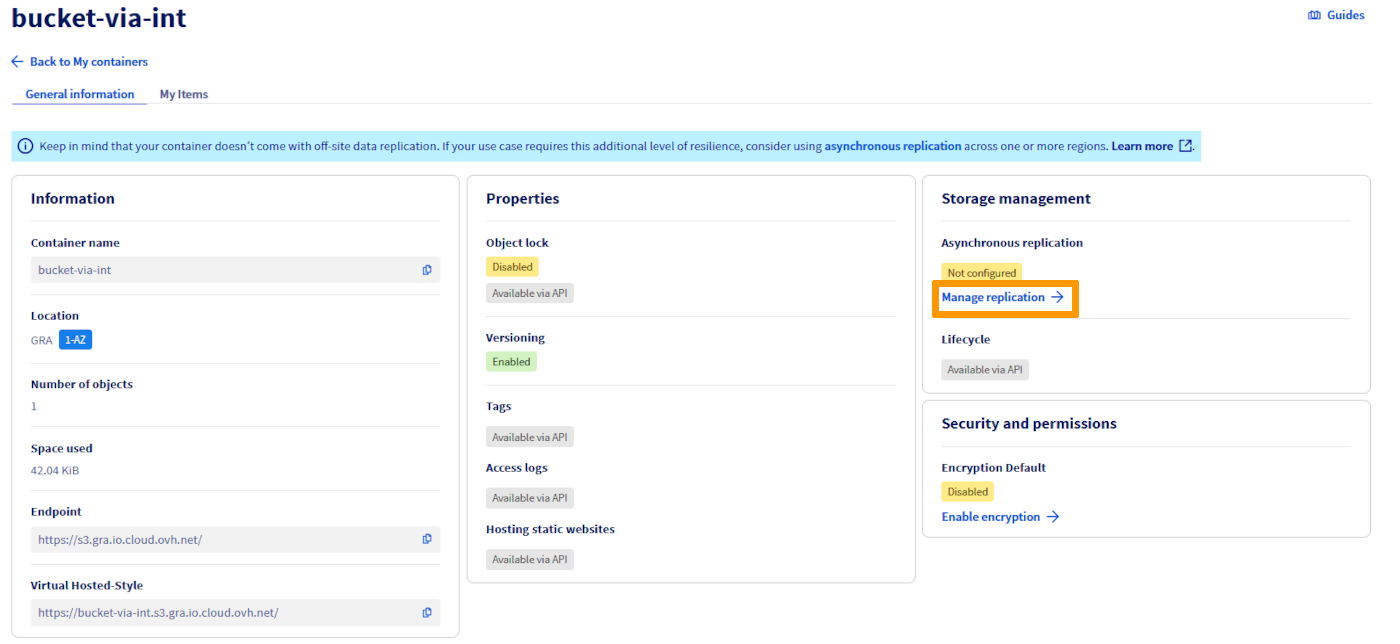
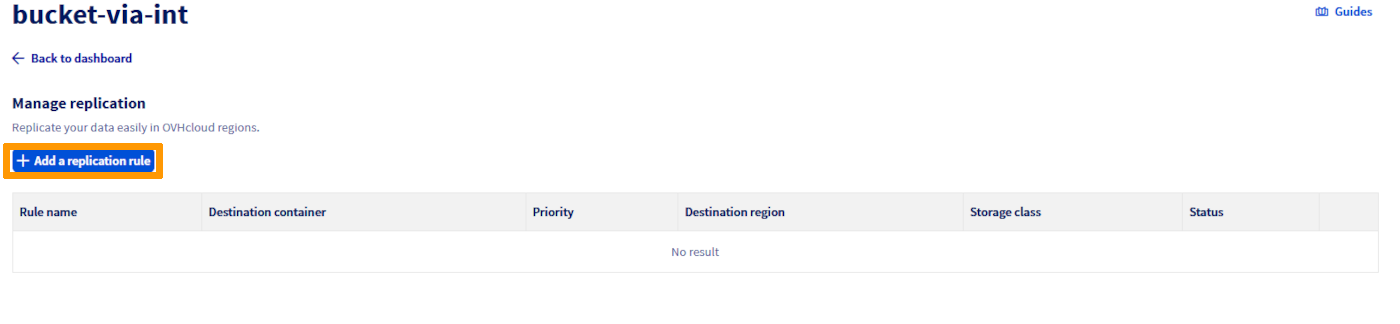
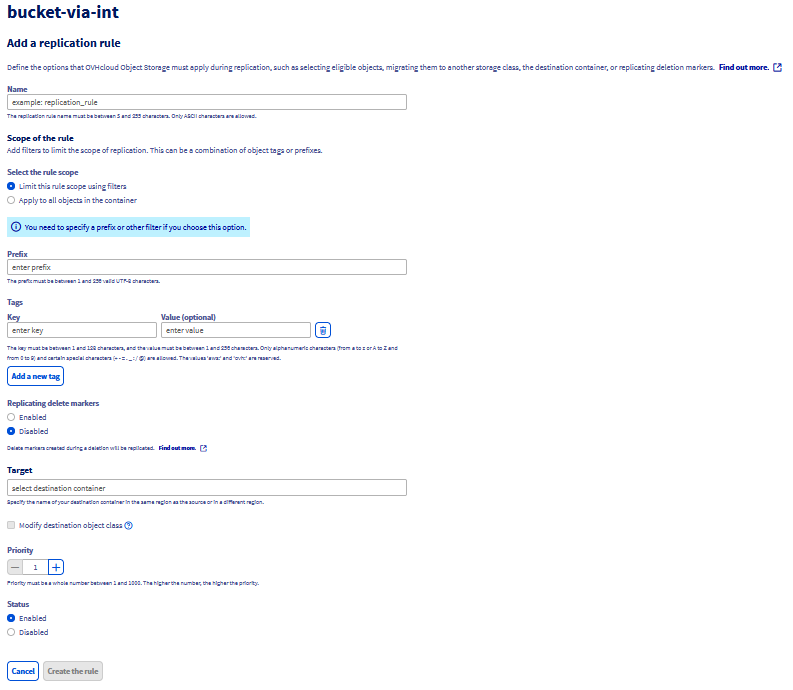
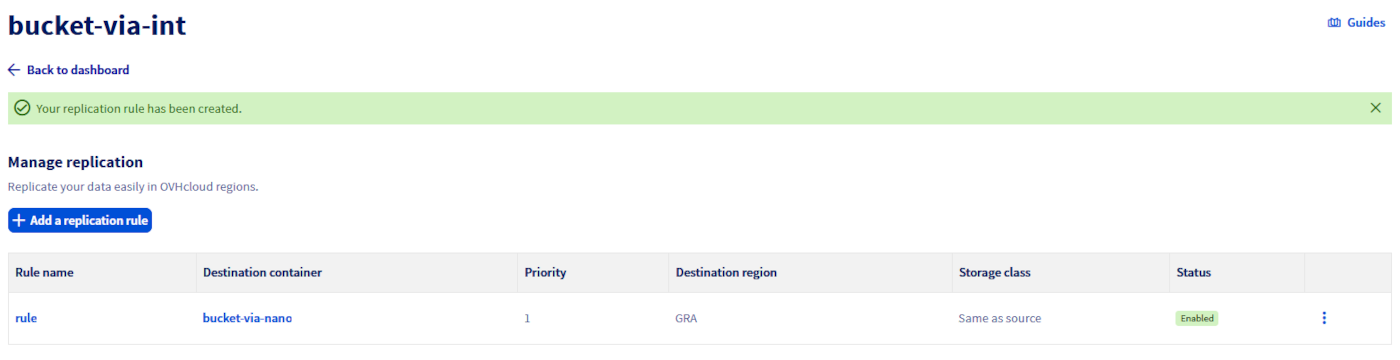
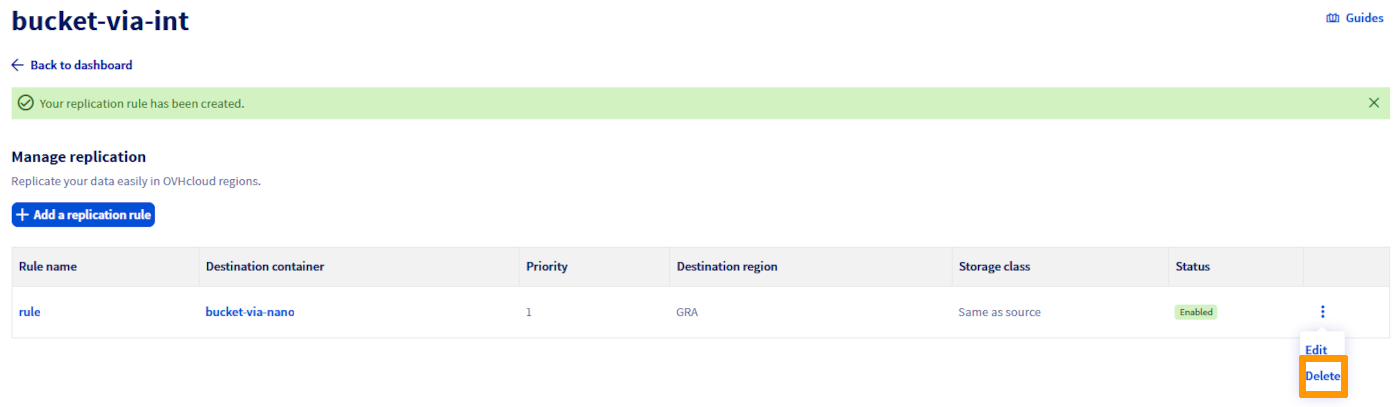
Delete a replication rule
In the Replication rules management view, you can delete a rule from the menu.
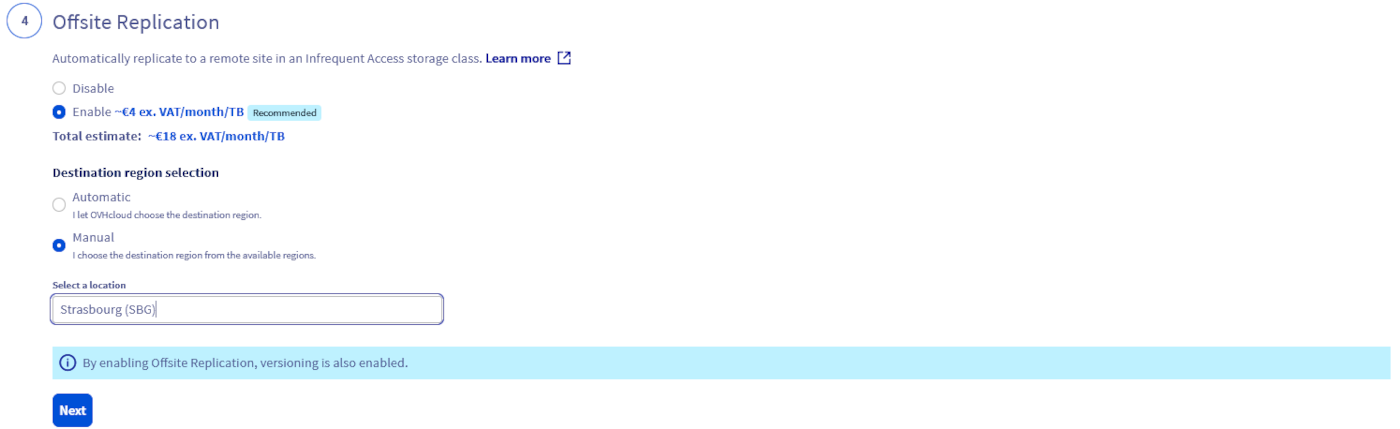
Offsite Replication option in 3-AZ regions
With Object Storage in a 3-AZ region, we have introduced a new option called Offsite Replication, which simplifies the replication process and automatically replicates your data to a remote site for greater resiliency with a one-click action in the OVHcloud Control Panel. This feature is only available for primary Object Storage in a 3-AZ region (to know more about existing 1-AZ and 3-AZ regions, see Endpoints and Object Storage geoavailability) and is based on an OVHcloud auto-generated and managed replication rule configuration:
- Data is replicated on a remote 1-AZ region. The system will automatically determine the most suitable location among Strasbourg, Gravelines, and Roubaix, ensuring efficient and reliable offsite data protection.
- Objects stored in the replica bucket are stored in an Infrequent Access class and are billed differently. View pricing on this page. This class is designed for less frequently accessed data and allow you to reduce your overall Object Storage bill together with Standard-class performance level. This said, if the destination bucket storage class doesn’t suit your needs, you can choose another approach and use the asynchronous replication feature and manage the replication rule configuration by yourself.
- The replica bucket and the replication rule configuration are then available for modification if needed.
Offsite Replication Q&A
How can I access the option in the OVHcloud Control Panel?
When creating a new bucket/container in a 3-AZ region, you will be asked if you want to activate the Offsite Replication option. If enabled, and because it relies on the asynchronous replication feature, versioning will be automatically enabled too.
What are the differences between the asynchronous replication feature and the Offsite Replication feature available in 3-AZ regions?
The Offsite Replication option offered in 3-AZ regions is based on the asynchronous replication feature. With this Offsite Replication option, OVHcloud automatically generates a replication rule configuration with pre-filled parameters, whereas the S31-compatible asynchronous replication functionality allows the user to take control of the entire function (configuration and deployment).
Where will the replicated data be stored, since the replication rule configuration is managed by OVHcloud?
Replicated data is stored like all other data, in a bucket automatically created by OVHcloud. Depending on what is available in the Control Panel, you may be offered a destination choice; otherwise OVHcloud selects automatically among Strasbourg, Gravelines, and Roubaix.
What if a replica bucket is deleted?
The source objects that are to be replicated will have a replication status FAILED when Object Storage tries to replicate them but you will not get any errors.
What about the initial replication rule?
The initial rule will remain unchanged and active until you modify or disable it.
What if a source bucket with offsite replication enabled is deleted? And what about the initial replication rule?
Your replica bucket still exists but no more objects are replicated to it from your original source bucket. The initial replication rule is set up on the source bucket and thus will also be deleted.
Where will be stored the replicated data as the replication rule configuration is managed by OVHcloud?
Your replicated data is stored as any other data and will be stored in a bucket automatically generated by OVHcloud in a region of our choosing. The system will automatically determine the most suitable location between Strasbourg, Gravelines, and Roubaix, ensuring efficient and reliable offsite data protection.
Can I modify the replication rule configuration?
We recommend that you do not modify the auto-generated replication rule configuration to ensure optimal operation. However, as it is a standard asynchronous replication rule configuration, you can decide to enrich/upgrade it for advanced protection by following the steps highlighted in the sections above.
What is the name of the replica bucket?
The destination bucket name follows the pattern backup-{src-region}-{dst-region}-{timestamp_in_ms}-{src-bucket}.
How can I access my backed up data and which actions are possible with the replica bucket?
You can list/head/delete objects on this replica bucket. Data stored on the replica bucket use the Infrequent Access storage class to help you optimize your storage costs. As it is used for data protection reasons and is supposed to be rarely accessed, this storage class is adapted and designed for such use cases. The replica bucket is exclusively dedicated to the Offsite Replication option. You can also read those objects, however a retrieval fee is applied for the Infrequent Access target storage class. View pricing on this page.
Which users/credentials can be used to access the destination bucket?
When you activate the Offsite Replication during the source bucket creation, the same user that you associated with your source bucket will be associated with the replica bucket.
How will my backup data be billed?
You can access the details of the Offsite Replication pricing on the global Object Storage pricing page. It is billed according to the storage space used, with a granularity of 1 GiB. To ensure readability, the price is displayed per GiB/month, but the billing granularity is per GiB/hour.
Go further
For training or technical assistance implementing our solutions, contact your sales representative or visit our Professional Services page to request a quote and have your project analysed by our experts.
Join our community of users.
1: S3 is a trademark of Amazon Technologies, Inc. OVHcloud's service is not sponsored by, endorsed by, or otherwise affiliated with Amazon Technologies, Inc.