
Object Storage Swift - Managing Object Storage with CyberDuck
Managing Object Storage with CyberDuck
Objective
Object Storage is a storage solution that is managed primarily through the OpenStack API.
If you're not familiar with managing storage through command lines, there are some graphics solutions that use the OpenStack API for you. CyberDuck is one of these solutions and it is easy to configure.
This guide will explain how to configure Cyberduck to manage your Object Storage using a graphical interface based on the Openstack APIs.
OVHcloud provides services which you are responsible for with regard to their configuration and management. You are therefore responsible for ensuring they function correctly.
This guide is designed to assist you in common tasks as much as possible. If you encounter any difficulties performing these actions, please contact a specialist service provider and/or discuss the issue with our community on https://community.ovhcloud.com/. OVHcloud cannot provide you with technical support in this regard.
Requirements
- Cyberduck installed on your computer.
- your username (OS_USERNAME) and project credentials (OS_PROJECT_NAME or OS_TENANT_NAME). Retrieve them by downloading the OpenRC file from the Users and Roles menu in the .
- your OpenStack user password.
In case you have forgotten your OpenStack user password, you can change it by following this guide.
Instructions
This guide's last update is based upon version 7.9.2 of Cyberduck for MacOS.
Depending on the source of your OpenRC file download (from Horizon or from your OVHcloud Control Panel), your project ID may be named OS_PROJECT_NAME or OS_TENANT_NAME.
In Cyberduck, open an OpenStack Swift (Keystone 3) connection.
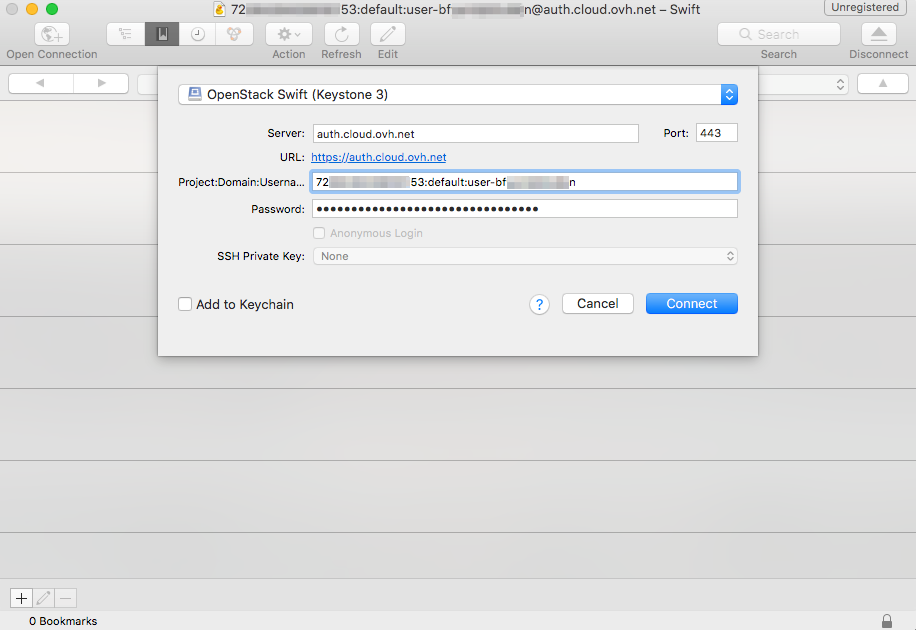
Enter the following information:
- Server: auth.cloud.ovh.net
- Project:Domain:Username: OS_PROJECT_NAME:default:OS_USERNAME
- Password: your OpenStack user password
Then click Connect. Once you're logged in, you will have access to the tree-view of your folders and files.
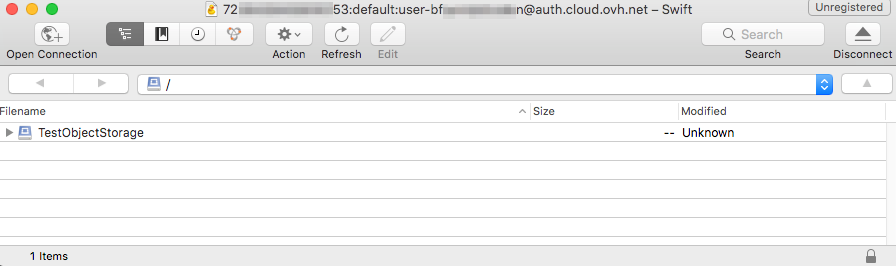
In case of connection difficulties, you can download the Cyberduck connection profile for OpenStack Swift (Keystone 3) and open it with Cyberduck.
Right-click here and click "Save Link Target As" to download the profile.
Go further
Getting started with the Swift API
For training or technical assistance implementing our solutions, contact your sales representative or visit our Professional Services page to request a quote and have your project analysed by our experts.
Join our community of users.