Learn how to use a Terraform module to deploy the infrastructure stack for NetApp Trident CSI with Enterprise File Storage and Managed Kubernetes Service
Objective
This guide explains how to use an OVHcloud Terraform module called efs-trident to provision the complete infrastructure stack required for using NetApp Trident CSI with Enterprise File Storage (EFS).
The module automates the creation of:
- An Enterprise File Storage (EFS) service
- A Managed Kubernetes Service (MKS) cluster
- A vRack and a vRack Services and their configuration
- A Public Cloud Project with private network configuration
- An IAM policy and OAuth2 credentials for Trident CSI storage backend authentication
- A network Gateway for MKS cluster nodes connectivity to the OVHcloud API
Learn how to deploy and configure OVHcloud infrastructure with Terraform to provision EFS volumes with NetApp Trident CSI.
Requirements
Architecture
The Terraform module creates the following infrastructure:
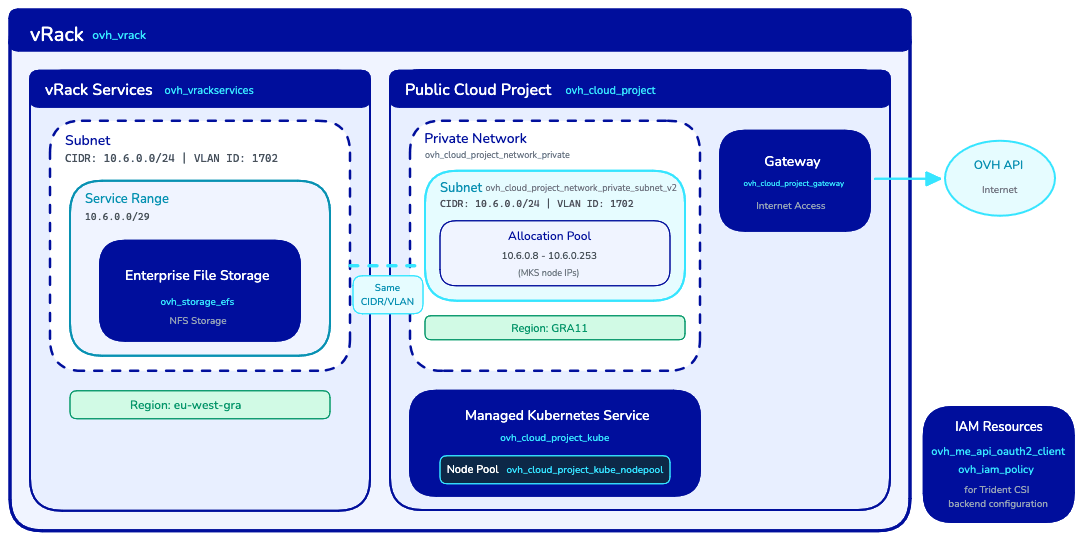
Network constraints
The module enforces the following constraints:
Instructions
Generate API credentials
The OVHcloud Terraform Provider needs to be configured with an API token to make calls to the OVHcloud API.
Your API token will need to have the following rights:
- GET, POST, PUT, DELETE on
/storage/netapp/*
- GET, POST, PUT, DELETE on
/vrack/*
- GET, POST, PUT, DELETE on
/cloud/project/*
- GET, POST, PUT, DELETE on
/me/*
- GET, POST, PUT, DELETE on
/iam/*
- POST on
/order/*
Follow the First steps with the OVHcloud APIs guide to generate your API token.
Once your token is generated, save its information for later use with the OVHcloud Terraform provider.
Create a provider.tf file with the OVHcloud provider configuration:
terraform {
  required_providers {
    ovh = {
      source  = "ovh/ovh"
      version = ">= 2.12.0"
    }
  }

  required_version = ">= 1.7.0"
}

provider "ovh" {
  endpoint           = var.ovh.endpoint
  application_key    = var.ovh.application_key
  application_secret = var.ovh.application_secret
  consumer_key       = var.ovh.consumer_key
}
Then create a variables.tf file defining the variables that will be used inside your .tf files:
variable "ovh" {
  type = map(string)
  default = {
    endpoint           = "ovh-eu"
    application_key    = ""
    application_secret = ""
    consumer_key       = ""
  }
}
Info
About the ovh.endpoint variable: by default, ovh-eu is defined because we are making calls to the OVHcloud Europe API.
Other endpoints exist, depending on your needs:
ovh-eu for OVHcloud Europe APIovh-ca for OVHcloud America/Asia API
Create a secrets.tfvars file with your credentials:
Warning
Don't forget to replace <application_key>, <application_secret> and <consumer_key> with your API token information obtained previously.
ovh = {
  endpoint           = "ovh-eu"
  application_key    = "<application_key>"
  application_secret = "<application_secret>"
  consumer_key       = "<consumer_key>"
}
Minimal configuration
Create a main.tf file using the module with minimal required parameters:
module "ovh_efs_trident" {
  source = "ovh/efs/ovh//modules/efs-trident"

  # Region Configuration (required)
  region              = "eu-west-gra"
  public_cloud_region = "GRA9"

  # Network Configuration (required)
  vlan_id = 1234

  # Set to false and terraform apply the configuration before destroying to detach vRack Services service endpoint
  vrackservices_attach_to_efs = true
}
This minimal configuration creates all resources from scratch with default settings.
Info
We recommend the EFS region and the MKS public_cloud_region to be as close as possible.
Latency between regions may impact your storage workload performance.
Keep your storage and compute as close as possible.
For example:
eu-west-gra and GRA9eu-west-sbg and SBG5
See the OVHcloud Regions documentation for the complete mapping.
Full configuration example
For complete control over all resources, use the full configuration:
module "ovh_efs_trident" {
  source = "ovh/efs/ovh//modules/efs-trident"

  # Region Configuration
  region              = "eu-west-gra"
  public_cloud_region = "GRA9"

  # Network Configuration
  vlan_id = 1234

  # Set to false and terraform apply the configuration before destroying to detach vRack Services service endpoint
  vrackservices_attach_to_efs = true

  # OAuth2 and IAM
  oauth2_client_name        = "efs-trident-client"
  oauth2_client_description = "OAuth2 client for EFS Trident integration"
  iam_policy_name           = "efs-trident-policy"
  iam_policy_description    = "IAM policy for EFS Trident access"

  # EFS
  storage_efs_name      = "my-efs-storage"
  storage_efs_plan_code = "enterprise-file-storage-premium-1tb"

  # vRack
  vrack_name        = "my-vrack"
  vrack_description = "vRack for EFS connectivity"

  # MKS Cluster
  mks_cluster_name                    = "my-mks-cluster"
  mks_cluster_node_pool_name          = "default-pool"
  mks_cluster_node_pool_flavor        = "b3-8"
  mks_cluster_node_pool_desired_nodes = 3

  # Network Configuration
  private_network_subnet_cidr             = "10.6.0.0/24"
  private_network_gateway                 = "10.6.0.254"
  vrackservices_subnet_name               = "efs-subnet"
  vrackservices_subnet_service_range_cidr = "10.6.0.0/29"

  # Public Cloud Private Network
  public_cloud_private_network_name        = "mks-private-network"
  public_cloud_private_network_subnet_name = "mks-subnet"
  public_cloud_private_network_subnet_allocation_pools = {
    start = "10.6.0.8"
    end   = "10.6.0.253"
  }

  # Gateway
  public_cloud_gateway_name  = "mks-gateway"
  public_cloud_gateway_model = "s"

  # Cloud Project
  cloud_project_description = "EFS Trident Project"
}
Use existing resources
The module is designed to be compatible with your existing infrastructure. You can use your OVHcloud resources instead of creating new ones.
Use an existing EFS and vRack Services bound to a vRack
module "ovh_efs_trident" {
  source = "ovh/efs/ovh//modules/efs-trident"

  region              = "eu-west-gra"
  public_cloud_region = "GRA9"
  vlan_id             = 1234

  # Use existing EFS
  create_efs = false
  efs_id     = "xxxxxxxx-xxxx-xxxx-xxxx-xxxxxxxxxxxx"

  # Use existing vRack Services
  create_vrack_services = false
  vrack_services_id     = "vrs-xyz-789"

  # Use existing vRack
  create_vrack       = false
  vrack_service_name = "pn-1234567"

  # Network Configuration
  # Adjust subnet allocation pool and gateway address if your network configuration differs from example.
  # public_cloud_private_network_subnet_allocation_pools = {
  #   start = "10.7.0.8"
  #   end   = "10.7.0.253"
  # }
  # private_network_gateway = "10.7.0.254"

  # Skip binding since vRack Services is already configured
  bind_vrack_to_vrack_services = false
}
Use an existing MKS cluster
This example assumes that only Public Cloud products already exist: an MKS cluster with private network connectivity
and a gateway to reach the Internet but no vRack, EFS, or other resources.
module "ovh_efs_trident" {
  source = "ovh/efs/ovh//modules/efs-trident"

  region              = "eu-west-gra"
  public_cloud_region = "GRA9"
  vlan_id             = 1234

  # Use existing Cloud Project
  create_cloud_project = false
  cloud_project_id     = "abc123"

  # Use existing Private Network
  create_private_network = false
  private_network_id     = "network-openstack-id"

  # Use existing Subnet
  create_private_subnet = false
  private_subnet_id     = "subnet-id"

  # Skip gateway creation (existing network already has a gateway)
  create_gateway = false

  # Use existing MKS Cluster
  create_mks_cluster = false
  mks_cluster_id     = "cluster-id"

  # Don't create a node pool for MKS cluster
  create_node_pool = false
}
Deploy the infrastructure
Create an outputs.tf file that will hold all the module outputs:
# OAuth2 Credentials for Trident
output "client_id" {
  description = "OAuth2 client ID for EFS access"
  value       = module.ovh_efs_trident.client_id
}

output "client_secret" {
  description = "OAuth2 client secret for EFS access"
  value       = module.ovh_efs_trident.client_secret
  sensitive   = true
}

# Kubernetes Configuration
output "kubeconfig" {
  description = "Kubernetes configuration file for MKS cluster"
  value       = module.ovh_efs_trident.kubeconfig
  sensitive   = true
}

# Resource Identifiers
output "efs_id" {
  description = "EFS service name"
  value       = module.ovh_efs_trident.efs_id
}

output "vrack_service_name" {
  description = "vRack service name"
  value       = module.ovh_efs_trident.vrack_service_name
}

output "cloud_project_id" {
  description = "Cloud Project ID"
  value       = module.ovh_efs_trident.cloud_project_id
}

output "mks_cluster_id" {
  description = "MKS cluster ID"
  value       = module.ovh_efs_trident.mks_cluster_id
}

# Network Information
output "private_network_id" {
  description = "Private network OpenStack ID"
  value       = module.ovh_efs_trident.private_network_id
}

output "vlan_id" {
  description = "VLAN ID used"
  value       = module.ovh_efs_trident.vlan_id
}

# Summary
output "resources_created" {
  description = "Summary of resources that were created vs used"
  value       = module.ovh_efs_trident.resources_created
}
Initialize Terraform to download the required providers:
Create an execution plan to review the changes:
terraform plan -var-file=secrets.tfvars -out main.tfplan
Review the plan output to confirm which resources will be created:
Terraform will perform the following actions:

  # module.ovh_efs_trident.null_resource.config_validation will be created
  # module.ovh_efs_trident.ovh_cloud_project.cloud_project[0] will be created
  # module.ovh_efs_trident.ovh_cloud_project_gateway.gateway[0] will be created
  # module.ovh_efs_trident.ovh_cloud_project_kube.mks_cluster[0] will be created
  # module.ovh_efs_trident.ovh_cloud_project_kube_nodepool.node_pool[0] will be created
  # module.ovh_efs_trident.ovh_cloud_project_network_private.network[0] will be created
  # module.ovh_efs_trident.ovh_cloud_project_network_private_subnet_v2.subnet[0] will be created
  # module.ovh_efs_trident.ovh_iam_policy.iam_policy will be created
  # module.ovh_efs_trident.ovh_me_api_oauth2_client.api_oauth2_client will be created
  # module.ovh_efs_trident.ovh_storage_efs.efs[0] will be created
  # module.ovh_efs_trident.ovh_vrack.vrack[0] will be created
  # module.ovh_efs_trident.ovh_vrack_cloudproject.vrack-cloudproject-binding[0] will be created
  # module.ovh_efs_trident.ovh_vrack_vrackservices.vrack-vrackservices-binding[0] will be created
  # module.ovh_efs_trident.ovh_vrackservices.vrackservices[0] will be created

Plan: 14 to add, 0 to change, 0 to destroy.
Apply the configuration to create the resources:
terraform apply main.tfplan
module.ovh_efs_trident.null_resource.config_validation: Creation complete after 0s [id=xxx]
module.ovh_efs_trident.ovh_me_api_oauth2_client.api_oauth2_client: Creation complete after 0s [id=EU.xxx]
module.ovh_efs_trident.ovh_cloud_project.cloud_project[0]: Creation complete after 26s [id=xxx]
module.ovh_efs_trident.ovh_vrack.vrack[0]: Creation complete after 54s [id=pn-xxx]
module.ovh_efs_trident.ovh_vrack_cloudproject.vrack-cloudproject-binding[0]: Creation complete after 52s [id=vrack_pn-xxx-cloudproject_xxx]
module.ovh_efs_trident.ovh_cloud_project_network_private.network[0]: Creation complete after 14s [id=pn-xxx]
module.ovh_efs_trident.ovh_cloud_project_network_private_subnet_v2.subnet[0]: Creation complete after 1s [id=x-x-x-x-x]
module.ovh_efs_trident.ovh_cloud_project_gateway.gateway[0]: Creation complete after 32s [id=x-x-x-x-x]
module.ovh_efs_trident.ovh_storage_efs.efs[0]: Creation complete after 3m58s [id=x-x-x-x-x]
module.ovh_efs_trident.ovh_iam_policy.iam_policy: Creation complete after 0s [id=x-x-x-x-x]
module.ovh_efs_trident.ovh_vrackservices.vrackservices[0]: Creation complete after 56s [id=vrs-x-x-x-x]
module.ovh_efs_trident.ovh_vrack_vrackservices.vrack-vrackservices-binding[0]: Creation complete after 1m11s [id=vrack_pn-xxx-vrackServices_vrs-x-x-x-x]
module.ovh_efs_trident.ovh_cloud_project_kube.mks_cluster[0]: Creation complete after 4m11s [id=x-x-x-x-x]
module.ovh_efs_trident.ovh_cloud_project_kube_nodepool.node_pool[0]: Creation complete after 5m23s [id=x-x-x-x-x]

Apply complete! Resources: 14 added, 0 changed, 0 destroyed.
Warning
Resource creation may take several minutes. The MKS cluster creation typically takes the longest.
Retrieve outputs
After successful deployment, retrieve the outputs needed for Trident configuration:
Key outputs include:
To retrieve sensitive values:
terraform output -raw client_secret
terraform output -raw kubeconfig > kubeconfig.yaml
After deploying the infrastructure with this module, configure Trident CSI to use Enterprise File Storage. Follow the Getting started with Trident CSI guide for detailed instructions.
Use the module outputs to configure the Trident backend.
Get the OAuth2 credentials:
export CLIENT_ID=$(terraform output -raw client_id)
export CLIENT_SECRET=$(terraform output -raw client_secret)
Create Kubernetes secret:
Warning
If the trident namespace does not exist yet, create it with kubectl --kubeconfig kubeconfig.yaml create ns trident
kubectl --kubeconfig kubeconfig.yaml create secret generic tbc-ovh-efs-secret \
  --namespace trident \
  --from-literal=clientID="$CLIENT_ID" \
  --from-literal=clientSecret="$CLIENT_SECRET"
Destroy the infrastructure
Before removing the resources, if the vRack Services to EFS attachment was created using Terraform, delete it first by setting vrackservices_attach_to_efs = false and applying new configuration.
module "ovh_efs_trident" {
  [...]
  # Set to false and terraform apply the configuration before destroying to detach vRack Services service endpoint
  vrackservices_attach_to_efs = false
  [...]
}
terraform apply -var-file=secrets.tfvars
Once vRack Services is detached from EFS, all resources can be removed.
To remove all resources created by the module:
Warning
This will permanently delete all resources including the MKS cluster and EFS storage. Ensure you have backed up any important data before proceeding.
terraform destroy -var-file=secrets.tfvars
Go further
For training or technical assistance implementing our solutions, contact your sales representative or visit our Professional Services page to request a quote and have your project analysed by our experts.
Join our community of users.
