
OVHcloud Zimbra FAQ
Here you will find the most frequently asked questions about the migration of OVHcloud MX Plan solution to Zimbra
Objective
This page answers questions about the Zimbra solution at OVHcloud
General questions about Zimbra solutions at OVHcloud
What is Zimbra?
Zimbra is a popular open-source collaborative solution. Zimbra offers many features offered in the OVHcloud catalog.
To contextualize the Zimbra solution within OVHcloud, it is used for 2 email offers.
- MX Plan: Zimbra is used as part of a technological transition from Outlook Web App (OWA) to Zimbra webmail for MX Plan services using the OWA webmail.
- Zimbra: Zimbra is appearing in the OVHcloud catalog as a standalone solution with Zimbra Starter.
To get a better understanding, the following graphic shows the technologies currently used on each OVHcloud solution. Outlook Web App (OWA) will gradually disappear from the MX Plan solution.
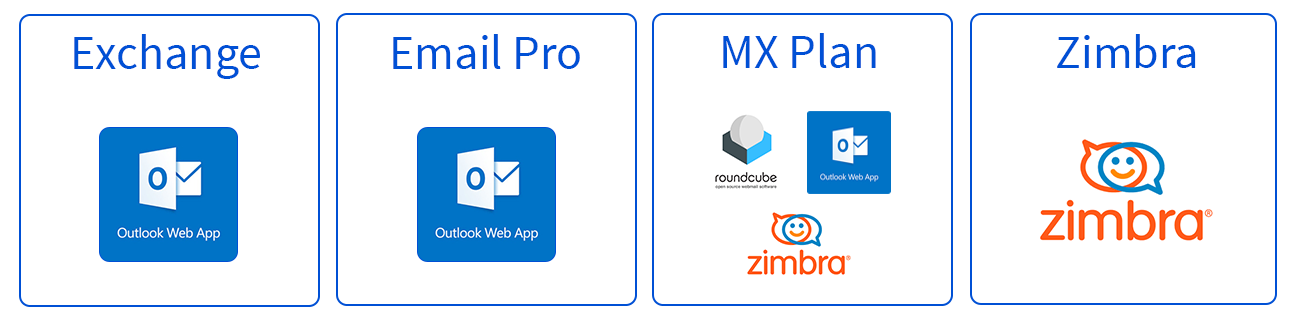
There are differences in functionality between the Zimbra solution used in the MX Plan solution and the Zimbra solution used in the Zimbra Starter solution. Find the features that have been maintained as part of the transition to the Zimbra solution for the MX Plan solution in the table at the end of this FAQ
Where can I find guides?
A user guide for Zimbra is now available at this address.
I can no longer access my Zimbra email account and I do not understand why: what should I do?
If you notice a complete loss of access to your Zimbra email account (Zimbra webmail login refused, sending and receiving suspended, credentials apparently correct), the most common cause is an automatic blocking of the address for spam.
This measure applies to all three Zimbra offers:
- MX Plan - Zimbra
- Zimbra Starter
- Zimbra Pro
How to recognise this case:
- Access to Zimbra webmail is entirely suspended (and not only sending).
- No support ticket has been automatically generated in your OVHcloud Control Panel, unlike with other email technologies.
- Unusual sending activity may have been detected on the account recently (mass sending, suspicious content, potentially infected user workstation, compromised credentials, redirection to a malicious address).
Why you do not receive a clear notification:
For Zimbra accounts, the anti-spam blocking suspends the entire account access and does not trigger an automatic support ticket. The customer can therefore notice the loss of access without receiving an immediate explanation.
What to do?
- Refer to the guide "What to do if your email address is blocked for spam" and carry out the checks described in step 1 (workstation, third-party software, redirections, filters, automatic replies) based on the elements still accessible.
- Manually create a support ticket from your OVHcloud Control Panel. In the ticket, indicate:
- The email address concerned;
- The associated service (MX Plan, Zimbra Starter or Zimbra Pro) and its identifier;
- The corrective actions already undertaken.
- Once the ticket is processed by support, your address is unblocked and access to Zimbra webmail is restored.
Other possible causes of loss of access (to rule out before or after contacting support):
- Password recently changed (by yourself or by a platform administrator).
- Service currently undergoing administrative suspension (unpaid invoice, termination, end of contract).
- Service migration recently performed (check any notification emails sent 2 weeks then 1 day before migration).
- One-off infrastructure incident: check the OVHcloud services status.
How do I configure my email address on an email client?
Visit our page "Configuring your Zimbra email address in an email client".
How to change my Zimbra plan?
Your needs are changing: you want to benefit from more features on your Zimbra account, or, conversely, you no longer need it. Zimbra plans are flexible, so follow the instructions below according to your situation:
Want to upgrade to a higher plan?
- Log in to your .
- Go to the
Web Cloudsection. - Click on
Zimbra Mail. - Click on the
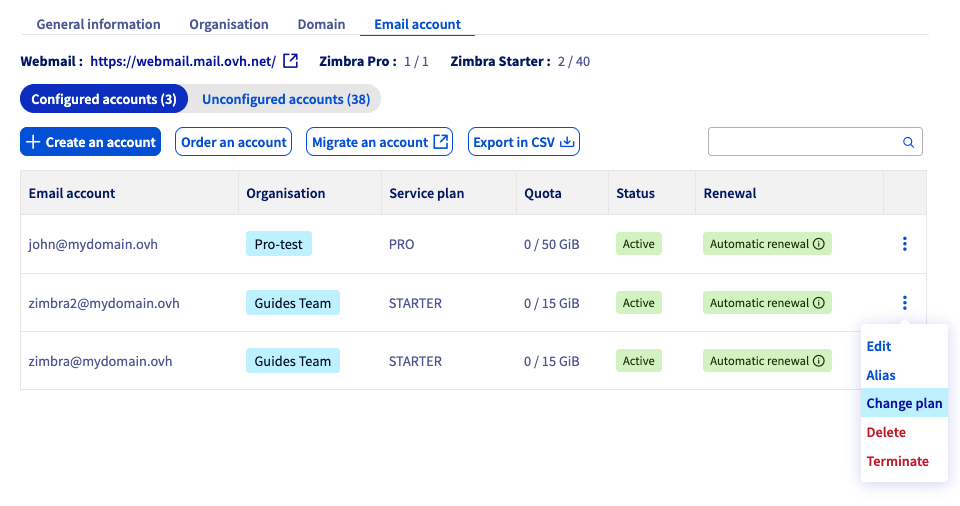
Email accounttab. - To the right of the email account for which you want to switch to a higher offer, click on
⁝. - Click on
Change plan.
Would you like to downgrade?
The steps are the same as for upgrading (detailed above).
Before switching to a lower plan, please ensure the following:
- No files are stored on your "Briefcase" storage volume if you are switching to the Starter plan.
- The content of your email account must be less than 15 GB if you are switching to the Starter plan.
Questions on MX Plan migration to Zimbra solution
As part of the MX Plan solution upgrade, a migration is planned from the current webmail using Outlook Web App (OWA) to the Zimbra solution's webmail.
If you are affected by this migration, you will find the most frequently asked questions here.
What are the differences between Outlook Web App (OWA) and Zimbra webmail?
Zimbra offers similar features and a user experience close to OWA. A user guide for Zimbra is now available at this address.
Does migration open up new features?
Migrating to the new webmail maintains the same level of services as the previous one.
When will my services be migrated?
Notification emails for each service will be sent to you 2 week and then 1 day before the migration.
Services will be migrated gradually, so it is possible that your different services will be migrated several weeks apart.
How do I prepare for my migration to Zimbra?
The migration does not require any action on your part regarding the content of email accounts.
However, a short service interruption is required during the migration phase. It is therefore strongly recommended that you inform your users as soon as the migration date for your email accounts is communicated to you.
Do I need to make any changes when migrating to Zimbra?
This migration was designed to minimise the impact on our customers. No actions are expected from you.
No changes are expected from you.
Are there any changes to be expected in the OVHcloud Control Panel?
There are no changes planned in the Control Panel. Since the migration is under a new solution, some minor features may not be accessible in the first few weeks after the migration.
Find the list of features and their statuses for this migration at the end of this FAQ.
Will I need to reconfigure my email software?
No, the migration does not require a reconfiguration of your email software.
If you change your password, you will need to enter the new password in your email client.
Does the migration change the billing for my service?
No, the migration to the new Zimbra webmail solution is included in your solution. There are no changes to the billing or the contract of your MX Plan service.
Where will my emails be hosted after the migration?
The migration is done within our French data centres. Your data will remain in France.
Will there be any changes regarding the processing of my data?
No changes are planned regarding the processing of data and its use. You can find all this information in the contract for your MX Plan solution.
How do I stay on the current webmail (OWA)?
You can migrate your accounts at any time to Email Pro or Exchange in order to keep using the OWA webmail. To do this, please refer to our guide on Migrating an MX Plan email account to an Email Pro or Exchange account.
Can I oppose the migration?
No. OVHcloud is committed to providing a service with the best price performance ratio for its MX Plan offers. This is why we have chosen to migrate the current offers to the Zimbra solution.
However, you can still take advantage of the OWA interface by migrating your email accounts to an Email Pro or Exchange solution.
Can I cancel my MX Plan solution?
To cancel your solution in the "My services" section of the OVHcloud Control Panel, please refer to the MX Plan part of our guide on Cancelling your OVHcloud services.
Go further
MX Plan - How to use Zimbra webmail
For specialised services (SEO, development, etc.), contact OVHcloud partners.
If you would like assistance using and configuring your OVHcloud solutions, please refer to our support offers.
Join our community of users.