
Understanding link aggregation on dedicated servers
Find out how link aggregation works on your dedicated server, what OVHcloud Link Aggregation (OLA) changes, and which guide to follow for your operating system
Objective
Link aggregation bonds several of your server's network interfaces together using the Link Aggregation Control Protocol (LACP), defined by the IEEE 802.3ad standard. Available bandwidth increases, and your network links become redundant: if one link goes down, traffic is automatically redirected to another available link.
Several guides cover link aggregation, depending on your server's range, its operating system, and whether it keeps public connectivity.
This guide explains how the default aggregation and OVHcloud Link Aggregation (OLA) differ, and points you to the guide matching your setup.
Requirements
- A dedicated server that supports link aggregation, for example from the Scale or High Grade ranges, or a third-generation or newer Advance server
- An operating system or hypervisor that supports the 802.3ad aggregation protocol (LACP)
Instructions
Which interfaces can be aggregated
Servers from the Scale and High Grade ranges have four network interfaces. In their default configuration, two are public and two are private (vRack). Both aggregations are already enabled on the OVHcloud network, so the operating system only has to create the matching bonds.
Other servers that support link aggregation have a single public and a single private interface.
Choosing an aggregation mode
OVHcloud Link Aggregation (OLA) is an option that you enable in the OVHcloud Control Panel: it groups all of the server's interfaces into a single private aggregation, instead of keeping the public and the private ones separate.
The bonds that each mode creates depend on how many interfaces the server has.
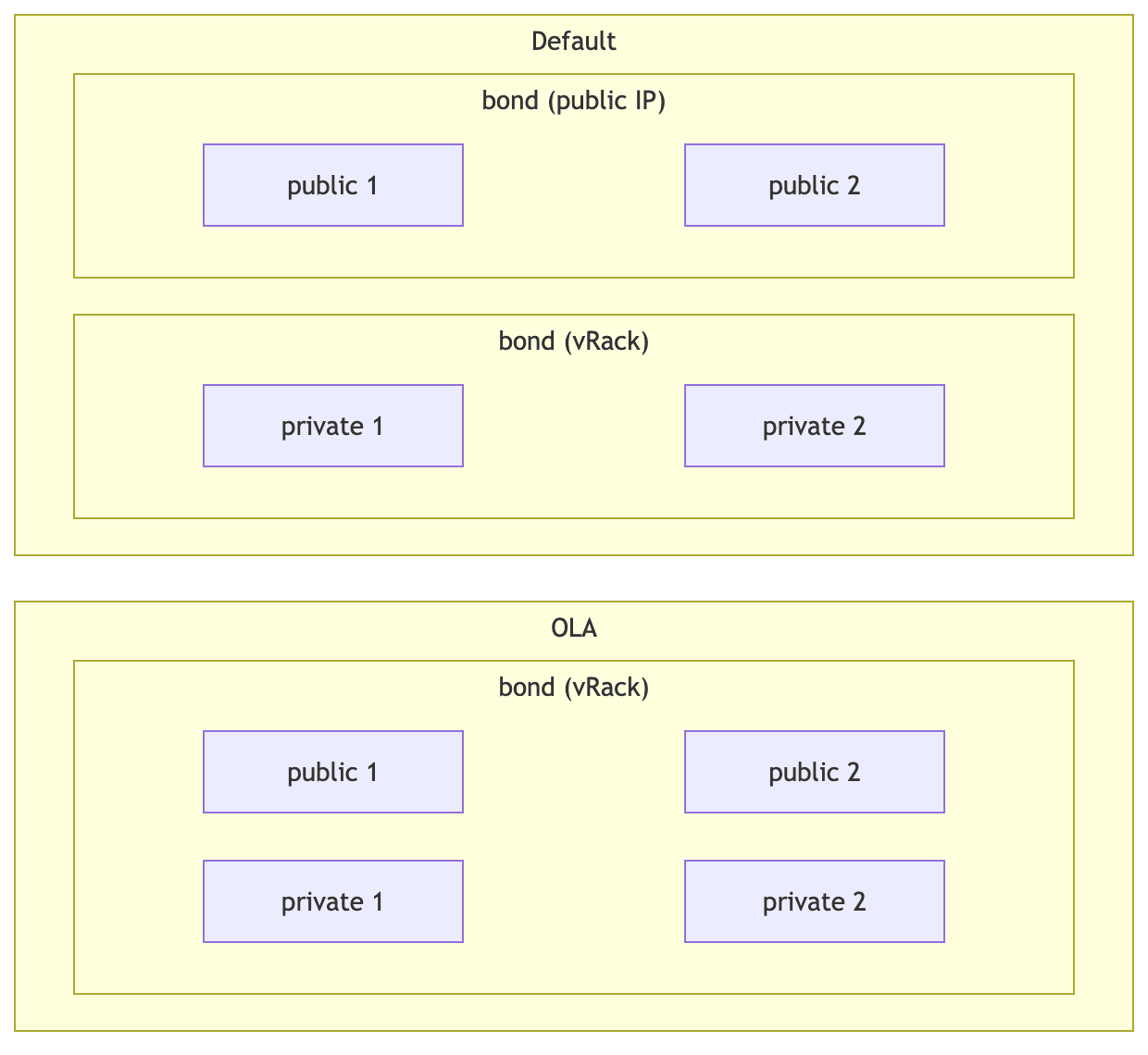
Four interfaces, on the Scale and High Grade ranges: by default, the two public interfaces form one bond and the two private ones another. With OLA, all four form a single vRack bond.
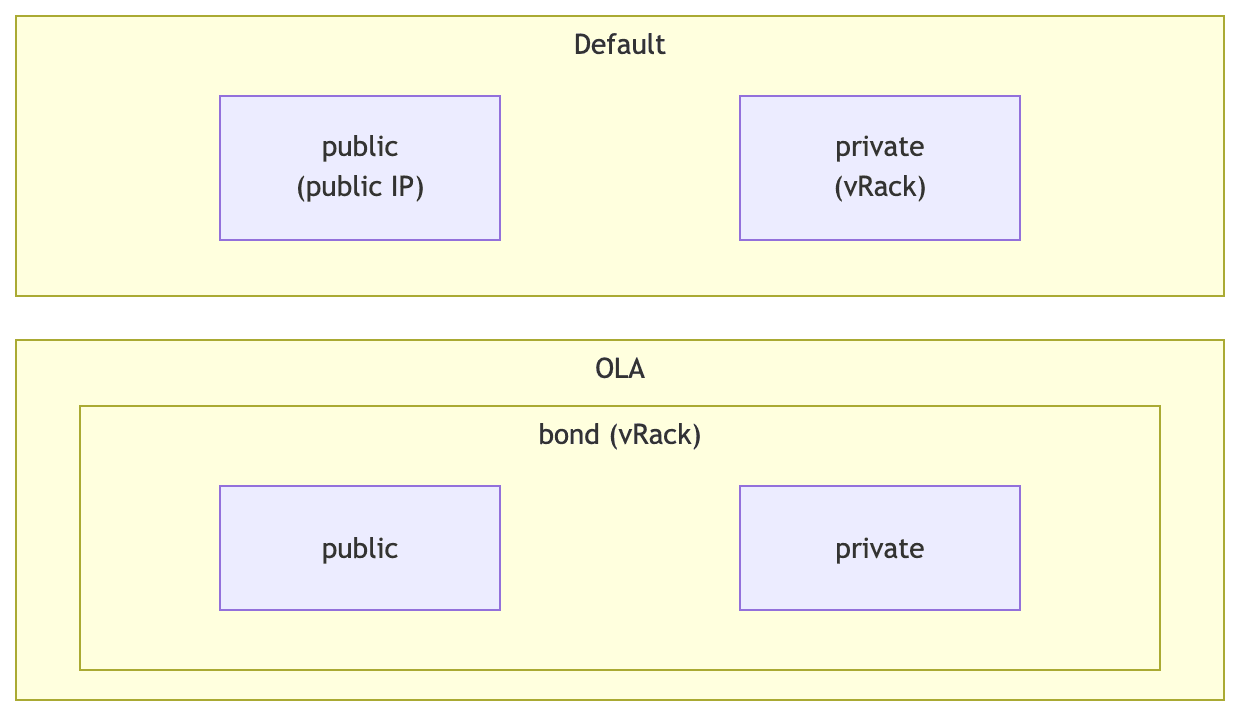
Two interfaces, one public and one private: by default, neither is bonded. With OLA, the two form a single vRack bond.
A server whose interfaces are fully aggregated for vRack use has no public network interface left, so it can no longer reach the OVHcloud netboot service. See Manage your server reboot with the OVHcloud Link Aggregation feature before enabling OLA.
Configuring the bonds during the installation
On Scale and High Grade servers, the installation can configure the bonds for you, so that the server comes up already aggregated.
This option can be enabled on any server, but it only has an effect if the server has interfaces to bond.
Availability by operating system
The bonds are always configured, and the option is not offered, on:
- Ubuntu Server 26.04
The option is offered, and disabled by default, on:
- AlmaLinux 8 and 9
- Debian, except Debian 11
- Proxmox Virtual Environment and Proxmox Backup Server
- Rocky Linux 9
- Ubuntu Server 22.04 and 24.04
- Windows Server, except the Hyper-V images
- Bring Your Own Image and Bring Your Own Linux
No other operating system configures the bonds during the installation, so you have to do it yourself afterwards.
Enabling the option
- In the OVHcloud Control Panel, check the corresponding box in the installation wizard.
- Through the API, set the
enableLacpBondingcustomization, as described in Install an OS via the OVHcloud API.
Configuring the bonds yourself
If your operating system does not offer the option at installation, or if you would rather configure the bonds afterwards, follow the guide matching your system:
How an aggregation is spread across network cards
On Scale and High Grade servers, an aggregation is spread across two distinct network cards, so that it survives the failure of a whole card and not only that of a switch. For more information, see Improve Network Resilience on Bare Metal servers.
Go further
Join our community of users.