
How to improve email security with a DMARC record
Find out how DMARC works, and how to set it up for your email service
Objective
The Domain-based Message Authentication, Reporting, and Compliance (DMARC) record is an email security mechanism. It is based on the results of the SPF and DKIM checks.
Find out how DMARC works, and how to set it up for your email service.
Information regarding OVHcloud service administration and how to find appropriate assistance
When using OVHcloud guides, please be aware of the following conditions:
- User instructions aim to provide as many details as possible but cannot cover individual use cases. You might need to adapt the pertinent actions to your requirements.
- The OVHcloud ecosystem is built for flexibility and freedom of choice. Customers are therefore responsible for the secure and proper configuration of their services. To prevent data loss, we strongly recommend to apply backup strategies to all your important data.
- Our guides and tutorials may reference third-party software or services in combination with OVHcloud solutions. The technical support provided by OVHcloud does not include the configuration of systems or products outside of our responsibility. This includes but is not limited to:
- Operating systems and user interfaces (Windows, Debian, Plesk, etc.).
- Any other third-party software (FTP clients, email software, etc.).
- Services offered by other providers (DNS, APIs, user interfaces, etc.).
To receive the appropriate assistance for any issues you might experience, follow these guidelines:
- You seek personalized advice or you would like to discuss a topic that is not covered in detail by our documentation?
Join the OVHcloud Community to search for your topic and reach out to other users. - You need to report an incident regarding your OVHcloud service or you are experiencing difficulties in the OVHcloud Control Panel?
Create a support request in our Help Centre. - You require professional assistance for your project or you need help with tasks outside our support scope?
Visit our partner portal to search for experts who are familiar with OVHcloud solutions. - You are looking for more detailed information regarding our support levels and Professional Services?
Please visit our web pages for OVHcloud support levels and OVHcloud Professional Services.
You can participate in improving our documentation:
- You would like to share feedback to improve a guide page or you want to report insufficient information on a specific page?
Use the "Was this page helpful?" buttons at the bottom of the page to let us know. - You would like to propose a specific documentation update?
Use the "Edit this page" function, available at the bottom of the page and in the sidebar.
Requirements
- One of the authentication mechanisms, SPF and/or DKIM must be configured in the DNS zone of the email solution domain name.
OVHcloud Control Panel Access
- Direct link:
- Navigation path:
Web Cloud>Domain names> select your domain name >DNS zonetab
Instructions
The DMARC record allows the domain name holder to manage the security of emails sent with their domain name. Its purpose is to:
- Declare to the recipient server actions to be carried out in the event of failure of the SPF and/or DKIM authentication mechanisms.
- Get a better handle on how your domain name is used, and detect spoofing attempts using reports sent if email authentication fails. It also improves security by linking SPF and DKIM protocols.
The DMARC record contains policy information for malicious emails that attempt to spoof your domain name.
DMARC queries authentication mechanisms SPF and DKIM to verify incoming emails.
The result of these SPF and/or DKIM checks is translated by DMARC into "actions to take" when an email fails the checks. These measures can include quarantining or rejecting the emails concerned.
How does DMARC work?
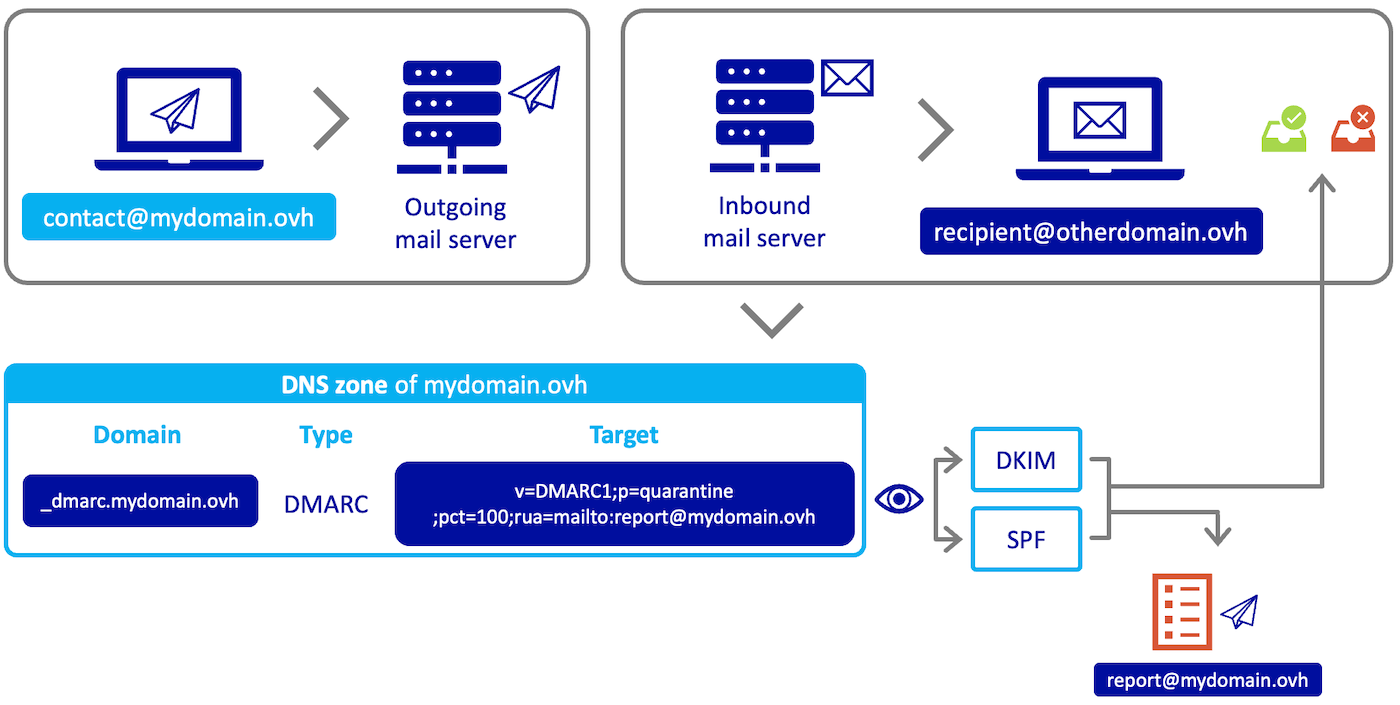
To understand how DMARC works, here is an example.
When the contact@mydomain.ovh address sends an email to the destination address recipient@otherdomain.ovh, the receiving server for the destination domain name otherdomain.ovh will query the DNS zone for the sending domain name mydomain.ovh to read the instructions in the DMARC record.
The DMARC record communicates the policy based on the SPF and DKIM test results. They can also enter one or more email addresses (represented in our example by the address report@mydomain.ovh) used to receive reports of email failures sent from the domain name mydomain.ovh.
After reading the instructions of the mydomain.ovh domain name DMARC record by the "otherdomain.ovh" receiving server, emails will either be delivered to the address recipient@otherdomain.ovh, or marked as "spam" or rejected.
Configure DMARC
You must first enable DMARC on the email service associated with your domain name.
There are two ways to configure the DMARC in your OVHcloud DNS zone:
- Via a DMARC record. This registration allows a simplified configuration of the DMARC. Simply fill in the fields with the DMARC settings required for your configuration. This record is read as a TXT record by DNS servers.
- Via a TXT record. This standard record can be used as part of the DMARC configuration from the OVHcloud Control Panel. You can use it to integrate all of the DMARC settings tags, including those that are missing via the OVHcloud DMARC record. However, you will need to follow the syntax rules of the DMARC protocol.
DMARC record
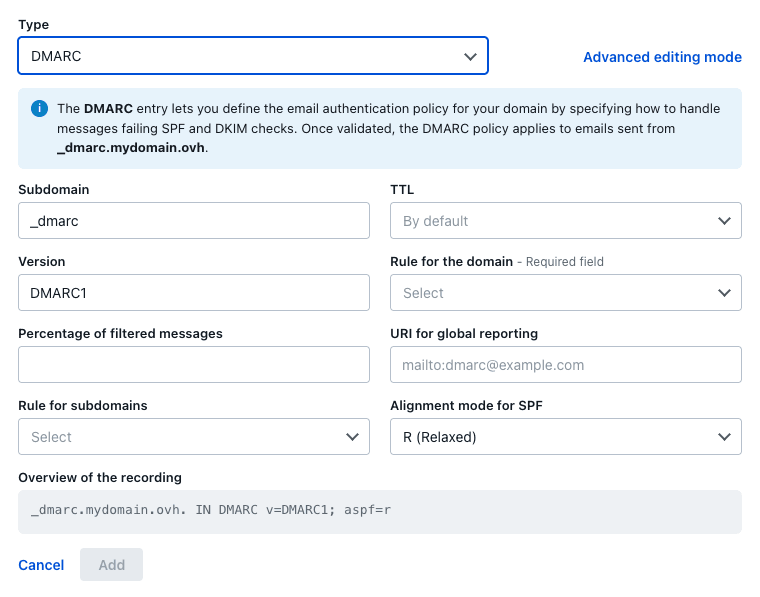
You can add the DMARC record to your DNS zone from the OVHcloud Control Panel. To do this, log in to the , and click the Web Cloud tab. In the left-hand column, select the domain name in the Domain names section, then click on the DNS zone tab to access your DNS zone.
Click Add an entry above the table, then select the DMARC type. The form lets you set each part of the record:
- Subdomain: this entry must start with
_dmarc. If you are applying your DMARC to the entire domain, do not enter anything other than_dmarcin this box. If you are defining your DMARC to a subdomain of your primary domain, add your subdomain after_dmarc. For example, if you need to apply the DMARC to a subdomain subdomain.mydomain.ovh, you will need to enter_dmarc.subdomainin the Subdomain box for the mydomain.ovh domain name.
Below is a full description of the tags used for the OVHcloud DMARC record:
-
Version: mandatory field determining the version of the DMARC protocol (
DMARC1). -
Rule for the domain (p=): Policy to be adopted by the recipient at the request of the holder of the sending domain. The policy applies to the queried domain and subdomains unless the sp= subdomain tag specifies different instructions. Possible values are:
- none: The domain holder does not request any specific action regarding message delivery.
- quarantine: If the DMARC verification fails, the recipients must treat the emails as suspicious. Depending on the capabilities of the recipient server, this may mean "put in the spam folder" and/or "report as suspicious".
- reject: Rejects emails that fail the DMARC verification.
Configuring the p= parameter can have a significant impact on the deliverability of your domain name's emails. It is recommended that you configure p=none and perform a failure report analysis for several weeks, in order to resolve any anomalies. Switching to p=quarantine or p=reject requires full control of the email security settings, concerning SPF and DKIM. The use of the pct= factor, shown below, allows for a gradual transition.
-
Percentage of filtered messages (pct=) (value between 0 and 100, default is 100): The percentage of the message flow to which the DMARC policy should be applied. The purpose of the
pcttag is to enable domain name holders to adopt a slow implementation of the DMARC mechanism. -
URI for global reporting (rua=): Addresses to which reports should be sent (comma separated plain text list). Any valid URI can be specified. The
mailto:prefix must precede the email recipient (e.g.mailto:address@example.com). -
Rule for subdomains (sp=): The policy to be adopted by the recipient for all sub-domains. It only applies to the sub-domains of the domain being queried, and not to the domain itself. Its syntax is identical to that of the
ptag defined above. If this tag is not present, the policy specified by theptag is applied to the subdomains. -
Alignment mode for SPF (aspf=) (default is
r): Specifies the SPF alignment mode. The values are as follows:r(relaxed) for flexible mode: emails can be sent, for example, from a subdomain of the declared domain name. This is known as partial alignment.s(strict) for strict mode: emails must be sent from the declared domain name and from that domain only. The result is therefore "aligned".
In the context of the SPF and DKIM authentication mechanisms, alignment refers to the correspondence between the domain name (and/or the domain signature) used when sending and the domain name registered in these mechanisms.
Examples
- Aligned: When the address john.smith@mydomain.ovh transmits a message from the email service attached to the domain name mydomain.ovh and the SPF and DKIM authentication mechanisms have been configured, an aligned result is obtained.
- Partially aligned: When the address john.smith@subdomain.mydomain.ovh transmits a message from the email service attached to the domain name mydomain.ovh, but the SPF and DKIM authentication mechanisms have been configured only on the primary domain (i.e. mydomain.ovh), a partially aligned result is obtained.
- Authentication failed: the sender attempts to send an email as john.smith@mydomain.ovh via another address (such as robert@example.com) or using an email service that is not listed in the SPF. In this case, the SPF and DKIM authentication mechanisms return a failure as a result.
TXT record
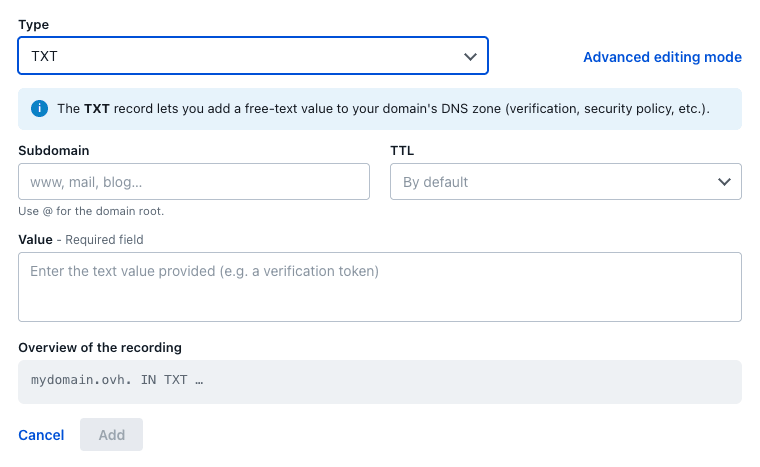
You can add the TXT record to your DNS zone from the . Click the Web Cloud tab, go to Domain names, choose the domain name concerned, then open the DNS zone tab.
Click Add an entry above the table, then select the TXT type.
- Subdomain: this entry must start with
_dmarc. If you are applying your DMARC to the entire domain, do not enter anything other than_dmarcin this box. If you are defining your DMARC to a subdomain of your primary domain, add your subdomain after_dmarc. For example, if you need to apply the DMARC to a subdomain subdomain.mydomain.ovh, you will need to enter_dmarc.subdomainin the Subdomain box for the mydomain.ovh domain name.
The following is a list of tags used to create a TXT record with DMARC settings. This list is complementary to the tags mentioned in the previous DMARC record section.
-
adkim (default is
r): Specifies the DKIM alignment mode. The values are as follows:rfor relaxed mode: Emails that fail DKIM authentication are marked as "unwanted" by the recipient server.sfor strict mode: Emails that fail DKIM authentication are rejected by the recipient server.
-
ruf (a comma-separated list in plain text): Addresses to which message-specific failure information should be reported. If this tag is present, the holder of the sending domain will ask recipients to send detailed failure reports about emails that specifically fail the DMARC assessment (see
fotag below). The format of the message to be generated must follow the format specified for therftag. Themailto:prefix must precede the email recipient (e.g.mailto:address@example.com). -
fo (Plain text, default is
0): Detailed failure report options. Report generators can choose to comply with the requested options. The contents of this tag should be ignored if aruftag (above) is not also specified. The value of this tag is a colon-separated (:) list of characters that indicate the following failure report options:- 0: Generates a DMARC failure report if all authentication mechanisms (DKIM AND SPF) fail to produce an aligned pass result.
- 1: Generates a DMARC failure report if an authentication mechanism (DKIM OR SPF) produces something other than a aligned "success" result.
- d: Generates a DKIM failure report if the DKIM authentication mechanism fails, regardless of its alignment.
- s: Generates an SPF failure report if the SPF authentication mechanism fails, regardless of its alignment.
-
rf (comma-separated plain text values, the default value is
afrf): This tag indicates the type of format expected for reports that provide specific details about message authentication failures. Currently, onlyafrf(Auth Failure Reporting Format) is supported. -
ri (an unsigned 32-bit integer in plain text, the default is 86400): The required interval, in seconds, between aggregated reports. This tag specifies how often email recipients should generate aggregated reports on the DMARC assessment results for the domain.
Records examples
In our two examples, the parameter p= is used in its restrictive form to illustrate the behaviour of an email service in this case.
Configuring the p= parameter can have a significant impact on the deliverability of your domain name's emails. It is recommended that you configure p=none and perform a failure report analysis for several weeks, in order to resolve any anomalies. Switching to p=quarantine or p=reject requires full control of the email security settings, concerning SPF and DKIM. The use of the pct= factor, shown below, allows for a gradual transition.
First example
To illustrate this first example, we used the DMARC record in the DNS zone and applied the following settings to it. The result is:
- All sent emails (pct=100) are processed by the SPF and/or DKIM authentication mechanisms.
- Emails that fail the SPF test are automatically rejected because "aspf=s" (SPF mechanism in strict mode).
- An error report on the SPF and/or DKIM authentication mechanisms failure is sent to the address
report@mydomain.ovh(rua=mailto:report@mydomain.ovh).
Second example
For this second example, we used a TXT record to use tags that are not available through the simplified DMARC record. The result is:
-
p=quarantine: Emails that do not pass the DMARC tests are treated as "suspicious".
-
pct=100: The DMARC policy applies to 100% of the emails sent from the domain holder's email stream.
-
ruf=mailto:report@mydomain.ovh: Email address to which detailed failure reports should be sent via the "mailto" argument.
-
fo=0: Options for generating failure reports. A "0" value indicates that DMARC failure reports should be generated only if the SPF and DKIM authentication mechanisms fail to produce a pass-aligned result.
-
adkim=r: The DKIM ID alignment mode required by the domain holder is "relaxed" (flexible mode). In this mode, DKIM must provide a valid signature and the identifier of the "From" header can be partially aligned.
-
aspf=s: The SPF identifier alignment mode required is "strict". This means that the SPF identifier of the aligned domain must exactly match the sending IP address of the message.
-
ri=86400: Sets the requested interval between aggregated reports, in seconds. In this case, an aggregated report must be generated at least once every 86400 seconds (i.e. once per day).
Go further
For specialised services (SEO, development, etc.), contact OVHcloud partners.
If you would like assistance using and configuring your OVHcloud solutions, please refer to our support offers.
Join our community of users.