Change the announcement of an IP block in vRack

View as Markdown

Learn how to change the announcement of an IP block in vRack

Objective

The vRack is a private network that allows you to configure the address between two or more OVHcloud dedicated servers.

Learn how to set the announcement zone of an IP block in vRack.

Requirements:

Warning

This feature might be unavailable or limited on servers of the Eco product line.

Please visit our comparison page for more information.

Instructions

Step 1: Verify the current announcement zone

Begin by checking the current announcement zone of the applicable IP block. To do this, perform a 'traceroute' on an IP of your choice from the block.

traceroute to 1.2.3.4, 30 hops max, 60 byte packets
 1  54.36.52.1 (54.36.52.1)  0.464 ms  0.461 ms  0.454 ms
 2  158.69.61.222 (158.69.61.222)  0.443 ms  0.426 ms  0.411 ms
 3  gra-z1b1-a70.fr.eu (92.222.60.62)  0.394 ms  0.396 ms  0.391 ms
 4  po101.gra-z1g2-a75.fr.eu (92.222.60.119)  0.374 ms  0.356 ms po101.gra-z1g1-a75.fr.eu (92.222.60.117)  0.333 ms
 5  be120.gra-d1-a75.fr.eu (37.187.232.74)  0.327 ms be121.gra-d2-a75.fr.eu (37.187.232.80)  0.335 ms be120.gra-d2-a75.fr.eu (37.187.232.78)  0.328 ms
 6  vl1247.rbx-g1-a75.fr.eu (37.187.231.234)  1.850 ms vl1248.rbx-d2-a75.fr.eu (37.187.231.252)  1.874 ms vl1247.rbx-g1-a75.fr.eu (37.187.231.234)  1.816 ms
 7  10.95.66.51 (10.95.66.51)  1.943 ms 10.95.66.53 (10.95.66.53)  1.872 ms 10.95.66.59 (10.95.66.59)  1.860 ms
 8  1.2.3.4  2.865 ms

In this example, the tested IP address is currently announced to Roubaix. This is visible in the last completed hop: 'vl1247.rbx-g1-a75.fr.eu (37.187.231.234) 1.816 ms.'

Step 2: Change the announcement zone of the IP block

Go to https://api.ovh.com/console/, then sign in with your OVHcloud customer ID. Use the API call below to change the announcement of the IP block.

GET/vrack

This API allows you to retrieve the list of vRack services. If you can't identify the service concerned with these references, they can be found in the . To do this, go to the Bare Metal Cloud section, click on Network then “vRack”.

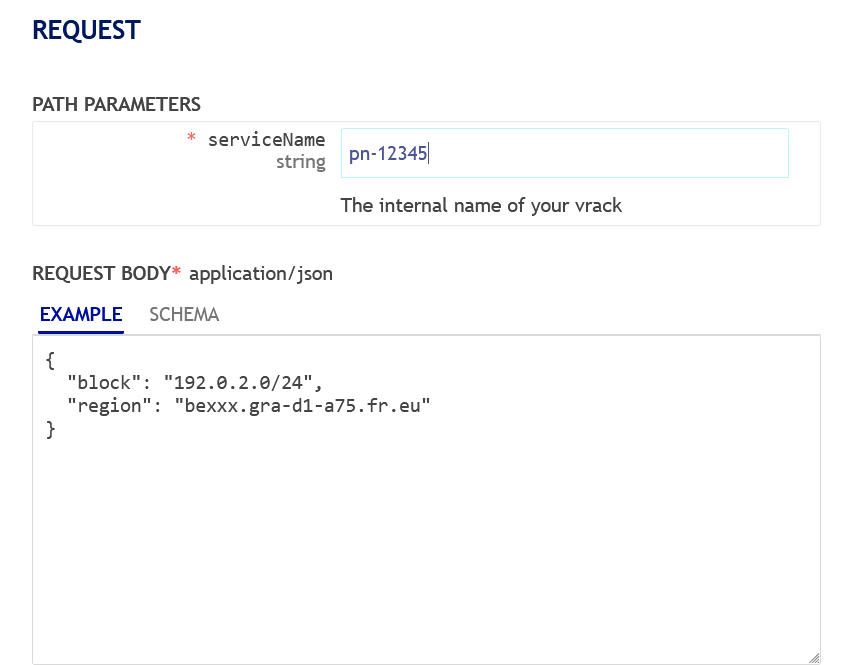
This API call makes it possible to change the announcement of an IP block. Fill in the requested fields:
FieldDescription
serviceNameFill in the name of the concerned vRack service. For example: pn-12345.
blockFill in the name of the concerned IP block. Be sure to fill in the IP block, not the IP address that you tested in the previous step. For example: 192.0.2.0/24.
regionSelect the new announcement zone (region) of the IP block. Be sure this is not the same zone as retrieved in the previous step. For example: bexxx.gra-d1-a75.fr.eu
vrack zone

Finally, run the API to change the announcement.

Step 3: Test the new announcement zone

Now that the announcement zone is changed, do a 'traceroute' for the IP address used in step 1 to verify it.

traceroute to 1.2.3.4, 30 hops max, 60 byte packets
 1  54.36.52.1 (54.36.52.1)  0.464 ms  0.461 ms  0.454 ms
 2  158.69.61.222 (158.69.61.222)  0.396 ms  0.379 ms  0.372 ms
 3  gra-z1b1-a70.fr.eu (92.222.60.62)  0.360 ms  0.361 ms  0.354 ms
 4  po101.gra-z1g1-a75.fr.eu (92.222.60.117)  0.401 ms  0.396 ms  0.389 ms
 5  be121.gra-d1-a75.fr.eu (37.187.232.76)  0.346 ms be120.gra-d2-a75.fr.eu (37.187.232.78)  0.318 ms be120.gra-d1-a75.fr.eu (37.187.232.74)  0.351 ms
 6  10.73.0.65 (10.73.0.65)  0.625 ms 10.73.0.69 (10.73.0.69)  0.729 ms 10.73.0.65 (10.73.0.65)  0.526 ms
 7  10.17.145.25 (10.17.145.25)  0.354 ms 10.17.145.29 (10.17.145.29)  0.426 ms 10.17.145.25 (10.17.145.25)  0.415 ms
 8  1.2.3.4  2.865 ms

In this example, the tested IP address is now announced to Gravelines. This is visible in the last hop: 'be120.gra-d1-a75.fr.eu (37.187.232.74) 0.351 ms.’

Go further

Join our community of users.

Was this page helpful?