
What is Microsoft Exchange?
OVHcloud Microsoft Exchange is the most comprehensive collaborative email solution (Hosted, Private and Dedicated): email addresses, calendars, contacts and tasks synchronised across all your devices, resources, shared accounts and advanced administration. Find all the guides here to order, configure and manage your accounts.
With Microsoft Exchange, you can:
- Order and get started with a Hosted, Private or Dedicated Exchange platform
- Associate your domain name with your email platform and validate its DNS configuration
- Access your email, calendars and contacts from the Outlook Web App webmail
- Configure your accounts in an email client on your computer or mobile
- Manage advanced features (groups, delegation, resources, shared accounts, two-factor authentication)
Getting started with Microsoft Exchange
Getting started with Hosted Exchange→
Order and get started with your Hosted Exchange service.
Getting started with Private Exchange→
Order and get started with your Private Exchange service.
Managing billing→
Manage the billing of your Exchange accounts.
Adding a domain name→
Associate and manage a domain name on your email platform.
Validating your domain (CNAME)→
Add a CNAME record to validate your domain on your email service.
Accessing your email
Access your email, calendars and contacts online via the Outlook Web App (OWA) webmail — no installation required.
Finding your server name
Most email clients configure your account automatically via Autodiscover: simply enter your email address and password.
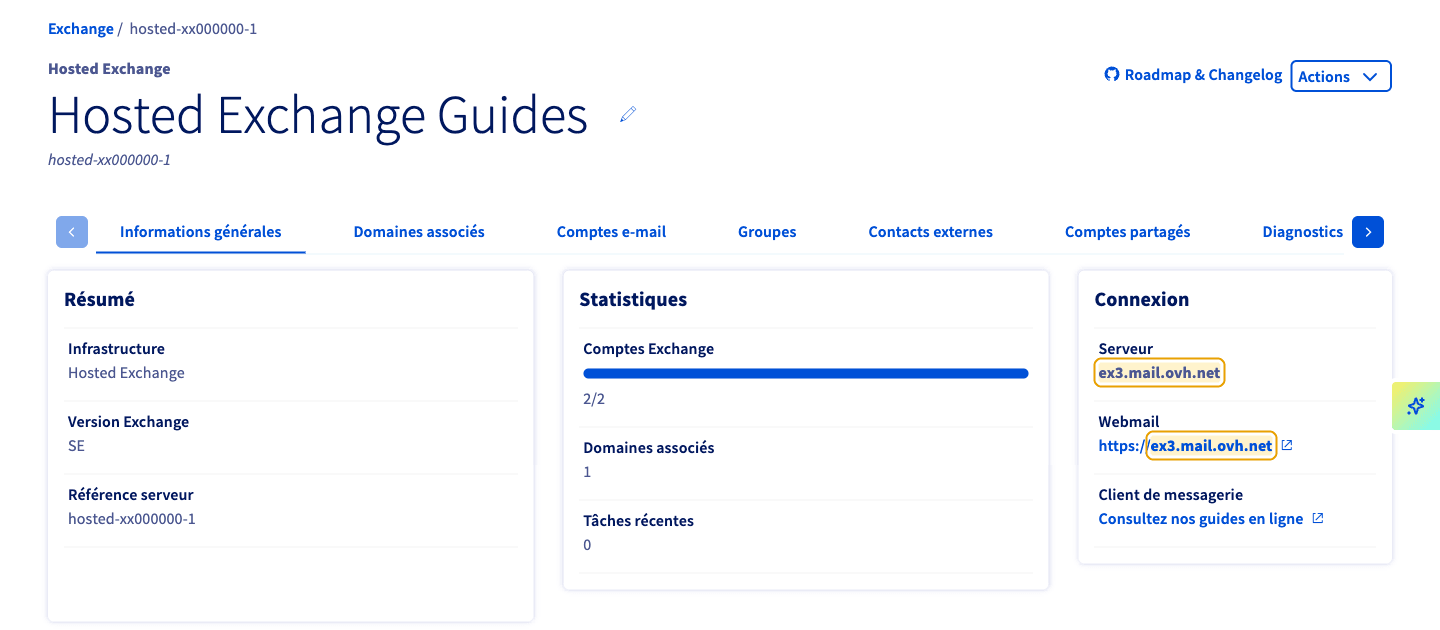
For a manual configuration (ActiveSync or EWS), the server name takes the form ex?.mail.ovh.net.
To find your server number, log in to your and select your Microsoft Exchange platform. The full server name is shown in the General information tab (for example: ex3.mail.ovh.net).
Configuring an email client
Manual configuration (ActiveSync): server ex?.mail.ovh.net, SSL/TLS, port 443.
Account features
- Creating a contact group→
- Delegating rights on an email account→
- Configuring two-factor authentication→
- Creating and using resource accounts→
- Creating and using a shared account→
- Adding a footer to your email accounts→
- Getting an Outlook licence for Exchange→
- Configuring a send connector→
- Signing and encrypting emails with S/MIME→
Backup and administration
Troubleshooting
Go further
Any questions? Access OVHcloud Support
Find answers to your questions in our Help Centre.