
Kafka - How to enable schema registry
Learn how to enable the schema registry for your Kafka cluster
Objective
Apache Kafka is an open-source, distributed event streaming platform designed for real-time, large-scale data processing with high scalability, durability, and low latency.
This guide explains how to enable the schema registry for your Kafka cluster via the OVHcloud Control Panel.
Requirements
- A Public Cloud project in your OVHcloud account
- A Kafka cluster running on OVHcloud Public Cloud
OVHcloud Control Panel Access
- Direct link:
- Navigation path:
Public Cloud> Select your project >Analytics
Instructions
Enable schema registry
To enable schema registry, go to Configuration tab from your Kafka cluster. Then scroll to the Kafka specific section and click the schema registry toggle to enable it.
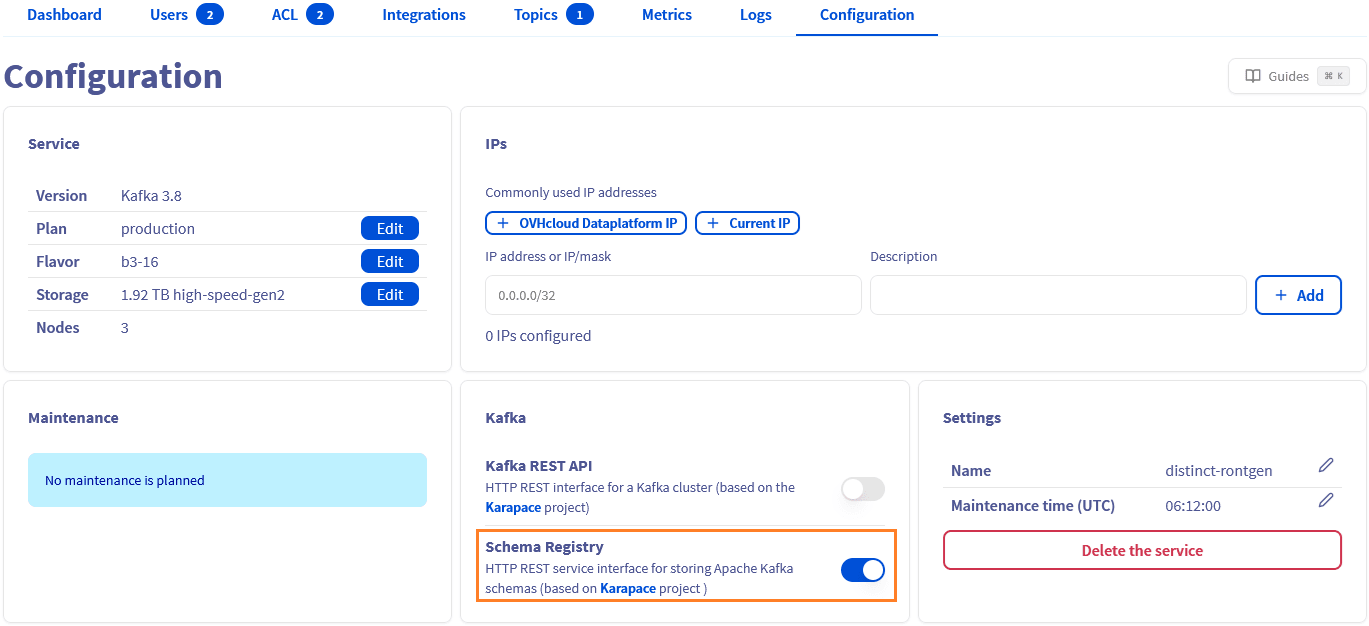
The schema registry could be disabled with the same toggle.
We want your feedback!
We would love to help answer questions and appreciate any feedback you may have.
For training or technical assistance implementing our solutions, contact your sales representative or visit our Professional Services page to request a quote and have your project analysed by our experts.
Are you on Discord? Connect to our channel at https://discord.gg/ovhcloud and interact directly with the team that builds our Analytics service!
Join our community of users.