
Delegating projects
Find out how to delegate access rights for a Public Cloud project to other OVHcloud accounts
Objective
Depending on your use case, you may need to grant other users access to your project, without giving them full access to your services. To this end, you can delegate read-only or read/write permissions for your projects to other OVHcloud customer accounts.
This guide explains how to delegate access rights for a Public Cloud project in the OVHcloud Control Panel.
Requirements
- A Public Cloud project in your OVHcloud account
OVHcloud Control Panel Access
- Direct link:
- Navigation path:
Public Cloud> Select your project >Contacts & Rights
Instructions
Click on Contacts & Rights in the left-hand menu under Settings.
On this page you can see the contacts associated with your project.
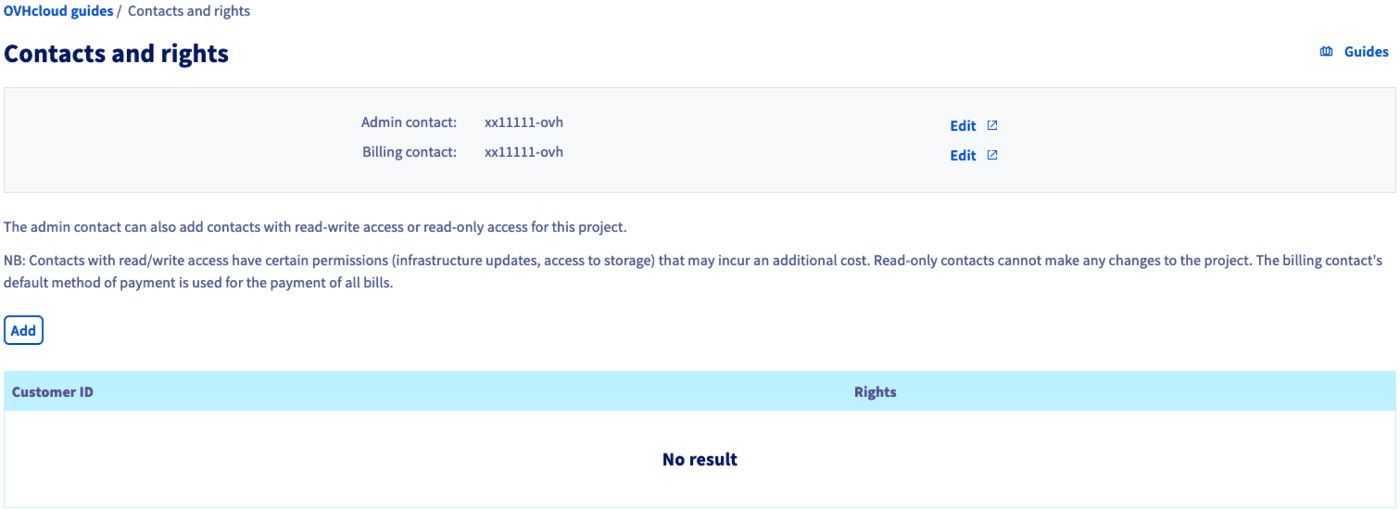
You can click on the Edit buttons to change the current contacts. Follow the instructions in our guide Changing project contacts to complete this process.
Adding contacts and permissions
Click on the Add button in order to add a user and assign permissions. In the popup window, enter the NIC handle of the user (in the form xx00000-ovh), then select Read-only or Read/Write from the menu.
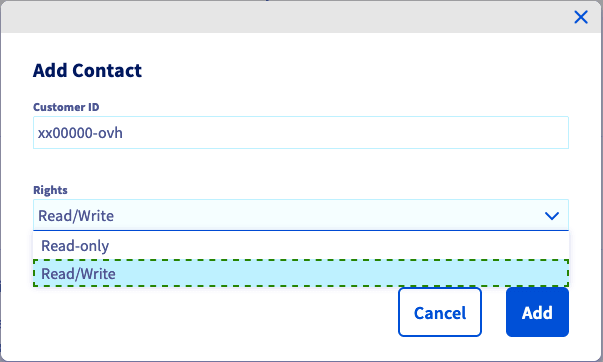
Note that Read/Write permissions will allow changes to the project that might affect future billing.
Click on Add to confirm the access delegation. A confirmation email will be sent to you and the new user who will now be able to open the project in the Public Cloud section of their OVHcloud Control Panel.
Once the page has reloaded, the added OVHcloud customer accounts and their respective permissions are listed in the table.

To revoke an access, click on the ... button and then select Delete.
Go further
Getting started with a Public Cloud Instance
Information regarding Public Cloud billing options
Access and Security in Horizon
For training or technical assistance implementing our solutions, contact your sales representative or visit our Professional Services page to request a quote and have your project analysed by our experts.
Join our community of users.