
Using OVHcloud Key Management Service (KMS)
Encrypt or sign your data with the OVHcloud Key Management Service (KMS) regional REST API
Objective
The purpose of this guide is to show you the steps to interact with the OVHcloud KMS to encrypt or sign your data.
Requirements
- An OVHcloud customer account.
- An OVHcloud KMS ordered.
- An authentication method configured for the OKMS data plane (Personal Access Token, service account, or access certificate).
Instructions
Contacting the KMS
Communication with the KMS for encryption and signature actions is available via APIs.
Since the KMS is regionalized, you can access the API directly in its region: https://my-region.okms.ovh.net.
For example, for a KMS created in the eu-west-rbx region: https://eu-west-rbx.okms.ovh.net.
It's possible to communicate with the KMS using:
- The Swagger UI
- The OKMS CLI: https://github.com/ovh/okms-cli
- The Golang SDK: https://pkg.go.dev/github.com/ovh/okms-sdk-go
Authenticate using a Personal Access Token, service account, or access certificate. For REST API usage, a PAT or service account is recommended. Access certificates are required for KMIP integrations.
To test API calls interactively, use the OKMS Swagger UI at https://<region>.okms.ovh.net/swagger/.
Creating an encryption key via API
Key creation can be performed either through the or on the specific OVHcloud KMS API. There is no difference on the result from the creation method.
The routes below take your OKMS domain identifier. It is returned by the following API call:
It also appears, together with the regional endpoint, in the General information tab of your .
In the case of the specific OVHcloud KMS API, you can create a key using the following API:
The API expects the following values:
Example of symmetric key creation:
Example of asymmetric key creation:
Example of EC key creation:
Example of HSM-backed key creation:
Depending on the key type, the possible sizes and operations are:
- Oct:
- size: 128, 192, 256
- operations:
- encrypt, decrypt
- wrapKey, unwrapKey
- RSA:
- size: 2048, 3072, 4096
- operations:
- sign, verify
- wrapKey, unwrapKey
- EC:
- size: do not specify
- curve: P-256, P-384, P-521
- operations: sign, verify
For RSA keys, wrapKey / unwrapKey are mutually exclusive with sign / verify.
Importing an encryption key
When you create a key, you can import an existing key in plaintext JWK form.
Importing key material in plaintext is not recommended for keys that must remain trusted. Prefer secure BYOK with asymmetric RSA wrapping.
To do this, you can add an additional keys field in the body of the request:
The key must be in JSON Web Key (JWK) format. The values of the fields contained in the table follow the documentation in RFC 7518.
Managing encryption keys
In order to manage encryption keys, several APIs are available:
Keys are created or imported directly in the active state. Deactivating a key blocks cryptographic use but keeps the key in the KMS. Only a deactivated or compromised key can be deleted.
For the operations permitted in each state, see Service key states and allowed operations.
Deleting an encryption key is permanent. All data encrypted with that key becomes permanently inaccessible.
Service key states and allowed operations
The state of a service key determines which operations the KMS accepts, following the KMIP 2.1 and NIST SP 800-57 key lifecycle models:
- An
activekey can be used for every cryptographic operation listed in itsoperationsfield. - A
deactivatedorcompromisedkey does not accept cryptographic operations. It can no longer protect data (encrypt,sign, wrap, generate Data Keys), recover it (decrypt, unwrap Data Keys), or verify signatures. Management operations (read, list, patch, activate, deactivate, delete) remain available. - After
DELETE, the key is permanently removed: any subsequent request targeting that key ID returns404 Not Found.
State changes take effect immediately, with no propagation delay: every request received after a successful activate, deactivate or DELETE is evaluated against the new state.
Deactivation immediately prevents recovery of data protected by the key. When envelope encryption is used, Data Keys wrapped by a deactivated service key cannot be unwrapped until the key is reactivated. Ensure that applications no longer require the key before deactivating it, or retain a recovery path through POST /servicekey/{keyId}/activate.
Service key sensitivity attributes
When you create or retrieve a service key, sensitivity and extractability flags are returned in the attributes object of the GET response (alongside other metadata such as state). Only extractable is user-settable (at creation or via PATCH). The other flags are set by the KMS. Setting extractable to true permanently sets never_extractable to false.
Example GET response shape (fields abbreviated):
To extract a key securely, set extractable to true only for the export operation, export with RSA wrapping, then set it back to false. See Export a wrapped key.
Encrypting data with the KMS
KMS encryption
The OVHcloud KMS has a dedicated encryption API for encrypting small volumes of data (less than 4 kB).
This is the easiest method, but it does not have the best performance.
The API expects the following values:
Encryption example
The API then returns the encrypted data in a ciphertext field:
The decryption of the data is done in reverse via the API:
The API expects the following values:
The context field must have the same value as the one given during encryption.
Encryption with a Data Key (DK)
For better performance, you can generate a Data Key (DK) from a Symmetric Key (AES) to use from your application.
The AES key used must have been generated with the wrapKey and unwrapKey operations.
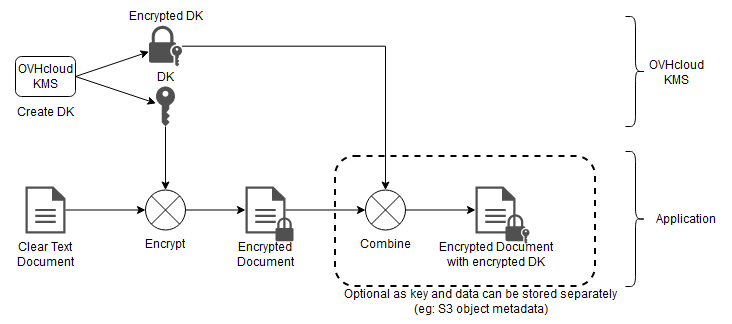
You can generate a DK using the following API:
The API expects the following values:
Data Key generation example:
The API will then return the Data Key:
- key : encrypted key encoded in base64. This information must be stored with the encrypted data and will be used for decryption by the KMS.
- plaintext: plain key encoded in base64. This information must be deleted once the encryption is complete and must not be backed up.
The use of the Data Key is then done through encryption algorithms like AES-GCM. This is not covered by this documentation.
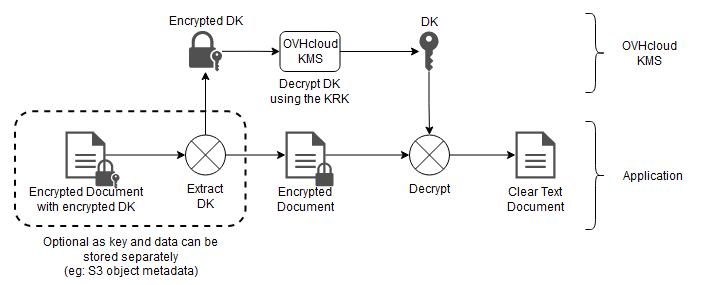
Conversely, you can retrieve the decrypted version of a Data Key via the following API:
The API expects the following values:
And it returns the decrypted Data Key in a plaintext field.
Signing with the KMS
File signing is done using the private key of an asymmetric key pair.
Supported algorithms
The OVHcloud KMS supports the following list of signing algorithms:
- RSASSA-PKCS1 v1.5
Following the documentation in RFC 7518.
- ECDSA
Following the documentation in RFC 7518.
- RSASSA-PSS
Following the documentation in RFC 7518.
Message signature
Since the private key cannot be extracted in plaintext from the KMS, the signature can only be done directly with the KMS.
The API expects the following values:
Signature example:
The API will then return the file signature:
Checking a file
You can check a file either directly with the KMS, or by using the public key.
With the KMS, you can use the following API:
The API expects the following values:
Verification example
The API will then return the result of the verification:
Go further
Import and export keys on OVHcloud KMS using BYOK
How to connect a compatible product using KMIP protocol
Join our community of users.