
How to renew OVHcloud domain names
Find out why and how to renew your OVHcloud domain names
Objective
This guide will help you manage your domain names, covering all aspects of their renewal:
- Differentiate between automatic and manual renewal
- Change the renewal mode for your domain names
- Renew a domain name before the expiry date
- Cancel a domain name
- Access the domain name renewal bill
This guide explains how to renew your OVHcloud domain names.
Requirements
- A domain name registered with OVHcloud
- Access to the billing contact account for your OVHcloud services
OVHcloud Control Panel Access
- Direct link:
- Navigation path: Click your name in the top right >
My offers and services
Instructions
Why renew your domain name?
Properly renewing your domain name is crucial to maintain your online visibility and brand image, while avoiding any additional fees.
A domain name is the address that allows your contacts to visit your website and communicate with you by email. If your domain name is not renewed, your website and email addresses will no longer be accessible. A website that is not accessible for a while can have an impact on your web visibility and organic SEO.
If you have not renewed your domain name before its anniversary date, but you still want to keep it, you may incur additional costs.
Once the domain name has been deleted, it can no longer be renewed, and you will need to restore your domain name. In order for the restoration to take effect, a restoration fee will be applied.
If you do not restore your domain name, it will become available on the market and can be registered again by someone else.
If the domain name includes your brand name, take special care. A malicious person could use your old domain name for phishing or scams pretending to be your company.
If you would like to keep your domain name, we recommend registering and renewing it for several years, or enabling automatic renewal.
If automatic renewal is enabled, your payment method must be valid before automatic payment can be made.
The different types of renewal
Here are the main advantages of automatic renewal:
- Simplicity: No need to worry about renewal dates, everything is automated for you.
- Service continuity: Your services remain active, without interruption.
- Saves time: You avoid any manual steps and risk of forgetting.
If you do not have a valid payment method, the renewal cannot be processed, and you may lose your domain name. Please check that your payment method is valid.
Changing the renewal mode of domain names
Click the tabs below to view each of the 2 steps.
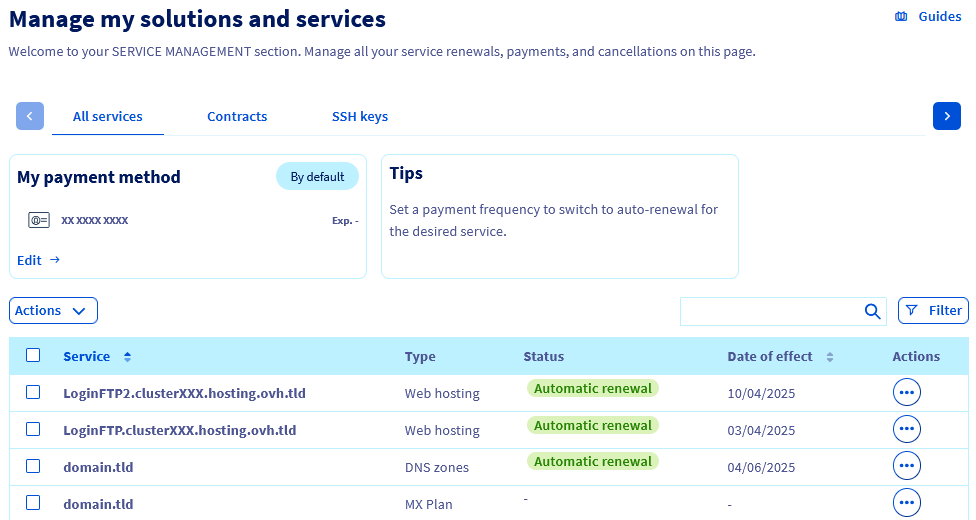
Go to the page. In the table, identify the domain name(s) for which you would like to change the renewal mode.
Renewing a domain name before the expiry date
Click the tabs below to view each of the 3 steps.
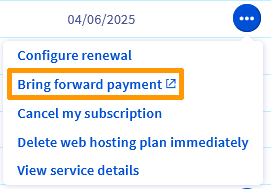
Go to the page. In the table, identify the domain name you want to renew.
Checking the renewal status of a domain name
Once you have paid for your renewal, the domain name will be renewed the day before its expiry (approximately one month after the renewal).
The data displayed in the WHOIS will then be updated, confirming the correct domain name renewal.
To check the renewal status of your domain name, click the tabs below to view each of the 2 steps.
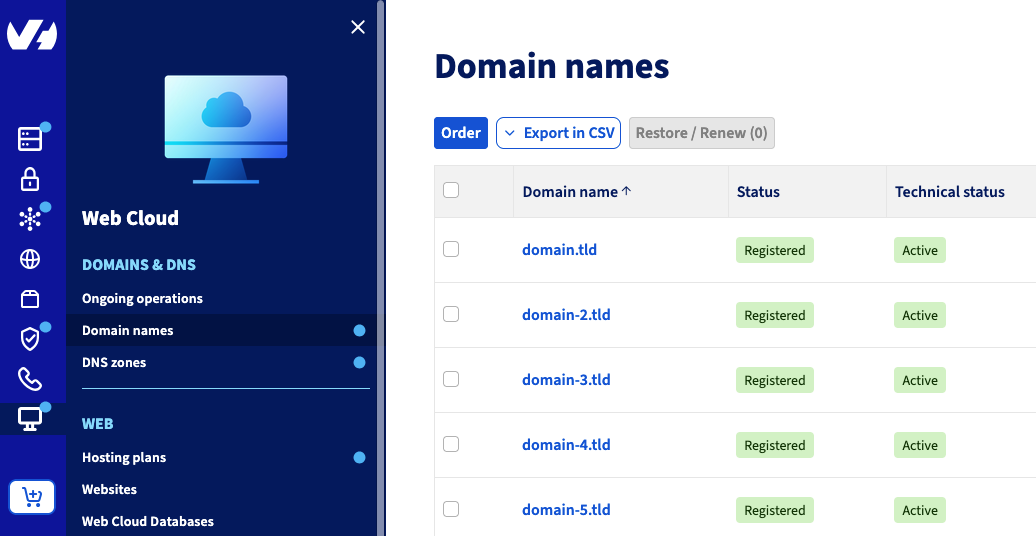
Go to the page, then choose the domain name concerned.
Cancelling a domain name
Click the tabs below to view each of the 2 steps.
Go to the page. In the table, identify the domain name you want to cancel.
The domain name cancellation will end when it expires.
For more information, refer to our guide "How to cancel my OVHcloud services".
Paying a domain name renewal bill
Click the tabs below to view each of the 2 steps.
Go to the page. In the table, identify the domain name for which you need to pay a renewal bill.
FAQ
I forgot to renew my domain name in time, what should I do?
Start by checking the domain name's status using the WHOIS domain name tool.
If it is a generic domain name (.com, .org, .net, etc.), it remains reserved for a "grace period" (approximately 7 days), followed by a "redemption period" (approximately 35 to 40 additional days). These delays vary, and depend on the extension and the rules of the registry that owns the extension. During these two periods, only you will be able to renew the domain name.
During the grace period, you can renew it via the OVHcloud Control Panel by following the steps in this guide.
During the redemption period, the domain is no longer managed by OVHcloud. Renewal via the OVHcloud Control Panel will incur an additional fee, which vary depending on the extension. View prices by clicking on the extension concerned here.
After the redemption period, the domain name will enter a deletion phase that can take several days, before becoming public again. If you would like to use it again, we recommend using the WHOIS domain name tool to check its availability regularly.
I do not want to renew my domain name, but transfer it to a registrar other than OVHcloud. How do I do this?
Follow the instructions in our guide "Transferring a domain name to another registrar".
I use automatic renewal, and I have been charged automatically. However, I do not want to keep my domain name, and I want a refund.
You can be automatically refunded up to 10 days before the effective renewal date for your domain name. To do this, cancel the domain name.
I have renewed my domain name but the WHOIS is still not up to date. How can I ensure that the domain name is renewed properly?
Once the renewal fee has been paid, we will send the request to the appropriate registry.
Your domain name's status will then change to renewal in progress.
Once the registry has renewed your domain name (approximately one month after the renewal fees have been paid), your domain name's status will change back to registered.
WHOIS data will then be updated.
To check the renewal status of your domain name, click the tabs below to view each of the 2 steps.
Go to the page, then choose the domain name concerned.
Go further
This guide did not answer your question? View our Billing and payment FAQ.
How to renew OVHcloud services
Join our community of users.