
Everything you need to know about SMS senders
Discover the different senders available with our SMS solutions
OVHcloud SMS offers are only available in the following countries: France, the United Kingdom, Ireland, Spain, Italy and Poland.
Spain also requires a regulatory declaration of the alphanumeric sender (Sender ID) with its regulator before it can be used. See the "Country-specific requirements" section.
Objective
This guide explains how to create and use senders for sending your SMS messages.
Requirements
OVHcloud Control Panel Access
- Direct link: SMS
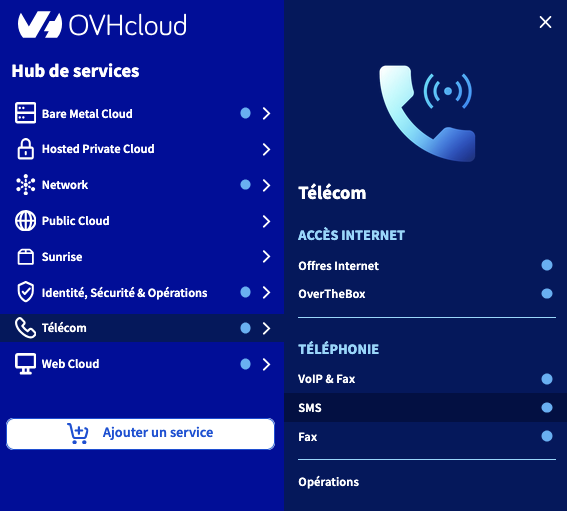
- Navigation path:
Telecom>SMS> Select your SMS account
Instructions
Available sender types
OVHcloud allows you to choose a sender type to send your SMS messages.
The "Short number allowing replies" sender is available by default on our SMS solutions. However, you can also use an alphanumeric sender or a virtual mobile number.
Short number allowing replies
Only for OVHcloud accounts in France excluding French overseas departments and territories.
It allows you to receive a reply via Message and campaign > SMS management > SMS received.
Sending SMS containing a URL
It is not possible to send an SMS containing a URL via a short number allowing replies. Any such message will be blocked.
If you need to send SMS messages containing URLs, you must use an alphanumeric sender.
Alphanumeric sender
You can customise your sender. However, you will no longer be able to receive a reply from the recipient of your SMS. To access the management of SMS senders, select the Senders tab (1) when you are on the relevant SMS account.
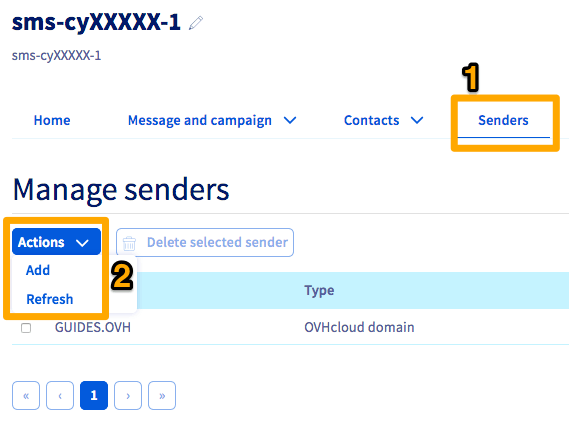
If you want to add an additional SMS sender, click on the Actions button in the centre, then on Add (2).
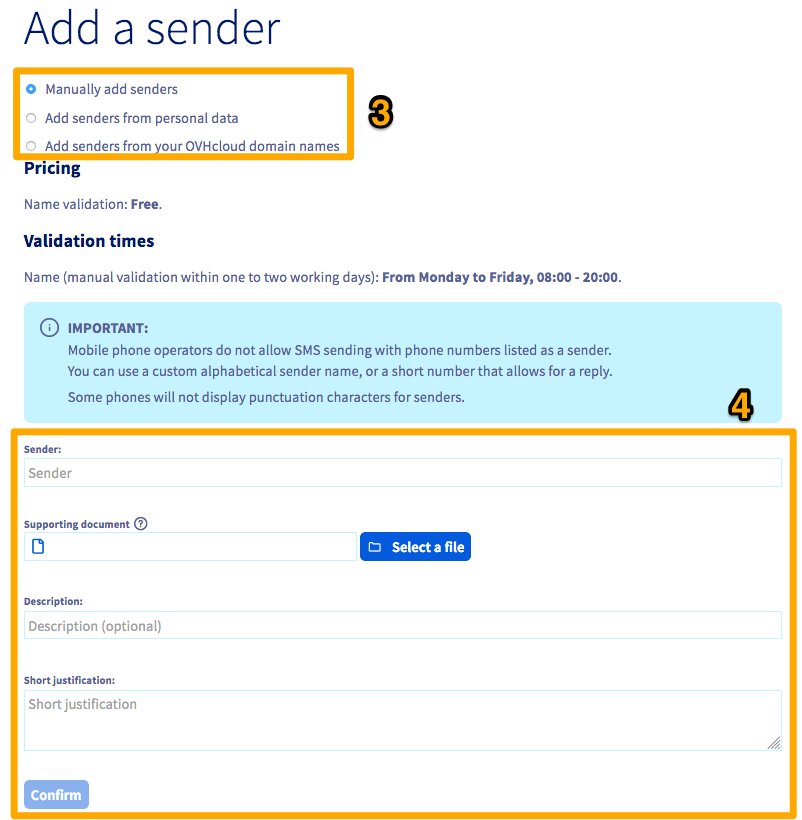
On the addition page, you have several options to configure a new SMS sender (3):
- Add senders manually: You must enter the desired sender, a description, and a justification for using this sender (4). A supporting document is also required.
Example: if you want to send your SMS with the name of your company as the sender, a company document will be requested.
The validation of an alphanumeric sender is usually processed within 72 hours after its creation.
We ask for a supporting document as part of our security policy. By default, this is a letterhead from the company or brand, including authorisation from a responsible person with a signature and company stamp, an identity document, or a Kbis extract if it is not a registered brand.
-
Add senders from personal data: You can request a sender based on the contact details of your OVHcloud account. A drop-down list of available senders will then appear.
-
Add senders from your OVHcloud domain names: You can use a domain name available in your OVHcloud account as a sender. A drop-down list of available senders will then appear.
Country-specific requirements
Spain
Spain requires prior declaration of any alphanumeric sender with its regulator, the CNMC (Comisión Nacional de los Mercados y la Competencia). This requirement applies when you want to create an alphanumeric sender or have one validated to send SMS messages to Spain.
Information to provide
When creating a new alphanumeric sender for Spain, provide the following information:
All the information in the table is mandatory: an incomplete request is likely to be refused.
Opening the request
First request your alphanumeric sender in the OVHcloud Control Panel, then submit this declaration to OVHcloud support:
- Go to the OVHcloud Help Centre.
- Open a support ticket specifying that it concerns a declaration of an SMS Sender ID for Spain.
- Provide the information listed above.
Until the CNMC has validated the declaration, your recipients in Spain see a phone number instead of your alphanumeric sender. The declaration is needed only once per sender: once it has been validated, you can use the sender as often as you need.
Virtual mobile number
Only for OVHcloud accounts in France.
If you have an SMS offer with a virtual mobile number, you can use this number as a sender. For more information, see our page on virtual mobile numbers.
If you already have an SMS account, it is not possible to create a virtual mobile number for an existing account. You will need to order a new SMS account via the virtual mobile number offer page.
Go further
Join our community of users.