
Delisting blocklisted IP addresses
Find out how to request the removal of an OVHcloud IP address from anti-spam blocklists to restore email deliverability and preserve your sender reputation
Objective
Blocklisting (also known as blacklisting, or being listed on a Realtime Blackhole List (RBL)) is a spam-fighting measure applied to IP addresses or IP ranges to block email that is considered spam or that may contain malware. When an email domain or IP address is blocklisted, messages sent from it may not reach their recipients, which affects deliverability and sender reputation. Messages that are delivered may land in the recipient's spam folder rather than their inbox.
Blocklists can include domain names and IP addresses that pose no actual threat. Some spam-filtering services, such as SpamRATS, also take reverse DNS into account when evaluating IP addresses.
For the best practices on running an email server, refer to our guide on how to prevent your emails from being marked as spam.
This guide explains the actions you can take to delist OVHcloud IP addresses that appear on a blocklist.
The information in this guide is subject to change and applies to newly purchased IP addresses. OVHcloud cannot be held responsible for the actions of third-party providers.
We recommend that you contact a specialist service provider or our community of users if you have any difficulties or doubts concerning the administration, use, or implementation of services on a server.
Requirements
- You have no open abuse cases involving your services.
OVHcloud Control Panel Access
- Direct link:
- Navigation path:
Network>Public IP Addresses
Instructions
Supported providers
-
-
Spamhaus Block List (SBL)
If the IP is listed under the Spamhaus Blocklist (SBL), this means our abuse reporting team has already contacted you by email.The email sent by our team comes from an address similar to this one:
ticket+ABCDEFGHIJ.ID@abuse.ovh.net(the ticket number is always in capital letters and the ID that follows is composed of 4 alphanumeric characters).Follow the instructions in this email to resolve the situation. Once you have taken corrective measures, we will forward them to Spamhaus and request that your IP be removed from the list. Spamhaus remains the sole decision-maker regarding our request.
-
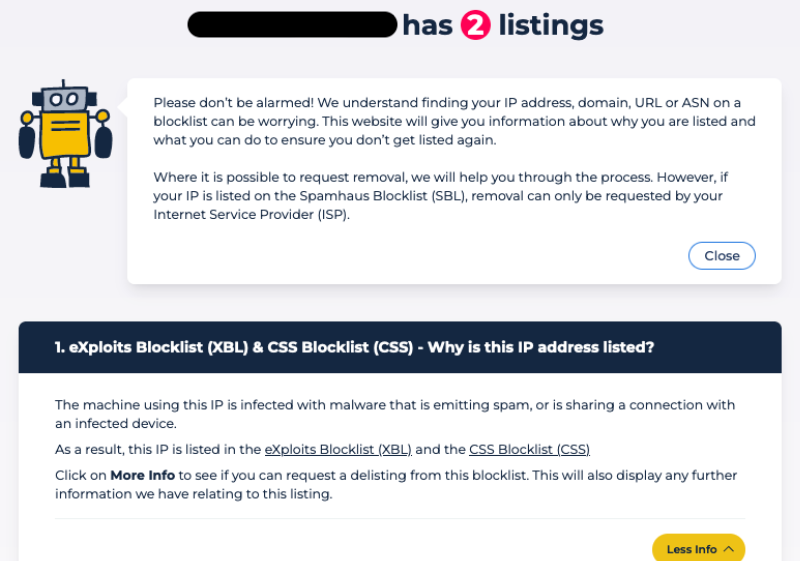
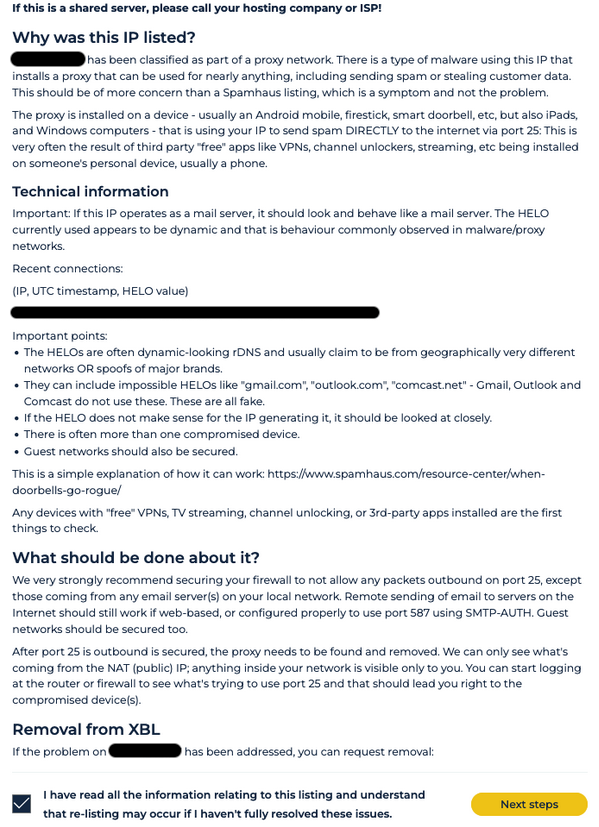
Exploits Block List (XBL) or Combined Spam Sources (CSS)
If your IP is listed under Exploits Block List and/or Combined Spam Sources, this is usually due to configuration issues. Follow the steps described on the Spamhaus website to delist the IP (see the example below). Once you have followed them, you can delist the IP yourself.Example
-
-
SpamCop
On this page, you can check the current status of an IP. The SpamCop Blocking List (SCBL) is time-based: an IP is delisted automatically once spam reports stop, so there is usually no manual removal request to submit. -
Barracuda
To request removal from the Barracuda Reputation Block List (BRBL), submit the Barracuda removal request form. Listings are manually verified, so removal is not immediate. -
SpamRATS
If you are running your own email server, you must configure the domain name in the PTR record, where the contact information for the responsible party can be found. Only properly configured email servers are removed from this list.
You must also configure the reverse DNS resolution.InfoBest practices:
IP addresses used to send email should resolve to the responsible party's domain name. You can also use subdomains for the reverse DNS resolution, such as
mail.domain_name.comorgateway.domain_name.com.
Unsupported providers
s5h.net
More information
To request removal, visit the usenix RBL removal page from the IP address that has been blocklisted. The IP should be delisted immediately.
You can also do this with the tools telnet, curl or wget.
To delist your IPv4 address via curl, log in to the listed mail server and run:
To do the same using telnet from a Windows/Linux host, enter the GET and Host lines after the telnet command as shown below.
For a detailed explanation, see the usenix RBL documentation.
UCEprotect
More information
UCEprotect periodically places large numbers of ASNs on its level-3 blocklist, and the OVHcloud ASN (AS16276) may be affected. To view the list of affected ASNs and the number of newly added ASNs, check the following links:
Our Abuse team contacts UCEprotect to request the removal of our ASN from the blocklist. UCEprotect requires the network operators of the blocked ASNs to pay for express delisting. Like all major providers, OVHcloud does not pay for blocklist delisting, as it is a service outside of our control. Paying for delisting only increases blocklisting overall and ultimately harms the industry.
UCEprotect states that it automatically delists ASNs after one week. As this is outside of our control, we cannot provide any guarantee in this regard.
If you are currently affected, we recommend the following:
- Use IPv6 addresses to send emails. UCEprotect does not blocklist email sent over IPv6. All OVHcloud services include at least one IPv6 address that you can configure, and all major email providers now support IPv6.
- Ask the recipient to contact their email provider and request that they stop using the UCEprotect blocklist.
Fabel Spamsources
More information
To delist an IP from Fabel Spamsources, navigate to their delisting page.
Click Please login to continue, enter your email address, and check your email inbox. Use the verification code to finish logging in.
Enter your IP address, provide a reason for the removal request, and click Submit Query.
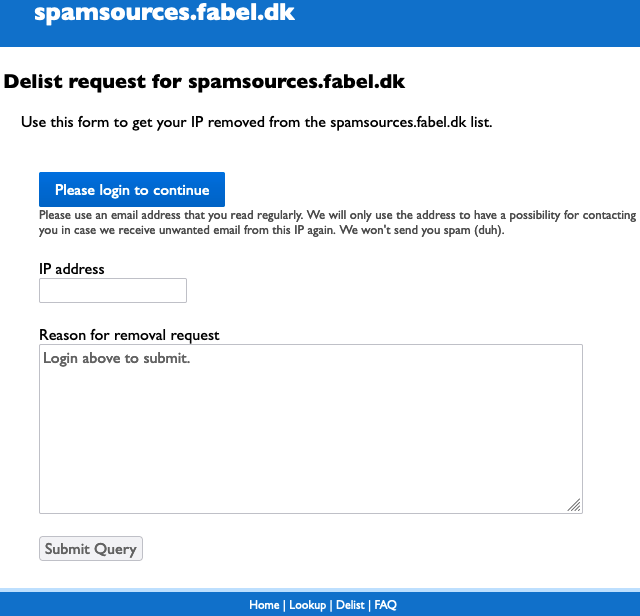
Delisting should take between 20 and 30 minutes to complete.
MIPSpace
More information
To delist an IP from MIPSpace, first log in to the and ensure that the following information is up-to-date:
- The reverse DNS resolution (PTR record).
- The details of your organisation (RWhois). Navigate to
Network>Public network>Public IP Addresses, then open theManage my organisationstab.
Go further
For specialised services (SEO, development, etc.), contact OVHcloud partners.
Join our community of users.