Object Storage - Master asynchronous replication across your buckets

Introduction

Object replication is a powerful feature that facilitates the automatic and asynchronous replication of objects within a source bucket to one or several destination buckets. This capability is crucial for maintaining data consistency, availability, and redundancy across different storage locations.

Destination buckets can reside within a single region or be dispersed across multiple regions, tailored to your specific requirements. This flexibility allows for strategic data placement and management across global infrastructure networks.

Objectives

This guide aims to equip you with the knowledge and skills to:

  • Set up object replication: Learn to configure object replication across buckets for automated data duplication from a source to one or more destinations.
  • Enhance data availability: Understand how object replication improves data resilience by creating copies in different regions or storage zones.
  • Achieve compliance: Explore how replication aids in meeting regulatory requirements for data geo-redundancy and backup.
  • Reduce storage costs: Discover strategies to lower storage expenses by replicating data to more cost-effective storage classes.
  • Facilitate data sharing: See how object replication streamlines data sharing and synchronization across teams, boosting operational efficiency.

Requirements

  • Cloud storage account: An active account with access to cloud storage services that support object replication.
  • Buckets configured: At least two buckets set up within your cloud storage account, designated as the source and destination.
  • Data backup: A recent backup of your data, particularly important if setting up replication for existing data to avoid accidental loss.
  • Understanding of storage classes: Familiarity with the various storage classes offered by your cloud service, along with their cost and performance implications.
  • Familiarity with cloud storage policies: Knowledge of the policies and permissions necessary for performing object replication.
  • CLI tools or management console access: The ability to use your cloud provider's command line interface (CLI) tools or management console to set up and manage replication rules.
  • Versioning enabled: Versioning must be activated on your buckets if required by your cloud service for object replication.
  • Object Storage User: An Object Storage user account already created within your project.
  • AWS CLI configuration: The AWS CLI installed and configured on your system. For a guide on configuring the CLI, refer to the OVHcloud documentation on "Getting started with Object Storage".

Instructions

Key use cases for object replication

  • Exact object copies with metadata replication: Replication is not just about duplicating the object; it includes the replication of all associated metadata (e.g. object creation time, version ID, etc.). This ensures that the replicas are true copies of the source objects, maintaining integrity and consistency for critical applications.

  • Data synchronization across teams: This facilitates seamless synchronization of data across various teams, enhancing collaboration and data sharing based on predefined access controls and policies. It is crucial to note that while data synchronization is a significant advantage, storage options and configurations must be carefully managed to ensure they meet the specific needs of each team in terms of access and security.

  • Cost-effective data storage management: Organizations need to explore alternative strategies to optimize their backup and storage costs, considering the current limitations related to data replication. By default, replicas are created using the source object’s storage class. If you need replicas in a different storage class, set Destination.StorageClass (where supported by the destination region and storage class availability). Nevertheless, organizations can still optimize their storage management by carefully assessing their needs and selecting the most suitable storage class from the outset to balance cost and performance without compromising data availability or durability.

  • Enhanced data resiliency across regions: Enhance your data protection strategies by replicating critical data across multiple geographical regions. This increases resiliency against data loss and ensures business continuity in the face of regional disruptions.

  • Reduced latency for global access: Positioning your data closer to your end users minimizes access latency and improves the overall user experience. Replication allows for strategic data placement in OVHcloud regions nearest to your customer base.

  • Efficiency boost for computational workloads: By bringing your data closer to your OVHcloud compute resources, replication enhances the efficiency and performance of your workloads, facilitating faster data processing and analysis.

  • Compliance and regulatory fulfillment: Many compliance frameworks mandate that data be stored at a considerable distance from the primary location or require multiple copies of critical data. Object replication simplifies the process of meeting these requirements by enabling automatic replication across vast distances and into multiple storage mediums.

Implementing object replication ensures not only the safety and availability of your data but also enhances operational efficiency and compliance posture.

What is asynchronous replication?

Basic concepts

At its core, the asynchronous replication is designed to facilitate several key operations in the management and safeguarding of your data. This includes the following actions:

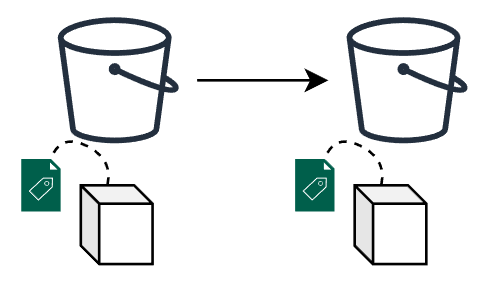
  • Exact replica creation
Schema 1
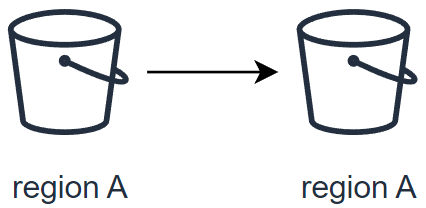
  • Replicate data within the same region
Schema 2
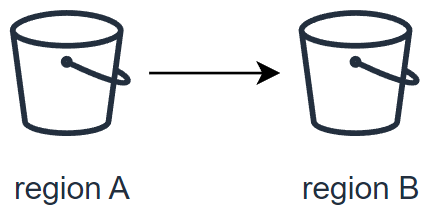
  • Replicate data to a different region
Schema 3
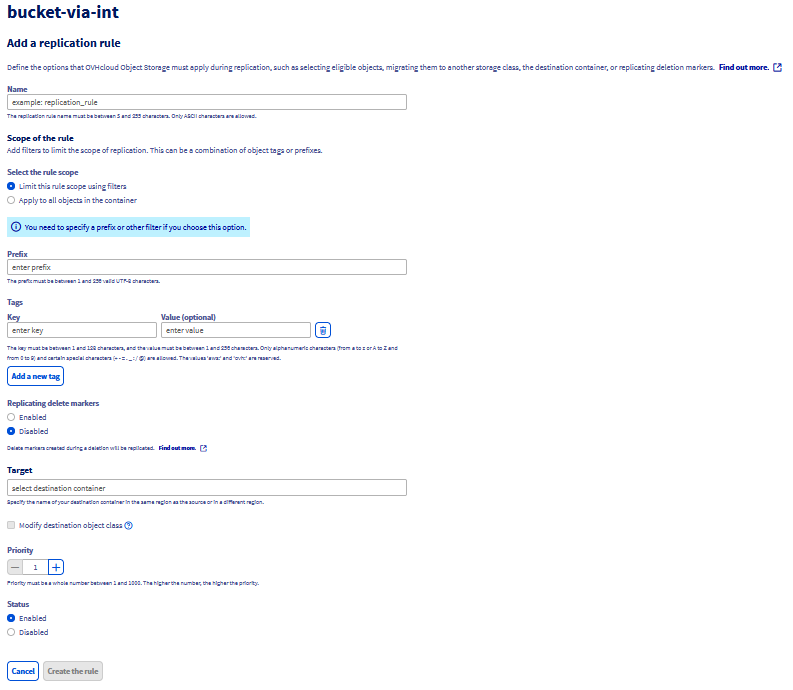
  • Replicate data to two different regions
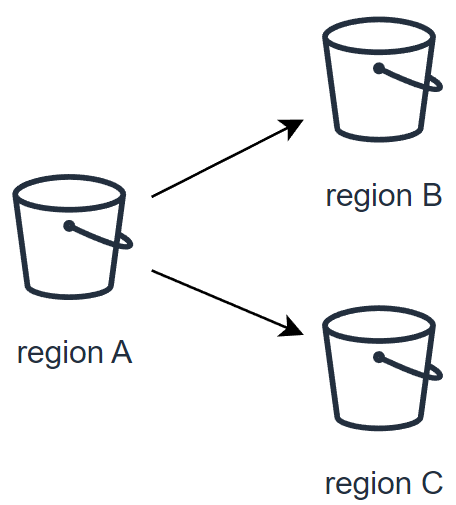
Schema 4

What is replicated and what is not

The following table provides the default behavior of the OVHcloud Object Storage Asynchronous Replication feature:

What is replicatedWhat is not replicated
- Objects created after the upload of the replication configuration
- Unencrypted objects and objects encrypted with SSE-OMK (OVHcloud managed keys)
- Objects in the source bucket for which the bucket owner has permissions to read and access ACLs
- Object metadata from the source objects to the replicas
- Object Lock retention configuration
- Object ACL updates
- Object tags


- Objects created before the upload of the replication configuration1
- Objects that have already been replicated to a previous destination
- Object replicas i.e. objects that are the result of a previous replication operation
- Objects encrypted with SSE-C (customer provided keys)
- Bucket configurations i.e. lifecycle configuration, CORS configuration, bucket ACLs, etc.
- Actions resulting from Lifecycle Configuration actions
- Delete marker i.e. objects deleted in the source bucket are not automatically deleted by default in the destination bucket2
- Objects that are stored in the Cold Archive v1 temporary storage
- You cannot replicate objects that are stored in the Cold Archive v2 storage class until you restore them and copy them to a different storage class
- Replication to a bucket in a different Public Cloud Project i.e. source and destination buckets must be in the same project

1: To replicate objects that were uploaded before the creation of the replication configuration, use Batch Replication. Learn more about configuring Batch Replication at Replicating existing objects.

2: Learn how to activate the replication of delete markers at Delete marker replication.

Replication configuration

A replication configuration is defined through a set of rules within a JSON file. This file is uploaded and applied to the source bucket, detailing how objects are to be replicated. Each replication rule defines:

  • A unique rule ID to identify the rule.
  • Rule priority to determine the order of execution when multiple rules exist.
  • Destination bucket where the replicated objects will be stored.
  • Objects to be replicated: By default, all objects are eligible for replication. However, you can specify a subset of objects by filtering them with a prefix and/or tags.

Replication rule structure

The basic structure of a replication rule within the configuration JSON file is as follows:

{
  "Role": "arn:aws:iam::<project_id>:role/s3-replication",
  "Rules": [
    {
      "ID": "string",
      "Priority": integer,
      "Filter": {
        "Prefix": "string",
        "Tag": {
          "Key": "string",
          "Value": "string"
        },
        "And": {
          "Prefix": "string",
          "Tags": [
            {
              "Key": "string",
              "Value": "string"
            }
          ]
        }
      },
      "Status": "Enabled"|"Disabled",
      "Destination": {
        "Bucket": "arn:aws:s3:::<destination_bucket_name>",
        "StorageClass": "STANDARD"|"STANDARD_IA"|"EXPRESS_ONEZONE"
      },
      "DeleteMarkerReplication": {
        "Status": "Enabled"|"Disabled"
      }
    }
  ]
}
AttributeDescriptionRequired
TagFilter the objects by tag key and/or value.No
StatusTells if your replication rule is Enabled or Disabled.Yes
RoleOVHcloud IAM role needed to allow OVHcloud Object Storage to access data from the source bucket & write data to destination buckets. Currently, OVHcloud has set a unique role "s3-replication".Yes
PriorityIf there are two or more rules with the same destination bucket, objects will be replicated according to the rule with the highest priority. The higher the number, the higher the priority.Yes
PrefixAn object key name prefix that identifies the object or objects to which the rule applies. To include all objects in a bucket, specify an empty stringNo
IDEach replication rule has a unique ID.Yes
FilterA filter that identifies the subset of objects to which the replication rule applies. To replicate all objects in the bucket, specify an empty object.Yes
DestinationA container for information about the replication destination and its configurations.Yes
DeleteMarkerReplicationTells if delete operations should be replicated.Yes
BucketThe destination bucket (to replicate to multiple destinations, you must create multiple replication rules).Yes
StorageClassThe destination storage class. By default, OVHcloud Object Storage uses the storage class of the source object to create the object replica.

Please note that not all storage classes are available in all regions (i.e., some storage classes are not supported in some regions such as EXPRESS_ONEZONE which is not supported in 3-AZ regions). To learn more about the available storage classes in each region, check our documentation.
Yes
AndYou can apply multiple selection criteria in the filter.No

Delete marker replication

Warning

IMPORTANT

If you specify a Filter in your replication configuration, you must also include a DeleteMarkerReplication element. If your Filter includes a Tag element, the DeleteMarkerReplication Status must be set to Disabled.

Understanding delete markers

When a delete object operation is performed on an object in a versioning-enabled bucket, it does not delete the object permanently but it creates a delete marker on the object. This delete marker becomes the latest and current version of the object with a new version ID.

A delete marker has the following properties:

  • A key and version ID like any other object.
  • It does not have data associated with it, thus it does not retrieve anything from a GET request (you get a 404 error).
  • By default, it is not displayed in the Control Panel UI anymore.
  • The only operation you can use on a delete marker is DELETE, and only the bucket owner can issue such a request.

To permanently delete an object, you have to specify the version ID in your DELETE object request.

Warning

By default, OVHcloud Object Storage does not replicate delete markers nor replicate the permanent deletion to destination buckets. This behavior protects your data from unauthorized or unintentional deletions.

Replicate delete markers

However, you can still replicate delete markers by adding the DeleteMarkerReplication element to your replication configuration rule. DeleteMarkerReplication specifies if delete markers should or should not be replicated (when versioning is enabled, a delete operation is performed on an object it does not actually delete the object but it flags it with a delete marker).

{
  "Role": "arn:aws:iam::<project_id>:role/s3-replication",
  "Rules": [
    {
      "ID": "ruleId",
      "Status": "Enabled",
      "Priority": 1,
      "Filter": {},
      "Destination": {
        "Bucket": "arn:aws:s3:::destination-bucket"
      },
      "DeleteMarkerReplication": {
        "Status": "Enabled"
      }
    }
  ]
}

Checking the replication status

The replication status can be used to determine the status of an object that is being replicated. To get the replication status of an object, you can use the head-object command via the AWS CLI:

aws s3api head-object --bucket <source_bucket_name> --key <object_key>
{
  "LastModified": "Fri, 15 Mar 2024 10:18:15 GMT",
  "ContentLength": 3481,
  "ETag": "\"417947d3634d4645e05ca9e875f5b202\"",
  "VersionId": "17104978950.04081",
  "ContentType": "binary/octet-stream",
  "Metadata": {},
  "StorageClass": "STANDARD",
  "ReplicationStatus": "COMPLETED"
}
Warning

The replication status only applies to objects that are eligible for replication.

The ReplicationStatus attribute can have the following values:

Source objectReplica Object
COMPLETEDREPLICA
FAILEDn/a as the replica does not exist
PENDINGn/a as the replica does not exist yet
Warning

When you replicate objects to multiple destination buckets, the value of ReplicationStatus is "COMPLETED" only when the source object has been successfully replicated to all the destination buckets, otherwise, the attribute remains at the "PENDING" value.

If one or more destination fail replication, the value of the attribute becomes "FAILED".

Replication between buckets with object lock enabled

Object Lock can be used with replication to enable automatic copying of locked objects across buckets. For replicated objects, the object lock configuration of the source bucket will be used in the destination bucket. However, if you upload an object directly to the destination bucket (outside of the replication process), it will use the lock configuration of the destination bucket.

Warning

To replicate data in buckets with object lock on, you must have the following prerequisites:

  • Versioning must be enabled on both source and destination buckets.
  • Object Lock must be enabled on both source and destination buckets.

Replicating existing objects

By default, the Asynchronous Replication feature does not replicate objects uploaded before the setup of a replication configuration i.e existing objects. While Asynchronous Replication continuously and automatically replicates new objects across OVHcloud Object Storage buckets, Batch Replication occurs on demand on existing objects.

You can get started with Batch Replication by creating a new Batch replication job that will get executed on your source bucket.

Special considerations

Before creating your first job, please take into account the following considerations:

  • Your source bucket and destination(s) bucket(s) must have versioning enabled.
  • Your source bucket must have an existing replication configuration set up, as Batch Replication will create a job that will try to apply the existing replication configuration to ALL objects of the source bucket that have NOT been replicated yet.
  • If you have a Lifecycle policy configured for your bucket, we recommend disabling your lifecycle rules while the Batch Replication job is active to ensure maximum consistency between buckets and data synchronization.
  • You cannot create another Batch Replication job when there is a running job, this limitation helps us to protect our infrastructures from malicious and/or abusive uses.
  • Batch replication does NOT support objects that are stored in the Cold Archive storage class.
  • There are no SLAs on the job time to completion.

Checking the Batch Replication job status

Warning

Currently, there is no way to check or monitor the execution status of a job. We are actively working to implement this feature and deploy it very soon.

Getting started with Batch Replication

Via the OVHcloud API
Via the OVHcloud Control Panel

Use the following API route to initiate job creation:

    POST /cloud/project/{serviceName}/region/{regionName}/storage/{name}/job/replication HTTP/1.1
    -H "accept: application/json"\
    -H "authorization: Bearer {auth_token}"

Where:

  • serviceName is the public cloud project id
  • regionName is the region where your source bucket is located
  • name is the name of your source bucket

The API should return:

{
    "id": "{job_id}"
}

Where:

  • id is the unique identifier of the newly created Batch Replication job

Examples of replication configurations

Simple replication between 2 buckets

{
  "Role": "arn:aws:iam::<your_project_id>:role/s3-replication",
  "Rules": [
    {
      "ID": "ruleId",
      "Status": "Enabled",
      "Priority": 1,
      "Filter": { },
      "DeleteMarkerReplication": { "Status": "Disabled" },
      "Destination": {
        "Bucket": "arn:aws:s3:::destination-bucket"
      }
    }
  ]
}

This configuration will replicate all objects (indicated by the empty Filter field) to the bucket destination-bucket.

Replication of delete markers

{
  "Role": "arn:aws:iam::<your_project_id>:role/s3-replication",
  "Rules": [
    {
      "ID": "ruleId",
      "Status": "Enabled",
      "Priority": 1,
      "Filter" : {
        "Prefix": "backup"
      },
      "Destination": {
        "Bucket": "arn:aws:s3:::destination-bucket"
      },
      "DeleteMarkerReplication": { "Status": "Enabled" }
    }
  ]
}

This configuration will replicate all objects that have the prefix "backup" to the bucket destination-bucket. Additionally, we indicate that deletion operations in the source bucket should be also replicated.

Replicating source to multiple regions

{
  "Role": "arn:aws:iam::<your_project_id>:role/s3-replication",
  "Rules": [
    {
      "ID": "rule1",
      "Status": "Enabled",
      "Priority": 1,
      "Filter": {},
      "Destination": {
        "Bucket": "arn:aws:s3:::region1-destination-bucket"
      },
      "DeleteMarkerReplication": {
        "Status": "Disabled"
      }
    },
    {
      "ID": "rule2",
      "Status": "Enabled",
      "Priority": 2,
      "Filter": {},
      "Destination": {
        "Bucket": "arn:aws:s3:::region2-destination-bucket"
      },
      "DeleteMarkerReplication": {
        "Status": "Disabled"
      }
    }
  ]
}

Suppose the source bucket, region1-destination-bucket and region2-destination-bucket are 3 buckets in 3 OVHcloud regions, this configuration will allow you to back up all objects in the source bucket to 2 different regions.

Replicating 2 subsets of objects to different destination buckets

{
  "Role": "arn:aws:iam::<your_project_id>:role/s3-replication",
  "Rules": [
    {
      "ID": "rule1",
      "Status": "Enabled",
      "Priority": 1,
      "Filter" : {
        "Prefix": "dev"
      },
      "Destination": {
        "Bucket": "arn:aws:s3:::destination-bucket1"
      },
      "DeleteMarkerReplication": { "Status": "Enabled" }
    },
    {
      "ID": "rule2",
      "Status": "Enabled",
      "Priority": 2,
      "Filter" : {
        "Prefix": "prod"
      },
      "Destination": {
        "Bucket": "arn:aws:s3:::destination-bucket2"
      },
      "DeleteMarkerReplication": { "Status": "Disabled" }
    }
  ]
}

This configuration contains 2 replication rules:

  • rule1 will replicate all objects with prefix "dev" to bucket destination-bucket1 and additionally, will replicate also deletion operations.
  • rule2 will replicate all objects with prefix "prod" to bucket destination-bucket2 without replicating deletion operations.
Warning

Versioning must be activated in source bucket and destination bucket(s).

Step-by-step instructions

Create source and destination buckets

Info

To create a bucket via the OVHcloud Control Panel, please refer to our guide Object Storage - Getting started with Object Storage

The source bucket is the bucket whose objects are automatically replicated and the destination bucket is the bucket which will contain your object replicas.

aws s3 mb s3://<bucket_name>

Example: Creation of a source bucket and a destination bucket

aws s3 mb s3://my-source-bucket
aws s3 mb s3://my-destination-bucket

Activate versioning in source and destination bucket

Info

To enable versioning in a bucket via the OVHcloud Control Panel, please refer to our guide Object Storage - Getting Started with Versioning

aws s3api put-bucket-versioning --bucket <bucket_name> --versioning-configuration Status=Enabled

Example: Activation of versioning in previously created source and destination buckets

aws s3api put-bucket-versioning --bucket my-source-bucket --versioning-configuration Status=Enabled
aws s3api put-bucket-versioning --bucket my-destination-bucket --versioning-configuration Status=Enabled

Apply replication configuration

Via the AWS S3api
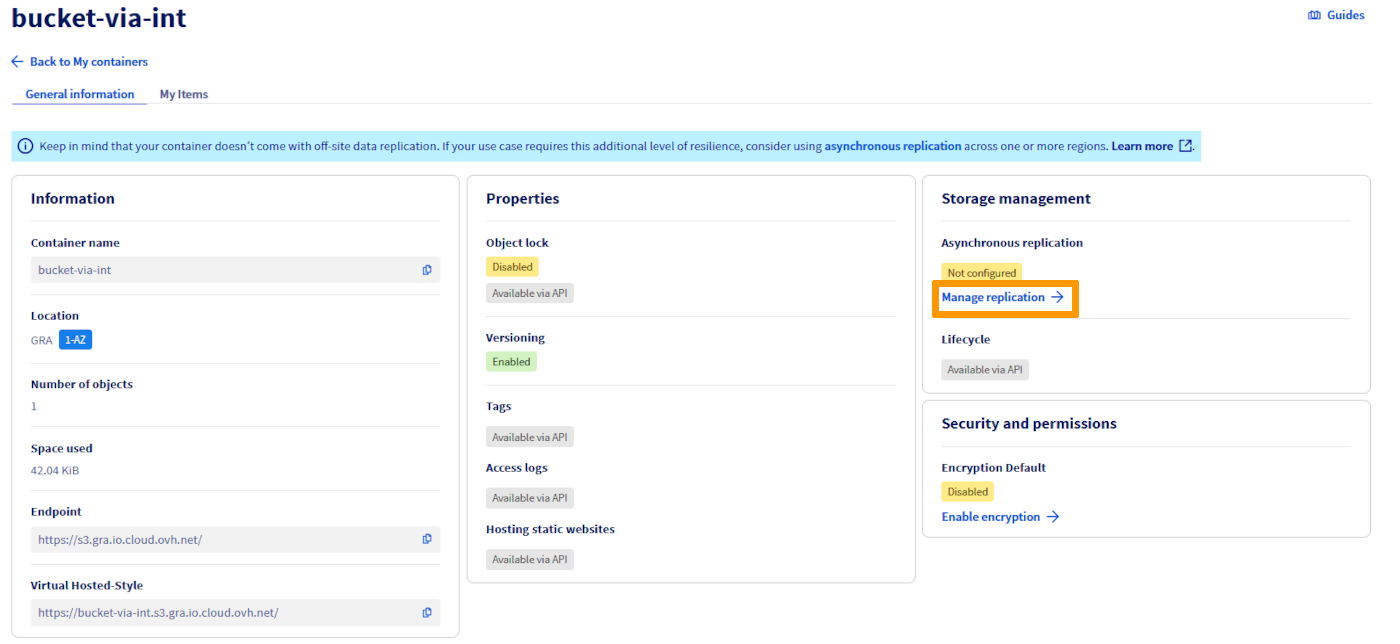
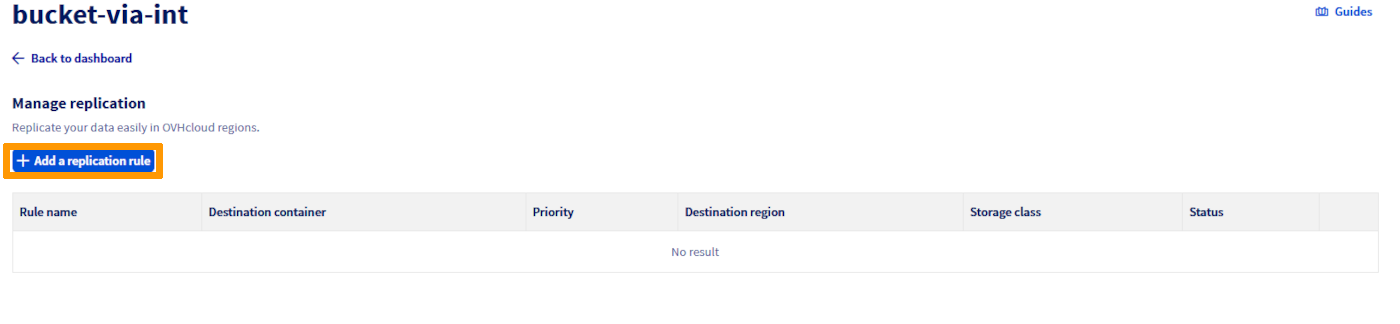
Via the OVHcloud Control Panel

Using the AWS CLI, replication configuration is applied on the source bucket.

aws s3api put-bucket-replication --bucket <source> --replication-configuration file://<conf.json>

Example: Replicate all objects with prefix "docs" to my-destination-bucket and replicate delete markers (i.e., objects marked as deleted in the source will be marked as deleted in the destination).
{
   "Role": "arn:aws:iam::<your_project_id>:role/s3-replication",
   "Rules": [
    {
      "ID": "replication-rule-456",
      "Status": "Enabled",
      "Priority": 1,
      "Filter": {
        "And": {
          "Prefix": "docs",
          "Tags": [
            {
              "Key": "importance",
              "Value": "high"
            }
          ]
        }
      },
      "Destination": {
        "Bucket": "arn:aws:s3:::my-destination-bucket"
      },
      "DeleteMarkerReplication": {
        "Status": "Enabled"
      }
    }
  ]
}

Delete a replication rule

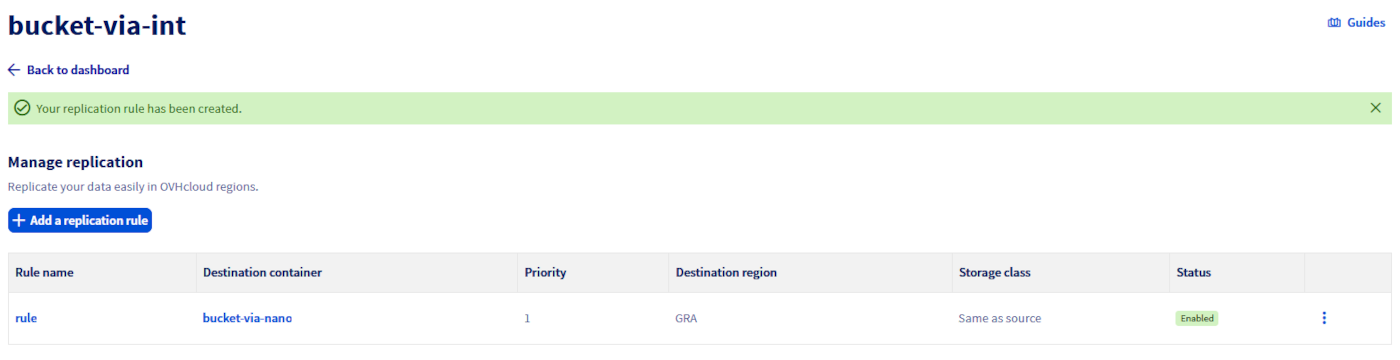
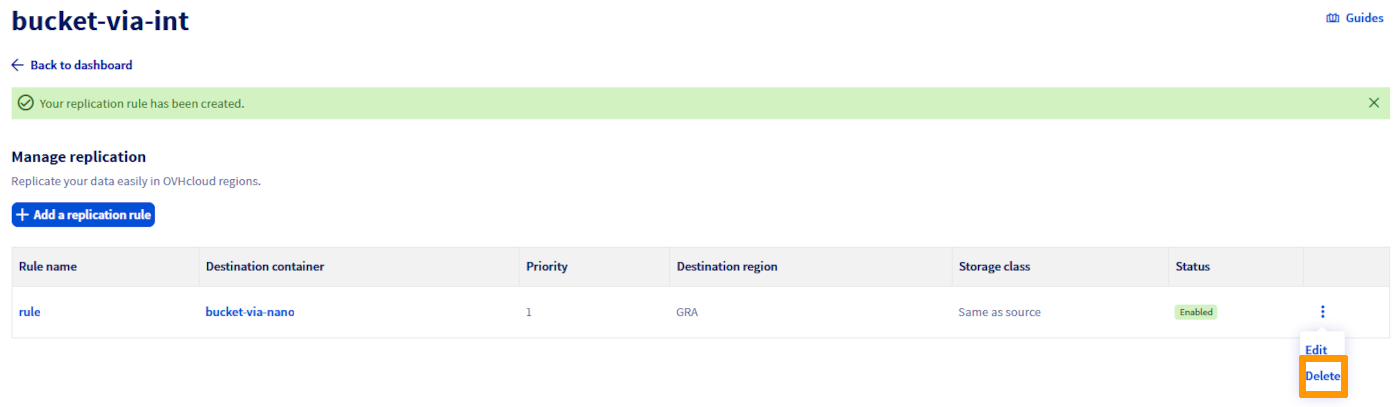
In the Replication rules management view, you can delete a rule from the menu.

replication_screenshot_6

Offsite Replication option in 3-AZ regions

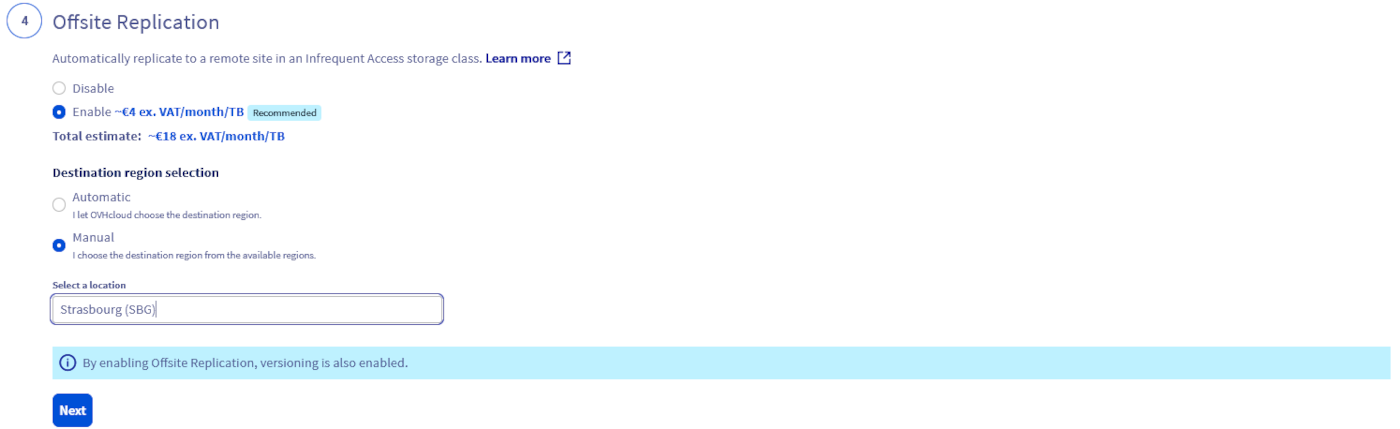
With Object Storage in a 3-AZ region, we have introduced a new option called Offsite Replication, which simplifies the replication process and automatically replicates your data to a remote site for greater resiliency with a one-click action in the OVHcloud Control Panel. This feature is only available for primary Object Storage in a 3-AZ region (to know more about existing 1-AZ and 3-AZ regions, see Endpoints and Object Storage geoavailability) and is based on an OVHcloud auto-generated and managed replication rule configuration:

  • Data is replicated on a remote 1-AZ region. The system will automatically determine the most suitable location among Strasbourg, Gravelines, and Roubaix, ensuring efficient and reliable offsite data protection.
  • Objects stored in the replica bucket are stored in an Infrequent Access class and are billed differently. View pricing on this page. This class is designed for less frequently accessed data and allow you to reduce your overall Object Storage bill together with Standard-class performance level. This said, if the destination bucket storage class doesn’t suit your needs, you can choose another approach and use the asynchronous replication feature and manage the replication rule configuration by yourself.
  • The replica bucket and the replication rule configuration are then available for modification if needed.

Offsite Replication Q&A

How can I access the option in the OVHcloud Control Panel?

When creating a new bucket/container in a 3-AZ region, you will be asked if you want to activate the Offsite Replication option. If enabled, and because it relies on the asynchronous replication feature, versioning will be automatically enabled too.

OffsiteReplication

What are the differences between the asynchronous replication feature and the Offsite Replication feature available in 3-AZ regions?

The Offsite Replication option offered in 3-AZ regions is based on the asynchronous replication feature. With this Offsite Replication option, OVHcloud automatically generates a replication rule configuration with pre-filled parameters, whereas the S31-compatible asynchronous replication functionality allows the user to take control of the entire function (configuration and deployment).

Where will the replicated data be stored, since the replication rule configuration is managed by OVHcloud?

Replicated data is stored like all other data, in a bucket automatically created by OVHcloud. Depending on what is available in the Control Panel, you may be offered a destination choice; otherwise OVHcloud selects automatically among Strasbourg, Gravelines, and Roubaix.

What if a replica bucket is deleted?

The source objects that are to be replicated will have a replication status FAILED when Object Storage tries to replicate them but you will not get any errors.

What about the initial replication rule?

The initial rule will remain unchanged and active until you modify or disable it.

What if a source bucket with offsite replication enabled is deleted? And what about the initial replication rule?

Your replica bucket still exists but no more objects are replicated to it from your original source bucket. The initial replication rule is set up on the source bucket and thus will also be deleted.

Where will be stored the replicated data as the replication rule configuration is managed by OVHcloud?

Your replicated data is stored as any other data and will be stored in a bucket automatically generated by OVHcloud in a region of our choosing. The system will automatically determine the most suitable location between Strasbourg, Gravelines, and Roubaix, ensuring efficient and reliable offsite data protection.

Can I modify the replication rule configuration?

We recommend that you do not modify the auto-generated replication rule configuration to ensure optimal operation. However, as it is a standard asynchronous replication rule configuration, you can decide to enrich/upgrade it for advanced protection by following the steps highlighted in the sections above.

What is the name of the replica bucket?

The destination bucket name follows the pattern backup-{src-region}-{dst-region}-{timestamp_in_ms}-{src-bucket}.

How can I access my backed up data and which actions are possible with the replica bucket?

You can list/head/delete objects on this replica bucket. Data stored on the replica bucket use the Infrequent Access storage class to help you optimize your storage costs. As it is used for data protection reasons and is supposed to be rarely accessed, this storage class is adapted and designed for such use cases. The replica bucket is exclusively dedicated to the Offsite Replication option. You can also read those objects, however a retrieval fee is applied for the Infrequent Access target storage class. View pricing on this page.

Which users/credentials can be used to access the destination bucket?

When you activate the Offsite Replication during the source bucket creation, the same user that you associated with your source bucket will be associated with the replica bucket.

How will my backup data be billed?

You can access the details of the Offsite Replication pricing on the global Object Storage pricing page. It is billed according to the storage space used, with a granularity of 1 GiB. To ensure readability, the price is displayed per GiB/month, but the billing granularity is per GiB/hour.

Go further

If you need training or technical assistance to implement our solutions, contact your sales representative or click on this link to get a quote and ask our Professional Services experts for a custom analysis of your project.

Join our community of users.

1: S3 is a trademark of Amazon Technologies, Inc. OVHcloud's service is not sponsored by, endorsed by, or otherwise affiliated with Amazon Technologies, Inc.

Esta página foi útil?
🚀

Partilhe a sua opinião sobre a nova documentação

O seu feedback ajuda as nossas equipas a melhorar a sua experiência.

2 minutos · Anónimo

Object Storage - Master asynchronous replication across your buckets

Webmail Minha conta Suporte 🇵🇹 Portugues Tema Idiomas 🇵🇹 Portugues 🇫🇷 Francais 🇬🇧 English 🇩🇪 Deutsch 🇪🇸 Espanol 🇮🇹 Italiano 🇵🇱 Polski 🇵🇹 Portugues Menu Nesta pagina Search ⌘K Documentation Beta Referencia da API Registo de alteracoes E-Learning e certificacoes Migracao Bare Metal Cloud Servidores dedicados Visao geral Conceitos chave Bare Metal 3-AZ Region - Apresentacao da oferta Clientes Kimsufi e So you Start - Familiarizar-se com a Area de Cliente OVHcloud Shared responsibility for Dedicated Servers (EN) Understanding the dedicated server boot process Primeiros passos Primeiros passos com um servidor dedicado Primeiros passos com um servidor dedicado Kimsufi, So You Start ou Rise Como comecar com as ligacoes SSH Como criar e utilizar chaves de autenticacao para as ligacoes SSH aos servidores OVHcloud Como armazenar as chaves SSH na sua Area de Cliente Como utilizar a consola IPMI com um servidor dedicado Como obter a pegada de carbono dos seus servicos OVHcloud Configuracao Sistema Configuracao das contas utilizadores e do acesso root num servidor Como alterar a chave de produto do Windows Server Alterar a palavra-passe administrador num servidor dedicado Windows Como redefinir a palavra-passe de administrador com o Rescue-Customer-Windows Como gerir Intel SGX num servidor dedicado Atualizacao do hardware num servidor dedicado High Grade ou Scale Como atribuir uma tag a um servidor Bare Metal How to install VMware ESXi 8 on a dedicated server Armazenamento Gestao e reconstrucao do RAID software nos servidores em modo de arranque legado (BIOS) Gestao e reconstrucao de um RAID software nos servidores que utilizam o modo de arranque UEFI Managing hardware RAID (EN) Hot Swap - Hardware RAID (EN) Substituir um disco a quente num servidor com RAID por software Configurar o seu MegaRAID em RAID 0 Configurar um espelho de software (RAID) em Windows OVHcloud API and Storage (EN) Configuring the storage on a HGR-STOR-2 server (EN) Creating a Windows partition on a server with hardware RAID Advance Dedicated Servers - Upgrading your Samsung NVMe PM9A1 firmware (EN) High Grade Dedicated Servers - Upgrading your SSD SAS Western Digital SS300 firmware (EN) High Grade Dedicated Servers - Upgrading your SSD SAS Western Digital SS530 firmware (EN) Dedicated Servers - Upgrading your SSD Solidigm D7-P5520 firmware Dedicated Servers - Upgrading your Micron 7500 PRO firmware Como verificar a versao do firmware BMC num servidor dedicado Rede Criar um DNS secundario num servidor dedicado Como instalar a chave SSH OVHcloud Como configurar a NIC para o OVHcloud Link Aggregation na Area de Cliente OVHcloud Como configurar a NIC para o OVHcloud Link Aggregation em Debian 9 a 11 Como configurar a agregacao de links com LACP em Debian 12 ou Ubuntu 24.04 (EN) Como configurar a NIC para o OVHcloud Link Aggregation em Windows Server 2019 Como configurar o seu NIC para a agregacao de ligacoes OVHcloud no SLES 15 Tutorial - Instalar um servidor web (LAMP) em Debian ou Ubuntu Manage your server reboot with the OVHcloud Link Aggregation feature (EN) Configurar IPv6 em servidores dedicados Configurar um endereco IPv6 numa maquina virtual (EN) Migrar um Additional IP Configurer des Additional IP en mode bridge sur vos machines virtuelles Quais sao os enderecos IP do monitoring OVHcloud? Configurer son adresse IP en alias Como configurar a reverse DNS do seu servidor (registo PTR) Determinar se a funcionalidade dos MAC virtuais e suportada por um servidor dedicado Atribuir um endereco MAC virtual a um Additional IP Configurar a rede em Windows Server com Hyper-V Configurar a rede em Proxmox VE nas gamas High Grade, Scale & Advance (EN) Upgrade and downgrade Bandwidth via the OVHcloud API Improving Network Resilience on Bare Metal servers vRack Configurar varios servidores dedicados no vRack Configurar quadros Jumbo no vRack Configurar um bloco de Additional IP num vRack Configurar um bloco Additional IPv6 num vRack Alterar o anuncio de um bloco IP no vRack Criar varias VLAN no vRack Utilizar Hyper-V com enderecos Additional IP num vRack Configurar o vRack entre o Public Cloud e um servidor dedicado Upgrade and downgrade private bandwidth (vRack) via the OVHcloud API Implantacao OVHcloud API and OS Installation (EN) Bring Your Own Image (BYOI) / Bring Your Own Linux (BYOLinux), a comparison sheet (EN) Bring Your Own Image (BYOI) (EN) Bring Your Own Linux (BYOLinux) (EN) Configurar um script iPXE personalizado para iniciar o seu servidor atraves da API OVHcloud Migracao Migracao dos dados de um servidor dedicado para outro Como copiar dados de um servidor dedicado para outro utilizando rsync Tutoriais Tutorial - Como usar o PuTTY para conexoes SSH e autenticacao Tutorial - Configuring pfSense network bridge (EN) Tutorial - Instalar um servidor web (LAMP) em Debian ou Ubuntu Activating Windows Machines using Hyper-V on an OVHcloud licensed Windows Server Como Instalar a plataforma CUDA num servidor dedicado GPU Fazer o backup das informacoes e das bases de dados para um servidor de armazenamento Como utilizar o SFTP para transferir ficheiros How to create a Palworld compatible server (EN) Installer un environnement de developpement web sur un VPS ou un serveur dedie How to deploy and verify an OpenNebula Hosted Cloud on Bare Metal servers How to install CloudPanel on a VPS or a Dedicated Server How to install WordPress with Docker on a VPS or a dedicated server How to install WordPress with WP-CLI on a VPS or a dedicated server How to install ISPmanager on a VPS or Dedicated Server Como evitar que os seus e-mails sejam marcados como spam Seguranca Hardening Proteger um servidor dedicado Como proteger um servidor com o servico Memcached How to mitigate the Zenbleed vulnerability How to mitigate the Downfall vulnerability How to mitigate the Inception vulnerability Find your patch for Meltdown and Spectre Information about Meltdown and Spectre vulnerability fixes AMD SME/SEV on Ubuntu 20 Dedicated Server Security Specifications Controle e proteja o seu servidor dedicado ESXi desde o seu primeiro comeco (EN) ESXi Dedicated Servers - FAQ Backup Preparing a Bare Metal Server backup with Veeam Enterprise (EN) Backing up a Bare Metal Linux Server with Veeam Enterprise (EN) Backing Up a Bare Metal Windows Server Using Veeam Agent for Windows (EN) Restoring a Bare Metal Server with Veeam Enterprise (EN) Utilizar o Backup Storage num servidor dedicado Rede OVHcloud AntiSpam - Boas praticas e desbloqueio de um endereco IP Configurar a firewall em Linux com iptables Configurar a firewall em Windows Ativar e configurar o Edge Network Firewall Proteger um servidor de jogos com a firewall aplicacional Monitorizacao dos ataques DDoS com o Network Security Dashboard How to configure the Anti-DDos Infrastructure for Solana Diagnostico Como recuperar o acesso ao servidor em caso de perda da palavra-passe do utilizador Ativar e utilizar o modo rescue Como ativar e utilizar o modo rescue Windows Substituicao do par de chaves SSH Substituir um disco com defeito Diagnosticar avarias materiais num servidor dedicado Obter o numero de serie de um disco rigido Finalizar uma intervencao de manutencao no seu servidor dedicado (EN) Desinstalar o sistema de monitorizacao RTM v2 Recuperacao das bases de dados em modo rescue Network - Fixing slow downloads problems inside containers and VMs running on Proxmox VE servers with Broadcom BCM57502 NICs Servidores privados virtuais Visao geral Primeiros passos Primeiros passos com um VPS VPS - Gestao a partir da Area de Cliente OVHcloud OVHcloud VPS Perguntas frequentes Configuracao das contas utilizadores e do acesso root num servidor Como comecar com as ligacoes SSH Como criar e utilizar chaves de autenticacao para as ligacoes SSH aos servidores OVHcloud Como armazenar as chaves SSH na sua Area de Cliente Como fazer evoluir os recursos de um VPS Reparticionar um VPS apos um upgrade de armazenamento Primeiros passos com as aplicacoes pre-instaladas Como utilizar a consola KVM para aceder a um VPS Gerir um VPS legacy Configuracao Backups Utilizar snapshots num alojamento VPS Comment utiliser les sauvegardes automatisees sur un VPS Configurar um disco adicional Aumentar o tamanho de um disco adicional Rede e IP Configurar o IPv6 num VPS Como configurar a reverse DNS do seu servidor (registo PTR) Configurar um endereco de IP alias Configurar um DNS secundario OVHcloud num VPS Utilizacao avancada Implementar o cPanel num VPS Backup automatico - Kernel panic (cPanel) Migracao How to migrate a website from a VPS to a Dedicated Server or a Public Cloud instance (EN) How to migrate an n8n configuration between two VPS Tutoriais Tutorial - Como usar o PuTTY para conexoes SSH e autenticacao Como utilizar o SFTP para transferir ficheiros Recuperacao das bases de dados em modo rescue Como criar um servidor Minecraft num VPS ou num servidor dedicado How to create a Palworld compatible server (EN) Tutorial - Instalar um servidor web (LAMP) em Debian ou Ubuntu Installer un environnement de developpement web sur un VPS ou un serveur dedie How to install CloudPanel on a VPS or a Dedicated Server How to install WordPress with Docker on a VPS or a dedicated server How to install WordPress with WP-CLI on a VPS or a dedicated server Automating the deployment of your website on your VPS via GitHub Actions (EN) Automating the deployment of your website on your VPS via GitLab CI/CD (EN) How to install n8n on an OVHcloud VPS How to migrate an n8n configuration between two VPS Automate SMS sending with n8n via the OVHcloud API How to create and import a Lovable website on an OVHcloud VPS How to install an AI agent on an OVHcloud VPS How to install ISPmanager on a VPS or Dedicated Server How to install Docker and Docker Compose on a VPS How to install Nextcloud on an OVHcloud VPS with Docker How to install Nextcloud on an OVHcloud VPS with Docker and Traefik How to install an OpenClaw agent on a VPS Automated backup with plakar Seguranca Securiser un VPS Como instalar um certificado SSL num VPS Configurar a firewall em Linux com iptables Configurar a firewall em Windows Diagnostico Verificar o sistema de ficheiros num VPS VPS - Ativar os registos de arranque do Windows Mostrar os logs de boot no KVM Ativar e utilizar o modo rescue num VPS Como recuperar o acesso ao servidor em caso de perda da palavra-passe do utilizador Alterar a palavra-passe de administrador num servidor Windows Substituicao do par de chaves SSH Como evitar que os seus e-mails sejam marcados como spam Recursos adicionais Public Cloud & VPS - Image and OS life cycle and end of life/support announcements Fim do suporte Plesk e cPanel para VPS - Assegurar a continuidade dos seus servicos Managed Bare Metal Visao geral Servicos e opcoes da OVHcloud Configuracao de uma VPN para o Zerto DRP OVHcloud Restaurar backups atraves das API OVHcloud Activating and using Veeam Managed Backup Alterar a politica de acesso ao vCenter Autorizar IP a ligar-se ao vCenter FAQ Capacidade tecnica Funcionalidades OVHcloud Adicionar um bloco IP Snapshots horarias OVHcloud Alteracao da palavra-passe de utilizador Criacao da VLAN Utilizar o Managed Bare Metal no seio de um vRack Host de substituicao Eliminar um servidor host Eliminar um datastore Alterar os direitos de um utilizador Adicionar um recurso faturado a hora Associar um e-mail a um utilizador vSphere Utilizar o plugin OVHcloud Network Como rescindir o seu Managed Bare Metal Primeiros passos Apresentacao da Area de Cliente Managed Bare Metal OVHcloud Configurar um endereco IP numa maquina virtual (EN) Boas praticas de seguranca vSphere Web Client Ligar-se a interface vSphere Migrating an infrastructure to a new vDC Migrating an infrastructure to a Managed Bare Metal solution Gestao das maquinas virtuais Modificar os recursos de uma maquina virtual Criar uma snapshot Criar um Alerta Clonar uma VM Escolher o formato do disco Instalacao das VMware Tools Usar um template OVF Windows e SQL Server Implementacao de uma maquina virtual Como evitar a passagem para o modo leitura apenas do disco da sua VM em Linux Funcionalidades VMware vSphere VMware vMotion VMware Storage vMotion VMware HA (High Availability) VMware Fault Tolerance VMware DRS (Distributed Ressource Scheduler) Ativacao da encriptacao das maquinas virtuais (VM Encryption) Utilizacao do SDK vSphere Hosted Private Cloud Public VCF as-a-Service Visao geral Conceitos-chave Capacidade tecnica Hosted Private Cloud VMware Lifecycle Policy Ciclo de vida do VMware on OVHcloud - Determinar as acoes a empreender (EN) Responsibility sharing for the VMware on OVHcloud service Datamotive - Introduction Public VCF as-a-Service - The fundamentals of Public VCF as-a-Service Technical capabilities and limitations of Public VCF as-a-Service Introducao Apresentacao da Area de Cliente Private Cloud OVHcloud Ligar-se a interface vSphere Connexion a l'API OVH Public VCF as-a-Service - Logging in to your organization (EN) Public VCF as-a-Service - Find out how to use the Public VCF as-a-Service user interface (EN) Configuracao Ligar uma imagem ISO a uma VM (EN) How to disconnect an ISO image from a VM (EN) Configurar um endereco IP numa maquina virtual (EN) Public VCF as-a-Service - Network concepts and best practices Public VCF as-a-Service - Creating network components from the Public VCF as-a-Service control panel Public VCF as-a-Service - Linking a public IP block with vRack Public VCF as-a-Service - Declaring the public IP gateway in VCD Migracao Migrating a PCC to Hosted Private Cloud Migrating an infrastructure to a new vDC End-Of-Life management for LV1 and LV2 storage Public VCF as-a-Service - Migrate from VMware vSphere on OVHcloud Public VCF as-a-Service - Setting up your network after vSphere to Public VCF as-a-Service migration Reversibility Policy for the Managed Mutualized Virtualization product Tutoriais Public VCF as-a-Service - Creating a new virtual machine (EN) Public VCF as-a-Service - Backups with Veeam Data Platform (EN) Seguranca Diagnostico Recursos adicionais FAQ Hosted Private Cloud Como obter a pegada de carbono dos seus servicos OVHcloud Public VCF as-a-Service - FAQ (EN) Managed VMware Conceitos-chave SPN Concept Concepts overview Introducao Introducao ao NSX (EN) Activer NSX-T dans un Hosted Private Cloud VMware on OVHcloud Introducao ao vRealize Operations - vROPS (EN) Getting started with your SecNumCloud vSphere Configuracao Maquinas virtuais Implementacao de uma maquina virtual Instalacao das VMware Tools Escolher o formato do disco Modificar os recursos de uma maquina virtual Como evitar a passagem para o modo leitura apenas do disco da sua VM em Linux Ativacao do modo promiscuo numa Maquina Virtual (EN) Changing the MTU size for machines reaching the OVHcloud Gateway SSL (EN) Deploy an OVF template through content libraries (EN) Usar um template OVF Windows e SQL Server OVF Tool (EN) Armazenamento e recursos Como adicionar uma unidade de armazenamento ? (EN) Como adicionar um host ? (EN) Eliminar um datastore Eliminar um servidor host Uploading an ISO in a datastore Rede e conectividade Criacao de VLANs (EN) Compatibilidade do vRack com o Hosted Private Cloud Enable the Private Gateway Adicionar um bloco IP Host de substituicao Gerenciamento de segmentos no NSX (EN) Configuracao de DHCP no NSX (EN) Configurando o DNS Forwarder no NSX (EN) Adicionando um novo gateway de nivel 1 no NSX (EN) Funcionalidades vSphere Utilizacao do SDK vSphere Managing granular rights on vSphere objects Criacao de cluster e ativacao de EVC (EN) Copias de seguranca e replicacao Activating and using Veeam Managed Backup (EN) Setting up Zerto Virtual Replication between two OVHcloud data centres Setting up Zerto multi-site replication on OVHcloud Managed vSphere Using Zerto between OVHcloud and a third-party platform Encrypting backup jobs with Veeam and OKMS Evitar o bloqueio da maquina virtual com a opcao Veeam Managed Backup Migracao Migrating OmniOS datastores Move2Cloud - Migrating VMware Workloads to OVHcloud Hosted Private Cloud with Veeam Replication Move2Cloud - Migrate VMware workloads to OVHcloud Hosted Private Cloud with Zerto Move2Cloud - Migrating VMware Workloads to OVHcloud SecNumCloud with Veeam Replication Move2Cloud - Migrate VMware workloads to OVHcloud SecNumCloud Hosted Private Cloud with Zerto Tutoriais Maquinas virtuais Criar uma snapshot (EN) Clonar uma VM (EN) Reregistar VM num novo PCC Verificar uma maquina virtual em caso de lentidao (EN) Criar um Alerta VMware vCenter Converter Armazenamento e replicacao Snapshots horarias OVHcloud Zmotion Restaurar backups atraves das API OVHcloud Eliminar a copia de uma VM do local de recuperacao Zerto Veeam Cloud Connect - How to migrate data from Veeam Cloud Connect to Object Storage Rede e NSX Utilizar o plugin OVHcloud Network Utilizar o Hosted Private Cloud no seio de um vRack Utilizar o plugin OVHcloud Configurando NAT para redirecionamentos de porta com NSX (EN) Configuracao de balanceamento de carga no NSX (EN) Funcionalidades vSphere Compreender a interface vScope (EN) VMware DRS (Distributed Resource Scheduler) VMware Storage vMotion Implementar a hiperconvergencia VMware com o vSAN (EN) Adicionar um servidor ESXi a um cluster vSAN (EN) Atualizando o formato de disco do vSAN (EN) Gestao de dominios com avarias vSAN VMware vMotion Alta disponibilidade e resiliencia VMware HA (High Availability) VMware Fault Tolerance Seguranca Gestao de identidade e acesso IAM for VMware on OVHcloud - Presentation and FAQ IAM for VMware on OVHcloud - How to activate IAM IAM for VMware on OVHcloud - How to create an IAM vSphere role IAM for VMware on OVHcloud - How to associate a vSphere role with an IAM policy IAM for VMware on OVHcloud - How to associate a user with a global IAM policy How to use IAM policies with vSphere (EN) Alteracao da palavra-passe de utilizador Associar um e-mail a um utilizador vSphere Encriptacao e gestao de chaves vNKP - Enabling virtual machine encryption (EN) Ativacao da encriptacao das maquinas virtuais (VM Encryption) (EN) KMS for VMware on OVHcloud - VM encryption use case scenarios KMS for VMware on OVHcloud - Configuring VM encryption Mise en route du KMS CipherTrust Manager Seguranca de rede (NSX) Gerenciamento de firewall distribuido no NSX (EN) Gerenciamento de firewall de gateway no NSX (EN) Setting up an IPsec Tunnel with NSX (EN) Configure BGP between two PCCs via NSX-T (EN) Endurecimento do sistema e vulnerabilidades Boas praticas de seguranca vSphere Web Client Interface segura Utilizacao da dupla autenticacao (2FA) na sua infraestrutura Hosted Private Cloud Autorizar IP a ligar-se ao vCenter Verificar e bloquear a falha L1TF Checking and applying patches for Spectre/Meltdown vulnerabilities on your hosts Utiliser le protocole SSLv3 sur Private Cloud Conformidade e SecNumCloud Partage de responsabilite sur le service Hosted Private Cloud by VMware sous la qualification SecNumCloud VPN-SPN Concept SPN Connector Concept Diagnostico Manutencao e atualizacoes VMware on OVHcloud maintenance operations (EN) Desativar uma manutencao programada no seu Hosted Private Cloud Updating hosts using vSphere Lifecycle Management (vLCM) Utilizar o VMware Update Manager Expandir um volume no vSphere e num SO (EN) Testar a perda temporaria de um host atraves da ativacao do modo Resiliencia (EN) Monitorizacao e registos Configuring a vROps alert via the SMTP protocol Logs Data Platform - Collect VMware on OVHcloud logs (EN) NSX-T: retrieving logs How to read and filter NSX-T logs Monitorizacao da conformidade Ativar a certificacao PCI DSS no Private Cloud da OVH How to manage Windows licences for virtual machines on your Hosted Private Cloud infrastructure Como alterar a chave de produto do Windows Server Recursos adicionais NSX - FAQ (EN) Pricing and Management of OVHcloud NSX Edges FAQ SecNumCloud Connectivity SNC Cloud Platform Primeiros passos Mise en route de votre projet SNC Cloud Platform Comment sauvegarder une instance SNC Cloud Platform Comment sauvegarder un bucket Object Storage SNC Cloud Platform Bare Metal Pod Primeiros passos Getting started with your Bare Metal Pod SecNumCloud On-Prem Cloud Platform Primeiros passos Getting started with your OPCP Lifecycle of an OPCP Node OPCP - How to use the APIs and obtain the credentials OPCP - How to install an instance from the Horizon interface OPCP - How to Deploy an Instance via OpenStack APIs OPCP - How to setup LACP on a Node OPCP - How to set up Trunk ports on a Node OPCP - How to configure a software RAID on a node OPCP - How to see the node inventory Recursos adicionais OPCP - Object Storage features and specifications Building a custom OpenStack Image on OPCP OPCP - Ceph RBD Block Storage - Performance, Resilience and Scalability with OpenStack Nutanix on OVHcloud Conceitos-chave Nutanix on OVHcloud - Documentacao geral (EN) Nutanix hardware compatibility - OVHcloud configurations Versoes Nutanix AOS suportadas pela OVHcloud (EN) Lista dos licencas incluidos (EN) Plano de Retomada de Atividade em Nutanix (EN) Partilha de responsabilidades - Nutanix on OVHcloud (EN) Nutanix on OVHcloud - Lifecycle Policy Introducao Primeiros passos com o seu cluster Nutanix (EN) Hiperconvergencia Nutanix (EN) Reafectacao personalizada do seu Cluster (EN) Apresentacao do armazenamento em Nutanix (EN) Importar imagens ISO (EN) Gestao das maquinas virtuais (EN) Gestao dos alertas e eventos (EN) Gestao das licencas no seu cluster da oferta Nutanix on OVHcloud BYOL (EN) Rede e seguranca Documentacao da OVHgateway (EN) Adicionar um endereco IP publico a uma nova VM (EN) Upgrade do seu cluster Nutanix (EN) Atualizacao de firmware do cluster Nutanix (EN) Configuracao Modificacao do vRack de um cluster Nutanix (EN) Isolacao das maquinas de gestao da producao (EN) Configurar Fluxo Nutanix (EN) Substituir o OVHgateway por um servidor dedicado (EN) Substituir OVHgateway (EN) KMS configuration with Nutanix on OVHcloud Configurar HYCU Backup (EN) Configurar Veeam Backup para Nutanix (EN) Migracao Migracao para Nutanix atraves da ferramenta Nutanix Move (EN) Tutoriais Ferramentas avancadas (EN) Ativar VMs do Windows instaladas no Nutanix pela OVHcloud (EN) Adicionar ou retirar um no num cluster Nutanix (Scale In/Out) (EN) Substituicao de Prism Central do modo Small pelo modo X-LARGE (EN) Criacao de NCM Self Service (CALM) (EN) Configuracao dos Objects Nutanix (EN) Seguranca Seguranca do acesso Web ao Prism Central (EN) Interligacao IPSec entre dois locais (EN) Interligacao de clusters atraves do vRack (EN) Diagnostico Obter as informacoes do estado da sua instalacao Nutanix (EN) Recursos adicionais Replicacao assincrona ou NearSync atraves de Prism Element (EN) Replicacao avancada com Leap (EN) Configurando a recuperacao de desastres com o Metro (EN) Setting up Multicloud Snapshot Technology (MST) on a Nutanix on OVHcloud infrastructure Configuring Prism Central Point-in-Time Backup to OVHcloud S3-compatible Object Storage SAP on OVHcloud Conceitos SAP HANA on Bare Metal and SAP Application Servers on VMware on OVHcloud SAP infrastructure with VMware on OVHcloud solution SAP infrastructure with SecNumCloud-qualified SAP HANA on Private Cloud Primeiros passos Install SAP HANA on Bare Metal with SLES 15 for SAP Deploy a virtual machine with SAP HANA and OVHcloud Backint Agent pre-installed Deployer un SAProuter avec NSX Shared responsibility for SAP on OVHcloud solutions Implementacoes automaticas Deploy virtual machines of SAP Application Server on VMware on OVHcloud solution with Terraform Deploy virtual machines of SAP HANA database on VMware on OVHcloud solution with Terraform Deploy an SAP system infrastructure on VMware on OVHcloud solution with Terraform SAP pre-installation wizard Resiliencia SAP HANA cluster with SLES on VMware on OVHcloud Backups Install and use OVHcloud Backint Agent for SAP HANA Use OVHcloud Backint Agent with several Object Storage buckets OVHcloud Backint Agent versions Sauvegarder SAP HANA avec Veeam Backup and Replication Observabilidade SAP logs on OVHcloud Logs Data Platform - Configuration SAP logs on OVHcloud Logs Data Platform - Analysez et exploitez vos logs SAP logs on OVHcloud Logs Data Platform - Index des logs SAP Public Cloud Public Cloud - Informacoes gerais Visao geral Conceitos-chave Public Cloud Glossary Limites de debito das API Public Cloud Comparison and resilience of Deployment Modes - Understanding 3-AZ / 1-AZ / Local Zones (EN) 3-AZ resilience: Mechanisms and reference architectures (EN) How do Savings Plans work? Introducao O essencial para comecar com o Public Cloud Familiarizar-se com a interface Public Cloud Criando seu primeiro projeto Public Cloud da OVHcloud Getting started with OVHcloud Shell Getting Started with OVHcloud CLI Configuracao Informacoes de faturacao Aumentar as quotas Public Cloud Comment gerer un Savings Plan Gestao de projectos Public Cloud Best Practices for securing & structuring OVHcloud Public Cloud Projects (EN) Eliminar um projeto Public Cloud Delegar projetos Migracao Public Cloud IaaS Migration - Steps and Best Practices Architecture Reference - Building a Landing Zone with OVHcloud Public Cloud Tutoriais Gestao a partir do Horizon Apresentacao do Horizon Parametros de acesso e de seguranca no Horizon Gestao a partir do Openstack Preparar o ambiente para utilizar a API OpenStack Carregar as variaveis de ambiente OpenStack Utilizacao dos tokens OpenStack Gestao dos tokens How to use service accounts to connect to OpenStack (EN) Gestao dos utilizadores OpenStack Gestao das regras de firewall e port security nas redes que utilizam OpenStack CLI Gestao a partir do Terraform Terraform Tutorial (EN) Seguranca Healthcare (HDS) compliance activation (EN) Diagnostico FAQ Public Cloud OVHcloud Recursos adicionais Informacoes sobre o metodo de faturacao Public Cloud Proper Usage and Limitations of Classic Multi-Attach Block Storage in 3AZ Regions Understanding Landing Zones Understanding metrics in OVHcloud Public Cloud Compute Visao geral Conceitos-chave Public Cloud Instancias - Conceitos-chave Introducao Adicionar um credito cloud Como criar uma instancia Public Cloud e conectar-se a ela Gerir as suas instancias Public Cloud Como iniciar uma instancia Public Cloud num volume de arranque Suspender ou colocar em pausa uma instancia Ativar uma licenca Windows para uma instancia em modo privado Primeiros passos com as aplicacoes pre-instaladas Configuration Gestao do projeto Gestao de contactos de um projeto Public Cloud Compute - Passar de uma faturacao a hora para uma faturacao ao mes Gestao das instancias Guardar uma instancia Criar / Restaurar um servidor virtual a partir de um backup Modificar o hostname de uma instancia Public Cloud Comment activer le mode rescue sur une instance Public Cloud Colocar uma instancia Metal em modo de rescue - (EN) Como substituir um par de chaves SSH numa instancia Public Cloud Criar uma instancia GPU Configurar a reverse DNS de uma instancia Public Cloud Redimensionar uma instancia atraves da Area de Cliente OVHcloud Creating and using a Server Group in Horizon and CLI Gestao a partir do Horizon Criar uma instancia a partir da interface Horizon Gerir as suas instancias Public Cloud atraves do Horizon Criar e configurar um grupo de seguranca no Horizon Gestao de snapshots de uma instancia na interface Horizon Criacao, dar inicio e eliminar imagens no Horizon Redimensionar uma instancia atraves do Horizon Migrar de uma instancia Flex para uma instancia classica Gestao via OpenStack API Primeiros passos com a API OpenStack Comecar com a gestao dos volumes na API OpenStack Importe a sua propria imagem Redimensionar uma instancia de Public Cloud usando a CLI do OpenStack Descarregar e transferir a copia de seguranca de uma instancia de uma regiao OpenStack para outra Launching a script when an instance is created Partilhar um objeto com um endereco temporario Partilhar imagens entre projetos Public Cloud Migracao Migracao de instancias entre zonas de disponibilidade (AZ) Tutoriais Tutorial - Como usar o PuTTY para conexoes SSH e autenticacao Using OVHcloud Object Storage as Terraform Backend to store your Terraform state (EN) Using OVHcloud Object Storage as Pulumi Backend to store your Pulumi state Create a custom OpenStack image with Packer (EN) How To Install ownCloud on a Public Cloud Instance Como instalar o Plesk numa instancia Public Cloud Instalar o WordPress numa instancia Instalar o agente Prometheus numa instancia Public Cloud How to deploy the 3CX IPBX automatically on OVHcloud Public Cloud Tutorial - Instalar um servidor web (LAMP) em Debian ou Ubuntu Local Zone VPN-as-a-Service (VPNaaS) with Tailscale integration (EN) Enterprise File Storage - Connect a Public Cloud instance to an EFS Volume via vRack Private Network Seguranca Como criar e utilizar chaves de autenticacao para as ligacoes SSH as instancias Public Cloud Como configurar chaves SSH suplementares numa instancia Alterar a palavra-passe de administrador num servidor Windows Atualizar o sistema operativo Diagnostico Forensics: How to deal with Public Cloud instances (EN) Reparar o bootloader GRUB Redimensionar o sistema de ficheiros no FreeBSD 12 Recuperacao das bases de dados em modo rescue FAQ - Alteracao do regime de faturacao mensal Recursos adicionais Public Cloud Instances - Shared responsibilities (EN) Public Cloud & VPS - Image and OS life cycle and end of life/support announcements Local Zone Compute - Funcionalidades, capacidades e limites Como obter a pegada de carbono dos seus servicos OVHcloud Como evitar que os seus e-mails sejam marcados como spam Storage and Backup Object Storage S3 compatible Conceitos Object Storage - Choosing the right storage class for your needs Object Storage - Endpoints and Object Storage geoavailability Comparison of Object Storage Deployment Modes - Understanding 3-AZ / 1-AZ / Local Zones Cold Archive - Visao Geral (EN) Introducao Object Storage - Getting started Cold Archive - Getting started with Cold Archive Object Storage - Identity and access management Configuracao Object Storage - Getting Started with Versioning Object Storage - Smart Storage Management with Lifecycle Rules Object Storage - Master asynchronous replication across your buckets Object Storage - Server Access Logging Object Storage - Setting up CORS on Object Storage Object Storage - Bucket ACL Object Storage - Hosting a static website in an Object Storage bucket Object Storage - Restoring an archived object from Cold Archive storage class Object Storage - Enabling HTTPS on a static website using a custom domain Object Storage - How to connect Object Storage buckets with other resources in a vRack Migracao Object Storage - How to migrate from an S3-compatible object storage provider to OVHcloud Object Storage Object Storage - How to migrate from OVHcloud Swift Object Storage to OVHcloud S3-compatible Object Storage Tutoriais Object Storage - Use Object Storage with Rclone Object Storage - Use Object Storage with S3cmd Object Storage - Use Object Storage with WinSCP Object Storage - Utilizar Object Storage com Veeam (EN) Object Storage - Utilizar Object Storage com Nextcloud (EN) Object Storage - Utilizar Object Storage com Owncloud (EN) Object Storage – Use Object Storage with Cohesity NetBackup Object Storage – Use Object Storage with Pure Storage Flashblade Object Storage - Manage an Object Storage bucket with Terraform Object Storage – How to share an object or file externally Seguranca Object Storage - Encrypt your server-side objects with SSE-C or SSE-OMK Object Storage - Managing object immutability with Object Lock (WORM) Object Storage - Identity and access management Diagnostico Object Storage - FAQ Cold Archive - FAQ (EN) Object Storage - Local Zones specifications Object Storage - Compliance Object Storage - Limites tecnicos (EN) Object Storage - Optimising Performance Object Storage - Optimise the sending of your files to Object Storage Recursos adicionais Object Storage - Shared Responsibility Cold Storage - Shared Responsibility for archive and restoration services Object Storage - Third-party applications compatibility Swift Introducao Object Storage Swift - Creating an Object Storage container Object Storage Swift - Os primeiros passos com a API swift Object Storage Swift - Primeiros passos com a API Swift S3 Configuracao Object Storage Swift - Associar um container a um nome de dominio Object Storage Swift - Sincronizando conteineres de objetos (EN) Object Storage Swift - Configurar a eliminacao automatica de objectos Object Storage Swift - Setting up CORS on Object Storage (EN) Cloud Archive Swift - Gerir os seus arquivos a partir de um cliente SFTP/SCP Cloud Archive Swift - Criacao de container Public Cloud Archive Cloud Archive Swift - Descongelar os seus dados armazenados no Public Cloud Archive Cloud Archive Swift - Set up an Access Control List on Public Cloud Archive (EN) Migracao Object Storage - How to migrate from OVHcloud Swift Object Storage to OVHcloud S3-compatible Object Storage Tutoriais Object Storage Swift - Sincronizar uma NAS Synology com o Object Storage Object Storage Swift - Montar um container de objetos com S3QL (EN) Object Storage Swift - Utilizar o Object Storage com CyberDuck Object Storage Swift - Using Object Storage with Rclone Object Storage Swift - Configure o ownCloud com o Object Storage (EN) Cloud Archive Swift - Gerir os seus arquivos a partir de um cliente Swift (Cyberduck) Cloud Archive Swift - Gestao dos seus arquivos com Rsync Seguranca Object Storage Swift - Set up an Access Control List on Object Storage (EN) Diagnostico Object Storage Swift - S3/Swift REST API compatibility (EN) Object Storage Swift - Capabilities and limitations Cloud Archive Swift - Capabilities and limitations Object Storage Swift - Otimizar os uploads para o Object Storage Recursos adicionais Object Storage Swift - Curl Command Memo (EN) Object Storage Swift - Swift commands Memo (EN) Cloud Archive Swift - Curl Command Memo (EN) Cloud Archive Swift - Swift Command Memo (EN) Block Storage Conceitos-chave Escolher a classe correta de Block Storage Proper Usage and Limitations of Classic Multi-Attach Block Storage in 3AZ Regions Introducao Criar e configurar um disco suplementar numa instancia Criar uma copia de seguranca de um volume Criar uma snapshot de um volume Configuracao Criar um volume a partir de um backup Aumentar o tamanho de um disco adicional Testar a velocidade dos discos Migracao Migrer un volume Block Storage vers un volume chiffre LUKS Modificar um Volume Block Storage Recursos adicionais Public Cloud Block Storage - Shared responsibilities (EN) File Storage Key concepts Introducao File Storage Service - Getting started (Beta) Public Cloud Network Services Conceitos-chave Concepts - Public Cloud Networking (EN) Concepts - Additional IP or Floating IP (EN) Concepts - Load Balancer (EN) Public Cloud Network Services - Known limits (EN) Introducao Private Network Creating a private network with Gateway (EN) Configuracao do vRack Public Cloud Configuring vRack on the Public Cloud using the OVHcloud API (EN) Configuracao do vRack Public Cloud com a ajuda da OpenStack CLI Modificar os servidores DNS de uma instancia Public Cloud Load Balancer Getting started with Load Balancer on Public Cloud Public IPs Attaching a Floating IP to a Public Cloud instance (EN) Configuracao Private Network How to share a private network between 2 Public Cloud projects How to extend a private OVHcloud network across Public Cloud regions Update a subnet properties (EN) Changing the MTU size for existing networks using OpenStack CLI/API (EN) Load Balancer Deploying a Public Cloud Load Balancer (EN) Updating a Load Balancer size via the Horizon interface Using the weight feature on a Load Balancer member Public Cloud Load Balancer TCP / HTTP / HTTPS Logs Forwarding (EN) Public IPs Configurar um Additional IP Adicionar um Additional IP Importar um Additional IP Migrar um Additional IP Gateway L3 services SNAT configuration (EN) Configurar o IPv6 numa instancia Public Cloud Configuring a public IP block in a vRack on a Public Cloud instance Tutoriais geral Proteger a sua infraestrutura OVHcloud com o Stormshield Network Security Securing your OVHcloud infrastructure with Ubika WAAP Gateway (EN) Private Network Local Zone VPN-as-a-Service (VPNaaS) with Tailscale integration (EN) Load Balancer Configuring a secure Load Balancer with Let's Encrypt (EN) Seguranca Configuring a secure Load Balancer with Let's Encrypt (EN) Configuring a TERMINATED_HTTPS listener via CLI / Horizon Proteger a sua infraestrutura OVHcloud com o Stormshield Network Security Securing your OVHcloud infrastructure with Ubika WAAP Gateway (EN) Diagnostico Public Cloud Network Services - FAQ (EN) Recursos adicionais How to create and manage a Health Monitor for OVHcloud Public Cloud Load Balancer How to create and manage Level 7 (L7) Policies and Rules for OVHcloud Public Cloud Load Balancers Public Cloud Load Balancer monitoring with Prometheus Containers & Orchestration Managed Kubernetes Service (MKS) Visao geral Key concepts Understanding OVHcloud Managed Kubernetes architecture Limites connues Choosing the right OVHcloud Managed Kubernetes Plan: Free or Standard Available datacenters, worker nodes and persistent storage flavors Exposed APIs, Kubernetes configuration and Feature gates Getting started Creating a cluster Deploying an application Deploying a Hello World application Expose your app deployed on an OVHcloud Managed Kubernetes Service Installing the Kubernetes Dashboard on OVHcloud Managed Kubernetes Installing and using Helm on OVHcloud Managed Kubernetes Installing WordPress on OVHcloud Managed Kubernetes Deploying a GPU application on OVHcloud Managed Kubernetes Service Managed Kubernetes objects (services, deployments, pods...) Configuration Cluster Configuring kubectl on an OVHcloud Managed Kubernetes cluster Configuring the API server flags on an OVHcloud Managed Kubernetes cluster Resetting an OVHcloud Managed Kubernetes cluster Upgrading Kubernetes version on an OVHcloud Managed Kubernetes cluster Add IP restrictions on an OVHcloud Managed Kubernetes cluster Changing the security update policy on an OVHcloud Managed Kubernetes cluster Configuring the OIDC provider on an OVHcloud Managed Kubernetes cluster Personnaliser l'allocation IP sur un cluster OVHcloud Managed Kubernetes Nodepools & Nodes How to manage nodes and node pools on an OVHcloud Managed Kubernetes cluster Dynamically resizing a cluster with the cluster autoscaler Configuring the cluster autoscaler Adding Labels & Taint on Node Pool (Node Pool template) Cluster autoscaler example Deploy applications to specific Nodes and Nodes Pools Taint, cordon and drain specific Nodes and Nodes Pools Adapt your Inotify parameters for your Managed Kubernetes Service deployments Storage Persistent Volumes on OVHcloud Managed Kubernetes Service Resizing Persistent Volumes Configuring multi-attach persistent volumes with OVHcloud NAS-HA Configuring multi-attach persistent volumes with Enterprise File Storage Configuring multi-attach persistent volumes with OVHcloud Cloud Disk Array Formating NVMe disks on IOPS nodes Network Using vRack Private Network Using vRack - Communicating between different private networks Using a custom gateway on an OVHcloud Managed Kubernetes cluster Working with vRack example - Managed Kubernetes and Public Cloud instances Working with vRack example - Communicating between different private networks Using Floating IPs on Managed Kubernetes Service Customizing Kube-proxy on an OVHcloud Managed Kubernetes cluster Customizing CoreDNS on an OVHcloud Managed Kubernetes cluster Customizing Cilium on an OVHcloud Managed Kubernetes cluster Traffic management Installing Nginx Ingress on OVHcloud Managed Kubernetes Expose your applications using OVHcloud Public Cloud Load Balancer Sticky sessions/Session Affinity based on Nginx Ingress on OVHcloud Managed Kubernetes Secure a Nginx Ingress with cert-manager on OVHcloud Managed Kubernetes Getting the source IP behind the LoadBalancer How to migrate from Load Balancer for MKS (IOLB) to Public Cloud Load Balancer (Octavia) Backup and Restore Backup and Restore OVHcloud Managed Kubernetes Cluster, Namespace and Applications using TrilioVault for Kubernetes Backing-up an OVHcloud Managed Kubernetes cluster using CloudCasa Backing up and restoring your Persistent Volume with Volume Snapshots on OVHcloud Managed Kubernetes Backing-up an OVHcloud Managed Kubernetes cluster using Velero Backing-up Persistent Volumes using Stash Monitoring & Observability Monitoring apps with Prometheus and Grafana on an OVHcloud Managed Kubernetes Service Collect metrics from Public Cloud instances with Prometheus on an OVHcloud Managed Kubernetes Service Distributed tracing with Jaeger on an OVHcloud Managed Kubernetes Service Pushing logs from a Kubernetes cluster to Logs Data Platform using Fluent Bit Managed Kubernetes Service Audit Logs Forwarding Monitoring GPU usage on OVHcloud Managed Kubernetes Service Managed Kubernetes Service Audit Logs Forwarding Operators Set up the Kubernetes operator for Public Cloud Databases Deploying a Kubernetes Operator based on Helm on OVHcloud Managed Kubernetes Deploying a Kubernetes Operator written in Golang on OVHcloud Managed Kubernetes Migration Migration Guide – Moving Your Kubernetes cluster to OVHcloud How to migrate from Load Balancer for MKS (IOLB) to Public Cloud Load Balancer (Octavia) Tutorials Installing Agones on OVHcloud Managed Kubernetes Installing Jenkins on OVHcloud Managed Kubernetes Using Codefresh with OVHcloud Managed Kubernetes cluster Deploying Apache Pulsar on an OVHcloud Managed Kubernetes cluster How to install OpenFaaS CE on OVHcloud Managed Kubernetes Run Serverless containers on OVHcloud Managed Kubernetes with Knative Deploying Artifactory on an OVHcloud Managed Kubernetes cluster Enforcing policy management on OVHcloud Managed Kubernetes with Kyverno Scan for vulnerabilities and misconfigurations of your OVHcloud Managed Kubernetes with Trivy Near real-time threats detection with Falco on OVHcloud Managed Kubernetes Sanitize your OVHcloud Managed Kubernetes with Popeye Installing cert-manager on OVHcloud Managed Kubernetes Installing Keycloak, an OIDC Provider, on OVHcloud Managed Kubernetes Installing Istio on OVHcloud Managed Kubernetes Traffic management with Istio on OVHcloud Managed Kubernetes Security Add IP restrictions on an OVHcloud Managed Kubernetes cluster Changing the security update policy on an OVHcloud Managed Kubernetes cluster Configuring the OIDC provider on an OVHcloud Managed Kubernetes cluster Encrypt your Secret for OVHcloud Managed Kubernetes with Sealed Secrets (Kubeseal) Using RBAC to handle limited access to an OVHcloud Managed Kubernetes cluster Troubleshooting ETCD Quotas, usage, troubleshooting and error Troubleshooting permission errors when enabling persistence Additional resources Managed Kubernetes End-of-Sale, End-of-Service and End-of-Life policies Managed Kubernetes - Responsibility model Orchestration product reversibility policy Recommended external resources OVHcloud Managed Kubernetes - Features and roadmap Kubernetes Plugins (CNI, CRI, CSI...) & softwares versions and reserved resources Managed Private Registry (MPR) Visao geral Getting started Creating a private registry Creating a private registry (Harbor) through Terraform Creating a private registry with Pulumi Creating and using a Docker image stored in an OVHcloud Managed Private Registry Connecting to the UI Managing users and projects Configuration Using Private Registry with OVHcloud Managed Kubernetes Managing Helm charts in the OVHcloud Managed Private Registry Deploying a Helm chart from your private registry in Kubernetes Configuring Proxy Cache on an OVHcloud Managed Private Registry Migrate Helm Charts from Chartmuseum to OCI Security Configure the authentication via an OIDC provider on an OVHcloud Managed Private Registry Adding IP restrictions on an OVHcloud Managed Private Registry Sign OCI artifacts with Cosign on OVHcloud Managed Private Registry Scanning Docker images for vulnerabilities with OVHcloud Managed Private Registry Troubleshooting FAQ Managed Private Registry (MPR) Additional resources Managed Private Registry - Responsibility model (EN) Managed OCI artifact Registry Product Reversibility Policy Managed Rancher Service (MRS) Visao geral Getting started Getting Started with Managed Rancher Service Creating, updating and accessing a Managed Rancher Service (EN) Managing users and projects in Managed Rancher Service Importing an existing Kubernetes cluster in MRS Creating a Managed Kubernetes Service (MKS) cluster in MRS Creating a Kubernetes cluster based on OVHcloud Public Cloud Compute Instances in MRS Creating a Kubernetes cluster with existing nodes (Generic) in MRS Configuration Editing the configuration of a Kubernetes cluster in Managed Rancher Service Backing up and restoring a Kubernetes cluster in Managed Rancher Service Deploying a monitoring stack (Prometheus & Grafana) in a Kubernetes cluster in MRS Tutorials How to use Rancher CLI Additional resources Managed Rancher Service supported versions and lifecycle policy Orchestration product reversibility policy Public Cloud Databases Visao geral PostgreSQL Visao geral Conceitos-chave Lifecycle policy for Public Cloud Databases FAQ for Public Cloud Databases Capabilities and Limitations of Public Cloud Databases Capabilities and Limitations of Public Cloud Databases for PostgreSQL Automated Backups for Public Cloud Databases High availability and failure scenarios for Public Cloud Databases for PostgreSQL Introducao Getting started with Public Cloud Databases Getting started with Public Cloud Databases APIs Getting started with Terraform for Public Cloud Databases Configure incoming connections of a Public Cloud Databases for PostgreSQL service Connect using the CLI for Public Cloud Databases for PostgreSQL Connect using PHP for Public Cloud Databases for PostgreSQL Connect using Python for Public Cloud Databases for PostgreSQL Connect using PgAdmin for Public Cloud Databases for PostgreSQL Configuracao Create and use connection pools in Public Cloud Databases for PostgreSQL Maintenance operations for Public Cloud Databases Configurer le reseau prive des bases de donnees Public Cloud (EN) Configure the advanced parameters for Public Cloud Databases Advanced parameters for Public Cloud Databases for PostgreSQL Restore a backup of Public Cloud Databases Detect and terminate long-running queries of Public Cloud Databases for PostgreSQL Resize the storage of Public Cloud Databases Update the flavor of Public Cloud Databases Update the plan of Public Cloud Databases Mettre en place le transfert de logs des bases de donnees Public Cloud (EN) Set up the Kubernetes operator for Public Cloud Databases Set up service integration for Public Cloud Databases Fetch service metrics with Prometheus for Public Cloud Databases Enable deletion protection for Public Cloud Databases Migracao Public Cloud Databases - How to migrate to OVHcloud Database as a Service (DBaaS) Reversibility Policy for Managed Relational Database Product Tutoriais Build a Strapi app connected to Public Cloud Databases for PostgreSQL Install and connect Wagtail to Public Cloud Databases for PostgreSQL Migrate an on-premises database to Public Cloud Databases for PostgreSQL Seguranca Security Overview for Public Cloud Databases Responsibility model for Public Cloud Databases Diagnostico Troubleshoot your Public Cloud Databases Handle 'Disk Full' situations for Public Cloud Databases Recursos adicionais Available extensions for Public Cloud Databases for PostgreSQL MySQL Visao geral Conceitos-chave Lifecycle policy for Public Cloud Databases FAQ for Public Cloud Databases Capabilities and Limitations of Public Cloud Databases Capabilities and Limitations of Public Cloud Databases for MySQL Automated Backups for Public Cloud Databases Introducao Getting started with Public Cloud Databases Getting started with Public Cloud Databases APIs Getting started with Terraform for Public Cloud Databases Configure incoming connections of a Public Cloud Databases for MySQL service Connect using the CLI for Public Cloud Databases for MySQL Connect using PHP for Public Cloud Databases for MySQL Connect using Python for Public Cloud Databases for MySQL Connect using Workbench for Public Cloud Databases for MySQL Configuracao Maintenance operations for Public Cloud Databases Configurer le reseau prive des bases de donnees Public Cloud (EN) Configure the advanced parameters for Public Cloud Databases Advanced parameters for Public Cloud Databases for MySQL Restore a backup of Public Cloud Databases Resize the storage of Public Cloud Databases Update the flavor of Public Cloud Databases Update the plan of Public Cloud Databases Mettre en place le transfert de logs des bases de donnees Public Cloud (EN) Set up the Kubernetes operator for Public Cloud Databases Set up service integration for Public Cloud Databases Fetch service metrics with Prometheus for Public Cloud Databases Enable deletion protection for Public Cloud Databases Migracao Public Cloud Databases - How to migrate to OVHcloud Database as a Service (DBaaS) Reversibility Policy for Managed Relational Database Product Tutoriais Connect Managed Kubernetes to Public Cloud Databases for MySQL Seguranca Security Overview for Public Cloud Databases Responsibility model for Public Cloud Databases Diagnostico Troubleshoot your Public Cloud Databases Handle 'Disk Full' situations for Public Cloud Databases MongoDB Visao geral Conceitos-chave Why choose MongoDB? Cluster sizing for Public Cloud Databases for MongoDB Developer Best Practices with Public Cloud Databases for MongoDB Operational Best Practices with Public Cloud Databases for MongoDB Lifecycle policy for Public Cloud Databases FAQ for Public Cloud Databases Capabilities and Limitations of Public Cloud Databases Capabilities and Limitations of Public Cloud Databases for MongoDB Automated Backups for Public Cloud Databases Understand the connection strings URI format of Public Cloud Databases for MongoDB Introducao Getting started with Public Cloud Databases for MongoDB Getting started with Public Cloud Databases Getting started with Public Cloud Databases APIs Getting started with Terraform for Public Cloud Databases Deploy with Terraform for Public Cloud for MongoDB Configure incoming connections of a Public Cloud Databases for MongoDB service Connect using the CLI for Public Cloud Databases for MongoDB Connect using PHP for Public Cloud Databases for MongoDB Connect using Python for Public Cloud Databases for MongoDB Connect using Compass for Public Cloud Databases for MongoDB Developer Tools for Public Cloud Databases for MongoDB Cluster monitoring for Public Cloud Databases for MongoDB Configuracao Maintenance operations for Public Cloud Databases Configurer le reseau prive des bases de donnees Public Cloud (EN) Configure the advanced parameters for Public Cloud Databases Restore a backup of Public Cloud Databases Backup and restore a service with the CLI for Public Cloud Databases for MongoDB Resize the storage of Public Cloud Databases Update the flavor of Public Cloud Databases Update the plan of Public Cloud Databases Mettre en place le transfert de logs des bases de donnees Public Cloud (EN) Set up the Kubernetes operator for Public Cloud Databases Set up service integration for Public Cloud Databases Fetch service metrics with Prometheus for Public Cloud Databases Enable deletion protection for Public Cloud Databases Migracao Public Cloud Databases - How to migrate to OVHcloud Database as a Service (DBaaS) Migrate to OVHcloud Public Cloud Databases for MongoDB Relational Migrator for Public Cloud Databases for MongoDB Reversibility Policy for Managed Document Database Product Tutoriais Build and connect a Node.js application to Public Cloud Databases for MongoDB Seguranca Security Overview for Public Cloud Databases Responsibility model for Public Cloud Databases Diagnostico Troubleshoot your Public Cloud Databases Handle 'Disk Full' situations for Public Cloud Databases Recursos adicionais Set up BI Connector for Public Cloud Databases for MongoDB Configure an Analytics node for Public Databases for MongoDB Set up a Kafka integration for Public Cloud Databases for MongoDB Understand readPreference and writeConcern of Public Cloud Databases for MongoDB Benchmark Public Cloud Databases for MongoDB Valkey Visao geral Conceitos-chave Lifecycle policy for Public Cloud Databases FAQ for Public Cloud Databases Capabilities and Limitations of Public Cloud Databases Capabilities and Limitations of Public Cloud Databases for Valkey Automated Backups for Public Cloud Databases Introducao Getting started with Public Cloud Databases Getting started with Public Cloud Databases APIs Getting started with Terraform for Public Cloud Databases Configure incoming connections of a Public Cloud Databases for Valkey service Connect using the CLI for Public Cloud Databases for Valkey Connect using PHP for Public Cloud Databases for Valkey Connect using Python for Public Cloud Databases for Valkey Connect using RedisInsight for Public Cloud Databases for Valkey Configuracao Maintenance operations for Public Cloud Databases Configurer le reseau prive des bases de donnees Public Cloud (EN) Configure the advanced parameters for Public Cloud Databases Advanced parameters for Public Cloud Databases for Valkey Restore a backup of Public Cloud Databases Update the flavor of Public Cloud Databases Update the plan of Public Cloud Databases Manage ACLs via API for Public Cloud Databases for Valkey Mettre en place le transfert de logs des bases de donnees Public Cloud (EN) Set up the Kubernetes operator for Public Cloud Databases Set up service integration for Public Cloud Databases Fetch service metrics with Prometheus for Public Cloud Databases Enable deletion protection for Public Cloud Databases Migracao Public Cloud Databases - How to migrate to OVHcloud Database as a Service (DBaaS) Reversibility Policy for the Managed In-Memory Database product Tutoriais Boost your WordPress CMS with caching with Public Cloud Databases for Valkey Seguranca Security Overview for Public Cloud Databases Responsibility model for Public Cloud Databases Diagnostico Troubleshoot your Public Cloud Databases Common Conceitos-chave Lifecycle policy for Public Cloud Databases FAQ for Public Cloud Databases Capabilities and Limitations of Public Cloud Databases Automated Backups for Public Cloud Databases Introducao Getting started with Public Cloud Databases Getting started with Public Cloud Databases APIs Getting started with Terraform for Public Cloud Databases Configuracao Maintenance operations for Public Cloud Databases Configurer le reseau prive des bases de donnees Public Cloud (EN) Configure the advanced parameters for Public Cloud Databases Restore a backup of Public Cloud Databases Resize the storage of Public Cloud Databases Update the flavor of Public Cloud Databases Update the plan of Public Cloud Databases Mettre en place le transfert de logs des bases de donnees Public Cloud (EN) Set up the Kubernetes operator for Public Cloud Databases Set up service integration for Public Cloud Databases Fetch service metrics with Prometheus for Public Cloud Databases Enable deletion protection for Public Cloud Databases Migracao Public Cloud Databases - How to migrate to OVHcloud Database as a Service (DBaaS) Reversibility Policy for Managed Relational Database Product Reversibility Policy for Managed Document Database Product Reversibility Policy for the Managed In-Memory Database product Seguranca Security Overview for Public Cloud Databases Responsibility model for Public Cloud Databases Diagnostico Troubleshoot your Public Cloud Databases Handle 'Disk Full' situations for Public Cloud Databases Analytics Clickhouse Visao geral Key concepts Getting started Configuration Tutorials Kafka Visao geral Conceitos-chave Lifecycle policy for Analytics Capabilities and Limitations of Analytics Capabilities and Limitations of Analytics with Kafka Capabilities and Limitations of Analytics with Kafka Connect Capabilities and Limitations of Analytics with Kafka MirrorMaker Automated Backups for Analytics Introducao Getting started with Analytics with Kafka Getting started with Analytics Getting started with Analytics APIs Getting started with Terraform for Analytics Configuracao Maintenance operations for Analytics Configure the advanced parameters for Analytics Advanced parameters for Analytics with Kafka Advanced parameters for Analytics with Kafka Connect Restore a backup of Analytics Resize the storage of Analytics Update the flavor of Analytics Update the plan of Analytics Set up logs forwarding for Analytics Set up the Kubernetes operator for Analytics Fetch service metrics with Prometheus for Analytics Migracao Reversibility Policy for the Managed Message Broker product Tutoriais Create publisher and consumer applications with Analytics with Kafka Seguranca Presentation de la securite des services Analytics (EN) Partage des responsabilites des services Analytics (EN) Diagnostico Troubleshoot your Analytics Handle 'Disk Full' situations for Analytics OpenSearch OpenSearch - Guides OpenSearch - Capabilities and Limitations OpenSearch - Getting started OpenSearch - Monitor your infra (with Logstash or Fluent Bit) OpenSearch - Advanced parameters references Dashboards Visao geral Dashboards - Guides Dashboards - Capabilities and Limitations Dashboards - Configure your Dashboards instance to accept incoming connections Dashboards - Advanced parameters references Dashboards - Tutorials Dashboards - Tutorial - Expose your Dashboards instance in your private network via a reverse proxy NGINX Dashboards - Tutorial - How to use the Grafana® API Common Conceitos-chave Lifecycle policy for Analytics Capabilities and Limitations of Analytics Automated Backups for Analytics Introducao Getting started with Analytics Getting started with Analytics APIs Getting started with Terraform for Analytics Configuracao Maintenance operations for Analytics Configure the advanced parameters for Analytics Restore a backup of Analytics Resize the storage of Analytics Update the flavor of Analytics Update the plan of Analytics Set up logs forwarding for Analytics Set up the Kubernetes operator for Analytics Fetch service metrics with Prometheus for Analytics Migracao Reversibility Policy for the Managed Message Broker product Reversibility Policy for the Managed Search Engine Software Platform product Reversibility Policy for the Managed Data Visualization product Seguranca Presentation de la securite des services Analytics (EN) Partage des responsabilites des services Analytics (EN) Diagnostico Troubleshoot your Analytics Handle 'Disk Full' situations for Analytics AI & machine learning Visao geral General information Comparative tables - AI Notebooks, AI Training, AI Deploy AI Tools - Lifecycle policy Data - Concept and best practices Data - Compliance between AI Tools and S3 compatible Object Storage AI Dashboard - Getting started Users - Manage AI users and roles Registries - Use & manage your registries AI Tools - Remote SSH Connection AI Tools - Monitor your cloud resources AI Tools - ovhai SDK Reversibility Policy for the AI Managed Container product FAQ - AI Tools Command Line Interface CLI - Installation CLI - Cheat Sheet CLI - Launch an AI notebook CLI - Launch an AI Training job CLI - Manage access tokens CLI - Launch and share an AI Notebook with tokens CLI - Commands reference CLI - Commands reference for data CLI - Use your data in a notebook CLI - Launch an AI Deploy app AI Notebooks Visao geral AI Notebooks - Key concepts AI Notebooks - Notebook concept AI Notebooks - Features, Capabilities and Limitations AI Notebooks - Getting started AI Notebooks - Premiers pas (EN) AI Notebooks - Workspace AI Notebooks - Configuration AI Notebooks - Manage and use data in a notebook via UI AI Notebooks - Politique de reversibilite du produit Notebook Interface AI Notebooks - Tutorials Audio/Speech AI Notebooks - Tutorial - Audio analysis and classification with AI AI Notebooks - Tutorial - Use Speech-to-Text powers on audio and video Computer vision AI Notebooks - Tutorial - Train YOLOv5 on a custom dataset AI Notebooks - Tutorial - Train YOLOv7 for sign language recognition AI Notebooks - Tutorial - Train YOLOv8 to play rock paper scissors (EN) AI Notebooks - Tutorial - Use ResNet for image classification AI Notebooks - Tutorial - Brain tumor segmentation using U-Net AI Notebooks - Tutorial - Create and train an image generation model NLP AI Notebooks - Tutorial - Sentiment analysis on Tweets using Hugging Face AI Notebooks - Tutorial - Build your spam classifier Code assistant AI Notebooks - Using a code assistant (EN) Fine Tuning AI Notebooks - Tutorial - Fine-Tune and export an AI model to ONNX AI Notebooks - Tutorial - Create and train a Rasa chatbot AI Notebooks - Tutorial - Fine-tuning LLaMA 2 MLOps/Monitoring AI Notebooks - Tutorial - Use tensorboard inside notebooks AI Notebooks - Tutorial - Weights & Biases integration AI Notebooks - Tutorial - Track your ML models with MLflow inside notebooks AI Notebooks - Troubleshooting AI Notebooks - Troubleshooting AI Notebooks - Additional resources AI Notebooks - Billing and lifecycle AI Training Visao geral AI Training - Key concepts AI Training - Job concept AI Training - Features, Capabilities and Limitations AI Training - Getting started AI Training - Getting started AI Training - Start a job with a notebook Docker image AI Training - Tutorial - Build & use custom Docker image AI Training - Tutorial - Train your first ML model AI Training - Configuration AI Training - Tutorial - Build & use custom Docker image AI Training - Tutorials MLOps/Monitoring AI Training - Tutorial - Use tensorboard inside a job AI Training - Tutorial - Compare models with W&B for audio classification task NLP AI Training - Tutorial - Train a Rasa chatbot inside a Docker container Audio/Signal processing AI Training - Tutorial - Train a model to recognize marine mammal sounds Computer vision AI Training - Tutorial - Train YOLOv8 to play rock paper scissors (EN) AI Training - Tutorial - Turn a video into a 3D model using NVIDIA Neuralangelo Model export/Inference AI Training - Tutorial - Train a PyTorch model and export it to ONNX AI Training - Tutorial - Get started with NVIDIA Triton Inference Server and AI Training AI Training - Troubleshooting AI Training - Troubleshooting AI Training - Additional resources AI Training - Billing and lifecycle AI Deploy Visao geral AI Deploy - Key concepts AI Deploy - App concept AI Deploy - Features, Capabilities and Limitations AI Deploy - Apps portfolio AI Deploy - Scaling strategies AI Deploy - Getting started AI Deploy - Getting started AI Deploy - Configuration AI Deploy - Accessing your app with tokens (EN) AI Deploy - Scaling strategies AI Deploy - Update custom Docker images AI Deploy - Security AI Deploy - Accessing your app with tokens (EN) AI Deploy - Tutorials AI Deploy - Tutorial - Build & use a custom Docker image AI Deploy - Tutorial - Build & use a Streamlit image AI Deploy - Tutorial - Deploy a simple app with Flask AI Deploy - Tutorial - Deploy an app for audio classification task using Streamlit AI Deploy - Tutorial - Deploy a web service for YOLOv5 using Flask AI Deploy - Tutorial - Deploy a Gradio app for sketch recognition AI Deploy - Tutorial - Deploy an app for sentiment analysis with Hugging Face and Flask AI Deploy - Tutorial - Deploy an interactive app for EDA and prediction using Streamlit AI Deploy - Tutorial - Deploy and call a spam classifier with FastAPI AI Deploy - Tutorial - Create and deploy a Speech to Text application using Streamlit AI Deploy - Tutorial - How to load test your application with Locust AI Deploy - Tutorial - Deploy a Rasa chatbot with a simple Flask app AI Deploy - Tutorial - Create a web service to recognize sign language with YOLOv7 AI Deploy - Tutorial - Deploy a brain tumor segmentation app using Streamlit AI Deploy - Tutorial - Deploy LLaMA 2 in a Streamlit application AI Deploy - Tutorial - Deploy an ONNX model using FastAPI AI Deploy - Tutorial - Create an application to play rock paper scissors with YoloV8 (EN) AI Deploy - Tutorial - Deploy Whisper Speech Recognition Model AI Deploy - Tutorial - Deploy Stable Diffusion WebUI AI Deploy - Tutorial - Deploy FLUX Text-to-Image Models AI Deploy - Troubleshooting AI Deploy - Troubleshooting AI Deploy - Additional resources AI Deploy - Billing and lifecycle AI Endpoints Visao geral AI Endpoints - Key concepts AI Endpoints - Features, Capabilities and Limitations AI Endpoints - Structured Output AI Endpoints - Function Calling AI Endpoints - Responses API AI Endpoints - Getting started AI Endpoints - Getting started AI Endpoints - Tutorials AI Endpoints - Create your own audio summarizer AI Endpoints - Create your own voice assistant AI Endpoints - Using Virtual Models AI Endpoints - Speech to Text Integrations AI Endpoints - Create a code assistant with Continue AI Endpoints - Build a Python Chatbot with LangChain AI Endpoints - Build a JavaScript Chatbot with LangChain AI Endpoints - Create your own AI chatbot using LangChain4j and Quarkus AI Endpoints - Create a Streaming Chatbot with LangChain4j and Quarkus AI Endpoints - Enable conversational memory in your chatbot using LangChain AI Endpoints - Create a Memory Chatbot with LangChain4j AI Endpoints - Build a RAG Chatbot with LangChain AI Endpoints - Build a RAG Chatbot with LangChain4j AI Endpoints - Using Structured Output with LangChain4j AI Endpoints - Using Function Calling with LangChain4J AI Endpoints - Model Context Protocol (MCP) with LangChain4j AI Endpoints - Integration in Python with LiteLLM AI Endpoints - Integration with Apache Airflow AI Endpoints - Integration with Hugging Face Inference Providers AI Endpoints - Integration with Pydantic AI AI Endpoints - Troubleshooting AI Endpoints - Troubleshooting AI Endpoints - Additional resources AI Endpoints - Billing and lifecycle AI Partners Ecosystem Visao geral AI Partners - Key concepts AI Partners Ecosystem - Voxist - Models concept (EN) AI Partners Ecosystem - Lettria - Models concept (EN) AI Partners - Getting started AI Partners Ecosystem - Lettria - Models features, capabilities and billing (EN) AI Partners Ecosystem - Voxist - Models features, capabilities and billing (EN) Quantum computing General information Quantum computing - Features, Capabilities and Limitations Quantum computing - Billing and lifecycle Quantum computing - Troubleshooting Quantum emulators Guides Quantum computing - Getting started with Emulators Notebooks Quantum QPUs Guides Quantum computing - Getting started with QPUs Notebooks Integrations Prefect Prefect - Getting Started Prefect - Tutorial - Emails notification with blocks and automations Prefect - Tutorial - AI pipeline with training job Data Platform Data Platform documentation Sign-up to OVHcloud Data Platform Web Cloud Dominios Visao geral API Visao geral Conceitos-chave Introduction Primeiros passos Order a Domain Name Configuracao Tasks Management Manage Contacts of a Domain Name Managing Eligibility Rules Configure the Display of Contact Data in the Whois Configure the DNS of your Domain Name Migracao Transfer a Domain Name Nomes de dominio Visao geral Primeiros passos FAQ sobre os nomes de dominio & DNS Como criar um subdominio? Reencaminhar um dominio gerido pela OVHcloud Renovar os meus nomes de dominio OVHcloud Como obter informacoes relativas a um dominio com o WHOIS Como configurar a apresentacao do WHOIS de um nome de dominio? Como exportar a lista dos seus nomes de dominio em CSV Configuracao Gestao dos contactos dos dominios Nome de dominio - Como alterar o titular? Nome de dominio - Gestao do contacto titular Changer le proprietaire d'un domaine avec une Demande d'Operation AFNIC (DOA) Diagnostico Resolver um erro num nome de dominio Migracao Transferencia de entrada para a OVHcloud Transferir o nome de dominio para a OVHcloud Transferir um nome de dominio .uk para a OVHcloud Transferring a .pl domain name to OVHcloud Transferir um nome de dominio Hostinger para a OVHcloud Transferir um nome de dominio GoDaddy para a OVHcloud Transferring a home.pl domain name to OVHcloud Transferir um nome de dominio Ionos para a OVHcloud Transferir um nome de dominio O2Switch para a OVHcloud Transferir um dominio Gandi para a OVHcloud Transferir um nome de dominio Wix para a OVHcloud Transferencia de saida a partir da OVHcloud Transferir um nome de dominio para outro agente de registo Transferir um nome de dominio .uk para outro agente de registo Tutoriais Ligar um nome de dominio OVHcloud a um Google Site Ligar um nome de dominio OVHcloud ao Shopify Ligar um nome de dominio OVHcloud ao SquareSpace Ligar um nome de dominio OVHcloud ao Wix Ligar um nome de dominio OVHcloud ao GoDaddy Ligar um nome de dominio OVHcloud ao Webflow How to use an OVHcloud domain with iCloud Mail DNS (Domain Name System) Visao geral Conceitos-chave Saber tudo sobre os servidores DNS Saber tudo sobre a zona DNS Saber tudo sobre os registos DNS Configuracao Servidores DNS Alterar os servidores DNS de um nome de dominio OVHcloud List of IP addresses of OVHcloud DNS servers Zona DNS Criar uma zona DNS da OVHcloud para um dominio Criar uma zona DNS OVHcloud para um subdominio Editar uma zona DNS da OVHcloud Gerir o historico de uma zona DNS Como eliminar uma zona DNS OVHcloud? Registos DNS Adicionar um registo DNS do tipo A para um dominio Adicionar um registo DNS do tipo AAAA para um dominio Como adicionar um registo DNS de tipo CNAME para um subdominio Adicionar um registo DNS do tipo TXT para um dominio Configurar um registo MX para a gestao dos e-mails Opcoes DNS Ativar os DNS Anycast para o seu nome de dominio Personalizar os servidores DNS de um dominio (Hosts) Configurar um DNS dinamico (DynHost/DynDNS) para o seu nome de dominio Seguranca Melhorar a seguranca dos e-mails atraves do registo SPF Ameliorer la securite des e-mails via un enregistrement DKIM Melhorar a seguranca dos e-mails atraves do registo DMARC Proteger o seu nome de dominio com DNSSEC Tutoriais Tutorial - Utilizacao de Zonemaster Alojamento partilhado Primeiros passos Alojamento web - Ativar o alojamento gratuito 100M Como comecar bem com o seu alojamento web Premiers pas avec un hebergement Cloud Web Premiers pas avec la solution Visibilite Pro Visualizar e gerir todos os seus websites a partir da Area de Cliente OVHcloud Como criar um website - Realizar o seu projeto em 5 etapas Alojamentos web - FAQ Publicar um site num alojamento web Alojamento web - Ativar os enderecos de e-mail incluidos Alojamento web - Como conhecer o seu cluster e o seu filer Como encontrar o nome da sua oferta de alojamento web Configuracao Partilhar o alojamento entre varios sites Configurar e utilizar o Git com o seu alojamento web OVHcloud Alojamento web - Alterar um nome de dominio ja associado a um alojamento Alojamento web - Ambiente, versao PHP, .ovhconfig Configure um endereco IPv6 para o seu website Gerir os motores de execucao de um alojamento Cloud Web Recuperar o backup do espaco FTP do seu alojamento Cloud Web Alojamento web - Como fazer evoluir a sua oferta Guia de utilizacao do acelerador CDN num alojamento web Alojamento web - Consultar as estatisticas e logs de um website Alojamento Web - Consultar as estatisticas e logs CDN Como geolocalizar um website num pais especifico? Otimizar o desempenho do seu website Criar tarefas automatizadas (CRON) no seu alojamento Web How to create and manage a web application using the OVHcloud public API (EN) Bases de dados Criar uma base de dados num alojamento web Alterar a palavra-passe da base de dados de um alojamento web Duplicar o conteudo de uma base de dados em outra Recuperar a copia de seguranca da base de dados de um alojamento web Recuperar o backup de uma base de dados eliminada Como identificar o servidor da sua base de dados FTP e SSH Alojamento web - Como utilizar o FileZilla Alojamento web -Como gerir utilizadores FTP Aceder ao espaco de armazenamento FTP do alojamento web Alojamento web - Como ativar o acesso SFTP Alterar a palavra-passe de um utilizador FTP Gerir o seu alojamento web com Visual Studio Code via SFTP Tutorial - Utilizar o Cyberduck com o meu alojamento web Restaurar o espaco de armazenamento do alojamento web Alojamento web - Como utilizar o acesso SSH Tutorial - Como usar o PuTTY para conexoes SSH e autenticacao Utilizar SVN Alojamento Web - Copiar ficheiros com o comando SCP CMS Instalar o seu website com um 'modulo 1 clique' (CMS) Como alterar a palavra-passe de um CMS Como gerir o seu modulo em 1 clique? Migracao Como migrar um website a partir de um alojamento web partilhado para um VPS Importar um backup para a base de dados de um alojamento web Exportar o seu website Migrar o seu website e os seus servicos associados para a OVHcloud Migrar o seu website Xara para a OVHcloud Migrar o seu website WordPress para a OVHcloud Tutoriais Tutorial - Criar a sua pagina web pessoal na OVHcloud Casos de uso - Como alterar o dominio de um site existente Tutorial - Instalacao e configuracao de Cecil, um gerador de sites estaticos (SSG) em PHP Tutorial - Adicionar conteudo dinamico a uma pagina web estatica gerada com Cecil Instalar Composer num alojamento web Tutoriais WordPress Tutorial - Primeiros passos no WordPress Tutorial - Faca o backup do seu site WordPress Tutorial - Utilizar o ficheiro htaccess com WordPress Tutorial - Utilizar WooCommerce com o CMS WordPress Managing multiple WordPress websites with the MainWP plugin Backing up your WordPress websites with MainWP Improving your website's security with the MainWP plugin for WordPress Managing customer information on your WordPress websites with MainWP Tutoriais Cloud Web Instalar o Ghost num alojamento Cloud Web Installer Etherpad sur son hebergement Cloud Web Comment installer Django CMS sur son hebergement Cloud Web Installer Camaleon CMS sur son hebergement Cloud Web Reencaminhamento e autenticacao Tutorial - Proteger um diretorio ou a interface de administracao do seu website por ficheiros .htaccess e .htpasswd Tutorial - Reescrever o URL de acesso ao meu site gracas ao mod_rewrite atraves do ficheiro .htaccess Tutorial - Como bloquear o acesso ao meu site para alguns enderecos IP atraves de um ficheiro .htaccess ? Tutorial - Operacoes realizaveis com um ficheiro .htaccess CMS Tutorial - Instalar manualmente um CMS no meu alojamento Tutorial - Instalar manualmente WordPress Tutorial - Instalar manualmente o Joomla! Tutorial - Instalar manualmente o Pico Tutorial - Instalar manualmente o PrestaShop Tutorial - Instalar manualmente Drupal Tutorial - Instalar manualmente Grav Tutorial - Instalar manualmente o Typo3 Tutorial - Instalar manualmente o SPIP Seguranca Como proteger o seu website? Partilhado: ativacao da firewall Alojamento web - Gerir um certificado SSL Alojamento web - Passar o seu website em HTTPS Alojamento web - Ativar um certificado SSL gratuito Let's Encrypt Alojamento web - Ativar um certificado SSL Sectigo DV Alojamento web - Ativar um certificado SSL Sectigo EV Alojamento web - Instalar um certificado SSL personalizado Erros comuns associados a seguranca do seu website com SSL Diagnostico Casos de uso - Conselhos apos a pirataria do seu website Como mitigar a vulnerabilidade do HTTP/2 Rapid Reset (EN) O que fazer se o meu site esta inacessivel? O meu site e lento. O que fazer? Resolver os erros mais frequentes associados aos modulos 1 clique O que fazer em caso de erro 'Sua conexao nao e particular'? Resolver os erros mais frequentes associados as bases de dados Resolver o erro “Site nao instalado” O que fazer em caso de erro 500 Internal Server Error? O que fazer em caso de pagina "Index of"? O que fazer em caso de pagina "403 forbidden"? O que acontece se a pagina «Your IP has been banned» aparecer? O que acontece se a pagina «Your request has been blocked» aparecer? Alojamento partilhado Seguimento dos emails automatizados How to react to abnormal activity detected on your web hosting Alojamento web - A minha base de dados esta saturada, o que fazer? Resolver os erros recorrentes durante a utilizacao de um programa FTP Recursos adicionais Alojamento web - Lista dos enderecos IP por cluster Especificidades tecnicas relacionadas com os alojamentos partilhados Hebergement web - Versions disponibles des langages Web Hosting Reversibility Policy (DE) Anuncios de fim de venda/vida de base de dados SQL Migracao de MySQL para Percona Server para MySQL Managed Hosting for WordPress Primeiros passos Discover Managed Hosting for WordPress (Beta version) Video Center Primeiros passos Video Center - Manage your videos online SSL Gateway Primeiros passos Encomendar um SSL Gateway Utilizar o SSL Gateway Web Cloud Databases Primeiros passos Web Cloud Databases - Primeira utilizacao Comecar com MySQL e MariaDB Comecar com PostgreSQL Configuracao Web Cloud Databases - Como autorizar um endereco IP? Criar bases de dados e utilizadores no servidor de bases de dados Web Cloud Databases - Alterar as permissoes de um utilizador Web Cloud Databases - Ligar-se a uma base de dados Configurar o servidor de bases de dados Web Cloud Databases - Como gerir os logs? Desassociar a minha solucao Web Cloud Databases de um alojamento web Migracao Backup e exportacao de uma base de dados no servidor de bases de dados Restaurar e importar uma base de dados no servidor de bases de dados Recursos adicionais Anuncios de fim de venda/vida Web Cloud Databases Politica de fim de vida das bases de dados geridas Reversibility Policy for the Managed Database System for Web Hosting product Solucoes de e-mail e Ferramentas Colaborativas Funcionalidades comuns as ofertas de e-mail Gerir a politica de seguranca de um servico de e-mail Utilizar os alias e reencaminhamentos de e-mail Eliminar uma conta de e-mail Utilizacao do Outlook Web Application (OWA) Utilizar o endereco de e-mail a partir do webmail Outlook Web App (OWA) Criar regras inbox no OWA Criar respostas automaticas no OWA Partilhar uma pasta atraves do webmail OWA Partilha de calendarios em OWA Migracao de servicos Migrar um endereco de e-mail MX Plan para uma conta de E-mail Pro, Exchange ou Zimbra Migrar manualmente o seu endereco de e-mail Migrar contas de e-mail com o OVHcloud Mail Migrator Migrar os enderecos de e-mail de uma plataforma de e-mail OVHcloud para outra Diagnostico Envio ou rececao de e-mails impossivel O que fazer no caso de uma conta bloqueada por spam? Obter o cabecalho e o ficheiro .eml de um e-mail Gerir o espaco de armazenamento de uma conta de e-mail Restaurar os elementos eliminados da sua conta de e-mail MX Plan Visao geral Primeiros passos Introducao a oferta MX Plan Criar um endereco de e-mail com a oferta MX Plan Alterar a palavra-passe de um endereco de e-mail Webmail: Guia de utilizacao do Roundcube FAQ e-mails OVHcloud Utilizar o webmail Zimbra FAQ sobre a solucao Zimbra OVHcloud Funcionalidades de enderecos de correio eletronico MX Plan - Criar uma resposta automatica em um endereco de e-mail Gerir e utilizar as mailing lists Criar filtros para os seus enderecos de e-mail MX Plan - Delegue a gestao das suas contas de e-mail a outra pessoa Configurar uma aplicacao de e-mail no seu computador MX Plan / Zimbra Starter - Configurar o seu endereco de e-mail no Outlook classico para Windows MX Plan - Configurar um endereco de e-mail no Outlook para macOS MX Plan - Configure sua conta de e-mail no Mail para macOS MX Plan - Configurar seu endereco de e-mail no Thunderbird para Windows MX Plan - Configurar seu endereco de e-mail no Thunderbird para macOS MX Plan / Zimbra Starter - Adicionar uma conta de e-mail no novo Outlook para Windows Configurar uma aplicacao de e-mail no seu smartphone MX Plan - Configure sua conta de e-mail no Mail para iPhone e iPad MX Plan - Configurar um endereco de e-mail no Gmail para Android MX Plan / Zimbra STARTER - Configurar o Outlook para Android MX Plan - Configurar a sua conta de e-mail no Outlook para iOS Adicionar endereco de correio eletronico a um servico de correio eletronico existente MX Plan - Configurar o seu endereco de e-mail na interface online do Gmail E-mail Pro Visao geral Primeiros passos Primeiros passos com a solucao E-mail Pro Gerir a faturacao das contas E-mail Pro Delegar permissoes numa conta de e-mail Criar assinaturas automaticas Configurar uma aplicacao de e-mail no seu computador E-mail Pro - Configurar uma conta de e-mail no Outlook classico para Windows E-mail Pro - Configure sua conta de e-mail no Outlook para macOS E-mail Pro - Configure sua conta de e-mail no Mail para macOS E-mail Pro - Configurar sua conta de E-mail Pro no novo Outlook para Windows E-mail Pro - Configurar seu endereco de e-mail no Thunderbird para Windows E-mail Pro - Configurar seu endereco de e-mail no Thunderbird para macOS Configurar uma aplicacao de e-mail no seu smartphone E-mail Pro - Configure sua conta de e-mail no Mail para iPhone e iPad E-mail Pro - Configurar um endereco de e-mail no Gmail para Android E-mail Pro - Configurar um endereco de e-mail no Outlook para Android E-mail Pro - Configurar a sua conta de e-mail no Outlook para iOS Adicionar endereco de correio eletronico a um servico de correio eletronico existente E-mail Pro - Configurar o seu endereco de e-mail na interface online do Gmail Microsoft Exchange Visao geral Primeiros passos Primeiros passos com o servico Hosted Exchange Primeiros passos com um servidor Private Private Exchange - Backing up your email accounts with Veeam Backup for Microsoft 365 Gerir a faturacao das contas Exchange Adicionar um dominio a uma plataforma de e-mail Adicionar um registo CNAME para validar o seu dominio na sua oferta de e-mail Responsibility model for the product Managed Email Server on Mutualized Infrastructure (EN) Responsibility model for the product Managed Dedicated E-mail Infrastructure (EN) Funcionalidades de uma conta Exchange Exchange - Utilizacao de grupos de difusao (mailing lists) Delegar permissoes numa conta de e-mail Configurar a dupla autenticacao numa conta Exchange Utilizacao das contas de recurso Criar e utilizar uma conta partilhada Criar assinaturas automaticas Obter uma licenca Outlook para Exchange Configurer un connecteur d'envoi sur votre plateforme Private ou Trusted Exchange Configurar uma aplicacao de e-mail no seu computador Exchange - Configurar uma conta de e-mail no Outlook classico para Windows Exchange - Configure sua conta de e-mail no Outlook para macOS Exchange - Configurar uma conta de e-mail no Mail do macOS Exchange - Configure sua conta de e-mail no Correio para Windows Exchange - Configurar seu endereco de e-mail no Thunderbird para Windows Exchange - Configurar seu endereco de e-mail no Thunderbird para macOS Configurar uma aplicacao de e-mail no seu smartphone Exchange - Configure sua conta de e-mail no Mail para iPhone e iPad Exchange - Configurar um endereco de e-mail no Gmail para Android Diagnostico Utilizacao do diagnostico de erros Exchange Exchange - Como gerir os logs Microsoft Office Gerir um grupo de licencas Microsoft 365 OVHcloud Gerir um grupo de licencas Office 365 Revendedores (CSP2) OVHcloud Utilizar o ambiente de trabalho remoto com Microsoft 365 apps Zimbra Visao geral Primeiros passos Primeiros passos com a oferta Zimbra Utilizar o webmail Zimbra FAQ sobre a solucao Zimbra OVHcloud Configurar um endereco de e-mail Zimbra num software de mensagens Migrar um endereco de e-mail MX Plan para uma conta Zimbra OVHcloud Zimbra - Configurar a sua conta de e-mail na aplicacao movel Zimbra Zimbra - Sincronizar um calendario CalDAV numa aplicacao Zimbra - Configurar uma pasta WebDAV no seu computador Configurar uma aplicacao de e-mail no seu computador Zimbra Pro - Configurar a sua conta de e-mail atraves do AtiveSync no Outlook para Windows Zimbra Pro - Configurar a sua conta de e-mail atraves do EWS no Outlook para Mac Zimbra Pro - Configurar a sua conta de e-mail via EWS no Mail no Mac Configurar uma aplicacao de e-mail no seu smartphone Zimbra Pro - Configurar a sua conta de e-mail atraves do AtiveSync no Outlook para iOS Zimbra Pro - Configurar uma conta de e-mail via AtiveSync no Mail para iPhone ou iPad Zimbra Pro - Configurar sua conta de e-mail via AtiveSync no Outlook para Android Zimbra Pro - Configurar uma conta de e-mail via AtiveSync no Gmail para Android Internet Acesso Internet Visao geral Conceitos-chave La desserte interne Comprendre le cycle de vie des commandes FTTE et FTTO Primeiros passos FAQ solutions Internet OVHcloud Obtenir les identifiants PPPoE Configuracao Configuracao do acesso Configurer sa box a partir de l'espace client OVHcloud Modification du profil de synchronisation Comment configurer le reverse DNS de ma connexion Internet OVHcloud Activer l'adresse IPv6 d'une connexion Internet OVHcloud Gestao da oferta Comment changer mon offre xDSL/Fibre Fin du cuivre - Comment migrer mon offre xDSL vers la Fibre ? Comment demenager mon acces xDSL/Fibre Comment resilier un acces xDSL/Fibre VoIP / Acces Internet - Deroulement d'un RMA Gestao das opcoes Comment activer mes lignes telephoniques ? (Offres ADSL/VDSL/FTTH) Activer les adresses e-mail incluses dans votre offre FTTH/xDSL Configuracao avancada Comment activer le mode bridge sur un modem Zyxel Comment reutiliser le WiFi d'un modem Zyxel avec OverTheBox Activer ou desactiver l'envoi d'e-mails depuis le SMTP OVHcloud Gerer et configurer un bloc IP /29 Comment changer le backend ACS du modem Connectivity API Configurer un routeur manuellement Diagnostico Redemarrer ou reinitialiser une box OVHcloud Depanner son acces Internet fibre Resoudre une interruption ou des lenteurs de navigation Retablir la synchronisation d'une connexion suite a une coupure Retablir un acces a Internet suite a une coupure complete ou partielle Verifier si son lien xDSL est sature Verifier la stabilite de son acces OVHcloud via les logs radius Activer une alerte de monitoring OverTheBox Visao geral Primeiros passos Premiers pas avec OverTheBox Comment installer OverTheBox ? FAQ OverTheBox Configuracao Gestao da oferta Comment changer mon offre OverTheBox Configuracao inicial Comment mettre a jour un appareil OverTheBox ? Comment acceder a distance a une OverTheBox Comment configurer IPv6 sur OverTheBox ? Comment reinitialiser ou restaurer la configuration d'une OverTheBox Comment configurer le pare-feu (firewall) sur OverTheBox ? Comment configurer le reseau local d'une OverTheBox ? Comment configurer une route statique sur OverTheBox ? Comment configurer la qualite de service (QoS) sur OverTheBox ? Comment configurer un lien 4G sur OverTheBox? Configuracao Avancada Comment configurer une interface reseau ? Installer l'image OverTheBox sur votre appareil Configurer un ancien appareil OverTheBox v1 (Intel & IT v1) Telefone e Fax VoIP - Presentation de la documentation Introducao FAQ VoIP OVHcloud Gerer vos services VoIP Gerer vos groupes de telephonie Renseigner les coordonnees d'une ligne ou d'un numero et les faire paraitre en ligne Administrar Valider votre identite pour l'utilisation des services VoIP Valider votre identite pour l'exploitation d'un numero special SVA Gerer les reversements ou les couts de vos numeros speciaux Gestion du depot de garantie et de la limite hors-forfait Effectuer un changement de contacts pour vos groupes de telephonie Comment resilier un service VoIP ou une ligne Fax VoIP / Acces Internet - Deroulement d'un RMA Configuracao Linhas telefonicas Ligne SIP - commander, modifier, rattacher ou detacher un telephone OVHcloud Configurer et consulter le repondeur de sa ligne Configurer la presentation de son numero Filtrer et renvoyer ses appels Configurer des plages horaires et des fermetures exceptionnelles sur une ligne Installer et configurer Softcall Gerer un carnet de contacts sur une ligne SIP Creer des numeros abreges Modifier les musiques et sonneries de votre ligne Activer ou desactiver des services depuis le telephone Gerer et utiliser les appels simultanes Configurer les touches programmables de votre telephone OVHcloud Gerer le mode intercom de votre ligne Configurer et utiliser le Click2Call sur une ligne SIP Statistiques sur la QoS des appels Numeros e alias Demander et suivre une portabilite de numero Demander et suivre une portabilite de numero belge Choisir et appliquer une configuration pour un numero Configurer une redirection d'appels Configurer une file d'appels Configurer un serveur vocal interactif (SVI) Configurer un Contact Center Solution Creer et gerer des conferences telephoniques POPC Installer le logiciel POPC Prise en main du logiciel POPC IPBX How to deploy the 3CX IPBX automatically on OVHcloud Public Cloud Asterisk - configuration et utilisation Comment modifier le temps d’enregistrement d’une ligne sur Asterisk 3CX - Configuration et utilisation Freeswitch - configuration et utilisation Integracao de telefonia informatica (CTI) Integration CTI de la telephonie OVHcloud aux CRM et ERP - exemple avec SugarCRM Documentation technique CTI Projet communautaire CTI Tutoriais Ligne SIP - Configuration sur un softphone / telephone personnel Enregistrer une ligne SIP OVHcloud sur Zoiper Tutoriel - Utiliser une ligne SIP OVHcloud sur Linphone Seguranca Securiser sa ligne SIP OVHcloud Modifier le mot de passe d'une ligne SIP Restreindre sa ligne SIP OVHcloud par IP Diagnostico Tutoriel - Diagnostic du reseau local Depanner son telephone OVHcloud Recursos adicionais Guides d'utilisation de nos precedentes gammes de telephones Utiliser le Cisco 8851 Utiliser le Cisco 7841 Utiliser le Yealink T4X Utiliser le Yealink W56P Utiliser le Yealink CP860 Branchements du C530 IP Utiliser le Gigaset C530IP Depannage C530 IP Branchements SPA112 Adaptateur SPA112 Depannage SPA112 Branchements SPA504G Fonctionalites SPA504G Depannage SPA504G Branchements IP5000 Depannage IP5000 Fax Visao geral Primeiros passos FAQ sur la solution Fax OVHcloud Configuration de votre ligne Fax Utiliser son fax physique avec l'offre Plug & Fax Activation du repondeur Fax EcoFax Pro / Plug & Fax Configuracao Envio e rececao de faxes Envoyer des fax par e-mail Envoyer une campagne de fax depuis l'espace client OVHcloud Envoyer des Fax via l'imprimante virtuelle EcoFax - macOS X Envoyer des Fax via l'imprimante virtuelle EcoFax - Windows Comment resilier un service VoIP ou une ligne Fax Mensagens SMS Visao geral Primeiros passos FAQ SMS OVHcloud Launching your first SMS campaign Time2Chat, la messagerie conversationnelle par SMS pour les entreprises Configuracao Envio de SMS Sending SMS messages via the OVHcloud Control Panel Sending SMS messages via an email address Sending SMS messages with the OVHcloud API in PHP Sending SMS messages with the OVHcloud API in Node.js Sending SMS messages with the OVHcloud API in Java Envoyer des SMS avec l’API OVHcloud en c# Sending SMS messages to the USA Sending SMS messages via a URL - http2sms Gerir a oferta Managing SMS credits and enabling automatic re-crediting Manage your SMS history Everything you need to know about SMS senders Everything you need to know about SMS users How to create an SMS recipient list Managing SMS address books Envoyer des SMS permettant la reponse Utilizacao avancada Tout ce qu'il faut savoir sur le HLR - SMS API SMS Cookbook Automate SMS sending with n8n via the OVHcloud API SMPP Managing an SMS SMPP account SMPP Technical Specifications Armazenamento e backup Object Storage Visao geral S3 compatible Conceitos Object Storage - Choosing the right storage class for your needs Object Storage - Endpoints and Object Storage geoavailability Comparison of Object Storage Deployment Modes - Understanding 3-AZ / 1-AZ / Local Zones Cold Archive - Visao Geral (EN) Introducao Object Storage - Getting started Cold Archive - Getting started with Cold Archive Object Storage - Identity and access management Configuracao Object Storage - Getting Started with Versioning Object Storage - Smart Storage Management with Lifecycle Rules Object Storage - Master asynchronous replication across your buckets Object Storage - Server Access Logging Object Storage - Setting up CORS on Object Storage Object Storage - Bucket ACL Object Storage - Hosting a static website in an Object Storage bucket Object Storage - Enabling HTTPS on a static website using a custom domain Object Storage - How to connect Object Storage buckets with other resources in a vRack Migracao Object Storage - How to migrate from an S3-compatible object storage provider to OVHcloud Object Storage Object Storage - How to migrate from OVHcloud Swift Object Storage to OVHcloud S3-compatible Object Storage Tutoriais Object Storage - Use Object Storage with Rclone Object Storage - Use Object Storage with S3cmd Object Storage - Use Object Storage with WinSCP Object Storage - Utilizar Object Storage com Veeam (EN) Object Storage - Utilizar Object Storage com Nextcloud (EN) Object Storage - Utilizar Object Storage com Owncloud (EN) Object Storage – Use Object Storage with Cohesity NetBackup Object Storage – Use Object Storage with Pure Storage Flashblade Object Storage - Manage an Object Storage bucket with Terraform Object Storage – How to share an object or file externally Seguranca Object Storage - Encrypt your server-side objects with SSE-C or SSE-OMK Object Storage - Managing object immutability with Object Lock (WORM) Object Storage - Identity and access management Diagnostico Object Storage - FAQ Cold Archive - FAQ (EN) Object Storage - Local Zones specifications Object Storage - Compliance Object Storage - Limites tecnicos (EN) Object Storage - Optimising Performance Object Storage - Optimise the sending of your files to Object Storage Recursos adicionais Object Storage - Shared Responsibility Cold Storage - Shared Responsibility for archive and restoration services Object Storage - Third-party applications compatibility Swift Introducao Object Storage Swift - Creating an Object Storage container Object Storage Swift - Os primeiros passos com a API swift Object Storage Swift - Primeiros passos com a API Swift S3 Configuracao Object Storage Swift - Associar um container a um nome de dominio Object Storage Swift - Sincronizando conteineres de objetos (EN) Object Storage Swift - Configurar a eliminacao automatica de objectos Object Storage Swift - Setting up CORS on Object Storage (EN) Cloud Archive Swift - Gerir os seus arquivos a partir de um cliente SFTP/SCP Cloud Archive Swift - Criacao de container Public Cloud Archive Cloud Archive Swift - Descongelar os seus dados armazenados no Public Cloud Archive Cloud Archive Swift - Set up an Access Control List on Public Cloud Archive (EN) Migracao Object Storage - How to migrate from OVHcloud Swift Object Storage to OVHcloud S3-compatible Object Storage Tutoriais Object Storage Swift - Sincronizar uma NAS Synology com o Object Storage Object Storage Swift - Montar um container de objetos com S3QL (EN) Object Storage Swift - Utilizar o Object Storage com CyberDuck Object Storage Swift - Using Object Storage with Rclone Object Storage Swift - Configure o ownCloud com o Object Storage (EN) Cloud Archive Swift - Gerir os seus arquivos a partir de um cliente Swift (Cyberduck) Cloud Archive Swift - Gestao dos seus arquivos com Rsync Seguranca Object Storage Swift - Set up an Access Control List on Object Storage (EN) Diagnostico Object Storage Swift - S3/Swift REST API compatibility (EN) Object Storage Swift - Capabilities and limitations Cloud Archive Swift - Capabilities and limitations Object Storage Swift - Otimizar os uploads para o Object Storage Recursos adicionais Object Storage Swift - Curl Command Memo (EN) Object Storage Swift - Swift commands Memo (EN) Cloud Archive Swift - Curl Command Memo (EN) Cloud Archive Swift - Swift Command Memo (EN) File Storage Visao geral Enterprise File Storage Visao geral Conceitos-chave Enterprise File Storage - Conceitos Enterprise File Storage - Conceitos de performance Enterprise File Storage - FAQ Primeiros passos Enterprise File Storage - Gestao a partir da Area de Cliente OVHcloud Managing Enterprise File Storage with OVHcloud Terraform provider Enterprise File Storage - Primeiros passos com as API Enterprise File Storage - Primeiros passos com Trident CSI Configuracao Enterprise File Storage - Faca a gestao das suas politicas de snapshots Enterprise File Storage - Conservar uma snapshot automatica Enterprise File Storage - Restaurar um volume utilizando a API de restauro de snapshots Enterprise File Storage - Gerir os seus volumes Enterprise File Storage - Gerir os ACL de um volume Enterprise File Storage - Gerir as snapshots de um volume Enterprise File Storage - Particularidades relativas a certos clientes NFS Enterprise File Storage - Connect a Public Cloud instance to an EFS Volume via vRack Private Network Enterprise File Storage - Private network configuration Migracao Enterprise File Storage - Clonar um volume Recursos adicionais File Storage services - Responsibility model (EN) File Storage reversibility policy NAS-HA Visao geral Conceitos-chave Les questions frequentes concernant le service NAS-HA Primeiros passos Primeiros passos com um NAS-HA NAS-HA - Primeiros passos com as API Configuracao Montagem de NAS-HA atraves de NFS Configure o seu NAS-HA no Windows Server atraves do CIFS NAS-HA - Gestao dos ACL atraves da API NAS-HA - Gestao das particoes por API NAS-HA - Gestao das snapshots atraves da API Migracao Migracao de dados de um NAS-HA para outro via NFS Recursos adicionais File Storage reversibility policy File Storage services - Responsibility model (EN) Public Cloud File Storage Key concepts Primeiros passos File Storage Service - Getting started (Beta) Block Storage Visao geral Block volume Conceitos-chave Proper Usage and Limitations of Classic Multi-Attach Block Storage in 3AZ Regions Primeiros passos Criar e configurar um disco suplementar numa instancia Criar uma copia de seguranca de um volume Criar uma snapshot de um volume Configuracao Criar um volume a partir de um backup Aumentar o tamanho de um disco adicional Testar a velocidade dos discos Migracao Migrer un volume Block Storage vers un volume chiffre LUKS Modificar um Volume Block Storage Recursos adicionais Public Cloud Block Storage - Shared responsibilities (EN) Cloud Disk Array Conceitos-chave Perguntas frequentes (EN) Primeiros passos Cloud Disk Array - Criacao de usuario (EN) Cloud Disk Array - Criacao de pool (EN) Cloud Disk Array - Criacao de IP ACL (EN) Configuracao Alterar direitos do usuario (EN) Sistema de arquivos distribuido CephFS (EN) How to upgrade a Cloud Disk Array (CDA) using the OVHcloud API Acesse o cluster usando o cliente rbd (EN) Tutorials Utilizar Ceph com Proxmox (EN) Recursos adicionais Status do cluster (EN) Avaliar o desempenho do armazenamento Benchmarking Backup and disaster recovery solution Backup Agent Conceitos-chave Backup Agent - Apresentacao da oferta Backup Agent - Funcionamento do Vault Primeiros passos Backup Agent - Como configurar a sua primeira copia de seguranca Backup Agent - Gerir as suas copias de seguranca e restauracoes Backup Agent - Conectar-se a VSPC Diagnostico Backup Agent - Diagnostico e resolucao de problemas Backup Agent - Restore a Bare Metal server with Veeam Backup Agent Recursos adicionais Backup Agent - Restricoes conhecidas Backup Agent - Faturacao Backup Agent - Atualizacao do servico Backup Agent - Procedimento de eliminacao Veeam Enterprise Plus Primeiros passos Instalar o Veeam Backup & Replication (EN) Configuracao Preparing a Bare Metal Server backup with Veeam Enterprise (EN) Backing up a Bare Metal Linux Server with Veeam Enterprise (EN) Backing Up a Bare Metal Windows Server Using Veeam Agent for Windows (EN) Restoring a Bare Metal Server with Veeam Enterprise (EN) Seguranca Encrypting backup jobs with Veeam and OKMS Managed Veeam for Public VCF aaS Primeiros passos Public VCF as-a-Service - Backups with Veeam Data Platform (EN) HYCU for OVHcloud Primeiros passos Configurar HYCU Backup (EN) Managed Kubernetes - Data Protection Tutorials Backup and Restore OVHcloud Managed Kubernetes Cluster, Namespace and Applications using TrilioVault for Kubernetes Backing-up an OVHcloud Managed Kubernetes cluster using CloudCasa Backing up and restoring your Persistent Volume with Volume Snapshots on OVHcloud Managed Kubernetes Backing-up an OVHcloud Managed Kubernetes cluster using Velero Backing-up Persistent Volumes using Stash Rede Additional IP Conceitos-chave Concepts - Primary IP and Additional IP Configuracao Migrar um Additional IP Configurar um bloco de Additional IP num vRack Configurar um bloco Additional IPv6 num vRack Guias especificos de produto Servidores dedicados Configurar a rede em Proxmox VE nas gamas High Grade, Scale & Advance (EN) Configurer des Additional IP en mode bridge sur vos machines virtuelles Tutorial - Configuring pfSense network bridge (EN) Configurer son adresse IP en alias Configurar a rede em Windows Server com Hyper-V Atribuir um endereco MAC virtual a um Additional IP Utilizar Hyper-V com enderecos Additional IP num vRack Hosted Private Cloud Adicionar um endereco IP publico a uma nova VM (EN) Adicionar um bloco IP Load Balancer How to route an Additional IP Managed Bare Metal Adicionar um bloco IP Public Cloud Concepts - Additional IP or Floating IP (EN) Configurar um Additional IP Adicionar um Additional IP Migrar um Additional IP Importar um Additional IP Virtual Private Servers Configurar um endereco de IP alias Resolucao de problemas Como remover um endereco IP de uma lista de IPs bloqueados Cancelling an Additional IP service Bring Your Own IP How to use the Bring Your Own IP feature (EN) BGP Service Configuration du service BGP Content Delivery Network (CDN) Infrastructure Primeira configuracao de um dominio Gestao do trafego na CDN Funcionamento do certificado SSL na CDN Lista dos enderecos IP a autorizar para a sua CDN Infrastructure Load Balancer Visao geral Conceitos-chave Introduction to the OVHcloud Load Balancer OVHcloud Load Balancer FAQ Primeiros passos Gestion du service OVHcloud Load Balancer via l'espace client Order a free SSL certificate Load Balancer API Quick Reference OVHcloud Load Balancer TCP / HTTP / HTTPS Logs Forwarding Load balancing methods Configuracao Infraestrutura How to route an Additional IP Configuring the vRack on the load balancer How to configure the OVHcloud Load Balancer in multiple zones Trafego Como configurar o protocolo HTTP/2 no Load Balancer OVHcloud Comment configurer le SMTP sur un service Load Balancer Configuration of an OVHcloud Load Balancer service - HTTP headers Configuring an OVHcloud Load Balancer with ProxyProtocol Configuration of probes on an OVHcloud Load Balancer service Configuring an OVHcloud Load Balancer service with redirects Configuring an OVHcloud Load Balancer with HTTP routes Tracking connections on the OVHcloud Load Balancer Implementacoes Configuration of an OVHcloud Load Balancer service with HTTP/HTTPS Deploying a blue-green infrastructure Recursos adicionais Details of API functions Resolucao de problemas Retrieving server health status Seguranca de rede Ativar e configurar o Edge Network Firewall Proteger um servidor de jogos com a firewall aplicacional Monitorizacao dos ataques DDoS com o Network Security Dashboard OVHcloud Connect Visao geral Conceitos-chave Concepts overview Layer 2 mode Layer 3 mode Primeiros passos Installation of OVHcloud Connect Direct from the OVHcloud Control Panel Installation of OVHcloud Connect Provider from the OVHcloud Control Panel How to initiate a diagnostic for OVHcloud Connect from the OVHcloud Control Panel OVHcloud Connect Logs Forwarding FAQ OVHcloud Connect Configuracao Configuration of OVHcloud Connect using OVHcloud APIv6 Resolucao de problemas Troubleshooting common errors setting up OVHcloud Connect Recursos adicionais Technical capabilities and limitations SecNumCloud Concepts overview SPN Concept VPN-SPN Concept FAQ SecNumCloud Connectivity vRack Private Network Visao geral Configuracao Configurar um bloco de Additional IP num vRack Configurar um bloco Additional IPv6 num vRack Configurar quadros Jumbo no vRack Criar varias VLAN no vRack Alterar o anuncio de um bloco IP no vRack Upgrade and downgrade private bandwidth (vRack) via the OVHcloud API Guias especificos de produto Servidores dedicados Configurar a rede em Proxmox VE nas gamas High Grade, Scale & Advance (EN) Configurar varios servidores dedicados no vRack Configurar a rede em Windows Server com Hyper-V Configurar o vRack entre o Public Cloud e um servidor dedicado Utilizar Hyper-V com enderecos Additional IP num vRack Como configurar a NIC para o OVHcloud Link Aggregation em Debian 9 a 11 Hosted Private Cloud Nutanix on OVHcloud Interligacao de clusters atraves do vRack (EN) Modificacao do vRack de um cluster Nutanix (EN) VMware on OVHcloud Criacao de VLANs (EN) Utilizar o Hosted Private Cloud no seio de um vRack Compatibilidade do vRack com o Hosted Private Cloud Load Balancer Configuring the vRack on the load balancer Managed Bare Metal Utilizar o Managed Bare Metal no seio de um vRack Criacao da VLAN Public Cloud Contentores & Orquestracao Using vRack Private Network Working with vRack example - Communicating between different private networks Using vRack - Communicating between different private networks Working with vRack example - Managed Kubernetes and Public Cloud instances Public Cloud Network Services Configuracao do vRack Public Cloud Configuring vRack on the Public Cloud using the OVHcloud API (EN) Configuracao do vRack Public Cloud com a ajuda da OpenStack CLI Configurar o vRack entre o Public Cloud e um servidor dedicado Configuring a public IP block in a vRack on a Public Cloud instance vRack Services vRack Services - Exposing a Managed Service on your vRack Enterprise File Storage - Private network configuration Enterprise File Storage - Connect a Public Cloud instance to an EFS Volume via vRack Private Network Resolucao de problemas How to troubleshoot your network using OVHcloud tools Como saber se o meu endereco IP e gerido pela OVHcloud? Gerir e operar API Primeiros passos Primeiros passos com as API OVHcloud Exploring the OVHcloud APIs (EN) APIv6 OVHcloud API v2 - Principles of operation Manage services Manage payment and billing of OVHcloud services Create a OVH sub-account and a user account with OVH API Managing OVHcloud service accounts via the API (EN) How to use service accounts to connect to OVHcloud APIs (EN) Generating OVHcloud account logs with Logs Data Platform (EN) Gestao dos utilizadores e da federacao Primeiros passos Apresentacao das identidades que podem interagir dentro de uma conta OVHcloud Criar e gerir utilizadores locais numa conta OVHcloud Managing OVHcloud service accounts via the API (EN) Federacao de identidades Ativar as ligacoes Active Directory Federation Services (AD FS) SSO com a sua conta OVHcloud Ativar as ligacoes SSO do Google Workspace com a sua conta OVHcloud Ativar as ligacoes Entra ID SSO com a sua conta OVHcloud Ativar as ligacoes Okta SSO com a sua conta OVHcloud IAM Utilizacao das politicas IAM com a API OVHcloud (EN) Como utilizar as politicas IAM a partir do seu Espaco Cliente Lista dos grupos de permissoes da OVHcloud (EN) How to manage tags on resources Como criar uma politica IAM para permitir que um utilizador se ligue a Area de Cliente OVHcloud (EN) How to use IAM policies with vSphere (EN) How to use service accounts to connect to OpenStack (EN) How to analyse IAM policy results (EN) Generating OVHcloud account logs with Logs Data Platform (EN) Terraform Using Terraform with OVHcloud (EN) CLI Getting Started with OVHcloud CLI Observability Logs Data Platform Getting Started Introduction to Logs Data Platform Quick start for Logs Data Platform Logs Data Platform - Responsibility model Reversibility Policy for the Managed Log Manager product OVHcloud Service Logs Generating OVHcloud account logs with Logs Data Platform (EN) Logs Data Platform - Collect VMware on OVHcloud logs (EN) Public Cloud Load Balancer TCP / HTTP / HTTPS Logs Forwarding (EN) Mettre en place le transfert de logs des bases de donnees Public Cloud (EN) Web Cloud Databases - Como gerir os logs? Managed Kubernetes Service Audit Logs Forwarding Pushing logs from OVHcloud KMS to Logs Data Platform OVHcloud Connect Logs Forwarding IAM Ingesting your logs Field naming convention Mutualized Inputs Dedicated input - Logstash Mutualized input - OpenSearch API Pushing logs with a SDK - Python 2.x - Djehouty Pushing logs with a SDK - Python 3.x - logging-ldp Pushing logs with a logging library - Rust - gelf_logger and log4rs-gelf Pushing logs with a forwarder - Filebeat (Linux) Pushing logs with a forwarder - Syslog-ng 3.12.1+ (Linux) Pushing logs with a forwarder - NXLog (Windows) Pushing logs from software - Apache Pushing logs from a Kubernetes cluster to Logs Data Platform using Fluent Bit Generating OVHcloud account logs with Logs Data Platform (EN) SAP logs on OVHcloud Logs Data Platform - Configuration Logs Data Platform - Collect VMware on OVHcloud logs (EN) Visualizing, querying and exploiting your logs Exposing your logs to third-party tools via the OpenSearch API Using OpenSearch Dashboards with Logs Data Platform Using Grafana with Logs Data Platform CLI - ldp-tail, a tool to follow your logs in real-time CLI - bonfire, querying graylog from a CLI Alerting - Configuring alerts on your streams Alerting - Using ElastAlert 2 with Logs Data Platform OpenSearch Index as a service OpenSearch Index as a Service Security and conformity Archiving your logs - Cold-storage Encrypting your logs archives Securing Logs Data Platform's APIs with tokens Usecases Tracking slow MySQL queries with Logs Data Platform Supervising your HAProxy deployment with Logs Data Platform Pushing logs from a Kubernetes cluster to Logs Data Platform using Fluent Bit Handling roles and permissions when IAM is not enabled SAP logs on OVHcloud Logs Data Platform - Configuration KMS Getting started with OVHcloud Key Management Service (KMS) Using OVHcloud Key Management Service (KMS) Manage your OKMS access certificate OKMS Architecture overview OKMS - Shared responsibilities How to connect a compatible product using KMIP protocol How to Encrypt Kubernetes ETCD with OVHcloud KMS Pushing logs from OVHcloud KMS to Logs Data Platform Secret Manager Using the Secret Manager in the OVHcloud Control Panel Using the Secret Manager with the REST API Using the Secret Manager with the HashiCorp Vault KV2 compliant API Manage your OKMS access certificate OKMS Architecture overview OKMS - Shared responsibilities How to use Kubernetes External Secret Operator with Secret Manager Gestao de conta Informacoes da conta Visao geral Primeiros passos Criar uma conta OVHcloud Aceder a Area de Cliente OVHcloud Definir e gerir a palavra-passe da sua conta Proteger a minha conta OVHcloud e gerir as minhas informacoes pessoais Como gerir os contactos (gestores) dos servicos OVHcloud Gerir comunicacoes relacionadas com os servicos da OVHcloud Apresentacao da nova navegacao na Area de Cliente OVHcloud Partilhar ficheiros com a ferramenta Plik Criacao e gestao de utilizadores Apresentacao das identidades que podem interagir dentro de uma conta OVHcloud Criar e gerir utilizadores locais numa conta OVHcloud Utilizacao das politicas IAM com a API OVHcloud (EN) Como utilizar as politicas IAM a partir do seu Espaco Cliente Generating OVHcloud account logs with Logs Data Platform (EN) How to analyse IAM policy results (EN) Lista dos grupos de permissoes da OVHcloud (EN) Como criar uma politica IAM para permitir que um utilizador se ligue a Area de Cliente OVHcloud (EN) Managing OVHcloud service accounts via the API (EN) Ativar as ligacoes Active Directory Federation Services (AD FS) SSO com a sua conta OVHcloud Ativar as ligacoes SSO do Google Workspace com a sua conta OVHcloud Ativar as ligacoes Entra ID SSO com a sua conta OVHcloud Ativar as ligacoes Okta SSO com a sua conta OVHcloud How to use IAM policies with vSphere (EN) How to use service accounts to connect to OpenStack (EN) How to use service accounts to connect to OVHcloud APIs (EN) Como adicionar uma chave SSH no Painel de Controle da OVHcloud (generated by AI) FAQ FAQ sobre a gestao da conta OVHcloud FAQ sobre o suporte da OVHcloud Seguranca e conformidade Proteger a sua conta OVHcloud com a dupla autenticacao Limitar o acesso por IP a Area de Cliente OVHcloud Phishing - Como identificar e-mails fraudulentos? Information System Security Policy (ISSP) Dedicated Server Security Specifications Security specification for Private Cloud by VMmare (EN) Block Storage security specifications Security specification for Private Cloud VMmare under SecNumCloud qualification (EN) OVHcloud products ISO27k certifications OVHcloud products HDS certification Representation des garanties de la certification d'Hebergement de Donnees de Sante (HDS) sur les produits OVHcloud Gestao da faturacao, dos pagamentos e dos servicos Renovar um servico Como renovar os meus servicos OVHcloud Renovar os meus nomes de dominio OVHcloud Renovar os seus servicos atraves da API OVHcloud Gestao de servicos As boas praticas para a gestao dos seus servicos e da sua conta OVHcloud Como obter a pegada de carbono dos seus servicos OVHcloud Faturas, faturacao e pagamentos Gerir as encomendas da OVHcloud Gerir os meus metodos de pagamento Gerir as minhas faturas OVHcloud Conceito de Numero de Comando ou Purchase Order (PO) Payer une commande en tant qu’administration publique Hosted Private Cloud Hosted Private Cloud Billing (EN) AI Notebooks AI Notebooks - Billing and lifecycle Public Cloud Adicionar um credito cloud Public Cloud Compute - Passar de uma faturacao a hora para uma faturacao ao mes Rescisao de um servico Como cancelar os meus servicos OVHcloud Hosted Private Cloud Como rescindir o seu Hosted Private Cloud GDPR - How to immediately delete your OVHcloud services FAQ FAQ sobre faturacao e pagamento FAQ sobre o seguimento da encomenda OVHcloud Como saber se o meu endereco IP e gerido pela OVHcloud? API Encomendar um projeto Public Cloud atraves da API OVHcloud Reversibilidade Politicas de reversibilidade Global Reversibility Policy (EN) Web Hosting Reversibility Policy (DE) Public Cloud Reversibility Policy Reversibility Policy for Managed Dedicated Cloud product (EN) Reversibility policy for the service VMware on OVHcloud under SecNumCloud qualification (EN) Dedicated Servers Reversibility Policy (EN) Dedicated Servers 3-AZ Reversibility Policy Reversibility Policy for Managed Document Database Product Reversibility Policy for Managed Relational Database Product Reversibility Policy for the Managed Message Broker product Reversibility Policy for the Managed Data Visualization product File Storage reversibility policy Cold Storage product reversibility policy Object Storage product reversibility policy Politique de reversibilite du produit Object Storage 3AZ Orchestration product reversibility policy Managed OCI artifact Registry Product Reversibility Policy Reversibility Policy for the Managed Log Manager product Reversibility Policy for the Unified Data Platform product AI Notebooks - Politique de reversibilite du produit Notebook Interface Reversibility Policy for the AI Managed Container product Reversibility Policy for the Managed Search Engine Software Platform product Reversibility Policy for the Managed Mutualized Virtualization product Reversibility Policy for the Dedicated PoD-SecNumCloud product Reversibility Policy for the Managed Database System for Web Hosting product Reversibility Policy for the Managed In-Memory Database product Partilha de responsabilidades Shared responsibility for Dedicated Servers (EN) File Storage services - Responsibility model (EN) Cold Storage - Shared Responsibility for archive and restoration services Responsibility sharing for the VMware on OVHcloud service Partage de responsabilite sur le service Hosted Private Cloud by VMware sous la qualification SecNumCloud Partilha de responsabilidades - Nutanix on OVHcloud (EN) Shared responsibility for SAP on OVHcloud solutions Logs Data Platform - Responsibility model Public Cloud Instances - Shared responsibilities (EN) Responsibility model for Public Cloud Databases Public Cloud Block Storage - Shared responsibilities (EN) Object Storage - Shared Responsibility Managed Kubernetes - Responsibility model Managed Private Registry - Responsibility model (EN) Responsibility model for the product Managed Email Server on Mutualized Infrastructure (EN) Responsibility model for the product Managed Dedicated E-mail Infrastructure (EN) OKMS - Shared responsibilities Startup Program Visao geral General information Startup Program - How to apply to our newsletter? How to optimise your application to the Startup Program How to sign your Startup Program contract Support & Communication How to contact a Startup Program manager and/or request a technical consultation Credits & Billing How to check your Startup Program credits How to pay a bill with your Startup Program credits Which products are available to use with Startup Program credits? Technical resources How to increase Public Cloud quotas for a Startup Program member Seguranca e identidade IAM Visao geral Conceitos-chave Primeiros passos Configuracao Gerir politicas (UI) Gerir politicas (API) Grupos de permissoes Contas de servico SSO / SAML Visao geral Conceitos-chave Primeiros passos Configuracao Ligacao com ADFS Ligacao com Azure AD Ligacao com Google Workspace Ligacao com Okta Certificacoes de seguranca Certificacao HDS Politica de seguranca Especificacoes servidores dedicados Especificacoes Block Storage Especificacoes Private Cloud VMware Especificacoes Private Cloud SNC Home › Armazenamento e backup › Object storage › Object Storage - Master asynchronous replication across your buckets Object Storage - Master asynchronous replication across your buckets Copiar Markdown Perguntar a IA Introduction Object replication is a powerful feature that facilitates the automatic and asynchronous replication of objects within a source bucket to one or several destination buckets. This capability is crucial for maintaining data consistency, availability, and redundancy across different storage locations. Destination buckets can reside within a single region or be dispersed across multiple regions, tailored to your specific requirements. This flexibility allows for strategic data placement and management across global infrastructure networks. Objectives This guide aims to equip you with the knowledge and skills to: Set up object replication : Learn to configure object replication across buckets for automated data duplication from a source to one or more destinations. Enhance data availability : Understand how object replication improves data resilience by creating copies in different regions or storage zones. Achieve compliance : Explore how replication aids in meeting regulatory requirements for data geo-redundancy and backup. Reduce storage costs : Discover strategies to lower storage expenses by replicating data to more cost-effective storage classes. Facilitate data sharing : See how object replication streamlines data sharing and synchronization across teams, boosting operational efficiency. Requirements Cloud storage account : An active account with access to cloud storage services that support object replication. Buckets configured : At least two buckets set up within your cloud storage account, designated as the source and destination. Data backup : A recent backup of your data, particularly important if setting up replication for existing data to avoid accidental loss. Understanding of storage classes : Familiarity with the various storage classes offered by your cloud service, along with their cost and performance implications. Familiarity with cloud storage policies : Knowledge of the policies and permissions necessary for performing object replication. CLI tools or management console access : The ability to use your cloud provider's command line interface (CLI) tools or management console to set up and manage replication rules. Versioning enabled : Versioning must be activated on your buckets if required by your cloud service for object replication. Object Storage User : An Object Storage user account already created within your project. AWS CLI configuration : The AWS CLI installed and configured on your system. For a guide on configuring the CLI, refer to the OVHcloud documentation on "Getting started with Object Storage" . Instructions Key use cases for object replication Exact object copies with metadata replication : Replication is not just about duplicating the object; it includes the replication of all associated metadata (e.g. object creation time, version ID, etc.). This ensures that the replicas are true copies of the source objects, maintaining integrity and consistency for critical applications. Data synchronization across teams : This facilitates seamless synchronization of data across various teams, enhancing collaboration and data sharing based on predefined access controls and policies. It is crucial to note that while data synchronization is a significant advantage, storage options and configurations must be carefully managed to ensure they meet the specific needs of each team in terms of access and security. Cost-effective data storage management : Organizations need to explore alternative strategies to optimize their backup and storage costs, considering the current limitations related to data replication. By default, replicas are created using the source object’s storage class. If you need replicas in a different storage class, set (where supported by the destination region and storage class availability). Nevertheless, organizations can still optimize their storage management by carefully assessing their needs and selecting the most suitable storage class from the outset to balance cost and performance without compromising data availability or durability. Enhanced data resiliency across regions : Enhance your data protection strategies by replicating critical data across multiple geographical regions. This increases resiliency against data loss and ensures business continuity in the face of regional disruptions. Reduced latency for global access : Positioning your data closer to your end users minimizes access latency and improves the overall user experience. Replication allows for strategic data placement in OVHcloud regions nearest to your customer base. Efficiency boost for computational workloads : By bringing your data closer to your OVHcloud compute resources, replication enhances the efficiency and performance of your workloads, facilitating faster data processing and analysis. Compliance and regulatory fulfillment : Many compliance frameworks mandate that data be stored at a considerable distance from the primary location or require multiple copies of critical data. Object replication simplifies the process of meeting these requirements by enabling automatic replication across vast distances and into multiple storage mediums. Implementing object replication ensures not only the safety and availability of your data but also enhances operational efficiency and compliance posture. What is asynchronous replication? Basic concepts At its core, the asynchronous replication is designed to facilitate several key operations in the management and safeguarding of your data. This includes the following actions: Exact replica creation Replicate data within the same region Replicate data to a different region Replicate data to two different regions What is replicated and what is not The following table provides the default behavior of the OVHcloud Object Storage Asynchronous Replication feature: What is replicated What is not replicated - Objects created after the upload of the replication configuration - Unencrypted objects and objects encrypted with SSE-OMK (OVHcloud managed keys) - Objects in the source bucket for which the bucket owner has permissions to read and access ACLs - Object metadata from the source objects to the replicas - Object Lock retention configuration - Object ACL updates - Object tags - Objects created before the upload of the replication configuration 1 - Objects that have already been replicated to a previous destination - Object replicas i.e. objects that are the result of a previous replication operation - Objects encrypted with SSE-C (customer provided keys) - Bucket configurations i.e. lifecycle configuration, CORS configuration, bucket ACLs, etc. - Actions resulting from Lifecycle Configuration actions - Delete marker i.e. objects deleted in the source bucket are not automatically deleted by default in the destination bucket 2 - Objects that are stored in the Cold Archive v1 temporary storage - You cannot replicate objects that are stored in the Cold Archive v2 storage class until you restore them and copy them to a different storage class - Replication to a bucket in a different Public Cloud Project i.e. source and destination buckets must be in the same project 1 : To replicate objects that were uploaded before the creation of the replication configuration, use Batch Replication. Learn more about configuring Batch Replication at Replicating existing objects . 2 : Learn how to activate the replication of delete markers at Delete marker replication . Replication configuration A replication configuration is defined through a set of rules within a JSON file. This file is uploaded and applied to the source bucket, detailing how objects are to be replicated. Each replication rule defines: A unique rule ID to identify the rule. Rule priority to determine the order of execution when multiple rules exist. Destination bucket where the replicated objects will be stored. Objects to be replicated : By default, all objects are eligible for replication. However, you can specify a subset of objects by filtering them with a prefix and/or tags. Replication rule structure The basic structure of a replication rule within the configuration JSON file is as follows: Attribute Description Required Tag Filter the objects by tag key and/or value. No Status Tells if your replication rule is Enabled or Disabled . Yes Role OVHcloud IAM role needed to allow OVHcloud Object Storage to access data from the source bucket & write data to destination buckets. Currently, OVHcloud has set a unique role "s3-replication". Yes Priority If there are two or more rules with the same destination bucket, objects will be replicated according to the rule with the highest priority. The higher the number, the higher the priority. Yes Prefix An object key name prefix that identifies the object or objects to which the rule applies. To include all objects in a bucket, specify an empty string No ID Each replication rule has a unique ID. Yes Filter A filter that identifies the subset of objects to which the replication rule applies. To replicate all objects in the bucket, specify an empty object. Yes Destination A container for information about the replication destination and its configurations. Yes DeleteMarkerReplication Tells if delete operations should be replicated. Yes Bucket The destination bucket (to replicate to multiple destinations, you must create multiple replication rules). Yes StorageClass The destination storage class. By default, OVHcloud Object Storage uses the storage class of the source object to create the object replica. Please note that not all storage classes are available in all regions (i.e., some storage classes are not supported in some regions such as EXPRESS_ONEZONE which is not supported in 3-AZ regions). To learn more about the available storage classes in each region, check our documentation . Yes And You can apply multiple selection criteria in the filter. No Delete marker replication Warning IMPORTANT If you specify a in your replication configuration, you must also include a element. If your includes a element, the Status must be set to Disabled . Understanding delete markers When a delete object operation is performed on an object in a versioning-enabled bucket, it does not delete the object permanently but it creates a delete marker on the object. This delete marker becomes the latest and current version of the object with a new version ID. A delete marker has the following properties: A key and version ID like any other object. It does not have data associated with it, thus it does not retrieve anything from a request (you get a 404 error). By default, it is not displayed in the Control Panel UI anymore. The only operation you can use on a delete marker is , and only the bucket owner can issue such a request. To permanently delete an object, you have to specify the version ID in your object request. Warning By default, OVHcloud Object Storage does not replicate delete markers nor replicate the permanent deletion to destination buckets. This behavior protects your data from unauthorized or unintentional deletions. Replicate delete markers However, you can still replicate delete markers by adding the element to your replication configuration rule. specifies if delete markers should or should not be replicated (when versioning is enabled, a delete operation is performed on an object it does not actually delete the object but it flags it with a delete marker). Checking the replication status The replication status can be used to determine the status of an object that is being replicated. To get the replication status of an object, you can use the command via the AWS CLI: Warning The replication status only applies to objects that are eligible for replication. The attribute can have the following values: Source object Replica Object COMPLETED REPLICA FAILED n/a as the replica does not exist PENDING n/a as the replica does not exist yet Warning When you replicate objects to multiple destination buckets, the value of is " COMPLETED " only when the source object has been successfully replicated to all the destination buckets, otherwise, the attribute remains at the " PENDING " value. If one or more destination fail replication, the value of the attribute becomes " FAILED ". Replication between buckets with object lock enabled Object Lock can be used with replication to enable automatic copying of locked objects across buckets. For replicated objects, the object lock configuration of the source bucket will be used in the destination bucket. However, if you upload an object directly to the destination bucket (outside of the replication process), it will use the lock configuration of the destination bucket. Warning To replicate data in buckets with object lock on, you must have the following prerequisites: Versioning must be enabled on both source and destination buckets. Object Lock must be enabled on both source and destination buckets. Replicating existing objects By default, the Asynchronous Replication feature does not replicate objects uploaded before the setup of a replication configuration i.e existing objects. While Asynchronous Replication continuously and automatically replicates new objects across OVHcloud Object Storage buckets, Batch Replication occurs on demand on existing objects. You can get started with Batch Replication by creating a new Batch replication job that will get executed on your source bucket. Special considerations Before creating your first job, please take into account the following considerations: Your source bucket and destination(s) bucket(s) must have versioning enabled. Your source bucket must have an existing replication configuration set up, as Batch Replication will create a job that will try to apply the existing replication configuration to ALL objects of the source bucket that have NOT been replicated yet. If you have a Lifecycle policy configured for your bucket, we recommend disabling your lifecycle rules while the Batch Replication job is active to ensure maximum consistency between buckets and data synchronization. You cannot create another Batch Replication job when there is a running job, this limitation helps us to protect our infrastructures from malicious and/or abusive uses. Batch replication does NOT support objects that are stored in the Cold Archive storage class. There are no SLAs on the job time to completion. Checking the Batch Replication job status Warning Currently, there is no way to check or monitor the execution status of a job. We are actively working to implement this feature and deploy it very soon. Getting started with Batch Replication Via the OVHcloud API Via the OVHcloud Control Panel Use the following API route to initiate job creation: 🇪🇺 EU 🇨🇦 CA 🇺🇸 US POST /cloud/project/{serviceName}/region/{regionName}/storage/{name}/job/replication Where: is the public cloud project id is the region where your source bucket is located is the name of your source bucket The API should return: Where: is the unique identifier of the newly created Batch Replication job Click on your source bucket and go to the tab. Click on the button, you will be asked to confirm that you want to create a replication job. Click on . Examples of replication configurations Simple replication between 2 buckets This configuration will replicate all objects (indicated by the empty field) to the bucket . Replication of delete markers This configuration will replicate all objects that have the prefix "backup" to the bucket . Additionally, we indicate that deletion operations in the source bucket should be also replicated. Replicating source to multiple regions Suppose the source bucket, and are 3 buckets in 3 OVHcloud regions, this configuration will allow you to back up all objects in the source bucket to 2 different regions. Replicating 2 subsets of objects to different destination buckets This configuration contains 2 replication rules : will replicate all objects with prefix "dev" to bucket and additionally, will replicate also deletion operations. will replicate all objects with prefix "prod" to bucket without replicating deletion operations. Warning Versioning must be activated in source bucket and destination bucket(s). Step-by-step instructions Create source and destination buckets Info To create a bucket via the OVHcloud Control Panel, please refer to our guide Object Storage - Getting started with Object Storage The source bucket is the bucket whose objects are automatically replicated and the destination bucket is the bucket which will contain your object replicas. Example: Creation of a source bucket and a destination bucket Activate versioning in source and destination bucket Info To enable versioning in a bucket via the OVHcloud Control Panel, please refer to our guide Object Storage - Getting Started with Versioning Example: Activation of versioning in previously created source and destination buckets Apply replication configuration Via the AWS S3api Via the OVHcloud Control Panel Using the AWS CLI, replication configuration is applied on the source bucket. Example: Replicate all objects with prefix "docs" to and replicate delete markers (i.e., objects marked as deleted in the source will be marked as deleted in the destination). Info You will need the following prerequisites: A source bucket and a destination bucket. Versioning must be enabled on both the source bucket and the destination bucket. Go directly to the information panel for the bucket concerned, then click on : Select . Specify a name for your rule to help you identify it later. This name is required and must be unique within your bucket. You can specify a prefix and/or tags to limit the scope of the objects to be replicated. Warning As a reminder, you cannot replicate delete markers if you are using tags to filter your objects. Under Destination , select a destination bucket. The selected bucket must have versioning enabled and if object lock has been enabled on the source bucket then it also must be enabled on the destination bucket. By default, the objects will be replicated with the same storage class. However, you can choose to replicate the objects to another storage class. If there are two or more rules with the same destination bucket, objects will be replicated according to the rule with the highest priority. The higher the number, the higher the priority. Under Status , is selected by default. An enabled rule starts to work as soon as you save it. If you want to disable the rule at creation and activate it later, choose . To finish, click on . Delete a replication rule In the Replication rules management view, you can delete a rule from the menu. Offsite Replication option in 3-AZ regions With Object Storage in a 3-AZ region, we have introduced a new option called Offsite Replication , which simplifies the replication process and automatically replicates your data to a remote site for greater resiliency with a one-click action in the OVHcloud Control Panel. This feature is only available for primary Object Storage in a 3-AZ region (to know more about existing 1-AZ and 3-AZ regions, see Endpoints and Object Storage geoavailability ) and is based on an OVHcloud auto-generated and managed replication rule configuration: Data is replicated on a remote 1-AZ region. The system will automatically determine the most suitable location among Strasbourg, Gravelines, and Roubaix, ensuring efficient and reliable offsite data protection. Objects stored in the replica bucket are stored in an Infrequent Access class and are billed differently. View pricing on this page . This class is designed for less frequently accessed data and allow you to reduce your overall Object Storage bill together with Standard-class performance level. This said, if the destination bucket storage class doesn’t suit your needs, you can choose another approach and use the asynchronous replication feature and manage the replication rule configuration by yourself. The replica bucket and the replication rule configuration are then available for modification if needed. Offsite Replication Q&A How can I access the option in the OVHcloud Control Panel? When creating a new bucket/container in a 3-AZ region , you will be asked if you want to activate the Offsite Replication option. If enabled, and because it relies on the asynchronous replication feature, versioning will be automatically enabled too. What are the differences between the asynchronous replication feature and the Offsite Replication feature available in 3-AZ regions? The Offsite Replication option offered in 3-AZ regions is based on the asynchronous replication feature. With this Offsite Replication option, OVHcloud automatically generates a replication rule configuration with pre-filled parameters, whereas the S3 1 -compatible asynchronous replication functionality allows the user to take control of the entire function (configuration and deployment). Where will the replicated data be stored, since the replication rule configuration is managed by OVHcloud? Replicated data is stored like all other data, in a bucket automatically created by OVHcloud. Depending on what is available in the Control Panel, you may be offered a destination choice; otherwise OVHcloud selects automatically among Strasbourg, Gravelines, and Roubaix. What if a replica bucket is deleted? The source objects that are to be replicated will have a replication status when Object Storage tries to replicate them but you will not get any errors. What about the initial replication rule? The initial rule will remain unchanged and active until you modify or disable it. What if a source bucket with offsite replication enabled is deleted? And what about the initial replication rule? Your replica bucket still exists but no more objects are replicated to it from your original source bucket. The initial replication rule is set up on the source bucket and thus will also be deleted. Where will be stored the replicated data as the replication rule configuration is managed by OVHcloud? Your replicated data is stored as any other data and will be stored in a bucket automatically generated by OVHcloud in a region of our choosing. The system will automatically determine the most suitable location between Strasbourg, Gravelines, and Roubaix, ensuring efficient and reliable offsite data protection. Can I modify the replication rule configuration? We recommend that you do not modify the auto-generated replication rule configuration to ensure optimal operation. However, as it is a standard asynchronous replication rule configuration, you can decide to enrich/upgrade it for advanced protection by following the steps highlighted in the sections above. What is the name of the replica bucket? The destination bucket name follows the pattern . How can I access my backed up data and which actions are possible with the replica bucket? You can list/head/delete objects on this replica bucket. Data stored on the replica bucket use the Infrequent Access storage class to help you optimize your storage costs. As it is used for data protection reasons and is supposed to be rarely accessed, this storage class is adapted and designed for such use cases. The replica bucket is exclusively dedicated to the Offsite Replication option. You can also read those objects, however a retrieval fee is applied for the Infrequent Access target storage class. View pricing on this page . Which users/credentials can be used to access the destination bucket? When you activate the Offsite Replication during the source bucket creation, the same user that you associated with your source bucket will be associated with the replica bucket. How will my backup data be billed? You can access the details of the Offsite Replication pricing on the global Object Storage pricing page . It is billed according to the storage space used, with a granularity of 1 GiB. To ensure readability, the price is displayed per GiB/month, but the billing granularity is per GiB/hour. Go further If you need training or technical assistance to implement our solutions, contact your sales representative or click on this link to get a quote and ask our Professional Services experts for a custom analysis of your project. Join our community of users . 1 : S3 is a trademark of Amazon Technologies, Inc. OVHcloud's service is not sponsored by, endorsed by, or otherwise affiliated with Amazon Technologies, Inc. Esta pagina foi util? Sim Nao Editar esta pagina Ultima atualizacao : 01/04/2026, 12:38:03 Pagina anterior Object Storage - Smart Storage Management with Lifecycle Rules Proxima pagina Object Storage - Server Access Logging Nesta pagina Introduction Objectives Requirements Instructions Key use cases for object replication What is asynchronous replication? Basic concepts What is replicated and what is not Replication configuration Replication rule structure Delete marker replication Understanding delete markers Replicate delete markers Checking the replication status Replication between buckets with object lock enabled Replicating existing objects Special considerations Checking the Batch Replication job status Getting started with Batch Replication Examples of replication configurations Simple replication between 2 buckets Replication of delete markers Replicating source to multiple regions Replicating 2 subsets of objects to different destination buckets Step-by-step instructions Create source and destination buckets Activate versioning in source and destination bucket Apply replication configuration Delete a replication rule Offsite Replication option in 3-AZ regions Offsite Replication Q&A How can I access the option in the OVHcloud Control Panel? What are the differences between the asynchronous replication feature and the Offsite Replication feature available in 3-AZ regions? Where will the replicated data be stored, since the replication rule configuration is managed by OVHcloud? What if a replica bucket is deleted? What about the initial replication rule? What if a source bucket with offsite replication enabled is deleted? And what about the initial replication rule? Where will be stored the replicated data as the replication rule configuration is managed by OVHcloud? Can I modify the replication rule configuration? What is the name of the replica bucket? How can I access my backed up data and which actions are possible with the replica bucket? Which users/credentials can be used to access the destination bucket? How will my backup data be billed? Go further Editar esta pagina 🚀 Partilhe a sua opiniao sobre a nova documentacao O seu feedback ajuda as nossas equipas a melhorar a sua experiencia. 2 minutos · Anonimo Nao, obrigado Responder