Object Storage - Encrypt your server-side objects with SSE-C or SSE-OMK

Objective

At OVHcloud, we understand the crucial importance of data protection in today’s digital ecosystem. In the face of ever-evolving security threats and increasingly stringent regulatory requirements, it’s essential to implement robust measures to secure data at all times. This includes not only data in transit, but also data at rest.

Protecting at rest data, i.e. data stored on physical devices or in the cloud, is a crucial part of any organization’s IT security strategy. In this context, there are two main approaches to encrypting this data: client-side encryption (CSE) and server-side encryption (SSE).

Client-Side Encryption (CSE) allows our customers to encrypt their data on their own device before sending it to our servers for storage. This ensures that data remains encrypted throughout its lifecycle, offering a high degree of security, as encryption keys are managed by the customer and never shared with OVHcloud or any other third party.

While this approach requires the customer to strictly manage the keys, it is an ideal solution for those who require complete control over their data security.

At the same time, server-side encryption (SSE) offers an alternative where data is encrypted when it arrives at our servers. This is the responsibility of OVHcloud, which greatly reduces the burden of security management for our customers. Two server-side encryption methods are available:

  • SSE-C (Server-Side Encryption with Customer Keys): You can provide and manage your own encryption keys, giving you complete control over your data security. This option is particularly well-suited to organizations with specific compliance and data security needs, as it allows for exclusive management of encryption keys.
  • SSE-OMK (Server-Side Encryption with OVHcloud-Managed Keys): Simplifies the encryption process by using keys managed by OVHcloud. This method is ideal for customers who want a robust encryption solution without the complexities of key management.

Our goal is to help you choose the type of encryption that is best for you. This page gives you all the information you need to make an informed choice. Whether you prefer to manage yourself with SSE-C or opt for the ease of SSE-OMK, we are committed to offering you flexible and secure solutions to protect your data when it is stored.

This guide explains how to encrypt your server-side objects with SSE-C or SSE-OMK.

Warning

Object Storage does not store the encryption key you provide. That means if you lose the encryption key, you lose the object. The only thing left to do is to delete it.

Requirements

  • An Object Storage bucket
  • A user with the required access rights on the bucket
  • Have installed and configured the AWS CLI

See our Getting started with Object Storage guide.


OVHcloud Control Panel Access


Instructions

Using server-side encryption with client-provided encryption keys (SSE-C) allows you to define your own encryption keys.

When you download an object, Object Storage uses the encryption key you provide to apply AES-256 encryption to your data. When you check out an object, you must provide the same encryption key as part of your request. Object Storage first checks that the encryption key you provided matches, then decrypts the object before returning the object data to you.

When you use SSE-C, you must provide encryption key information using the following request headers.

NameDescription
--sse-customer-algorithmUse this header to specify the encryption algorithm. The header value must be AES256.
--sse-customer-keyUse this header to provide the 256-bit, base64-encoded encryption key for Object Storage to use to encrypt or decrypt your data.
--sse-customer-key-md5Use this header to provide the base64-encoded 128-bit MD5 digest of the encryption key according to RFC 1321. Object Storage uses this header for a message integrity check to ensure that the encryption key was transmitted without error.

SSE-C - Server-Side Encryption with Client Encryption Keys

Creating an encryption key

Example of creating an encryption key ( --sse-customer-key ) with its MD5 hash:

secret=$(openssl rand 32)
encKey=$(echo -n $secret | base64)
md5Key=$(echo -n $secret | openssl dgst -md5 -binary | base64)

Uploading an object with SSE-C

To upload an object with SSE-C and the AWS CLI, proceed as follows:

aws s3api put-object \
  --body <file_path> \
  --bucket <bucket_name> \
  --key <object_key> \
  --sse-customer-algorithm AES256 \
  --sse-customer-key $encKey \
  --sse-customer-key-md5 $md5Key

Downloading an object with SSE-C

To download an object with SSE-C and the AWS CLI, proceed as follows:

aws s3api get-object \
  --bucket <bucket_name> \
  --key <object_key> \
  --sse-customer-algorithm AES256 \
  --sse-customer-key $encKey \
  --sse-customer-key-md5 $md5Key \
  <destination_file_path>

Without encryption headers, you will get a Bad Request error:

aws s3api get-object \
  --bucket <bucket_name> \
  --key <object_key> \
  <destination_file_path>

An error occurred (400) when calling the HeadObject operation: Bad Request

Getting object metadata with SSE-C

To get object metadata with SSE-C and the AWS CLI, proceed as follows:

aws s3api head-object \
  --bucket <bucket_name> \
  --key <object_key> \
  --sse-customer-algorithm AES256 \
  --sse-customer-key $encKey \
  --sse-customer-key-md5 $md5Key

Output should look like:

{
    "LastModified": "Tue, 19 Apr 2022 09:38:47 GMT",
    "ContentLength": 111,
    "ETag": "\"272913026300e7ae9b5e2d51f138e674\"",
    "VersionId": "1650376416551536",
    "ContentType": "binary/octet-stream",
    "Metadata": {},
    "StorageClass": "STANDARD"
}

Without encryption headers, you will get a Bad Request error.

Deleting an encrypted object with SSE-C

To delete an encrypted object with SSE-C and the AWS CLI, proceed as follows:

aws s3 rm s3://<bucket_name>/<object_key>

Presigned URLs and SSE-C

Presigned URLs, that can be used for operations such as upload a new object, retrieve an existing object, or object metadata, support the SSE-C as follows:

  • When creating a presigned URL, you must specify the algorithm using the x-amz-server-side​-encryption​-customer-algorithm header in the signature calculation.

  • When using the presigned URL to upload a new object, retrieve an existing object, or retrieve only object metadata, you must provide all the encryption headers in your client application.

Info

You can use the presigned URL for SSE-C objects only programmatically, because in addition to the presigned URL, you also need to include HTTP headers that are specific to SSE-C objects.

SSE-OMK - Server-side encryption with keys managed by OVHcloud

Using server-side encryption with keys managed by OVHcloud (SSE-OMK) helps protect your data stored on OVHcloud by encrypting it automatically at rest. SSE-OMK uses keys managed and protected by OVHcloud, eliminating the need for the user to manually manage these encryption keys.

Benefits

  • Simplified Key Management

With OVHcloud supporting secure encryption key management, users benefit from simplified key management. This approach eliminates the complexities of key rotation while maintaining a high level of data security. It balances security with operational efficiency, eliminating the administrative burden of manually managing encryption keys.

  • Enhanced Security

We use an advanced encryption strategy to offer maximum protection for your data. Each bucket has a unique key, and for each stored object, a separate encryption key is generated. This key is obtained by combining the unique key of the bucket with a random salt, which ensures that each object is encrypted with its own key. This key derivation method reduces the risk associated with exposing a single key and ensures enhanced security for your data.

  • Transparency

The encryption and decryption process is completely transparent to the user, allowing encrypted data to be accessed and managed as easily as unencrypted data.

  • Enhanced security with OVHcloud Key Management Service (KMS)

Our commitment to securing your data is reinforced through the use of OVHcloud Key Management Service (KMS), an advanced platform for secure storage and encryption key management. This approach ensures optimal data protection, setting up a robust security infrastructure without the complexities of directly managing encryption keys.

To further your understanding of OVHcloud Key Management Service (KMS) and its applications in various cloud infrastructure contexts, we recommend reading the following resources:

These documents provide valuable information on how the KMS can be used to enhance security in different cloud infrastructure scenarios.

Implementation

To enhance the security of data uploaded to OVHcloud, enabling server-side encryption (SSE-OMK) has been designed to be both easy and transparent. By configuring a default encryption method on your bucket via the PutBucketEncryption request, any uploaded object will be automatically encrypted without requiring any additional actions on your side. When uploading an object, simply specify the encryption option in the API request or via the AWS CLI command line. OVHcloud takes care of the rest, encrypting your data before it is stored using an automatically generated unique key for the bucket.

Secure encryption key management with SSE-OMK on Object Storage

The implementation of SSE-OMK encryption on Object Storage is designed to provide encryption key management that is both secure and transparent for the user. Each bucket has a separate key, which ensures that data is secured individually and in isolation. This encryption method, integrated and managed by the platform, eliminates the complexities associated with manual key management by users. While making the user process as smooth and intuitive as possible, it maintains robust security and complies with the very strictest data protection standards.

Sending an object with SSE-OMK on Object Storage

Uploading an object on Object Storage with SSE-OMK encryption

To send an object in your Object Storage bucket on OVHcloud with SSE-OMK encryption, use the following Bash command via the AWS CLI. This command includes the server-side encryption option to enhance the security of your stored data.

aws s3api put-object --bucket <bucket_name> --key <object_key> --body <file_path> --server-side-encryption AES256 --endpoint-url https://s3.<region>.io.cloud.ovh.net

When using the AWS CLI command to upload an object with SSE-OMK encryption to Object Storage, make sure to replace the following values based on your specific information:

  • <bucket_name>: the name of your Object Storage bucket.
  • <object_key>: the object key (name) in the bucket.
  • <file_path>: the path to the file you want to upload.

The option --server-side-encryption AES256 in the command indicates that you want to apply SSE-OMK encryption. This ensures that the sent object is securely encrypted directly on the OVHcloud server, providing an additional layer of protection for your data.

Downloading an Object with SSE-OMK to Object Storage

To download an object that has been encrypted with SSE-OMK from Object Storage, you do not need to specify encryption headers in the command. The object can be downloaded directly without any additional manipulation linked to the encryption, because the decryption is managed automatically on the server side. Here is an example of a download command:

aws s3api get-object --bucket <bucket_name> --key <object_key> <destination_file_path> --endpoint-url https://s3.<region>.io.cloud.ovh.net
  • Replace <bucket_name> with the name of your bucket.
  • Replace <object_key> with the key of the object you want to download.
  • Replace <destination_file_path> with the path where you want to save the downloaded file.

Be careful not to include specific encryption headers when downloading an encrypted object with SSE-OMK to avoid errors, such as a 400 Bad Request error.

Adding encryption to an existing bucket on Object Storage

Info

Note: If you want to enable SSE-OMK encryption at bucket creation, see our Object Storage - Getting started with Object Storage guide.

Via AWS S3api
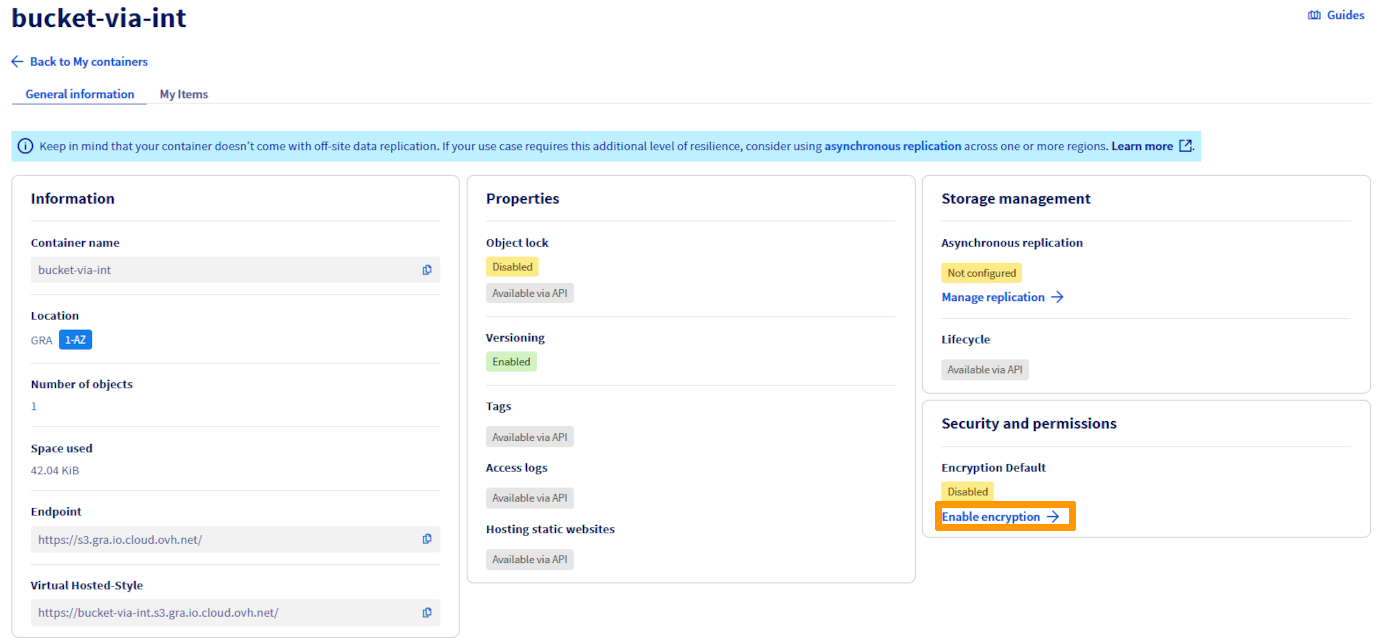
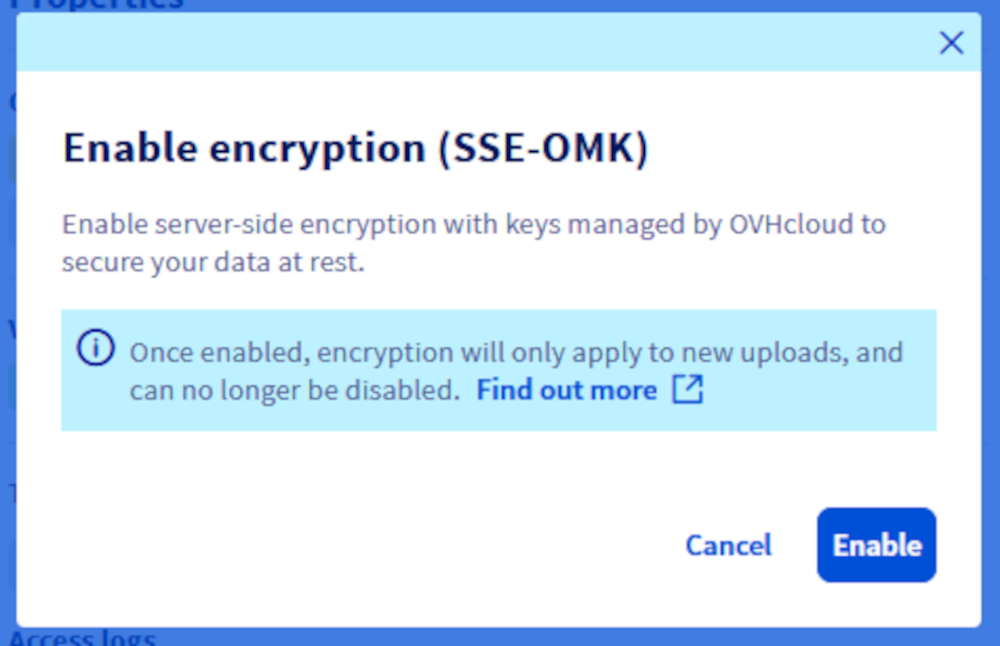
Via the OVHcloud Control Panel

To add SSE-OMK encryption to an existing Object Storage bucket on OVHcloud, you must use the put-bucket-encryption command from the AWS CLI. This command configures bucket encryption so that all newly added objects are automatically encrypted with SSE-OMK. Here is the specific command you would use:

aws s3api put-bucket-encryption --bucket <bucket_name> --server-side-encryption-configuration '{"Rules":[{"ApplyServerSideEncryptionByDefault":{"SSEAlgorithm":"AES256"}}]}' --endpoint-url https://s3.<region>.io.cloud.ovh.net
  • Replace <bucket_name> with the name of your Object Storage bucket.

This will configure the bucket to use SSE-OMK encryption with keys managed by Object Storage (AES256) for all new objects.

Info

Existing objects will not be affected. If you also wish to encrypt them, you will need to copy or upload them again after changing this configuration.

Viewing bucket encryption configuration

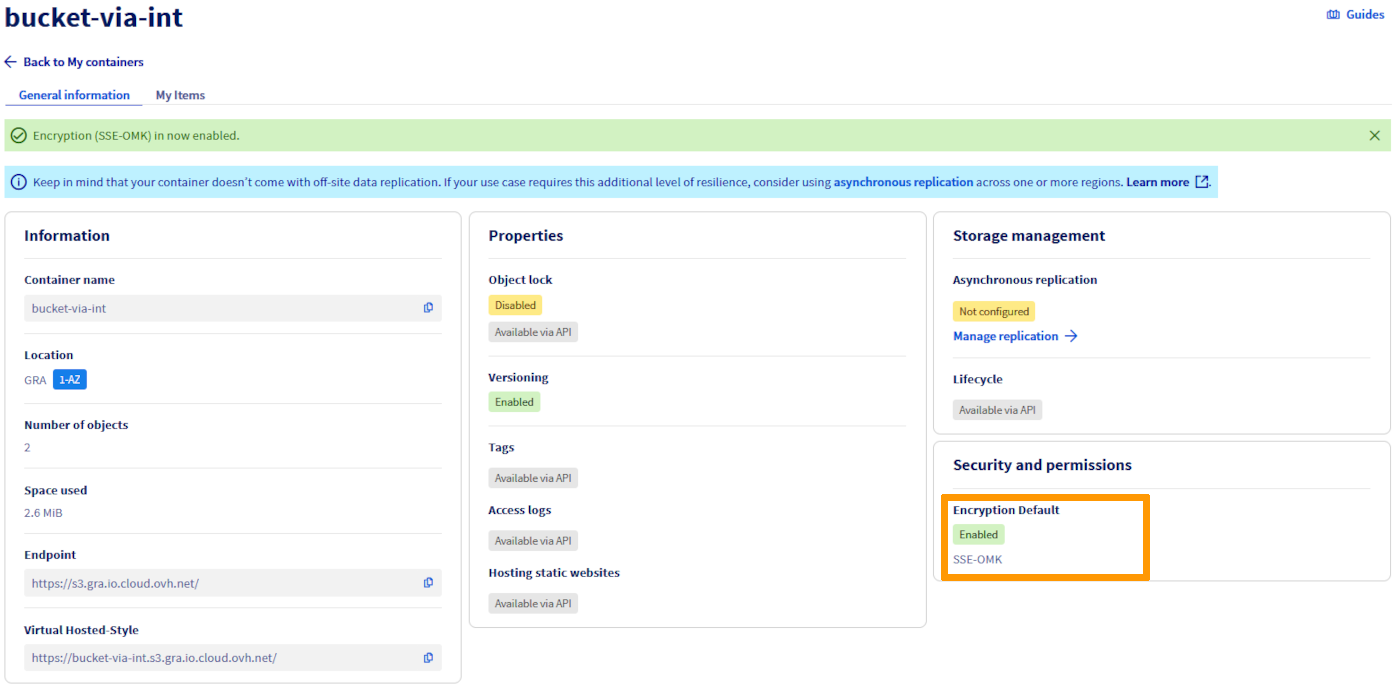
After configuring bucket encryption using PutBucketEncryption or through the OVHcloud Control Panel to enable SSE-OMK, make sure that everything has been set up correctly:

Via the AWS S3api
Via the OVHcloud Control Panel
aws s3api get-bucket-encryption --bucket <bucket_name> --endpoint-url https://s3.<region>.io.cloud.ovh.net
  • Replace your-bucket with the name of your bucket.

With this command, you can check your bucket’s current encryption configuration to ensure that SSE-OMK encryption is enabled.

In this order, replace your-bucket with the name of your bucket. This command returns the details of your bucket’s current encryption configuration, confirming the use of SSE-OMK for data encryption at rest.

This extra step ensures full transparency and helps ensure your data is kept safe to the highest standards, with the simplicity and efficiency offered by SSE-OMK encryption managed by OVHcloud.

Deleting an encrypted object with SSE-OMK

Deleting objects encrypted with SSE-OMK is no different from deleting objects that are not encrypted. You can use the following command to delete an object:

aws s3 rm s3://my-Bucket/my-object
  • Replace my-Bucket with the name of your bucket
  • Replace my-object by the name of the object you want to delete.

With this command, you can effectively delete an object, whether it is encrypted or not, from your bucket on Object Storage.

SSE-OMK Encryption considerations

When using SSE-OMK encryption on Object Storage, it is important to consider the following:

Performance

  • Overhead: SSE-OMK encryption can introduce a slight overhead due to the encryption and decryption process. However, this overhead is usually minimal and does not significantly affect overall performance.

Security

  • Key Management: SSE-OMK offers a high level of security by automatically managing encryption keys. This simplifies security management for users.
  • Additional security practices: Combining SSE-OMK encryption with other security practices is crucial for optimal protection. This includes the use of strict IAM policies and log access tracking to monitor and control data access.

Comparison of encryption methods

It’s essential to compare the different encryption methods available to choose the one that best suits your specific needs. Methods to consider include client-side encryption (CSE) and server-side encryption (SSE), with its SSE-C and SSE-OMK variants.

Pros and cons

  • CSE vs SSE: Each method has its own advantages and disadvantages in terms of manageability, security and performance impact.
  • Recommended use cases: depending on your specific situation, some methods may be more appropriate than others. It is important to evaluate the recommended use cases for each encryption method.

A comparative table may be useful for summarizing these elements, providing a clear overview that facilitates decision-making.

Encryption methodBenefitsConsRecommended Use Cases
CSE (Client-Side Encryption)- Full control over encryption keys
- Maximized security because keys never leave the client
- Complex key management
- Full responsibility for key security
- Scenarios requiring specific compliance
- High data sensitivity
SSE-C (Server-Side Encryption with Customer Keys)- Control over encryption keys
- Enhanced security without the total complexity of CSE
- No additonal cost
- Need to provide keys at each request
- More complex key management than SSE-OMK
- Compliance and key control
- Intermediate security needs
SSE-OMK (Server-Side Encryption with OVHcloud-Managed Keys)- Simple to implement
- Automatic key management by OVHcloud
- Transparent usage
- No additonal cost
- Less control over encryption keys compared to CSE and SSE-C- General purpose where manageability is paramount
- Less sensitive data

Each encryption method has its own strengths and weaknesses. The choice of method depends on several factors, including the level of security required, the complexity of managing the keys you are willing to assume, and the regulatory or compliance specifics your organization must adhere to.

Info

There are no additional fees for using server-side encryption with SSE-C or SSE-OMK.

CSE (Client-Side Encryption)

  • Ideal for: Organizations with very high security requirements, requiring encryption keys to remain under exclusive control.
  • Suitable for: strictly regulated environments, such as financial institutions or healthcare services.

SSE-C (Server-Side Encryption with Customer Keys)

  • Suitable for: Organizations seeking a balance between key control and manageability.
  • Useful for: when customers are ready to manage keys but want to delegate encryption and decryption.

SSE-OMK (Server-Side Encryption with OVHcloud-Managed Keys)

  • Perfect for: users who prefer a turnkey solution without the burden of key management.
  • Preferred method for: companies looking to protect their data without specific encryption compliance needs.

The choice between these methods should be guided by security policies and regulatory requirements, as well as the ability to manage encryption keys. A balance between ease of use and security is essential.

Examples of scripts and commands

CSE (Client-Side Encryption)

# Generating a client-side encryption key
client_key=$(openssl rand -base64 32)
# Encryption of a file before sending
openssl enc -aes-256-cbc -salt -in path/to/your/file -out path/to/encrypted/file -pass pass:$client_key
# Sending encrypted file to Object Storage bucket
aws s3 cp path/to/encrypted/file s3://your-bucket/your-encrypted-object

SSE-C (Server-Side Encryption with Customer Keys)

# Creating an encryption key and its MD5 fingerprint
sse_c_key=$(openssl rand -base64 32)
sse_c_key_md5=$(echo -n $sse_c_key | openssl md5 -binary | base64)
# Uploading an object with SSE-C encryption
aws s3api put-object \
  --bucket your-bucket \
  --key your-object \
  --body path/to/your/file \
  --sse-customer-algorithm AES256 \
  --sse-customer-key $sse_c_key \
  --sse-customer-key-md5 $sse_c_key_md5
# Retrieving an object with SSE-C encryption
aws s3api get-object \
  --bucket your-bucket \
  --key your-object \
  --sse-customer-algorithm AES256 \
  --sse-customer-key $sse_c_key \
  --sse-customer-key-md5 $sse_c_key_md5 \
  path/to/destination/file

SSE-OMK (Server-Side Encryption with OVHcloud-Managed Keys):

# Sending an object with SSE-OMK encryption
aws s3api put-object \
  --bucket your-bucket \
  --key your-object \
  --body path/to/your/file \
  --server-side-encryption AES256
# Uploading an object with SSE-OMK encryption
aws s3api get-object \
  --bucket your-bucket \
  --key your-object \
  path/to/destination/file

Troubleshooting and Common Error Resolution

Error using SSE-C without proper encryption headers

  • Required headers: ensure that the headers --sse-customer-algorithm, --sse-customer-key, and --sse-customer-key-md5 are correctly included in your order.
  • Key verification: Confirm that the encryption key is correct and has not been modified or altered since it was used to encrypt the object.

In case of a loss of the SSE-C encryption key

  • Cannot Recover: If the encryption key is lost, it is not possible to recover data encrypted with SSE-C. Keep your keys in a safe place and consider using key management services to improve security.

Bad query error when using SSE-OMK

  • Without specific headers: For SSE-OMK, avoid specifying encryption headers during download. The --server-side-encryption AES256 option is sufficient.
  • Verifying encryption method: Make sure the object was not originally encrypted with a different method.

Performance or latency issues during encryption/decryption with SSE-OMK

  • Potential overhead: Encryption and decryption may cause a slight overhead.
  • Performance Optimization: To improve performance, perform encryption and decryption in a geographical region close to your location to minimize latency.

Conclusion

This documentation highlights our commitment to providing advanced data security solutions. Whether you opt for client-side (CSE) or server-side (SSE-OMK) encryption, our goal is to offer you optimal security with minimal operational overhead.

The OVHcloud Key Management Service (KMS) is a testament to our commitment to securing your data, offering comprehensive protection without the complexities of direct key management. We encourage the adoption of these encryption practices to secure your data at rest, providing you with the tools and knowledge necessary for effective implementation. OVHcloud is here to help with any additional support regarding data encryption and security. Please refer to our additional resources or contact our technical support team for any clarification or assistance.

Go further

If you need training or technical assistance to implement our solutions, contact your sales representative or click on this link to get a quote and ask our Professional Services experts for assisting you on your specific use case of your project.

Join our community of users.

Questa pagina ti è stata utile?
🚀

Condividi il tuo parere sulla nuova documentazione

Il tuo feedback aiuta i nostri team a migliorare la tua esperienza.

2 minuti · Anonimo

Object Storage - Encrypt your server-side objects with SSE-C or SSE-OMK

Webmail Il mio account Supporto 🇮🇹 Italiano Tema Lingue 🇮🇹 Italiano 🇫🇷 Francais 🇬🇧 English 🇩🇪 Deutsch 🇪🇸 Espanol 🇮🇹 Italiano 🇵🇱 Polski 🇵🇹 Portugues Menu In questa pagina Search ⌘K Documentation Beta Riferimento API Changelog prodotto E-Learning e certificazioni Migrazione Bare Metal Cloud Server dedicati Panoramica Concetti chiave Bare Metal 3-AZ Region - Presentazione dell'offerta Clienti Kimsufi e So you Start - familiarizzarsi con lo Spazio Cliente OVHcloud Shared responsibility for Dedicated Servers (EN) Understanding the dedicated server boot process Per iniziare Iniziare a utilizzare un server dedicato Iniziare a utilizzare un server dedicato Kimsufi, So You Start o Rise Come eseguire le prime operazioni sulle connessioni SSH Come creare e utilizzare chiavi di autenticazione per le connessioni SSH ai server OVHcloud Come salvare le chiavi SSH nello Spazio Cliente Come utilizzare la console IPMI con un server dedicato Come ottenere l'impronta di carbonio dei servizi OVHcloud Configurazione Sistema Configurazione degli account utente e dell'accesso root su un server Come cambiare la Product Key di Windows Server Modificare la password amministratore su un server dedicato Windows Come reimpostare la password amministratore con Rescue-Customer-Windows Come gestire Intel SGX su un server dedicato Aggiornamento dell'hardware su un server dedicato High Grade o Scale Come assegnare un tag a un server Bare Metal How to install VMware ESXi 8 on a dedicated server Storage Gestione e ricostruzione del RAID software sui server in modalita legacy boot (BIOS) Gestione e ricostruzione di un RAID software sui server in modalita UEFI Managing hardware RAID (EN) Hot Swap - Hardware RAID (EN) Sostituire un disco a caldo su un server con RAID Software Configura il tuo MegaRAID in RAID 0 Configura un software mirror (RAID) su Windows OVHcloud API and Storage (EN) Configuring the storage on a HGR-STOR-2 server (EN) Creating a Windows partition on a server with hardware RAID Advance Dedicated Servers - Upgrading your Samsung NVMe PM9A1 firmware (EN) High Grade Dedicated Servers - Upgrading your SSD SAS Western Digital SS300 firmware (EN) High Grade Dedicated Servers - Upgrading your SSD SAS Western Digital SS530 firmware (EN) Dedicated Servers - Upgrading your SSD Solidigm D7-P5520 firmware Dedicated Servers - Upgrading your Micron 7500 PRO firmware Come verificare la versione del firmware BMC su un server dedicato Rete Creare un DNS secondario su un server dedicato Installare la chiave SSH OVHcloud Configurare un NIC per il servizio OVHcloud Link Aggregation nello Spazio Cliente Configurare un NIC per il servizio OVHcloud Link Aggregation in Debian 9 a 11 Come configurare l'aggregazione di link con LACP in Debian 12 o Ubuntu 24.04 (EN) Configurare un NIC per il servizio OVHcloud Link Aggregation in Windows Server 2019 Come configurare il NIC handle per aggregare i link OVHcloud in SLES 15 Tutorial - Installare un server Web (LAMP) su Debian o Ubuntu Manage your server reboot with the OVHcloud Link Aggregation feature (EN) Configurare IPv6 su un server dedicato Configurare un indirizzo IPv6 su una macchina virtuale (EN) Spostare un Additional IP Configurare Additional IP in modalita bridge sulle proprie macchine virtuali Quali sono gli indirizzi IP del monitoring OVHcloud? Configurer son adresse IP en alias Come configurare il reverse DNS del tuo server (record PTR) Determinare se la funzionalita dei MAC virtuali e supportata su un server dedicato Assegnare un MAC virtuale a un Additional IP Configurare la rete su Windows Server con Hyper-V Configurare la rete su Proxmox VE sulle gamme High Grade, Scale & Advance (EN) Upgrade and downgrade Bandwidth via the OVHcloud API Improving Network Resilience on Bare Metal servers vRack Configurare due o piu server dedicati nella vRack Configurare frame Jumbo nella vRack Configurare un blocco Additional IP in un vRack Configurare un blocco Additional IPv6 in un vRack Modificare i blocchi IP annunciati nella vRack Creare due o piu VLAN nella vRack Utilizza Hyper-V con indirizzi Additional IP su una vRack Configurare la vRack tra un'istanza Public Cloud e un server dedicato Upgrade and downgrade private bandwidth (vRack) via the OVHcloud API Implementazione OVHcloud API and OS Installation (EN) Bring Your Own Image (BYOI) / Bring Your Own Linux (BYOLinux), a comparison sheet (EN) Bring Your Own Image (BYOI) (EN) Bring Your Own Linux (BYOLinux) (EN) Configurare uno script iPXE personalizzato per avviare il tuo server tramite l'API OVHcloud Migrazione Migrare i dati da un server dedicato a un altro Copiare dati da un server dedicato a un altro con rsync Tutoriels Tutorial - Come utilizzare PuTTY per le connessioni SSH e l'autenticazione Tutorial - Configuring pfSense network bridge (EN) Tutorial - Installare un server Web (LAMP) su Debian o Ubuntu Activating Windows Machines using Hyper-V on an OVHcloud licensed Windows Server Installare CUDA su un server dedicato GPU Eseguire il backup di dati e database su un server di storage Come utilizzare SFTP per trasferire i file How to create a Palworld compatible server (EN) Installer un environnement de developpement web sur un VPS ou un serveur dedie How to deploy and verify an OpenNebula Hosted Cloud on Bare Metal servers How to install CloudPanel on a VPS or a Dedicated Server How to install WordPress with Docker on a VPS or a dedicated server How to install WordPress with WP-CLI on a VPS or a dedicated server How to install ISPmanager on a VPS or Dedicated Server Come evitare che le tue email siano contrassegnate come Spam Sicurezza Rafforzamento Mettere in sicurezza un server dedicato Mettere in sicurezza un server con Memcached How to mitigate the Zenbleed vulnerability How to mitigate the Downfall vulnerability How to mitigate the Inception vulnerability Find your patch for Meltdown and Spectre Information about Meltdown and Spectre vulnerability fixes AMD SME/SEV on Ubuntu 20 Dedicated Server Security Specifications Controllare e proteggere il vostro server dedicato ESXi dal primo avvio (EN) ESXi Dedicated Servers - FAQ Backup Preparing a Bare Metal Server backup with Veeam Enterprise (EN) Backing up a Bare Metal Linux Server with Veeam Enterprise (EN) Backing Up a Bare Metal Windows Server Using Veeam Agent for Windows (EN) Restoring a Bare Metal Server with Veeam Enterprise (EN) Utilizzare il Backup Storage su un server dedicato Rete OVHcloud AntiSpam - Migliori pratiche e sblocco di un indirizzo IP Configura il firewall su Linux con iptables Configura il firewall su Windows Attivare e configurare Edge Network Firewall Proteggere un server game con il firewall dell'applicazione Monitoraggio degli attacchi DDoS con il Network Security Dashboard How to configure the Anti-DDos Infrastructure for Solana Diagnosi Come recuperare l'accesso al server in caso di perdita della password dell'utente Attivare e utilizzare il Rescue mode Come attivare e utilizzare la modalita Rescue Windows Sostituzione del vostro paio di chiavi SSH Sostituire un disco difettoso Diagnosticare problemi hardware su un server dedicato Recuperare il numero di serie di un hard disk Completa l'intervento di manutenzione del tuo server dedicato (EN) Disinstallare il sistema di monitoring RTM v2 Recupero dei database in modalita Rescue Network - Fixing slow downloads problems inside containers and VMs running on Proxmox VE servers with Broadcom BCM57502 NICs Server Privati Virtuali Panoramica Per iniziare Prime attivazione di un VPS VPS - Gestione tramite lo Spazio Cliente OVHcloud FAQ su VPS OVHcloud Configurazione degli account utente e dell'accesso root su un server Come eseguire le prime operazioni sulle connessioni SSH Come creare e utilizzare chiavi di autenticazione per le connessioni SSH ai server OVHcloud Come salvare le chiavi SSH nello Spazio Cliente Come modificare le risorse di un VPS Partizionare un VPS dopo un upgrade di storage Iniziare a utilizzare applicazioni preinstallate Utilizzare la console KVM per accedere a un VPS Gestire un VPS legacy Configurazione Backup Usare snapshot su un VPS Comment utiliser les sauvegardes automatisees sur un VPS Configura un disco aggiuntivo Aumenta la dimensione di un disco aggiuntivo Rete e IP Configurare IPv6 su un server VPS Come configurare il reverse DNS del tuo server (record PTR) Configurare un indirizzo IP in alias Configurare un DNS secondario OVHcloud su un VPS Utilizzo avanzato Deploy di cPanel su un VPS Backup automatico - Kernel panic (cPanel) Migrazione How to migrate a website from a VPS to a Dedicated Server or a Public Cloud instance (EN) How to migrate an n8n configuration between two VPS Tutorial Tutorial - Come utilizzare PuTTY per le connessioni SSH e l'autenticazione Come utilizzare SFTP per trasferire i file Recupero dei database in modalita Rescue Come creare un server Minecraft su un VPS o un server dedicato How to create a Palworld compatible server (EN) Tutorial - Installare un server Web (LAMP) su Debian o Ubuntu Installer un environnement de developpement web sur un VPS ou un serveur dedie How to install CloudPanel on a VPS or a Dedicated Server How to install WordPress with Docker on a VPS or a dedicated server How to install WordPress with WP-CLI on a VPS or a dedicated server Automating the deployment of your website on your VPS via GitHub Actions (EN) Automating the deployment of your website on your VPS via GitLab CI/CD (EN) How to install n8n on an OVHcloud VPS How to migrate an n8n configuration between two VPS Automatizzare l'invio di SMS con n8n tramite l'API OVHcloud How to create and import a Lovable website on an OVHcloud VPS How to install an AI agent on an OVHcloud VPS How to install ISPmanager on a VPS or Dedicated Server How to install Docker and Docker Compose on a VPS How to install Nextcloud on an OVHcloud VPS with Docker How to install Nextcloud on an OVHcloud VPS with Docker and Traefik How to install an OpenClaw agent on a VPS Automated backup with plakar Sicurezza Securiser un VPS Come installare un certificato SSL su un VPS Configura il firewall su Linux con iptables Configura il firewall su Windows Diagnosi Verifica il file system su un VPS VPS - Attivare i log di avvio Windows Visualizza i log di boot nel KVM Attivare e utilizzare il Rescue mode su un VPS Come recuperare l'accesso al server in caso di perdita della password dell'utente Modificare la password amministratore su un server Windows Sostituzione del vostro paio di chiavi SSH Come evitare che le tue email siano contrassegnate come Spam Risorse aggiuntive Public Cloud & VPS - Image and OS life cycle and end of life/support announcements Fine del supporto Plesk e cPanel per VPS - Garantire la continuita dei servizi Managed Bare Metal Panoramica Opzioni e servizi OVHcloud Setting up a VPN for OVHcloud Zerto DRP Ripristina i backup tramite le API OVHcloud Activating and using Veeam Managed Backup Modificare la politica di accesso al vCenter Autorizzare IP ad accedere al vCenter FAQ Capacita tecniche Funzionalita OVHcloud Aggiungere un blocco IP Snapshot orari OVHcloud Modificare la password utente Creazione di VLAN Utilizzare Managed Bare Metal all'interno di una vRack Host sostitutivo Rimuovere un server host Rimuovere un datastore Modificare i permessi di un utente Aggiungere una risorsa oraria Associare un’email a un utente vSphere Utilizzare il plugin OVHcloud Network Disattivare una soluzione Managed Bare Metal Per iniziare Introduzione allo Spazio Cliente Managed Bare Metal OVHcloud Configurare un IP su una macchina virtuale (EN) Best practice di sicurezza per il client vSphere Web Connessione all’interfaccia vSphere Migrating an infrastructure to a new vDC Migrating an infrastructure to a Managed Bare Metal solution Gestione delle macchine virtuali Modificare le risorse di una macchina virtuale Creare uno Snapshot Creare un alert Clonare una VM Scegliere il formato del disco Installare VMware Tools Installare un template OVF Windows e SQL Server Deploy di una macchina virtuale Evitare la modalita di sola lettura sui dischi delle VM Linux Caratteristiche VMware vSphere VMware vMotion VMware Storage VMotion VMware HA (High Availability) VMware Fault Tolerance VMware DRS (Distributed Resource Scheduler) Attivare Virtual Machine Encryption (VM Encryption) Utilizzare SDK vSphere Hosted Private Cloud Public VCF as-a-Service Panoramica Concetti chiave Capacita tecniche Hosted Private Cloud VMware Lifecycle Policy Ciclo di vita di VMware on OVHcloud - Determinare le azioni da intraprendere (EN) Responsibility sharing for the VMware on OVHcloud service Datamotive - Introduction Public VCF as-a-Service - The fundamentals of Public VCF as-a-Service Technical capabilities and limitations of Public VCF as-a-Service Per iniziare Introduzione allo Spazio Cliente Private Cloud OVHcloud Connessione all’interfaccia vSphere Connexion a l'API OVH Public VCF as-a-Service - Logging in to your organization (EN) Public VCF as-a-Service - Find out how to use the Public VCF as-a-Service user interface (EN) Configurazione Connettere un'immagine ISO a una VM (EN) How to disconnect an ISO image from a VM (EN) Configurare un IP su una macchina virtuale (EN) Public VCF as-a-Service - Network concepts and best practices Public VCF as-a-Service - Creating network components from the Public VCF as-a-Service control panel Public VCF as-a-Service - Linking a public IP block with vRack Public VCF as-a-Service - Declaring the public IP gateway in VCD Migrazione Migrating a PCC to Hosted Private Cloud Migrating an infrastructure to a new vDC End-Of-Life management for LV1 and LV2 storage Public VCF as-a-Service - Migrate from VMware vSphere on OVHcloud Public VCF as-a-Service - Setting up your network after vSphere to Public VCF as-a-Service migration Reversibility Policy for the Managed Mutualized Virtualization product Tutorials Public VCF as-a-Service - Creating a new virtual machine (EN) Public VCF as-a-Service - Backups with Veeam Data Platform (EN) Sicurezza Diagnosi Risorse aggiuntive FAQ Hosted Private Cloud Come ottenere l'impronta di carbonio dei servizi OVHcloud Public VCF as-a-Service - FAQ (EN) Managed VMware Concetti chiave SPN Concept Concepts overview Per iniziare Iniziare con NSX (EN) Activer NSX-T dans un Hosted Private Cloud VMware on OVHcloud Introduzione a vRealize Operations - vROPS (EN) Getting started with your SecNumCloud vSphere Configurazione Macchine virtuali Deploy di una macchina virtuale Installare VMware Tools Scegliere il formato del disco Modificare le risorse di una macchina virtuale Evitare la modalita di sola lettura sui dischi delle VM Linux Attivazione della modalita promiscua su una macchina virtuale (EN) Changing the MTU size for machines reaching the OVHcloud Gateway SSL (EN) Deploy an OVF template through content libraries (EN) Installare un template OVF Windows e SQL Server OVF Tool (EN) Archiviazione e risorse Come aggiungere uno storage? (EN) Come aggiungere un host? (EN) Rimuovere un datastore Rimuovere un server host Uploading an ISO in a datastore Rete e connettivita Creazione di VLAN (EN) Compatibilita della vRack con Hosted Private Cloud Enable the Private Gateway Aggiungere un blocco IP Host sostitutivo Gestione dei segmenti in NSX (EN) Configurazione DHCP in NSX (EN) Configurazione del server d'inoltro DNS in NSX (EN) Aggiunta di un nuovo gateway di livello 1 in NSX (EN) Funzionalita vSphere Utilizzare SDK vSphere Managing granular rights on vSphere objects Creazione di cluster e attivazione di EVC (EN) Backup e replica Activating and using Veeam Managed Backup (EN) Setting up Zerto Virtual Replication between two OVHcloud data centres Setting up Zerto multi-site replication on OVHcloud Managed vSphere Using Zerto between OVHcloud and a third-party platform Encrypting backup jobs with Veeam and OKMS Evitare il freeze di una macchina virtuale con l’opzione Veeam Managed Backup Migrazione Migrating OmniOS datastores Move2Cloud - Migrating VMware Workloads to OVHcloud Hosted Private Cloud with Veeam Replication Move2Cloud - Migrate VMware workloads to OVHcloud Hosted Private Cloud with Zerto Move2Cloud - Migrating VMware Workloads to OVHcloud SecNumCloud with Veeam Replication Move2Cloud - Migrate VMware workloads to OVHcloud SecNumCloud Hosted Private Cloud with Zerto Tutorials Macchine virtuali Creare uno Snapshot (EN) Clonare una VM (EN) Registra le VM in un nuovo PCC Verificare una macchina in caso di lentezza (EN) Creare un alert VMware vCenter Converter Archiviazione e replica Snapshot orari OVHcloud Zmotion Ripristina i backup tramite le API OVHcloud Eliminare la copia di una VM dal sito di recupero Zerto Veeam Cloud Connect - How to migrate data from Veeam Cloud Connect to Object Storage Rete e NSX Utilizzare il plugin OVHcloud Network Utilizzare Hosted Private Cloud all'interno di una vRack Utilizzare il plugin OVHcloud Configurazione di NAT per i reindirizzamenti delle porte con NSX (EN) Configurazione del bilanciamento del carico in NSX (EN) Funzionalita vSphere Capire l'interfaccia vScope (EN) VMware DRS (Distributed Resource Scheduler) VMware Storage VMotion Applicare l’iperconvergenza VMware utilizzando vSAN (EN) Aggiungere un server ESXi in un cluster vSAN (EN) Aggiornamento del formato del disco vSAN (EN) Gestione dei domini di guasto vSAN VMware vMotion Alta disponibilita e resilienza VMware HA (High Availability) VMware Fault Tolerance Sicurezza Gestione identita e accessi IAM for VMware on OVHcloud - Presentation and FAQ IAM for VMware on OVHcloud - How to activate IAM IAM for VMware on OVHcloud - How to create an IAM vSphere role IAM for VMware on OVHcloud - How to associate a vSphere role with an IAM policy IAM for VMware on OVHcloud - How to associate a user with a global IAM policy How to use IAM policies with vSphere (EN) Modificare la password utente Associare un’email a un utente vSphere Crittografia e gestione delle chiavi vNKP - Enabling virtual machine encryption (EN) Attivare Virtual Machine Encryption (VM Encryption) (EN) KMS for VMware on OVHcloud - VM encryption use case scenarios KMS for VMware on OVHcloud - Configuring VM encryption Mise en route du KMS CipherTrust Manager Sicurezza di rete (NSX) Gestione distribuita del firewall in NSX (EN) Gestione del firewall del gateway in NSX (EN) Setting up an IPsec Tunnel with NSX (EN) Configure BGP between two PCCs via NSX-T (EN) Rafforzamento del sistema e vulnerabilita Best practice di sicurezza per il client vSphere Web Utilizzare l’interfaccia sicura Utilizzare l’autenticazione a due fattori (2FA) su un’infrastruttura Private Cloud Autorizzare IP ad accedere al vCenter Rilevare e bloccare la vulnerabilita L1TF Checking and applying patches for Spectre/Meltdown vulnerabilities on your hosts Utiliser le protocole SSLv3 sur Private Cloud Conformita e SecNumCloud Partage de responsabilite sur le service Hosted Private Cloud by VMware sous la qualification SecNumCloud VPN-SPN Concept SPN Connector Concept Diagnosi Manutenzione e aggiornamenti VMware on OVHcloud maintenance operations (EN) Scegli la manutenzione pianificata su Hosted Private Cloud Updating hosts using vSphere Lifecycle Management (vLCM) Usare VMware Update Manager Estendi un volume in vSphere e in un OS (EN) Testa la perdita temporanea di un host attivando la modalita resilienza (EN) Monitoraggio e log Configuring a vROps alert via the SMTP protocol Logs Data Platform - Collect VMware on OVHcloud logs (EN) NSX-T: retrieving logs How to read and filter NSX-T logs Monitoraggio della conformita Attivare la certificazione PCI DSS nel Private Cloud OVH How to manage Windows licences for virtual machines on your Hosted Private Cloud infrastructure Come cambiare la Product Key di Windows Server Risorse aggiuntive NSX - FAQ (EN) Pricing and Management of OVHcloud NSX Edges FAQ SecNumCloud Connectivity SNC Cloud Platform Per iniziare Mise en route de votre projet SNC Cloud Platform Comment sauvegarder une instance SNC Cloud Platform Comment sauvegarder un bucket Object Storage SNC Cloud Platform Bare Metal Pod Per iniziare Getting started with your Bare Metal Pod SecNumCloud On-Prem Cloud Platform Per iniziare Getting started with your OPCP Lifecycle of an OPCP Node OPCP - How to use the APIs and obtain the credentials OPCP - How to install an instance from the Horizon interface OPCP - How to Deploy an Instance via OpenStack APIs OPCP - How to setup LACP on a Node OPCP - How to set up Trunk ports on a Node OPCP - How to configure a software RAID on a node OPCP - How to see the node inventory Risorse aggiuntive OPCP - Object Storage features and specifications Building a custom OpenStack Image on OPCP OPCP - Ceph RBD Block Storage - Performance, Resilience and Scalability with OpenStack Nutanix on OVHcloud Concetti chiave Nutanix on OVHcloud - Documentazione generale (EN) Nutanix hardware compatibility - OVHcloud configurations Versioni di Nutanix AOS supportate da OVHcloud (EN) Elenco delle licenze inclusi (EN) Disaster Recovery Plan a Nutanix (EN) Condivisione delle responsabilita - Nutanix on OVHcloud (EN) Nutanix on OVHcloud - Lifecycle Policy Per iniziare Iniziare a utilizzare il cluster Nutanix (EN) Hyperconvergenza Nutanix (EN) Ridistribuzione personalizzata del tuo Cluster (EN) Presentazione dello storage su Nutanix (EN) Importare immagini ISO (EN) Gestione delle macchine virtuali (EN) Gestione di alert ed eventi (EN) Gestione delle licenze nel cluster dell'offerta Nutanix on OVHcloud BYOL (EN) Rete e sicurezza Documentazione di OVHgateway (EN) Aggiungere un indirizzo IP pubblico a una nuova VM (EN) Upgrade del cluster Nutanix (EN) Aggiornamento Firmware Del Cluster Nutanix (EN) Configurazione Modifica della vRack di un cluster Nutanix (EN) Isolamento delle macchine di gestione dalla produzione (EN) Configura Flusso Nutanix (EN) Sostituzione del OVHgateway con un server dedicato (EN) Sostituzione del OVHgateway (EN) KMS configuration with Nutanix on OVHcloud Configura HYCU Backup (EN) Configura Veeam Backup per Nutanix (EN) Migrazione Migrazione verso Nutanix tramite il tool Nutanix Move (EN) Tutorials Strumenti avanzati (EN) Attiva le VM Windows installate su Nutanix da OVHcloud (EN) Aggiungere o rimuovere un nodo in un cluster Nutanix (Scale In/Out) (EN) Sostituzione di Prism Central dalla modalita Small alla modalita X-LARGE (EN) Configurazione NCM Self Service (CALM) (EN) Impostazione di Objects Nutanix (EN) Sicurezza Protezione dell'accesso Web a Prism Central (EN) Interconnessione IPSec tra due siti (EN) Interconnessione di cluster attraverso la vRack (EN) Diagnosi Recupera le informazioni di stato della tua installazione Nutanix (EN) Risorse aggiuntive Replicazione asincrona o NearSync attraverso Prism Element (EN) Replica avanzata con Leap (EN) Configurazione del ripristino di emergenza con Metro (EN) Setting up Multicloud Snapshot Technology (MST) on a Nutanix on OVHcloud infrastructure Configuring Prism Central Point-in-Time Backup to OVHcloud S3-compatible Object Storage SAP on OVHcloud Concetti SAP HANA on Bare Metal and SAP Application Servers on VMware on OVHcloud SAP infrastructure with VMware on OVHcloud solution SAP infrastructure with SecNumCloud-qualified SAP HANA on Private Cloud Per iniziare Install SAP HANA on Bare Metal with SLES 15 for SAP Deploy a virtual machine with SAP HANA and OVHcloud Backint Agent pre-installed Deployer un SAProuter avec NSX Shared responsibility for SAP on OVHcloud solutions Implementazioni automatizzate Deploy virtual machines of SAP Application Server on VMware on OVHcloud solution with Terraform Deploy virtual machines of SAP HANA database on VMware on OVHcloud solution with Terraform Deploy an SAP system infrastructure on VMware on OVHcloud solution with Terraform SAP pre-installation wizard Resilienza SAP HANA cluster with SLES on VMware on OVHcloud Backups Install and use OVHcloud Backint Agent for SAP HANA Use OVHcloud Backint Agent with several Object Storage buckets OVHcloud Backint Agent versions Sauvegarder SAP HANA avec Veeam Backup and Replication Osservabilita SAP logs on OVHcloud Logs Data Platform - Configuration SAP logs on OVHcloud Logs Data Platform - Analysez et exploitez vos logs SAP logs on OVHcloud Logs Data Platform - Index des logs SAP Public Cloud Public Cloud - Informazioni generali Panoramica Concetti chiave Public Cloud Glossary Limiti di velocita delle API Public Cloud Comparison and resilience of Deployment Modes - Understanding 3-AZ / 1-AZ / Local Zones (EN) 3-AZ resilience: Mechanisms and reference architectures (EN) How do Savings Plans work? Per iniziare L'essenziale per iniziare con il Public Cloud Scopri l’interfaccia Public Cloud Creazione del tuo primo progetto Public Cloud OVHcloud Getting started with OVHcloud Shell Getting Started with OVHcloud CLI Configurazione Informazioni sulla fatturazione Aumentare le quote Public Cloud Comment gerer un Savings Plan Gestione dei progetti Public Cloud Best Practices for securing & structuring OVHcloud Public Cloud Projects (EN) Eliminare un progetto Public Cloud Delega progetti Migrazione Public Cloud IaaS Migration - Steps and Best Practices Architecture Reference - Building a Landing Zone with OVHcloud Public Cloud Tutorials Gestione via Horizon Introduzione a Horizon Parametri di accesso e sicurezza in Horizon Gestione via Openstack Preparare l’ambiente per utilizzare l’API OpenStack Impostare le variabili d'ambiente OpenStack Utilizzo dei token OpenStack Gestione dei token How to use service accounts to connect to OpenStack (EN) Gestione degli utenti OpenStack Gestione delle regole di firewall e port security sulle reti che utilizzano OpenStack CLI Gestione via Terraform Terraform Tutorial (EN) Sicurezza Healthcare (HDS) compliance activation (EN) Risoluzione dei problemi FAQ Public Cloud OVHcloud Risorse aggiuntive Sistema di fatturazione dei servizi Public Cloud Proper Usage and Limitations of Classic Multi-Attach Block Storage in 3AZ Regions Understanding Landing Zones Understanding metrics in OVHcloud Public Cloud Compute Panoramica Concetti chiave Public Cloud Istanze - Concetti chiave Per iniziare Aggiungi credito Cloud al tuo progetto Come creare un'istanza Public Cloud e connettersi Gestire le istanze Public Cloud Come avviare un'istanza Public Cloud su un volume avviabile Sospendi o metti in pausa un’istanza Attiva una licenza Windows per un'istanza in modalita privata Iniziare a utilizzare applicazioni preinstallate Configurazione Gestione del progetto Modificare i contatti di un progetto Public Cloud Compute - Passare dalla fatturazione oraria a quella mensile Gestione delle istanze Effettuare il backup di un'istanza Crea/ripristina il tuo server virtuale da un backup Modificare l’hostname di un’istanza Public Cloud Comment activer le mode rescue sur une instance Public Cloud Mettere un’istanza Metal in modalita Rescue - (EN) Come sostituire un paio di chiavi SSH su un'istanza Public Cloud Creare un’istanza GPU Configura il reverse DNS di un'istanza Public Cloud Ridimensionare un'istanza dallo Spazio Cliente OVHcloud Creating and using a Server Group in Horizon and CLI Gestione via Horizon Creare un’istanza dall’interfaccia Horizon Gestisci le tue istanze Public Cloud tramite Horizon Creare e configurare un gruppo di sicurezza su Horizon Gestisci gli snapshot di un’istanza con Horizon Crea, carica ed elimina immagini con Horizon Ridimensionare un’istanza via Horizon Passare da un'istanza flex a un'istanza classica Gestione via API OpenStack Come utilizzare l’API OpenStack Iniziare con la gestione dei volumi con l'API OpenStack Importa la tua immagine Ridimensionare un’istanza Public Cloud con il CLI OpenStack Scaricare e trasferire il backup di un’istanza da una Region OpenStack ad un’altra Esegui uno script durante la creazione della tua istanza Condividere un oggetto con un indirizzo temporaneo Condividere immagini tra progetti Public Cloud Migrazione Migrazione di istanze tra zone di disponibilita (AZ) Tutorials Tutorial - Come utilizzare PuTTY per le connessioni SSH e l'autenticazione Using OVHcloud Object Storage as Terraform Backend to store your Terraform state (EN) Using OVHcloud Object Storage as Pulumi Backend to store your Pulumi state Create a custom OpenStack image with Packer (EN) How To Install ownCloud on a Public Cloud Instance Come installare Plesk su un’istanza Public Cloud Installa WordPress sulla tua istanza Installare l'agente Prometheus su un'istanza Public Cloud How to deploy the 3CX IPBX automatically on OVHcloud Public Cloud Tutorial - Installare un server Web (LAMP) su Debian o Ubuntu Local Zone VPN-as-a-Service (VPNaaS) with Tailscale integration (EN) Enterprise File Storage - Connect a Public Cloud instance to an EFS Volume via vRack Private Network Sicurezza Come creare e utilizzare chiavi di autenticazione per le connessioni SSH alle istanze Public Cloud Come configurare chiavi SSH aggiuntive su un’istanza Modificare la password amministratore su un server Windows Aggiorna il tuo sistema operativo Risoluzione dei problemi Forensics: How to deal with Public Cloud instances (EN) Riparare il bootloader GRUB Ridimensionare il file system su FreeBSD 12 Recupero dei database in modalita Rescue FAQ - Modifica del metodo di fatturazione mensile Risorse aggiuntive Public Cloud Instances - Shared responsibilities (EN) Public Cloud & VPS - Image and OS life cycle and end of life/support announcements Local Zone Compute - Funzionalita, capacita e limiti Come ottenere l'impronta di carbonio dei servizi OVHcloud Come evitare che le tue email siano contrassegnate come Spam Storage and Backup Object Storage S3 compatible Concetti chiave Object Storage - Choosing the right storage class for your needs Object Storage - Endpoints and Object Storage geoavailability Comparison of Object Storage Deployment Modes - Understanding 3-AZ / 1-AZ / Local Zones Cold Archive - Panoramica (EN) Per iniziare Object Storage - Getting started Cold Archive - Getting started with Cold Archive Object Storage - Identity and access management Configurazione Object Storage - Getting Started with Versioning Object Storage - Smart Storage Management with Lifecycle Rules Object Storage - Master asynchronous replication across your buckets Object Storage - Server Access Logging Object Storage - Setting up CORS on Object Storage Object Storage - Bucket ACL Object Storage - Hosting a static website in an Object Storage bucket Object Storage - Restoring an archived object from Cold Archive storage class Object Storage - Enabling HTTPS on a static website using a custom domain Object Storage - How to connect Object Storage buckets with other resources in a vRack Migrazione Object Storage - How to migrate from an S3-compatible object storage provider to OVHcloud Object Storage Object Storage - How to migrate from OVHcloud Swift Object Storage to OVHcloud S3-compatible Object Storage Tutorials Object Storage - Use Object Storage with Rclone Object Storage - Use Object Storage with S3cmd Object Storage - Use Object Storage with WinSCP Object Storage - Utilizza Object Storage con Veeam (EN) Object Storage - Utilizza Object Storage con Nextcloud (EN) Object Storage - Utilizza Object Storage con Owncloud (EN) Object Storage – Use Object Storage with Cohesity NetBackup Object Storage – Use Object Storage with Pure Storage Flashblade Object Storage - Manage an Object Storage bucket with Terraform Object Storage – How to share an object or file externally Sicurezza Object Storage - Encrypt your server-side objects with SSE-C or SSE-OMK Object Storage - Managing object immutability with Object Lock (WORM) Object Storage - Identity and access management Risoluzione dei problemi Object Storage - FAQ Cold Archive - FAQ (EN) Object Storage - Local Zones specifications Object Storage - Compliance Object Storage - Limiti tecnici (EN) Object Storage - Optimising Performance Object Storage - Optimise the sending of your files to Object Storage Risorse aggiuntive Object Storage - Shared Responsibility Cold Storage - Shared Responsibility for archive and restoration services Object Storage - Third-party applications compatibility Swift Per iniziare Object Storage Swift - Creating an Object Storage container Object Storage Swift - Come utilizzare l’API Swift Object Storage Swift - Iniziare a utilizzare l'API Swift S3 Configurazione Object Storage Swift - Configura un dominio su un container del tuo Object Storage Object Storage Swift - Sincronizzazione dei contenitori di oggetti (EN) Object Storage Swift - Configura la cancellazione automatica dei tuoi oggetti Object Storage Swift - Setting up CORS on Object Storage (EN) Cloud Archive Swift - Gestisci i tuoi archivi con un client SFTP/SCP Cloud Archive Swift - Creazione di container Public Cloud Archive Cloud Archive Swift - Rendi disponibili i tuoi dati salvati su Public Cloud Archive Cloud Archive Swift - Set up an Access Control List on Public Cloud Archive (EN) Migrazione Object Storage - How to migrate from OVHcloud Swift Object Storage to OVHcloud S3-compatible Object Storage Tutorials Object Storage Swift - Sincronizza un Synology NAS con l'Object Storage Object Storage Swift - Configura un container di oggetti S3QL (EN) Object Storage Swift - Gestisci il tuo Object Storage con CyberDuck Object Storage Swift - Using Object Storage with Rclone Object Storage Swift - Configura il tuo Object Storage su Owncloud (EN) Cloud Archive Swift - Gestisci i tuoi archivi con un client Swift (Cyberduck) Cloud Archive Swift - Gestisci i tuoi archivi con Rsync Sicurezza Object Storage Swift - Set up an Access Control List on Object Storage (EN) Risoluzione dei problemi Object Storage Swift - S3/Swift REST API compatibility (EN) Object Storage Swift - Capabilities and limitations Cloud Archive Swift - Capabilities and limitations Object Storage Swift - Ottimizza il trasferimento dei tuoi file verso l’Object Storage Risorse aggiuntive Object Storage Swift - Curl Command Memo (EN) Object Storage Swift - Swift commands Memo (EN) Cloud Archive Swift - Curl Command Memo (EN) Cloud Archive Swift - Swift Command Memo (EN) Block Storage Concetti chiave Scegliere la classe corretta di Block Storage Proper Usage and Limitations of Classic Multi-Attach Block Storage in 3AZ Regions Per iniziare Crea e configura un disco aggiuntivo sulla tua istanza Creare un backup di un volume Creare uno Snapshot di un volume Configurazione Creare un volume a partire da un backup Aumenta la dimensione di un disco aggiuntivo Esegui un test della velocita dei tuoi dischi Migrazione Migrer un volume Block Storage vers un volume chiffre LUKS Modificare un Volume Block Storage Risorse aggiuntive Public Cloud Block Storage - Shared responsibilities (EN) File Storage Key concepts Per iniziare File Storage Service - Getting started (Beta) Public Cloud Network Services Concetti chiave Concepts - Public Cloud Networking (EN) Concepts - Additional IP or Floating IP (EN) Concepts - Load Balancer (EN) Public Cloud Network Services - Known limits (EN) Per iniziare Private Network Creating a private network with Gateway (EN) Configurazione della vRack sul Public Cloud Configuring vRack on the Public Cloud using the OVHcloud API (EN) Configurare il Public Cloud vRack con OpenStack CLI Modifica i server DNS di un'istanza Public Cloud Load Balancer Getting started with Load Balancer on Public Cloud Public IPs Attaching a Floating IP to a Public Cloud instance (EN) Configurazione Private Network How to share a private network between 2 Public Cloud projects How to extend a private OVHcloud network across Public Cloud regions Update a subnet properties (EN) Changing the MTU size for existing networks using OpenStack CLI/API (EN) Load Balancer Deploying a Public Cloud Load Balancer (EN) Updating a Load Balancer size via the Horizon interface Using the weight feature on a Load Balancer member Public Cloud Load Balancer TCP / HTTP / HTTPS Logs Forwarding (EN) Public IPs Configura un Additional IP Acquista un Additional IP Importa un Additional IP Trasferisci il tuo Additional IP Gateway L3 services SNAT configuration (EN) Configurare IPv6 su un’istanza Public Cloud Configuring a public IP block in a vRack on a Public Cloud instance Tutorials Generale Rendere sicura la tua infrastruttura OVHcloud con Stormshield Network Security Securing your OVHcloud infrastructure with Ubika WAAP Gateway (EN) Private Network Local Zone VPN-as-a-Service (VPNaaS) with Tailscale integration (EN) Load Balancer Configuring a secure Load Balancer with Let's Encrypt (EN) Sicurezza Configuring a secure Load Balancer with Let's Encrypt (EN) Configuring a TERMINATED_HTTPS listener via CLI / Horizon Rendere sicura la tua infrastruttura OVHcloud con Stormshield Network Security Securing your OVHcloud infrastructure with Ubika WAAP Gateway (EN) Risoluzione dei problemi Public Cloud Network Services - FAQ (EN) Risorse aggiuntive How to create and manage a Health Monitor for OVHcloud Public Cloud Load Balancer How to create and manage Level 7 (L7) Policies and Rules for OVHcloud Public Cloud Load Balancers Public Cloud Load Balancer monitoring with Prometheus Containers & Orchestration Managed Kubernetes Service (MKS) Panoramica Key concepts Understanding OVHcloud Managed Kubernetes architecture Limites connues Choosing the right OVHcloud Managed Kubernetes Plan: Free or Standard Available datacenters, worker nodes and persistent storage flavors Exposed APIs, Kubernetes configuration and Feature gates Getting started Creating a cluster Deploying an application Deploying a Hello World application Expose your app deployed on an OVHcloud Managed Kubernetes Service Installing the Kubernetes Dashboard on OVHcloud Managed Kubernetes Installing and using Helm on OVHcloud Managed Kubernetes Installing WordPress on OVHcloud Managed Kubernetes Deploying a GPU application on OVHcloud Managed Kubernetes Service Managed Kubernetes objects (services, deployments, pods...) Configuration Cluster Configuring kubectl on an OVHcloud Managed Kubernetes cluster Configuring the API server flags on an OVHcloud Managed Kubernetes cluster Resetting an OVHcloud Managed Kubernetes cluster Upgrading Kubernetes version on an OVHcloud Managed Kubernetes cluster Add IP restrictions on an OVHcloud Managed Kubernetes cluster Changing the security update policy on an OVHcloud Managed Kubernetes cluster Configuring the OIDC provider on an OVHcloud Managed Kubernetes cluster Personnaliser l'allocation IP sur un cluster OVHcloud Managed Kubernetes Nodepools & Nodes How to manage nodes and node pools on an OVHcloud Managed Kubernetes cluster Dynamically resizing a cluster with the cluster autoscaler Configuring the cluster autoscaler Adding Labels & Taint on Node Pool (Node Pool template) Cluster autoscaler example Deploy applications to specific Nodes and Nodes Pools Taint, cordon and drain specific Nodes and Nodes Pools Adapt your Inotify parameters for your Managed Kubernetes Service deployments Storage Persistent Volumes on OVHcloud Managed Kubernetes Service Resizing Persistent Volumes Configuring multi-attach persistent volumes with OVHcloud NAS-HA Configuring multi-attach persistent volumes with Enterprise File Storage Configuring multi-attach persistent volumes with OVHcloud Cloud Disk Array Formating NVMe disks on IOPS nodes Network Using vRack Private Network Using vRack - Communicating between different private networks Using a custom gateway on an OVHcloud Managed Kubernetes cluster Working with vRack example - Managed Kubernetes and Public Cloud instances Working with vRack example - Communicating between different private networks Using Floating IPs on Managed Kubernetes Service Customizing Kube-proxy on an OVHcloud Managed Kubernetes cluster Customizing CoreDNS on an OVHcloud Managed Kubernetes cluster Customizing Cilium on an OVHcloud Managed Kubernetes cluster Traffic management Installing Nginx Ingress on OVHcloud Managed Kubernetes Expose your applications using OVHcloud Public Cloud Load Balancer Sticky sessions/Session Affinity based on Nginx Ingress on OVHcloud Managed Kubernetes Secure a Nginx Ingress with cert-manager on OVHcloud Managed Kubernetes Getting the source IP behind the LoadBalancer How to migrate from Load Balancer for MKS (IOLB) to Public Cloud Load Balancer (Octavia) Backup and Restore Backup and Restore OVHcloud Managed Kubernetes Cluster, Namespace and Applications using TrilioVault for Kubernetes Backing-up an OVHcloud Managed Kubernetes cluster using CloudCasa Backing up and restoring your Persistent Volume with Volume Snapshots on OVHcloud Managed Kubernetes Backing-up an OVHcloud Managed Kubernetes cluster using Velero Backing-up Persistent Volumes using Stash Monitoring & Observability Monitoring apps with Prometheus and Grafana on an OVHcloud Managed Kubernetes Service Collect metrics from Public Cloud instances with Prometheus on an OVHcloud Managed Kubernetes Service Distributed tracing with Jaeger on an OVHcloud Managed Kubernetes Service Pushing logs from a Kubernetes cluster to Logs Data Platform using Fluent Bit Managed Kubernetes Service Audit Logs Forwarding Monitoring GPU usage on OVHcloud Managed Kubernetes Service Managed Kubernetes Service Audit Logs Forwarding Operators Set up the Kubernetes operator for Public Cloud Databases Deploying a Kubernetes Operator based on Helm on OVHcloud Managed Kubernetes Deploying a Kubernetes Operator written in Golang on OVHcloud Managed Kubernetes Migration Migration Guide – Moving Your Kubernetes cluster to OVHcloud How to migrate from Load Balancer for MKS (IOLB) to Public Cloud Load Balancer (Octavia) Tutorials Installing Agones on OVHcloud Managed Kubernetes Installing Jenkins on OVHcloud Managed Kubernetes Using Codefresh with OVHcloud Managed Kubernetes cluster Deploying Apache Pulsar on an OVHcloud Managed Kubernetes cluster How to install OpenFaaS CE on OVHcloud Managed Kubernetes Run Serverless containers on OVHcloud Managed Kubernetes with Knative Deploying Artifactory on an OVHcloud Managed Kubernetes cluster Enforcing policy management on OVHcloud Managed Kubernetes with Kyverno Scan for vulnerabilities and misconfigurations of your OVHcloud Managed Kubernetes with Trivy Near real-time threats detection with Falco on OVHcloud Managed Kubernetes Sanitize your OVHcloud Managed Kubernetes with Popeye Installing cert-manager on OVHcloud Managed Kubernetes Installing Keycloak, an OIDC Provider, on OVHcloud Managed Kubernetes Installing Istio on OVHcloud Managed Kubernetes Traffic management with Istio on OVHcloud Managed Kubernetes Security Add IP restrictions on an OVHcloud Managed Kubernetes cluster Changing the security update policy on an OVHcloud Managed Kubernetes cluster Configuring the OIDC provider on an OVHcloud Managed Kubernetes cluster Encrypt your Secret for OVHcloud Managed Kubernetes with Sealed Secrets (Kubeseal) Using RBAC to handle limited access to an OVHcloud Managed Kubernetes cluster Troubleshooting ETCD Quotas, usage, troubleshooting and error Troubleshooting permission errors when enabling persistence Additional resources Managed Kubernetes End-of-Sale, End-of-Service and End-of-Life policies Managed Kubernetes - Responsibility model Orchestration product reversibility policy Recommended external resources OVHcloud Managed Kubernetes - Features and roadmap Kubernetes Plugins (CNI, CRI, CSI...) & softwares versions and reserved resources Managed Private Registry (MPR) Panoramica Getting started Creating a private registry Creating a private registry (Harbor) through Terraform Creating a private registry with Pulumi Creating and using a Docker image stored in an OVHcloud Managed Private Registry Connecting to the UI Managing users and projects Configuration Using Private Registry with OVHcloud Managed Kubernetes Managing Helm charts in the OVHcloud Managed Private Registry Deploying a Helm chart from your private registry in Kubernetes Configuring Proxy Cache on an OVHcloud Managed Private Registry Migrate Helm Charts from Chartmuseum to OCI Security Configure the authentication via an OIDC provider on an OVHcloud Managed Private Registry Adding IP restrictions on an OVHcloud Managed Private Registry Sign OCI artifacts with Cosign on OVHcloud Managed Private Registry Scanning Docker images for vulnerabilities with OVHcloud Managed Private Registry Troubleshooting FAQ Managed Private Registry (MPR) Additional resources Managed Private Registry - Responsibility model (EN) Managed OCI artifact Registry Product Reversibility Policy Managed Rancher Service (MRS) Panoramica Getting started Getting Started with Managed Rancher Service Creating, updating and accessing a Managed Rancher Service (EN) Managing users and projects in Managed Rancher Service Importing an existing Kubernetes cluster in MRS Creating a Managed Kubernetes Service (MKS) cluster in MRS Creating a Kubernetes cluster based on OVHcloud Public Cloud Compute Instances in MRS Creating a Kubernetes cluster with existing nodes (Generic) in MRS Configuration Editing the configuration of a Kubernetes cluster in Managed Rancher Service Backing up and restoring a Kubernetes cluster in Managed Rancher Service Deploying a monitoring stack (Prometheus & Grafana) in a Kubernetes cluster in MRS Tutorials How to use Rancher CLI Additional resources Managed Rancher Service supported versions and lifecycle policy Orchestration product reversibility policy Public Cloud Databases Panoramica PostgreSQL Panoramica Concetti chiave Lifecycle policy for Public Cloud Databases FAQ for Public Cloud Databases Capabilities and Limitations of Public Cloud Databases Capabilities and Limitations of Public Cloud Databases for PostgreSQL Automated Backups for Public Cloud Databases High availability and failure scenarios for Public Cloud Databases for PostgreSQL Per iniziare Getting started with Public Cloud Databases Getting started with Public Cloud Databases APIs Getting started with Terraform for Public Cloud Databases Configure incoming connections of a Public Cloud Databases for PostgreSQL service Connect using the CLI for Public Cloud Databases for PostgreSQL Connect using PHP for Public Cloud Databases for PostgreSQL Connect using Python for Public Cloud Databases for PostgreSQL Connect using PgAdmin for Public Cloud Databases for PostgreSQL Configurazione Create and use connection pools in Public Cloud Databases for PostgreSQL Maintenance operations for Public Cloud Databases Configurer le reseau prive des bases de donnees Public Cloud (EN) Configure the advanced parameters for Public Cloud Databases Advanced parameters for Public Cloud Databases for PostgreSQL Restore a backup of Public Cloud Databases Detect and terminate long-running queries of Public Cloud Databases for PostgreSQL Resize the storage of Public Cloud Databases Update the flavor of Public Cloud Databases Update the plan of Public Cloud Databases Mettre en place le transfert de logs des bases de donnees Public Cloud (EN) Set up the Kubernetes operator for Public Cloud Databases Set up service integration for Public Cloud Databases Fetch service metrics with Prometheus for Public Cloud Databases Enable deletion protection for Public Cloud Databases Migrazione Public Cloud Databases - How to migrate to OVHcloud Database as a Service (DBaaS) Reversibility Policy for Managed Relational Database Product Tutorials Build a Strapi app connected to Public Cloud Databases for PostgreSQL Install and connect Wagtail to Public Cloud Databases for PostgreSQL Migrate an on-premises database to Public Cloud Databases for PostgreSQL Sicurezza Security Overview for Public Cloud Databases Responsibility model for Public Cloud Databases Diagnosi Troubleshoot your Public Cloud Databases Handle 'Disk Full' situations for Public Cloud Databases Risorse aggiuntive Available extensions for Public Cloud Databases for PostgreSQL MySQL Panoramica Concetti chiave Lifecycle policy for Public Cloud Databases FAQ for Public Cloud Databases Capabilities and Limitations of Public Cloud Databases Capabilities and Limitations of Public Cloud Databases for MySQL Automated Backups for Public Cloud Databases Per iniziare Getting started with Public Cloud Databases Getting started with Public Cloud Databases APIs Getting started with Terraform for Public Cloud Databases Configure incoming connections of a Public Cloud Databases for MySQL service Connect using the CLI for Public Cloud Databases for MySQL Connect using PHP for Public Cloud Databases for MySQL Connect using Python for Public Cloud Databases for MySQL Connect using Workbench for Public Cloud Databases for MySQL Configurazione Maintenance operations for Public Cloud Databases Configurer le reseau prive des bases de donnees Public Cloud (EN) Configure the advanced parameters for Public Cloud Databases Advanced parameters for Public Cloud Databases for MySQL Restore a backup of Public Cloud Databases Resize the storage of Public Cloud Databases Update the flavor of Public Cloud Databases Update the plan of Public Cloud Databases Mettre en place le transfert de logs des bases de donnees Public Cloud (EN) Set up the Kubernetes operator for Public Cloud Databases Set up service integration for Public Cloud Databases Fetch service metrics with Prometheus for Public Cloud Databases Enable deletion protection for Public Cloud Databases Migrazione Public Cloud Databases - How to migrate to OVHcloud Database as a Service (DBaaS) Reversibility Policy for Managed Relational Database Product Tutorials Connect Managed Kubernetes to Public Cloud Databases for MySQL Sicurezza Security Overview for Public Cloud Databases Responsibility model for Public Cloud Databases Diagnosi Troubleshoot your Public Cloud Databases Handle 'Disk Full' situations for Public Cloud Databases MongoDB Panoramica Concetti chiave Why choose MongoDB? Cluster sizing for Public Cloud Databases for MongoDB Developer Best Practices with Public Cloud Databases for MongoDB Operational Best Practices with Public Cloud Databases for MongoDB Lifecycle policy for Public Cloud Databases FAQ for Public Cloud Databases Capabilities and Limitations of Public Cloud Databases Capabilities and Limitations of Public Cloud Databases for MongoDB Automated Backups for Public Cloud Databases Understand the connection strings URI format of Public Cloud Databases for MongoDB Per iniziare Getting started with Public Cloud Databases for MongoDB Getting started with Public Cloud Databases Getting started with Public Cloud Databases APIs Getting started with Terraform for Public Cloud Databases Deploy with Terraform for Public Cloud for MongoDB Configure incoming connections of a Public Cloud Databases for MongoDB service Connect using the CLI for Public Cloud Databases for MongoDB Connect using PHP for Public Cloud Databases for MongoDB Connect using Python for Public Cloud Databases for MongoDB Connect using Compass for Public Cloud Databases for MongoDB Developer Tools for Public Cloud Databases for MongoDB Cluster monitoring for Public Cloud Databases for MongoDB Configurazione Maintenance operations for Public Cloud Databases Configurer le reseau prive des bases de donnees Public Cloud (EN) Configure the advanced parameters for Public Cloud Databases Restore a backup of Public Cloud Databases Backup and restore a service with the CLI for Public Cloud Databases for MongoDB Resize the storage of Public Cloud Databases Update the flavor of Public Cloud Databases Update the plan of Public Cloud Databases Mettre en place le transfert de logs des bases de donnees Public Cloud (EN) Set up the Kubernetes operator for Public Cloud Databases Set up service integration for Public Cloud Databases Fetch service metrics with Prometheus for Public Cloud Databases Enable deletion protection for Public Cloud Databases Migrazione Public Cloud Databases - How to migrate to OVHcloud Database as a Service (DBaaS) Migrate to OVHcloud Public Cloud Databases for MongoDB Relational Migrator for Public Cloud Databases for MongoDB Reversibility Policy for Managed Document Database Product Tutorials Build and connect a Node.js application to Public Cloud Databases for MongoDB Sicurezza Security Overview for Public Cloud Databases Responsibility model for Public Cloud Databases Diagnosi Troubleshoot your Public Cloud Databases Handle 'Disk Full' situations for Public Cloud Databases Risorse aggiuntive Set up BI Connector for Public Cloud Databases for MongoDB Configure an Analytics node for Public Databases for MongoDB Set up a Kafka integration for Public Cloud Databases for MongoDB Understand readPreference and writeConcern of Public Cloud Databases for MongoDB Benchmark Public Cloud Databases for MongoDB Valkey Panoramica Concetti chiave Lifecycle policy for Public Cloud Databases FAQ for Public Cloud Databases Capabilities and Limitations of Public Cloud Databases Capabilities and Limitations of Public Cloud Databases for Valkey Automated Backups for Public Cloud Databases Per iniziare Getting started with Public Cloud Databases Getting started with Public Cloud Databases APIs Getting started with Terraform for Public Cloud Databases Configure incoming connections of a Public Cloud Databases for Valkey service Connect using the CLI for Public Cloud Databases for Valkey Connect using PHP for Public Cloud Databases for Valkey Connect using Python for Public Cloud Databases for Valkey Connect using RedisInsight for Public Cloud Databases for Valkey Configurazione Maintenance operations for Public Cloud Databases Configurer le reseau prive des bases de donnees Public Cloud (EN) Configure the advanced parameters for Public Cloud Databases Advanced parameters for Public Cloud Databases for Valkey Restore a backup of Public Cloud Databases Update the flavor of Public Cloud Databases Update the plan of Public Cloud Databases Manage ACLs via API for Public Cloud Databases for Valkey Mettre en place le transfert de logs des bases de donnees Public Cloud (EN) Set up the Kubernetes operator for Public Cloud Databases Set up service integration for Public Cloud Databases Fetch service metrics with Prometheus for Public Cloud Databases Enable deletion protection for Public Cloud Databases Migrazione Public Cloud Databases - How to migrate to OVHcloud Database as a Service (DBaaS) Reversibility Policy for the Managed In-Memory Database product Tutorials Boost your WordPress CMS with caching with Public Cloud Databases for Valkey Sicurezza Security Overview for Public Cloud Databases Responsibility model for Public Cloud Databases Diagnosi Troubleshoot your Public Cloud Databases Common Concetti chiave Lifecycle policy for Public Cloud Databases FAQ for Public Cloud Databases Capabilities and Limitations of Public Cloud Databases Automated Backups for Public Cloud Databases Per iniziare Getting started with Public Cloud Databases Getting started with Public Cloud Databases APIs Getting started with Terraform for Public Cloud Databases Configurazione Maintenance operations for Public Cloud Databases Configurer le reseau prive des bases de donnees Public Cloud (EN) Configure the advanced parameters for Public Cloud Databases Restore a backup of Public Cloud Databases Resize the storage of Public Cloud Databases Update the flavor of Public Cloud Databases Update the plan of Public Cloud Databases Mettre en place le transfert de logs des bases de donnees Public Cloud (EN) Set up the Kubernetes operator for Public Cloud Databases Set up service integration for Public Cloud Databases Fetch service metrics with Prometheus for Public Cloud Databases Enable deletion protection for Public Cloud Databases Migrazione Public Cloud Databases - How to migrate to OVHcloud Database as a Service (DBaaS) Reversibility Policy for Managed Relational Database Product Reversibility Policy for Managed Document Database Product Reversibility Policy for the Managed In-Memory Database product Sicurezza Security Overview for Public Cloud Databases Responsibility model for Public Cloud Databases Diagnosi Troubleshoot your Public Cloud Databases Handle 'Disk Full' situations for Public Cloud Databases Analytics Clickhouse Panoramica Key concepts Getting started Configuration Tutorials Kafka Panoramica Concetti chiave Lifecycle policy for Analytics Capabilities and Limitations of Analytics Capabilities and Limitations of Analytics with Kafka Capabilities and Limitations of Analytics with Kafka Connect Capabilities and Limitations of Analytics with Kafka MirrorMaker Automated Backups for Analytics Per iniziare Getting started with Analytics with Kafka Getting started with Analytics Getting started with Analytics APIs Getting started with Terraform for Analytics Configurazione Maintenance operations for Analytics Configure the advanced parameters for Analytics Advanced parameters for Analytics with Kafka Advanced parameters for Analytics with Kafka Connect Restore a backup of Analytics Resize the storage of Analytics Update the flavor of Analytics Update the plan of Analytics Set up logs forwarding for Analytics Set up the Kubernetes operator for Analytics Fetch service metrics with Prometheus for Analytics Migrazione Reversibility Policy for the Managed Message Broker product Tutorials Create publisher and consumer applications with Analytics with Kafka Sicurezza Presentation de la securite des services Analytics (EN) Partage des responsabilites des services Analytics (EN) Diagnosi Troubleshoot your Analytics Handle 'Disk Full' situations for Analytics OpenSearch OpenSearch - Guides OpenSearch - Capabilities and Limitations OpenSearch - Getting started OpenSearch - Monitor your infra (with Logstash or Fluent Bit) OpenSearch - Advanced parameters references Dashboards Panoramica Dashboards - Guides Dashboards - Capabilities and Limitations Dashboards - Configure your Dashboards instance to accept incoming connections Dashboards - Advanced parameters references Dashboards - Tutorials Dashboards - Tutorial - Expose your Dashboards instance in your private network via a reverse proxy NGINX Dashboards - Tutorial - How to use the Grafana® API Common Concetti chiave Lifecycle policy for Analytics Capabilities and Limitations of Analytics Automated Backups for Analytics Per iniziare Getting started with Analytics Getting started with Analytics APIs Getting started with Terraform for Analytics Configurazione Maintenance operations for Analytics Configure the advanced parameters for Analytics Restore a backup of Analytics Resize the storage of Analytics Update the flavor of Analytics Update the plan of Analytics Set up logs forwarding for Analytics Set up the Kubernetes operator for Analytics Fetch service metrics with Prometheus for Analytics Migrazione Reversibility Policy for the Managed Message Broker product Reversibility Policy for the Managed Search Engine Software Platform product Reversibility Policy for the Managed Data Visualization product Sicurezza Presentation de la securite des services Analytics (EN) Partage des responsabilites des services Analytics (EN) Diagnosi Troubleshoot your Analytics Handle 'Disk Full' situations for Analytics AI & machine learning Panoramica General information Comparative tables - AI Notebooks, AI Training, AI Deploy AI Tools - Lifecycle policy Data - Concept and best practices Data - Compliance between AI Tools and S3 compatible Object Storage AI Dashboard - Getting started Users - Manage AI users and roles Registries - Use & manage your registries AI Tools - Remote SSH Connection AI Tools - Monitor your cloud resources AI Tools - ovhai SDK Reversibility Policy for the AI Managed Container product FAQ - AI Tools Command Line Interface CLI - Installation CLI - Cheat Sheet CLI - Launch an AI notebook CLI - Launch an AI Training job CLI - Manage access tokens CLI - Launch and share an AI Notebook with tokens CLI - Commands reference CLI - Commands reference for data CLI - Use your data in a notebook CLI - Launch an AI Deploy app AI Notebooks Panoramica AI Notebooks - Key concepts AI Notebooks - Notebook concept AI Notebooks - Features, Capabilities and Limitations AI Notebooks - Getting started AI Notebooks - Premiers pas (EN) AI Notebooks - Workspace AI Notebooks - Configuration AI Notebooks - Manage and use data in a notebook via UI AI Notebooks - Politique de reversibilite du produit Notebook Interface AI Notebooks - Tutorials Audio/Speech AI Notebooks - Tutorial - Audio analysis and classification with AI AI Notebooks - Tutorial - Use Speech-to-Text powers on audio and video Computer vision AI Notebooks - Tutorial - Train YOLOv5 on a custom dataset AI Notebooks - Tutorial - Train YOLOv7 for sign language recognition AI Notebooks - Tutorial - Train YOLOv8 to play rock paper scissors (EN) AI Notebooks - Tutorial - Use ResNet for image classification AI Notebooks - Tutorial - Brain tumor segmentation using U-Net AI Notebooks - Tutorial - Create and train an image generation model NLP AI Notebooks - Tutorial - Sentiment analysis on Tweets using Hugging Face AI Notebooks - Tutorial - Build your spam classifier Code assistant AI Notebooks - Using a code assistant (EN) Fine Tuning AI Notebooks - Tutorial - Fine-Tune and export an AI model to ONNX AI Notebooks - Tutorial - Create and train a Rasa chatbot AI Notebooks - Tutorial - Fine-tuning LLaMA 2 MLOps/Monitoring AI Notebooks - Tutorial - Use tensorboard inside notebooks AI Notebooks - Tutorial - Weights & Biases integration AI Notebooks - Tutorial - Track your ML models with MLflow inside notebooks AI Notebooks - Troubleshooting AI Notebooks - Troubleshooting AI Notebooks - Additional resources AI Notebooks - Billing and lifecycle AI Training Panoramica AI Training - Key concepts AI Training - Job concept AI Training - Features, Capabilities and Limitations AI Training - Getting started AI Training - Getting started AI Training - Start a job with a notebook Docker image AI Training - Tutorial - Build & use custom Docker image AI Training - Tutorial - Train your first ML model AI Training - Configuration AI Training - Tutorial - Build & use custom Docker image AI Training - Tutorials MLOps/Monitoring AI Training - Tutorial - Use tensorboard inside a job AI Training - Tutorial - Compare models with W&B for audio classification task NLP AI Training - Tutorial - Train a Rasa chatbot inside a Docker container Audio/Signal processing AI Training - Tutorial - Train a model to recognize marine mammal sounds Computer vision AI Training - Tutorial - Train YOLOv8 to play rock paper scissors (EN) AI Training - Tutorial - Turn a video into a 3D model using NVIDIA Neuralangelo Model export/Inference AI Training - Tutorial - Train a PyTorch model and export it to ONNX AI Training - Tutorial - Get started with NVIDIA Triton Inference Server and AI Training AI Training - Troubleshooting AI Training - Troubleshooting AI Training - Additional resources AI Training - Billing and lifecycle AI Deploy Panoramica AI Deploy - Key concepts AI Deploy - App concept AI Deploy - Features, Capabilities and Limitations AI Deploy - Apps portfolio AI Deploy - Scaling strategies AI Deploy - Getting started AI Deploy - Getting started AI Deploy - Configuration AI Deploy - Accessing your app with tokens (EN) AI Deploy - Scaling strategies AI Deploy - Update custom Docker images AI Deploy - Security AI Deploy - Accessing your app with tokens (EN) AI Deploy - Tutorials AI Deploy - Tutorial - Build & use a custom Docker image AI Deploy - Tutorial - Build & use a Streamlit image AI Deploy - Tutorial - Deploy a simple app with Flask AI Deploy - Tutorial - Deploy an app for audio classification task using Streamlit AI Deploy - Tutorial - Deploy a web service for YOLOv5 using Flask AI Deploy - Tutorial - Deploy a Gradio app for sketch recognition AI Deploy - Tutorial - Deploy an app for sentiment analysis with Hugging Face and Flask AI Deploy - Tutorial - Deploy an interactive app for EDA and prediction using Streamlit AI Deploy - Tutorial - Deploy and call a spam classifier with FastAPI AI Deploy - Tutorial - Create and deploy a Speech to Text application using Streamlit AI Deploy - Tutorial - How to load test your application with Locust AI Deploy - Tutorial - Deploy a Rasa chatbot with a simple Flask app AI Deploy - Tutorial - Create a web service to recognize sign language with YOLOv7 AI Deploy - Tutorial - Deploy a brain tumor segmentation app using Streamlit AI Deploy - Tutorial - Deploy LLaMA 2 in a Streamlit application AI Deploy - Tutorial - Deploy an ONNX model using FastAPI AI Deploy - Tutorial - Create an application to play rock paper scissors with YoloV8 (EN) AI Deploy - Tutorial - Deploy Whisper Speech Recognition Model AI Deploy - Tutorial - Deploy Stable Diffusion WebUI AI Deploy - Tutorial - Deploy FLUX Text-to-Image Models AI Deploy - Troubleshooting AI Deploy - Troubleshooting AI Deploy - Additional resources AI Deploy - Billing and lifecycle AI Endpoints Panoramica AI Endpoints - Key concepts AI Endpoints - Features, Capabilities and Limitations AI Endpoints - Structured Output AI Endpoints - Function Calling AI Endpoints - Responses API AI Endpoints - Getting started AI Endpoints - Getting started AI Endpoints - Tutorials AI Endpoints - Create your own audio summarizer AI Endpoints - Create your own voice assistant AI Endpoints - Using Virtual Models AI Endpoints - Speech to Text Integrations AI Endpoints - Create a code assistant with Continue AI Endpoints - Build a Python Chatbot with LangChain AI Endpoints - Build a JavaScript Chatbot with LangChain AI Endpoints - Create your own AI chatbot using LangChain4j and Quarkus AI Endpoints - Create a Streaming Chatbot with LangChain4j and Quarkus AI Endpoints - Enable conversational memory in your chatbot using LangChain AI Endpoints - Create a Memory Chatbot with LangChain4j AI Endpoints - Build a RAG Chatbot with LangChain AI Endpoints - Build a RAG Chatbot with LangChain4j AI Endpoints - Using Structured Output with LangChain4j AI Endpoints - Using Function Calling with LangChain4J AI Endpoints - Model Context Protocol (MCP) with LangChain4j AI Endpoints - Integration in Python with LiteLLM AI Endpoints - Integration with Apache Airflow AI Endpoints - Integration with Hugging Face Inference Providers AI Endpoints - Integration with Pydantic AI AI Endpoints - Troubleshooting AI Endpoints - Troubleshooting AI Endpoints - Additional resources AI Endpoints - Billing and lifecycle AI Partners Ecosystem Panoramica AI Partners - Key concepts AI Partners Ecosystem - Voxist - Models concept (EN) AI Partners Ecosystem - Lettria - Models concept (EN) AI Partners - Getting started AI Partners Ecosystem - Lettria - Models features, capabilities and billing (EN) AI Partners Ecosystem - Voxist - Models features, capabilities and billing (EN) Quantum computing General information Quantum computing - Features, Capabilities and Limitations Quantum computing - Billing and lifecycle Quantum computing - Troubleshooting Quantum emulators Guides Quantum computing - Getting started with Emulators Notebooks Quantum QPUs Guides Quantum computing - Getting started with QPUs Notebooks Integrations Prefect Prefect - Getting Started Prefect - Tutorial - Emails notification with blocks and automations Prefect - Tutorial - AI pipeline with training job Data Platform Data Platform documentation Sign-up to OVHcloud Data Platform Web Cloud Domini Panoramica API Panoramica Concetti chiave Introduction Per iniziare Order a Domain Name Configurazione Tasks Management Manage Contacts of a Domain Name Managing Eligibility Rules Configure the Display of Contact Data in the Whois Configure the DNS of your Domain Name Migrazione Transfer a Domain Name Domini Panoramica Per iniziare FAQ sui nomi di dominio & DNS Come creare un sottodominio? Reindirizzare un dominio gestito da OVHcloud Rinnovare i miei domini OVHcloud Come ottenere informazioni relative a un dominio con il WHOIS Come configurare la visualizzazione del WHOIS di un nome di dominio? Come esportare la lista dei tuoi domini in CSV Configurazione Gestione dei contatti dei domini Dominio - Come cambiare l'intestatario? Nome di dominio - Gestione del contatto titolare Changer le proprietaire d'un domaine avec une Demande d'Operation AFNIC (DOA) Diagnostica Risolvere un errore su un nome di dominio Migrazione Trasferimento in entrata verso OVHcloud Trasferire un nome di dominio in OVHcloud Trasferire un nome di dominio.uk in OVHcloud Transferring a .pl domain name to OVHcloud Trasferire un nome di dominio Hostinger in OVHcloud Trasferire un nome di dominio GoDaddy in OVHcloud Transferring a home.pl domain name to OVHcloud Trasferire un nome di dominio Ionos in OVHcloud Trasferire un nome di dominio O2Switch in OVHcloud Trasferire un nome di dominio Gandi in OVHcloud Trasferire un nome di dominio Wix in OVHcloud Trasferimento in uscita da OVHcloud Trasferire un nome di dominio verso un altro Registrar Trasferire un nome di dominio .uk verso un altro Registrar Tutorial Connettere un nome di dominio OVHcloud a un Google Site Connettere un nome di dominio OVHcloud a Shopify Connettere un nome di dominio OVHcloud a SquareSpace Connettere un nome di dominio OVHcloud a Wix Connettere un nome di dominio OVHcloud a GoDaddy Connettere un nome di dominio OVHcloud a Webflow How to use an OVHcloud domain with iCloud Mail DNS (Domain Name System) Panoramica Concetti chiave Scopri tutto sui server DNS Sapere tutto sulla zona DNS Scopri tutto sui record DNS Configurazione Server DNS Modificare i server DNS di un nome di dominio OVHcloud List of IP addresses of OVHcloud DNS servers Zona DNS Creare una zona DNS OVHcloud per un dominio Creare una zona DNS OVHcloud per un sottodominio Modificare una zona DNS di OVHcloud Gestire la cronologia di una zona DNS Come eliminare una zona DNS OVHcloud? Record DNS Aggiungere un record DNS di tipo A per un dominio Aggiungere un record DNS di tipo AAAA per un dominio Come aggiungere un record DNS di tipo CNAME per un sottodominio Aggiungere un record DNS di tipo TXT per un dominio Configurare un record MX per la gestione delle email Opzioni DNS Attivare i DNS Anycast per il tuo dominio Personalizzare i server DNS di un dominio (Host) Impostare un DNS dinamico (DynHost/DynDNS) per il tuo dominio Sicurezza Migliora la sicurezza delle email con un record SPF Ameliorer la securite des e-mails via un enregistrement DKIM Migliora la sicurezza delle email con un record DMARC Rendere sicuro il tuo dominio con DNSSEC Tutorials Tutorial - Utilizzo di Zonemaster Hosting Web Per iniziare Hosting Web - Attivare l'hosting gratuito 100M Come eseguire le prime operazioni sul tuo hosting Web Premiers pas avec un hebergement Cloud Web Premiers pas avec la solution Visibilite Pro Visualizzare e gestire tutti i siti Web dallo Spazio Cliente OVHcloud Come creare un sito Web - Realizzare il tuo progetto in 5 tappe FAQ Hosting web Mettere online un sito Internet su un hosting Web Hosting Web - Attiva gli indirizzi email inclusi Hosting Web - Come conoscere cluster e filer Come trovare il nome della tua offerta di hosting web Configurazione Ospitare piu siti su uno stesso hosting Configurare e utilizzare Git con un hosting Web OVHcloud Hosting Web - Modificare un dominio gia associato a un hosting Hosting Web - Ambiente, versione PHP, .ovhconfig Configura un indirizzo IPv6 per il tuo sito Web Gestire i motori di esecuzione di un hosting Cloud Web Recuperare il backup dello spazio FTP del tuo hosting Cloud Web Hosting Web - Come far evolvere la tua offerta Aumentare la velocita di un sito Web con la CDN Hosting Web - Consultare le statistiche e i log di un sito Web Hosting Web - Consulta le statistiche e i log della CDN Come geolocalizzare un sito Web in un paese specifico? Ottimizza le performance del tuo sito Crea task automatizzati (CRON) sul tuo hosting Web How to create and manage a web application using the OVHcloud public API (EN) Database Creare un database su un hosting Web Modificare la password del database di un hosting Web Duplicare il contenuto di un database in un altro Recuperare il backup del database di un hosting Web Recuperare il backup di un database eliminato Come identificare il server del proprio database FTP e SSH Hosting Web - Come utilizzare FileZilla Hosting Web - Come gestire gli utenti FTP Accedi allo spazio di storage FTP del tuo hosting Web Web Hosting - Come attivare l'accesso SFTP Modificare la password di un utente FTP Gestire un hosting Web con Visual Studio Code via SFTP Tutorial - Utilizzare Cyberduck con un hosting Web Ripristinare i dati dello spazio di storage di un hosting Web Hosting Web - Come utilizzare l’accesso SSH Tutorial - Come utilizzare PuTTY per le connessioni SSH e l'autenticazione Utilizza SVN Hosting Web - Copiare file con il comando SCP CMS Installare il tuo sito Web con un 'CMS in 1 click' Come cambiare la password amministratore di un CMS Come gestire il tuo modulo in 1 click? Migrazione Come migrare un sito Web da un hosting Web condiviso a un VPS Importare un backup nel database di un hosting Web Esporta il tuo sito Web Migrare un sito Web e i servizi associati a OVHcloud Migrare un sito Web Xara in OVHcloud Migrare un sito Web WordPress in OVHcloud Tutorial Tutorial - Creare la propria pagina personale in OVHcloud Casi d’uso - Come cambiare il dominio di un sito esistente Tutorial - Installazione e configurazione di Cecil, un generatore di siti statici (SSG) in PHP Tutorial - Aggiungere contenuto dinamico in una pagina Web statica generata con Cecil Installare Composer su un hosting Web Tutorial WordPress Tutorial - Iniziare a utilizzare WordPress Tutorial - Salva il tuo sito WordPress Tutorial - Utilizza il file htaccess con WordPress Tutorial - Utilizza WooCommerce con CMS WordPress Managing multiple WordPress websites with the MainWP plugin Backing up your WordPress websites with MainWP Improving your website's security with the MainWP plugin for WordPress Managing customer information on your WordPress websites with MainWP Tutorial per Cloud Web Installare Ghost su un hosting Cloud Web Installer Etherpad sur son hebergement Cloud Web Comment installer Django CMS sur son hebergement Cloud Web Installer Camaleon CMS sur son hebergement Cloud Web Reindirizzamento e autenticazione Tutorial - Proteggere una directory o l'interfaccia di amministrazione del tuo sito web con file .htaccess e .htpasswd Tutorial - riscrivi l'URL di accesso al mio sito grazie al mod_rewrite tramite il file.htaccess Tutorial - Come bloccare l'accesso al mio sito per alcuni indirizzi IP tramite un file .htaccess? Tutorial - Operazioni realizzabili con un file .htaccess CMS Tutorial - Installare manualmente un CMS sul tuo hosting Tutorial - installa manualmente WordPress Tutorial - Installare manualmente Joomla! Tutorial - Installare manualmente Pico Tutorial - Installare manualmente PrestaShop Tutorial - Installare manualmente Drupal Tutorial - Installa manualmente Grav Tutorial - Installare manualmente Typo3 Tutorial - Installare manualmente SPIP Sicurezza Come proteggere il tuo sito Web? Hosting condiviso: attiva un firewall applicativo Hosting Web - Gestire un certificato SSL Hosting Web - Passare il proprio sito Web in HTTPS Hosting Web - Attivare un certificato SSL gratuito Let's Encrypt Hosting Web - Attivare un certificato SSL Sectigo DV Hosting Web - Attiva un certificato SSL Sectigo EV Hosting Web - Installa un certificato SSL personalizzato Errori comuni associati alla protezione del sito Web con il certificato SSL Diagnosi Casi d'uso - Consigli in seguito alla pirateria del tuo sito Web Come mitigare la vulnerabilita HTTP/2 Rapid Reset (EN) Cosa fare se il tuo sito e inaccessibile? Il mio sito e lento. Cosa fare? Risolvi gli errori piu comuni relativi ai CMS/moduli in 1 click Cosa fare in caso di errore 'La connessione non e privata'? Risolvi gli errori piu frequenti associati ai database Risolvere l’errore "Sito non installato" Cosa fare in caso di errore 500 Internal Server Error? Cosa fare in caso di pagina "Index of"? Cosa fare in caso di pagina "403 forbidden"? Cosa fare se viene visualizzata la pagina 'Your IP has been banned'? Cosa fare se viene visualizzata la pagina 'Your request has been blocked'? Gestire l’invio delle email automatiche Come reagire a un'attivita anomala rilevata sul tuo hosting web Hosting Web - Il mio database e saturo, cosa fare? Risolvere gli errori ricorrenti nell'utilizzo di un software FTP Risorse aggiuntive Hosting Web - Lista degli indirizzi IP per cluster Specifiche tecniche degli hosting condivisi Hebergement web - Versions disponibles des langages Web Hosting Reversibility Policy (DE) Annunci di fine vendita/vita database SQL Migrazione da MySQL a Percona Server per MySQL Managed Hosting for WordPress Per iniziare Discover Managed Hosting for WordPress (Beta version) Video Center Per iniziare Video Center - Manage your videos online SSL Gateway Per iniziare Ordinare un SSL Gateway Utilizza il servizio SSL Gateway Web Cloud Databases Per iniziare Iniziare a utilizzare Web Cloud Databases Come utilizzare MySQL e MariaDB Come utilizzare PostgreSQL Configurazione Web Cloud Databases - Come autorizzare un indirizzo IP? Creare database e utenti sul tuo database server Web Cloud Databases - Modificare i diritti di un utente Web Cloud Databases - Connettersi a un database Configura il tuo database server Web Cloud Databases - Come gestire i log? Scollegare la mia soluzione Web Cloud Databases da un hosting Web Migrazione Salvare ed esportare un database sul server di database Ripristinare e importare un database sul tuo server di database Risorse aggiuntive Annunci di fine vendita/vita Web Cloud Databases Politica di fine vita dei database gestiti Reversibility Policy for the Managed Database System for Web Hosting product Soluzioni email e strumenti collaborativi Funzionalita comuni alle offerte email Gestire la politica di sicurezza di un servizio di posta elettronica Utilizzare gli alias e i reindirizzamenti email Elimina un account email Utilizzo di Outlook Web App (OWA) Utilizzare un account di posta da "Outlook on the web" Creare regole di posta in arrivo in Outlook Web App (OWA) Imposta risposte automatiche con OWA Condividere una cartella con la Webmail OWA Condividi un calendario con la Webmail OWA Migrazione di servizi Migrare un indirizzo email MX Plan verso un account Email Pro, Exchange o Zimbra Migra manualmente il tuo indirizzo email Migrare accounti email tramite OVHcloud Mail Migrator Migrare i tuoi indirizzi email da una piattaforma OVHcloud verso un'altra Risoluzione dei problemi Invio o ricezione delle email impossibile Cosa fare in caso di account bloccato per spam? Recuperare l'header e il file .eml di un'e-mail Gestire lo spazio di storage di un account email Ripristina gli elementi eliminati dal tuo account email MX Plan Panoramica Per iniziare Iniziare a utilizzare la soluzione MX Plan Creare un account email con MX Plan Modifica la password di un indirizzo email Webmail: guida all’utilizzo di Roundcube FAQ email OVHcloud Utilizzare la webmail Zimbra Domande frequenti sulla soluzione Zimbra OVHcloud Caratteristiche indirizzo di posta elettronica MX Plan - Crea risposta automatica su un indirizzo email Gestire e utilizzare una mailing list Creare filtri per i tuoi indirizzi email MX Plan - Delegare la gestione dei tuoi account email a un'altra persona Configura un'applicazione di posta elettronica sul tuo computer MX Plan / Zimbra Starter - Configurare l'indirizzo e-mail su Outlook classico per Windows MX Plan - Configurare un indirizzo email su Outlook per macOS MX Plan - Configura il tuo account di posta elettronica su Mail per macOS MX Plan - Configurare l'indirizzo email su Thunderbird per Windows MX Plan - Configurare l'indirizzo e-mail in Thunderbird per macOS MX Plan / Zimbra Starter - Aggiungere un account e-mail sul nuovo Outlook per Windows Installazione di un'applicazione di posta elettronica sul telefono cellulare MX Plan - Configura il tuo account di posta elettronica su Mail per iPhone e iPad MX Plan - Configurare un indirizzo email in Gmail per Android MX Plan / Zimbra STARTER - Configurare Outlook per Android MX Plan - Configurare un account email su Outlook per iOS Aggiunta del tuo indirizzo di posta elettronica a un servizio di posta elettronica esistente MX Plan - Configurare un account di posta su Gmail Email Pro Panoramica Per iniziare Iniziare a utilizzare la soluzione Email Pro Gestire la fatturazione dei tuoi account Email Pro Delegare i diritti su un account email Creare firme automatiche Configura un'applicazione di posta elettronica sul tuo computer Email Pro - Configurare un account email su Outlook classico per Windows Email Pro - Configura il tuo account di posta elettronica su Outlook per macOS Email Pro - Configura il tuo account di posta elettronica su Mail per macOS Email Pro - Configurazione del tuo account Email Pro sul nuovo Outlook per Windows Email Pro - Configurare l'indirizzo email in Thunderbird su Windows Email Pro - Configurare l'indirizzo email in Thunderbird per macOS Installazione di un'applicazione di posta elettronica sul telefono cellulare Email Pro - Configura il tuo account di posta elettronica su Mail per iPhone e iPad Email Pro - Configurare un indirizzo email in Gmail per Android Email Pro - Configurare un indirizzo email su Outlook per Android Email Pro - Configurare un account email su Outlook per iOS Aggiunta del tuo indirizzo di posta elettronica a un servizio di posta elettronica esistente Email Pro - Configura il tuo account di posta elettronica su Gmail Microsoft Exchange Panoramica Per iniziare Iniziare a utilizzare Hosted Exchange Iniziare a utilizzare Private Exchange Private Exchange - Backing up your email accounts with Veeam Backup for Microsoft 365 Gestire la fatturazione di un account Exchange Aggiungi un dominio su una piattaforma email Aggiungi un record CNAME per convalidare il tuo dominio sul tuo servizio di posta Responsibility model for the product Managed Email Server on Mutualized Infrastructure (EN) Responsibility model for the product Managed Dedicated E-mail Infrastructure (EN) Funzionalita di un account Exchange Exchange - Utilizzo dei gruppi (mailing list) Delegare i diritti su un account email Attivare la doppia autenticazione su un account Exchange Crea e utilizza account di risorsa Crea e utilizza un account condiviso Creare firme automatiche Ottieni una licenza Outlook per Exchange Configurer un connecteur d'envoi sur votre plateforme Private ou Trusted Exchange Configura un'applicazione di posta elettronica sul tuo computer Exchange - Configurare un account email su Outlook classico per Windows Exchange - Configura il tuo account di posta elettronica su Outlook per macOS Exchange - Configura il tuo account di posta elettronica su Mail per macOS Exchange - Configura il tuo account di posta elettronica su Posta per Windows Exchange - Configurare l'indirizzo e-mail su Thunderbird per Windows Exchange - Configurare l'indirizzo e-mail su Thunderbird per macOS Installazione di un'applicazione di posta elettronica sul telefono cellulare Exchange - Configura il tuo account di posta elettronica su Mail per iPhone e iPad Exchange - Configurare un indirizzo email in Gmail per Android Risoluzione dei problemi Utilizzo della diagnostica di errori Exchange Exchange - Come gestire i log Microsoft Office Gestisci un gruppo di licenze Microsoft 365 OVHcloud Gestisci un gruppo di licenze Office 365 Reseller (CSP2) OVHcloud Utilizza il desktop remoto con Microsoft 365 aps Zimbra Panoramica Per iniziare Per iniziare con l'offerta Zimbra Utilizzare la webmail Zimbra Domande frequenti sulla soluzione Zimbra OVHcloud Configurare un indirizzo email Zimbra su un client di posta Migrare un indirizzo email MX Plan verso un account Zimbra OVHcloud Zimbra - Configurare un account email sull’applicazione mobile Zimbra Zimbra - Sincronizzare un calendario CalDAV in un'applicazione Zimbra - Configurare una cartella WebDAV sul tuo computer Configura un'applicazione di posta elettronica sul tuo computer Zimbra Pro - Configurare un account email con ActiveSync su Outlook per Windows Zimbra Pro - Configurare un account email via EWS su Outlook per Mac Zimbra Pro - Configurare un account email via EWS in Mail su Mac Installazione di un'applicazione di posta elettronica sul telefono cellulare Zimbra Pro - Configurare un account email con ActiveSync su Outlook per iOS Zimbra Pro - Configurare un account email via ActiveSync su Mail per iPhone o iPad Zimbra Pro - Configurare un account email con ActiveSync su Outlook per Android Zimbra Pro - Configurare un account email con ActiveSync su Gmail per Android Internet Accesso internet Panoramica Concetti chiave La desserte interne Comprendre le cycle de vie des commandes FTTE et FTTO Per iniziare FAQ solutions Internet OVHcloud Obtenir les identifiants PPPoE Configurazione Configura il tuo accesso Configurer sa box a partir de l'espace client OVHcloud Modification du profil de synchronisation Comment configurer le reverse DNS de ma connexion Internet OVHcloud Activer l'adresse IPv6 d'une connexion Internet OVHcloud Gestisci la tua offerta Comment changer mon offre xDSL/Fibre Fin du cuivre - Comment migrer mon offre xDSL vers la Fibre ? Comment demenager mon acces xDSL/Fibre Comment resilier un acces xDSL/Fibre VoIP / Acces Internet - Deroulement d'un RMA Gestisci le tue opzioni Comment activer mes lignes telephoniques ? (Offres ADSL/VDSL/FTTH) Activer les adresses e-mail incluses dans votre offre FTTH/xDSL Configurazione avanzata Comment activer le mode bridge sur un modem Zyxel Comment reutiliser le WiFi d'un modem Zyxel avec OverTheBox Activer ou desactiver l'envoi d'e-mails depuis le SMTP OVHcloud Gerer et configurer un bloc IP /29 Comment changer le backend ACS du modem Connectivity API Configurer un routeur manuellement Diagnosi Redemarrer ou reinitialiser une box OVHcloud Depanner son acces Internet fibre Resoudre une interruption ou des lenteurs de navigation Retablir la synchronisation d'une connexion suite a une coupure Retablir un acces a Internet suite a une coupure complete ou partielle Verifier si son lien xDSL est sature Verifier la stabilite de son acces OVHcloud via les logs radius Activer une alerte de monitoring OverTheBox Panoramica Per iniziare Premiers pas avec OverTheBox Comment installer OverTheBox ? FAQ OverTheBox Configurazione Gestisci la tua offerta Comment changer mon offre OverTheBox Configurazione iniziale Comment mettre a jour un appareil OverTheBox ? Comment acceder a distance a une OverTheBox Comment configurer IPv6 sur OverTheBox ? Comment reinitialiser ou restaurer la configuration d'une OverTheBox Comment configurer le pare-feu (firewall) sur OverTheBox ? Comment configurer le reseau local d'une OverTheBox ? Comment configurer une route statique sur OverTheBox ? Comment configurer la qualite de service (QoS) sur OverTheBox ? Comment configurer un lien 4G sur OverTheBox? Configurazione avanzata Comment configurer une interface reseau ? Installer l'image OverTheBox sur votre appareil Configurer un ancien appareil OverTheBox v1 (Intel & IT v1) Telefono e Fax VoIP - Presentation de la documentation Per iniziare FAQ VoIP OVHcloud Gerer vos services VoIP Gerer vos groupes de telephonie Renseigner les coordonnees d'une ligne ou d'un numero et les faire paraitre en ligne Amministrare Valider votre identite pour l'utilisation des services VoIP Valider votre identite pour l'exploitation d'un numero special SVA Gerer les reversements ou les couts de vos numeros speciaux Gestion du depot de garantie et de la limite hors-forfait Effectuer un changement de contacts pour vos groupes de telephonie Comment resilier un service VoIP ou une ligne Fax VoIP / Acces Internet - Deroulement d'un RMA Configurazione Linee telefoniche Ligne SIP - commander, modifier, rattacher ou detacher un telephone OVHcloud Configurer et consulter le repondeur de sa ligne Configurer la presentation de son numero Filtrer et renvoyer ses appels Configurer des plages horaires et des fermetures exceptionnelles sur une ligne Installer et configurer Softcall Gerer un carnet de contacts sur une ligne SIP Creer des numeros abreges Modifier les musiques et sonneries de votre ligne Activer ou desactiver des services depuis le telephone Gerer et utiliser les appels simultanes Configurer les touches programmables de votre telephone OVHcloud Gerer le mode intercom de votre ligne Configurer et utiliser le Click2Call sur une ligne SIP Statistiques sur la QoS des appels Numeri e alias Demander et suivre une portabilite de numero Demander et suivre une portabilite de numero belge Choisir et appliquer une configuration pour un numero Configurer une redirection d'appels Configurer une file d'appels Configurer un serveur vocal interactif (SVI) Configurer un Contact Center Solution Creer et gerer des conferences telephoniques POPC Installer le logiciel POPC Prise en main du logiciel POPC IPBX How to deploy the 3CX IPBX automatically on OVHcloud Public Cloud Asterisk - configuration et utilisation Comment modifier le temps d’enregistrement d’une ligne sur Asterisk 3CX - Configuration et utilisation Freeswitch - configuration et utilisation Integrazione della telefonia informatica (CTI) Integration CTI de la telephonie OVHcloud aux CRM et ERP - exemple avec SugarCRM Documentation technique CTI Projet communautaire CTI Tutorial Ligne SIP - Configuration sur un softphone / telephone personnel Enregistrer une ligne SIP OVHcloud sur Zoiper Tutoriel - Utiliser une ligne SIP OVHcloud sur Linphone Sicurezza Securiser sa ligne SIP OVHcloud Modifier le mot de passe d'une ligne SIP Restreindre sa ligne SIP OVHcloud par IP Diagnosi Tutoriel - Diagnostic du reseau local Depanner son telephone OVHcloud Risorse aggiuntive Guides d'utilisation de nos precedentes gammes de telephones Utiliser le Cisco 8851 Utiliser le Cisco 7841 Utiliser le Yealink T4X Utiliser le Yealink W56P Utiliser le Yealink CP860 Branchements du C530 IP Utiliser le Gigaset C530IP Depannage C530 IP Branchements SPA112 Adaptateur SPA112 Depannage SPA112 Branchements SPA504G Fonctionalites SPA504G Depannage SPA504G Branchements IP5000 Depannage IP5000 Fax Panoramica Per iniziare FAQ sur la solution Fax OVHcloud Configuration de votre ligne Fax Utiliser son fax physique avec l'offre Plug & Fax Activation du repondeur Fax EcoFax Pro / Plug & Fax Configurazione Invio e ricezione fax Envoyer des fax par e-mail Envoyer une campagne de fax depuis l'espace client OVHcloud Envoyer des Fax via l'imprimante virtuelle EcoFax - macOS X Envoyer des Fax via l'imprimante virtuelle EcoFax - Windows Comment resilier un service VoIP ou une ligne Fax Messaggistica SMS Panoramica Per iniziare FAQ SMS OVHcloud Creare la prima campagna SMS Time2Chat, la messagerie conversationnelle par SMS pour les entreprises Configurazione Invio SMS Inviare SMS dallo Spazio Cliente Inviare degli SMS da un indirizzo e-mail Inviare SMS con l’API OVHcloud in PHP Inviare SMS con l’API OVHcloud in Node.js Inviare SMS con l’API OVHcloud in Java Envoyer des SMS avec l’API OVHcloud en c# Inviare SMS negli Stati Uniti Inviare SMS da un URL - http2sms Gestisci la tua soluzione Gestire i crediti SMS e attivare la ricarica automatica Gestire la cronologia degli SMS Tutto cio che devi sapere sugli mittenti SMS Tutto sugli utenti SMS Lista di destinatari SMS Gestire le rubriche indirizzi SMS Envoyer des SMS permettant la reponse Utilizzo avanzato Tout ce qu'il faut savoir sur le HLR - SMS API SMS Cookbook Automatizzare l'invio di SMS con n8n tramite l'API OVHcloud SMPP Gestione di un account SMS SMPP SMPP Technical Specifications (EN) Storage e backup Object Storage Panoramica S3 compatible Concetti chiave Object Storage - Choosing the right storage class for your needs Object Storage - Endpoints and Object Storage geoavailability Comparison of Object Storage Deployment Modes - Understanding 3-AZ / 1-AZ / Local Zones Cold Archive - Panoramica (EN) Per iniziare Object Storage - Getting started Cold Archive - Getting started with Cold Archive Object Storage - Identity and access management Configurazione Object Storage - Getting Started with Versioning Object Storage - Smart Storage Management with Lifecycle Rules Object Storage - Master asynchronous replication across your buckets Object Storage - Server Access Logging Object Storage - Setting up CORS on Object Storage Object Storage - Bucket ACL Object Storage - Hosting a static website in an Object Storage bucket Object Storage - Enabling HTTPS on a static website using a custom domain Object Storage - How to connect Object Storage buckets with other resources in a vRack Migrazione Object Storage - How to migrate from an S3-compatible object storage provider to OVHcloud Object Storage Object Storage - How to migrate from OVHcloud Swift Object Storage to OVHcloud S3-compatible Object Storage Tutorials Object Storage - Use Object Storage with Rclone Object Storage - Use Object Storage with S3cmd Object Storage - Use Object Storage with WinSCP Object Storage - Utilizza Object Storage con Veeam (EN) Object Storage - Utilizza Object Storage con Nextcloud (EN) Object Storage - Utilizza Object Storage con Owncloud (EN) Object Storage – Use Object Storage with Cohesity NetBackup Object Storage – Use Object Storage with Pure Storage Flashblade Object Storage - Manage an Object Storage bucket with Terraform Object Storage – How to share an object or file externally Sicurezza Object Storage - Encrypt your server-side objects with SSE-C or SSE-OMK Object Storage - Managing object immutability with Object Lock (WORM) Object Storage - Identity and access management Risoluzione dei problemi Object Storage - FAQ Cold Archive - FAQ (EN) Object Storage - Local Zones specifications Object Storage - Compliance Object Storage - Limiti tecnici (EN) Object Storage - Optimising Performance Object Storage - Optimise the sending of your files to Object Storage Risorse aggiuntive Object Storage - Shared Responsibility Cold Storage - Shared Responsibility for archive and restoration services Object Storage - Third-party applications compatibility Swift Per iniziare Object Storage Swift - Creating an Object Storage container Object Storage Swift - Come utilizzare l’API Swift Object Storage Swift - Iniziare a utilizzare l'API Swift S3 Configurazione Object Storage Swift - Configura un dominio su un container del tuo Object Storage Object Storage Swift - Sincronizzazione dei contenitori di oggetti (EN) Object Storage Swift - Configura la cancellazione automatica dei tuoi oggetti Object Storage Swift - Setting up CORS on Object Storage (EN) Cloud Archive Swift - Gestisci i tuoi archivi con un client SFTP/SCP Cloud Archive Swift - Creazione di container Public Cloud Archive Cloud Archive Swift - Rendi disponibili i tuoi dati salvati su Public Cloud Archive Cloud Archive Swift - Set up an Access Control List on Public Cloud Archive (EN) Migrazione Object Storage - How to migrate from OVHcloud Swift Object Storage to OVHcloud S3-compatible Object Storage Tutorials Object Storage Swift - Sincronizza un Synology NAS con l'Object Storage Object Storage Swift - Configura un container di oggetti S3QL (EN) Object Storage Swift - Gestisci il tuo Object Storage con CyberDuck Object Storage Swift - Using Object Storage with Rclone Object Storage Swift - Configura il tuo Object Storage su Owncloud (EN) Cloud Archive Swift - Gestisci i tuoi archivi con un client Swift (Cyberduck) Cloud Archive Swift - Gestisci i tuoi archivi con Rsync Sicurezza Object Storage Swift - Set up an Access Control List on Object Storage (EN) Risoluzione dei problemi Object Storage Swift - S3/Swift REST API compatibility (EN) Object Storage Swift - Capabilities and limitations Cloud Archive Swift - Capabilities and limitations Object Storage Swift - Ottimizza il trasferimento dei tuoi file verso l’Object Storage Risorse aggiuntive Object Storage Swift - Curl Command Memo (EN) Object Storage Swift - Swift commands Memo (EN) Cloud Archive Swift - Curl Command Memo (EN) Cloud Archive Swift - Swift Command Memo (EN) File Storage Panoramica Enterprise File Storage Panoramica Concetti chiave Enterprise File Storage - Concetti Enterprise File Storage - Concetti di performance Enterprise File Storage - FAQ Per iniziare Enterprise File Storage - Gestione dallo Spazio Cliente OVHcloud Managing Enterprise File Storage with OVHcloud Terraform provider Enterprise File Storage - Iniziare a utilizzare le API Enterprise File Storage - Primi passi con Trident CSI Configurazione Enterprise File Storage - Gestisci le politiche degli Snapshot Enterprise File Storage - Conservare uno Snapshot automatico Enterprise File Storage - Ripristinare un volume con l'API di ripristino Snapshot Enterprise File Storage - Gestisci i tuoi volumi Enterprise File Storage - Gestire le ACL di un volume Enterprise File Storage - Gestire gli Snapshot di un volume Enterprise File Storage - Caratteristiche di alcuni client NFS Enterprise File Storage - Connect a Public Cloud instance to an EFS Volume via vRack Private Network Enterprise File Storage - Private network configuration Migrazione Enterprise File Storage - Clonare un volume Risorse aggiuntive File Storage services - Responsibility model (EN) File Storage reversibility policy NAS-HA Panoramica Concetti chiave Domande frequenti sul NAS-HA Per iniziare Iniziare a utilizzare un NAS-HA NAS-HA - Iniziare a utilizzare le API Configurazione Installazione di un NAS-HA tramite condivisione NFS Montare un NAS-HA tramite condivisione CIFS NAS-HA - Gestione delle ACL via API NAS-HA - Gestione delle partizioni tramite API NAS-HA - Gestisci gli Snapshot via API Migrazione Migrazione di dati da un NAS-HA verso un altro tramite NFS Risorse aggiuntive File Storage reversibility policy File Storage services - Responsibility model (EN) Public Cloud File Storage Key concepts Per iniziare File Storage Service - Getting started (Beta) Block Storage Panoramica Block volume Concetti chiave Proper Usage and Limitations of Classic Multi-Attach Block Storage in 3AZ Regions Per iniziare Crea e configura un disco aggiuntivo sulla tua istanza Creare un backup di un volume Creare uno Snapshot di un volume Configurazione Creare un volume a partire da un backup Aumenta la dimensione di un disco aggiuntivo Esegui un test della velocita dei tuoi dischi Migrazione Migrer un volume Block Storage vers un volume chiffre LUKS Modificare un Volume Block Storage Risorse aggiuntive Public Cloud Block Storage - Shared responsibilities (EN) Cloud Disk Array Concetti chiave FAQ (EN) Per iniziare Cloud Disk Array - Creazione dell'utente (EN) Cloud Disk Array - Pool creation (EN) Cloud Disk Array - Creazione ACL IP (EN) Configurazione Modifica i diritti dell'utente (EN) Filesystem distribuito CephFS (EN) How to upgrade a Cloud Disk Array (CDA) using the OVHcloud API Accedi al cluster utilizzando il client rbd (EN) Tutorials Utilizza Ceph con Proxmox (EN) Risorse aggiuntive Stato del cluster (EN) Eseguire test di Storage Benchmarking Backup and disaster recovery solution Backup Agent Concetti chiave Backup Agent - Presentazione del prodotto Backup Agent - Funzionamento del Vault Per iniziare Backup Agent - Come configurare il primo backup Backup Agent - Gestisci i tuoi backup e le tue ripristini Backup Agent - Connessione alla VSPC Risoluzione dei problemi Backup Agent - Diagnosi e risoluzione dei problemi Backup Agent - Restore a Bare Metal server with Veeam Backup Agent Risorse aggiuntive Backup Agent - Limitazioni note Backup Agent - Fatturazione Backup Agent - Aggiornamento del servizio Backup Agent - Procedura di eliminazione Veeam Enterprise Plus Per iniziare Installare Veeam Backup & Replication (EN) Configurazione Preparing a Bare Metal Server backup with Veeam Enterprise (EN) Backing up a Bare Metal Linux Server with Veeam Enterprise (EN) Backing Up a Bare Metal Windows Server Using Veeam Agent for Windows (EN) Restoring a Bare Metal Server with Veeam Enterprise (EN) Sicurezza Encrypting backup jobs with Veeam and OKMS Managed Veeam for Public VCF aaS Per iniziare Public VCF as-a-Service - Backups with Veeam Data Platform (EN) HYCU for OVHcloud Per iniziare Configura HYCU Backup (EN) Managed Kubernetes - Data Protection Tutorials Backup and Restore OVHcloud Managed Kubernetes Cluster, Namespace and Applications using TrilioVault for Kubernetes Backing-up an OVHcloud Managed Kubernetes cluster using CloudCasa Backing up and restoring your Persistent Volume with Volume Snapshots on OVHcloud Managed Kubernetes Backing-up an OVHcloud Managed Kubernetes cluster using Velero Backing-up Persistent Volumes using Stash Rete Additional IP Concetti chiave Concepts - Primary IP and Additional IP Configurazione Spostare un Additional IP Configurare un blocco Additional IP in un vRack Configurare un blocco Additional IPv6 in un vRack Guide specifiche al prodotto Server dedicati Configurare la rete su Proxmox VE sulle gamme High Grade, Scale & Advance (EN) Configurare Additional IP in modalita bridge sulle proprie macchine virtuali Tutorial - Configuring pfSense network bridge (EN) Configurer son adresse IP en alias Configurare la rete su Windows Server con Hyper-V Assegnare un MAC virtuale a un Additional IP Utilizza Hyper-V con indirizzi Additional IP su una vRack Hosted Private Cloud Aggiungere un indirizzo IP pubblico a una nuova VM (EN) Aggiungere un blocco IP Load Balancer How to route an Additional IP Managed Bare Metal Aggiungere un blocco IP Public Cloud Concepts - Additional IP or Floating IP (EN) Configura un Additional IP Acquista un Additional IP Trasferisci il tuo Additional IP Importa un Additional IP Virtual Private Servers Configurare un indirizzo IP in alias Risoluzione dei problemi Come rimuovere un indirizzo IP da un elenco di indirizzi IP bloccati Cancelling an Additional IP service Bring Your Own IP How to use the Bring Your Own IP feature (EN) BGP Service Configuration du service BGP Content Delivery Network (CDN) Infrastructure Prima configurazione di un dominio Funzionamento della quota sulla CDN Funzionamento del certificato SSL sulla CDN Lista degli indirizzi IP da autorizzare per la CDN Infrastructure Load Balancer Panoramica Concetti chiave Introduction to the OVHcloud Load Balancer OVHcloud Load Balancer FAQ Introduzione Gestion du service OVHcloud Load Balancer via l'espace client Order a free SSL certificate Load Balancer API Quick Reference OVHcloud Load Balancer TCP / HTTP / HTTPS Logs Forwarding Load balancing methods Configurazione Infrastruttura How to route an Additional IP Configuring the vRack on the load balancer How to configure the OVHcloud Load Balancer in multiple zones Traffico Configurare HTTP/2 su OVHcloud Load Balancer Comment configurer le SMTP sur un service Load Balancer Configuration of an OVHcloud Load Balancer service - HTTP headers Configuring an OVHcloud Load Balancer with ProxyProtocol Configuration of probes on an OVHcloud Load Balancer service Configuring an OVHcloud Load Balancer service with redirects Configuring an OVHcloud Load Balancer with HTTP routes Tracking connections on the OVHcloud Load Balancer Distribuzioni Configuration of an OVHcloud Load Balancer service with HTTP/HTTPS Deploying a blue-green infrastructure Risorse aggiuntive Details of API functions Risoluzione dei problemi Retrieving server health status Sicurezza di rete Attivare e configurare Edge Network Firewall Proteggere un server game con il firewall dell'applicazione Monitoraggio degli attacchi DDoS con il Network Security Dashboard OVHcloud Connect Panoramica Concetti chiave Concepts overview Layer 2 mode Layer 3 mode Introduzione Installation of OVHcloud Connect Direct from the OVHcloud Control Panel Installation of OVHcloud Connect Provider from the OVHcloud Control Panel How to initiate a diagnostic for OVHcloud Connect from the OVHcloud Control Panel OVHcloud Connect Logs Forwarding FAQ OVHcloud Connect Configurazione Configuration of OVHcloud Connect using OVHcloud APIv6 Risoluzione dei problemi Troubleshooting common errors setting up OVHcloud Connect Risorse aggiuntive Technical capabilities and limitations SecNumCloud Concepts overview SPN Concept VPN-SPN Concept FAQ SecNumCloud Connectivity vRack Private Network Panoramica Configurazione Configurare un blocco Additional IP in un vRack Configurare un blocco Additional IPv6 in un vRack Configurare frame Jumbo nella vRack Creare due o piu VLAN nella vRack Modificare i blocchi IP annunciati nella vRack Upgrade and downgrade private bandwidth (vRack) via the OVHcloud API Guide specifiche al prodotto Server dedicati Configurare la rete su Proxmox VE sulle gamme High Grade, Scale & Advance (EN) Configurare due o piu server dedicati nella vRack Configurare la rete su Windows Server con Hyper-V Configurare la vRack tra un'istanza Public Cloud e un server dedicato Utilizza Hyper-V con indirizzi Additional IP su una vRack Configurare un NIC per il servizio OVHcloud Link Aggregation in Debian 9 a 11 Hosted Private Cloud Nutanix on OVHcloud Interconnessione di cluster attraverso la vRack (EN) Modifica della vRack di un cluster Nutanix (EN) VMware on OVHcloud Creazione di VLAN (EN) Utilizzare Hosted Private Cloud all'interno di una vRack Compatibilita della vRack con Hosted Private Cloud Load Balancer Configuring the vRack on the load balancer Managed Bare Metal Utilizzare Managed Bare Metal all'interno di una vRack Creazione di VLAN Public Cloud Containers & Orchestration Using vRack Private Network Working with vRack example - Communicating between different private networks Using vRack - Communicating between different private networks Working with vRack example - Managed Kubernetes and Public Cloud instances Public Cloud Network Services Configurazione della vRack sul Public Cloud Configuring vRack on the Public Cloud using the OVHcloud API (EN) Configurare il Public Cloud vRack con OpenStack CLI Configurare la vRack tra un'istanza Public Cloud e un server dedicato Configuring a public IP block in a vRack on a Public Cloud instance vRack Services vRack Services - Exposing a Managed Service on your vRack Enterprise File Storage - Private network configuration Enterprise File Storage - Connect a Public Cloud instance to an EFS Volume via vRack Private Network Risoluzione dei problemi How to troubleshoot your network using OVHcloud tools Come sapere se il mio indirizzo IP e gestito da OVHcloud? Gestire e operare API Per iniziare Iniziare a utilizzare le API OVHcloud Exploring the OVHcloud APIs (EN) APIv6 OVHcloud API v2 - Principles of operation Manage services Manage payment and billing of OVHcloud services Create a OVH sub-account and a user account with OVH API Managing OVHcloud service accounts via the API (EN) How to use service accounts to connect to OVHcloud APIs (EN) Generating OVHcloud account logs with Logs Data Platform (EN) Gestione degli utenti e della federazione Per iniziare Presentazione delle identita che possono interagire all'interno di un account OVHcloud Creare e gestire utenti locali su un account OVHcloud Managing OVHcloud service accounts via the API (EN) Federazione di identita Attiva le connessioni Active Directory Federation Services (AD FS) SSO con il tuo account OVHcloud Attiva le connessioni SSO di Google Workspace con il tuo account OVHcloud Attiva le connessioni SSO di Entra ID con il tuo account OVHcloud Attiva le connessioni Okta SSO con il tuo account OVHcloud IAM Come utilizzare le policy di IAM utilizzando l’API OVHcloud (EN) Come utilizzare le politiche IAM dallo Spazio Cliente Lista dei gruppi di permessi di OVHcloud (EN) How to manage tags on resources Come creare una politica IAM per permettere a un utente di accedere allo Spazio Cliente OVHcloud (EN) How to use IAM policies with vSphere (EN) How to use service accounts to connect to OpenStack (EN) How to analyse IAM policy results (EN) Generating OVHcloud account logs with Logs Data Platform (EN) Terraform Using Terraform with OVHcloud (EN) CLI Getting Started with OVHcloud CLI Observability Logs Data Platform Getting Started Introduction to Logs Data Platform Quick start for Logs Data Platform Logs Data Platform - Responsibility model Reversibility Policy for the Managed Log Manager product OVHcloud Service Logs Generating OVHcloud account logs with Logs Data Platform (EN) Logs Data Platform - Collect VMware on OVHcloud logs (EN) Public Cloud Load Balancer TCP / HTTP / HTTPS Logs Forwarding (EN) Mettre en place le transfert de logs des bases de donnees Public Cloud (EN) Web Cloud Databases - Come gestire i log? Managed Kubernetes Service Audit Logs Forwarding Pushing logs from OVHcloud KMS to Logs Data Platform OVHcloud Connect Logs Forwarding IAM Ingesting your logs Field naming convention Mutualized Inputs Dedicated input - Logstash Mutualized input - OpenSearch API Pushing logs with a SDK - Python 2.x - Djehouty Pushing logs with a SDK - Python 3.x - logging-ldp Pushing logs with a logging library - Rust - gelf_logger and log4rs-gelf Pushing logs with a forwarder - Filebeat (Linux) Pushing logs with a forwarder - Syslog-ng 3.12.1+ (Linux) Pushing logs with a forwarder - NXLog (Windows) Pushing logs from software - Apache Pushing logs from a Kubernetes cluster to Logs Data Platform using Fluent Bit Generating OVHcloud account logs with Logs Data Platform (EN) SAP logs on OVHcloud Logs Data Platform - Configuration Logs Data Platform - Collect VMware on OVHcloud logs (EN) Visualizing, querying and exploiting your logs Exposing your logs to third-party tools via the OpenSearch API Using OpenSearch Dashboards with Logs Data Platform Using Grafana with Logs Data Platform CLI - ldp-tail, a tool to follow your logs in real-time CLI - bonfire, querying graylog from a CLI Alerting - Configuring alerts on your streams Alerting - Using ElastAlert 2 with Logs Data Platform OpenSearch Index as a service OpenSearch Index as a Service Security and conformity Archiving your logs - Cold-storage Encrypting your logs archives Securing Logs Data Platform's APIs with tokens Usecases Tracking slow MySQL queries with Logs Data Platform Supervising your HAProxy deployment with Logs Data Platform Pushing logs from a Kubernetes cluster to Logs Data Platform using Fluent Bit Handling roles and permissions when IAM is not enabled SAP logs on OVHcloud Logs Data Platform - Configuration KMS Getting started with OVHcloud Key Management Service (KMS) Using OVHcloud Key Management Service (KMS) Manage your OKMS access certificate OKMS Architecture overview OKMS - Shared responsibilities How to connect a compatible product using KMIP protocol How to Encrypt Kubernetes ETCD with OVHcloud KMS Pushing logs from OVHcloud KMS to Logs Data Platform Secret Manager Using the Secret Manager in the OVHcloud Control Panel Using the Secret Manager with the REST API Using the Secret Manager with the HashiCorp Vault KV2 compliant API Manage your OKMS access certificate OKMS Architecture overview OKMS - Shared responsibilities How to use Kubernetes External Secret Operator with Secret Manager Gestione account Informazioni account Panoramica Per iniziare Creare un account OVHcloud Accedi allo Spazio Cliente OVHcloud Impostare e gestire la password di un account OVHcloud Rendere sicuro il tuo account OVHcloud e gestire i tuoi dati personali Gestire i contatti dei servizi OVHcloud Gestire le comunicazioni relative ai servizi OVHcloud Presentazione della nuova navigazione nello Spazio Cliente OVHcloud Condividere file con il tool Plik Creazione e gestione degli utenti Presentazione delle identita che possono interagire all'interno di un account OVHcloud Creare e gestire utenti locali su un account OVHcloud Come utilizzare le policy di IAM utilizzando l’API OVHcloud (EN) Come utilizzare le politiche IAM dallo Spazio Cliente Generating OVHcloud account logs with Logs Data Platform (EN) How to analyse IAM policy results (EN) Lista dei gruppi di permessi di OVHcloud (EN) Come creare una politica IAM per permettere a un utente di accedere allo Spazio Cliente OVHcloud (EN) Managing OVHcloud service accounts via the API (EN) Attiva le connessioni Active Directory Federation Services (AD FS) SSO con il tuo account OVHcloud Attiva le connessioni SSO di Google Workspace con il tuo account OVHcloud Attiva le connessioni SSO di Entra ID con il tuo account OVHcloud Attiva le connessioni Okta SSO con il tuo account OVHcloud How to use IAM policies with vSphere (EN) How to use service accounts to connect to OpenStack (EN) How to use service accounts to connect to OVHcloud APIs (EN) Come aggiungere una chiave SSH nel pannello di controllo OVHcloud (generated by AI) FAQ FAQ sulla gestione dell'account OVHcloud FAQ sul supporto OVHcloud Sicurezza e conformita Rendere sicuro il tuo account OVHcloud con la doppia autenticazione Limitare l'accesso via IP al tuo Spazio Cliente OVHcloud Phishing - Come riconoscere e-mail fraudolente? Information System Security Policy (ISSP) Dedicated Server Security Specifications Security specification for Private Cloud by VMmare (EN) Block Storage security specifications Security specification for Private Cloud VMmare under SecNumCloud qualification (EN) OVHcloud products ISO27k certifications OVHcloud products HDS certification Representation des garanties de la certification d'Hebergement de Donnees de Sante (HDS) sur les produits OVHcloud Gestione della fatturazione, dei pagamenti e dei servizi Rinnovo di un servizio Come rinnovare i servizi OVHcloud Rinnovare i miei domini OVHcloud Rinnovare un servizio tramite l’API OVHcloud Gestione dei servizi Best practice per la gestione dei tuoi servizi e del tuo account OVHcloud Come ottenere l'impronta di carbonio dei servizi OVHcloud Fatture, fatturazione e pagamenti Gestire gli ordini OVHcloud Gestire i metodi di pagamento Gestire le fatture OVHcloud Nozione di numero d'ordine o Purchase Order (PO) Payer une commande en tant qu’administration publique Hosted Private Cloud Hosted Private Cloud Billing (EN) AI Notebooks AI Notebooks - Billing and lifecycle Public Cloud Aggiungi credito Cloud al tuo progetto Public Cloud Compute - Passare dalla fatturazione oraria a quella mensile Rescissione di un servizio Come disattivare i servizi OVHcloud Hosted Private Cloud Disattivare una soluzione Private Cloud GDPR - How to immediately delete your OVHcloud services FAQ FAQ fatturazione e pagamento FAQ sullo stato dell'ordine OVHcloud Come sapere se il mio indirizzo IP e gestito da OVHcloud? API Ordina un progetto Public Cloud tramite l'API OVHcloud Reversibilita Politiche di reversibilita Global Reversibility Policy (EN) Web Hosting Reversibility Policy (DE) Public Cloud Reversibility Policy Reversibility Policy for Managed Dedicated Cloud product (EN) Reversibility policy for the service VMware on OVHcloud under SecNumCloud qualification (EN) Dedicated Servers Reversibility Policy (EN) Dedicated Servers 3-AZ Reversibility Policy Reversibility Policy for Managed Document Database Product Reversibility Policy for Managed Relational Database Product Reversibility Policy for the Managed Message Broker product Reversibility Policy for the Managed Data Visualization product File Storage reversibility policy Cold Storage product reversibility policy Object Storage product reversibility policy Politique de reversibilite du produit Object Storage 3AZ Orchestration product reversibility policy Managed OCI artifact Registry Product Reversibility Policy Reversibility Policy for the Managed Log Manager product Reversibility Policy for the Unified Data Platform product AI Notebooks - Politique de reversibilite du produit Notebook Interface Reversibility Policy for the AI Managed Container product Reversibility Policy for the Managed Search Engine Software Platform product Reversibility Policy for the Managed Mutualized Virtualization product Reversibility Policy for the Dedicated PoD-SecNumCloud product Reversibility Policy for the Managed Database System for Web Hosting product Reversibility Policy for the Managed In-Memory Database product Condivisione delle responsabilita Shared responsibility for Dedicated Servers (EN) File Storage services - Responsibility model (EN) Cold Storage - Shared Responsibility for archive and restoration services Responsibility sharing for the VMware on OVHcloud service Partage de responsabilite sur le service Hosted Private Cloud by VMware sous la qualification SecNumCloud Condivisione delle responsabilita - Nutanix on OVHcloud (EN) Shared responsibility for SAP on OVHcloud solutions Logs Data Platform - Responsibility model Public Cloud Instances - Shared responsibilities (EN) Responsibility model for Public Cloud Databases Public Cloud Block Storage - Shared responsibilities (EN) Object Storage - Shared Responsibility Managed Kubernetes - Responsibility model Managed Private Registry - Responsibility model (EN) Responsibility model for the product Managed Email Server on Mutualized Infrastructure (EN) Responsibility model for the product Managed Dedicated E-mail Infrastructure (EN) OKMS - Shared responsibilities Startup Program Panoramica General information Startup Program - How to apply to our newsletter? How to optimise your application to the Startup Program How to sign your Startup Program contract Support & Communication How to contact a Startup Program manager and/or request a technical consultation Credits & Billing How to check your Startup Program credits How to pay a bill with your Startup Program credits Which products are available to use with Startup Program credits? Technical resources How to increase Public Cloud quotas for a Startup Program member Sicurezza e identita IAM Panoramica Concetti chiave Primi passi Configurazione Gestire le policy (UI) Gestire le policy (API) Gruppi di permessi Account di servizio SSO / SAML Panoramica Concetti chiave Primi passi Configurazione Connessione con ADFS Connessione con Azure AD Connessione con Google Workspace Connessione con Okta Certificazioni di sicurezza Certificazione HDS Politica di sicurezza Specifiche server dedicati Specifiche Block Storage Specifiche Private Cloud VMware Specifiche Private Cloud SNC Home › Storage e backup › Object storage › Object Storage - Encrypt your server-side objects with SSE-C or SSE-OMK Object Storage - Encrypt your server-side objects with SSE-C or SSE-OMK Copia Markdown Chiedi all'IA Objective At OVHcloud, we understand the crucial importance of data protection in today’s digital ecosystem. In the face of ever-evolving security threats and increasingly stringent regulatory requirements, it’s essential to implement robust measures to secure data at all times. This includes not only data in transit, but also data at rest. Protecting at rest data, i.e. data stored on physical devices or in the cloud, is a crucial part of any organization’s IT security strategy. In this context, there are two main approaches to encrypting this data: client-side encryption (CSE) and server-side encryption (SSE). Client-Side Encryption (CSE) allows our customers to encrypt their data on their own device before sending it to our servers for storage. This ensures that data remains encrypted throughout its lifecycle, offering a high degree of security, as encryption keys are managed by the customer and never shared with OVHcloud or any other third party. While this approach requires the customer to strictly manage the keys, it is an ideal solution for those who require complete control over their data security. At the same time, server-side encryption (SSE) offers an alternative where data is encrypted when it arrives at our servers. This is the responsibility of OVHcloud, which greatly reduces the burden of security management for our customers. Two server-side encryption methods are available: SSE-C (Server-Side Encryption with Customer Keys) : You can provide and manage your own encryption keys, giving you complete control over your data security. This option is particularly well-suited to organizations with specific compliance and data security needs, as it allows for exclusive management of encryption keys. SSE-OMK (Server-Side Encryption with OVHcloud-Managed Keys) : Simplifies the encryption process by using keys managed by OVHcloud. This method is ideal for customers who want a robust encryption solution without the complexities of key management. Our goal is to help you choose the type of encryption that is best for you. This page gives you all the information you need to make an informed choice. Whether you prefer to manage yourself with SSE-C or opt for the ease of SSE-OMK, we are committed to offering you flexible and secure solutions to protect your data when it is stored. This guide explains how to encrypt your server-side objects with SSE-C or SSE-OMK. Warning Object Storage does not store the encryption key you provide. That means if you lose the encryption key, you lose the object. The only thing left to do is to delete it. Requirements An Object Storage bucket A user with the required access rights on the bucket Have installed and configured the AWS CLI See our Getting started with Object Storage guide. OVHcloud Control Panel Access Direct link: Public Cloud Projects Navigation path: > Select your project Instructions Using server-side encryption with client-provided encryption keys (SSE-C) allows you to define your own encryption keys. When you download an object, Object Storage uses the encryption key you provide to apply AES-256 encryption to your data. When you check out an object, you must provide the same encryption key as part of your request. Object Storage first checks that the encryption key you provided matches, then decrypts the object before returning the object data to you. When you use SSE-C, you must provide encryption key information using the following request headers. Name Description --sse-customer-algorithm Use this header to specify the encryption algorithm. The header value must be AES256. --sse-customer-key Use this header to provide the 256-bit, base64-encoded encryption key for Object Storage to use to encrypt or decrypt your data. --sse-customer-key-md5 Use this header to provide the base64-encoded 128-bit MD5 digest of the encryption key according to RFC 1321. Object Storage uses this header for a message integrity check to ensure that the encryption key was transmitted without error. SSE-C - Server-Side Encryption with Client Encryption Keys Creating an encryption key Example of creating an encryption key ( --sse-customer-key ) with its MD5 hash: Uploading an object with SSE-C To upload an object with SSE-C and the AWS CLI, proceed as follows: Downloading an object with SSE-C To download an object with SSE-C and the AWS CLI, proceed as follows: Without encryption headers, you will get a error: Getting object metadata with SSE-C To get object metadata with SSE-C and the AWS CLI, proceed as follows: Output should look like: Without encryption headers, you will get a error. Deleting an encrypted object with SSE-C To delete an encrypted object with SSE-C and the AWS CLI, proceed as follows: Presigned URLs and SSE-C Presigned URLs, that can be used for operations such as upload a new object, retrieve an existing object, or object metadata, support the SSE-C as follows: When creating a presigned URL, you must specify the algorithm using the header in the signature calculation. When using the presigned URL to upload a new object, retrieve an existing object, or retrieve only object metadata, you must provide all the encryption headers in your client application. Info You can use the presigned URL for SSE-C objects only programmatically, because in addition to the presigned URL, you also need to include HTTP headers that are specific to SSE-C objects. SSE-OMK - Server-side encryption with keys managed by OVHcloud Using server-side encryption with keys managed by OVHcloud (SSE-OMK) helps protect your data stored on OVHcloud by encrypting it automatically at rest. SSE-OMK uses keys managed and protected by OVHcloud, eliminating the need for the user to manually manage these encryption keys. Benefits Simplified Key Management With OVHcloud supporting secure encryption key management, users benefit from simplified key management. This approach eliminates the complexities of key rotation while maintaining a high level of data security. It balances security with operational efficiency, eliminating the administrative burden of manually managing encryption keys. Enhanced Security We use an advanced encryption strategy to offer maximum protection for your data. Each bucket has a unique key, and for each stored object, a separate encryption key is generated. This key is obtained by combining the unique key of the bucket with a random salt, which ensures that each object is encrypted with its own key. This key derivation method reduces the risk associated with exposing a single key and ensures enhanced security for your data. Transparency The encryption and decryption process is completely transparent to the user, allowing encrypted data to be accessed and managed as easily as unencrypted data. Enhanced security with OVHcloud Key Management Service (KMS) Our commitment to securing your data is reinforced through the use of OVHcloud Key Management Service (KMS), an advanced platform for secure storage and encryption key management. This approach ensures optimal data protection, setting up a robust security infrastructure without the complexities of directly managing encryption keys. To further your understanding of OVHcloud Key Management Service (KMS) and its applications in various cloud infrastructure contexts, we recommend reading the following resources: Enabling Virtual Machine Encryption (VM Encrypt) - OVHcloud : practical guide on enabling VM encryption using KMS capabilities. Enabling virtual machine encryption with vSphere Native Key Provider - OVHcloud : detailed instructions on using KMS in conjunction with the vSphere Native Key Provider for VM encryption. These documents provide valuable information on how the KMS can be used to enhance security in different cloud infrastructure scenarios. Implementation To enhance the security of data uploaded to OVHcloud, enabling server-side encryption (SSE-OMK) has been designed to be both easy and transparent. By configuring a default encryption method on your bucket via the request, any uploaded object will be automatically encrypted without requiring any additional actions on your side. When uploading an object, simply specify the encryption option in the API request or via the AWS CLI command line. OVHcloud takes care of the rest, encrypting your data before it is stored using an automatically generated unique key for the bucket. Secure encryption key management with SSE-OMK on Object Storage The implementation of SSE-OMK encryption on Object Storage is designed to provide encryption key management that is both secure and transparent for the user. Each bucket has a separate key, which ensures that data is secured individually and in isolation. This encryption method, integrated and managed by the platform, eliminates the complexities associated with manual key management by users. While making the user process as smooth and intuitive as possible, it maintains robust security and complies with the very strictest data protection standards. Sending an object with SSE-OMK on Object Storage Uploading an object on Object Storage with SSE-OMK encryption To send an object in your Object Storage bucket on OVHcloud with SSE-OMK encryption, use the following Bash command via the AWS CLI. This command includes the server-side encryption option to enhance the security of your stored data. When using the AWS CLI command to upload an object with SSE-OMK encryption to Object Storage, make sure to replace the following values based on your specific information: : the name of your Object Storage bucket. : the object key (name) in the bucket. : the path to the file you want to upload. The option in the command indicates that you want to apply SSE-OMK encryption. This ensures that the sent object is securely encrypted directly on the OVHcloud server, providing an additional layer of protection for your data. Downloading an Object with SSE-OMK to Object Storage To download an object that has been encrypted with SSE-OMK from Object Storage, you do not need to specify encryption headers in the command. The object can be downloaded directly without any additional manipulation linked to the encryption, because the decryption is managed automatically on the server side. Here is an example of a download command: Replace with the name of your bucket. Replace with the key of the object you want to download. Replace with the path where you want to save the downloaded file. Be careful not to include specific encryption headers when downloading an encrypted object with SSE-OMK to avoid errors, such as a 400 Bad Request error. Adding encryption to an existing bucket on Object Storage Info Note: If you want to enable SSE-OMK encryption at bucket creation, see our Object Storage - Getting started with Object Storage guide. Via AWS S3api Via the OVHcloud Control Panel To add SSE-OMK encryption to an existing Object Storage bucket on OVHcloud, you must use the command from the AWS CLI. This command configures bucket encryption so that all newly added objects are automatically encrypted with SSE-OMK. Here is the specific command you would use: Replace with the name of your Object Storage bucket. This will configure the bucket to use SSE-OMK encryption with keys managed by Object Storage (AES256) for all new objects. Click on under in the left-hand menu. Select the Object Storage bucket you want to manage, and in the information panel, click on . Click on the button. Info Existing objects will not be affected. If you also wish to encrypt them, you will need to copy or upload them again after changing this configuration. Viewing bucket encryption configuration After configuring bucket encryption using or through the OVHcloud Control Panel to enable SSE-OMK, make sure that everything has been set up correctly: Via the AWS S3api Via the OVHcloud Control Panel Replace with the name of your bucket. With this command, you can check your bucket’s current encryption configuration to ensure that SSE-OMK encryption is enabled. In this order, replace with the name of your bucket. This command returns the details of your bucket’s current encryption configuration, confirming the use of SSE-OMK for data encryption at rest. Go to the information panel of the bucket concerned, then check the section. There you will find the option, which indicates whether SSE-OMK encryption is enabled or not. This extra step ensures full transparency and helps ensure your data is kept safe to the highest standards, with the simplicity and efficiency offered by SSE-OMK encryption managed by OVHcloud. Deleting an encrypted object with SSE-OMK Deleting objects encrypted with SSE-OMK is no different from deleting objects that are not encrypted. You can use the following command to delete an object: Replace with the name of your bucket Replace by the name of the object you want to delete. With this command, you can effectively delete an object, whether it is encrypted or not, from your bucket on Object Storage. SSE-OMK Encryption considerations When using SSE-OMK encryption on Object Storage, it is important to consider the following: Performance Overhead : SSE-OMK encryption can introduce a slight overhead due to the encryption and decryption process. However, this overhead is usually minimal and does not significantly affect overall performance. Security Key Management : SSE-OMK offers a high level of security by automatically managing encryption keys. This simplifies security management for users. Additional security practices : Combining SSE-OMK encryption with other security practices is crucial for optimal protection. This includes the use of strict IAM policies and log access tracking to monitor and control data access. Comparison of encryption methods It’s essential to compare the different encryption methods available to choose the one that best suits your specific needs. Methods to consider include client-side encryption (CSE) and server-side encryption (SSE), with its SSE-C and SSE-OMK variants. Pros and cons CSE vs SSE : Each method has its own advantages and disadvantages in terms of manageability, security and performance impact. Recommended use cases : depending on your specific situation, some methods may be more appropriate than others. It is important to evaluate the recommended use cases for each encryption method. A comparative table may be useful for summarizing these elements, providing a clear overview that facilitates decision-making. Encryption method Benefits Cons Recommended Use Cases CSE (Client-Side Encryption) - Full control over encryption keys - Maximized security because keys never leave the client - Complex key management - Full responsibility for key security - Scenarios requiring specific compliance - High data sensitivity SSE-C (Server-Side Encryption with Customer Keys) - Control over encryption keys - Enhanced security without the total complexity of CSE - No additonal cost - Need to provide keys at each request - More complex key management than SSE-OMK - Compliance and key control - Intermediate security needs SSE-OMK (Server-Side Encryption with OVHcloud-Managed Keys) - Simple to implement - Automatic key management by OVHcloud - Transparent usage - No additonal cost - Less control over encryption keys compared to CSE and SSE-C - General purpose where manageability is paramount - Less sensitive data Each encryption method has its own strengths and weaknesses. The choice of method depends on several factors, including the level of security required, the complexity of managing the keys you are willing to assume, and the regulatory or compliance specifics your organization must adhere to. Info There are no additional fees for using server-side encryption with SSE-C or SSE-OMK. Recommended use cases for encryption on OVHcloud Object Storage CSE (Client-Side Encryption) Ideal for : Organizations with very high security requirements, requiring encryption keys to remain under exclusive control. Suitable for : strictly regulated environments, such as financial institutions or healthcare services. SSE-C (Server-Side Encryption with Customer Keys) Suitable for : Organizations seeking a balance between key control and manageability. Useful for : when customers are ready to manage keys but want to delegate encryption and decryption. SSE-OMK (Server-Side Encryption with OVHcloud-Managed Keys) Perfect for : users who prefer a turnkey solution without the burden of key management. Preferred method for : companies looking to protect their data without specific encryption compliance needs. The choice between these methods should be guided by security policies and regulatory requirements, as well as the ability to manage encryption keys. A balance between ease of use and security is essential. Examples of scripts and commands CSE (Client-Side Encryption) SSE-C (Server-Side Encryption with Customer Keys) SSE-OMK (Server-Side Encryption with OVHcloud-Managed Keys): Troubleshooting and Common Error Resolution Error using SSE-C without proper encryption headers Required headers : ensure that the headers , , and are correctly included in your order. Key verification : Confirm that the encryption key is correct and has not been modified or altered since it was used to encrypt the object. In case of a loss of the SSE-C encryption key Cannot Recover : If the encryption key is lost, it is not possible to recover data encrypted with SSE-C. Keep your keys in a safe place and consider using key management services to improve security. Bad query error when using SSE-OMK Without specific headers : For SSE-OMK, avoid specifying encryption headers during download. The option is sufficient. Verifying encryption method : Make sure the object was not originally encrypted with a different method. Performance or latency issues during encryption/decryption with SSE-OMK Potential overhead : Encryption and decryption may cause a slight overhead. Performance Optimization : To improve performance, perform encryption and decryption in a geographical region close to your location to minimize latency. Conclusion This documentation highlights our commitment to providing advanced data security solutions. Whether you opt for client-side (CSE) or server-side (SSE-OMK) encryption, our goal is to offer you optimal security with minimal operational overhead. The OVHcloud Key Management Service (KMS) is a testament to our commitment to securing your data, offering comprehensive protection without the complexities of direct key management. We encourage the adoption of these encryption practices to secure your data at rest, providing you with the tools and knowledge necessary for effective implementation. OVHcloud is here to help with any additional support regarding data encryption and security. Please refer to our additional resources or contact our technical support team for any clarification or assistance. Go further If you need training or technical assistance to implement our solutions, contact your sales representative or click on this link to get a quote and ask our Professional Services experts for assisting you on your specific use case of your project. Join our community of users . Questa pagina ti e stata utile? Si No Modifica questa pagina Ultimo aggiornamento : 01/04/2026, 12:38:03 Pagina precedente Object Storage – How to share an object or file externally Pagina successiva Object Storage - Managing object immutability with Object Lock (WORM) In questa pagina Objective Requirements OVHcloud Control Panel Access Instructions SSE-C - Server-Side Encryption with Client Encryption Keys Creating an encryption key Uploading an object with SSE-C Downloading an object with SSE-C Getting object metadata with SSE-C Deleting an encrypted object with SSE-C Presigned URLs and SSE-C SSE-OMK - Server-side encryption with keys managed by OVHcloud Benefits Implementation Secure encryption key management with SSE-OMK on Object Storage Sending an object with SSE-OMK on Object Storage Adding encryption to an existing bucket on Object Storage SSE-OMK Encryption considerations Performance Security Comparison of encryption methods Pros and cons Recommended use cases for encryption on OVHcloud Object Storage CSE (Client-Side Encryption) SSE-C (Server-Side Encryption with Customer Keys) SSE-OMK (Server-Side Encryption with OVHcloud-Managed Keys) Examples of scripts and commands CSE (Client-Side Encryption) SSE-C (Server-Side Encryption with Customer Keys) SSE-OMK (Server-Side Encryption with OVHcloud-Managed Keys): Troubleshooting and Common Error Resolution Error using SSE-C without proper encryption headers In case of a loss of the SSE-C encryption key Bad query error when using SSE-OMK Performance or latency issues during encryption/decryption with SSE-OMK Conclusion Go further Modifica questa pagina 🚀 Condividi il tuo parere sulla nuova documentazione Il tuo feedback aiuta i nostri team a migliorare la tua esperienza. 2 minuti · Anonimo No, grazie Rispondi