
Tutorial - Zonemaster verwenden
Erfahren Sie, wie Sie die DNS-Konfiguration eines Domainnamens mit Zonemaster analysieren und verbesserungswürdige Elemente identifizieren
Informationen zur Verwaltung Ihrer OVHcloud Dienste und wie Sie die passende Unterstützung finden
Beachten Sie bei der Verwendung der OVHcloud Anleitungen die folgenden Bedingungen:
- Die Anweisungen sind so detailliert wie möglich, können jedoch nicht alle individuellen Anwendungsfälle abdecken. Gegebenenfalls müssen Sie die beschriebenen Schritte an Ihre Anforderungen anpassen.
- Das OVHcloud Ökosystem ist auf Flexibilität und Wahlfreiheit ausgelegt. Kunden sind daher für die sichere und ordnungsgemäße Konfiguration ihrer Dienste verantwortlich. Um Datenverlust vorzubeugen, empfehlen wir dringend, Backup-Strategien für alle wichtigen Daten anzuwenden.
- Unsere Anleitungen und Tutorials können Software oder Dienste von Drittanbietern in Kombination mit OVHcloud Lösungen umfassen. Der technische Support von OVHcloud beinhaltet nicht die Konfiguration von Systemen oder Produkten außerhalb unserer Verantwortung. Dazu zählen unter anderem:
- Betriebssysteme und Benutzeroberflächen (Windows, Debian, Plesk etc.).
- Jegliche andere Drittanbieter-Software (FTP-Clients, E-Mail-Programme etc.).
- Dienste anderer Anbieter (DNS, APIs, Benutzeroberflächen etc.).
Um bei Problemen die passende Unterstützung zu erhalten, beachten Sie folgende Hinweise:
- Sie benötigen individuelle Hilfe oder möchten ein Thema besprechen, das in unserer Dokumentation nicht ausführlich behandelt wird?
Treten Sie der OVHcloud Community bei, um nach Ihrem Thema zu suchen und sich mit anderen Nutzern auszutauschen. - Sie möchten einen Vorfall zu Ihrem OVHcloud Dienst melden oder haben Schwierigkeiten im OVHcloud Kundencenter?
Erstellen Sie eine Supportanfrage in unserem Help Center. - Sie benötigen professionelle Unterstützung für Ihr Projekt oder Hilfe bei Aufgaben außerhalb unseres Support-Bereichs?
Besuchen Sie unser Partnerportal, um Experten zu finden, die mit OVHcloud Lösungen vertraut sind. - Sie suchen ausführlichere Informationen zu unseren Support Levels und Professional Services?
Besuchen Sie unsere Webseiten zu den OVHcloud Support Levels und den OVHcloud Professional Services.
Sie können dazu beitragen, unsere Dokumentation zu verbessern:
- Sie möchten Feedback zur Verbesserung einer Anleitung geben oder unzureichende Informationen auf einer bestimmten Seite melden?
Nutzen Sie die Schaltflächen unter „War diese Seite hilfreich?“ am Ende der Seite. - Sie möchten eine konkrete Aktualisierung der Dokumentation vorschlagen?
Verwenden Sie die Funktion „Diese Seite bearbeiten“ am Ende der Seite oder in der Seitenleiste.
Ziel
Zonemaster ist ein Tool, das in Zusammenarbeit zwischen AFNIC (der französischen Registry) und The Swedish Internet Foundation (der schwedischen Registry) entstanden ist. Damit können Sie die DNS-Konfiguration (Domain Name System) eines Domainnamens analysieren und die Elemente identifizieren, die verbessert oder korrigiert werden können.
Um das Konzept des DNS besser zu verstehen, lesen Sie bitte unsere Anleitung "Alle Informationen zur DNS-Zone".
Voraussetzungen
- Sie verfügen über einen Domainnamen.
In der praktischen Anwendung
Eingabefeld
Mit dem Tool Zonemaster können Sie eine bereits für einen Domainnamen bestehende DNS-Konfiguration prüfen oder eine auf zukünftigen DNS-Servern vorkonfigurierte DNS-Zone testen.
Um die aktuelle Konfiguration eines Domainnamens zu prüfen, geben Sie Ihren Domainnamen ein und klicken Sie auf Run test
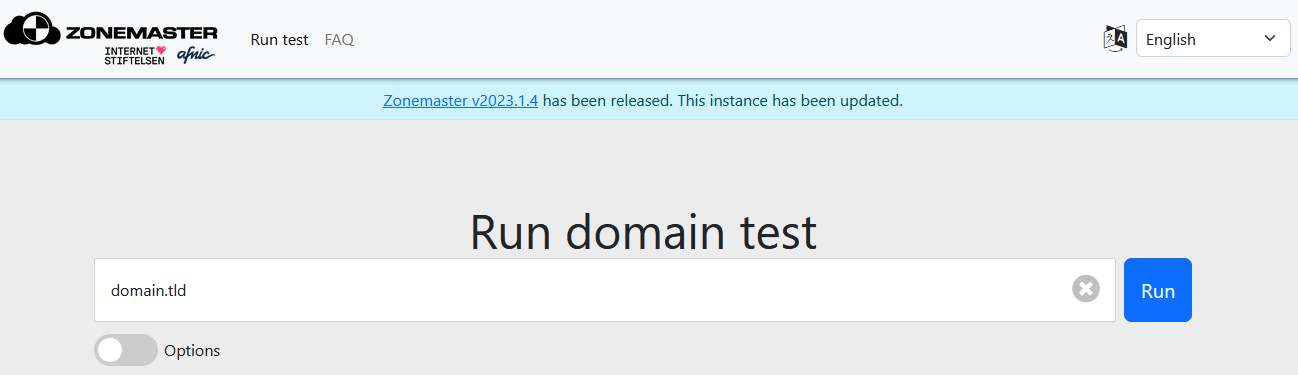
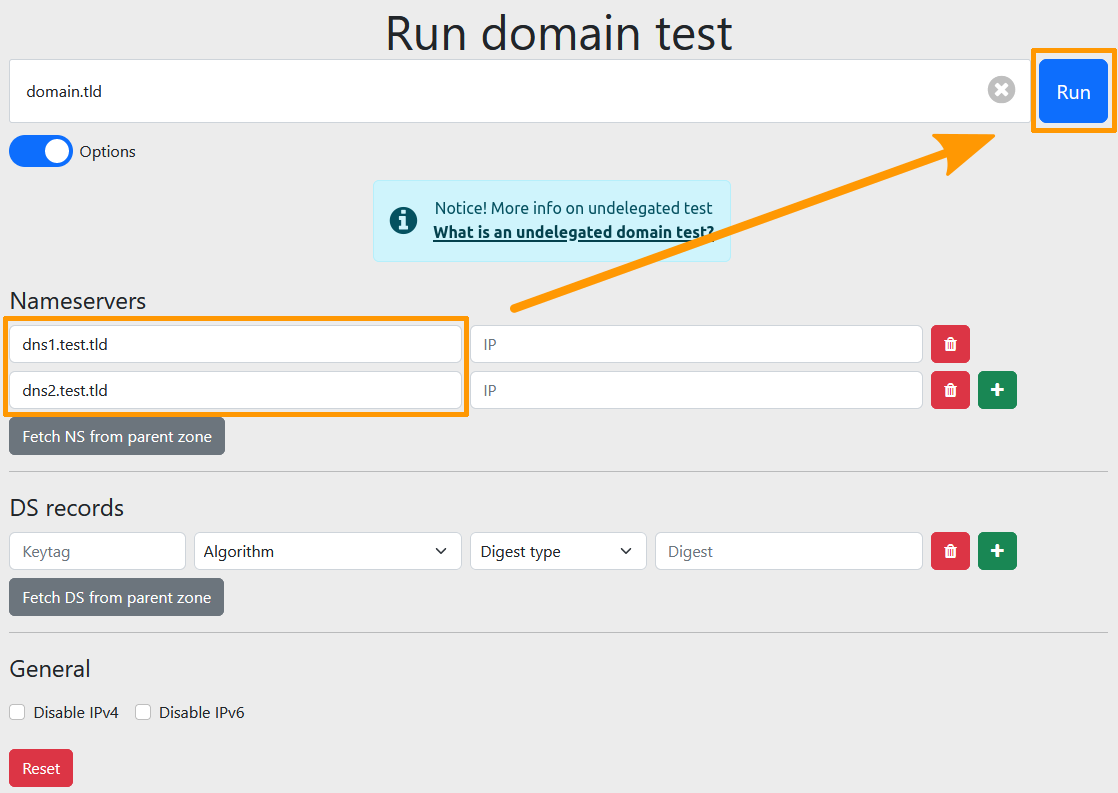
Um eine DNS-Konfiguration zu prüfen, die Sie vorbereitet, aber noch nicht auf den betreffenden Domainnamen angewendet haben, aktivieren Sie das Kästchen Show options und geben Sie die folgenden Informationen ein:
- Nameservers: Geben Sie die Daten des Nameservers ein, der einem Domainnamen zugeordnet ist. Sobald der vorherige Block ausgefüllt ist, erscheint automatisch ein neuer Block
Nameserver, sodass Sie mehrere angeben können. Die Eingabe einer IP-Adresse ist optional. - DS records: Geben Sie im Rahmen des DNSSEC-Schutzes die Daten des DS-Eintrags ein. Sobald der vorherige Block ausgefüllt ist, erscheint automatisch ein neuer Block
DS record. Wenn die DNS-Server das DNSSEC-Protokoll nicht verwenden, können Sie diese Felder leer lassen. Bei einer mit DNSSEC signierten Zone können Sie mit dieser Funktion vor der Veröffentlichung prüfen, ob die Zone mit einem validierenden Resolver und den DS-Einträgen, die Sie veröffentlichen möchten, korrekt funktioniert.
Über die Optionen IPv4 and IPv6, IPv4 only und IPv6 only können Sie die Prüfungen zudem auf ein bestimmtes IP-Protokoll beschränken
Beispiel:
Sie sind Inhaber des Domainnamens "domain.tld", der derzeit die DNS-Server "dnsXX.ovh.net" und "nsXX.ovh.net" verwendet.
Sie haben für diesen Domainnamen eine DNS-Zone auf den DNS-Servern "dns1.test.tld" und "dns2.test.tld" konfiguriert.
Vor dem Wechsel der DNS-Server können Sie über das Kästchen
Show optionseine erweiterte Suche durchführen, indem Sie "dns1.test.tld" und "dns2.test.tld" in die FelderNameserverseintragen.Zonemaster führt dann einen Test durch, als würden Sie die Server "dns1.test.tld" und "dns2.test.tld" für "domain.tld" verwenden.
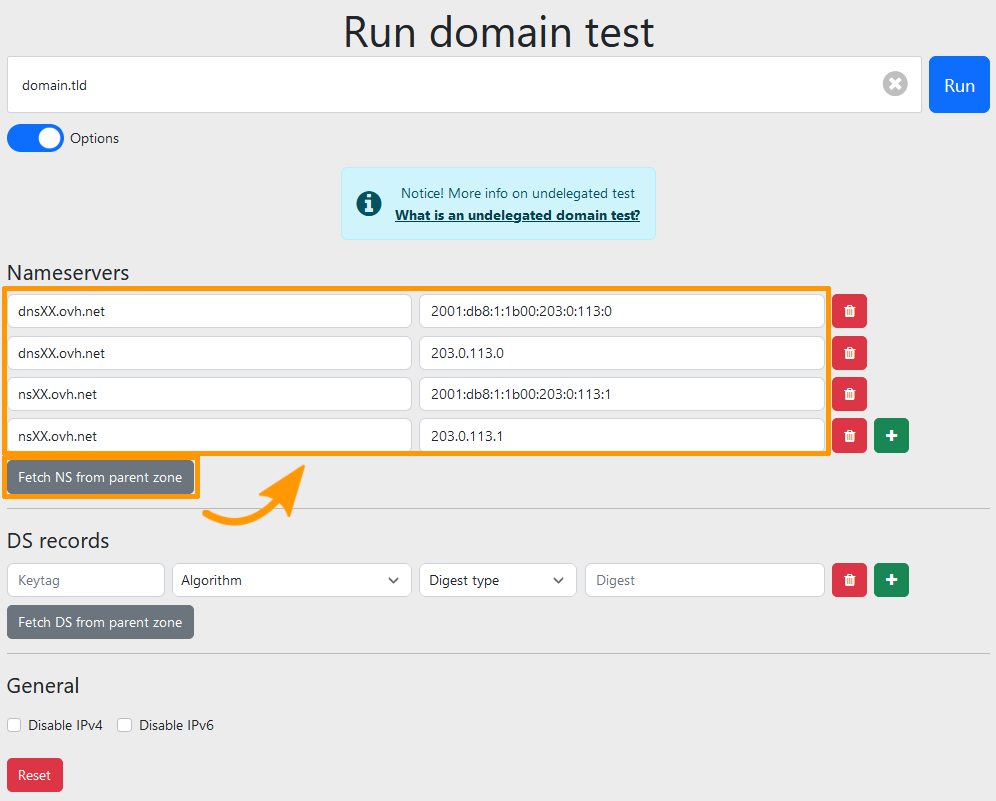
Wenn Sie einen Domainnamen eingeben und auf die Schaltflächen Fetch nameservers from parent zone und Fetch DS from parent zone klicken, werden die dem Domainnamen zugeordneten DNS-Server angezeigt sowie die Daten des DS-Eintrags (DNSSEC), sofern einer konfiguriert wurde.
Ergebnis
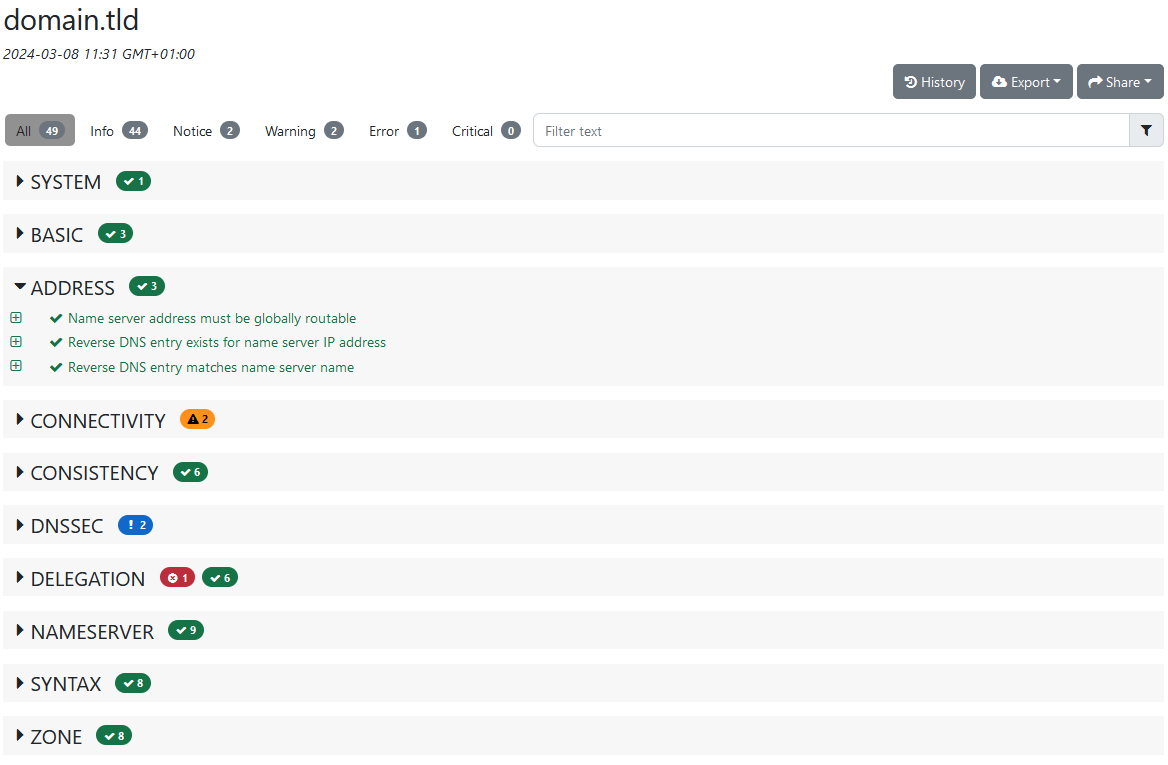
Nach dem Absenden des Formulars werden die Ergebnisse nach Testgruppen angezeigt. Die Tests sind nach Schweregrad sortiert.
- Error: Dieser Bereich zeigt Fehler oder fehlende Elemente an, die zu einer Fehlfunktion führen können.
- Warning: Dieser Bereich ist funktionsfähig, verdient jedoch besondere Aufmerksamkeit. Das Tool hat festgestellt, dass ein Parameter nicht dem Standard seiner Kategorie entspricht, ohne dass dies den Betrieb blockiert.
- Notice: Hierbei handelt es sich um eine reine Information ohne besondere Auswirkungen auf die Funktion des Domainnamens.
- Info: Dieser Bereich ist funktionsfähig und erfüllt die Standardkriterien seiner Kategorie.
Für jeden Test können weitere Details abgerufen werden, zum Beispiel um im Fall einer Fehlfunktion den Fehler nachzuvollziehen oder einfach zur Information.
Nützliche Informationen
Wenn Sie weitere Fragen zu Zonemaster haben, lesen Sie den Bereich FAQ auf https://zonemaster.net/.
Weiterführende Informationen
Alle Informationen zu DNS-Servern.
Bearbeiten der OVHcloud DNS-Zone.
Domainnamen mit DNSSEC gegen Cache Poisoning schützen.
Kontaktieren Sie für spezialisierte Dienstleistungen (SEO, Web-Entwicklung etc.) die OVHcloud Partner.
Wenn Sie Hilfe bei der Nutzung und Konfiguration Ihrer OVHcloud Lösungen benötigen, beachten Sie unsere Support-Angebote.
Treten Sie unserer User Community bei.