
Disaster recovery plan - Mechanisms and reference architectures
Learn how to design a disaster recovery plan for a Public Cloud application by replicating traffic and data to a second region
Objective
Deploying an application in a 3-AZ region, or in a high availability setup, protects it against the loss of a server, a rack or an Availability Zone. It does not protect it against the loss of an entire region. A major network outage on a Public Cloud region makes every resource hosted there unreachable, and your end users experience a full downtime.
Guarding against this scenario requires a disaster recovery site: a second Public Cloud region, ready to serve traffic as soon as the production region goes down.
This guide explains how to build a disaster recovery plan (DRP) across two Public Cloud regions: how to serve incoming traffic from both sites, and how to keep your data available in both of them.
Requirements
- A Public Cloud project in your OVHcloud account
- Two Public Cloud regions for your deployment: one for production, one for disaster recovery (Gravelines and Strasbourg, for example)
- Access to the OVHcloud API
- Recovery objectives defined for your application (RTO and RPO)
Instructions
Understanding the risk of a regional failure
The diagram below shows a typical Public Cloud deployment, and what becomes of it when the region suffers a major network outage:
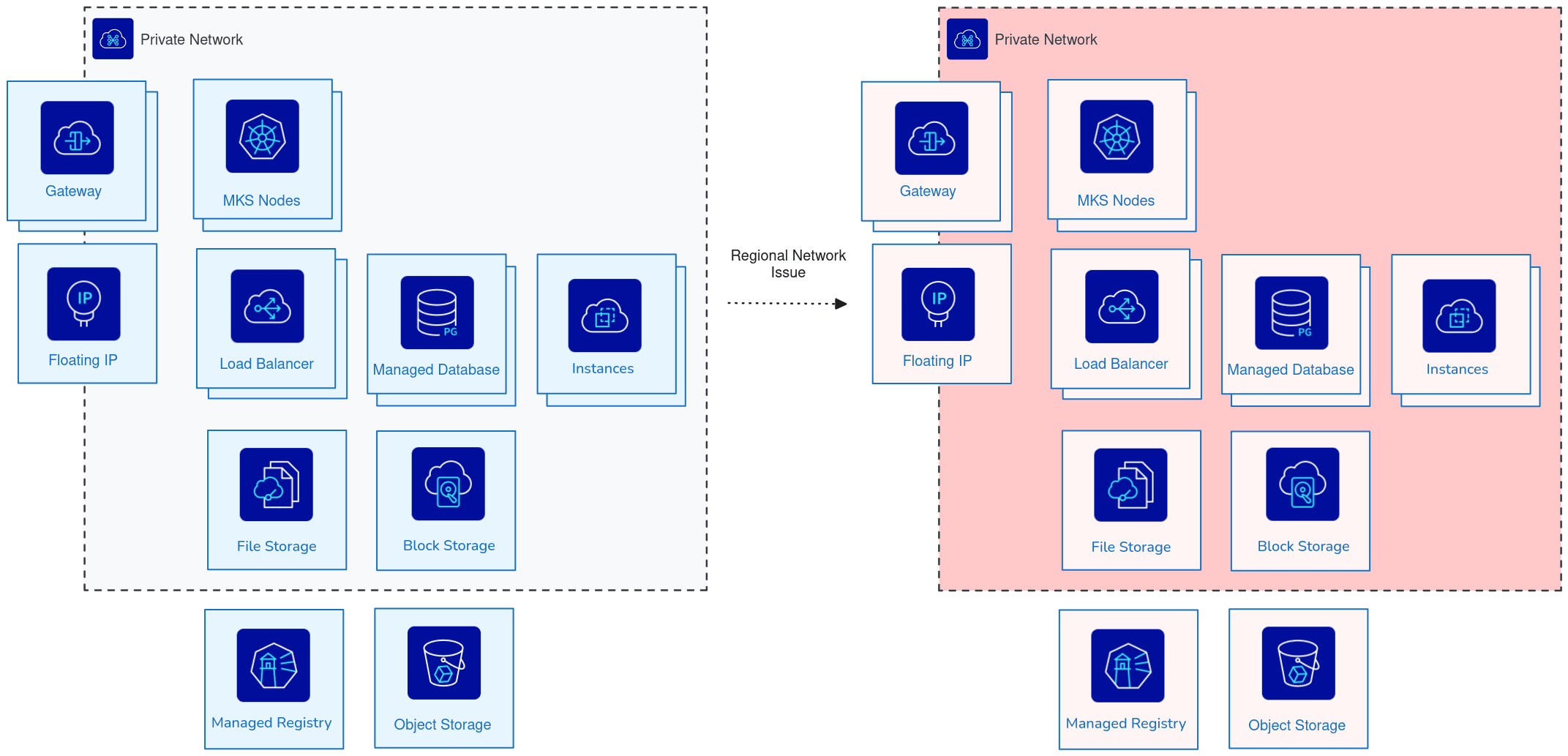
Every component loses network connectivity at once: instances, Managed Kubernetes Service nodes, gateway, Floating IP, Load Balancer, Managed Databases, Block Storage, File Storage, Managed Private Registry and Object Storage. However much resilience you build inside a single region, the outcome is the same: your service is down.
Extending the deployment to a second region raises two questions:
- How do you serve incoming traffic from two sites at the same time?
- How do you keep the same data available in two regions at the same time?
The sections below answer each in turn.
Serving incoming traffic from two sites
The first challenge is the ingress: traffic must keep flowing when one of the two sites disappears.
The OVHcloud IP Load Balancer solves this. The Public Cloud Load Balancer is a regional service, so it goes down with its region. The IP Load Balancer, by contrast, can point to backends in two different geographical sites simultaneously (Gravelines and Strasbourg, for example) and keeps serving traffic from the site that is still up.
The IP Load Balancer is the only OVHcloud load balancing product that can distribute traffic across two regions at the same time. Every other Public Cloud product is either regional or zonal, which means you need to create a dedicated resource in each region.
Choosing between replication and backup/restore
The second challenge is the data. Two mechanisms can make it available in the disaster recovery region:
- Replication continuously copies the data to the second region. Because the data is already there when the incident happens, recovery is fast. Prefer this option whenever the product supports it.
- Backup/restore rebuilds the data in the second region from a backup. Recovery is slower, and how much slower is hard to predict: a write-intensive database has to restore the backup first, then replay every transaction to reach the state it had just before the incident.
The table below lists the mechanism available for each Public Cloud product:
Managed Databases
PostgreSQL: tables replication
Public Cloud Databases for PostgreSQL provides a built-in tables replication mechanism, which keeps two databases hosted in two different regions in sync:
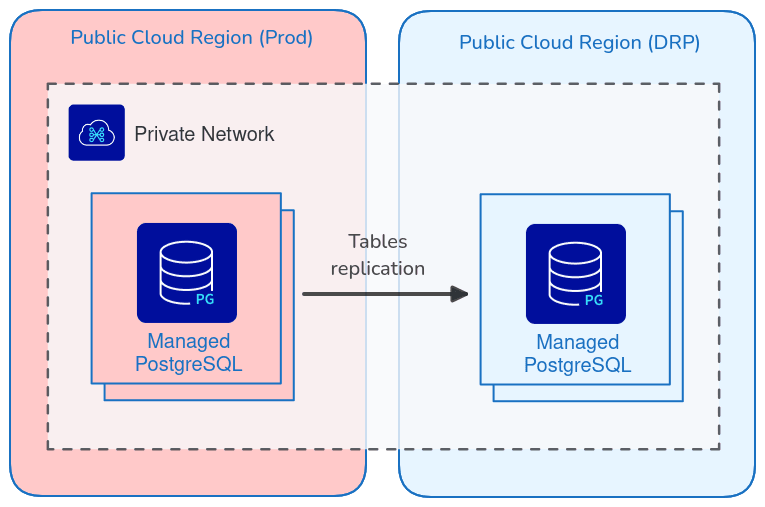
Advantages:
- The data is already present on the DRP site.
- Data loss is minimal.
- The DRP database endpoint is known in advance, since the database already exists.
Drawbacks:
- Both sides must share the same table schema.
- Replication is configured table by table, so you have to make sure none is left behind.
- Cost: you pay for two running databases.
Other database engines: backup/restore
You can also use backup/restore with Public Cloud Databases for PostgreSQL, for instance if you would rather run a single database.
When the engine offers no replication mechanism, backup/restore is the only option. Public Cloud Databases lets you store your backups in two locations, which you set through the OVHcloud API. Choose the region hosting the database, and the region where the DRP database will be created:
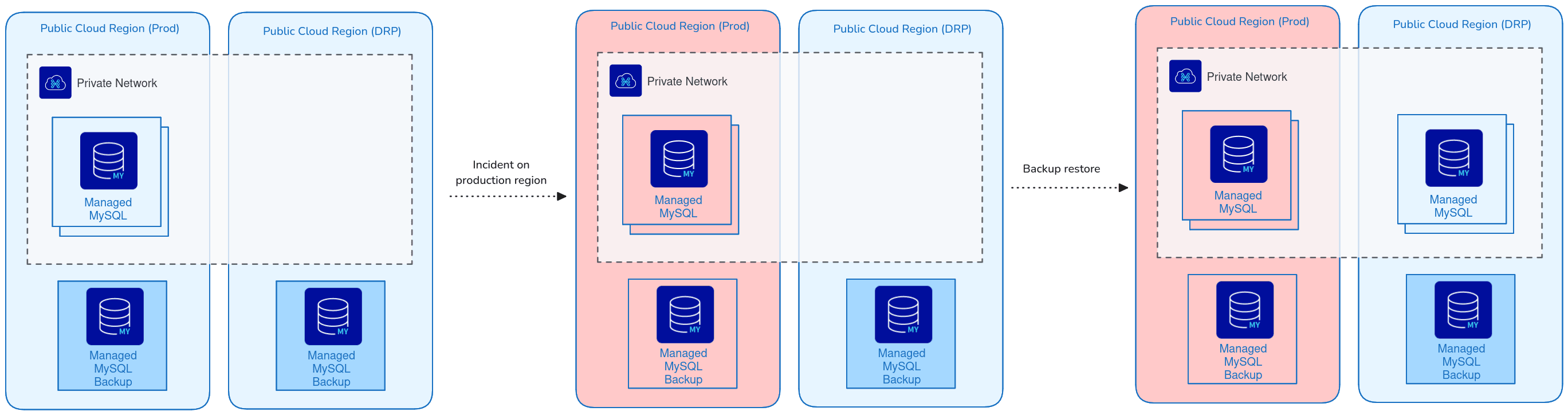
Advantage:
- Cost: you only pay for one running database.
Drawbacks:
- The endpoint of the new DRP database cannot be known in advance.
- The restore can take a long time, and that time is hard to predict.
To learn more about how your backups are handled, read Automated Backups for Public Cloud Databases and Restore a backup of Public Cloud Databases.
Object Storage
OVHcloud Object Storage comes with a built-in offsite replication mechanism: you create a replication rule from one bucket to another, and the two buckets can live in different regions, which is precisely what a DRP calls for.
To set it up, follow our guide Object Storage - Master asynchronous replication across your buckets.
Managed Private Registry
The OVHcloud Managed Private Registry is built on the open source project Harbor. Like Object Storage, it offers built-in asynchronous replication that fits a DRP use case: artifacts pushed to the production registry are replicated to the registry in the DRP region, so the Managed Kubernetes Service clusters of both regions pull the same images.
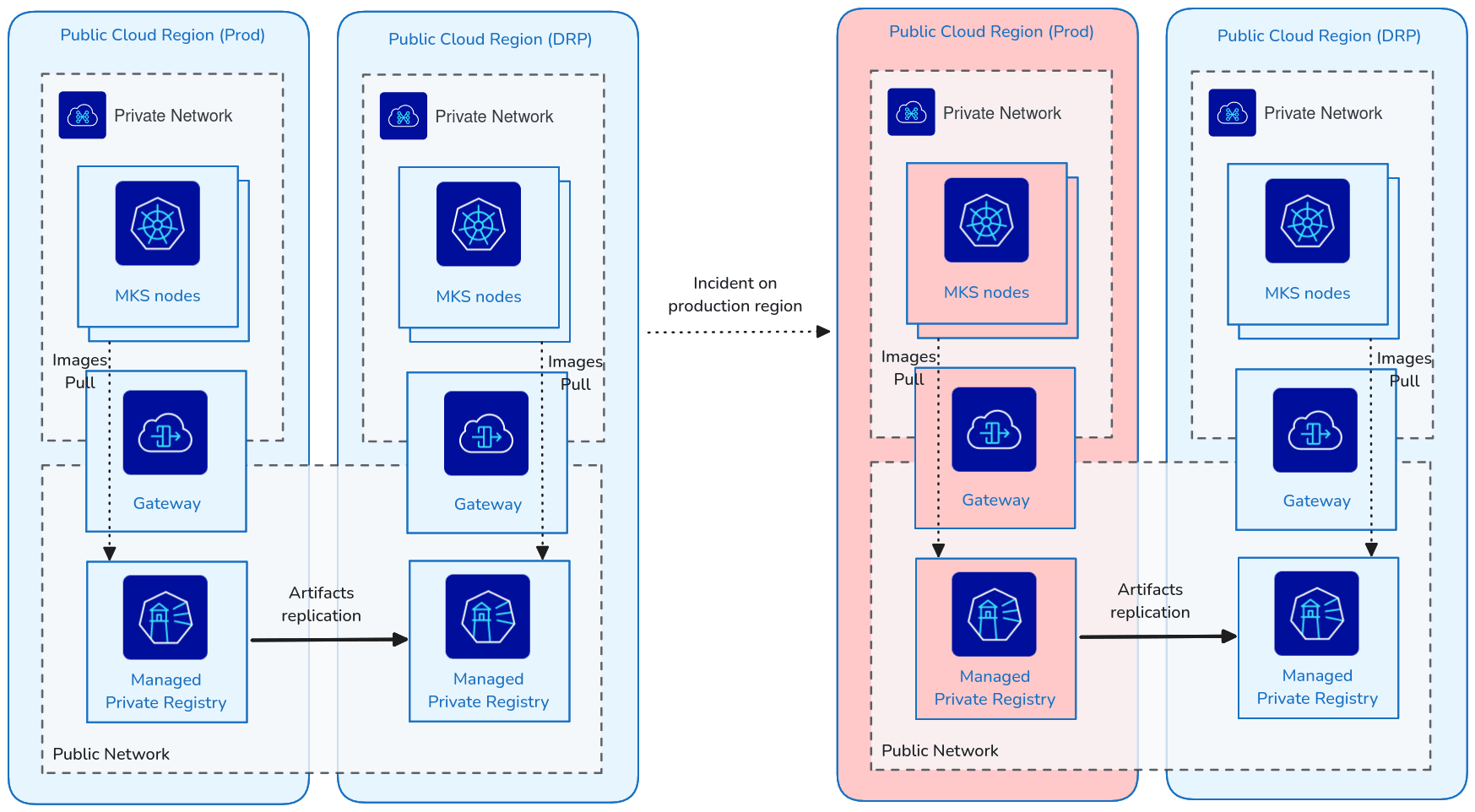
To create the replication rules, refer to the Harbor replication documentation.
The two registries have different FQDNs. Make sure each site pulls from the right one when you deploy your application.
Implementation example
Combining the mechanisms above yields a complete two-region deployment. Our guide Disaster recovery plan - Implementation example walks through one end to end, built on:
- Managed Kubernetes Service clusters
- Managed Databases for PostgreSQL and Valkey
- IP Load Balancer and Public Cloud Load Balancer
- Object Storage buckets
Go further
- Disaster recovery plan - Implementation example
- 3-AZ resilience - Mechanisms and reference architectures
- Comparison and resilience of Deployment Modes - Understanding 3-AZ / 1-AZ / Local Zones
- How to extend a private OVHcloud network across Public Cloud regions
For training or technical assistance implementing our solutions, contact your sales representative or visit our Professional Services page to request a quote and have your project analysed by our experts.
Feedback
Please send us your questions, feedback, and suggestions to improve the service:
- On the OVHcloud Discord server.