
Network integration and connectivity for OPCP
Understand how OPCP integrates into your network — data plane, out-of-band (OOB) administration network, and which flows to allow per service model
Objective
On-Prem Cloud Platform (OPCP) is a private cloud solution deployed on your own infrastructure, delivered as an integrated stack (servers, switches, automation, control plane). Before and during deployment, your team needs to understand how OPCP interconnects with your enterprise network: which flows it sends, which services it consumes from you, and – if you have subscribed to the Fully managed by OVHcloud offering – how OVHcloud reaches the platform to operate it remotely.
The aim of this guide is to present OPCP's network architecture, distinguishing:
- the out-of-band (OOB) administration network used to operate the platform,
- the data plane used by the workloads hosted on the OPCP servers.
It is intended for both architects preparing a deployment and administrators taking over a platform that has already been delivered.
Requirements
- A general understanding of your enterprise network architecture (VLANs, addressing plan, edge devices, firewalls).
- Knowing the OPCP subscription model you have chosen (Self-managed or Fully managed by OVHcloud).
- Having reviewed the OPCP technical prerequisites you need to provide before deployment.
Instructions
1. OPCP service models
OPCP is available with two levels of delegation. The chosen model determines who operates the platform's control plane and therefore which interconnection flows must be opened toward OVHcloud.
Whatever the model, managing what you deploy on top of the services provided by OPCP remains your responsibility: virtual machines, containers, bare-metal instances, applications, business data, application-level backups, and so on. OPCP provides the platform; you remain in charge of the use you make of it.
Whatever the model, the hardware architecture and the logical separation between networks are identical. The differences between Self-managed and Fully managed by OVHcloud relate to two points:
-
The level of access to administration interfaces. In Self-managed mode, your teams have full control of OPCP's management interfaces: OpenStack API, SSH access to the controllers, and two command-line tools embedded on the platform:
opcp-cli, which lets you configure OPCP (declaring platform resources, managing components, operational tasks),opcp-diag, which produces a platform health status and extracts the logs required for remote diagnostics when an incident occurs.
In Fully managed by OVHcloud mode, these interfaces are operated by the OVHcloud teams; your teams retain consultation and application-level operation access, but platform administration is delegated.
-
The need for an IPsec link between your administration network and OVHcloud. Required in Fully managed by OVHcloud mode so that OVHcloud teams can operate the platform remotely; this link does not exist in Self-managed mode.
2. The two OPCP network planes
OPCP relies on a strict separation between two networks with very different roles, equipment, and uses. This separation is structural: it underpins the security, resiliency, and quality of service of the platform.
The data plane
The data plane is the network used by the workloads hosted on the OPCP servers (virtual machines, containers, bare-metal instances exposed via OpenStack). It carries:
- the application traffic in and out of the instances,
- the communications between instances inside OPCP,
- the flows between OPCP and the rest of your production information system (databases, internal services, end users, and so on).
In terms of hardware, the data plane relies on:
- the data interfaces on the servers,
- redundant Top-of-Rack (ToR) switches,
- for multi-rack deployments, two additional families of switches:
- edge switches, which provide the junction between the OPCP internal network and your upstream network: they carry the uplink configuration toward your Customer Upstream Data Network,
- spine switches, which allow the platform to scale beyond 3 racks by aggregating the interconnection between the ToRs of several racks,
- fibre uplinks to your upstream network (Customer Upstream Data Network) in 40 GbE or 100 GbE, depending on the optics validated by OVHcloud for your deployment.
The data plane is driven end-to-end by OPCP through OpenStack Neutron: creating a network, a subnet or a security rule from Horizon or the API automatically propagates to the underlying switches.
The out-of-band (OOB) administration network
The OOB network is the network through which OPCP administers itself and through which you (and, in Fully managed by OVHcloud mode, the OVHcloud teams) reach the management interfaces. It is physically and logically separated from the data plane. It carries:
- access to the OpenStack APIs, the Horizon interface, and the OPCP management interfaces (HTTPS),
- SSH access to the OPCP Core Controllers (
opcp-cli,opcp-diag), - the inter-controller exchanges that provide control plane resiliency in STANDARD POD and FABRIC modes (state synchronisation, quorum election, VIP failover between the three OPCP Core Controllers),
- the logs and metrics emitted from OPCP toward your internal services,
- the outbound flows from OPCP toward your infrastructure services (NTP, DNS, S31 for backups, LDAP, syslog).
In terms of hardware, the OOB network relies on:
- the OPCP Core Controllers, each equipped with an OOB uplink negotiating at 10 GbE related to your upstream infrastructure, plus a 1 GbE BMC port,
- uplinks toward your upstream OOB network (Customer Upstream OOB Network).
In STANDARD POD and FABRIC modes, the three OPCP Core Controllers are reached through a shared virtual IP address, whose proper operation requires L2 reachability on a common untagged segment between the three OPCP Core Controllers. The availability of the control plane therefore depends directly on the availability of this network connection: a prolonged outage of the customer's OOB network can disrupt access to the administration of the platform. The NANOPOD mode is not concerned, since it only has one controller. Data exchanged between the OPCP Core Controllers travels through OPCP's own network. Only the administrators' access to the control plane can be affected by issues on the OOB network.
No direct communication is possible between the data plane and the OOB network from inside OPCP. Any cross-network communication must go through your upstream network, which leaves you in full control of the security rules between the two perimeters.
3. Deployment topologies
OPCP is delivered in one of three deployment modes, sized for different use cases. These modes differ mainly in the number of supported racks and the resiliency of the control plane. The presence or absence of spine and edge switches between the racks and your upstream network is a direct consequence of this.
From a network integration standpoint, the key point to keep in mind is:
- in NANOPOD, the data plane is configured directly on the Top-of-Rack (ToR) switches: they are the ones connecting to your Customer Upstream Data Network;
- in STANDARD POD and FABRIC, the data plane is configured on the edge switches, which sit between the ToRs and your upstream network. The ToR configuration remains internal to OPCP.
The number of OPCP Core Controllers follows the deployment mode: 1 controller in NANOPOD, 3 controllers in STANDARD POD and FABRIC.
Single-controller configuration (NANOPOD)
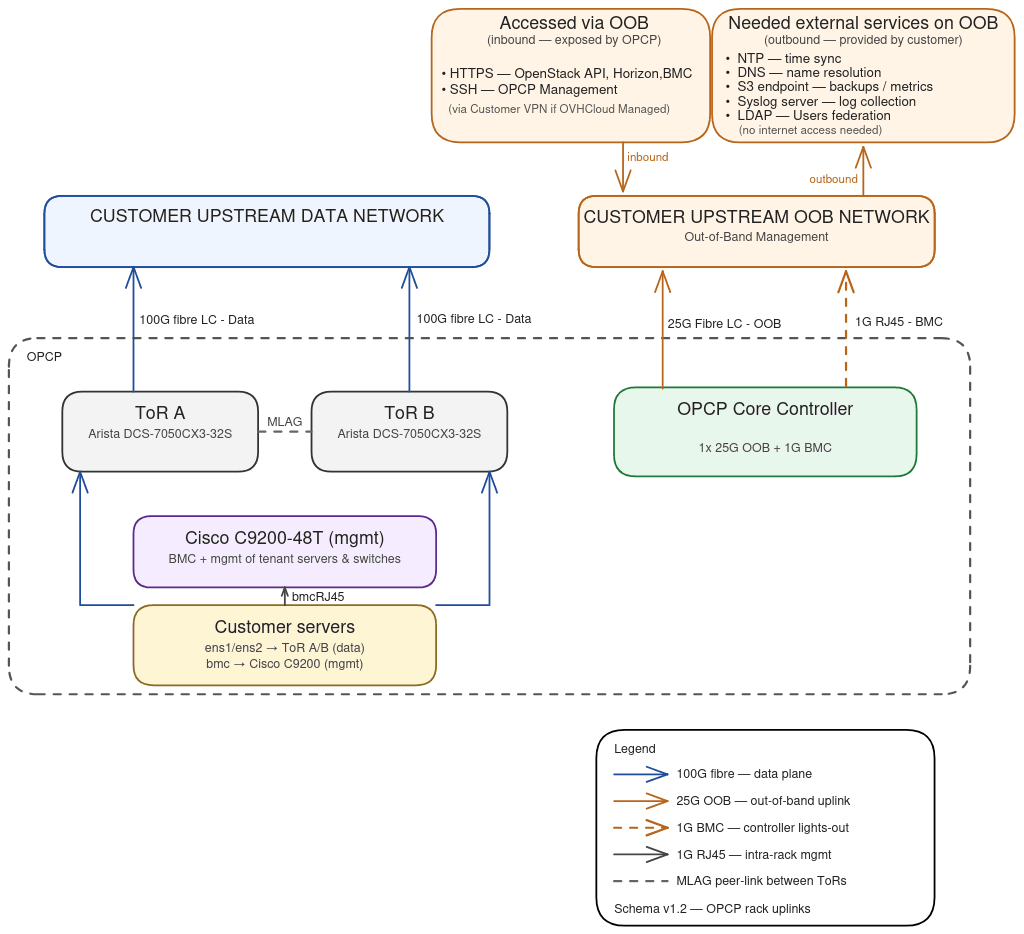
The key elements are:
- Customer Servers: the servers hosting the workloads. Their data interfaces are connected to both ToRs; their BMC is attached to the management switch.
- ToR A / ToR B (Arista DCS-7050CX3-32S): two redundant Top-of-Rack switches. In NANOPOD mode, they carry the data plane directly and connect to your Customer Upstream Data Network through fibre uplinks at 40 GbE or 100 GbE, depending on the optics validated by OVHcloud.
- Management switch (mgmt): dedicated switch that aggregates the server BMCs and the ToR management ports.
- A single OPCP Core Controller, connected through a 25 GbE or 10 GbE OOB uplink to your Customer Upstream OOB Network, plus a 1 GbE BMC port for its own lights-out access.
With a single controller, the control plane is not redundant: a hardware failure or maintenance operation on this controller interrupts the administration of the platform (workloads already deployed continue to run on the servers). For any production environment requiring high availability of the control plane, choose the STANDARD POD or FABRIC modes.
Three-controller configuration (STANDARD POD and FABRIC)
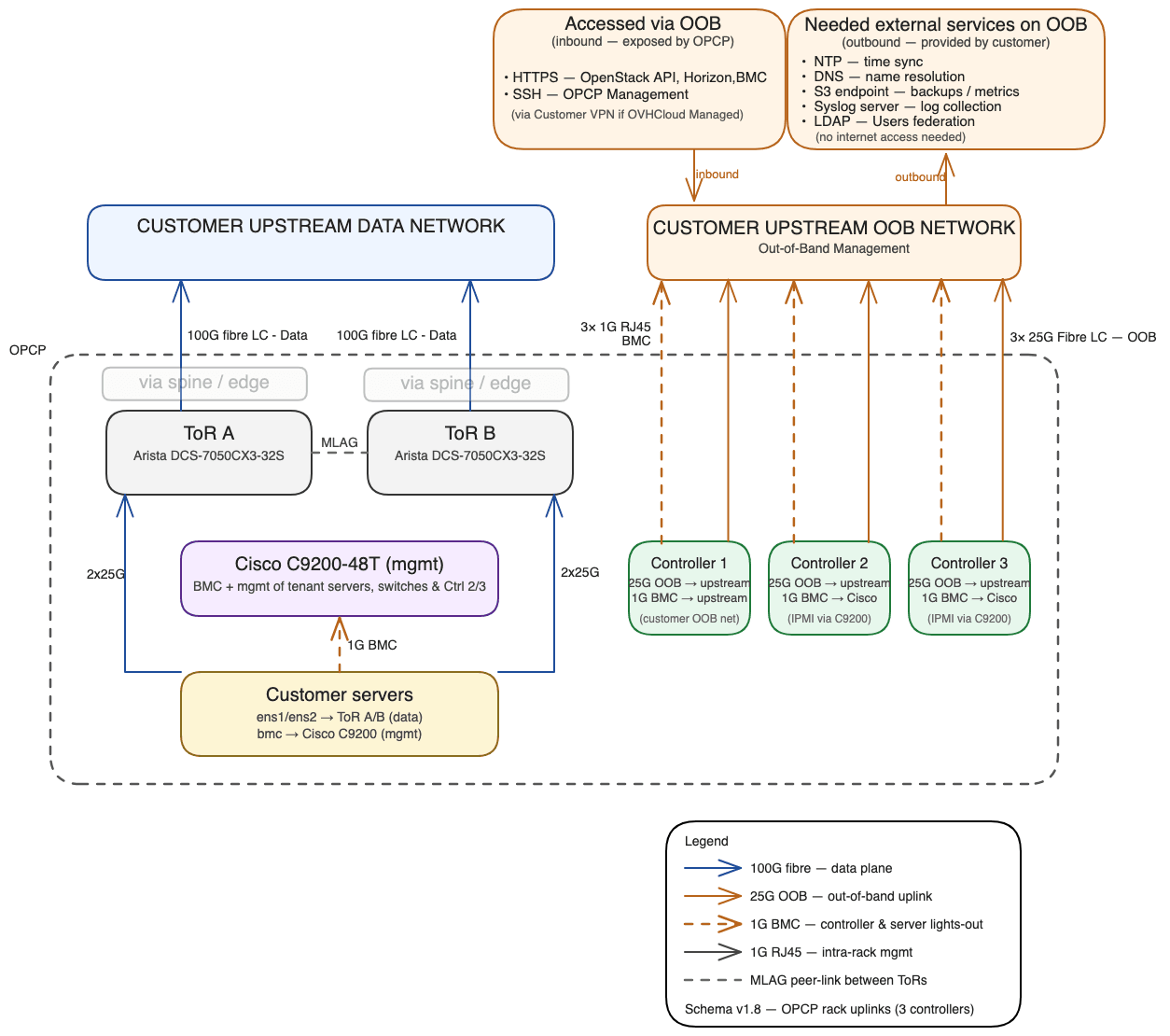
Compared to NANOPOD mode, the differences are:
- 3 OPCP Core Controllers instead of one, each connected to the upstream OOB network with a 25 GbE or 10 GbE uplink and a 1 GbE BMC link. A VIP (Virtual IP) is shared between the three controllers: this VIP is used to reach the OpenStack APIs and Horizon, regardless of which controller is active.
- The BMCs of all three controllers, like those of the servers, are exposed on your upstream OOB network. This ensures lights-out access to every piece of equipment even if a component internal to OPCP fails.
- Edge switches are inserted between the ToRs and your upstream network. The data plane is configured on these edges, no longer on the ToRs. In FABRIC mode, spine switches are also present to aggregate several racks; beyond ten racks, a megaspine layer can be added.
4. How OPCP integrates with your environment
The integration of OPCP relies on two network perimeters that you provide and keep under your control.
Data plane side (Customer Upstream Data Network)
This is your production network. OPCP connects to it through the fibre uplinks of the ToRs (in NANOPOD mode) or the edges (in STANDARD POD and FABRIC modes), at speeds of 40 GbE or 100 GbE depending on the optics validated by OVHcloud.
The configuration of the network attachment (uplinks toward your upstream) is driven by OPCP through an API exposed by the platform. Depending on the deployment mode:
- in NANOPOD, the configuration is applied directly on the ToRs;
- in STANDARD POD and FABRIC, it is applied on the edges.
Beyond this attachment, the content and segmentation of the data plane remain fully driven by OPCP through OpenStack Neutron: each Neutron network is exposed on the uplinks using one of the three modes below.
Access mode
The uplink port is attached to a single Neutron network and presents traffic as classic 802.1Q to your upstream equipment. This is the simplest mode and is suitable when an upstream port is dedicated to a single OPCP network.
If your instances push their own VLAN tags inside the Neutron network (hypervisor-level tagging, specific guest needs, etc.), those inner tags are transparently handled by OPCP and your upstream still only sees standard 802.1Q frames — there is nothing extra to configure on your side.
Trunk mode
The uplink port carries several Neutron networks over a single physical interface, each distinguished by its own VLAN ID. Because the VLAN tag set by OPCP is preserved end-to-end and never decapsulated, the framing your upstream sees depends on what happens inside each Neutron network:
- 802.1Q — if your instances do not use VLANs inside the Neutron network. Your upstream equipment must be configured to recognise the VLAN IDs assigned by OPCP.
- 802.1ad (QinQ) — if your instances push their own VLAN tags inside the Neutron network. The OPCP-assigned VLAN becomes the outer tag and the instance VLANs become inner tags. Your upstream equipment must be able to handle double encapsulation.
Both can coexist on the same trunk: each Neutron network is independent, so some can be plain 802.1Q while others are 802.1ad, depending on how each one is used.
Out-of-band side (Customer Upstream OOB Network)
This is the perimeter from which OPCP is administered. You need to plan for:
- a dedicated subnet for OPCP, with a default gateway. This subnet hosts the controllers (and their VIP in HA configuration),
- DNS resolution: a domain name you delegate to OPCP (for example
*.opcp01.example.com), together with a forwarder from your internal DNS resolvers to the OPCP VIP, - filtering rules allowing the flows described in the matrix below,
- access to at least one NTP time source from OPCP's administration network (mandatory) and, depending on the options you choose, to your other internal services (syslog, S3, LDAP).
5. Flow matrix to allow
All the flows below originate from or terminate on the out-of-band (OOB) administration network of OPCP. None of them uses the data plane.
Inbound flows (you → OPCP)
Outbound flows (OPCP → you)
OPCP is designed to run in air-gap mode: none of these flows requires Internet access. The only expected destinations are services from your own information system.
6. The OVHcloud interconnection (Fully managed by OVHcloud mode)
If you have subscribed to the Fully managed by OVHcloud offering, OVHcloud needs to reach your OPCP administration network in order to provide remote operations and support. This interconnection relies on a site-to-site IPsec tunnel between an edge device on the OVHcloud side and an edge device on the customer side.
The default parameters proposed by OVHcloud are:
- IKEv2 only (IKEv1 is not supported),
- PSK (Pre-Shared Key) authentication,
- AES-256 encryption,
- SHA-256 hash,
- Diffie-Hellman group 14,
- PFS (Perfect Forward Secrecy) enabled.
OVHcloud strongly discourages lowering the encryption level below AES-256. If a constraint on your side prevents the use of these parameters, contact your OVHcloud point of contact to study the alternatives.
To prepare this interconnection, you must provide OVHcloud with:
- the public IP address of your IPsec endpoint,
- the subnet on your side to expose in the tunnel (typically the OPCP administration subnet),
- the agreed PSK (transmitted through a secure channel: check with your OVHcloud point of contact).
Once the tunnel is established, OVHcloud teams reach your OPCP only through this interconnection, using the same flows as those described in the matrix above. No direct access from the Internet is opened on your platform.
7. Addressing plan and naming
When preparing the deployment, you will provide OVHcloud with:
- the subnet allocated to the OPCP administration network and its default gateway (for example: subnet
172.30.1.0/24, gateway172.30.1.254), - the hostnames and IP addresses of the OPCP controllers, as well as the VIP shared in HA configuration (for example:
opcp-controller-0/172.30.1.10,opcp-controller-1/172.30.1.11,opcp-controller-2/172.30.1.12, VIP172.30.1.5), - the domain name you delegate to OPCP (for example:
opcp01.example.com).
The addressing plan and naming convention are entirely under your control: OVHcloud does not impose any format. Refer to the OPCP technical prerequisites guide for the full list of elements to provide.
Go further
For training or technical assistance implementing our solutions, contact your sales representative or visit our Professional Services page to request a quote and have your project analysed by our experts.
Join our community of users.
1: S3 is a trademark of Amazon Technologies, Inc. OVHcloud's service is not sponsored by, endorsed by, or otherwise affiliated with Amazon Technologies, Inc.