AI Endpoints - Create a sentiment analyzer
Build a sentiment analyzer with AI Endpoints and Java using Quarkus
Introduction
In this tutorial, we'll show you how to create a sentiment analyzer using AI Endpoints and Java with Quarkus.
We'll use a model from the Natural Language Processing (NLP) category, specifically the roberta-base-go_emotions model. This model can analyze text and return emotions in response.
Project setup
To simplify the project, we'll use Quarkus for fast development and REST exposure.
Start by adding the necessary dependencies in your pom.xml:
<?xml version="1.0" encoding="UTF-8"?>

<project xmlns="http://maven.apache.org/POM/4.0.0"
  xmlns:xsi="http://www.w3.org/2001/XMLSchema-instance"
  xsi:schemaLocation="http://maven.apache.org/POM/4.0.0 http://maven.apache.org/xsd/maven-4.0.0.xsd">
  <modelVersion>4.0.0</modelVersion>

  <groupId>com.ovhcloud.examples.aiendpoints</groupId>
  <artifactId>nlp</artifactId>
  <version>1.0.0-SNAPSHOT</version>

  <name>nlp</name>
  <url>https://endpoints.ai.cloud.ovh.net/</url>

  <properties>
    <project.build.sourceEncoding>UTF-8</project.build.sourceEncoding>
    <compiler-plugin.version>3.12.1</compiler-plugin.version>
    <maven.compiler.source>21</maven.compiler.source>
    <maven.compiler.target>21</maven.compiler.target>
    <maven.compiler.release>21</maven.compiler.release>
    <quarkus.platform.artifact-id>quarkus-bom</quarkus.platform.artifact-id>
    <quarkus.platform.group-id>io.quarkus.platform</quarkus.platform.group-id>
    <quarkus.platform.version>3.11.0</quarkus.platform.version>
    <skipITs>true</skipITs>
    <surefire-plugin.version>3.2.5</surefire-plugin.version>
  </properties>

  <dependencyManagement>
    <dependencies>
      <dependency>
        <groupId>${quarkus.platform.group-id}</groupId>
        <artifactId>${quarkus.platform.artifact-id}</artifactId>
        <version>${quarkus.platform.version}</version>
        <type>pom</type>
        <scope>import</scope>
      </dependency>
    </dependencies>
  </dependencyManagement>

  <dependencies>
    <dependency>
      <groupId>io.quarkus</groupId>
      <artifactId>quarkus-arc</artifactId>
    </dependency>
    <dependency>
      <groupId>io.quarkus</groupId>
      <artifactId>quarkus-rest</artifactId>
    </dependency>
    <dependency>
      <groupId>io.quarkus</groupId>
      <artifactId>quarkus-rest-client-jackson</artifactId>
  </dependency>
    <dependency>
      <groupId>io.quarkus</groupId>
      <artifactId>quarkus-junit5</artifactId>
      <scope>test</scope>
    </dependency>
  </dependencies>


</project>
A full pom.xml example is available here.
Define the AI Endpoints client
We define a REST client interface using MicroProfile annotations to interact with the AI Endpoint, in a AISentimentService.java file:
package com.ovhcloud.examples.aiendpoints.nlp.sentiment;

import org.eclipse.microprofile.rest.client.annotation.ClientHeaderParam;
import org.eclipse.microprofile.rest.client.inject.RegisterRestClient;
import jakarta.ws.rs.POST;
import jakarta.ws.rs.Path;

@Path("/api")
@RegisterRestClient(baseUri = "https://roberta-base-go-emotions.endpoints.kepler.ai.cloud.ovh.net")
@ClientHeaderParam(name = "Authorization", value = "Bearer ${ovhcloud.ai-endpoints.token}")
@ClientHeaderParam(name = "Content-Type", value = "application/json")
public interface AISentimentService {

  @POST
  @Path("text2emotions")
  EmotionEvaluation text2emotions(String text);

}
We will use Eclipse MicroProfile and Jakarta EE here.
You can find the EmotionEvaluation class source code here.
Implement the REST resource
Now let's create the actual REST resource that uses the AISentimentService, in a SentimentsAnalysisResource.java file:
package com.ovhcloud.examples.aiendpoints.nlp.sentiment;

import org.eclipse.microprofile.rest.client.inject.RestClient;
import org.slf4j.Logger;
import org.slf4j.LoggerFactory;
import jakarta.ws.rs.POST;
import jakarta.ws.rs.Path;
import jakarta.ws.rs.Produces;
import jakarta.ws.rs.core.MediaType;

/**
 * Class to do textual sentiments analysis.
 */
@Path("/sentiment")
public class SentimentsAnalysisResource {

  private static final Logger _LOG = LoggerFactory.getLogger(SentimentsAnalysisResource.class);

  @RestClient
  private AISentimentService aiSentimentService;

  @POST
  @Produces(MediaType.TEXT_PLAIN)
  public String getSentiment(String text) {
    _LOG.info("Sentiment analysis for text: {}", text);

    return aiSentimentService.text2emotions(text).toEmoji();
  }
}
Run the application
Now it's time to test the sentiment analyzer!
Start your Quarkus app in dev mode:
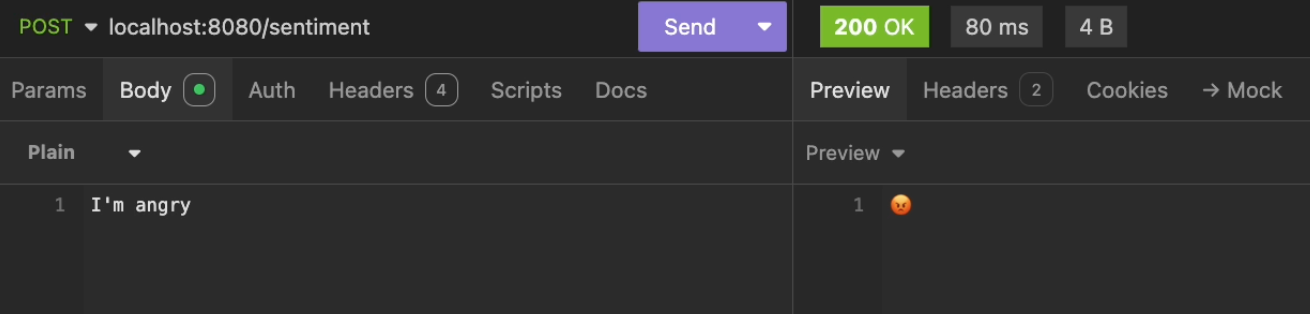
Then, send a POST request to the analyzer endpoint (http://localhost:8080/sentiment), with a text as payload:
curl -X POST http://localhost:8080/sentiment -d "I feel great today!"
You should receive an emoji (or label) representing the sentiment of the text:
Conclusion
You have constructed a sentiment analyzer in Java using Quarkus for REST development and the roberta-base-go_emotions model to detect emotions in text.
Go further
If you want to go further and deploy your Quarkus web app in the cloud, making your interface accessible to everyone, refer to the following articles and tutorials:
For training or technical assistance implementing our solutions, contact your sales representative or visit our Professional Services page to request a quote and have your project analysed by our experts.
Feedback
Please feel free to send us your questions, feedback, and suggestions regarding AI Endpoints and its features:
- In the #ai-endpoints channel of the OVHcloud Discord server, where you can engage with the community and OVHcloud team members.
