AI Endpoints - Créez un analyseur de sentiment
Faire de l'analyse de sentiments avec AI Endpoint, Java et Quarkus
Introduction
Dans ce tutoriel, nous allons vous montrer comment créer un analyseur de sentiment à l’aide des AI Endpoints et de Java avec Quarkus.
Nous allons utiliser un modèle de la catégorie Natural Language Processing (NLP), plus précisément le modèle roberta-base-go_emotions. Ce modèle peut analyser un texte et renvoyer les émotions correspondantes.
Configuration du projet
Pour simplifier le projet, nous allons utiliser Quarkus pour un développement rapide et l’exposition REST.
Commencez par ajouter les dépendances nécessaires dans votre pom.xml :
<?xml version="1.0" encoding="UTF-8"?>

<project xmlns="http://maven.apache.org/POM/4.0.0"
  xmlns:xsi="http://www.w3.org/2001/XMLSchema-instance"
  xsi:schemaLocation="http://maven.apache.org/POM/4.0.0 http://maven.apache.org/xsd/maven-4.0.0.xsd">
  <modelVersion>4.0.0</modelVersion>

  <groupId>com.ovhcloud.examples.aiendpoints</groupId>
  <artifactId>nlp</artifactId>
  <version>1.0.0-SNAPSHOT</version>

  <name>nlp</name>
  <url>https://endpoints.ai.cloud.ovh.net/</url>

  <properties>
    <project.build.sourceEncoding>UTF-8</project.build.sourceEncoding>
    <compiler-plugin.version>3.12.1</compiler-plugin.version>
    <maven.compiler.source>21</maven.compiler.source>
    <maven.compiler.target>21</maven.compiler.target>
    <maven.compiler.release>21</maven.compiler.release>
    <quarkus.platform.artifact-id>quarkus-bom</quarkus.platform.artifact-id>
    <quarkus.platform.group-id>io.quarkus.platform</quarkus.platform.group-id>
    <quarkus.platform.version>3.11.0</quarkus.platform.version>
    <skipITs>true</skipITs>
    <surefire-plugin.version>3.2.5</surefire-plugin.version>
  </properties>

  <dependencyManagement>
    <dependencies>
      <dependency>
        <groupId>${quarkus.platform.group-id}</groupId>
        <artifactId>${quarkus.platform.artifact-id}</artifactId>
        <version>${quarkus.platform.version}</version>
        <type>pom</type>
        <scope>import</scope>
      </dependency>
    </dependencies>
  </dependencyManagement>

  <dependencies>
    <dependency>
      <groupId>io.quarkus</groupId>
      <artifactId>quarkus-arc</artifactId>
    </dependency>
    <dependency>
      <groupId>io.quarkus</groupId>
      <artifactId>quarkus-rest</artifactId>
    </dependency>
    <dependency>
      <groupId>io.quarkus</groupId>
      <artifactId>quarkus-rest-client-jackson</artifactId>
  </dependency>
    <dependency>
      <groupId>io.quarkus</groupId>
      <artifactId>quarkus-junit5</artifactId>
      <scope>test</scope>
    </dependency>
  </dependencies>


</project>
Un exemple complet de pom.xml est disponible ici.
Définir le client AI Endpoints
Nous définissons une interface de client REST à l’aide des annotations MicroProfile pour interagir avec l’AI Endpoint, dans un fichier AISentimentService.java :
package com.ovhcloud.examples.aiendpoints.nlp.sentiment;

import org.eclipse.microprofile.rest.client.annotation.ClientHeaderParam;
import org.eclipse.microprofile.rest.client.inject.RegisterRestClient;
import jakarta.ws.rs.POST;
import jakarta.ws.rs.Path;

@Path("/api")
@RegisterRestClient(baseUri = "https://roberta-base-go-emotions.endpoints.kepler.ai.cloud.ovh.net")
@ClientHeaderParam(name = "Authorization", value = "Bearer ${ovhcloud.ai-endpoints.token}")
@ClientHeaderParam(name = "Content-Type", value = "application/json")
public interface AISentimentService {

  @POST
  @Path("text2emotions")
  EmotionEvaluation text2emotions(String text);

}
Nous utiliserons ici Eclipse MicroProfile et Jakarta EE.
Vous pouvez trouver le code source de la classe EmotionEvaluation ici.
Implémenter la ressource REST
Créons à présent la ressource REST qui utilise le AISentimentService, dans un fichier SentimentsAnalysisResource.java :
package com.ovhcloud.examples.aiendpoints.nlp.sentiment;

import org.eclipse.microprofile.rest.client.inject.RestClient;
import org.slf4j.Logger;
import org.slf4j.LoggerFactory;
import jakarta.ws.rs.POST;
import jakarta.ws.rs.Path;
import jakarta.ws.rs.Produces;
import jakarta.ws.rs.core.MediaType;

/**
 * Class to do textual sentiments analysis.
 */
@Path("/sentiment")
public class SentimentsAnalysisResource {

  private static final Logger _LOG = LoggerFactory.getLogger(SentimentsAnalysisResource.class);

  @RestClient
  private AISentimentService aiSentimentService;

  @POST
  @Produces(MediaType.TEXT_PLAIN)
  public String getSentiment(String text) {
    _LOG.info("Sentiment analysis for text: {}", text);

    return aiSentimentService.text2emotions(text).toEmoji();
  }
}
Exécuter l’application
Il est maintenant temps de tester l’analyseur de sentiment !
Démarrez votre application Quarkus en mode dev :
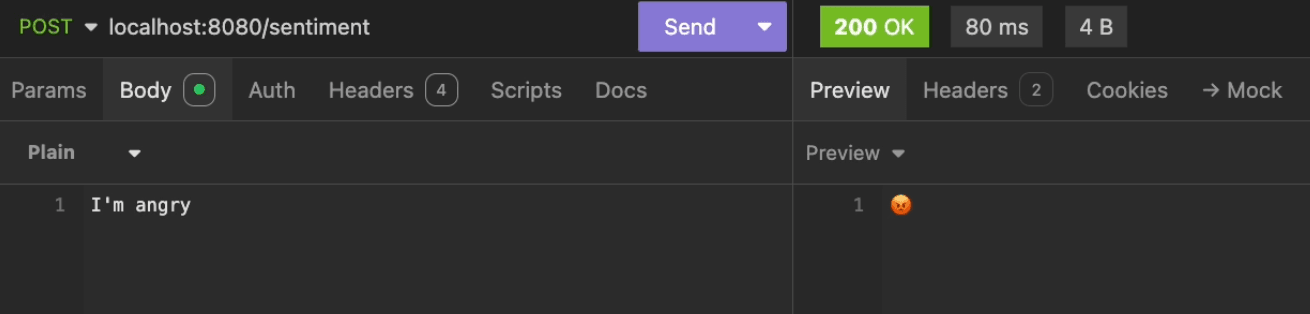
Ensuite, envoyez une requête POST à l’endpoint de l’analyseur (http://localhost:8080/sentiment), avec un texte en tant que payload :
curl -X POST http://localhost:8080/sentiment -d "I feel great today!"
Vous devriez recevoir un emoji (ou un label) représentant le sentiment du texte :
Conclusion
Vous avez construit un analyseur de sentiment en Java à l’aide de Quarkus pour le développement REST et du modèle roberta-base-go_emotions pour détecter les émotions dans un texte.
Aller plus loin
Si vous souhaitez aller plus loin et déployer votre application web Quarkus dans le cloud, en rendant votre interface accessible à tous, consultez les articles et tutoriels suivants :
Pour une formation ou une assistance technique sur la mise en œuvre de nos solutions, contactez votre commercial ou consultez la page Professional Services pour obtenir un devis et faire analyser votre projet par nos experts.
Votre avis nous intéresse !
N’hésitez pas à nous faire part de vos questions, retours et suggestions concernant AI Endpoints et ses fonctionnalités :
- Dans le canal #ai-endpoints du serveur Discord OVHcloud, où vous pouvez échanger avec la communauté et les équipes OVHcloud.
