Déployer un opérateur Kubernetes écrit en Golang sur OVHcloud Managed Kubernetes
Découvrez comment déployer un opérateur Kubernetes écrit en Golang sur OVHcloud Managed Kubernetes avec l'Operator SDK
Objectif
Les opérateurs sont un moyen d'étendre Kubernetes pour automatiser certaines actions dans le cluster.
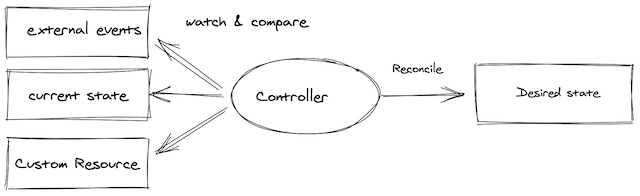
En quelques mots, un opérateur propose des actions OPS de manière programmatique et évite les activités humaines répétitives dénuées de valeur ajoutée.
Les tâches qu'un opérateur peut effectuer sont variées et peuvent concerner des ressources déployées dans Kubernetes (comme un Pod) ou en dehors (comme une base de données par exemple).
Dans ce guide, nous nous concentrons sur les ressources internes à un cluster Kubernetes.
Un opérateur repose sur des Custom Resources qui permettent d'étendre l'API Kubernetes.
Grâce à la boucle de contrôle de Kubernetes, l'opérateur maintient les ressources dans l'état souhaité.
Le rôle de l'opérateur est ensuite de surveiller l'état des objets internes ou externes qu'il gère.
Un opérateur peut avoir différentes capacités :
- configuration et installation basique de l'application
- mise à jour de l'application (avec rollback si nécessaire)
- sauvegarde et restauration si l'opérateur gère un état
- auto-remédiation de l'application en cas de problème
- supervision et observabilité de ses propres métriques
- autoscaling, auto-tuning...
Un bon résumé des capacités d'un opérateur est disponible sur le site de l'operator framework.
Un opérateur étant une API personnalisée dans Kubernetes, vous devez le développer. Heureusement, des frameworks existent pour vous aider à développer votre propre opérateur.
Le framework le plus important vous permet de développer un opérateur avec Ansible, Helm et Go.
D'autres frameworks existent pour utiliser d'autres langages, comme Java par exemple avec le Java operator SDK.
Comme nous allons le voir dans le tutoriel ci-dessous, les capacités de l'opérateur développé dépendent du langage utilisé. Par exemple, développer un opérateur avec Go offre de nombreuses possibilités.
Prérequis
Ce tutoriel suppose que vous disposez déjà d'un cluster Kubernetes managé par OVHcloud, ainsi que de connaissances de base sur son utilisation. Pour en savoir plus sur ces sujets, consultez la documentation déployer une application Hello World.
En pratique
Dans ce tutoriel, vous allez créer un opérateur simple qui gère l'installation d'un serveur Nginx et le supervise.
L'opérateur vous permet de :
- installer un serveur Nginx avec le nombre de Pods requis
- mettre à jour le nombre de Pods
- changer le port HTTP
- recréer le service s'il est supprimé
Vous allez développer cet opérateur avec l'operator SDK.
L'operator SDK fournit plusieurs outils :
- une CLI pour développer et exécuter localement l'opérateur développé
- plusieurs helpers dans différents langages (Helm, Ansible et Go) pour développer facilement un opérateur
Dans cet article, vous allez utiliser le helper Go.
Installer la CLI
Le SDK inclut une CLI (Command Line Interface).
Pour installer la CLI, suivez les instructions applicables à votre système d'exploitation.
Vous pouvez, par exemple, l'installer via Homebrew :
brew install operator-sdk
Vérifiez ensuite que la CLI est correctement installée sur votre ordinateur :
Le résultat devrait être le suivant :
$ brew install operator-sdk
...
==> Installing dependencies for operator-sdk: go
==> Installing operator-sdk dependency: go
==> Pouring go--1.17.6.x86_64_linux.bottle.tar.gz
🍺  /home/linuxbrew/.linuxbrew/Cellar/go/1.17.6: 10,822 files, 532.9MB
==> Installing operator-sdk
==> Pouring operator-sdk--1.17.0.x86_64_linux.bottle.tar.gz
==> Caveats
Bash completion has been installed to:
  /home/linuxbrew/.linuxbrew/etc/bash_completion.d
==> Summary
🍺  /home/linuxbrew/.linuxbrew/Cellar/operator-sdk/1.17.0: 10 files, 196.3MB
==> Running `brew cleanup operator-sdk`...
Disable this behaviour by setting HOMEBREW_NO_INSTALL_CLEANUP.
Hide these hints with HOMEBREW_NO_ENV_HINTS (see `man brew`).
==> Caveats
==> operator-sdk
...

$ operator-sdk version
operator-sdk version: "v1.17.0", commit: "704b02a9ba86e85f43edb1b20457859e9eedc6e6", kubernetes version: "v1.21", go version: "go1.17.6", GOOS: "darwin", GOARCH: "arm64"
Développer un opérateur avec Go
Dans ce guide, vous allez utiliser Go pour créer votre premier opérateur.
Générer le squelette du projet
La CLI propose de générer le squelette d'un projet complet ; vous n'utiliserez pas tous ces fichiers pour la démo, mais cela vous aide à démarrer facilement le projet.
Plus d'informations sur la structure de projet générée par la CLI sont disponibles dans la documentation officielle.
Créez d'abord le dossier racine nginx-go-operator de votre projet :
Puis, dans le dossier nginx-go-operator, générez le squelette du projet avec l'Operator SDK :
cd nginx-go-operator
operator-sdk init --project-name nginx-go-operator --domain ovhcloud.com --repo github.com/[your organisation or github account]/nginx-go-operator
Pour plus d'informations sur les options de la CLI, consultez la documentation, et pour plus d'informations sur la configuration Go (par exemple l'option --repo), consultez la partie dédiée de la documentation.
Info
N'utilisez pas le dépôt ovhcloud-devrel comme ci-dessous, il est fourni à titre d'exemple uniquement. Utilisez votre propre dépôt GitHub.
Le résultat devrait être le suivant :
$ operator-sdk init --project-name nginx-go-operator --domain ovhcloud.com --repo github.com/ovhcloud-devrel/nginx-go-operator

Writing kustomize manifests for you to edit...
Writing scaffold for you to edit...
Get controller runtime:
$ go get sigs.k8s.io/controller-runtime@v0.11.0
Update dependencies:
$ go mod tidy
Next: define a resource with:
$ operator-sdk create api
Info
Attention : si vous obtenez une erreur telle que :
/Users/xxxxxxxxx/go-operator/nginx-go-operator/bin/controller-gen: No such file or directory
Assurez-vous que votre variable GOPATH est bien définie.
Plusieurs ressources ont été créées :
.
├── Dockerfile
├── Makefile
├── PROJECT
├── config
│   ├── default
│   │   ├── kustomization.yaml
│   │   ├── manager_auth_proxy_patch.yaml
│   │   └── manager_config_patch.yaml
│   ├── manager
│   │   ├── controller_manager_config.yaml
│   │   ├── kustomization.yaml
│   │   └── manager.yaml
│   ├── manifests
│   │   └── kustomization.yaml
│   ├── prometheus
│   │   ├── kustomization.yaml
│   │   └── monitor.yaml
│   ├── rbac
│   │   ├── auth_proxy_client_clusterrole.yaml
│   │   ├── auth_proxy_role.yaml
│   │   ├── auth_proxy_role_binding.yaml
│   │   ├── auth_proxy_service.yaml
│   │   ├── kustomization.yaml
│   │   ├── leader_election_role.yaml
│   │   ├── leader_election_role_binding.yaml
│   │   ├── role_binding.yaml
│   │   └── service_account.yaml
│   └── scorecard
│       ├── bases
│       │   └── config.yaml
│       ├── kustomization.yaml
│       └── patches
│           ├── basic.config.yaml
│           └── olm.config.yaml
├── go.mod
├── go.sum
├── hack
│   └── boilerplate.go.txt
└── main.go
Custom resources definition et controller
La custom resources definition (CRD) est l'élément central de l'opérateur.
Elle vous permet d'étendre l'API par défaut de Kubernetes. Vous pouvez ainsi l'utiliser de la même manière que ses ressources natives.
En d'autres termes, une fois qu'une CRD est créée, vous pouvez créer de nouvelles ressources, appelées Custom Resources (CR), pour les distinguer des ressources natives de Kubernetes.
La CRD constitue une sorte de schéma pour la CR qui s'appuie sur elle.
Il est important de noter que les CRD, en elles-mêmes, ne sont que des données. Elles ne contiennent aucune logique ni comportement particulier.
Pour ajouter de la logique, vous avez besoin d'un controller ou d'un opérateur.
Vous devez ajouter une API pour créer ces deux types de ressources :
operator-sdk create api --group tutorials --version v1 --kind OvhNginx --resource --controller
Le résultat devrait être le suivant :
$ operator-sdk create api --group tutorials --version v1 --kind OvhNginx --resource --controller

Writing kustomize manifests for you to edit...
Writing scaffold for you to edit...
api/v1/ovhnginx_types.go
controllers/ovhnginx_controller.go
Update dependencies:
$ go mod tidy
Running make:
$ make generate
go: creating new go.mod: module tmp
Downloading sigs.k8s.io/controller-tools/cmd/controller-gen@v0.8.0
go get: installing executables with 'go get' in module mode is deprecated.
	To adjust and download dependencies of the current module, use 'go get -d'.
	To install using requirements of the current module, use 'go install'.
	To install ignoring the current module, use 'go install' with a version,
	like 'go install example.com/cmd@latest'.
	For more information, see https://golang.org/doc/go-get-install-deprecation
	or run 'go help get' or 'go help install'.
go get: added github.com/fatih/color v1.12.0
go get: added github.com/go-logr/logr v1.2.0
go get: added github.com/gobuffalo/flect v0.2.3
go get: added github.com/gogo/protobuf v1.3.2
go get: added github.com/google/go-cmp v0.5.6
go get: added github.com/google/gofuzz v1.1.0
go get: added github.com/inconshreveable/mousetrap v1.0.0
go get: added github.com/json-iterator/go v1.1.12
go get: added github.com/mattn/go-colorable v0.1.8
go get: added github.com/mattn/go-isatty v0.0.12
go get: added github.com/modern-go/concurrent v0.0.0-20180306012644-bacd9c7ef1dd
go get: added github.com/modern-go/reflect2 v1.0.2
go get: added github.com/spf13/cobra v1.2.1
go get: added github.com/spf13/pflag v1.0.5
go get: added golang.org/x/mod v0.4.2
go get: added golang.org/x/net v0.0.0-20210825183410-e898025ed96a
go get: added golang.org/x/sys v0.0.0-20210831042530-f4d43177bf5e
go get: added golang.org/x/text v0.3.7
go get: added golang.org/x/tools v0.1.6-0.20210820212750-d4cc65f0b2ff
go get: added golang.org/x/xerrors v0.0.0-20200804184101-5ec99f83aff1
go get: added gopkg.in/inf.v0 v0.9.1
go get: added gopkg.in/yaml.v2 v2.4.0
go get: added gopkg.in/yaml.v3 v3.0.0-20210107192922-496545a6307b
go get: added k8s.io/api v0.23.0
go get: added k8s.io/apiextensions-apiserver v0.23.0
go get: added k8s.io/apimachinery v0.23.0
go get: added k8s.io/klog/v2 v2.30.0
go get: added k8s.io/utils v0.0.0-20210930125809-cb0fa318a74b
go get: added sigs.k8s.io/controller-tools v0.8.0
go get: added sigs.k8s.io/json v0.0.0-20211020170558-c049b76a60c6
go get: added sigs.k8s.io/structured-merge-diff/v4 v4.1.2
go get: added sigs.k8s.io/yaml v1.3.0
/Users/sphilipp/dev/ovh/corp/tutorials-code/nginx-go-operator/bin/controller-gen object:headerFile="hack/boilerplate.go.txt" paths="./..."
Next: implement your new API and generate the manifests (e.g. CRDs,CRs) with:
$ make manifests
Vous pouvez ensuite générer votre CRD :
Le résultat devrait être le suivant :
$ make manifests

/Users/sphilipp/dev/ovh/corp/tutorials-code/nginx-go-operator/bin/controller-gen rbac:roleName=manager-role crd webhook paths="./..." output:crd:artifacts:config=config/crd/bases
Après cela, de nouveaux éléments sont générés :
.
├── Dockerfile
├── Makefile
├── PROJECT
├── api
│   └── v1
│       ├── groupversion_info.go
│       ├── ovhnginx_types.go
│       └── zz_generated.deepcopy.go
├── bin
│   └── controller-gen
├── config
│   ├── crd
│   │   ├── bases
│   │   │   └── tutorials.ovhcloud.com_ovhnginxes.yaml
...
│   ├── samples
│   │   ├── kustomization.yaml
│   │   └── tutorials_v1_ovhnginx.yaml
...
├── controllers
│   ├── ovhnginx_controller.go
│   └── suite_test.go
├── go.mod
├── go.sum
├── hack
│   └── boilerplate.go.txt
└── main.go
Info
Dans ce tutoriel, vous travaillerez principalement avec les ressources des dossiers suivants : api/v1, config/crd, config/samples et controllers/.
Vous pouvez maintenant examiner les trois principaux fichiers générés.
Le fichier de la CRD tutorials.ovhcloud.com_ovhnginxes.yaml dans le dossier ./config/crd/bases :
apiVersion: apiextensions.k8s.io/v1
kind: CustomResourceDefinition
metadata:
  annotations:
    controller-gen.kubebuilder.io/version: v0.8.0
  creationTimestamp: null
  name: ovhnginxes.tutorials.ovhcloud.com
spec:
  group: tutorials.ovhcloud.com
  names:
    kind: OvhNginx
    listKind: OvhNginxList
    plural: ovhnginxes
    singular: ovhnginx
  scope: Namespaced
  versions:
  - name: v1
    schema:
      openAPIV3Schema:
        description: OvhNginx is the Schema for the ovhnginxes API
        properties:
          apiVersion:
            description: 'APIVersion defines the versioned schema of this representation
              of an object. Servers should convert recognized schemas to the latest
              internal value, and may reject unrecognized values. More info: https://git.k8s.io/community/contributors/devel/sig-architecture/api-conventions.md#resources'
            type: string
          kind:
            description: 'Kind is a string value representing the REST resource this
              object represents. Servers may infer this from the endpoint the client
              submits requests to. Cannot be updated. In CamelCase. More info: https://git.k8s.io/community/contributors/devel/sig-architecture/api-conventions.md#types-kinds'
            type: string
          metadata:
            type: object
          spec:
            description: OvhNginxSpec defines the desired state of OvhNginx
            properties:
              foo:
                description: Foo is an example field of OvhNginx. Edit ovhnginx_types.go
                  to remove/update
                type: string
            type: object
          status:
            description: OvhNginxStatus defines the observed state of OvhNginx
            type: object
        type: object
    served: true
    storage: true
    subresources:
      status: {}
status:
  acceptedNames:
    kind: ""
    plural: ""
  conditions: []
  storedVersions: []
Le fichier CR d'exemple tutorials_v1_ovhnginx.yaml dans le dossier ./config/samples :
apiVersion: tutorials.ovhcloud.com/v1
kind: OvhNginx
metadata:
  name: ovhnginx-sample
spec:
  # TODO(user): Add fields here
Le controller Go ovhnginx_controller.go dans le dossier ./controllers :
package controllers

import (
	"context"

	"k8s.io/apimachinery/pkg/runtime"
	ctrl "sigs.k8s.io/controller-runtime"
	"sigs.k8s.io/controller-runtime/pkg/client"
	"sigs.k8s.io/controller-runtime/pkg/log"

	tutorialsv1 "github.com/ovhcloud-devrel/nginx-operator-go/api/v1"
)

// OvhNginxReconciler reconciles a OvhNginx object
type OvhNginxReconciler struct {
	client.Client
	Scheme *runtime.Scheme
}

//+kubebuilder:rbac:groups=tutorials.ovhcloud.com,resources=ovhnginxes,verbs=get;list;watch;create;update;patch;delete
//+kubebuilder:rbac:groups=tutorials.ovhcloud.com,resources=ovhnginxes/status,verbs=get;update;patch
//+kubebuilder:rbac:groups=tutorials.ovhcloud.com,resources=ovhnginxes/finalizers,verbs=update

// Reconcile is part of the main kubernetes reconciliation loop which aims to
// move the current state of the cluster closer to the desired state.
// TODO(user): Modify the Reconcile function to compare the state specified by
// the OvhNginx object against the actual cluster state, and then
// perform operations to make the cluster state reflect the state specified by
// the user.
//
// For more details, check Reconcile and its Result here:
// - https://pkg.go.dev/sigs.k8s.io/controller-runtime@v0.11.0/pkg/reconcile
func (r *OvhNginxReconciler) Reconcile(ctx context.Context, req ctrl.Request) (ctrl.Result, error) {
	_ = log.FromContext(ctx)

	// TODO(user): your logic here

	return ctrl.Result{}, nil
}

// SetupWithManager sets up the controller with the Manager.
func (r *OvhNginxReconciler) SetupWithManager(mgr ctrl.Manager) error {
	return ctrl.NewControllerManagedBy(mgr).
		For(&tutorialsv1.OvhNginx{}).
		Complete(r)
}
Vous pouvez maintenant mettre à jour la CRD pour ajouter des champs permettant de gérer le serveur Nginx.
Mettez à jour le fichier api/v1/ovhnginx_types.go :
package v1

import (
	metav1 "k8s.io/apimachinery/pkg/apis/meta/v1"
)

// OvhNginxSpec defines the desired state of OvhNginx
type OvhNginxSpec struct {
	// Number of replicas for the Nginx Pods
	ReplicaCount int32 `json:"replicaCount"`
	// Exposed port for the Nginx server
	Port int32 `json:"port"`
}

// OvhNginxStatus defines the observed state of OvhNginx
type OvhNginxStatus struct {
	// INSERT ADDITIONAL STATUS FIELD - define observed state of cluster
	// Important: Run "make" to regenerate code after modifying this file
}

//+kubebuilder:object:root=true
//+kubebuilder:subresource:status

// OvhNginx is the Schema for the ovhnginxes API
type OvhNginx struct {
	metav1.TypeMeta   `json:",inline"`
	metav1.ObjectMeta `json:"metadata,omitempty"`

	Spec   OvhNginxSpec   `json:"spec,omitempty"`
	Status OvhNginxStatus `json:"status,omitempty"`
}

//+kubebuilder:object:root=true

// OvhNginxList contains a list of OvhNginx
type OvhNginxList struct {
	metav1.TypeMeta `json:",inline"`
	metav1.ListMeta `json:"metadata,omitempty"`
	Items           []OvhNginx `json:"items"`
}

func init() {
	SchemeBuilder.Register(&OvhNginx{}, &OvhNginxList{})
}
Générez ensuite le manifest :
Le résultat devrait être le suivant :
$ make manifests

/Users/sphilipp/dev/ovh/corp/tutorials-code/nginx-go-operator/bin/controller-gen rbac:roleName=manager-role crd webhook paths="./..." output:crd:artifacts:config=config/crd/bases
Vérifiez que le fichier de la CRD config/crd/bases/tutorials.ovhcloud.com_ovhnginxes.yaml a bien été mis à jour avec les deux champs (port et replicaCount) :
apiVersion: apiextensions.k8s.io/v1
kind: CustomResourceDefinition
metadata:
  annotations:
    controller-gen.kubebuilder.io/version: v0.8.0
  creationTimestamp: null
  name: ovhnginxes.tutorials.ovhcloud.com
spec:
  group: tutorials.ovhcloud.com
  names:
    kind: OvhNginx
    listKind: OvhNginxList
    plural: ovhnginxes
    singular: ovhnginx
  scope: Namespaced
  versions:
  - name: v1
    schema:
      openAPIV3Schema:
        description: OvhNginx is the Schema for the ovhnginxes API
        properties:
          apiVersion:
            description: '...'
            type: string
          kind:
            description: '...'
            type: string
          metadata:
            type: object
          spec:
            description: OvhNginxSpec defines the desired state of OvhNginx
            properties:
              port:
                description: Exposed port for the Nginx server
                format: int32
                type: integer
              replicaCount:
                description: Number of replicas for the Nginx Pod
                format: int32
                type: integer
            required:
            - port
            - replicaCount
            type: object
          status:
            description: OvhNginxStatus defines the observed state of OvhNginx
            type: object
        type: object
    served: true
    storage: true
    subresources:
      status: {}
status:
  acceptedNames:
    kind: ""
    plural: ""
  conditions: []
  storedVersions: []
Le reconciler
Après la CRD, vous devez mettre à jour le reconciler pour :
- créer le
deployment du pod Nginx,
- créer le
service,
- surveiller le service créé afin de le recréer s'il est supprimé.
Mettez à jour le fichier ./controllers/ovhnginx_controller.go :
package controllers

import (
	"context"

	appsv1 "k8s.io/api/apps/v1"
	corev1 "k8s.io/api/core/v1"
	"k8s.io/apimachinery/pkg/api/errors"
	metav1 "k8s.io/apimachinery/pkg/apis/meta/v1"
	"k8s.io/apimachinery/pkg/runtime"
	"k8s.io/apimachinery/pkg/types"
	"k8s.io/apimachinery/pkg/util/intstr"
	ctrl "sigs.k8s.io/controller-runtime"
	"sigs.k8s.io/controller-runtime/pkg/builder"
	"sigs.k8s.io/controller-runtime/pkg/client"
	"sigs.k8s.io/controller-runtime/pkg/event"
	"sigs.k8s.io/controller-runtime/pkg/handler"
	ctrllog "sigs.k8s.io/controller-runtime/pkg/log"
	"sigs.k8s.io/controller-runtime/pkg/predicate"
	"sigs.k8s.io/controller-runtime/pkg/source"

	// /!\ Update with your GitHub repository name instead of ovh-cloud-devrel /!\
	tutorialsv1 "github.com/ovhcloud-devrel/nginx-go-operator/api/v1"
)

// OvhNginxReconciler reconciles a OvhNginx object
type OvhNginxReconciler struct {
	client.Client
	Scheme *runtime.Scheme
}

//+kubebuilder:rbac:groups=tutorials.ovhcloud.com,resources={ovhnginxes,secrets,serviceaccounts,services},verbs=get;list;watch;create;update;patch;delete
//+kubebuilder:rbac:groups=tutorials.ovhcloud.com,resources=ovhnginxes/status,verbs=get;update;patch
//+kubebuilder:rbac:groups=tutorials.ovhcloud.com,resources=ovhnginxes/finalizers,verbs=update
// Custom RBAC to allow the operator to interact with mandatory resources
//+kubebuilder:rbac:groups="",resources={secrets,serviceaccounts,services},verbs=get;list;watch;create;update;patch;delete
//+kubebuilder:rbac:groups=apps,resources=deployments,verbs=get;list;watch;create;update;patch;delete

func (r *OvhNginxReconciler) Reconcile(ctx context.Context, req ctrl.Request) (ctrl.Result, error) {
	log := ctrllog.FromContext(ctx)
	ovhNginx := &tutorialsv1.OvhNginx{}
	existingNginxDeployment := &appsv1.Deployment{}
	existingService := &corev1.Service{}

	log.Info("⚡️ Event received! ⚡️")
	log.Info("Request: ", "req", req)

	// CR deleted : check if  the Deployment and the Service must be deleted
	err := r.Get(ctx, req.NamespacedName, ovhNginx)
	if err != nil {
		if errors.IsNotFound(err) {
			log.Info("OvhNginx resource not found, check if a deployment must be deleted.")

			// Delete Deployment
			err = r.Get(ctx, types.NamespacedName{Name: req.Name, Namespace: req.Namespace}, existingNginxDeployment)
			if err != nil {
				if errors.IsNotFound(err) {
					log.Info("Nothing to do, no deployment found.")
					return ctrl.Result{}, nil
				} else {
					log.Error(err, "❌ Failed to get Deployment")
					return ctrl.Result{}, err
				}
			} else {
				log.Info("☠️ Deployment exists: delete it. ☠️")
				r.Delete(ctx, existingNginxDeployment)
			}

			// Delete Service
			err = r.Get(ctx, types.NamespacedName{Name: req.Name, Namespace: req.Namespace}, existingService)
			if err != nil {
				if errors.IsNotFound(err) {
					log.Info("Nothing to do, no service found.")
					return ctrl.Result{}, nil
				} else {
					log.Error(err, "❌ Failed to get Service")
					return ctrl.Result{}, err
				}
			} else {
				log.Info("☠️ Service exists: delete it. ☠️")
				r.Delete(ctx, existingService)
				return ctrl.Result{}, nil
			}
		}
	} else {
		log.Info("ℹ️  CR state ℹ️", "ovhNginx.Name", ovhNginx.Name, " ovhNginx.Namespace", ovhNginx.Namespace, "ovhNginx.Spec.ReplicaCount", ovhNginx.Spec.ReplicaCount, "ovhNginx.Spec.Port", ovhNginx.Spec.Port)

		// Check if the deployment already exists, if not: create a new one.
		err = r.Get(ctx, types.NamespacedName{Name: ovhNginx.Name, Namespace: ovhNginx.Namespace}, existingNginxDeployment)
		if err != nil && errors.IsNotFound(err) {
			// Define a new deployment
			newNginxDeployment := r.createDeployment(ovhNginx)
			log.Info("✨ Creating a new Deployment", "Deployment.Namespace", newNginxDeployment.Namespace, "Deployment.Name", newNginxDeployment.Name)

			err = r.Create(ctx, newNginxDeployment)
			if err != nil {
				log.Error(err, "❌ Failed to create new Deployment", "Deployment.Namespace", newNginxDeployment.Namespace, "Deployment.Name", newNginxDeployment.Name)
				return ctrl.Result{}, err
			}
		} else if err == nil {
			// Deployment exists, check if the Deployment must be updated
			var replicaCount int32 = ovhNginx.Spec.ReplicaCount
			if *existingNginxDeployment.Spec.Replicas != replicaCount {
				log.Info("🔁 Number of replicas changes, update the deployment! 🔁")
				existingNginxDeployment.Spec.Replicas = &replicaCount
				err = r.Update(ctx, existingNginxDeployment)
				if err != nil {
					log.Error(err, "❌ Failed to update Deployment", "Deployment.Namespace", existingNginxDeployment.Namespace, "Deployment.Name", existingNginxDeployment.Name)
					return ctrl.Result{}, err
				}
			}
		} else if err != nil {
			log.Error(err, "Failed to get Deployment")
			return ctrl.Result{}, err
		}

		// Check if the service already exists, if not: create a new one
		err = r.Get(ctx, types.NamespacedName{Name: ovhNginx.Name, Namespace: ovhNginx.Namespace}, existingService)
		if err != nil && errors.IsNotFound(err) {
			// Create the Service
			newService := r.createService(ovhNginx)
			log.Info("✨ Creating a new Service", "Service.Namespace", newService.Namespace, "Service.Name", newService.Name)
			err = r.Create(ctx, newService)
			if err != nil {
				log.Error(err, "❌ Failed to create new Service", "Service.Namespace", newService.Namespace, "Service.Name", newService.Name)
				return ctrl.Result{}, err
			}
		} else if err == nil {
			// Service exists, check if the port has to be updated.
			var port int32 = ovhNginx.Spec.Port
			if existingService.Spec.Ports[0].Port != port {
				log.Info("🔁 Port number changes, update the service! 🔁")
				existingService.Spec.Ports[0].Port = port
				err = r.Update(ctx, existingService)
				if err != nil {
					log.Error(err, "❌ Failed to update Service", "Service.Namespace", existingService.Namespace, "Service.Name", existingService.Name)
					return ctrl.Result{}, err
				}
			}
		} else if err != nil {
			log.Error(err, "Failed to get Service")
			return ctrl.Result{}, err
		}
	}
	return ctrl.Result{}, nil
}

// Create a Deployment for the Nginx server.
func (r *OvhNginxReconciler) createDeployment(ovhNginxCR *tutorialsv1.OvhNginx) *appsv1.Deployment {
	deployment := &appsv1.Deployment{
		ObjectMeta: metav1.ObjectMeta{
			Name:      ovhNginxCR.Name,
			Namespace: ovhNginxCR.Namespace,
		},
		Spec: appsv1.DeploymentSpec{
			Replicas: &ovhNginxCR.Spec.ReplicaCount,
			Selector: &metav1.LabelSelector{
				MatchLabels: map[string]string{"app": "ovh-nginx-server"},
			},
			Template: corev1.PodTemplateSpec{
				ObjectMeta: metav1.ObjectMeta{
					Labels: map[string]string{"app": "ovh-nginx-server"},
				},
				Spec: corev1.PodSpec{
					Containers: []corev1.Container{{
						Image: "ovhplatform/hello:1.0",
						Name:  "ovh-nginx",
						Ports: []corev1.ContainerPort{{
							ContainerPort: 80,
							Name:          "http",
							Protocol:      "TCP",
						}},
					}},
				},
			},
		},
	}
	return deployment
}

// Create a Service for the Nginx server.
func (r *OvhNginxReconciler) createService(ovhNginxCR *tutorialsv1.OvhNginx) *corev1.Service {
	service := &corev1.Service{
		ObjectMeta: metav1.ObjectMeta{
			Name:      ovhNginxCR.Name,
			Namespace: ovhNginxCR.Namespace,
		},
		Spec: corev1.ServiceSpec{
			Selector: map[string]string{
				"app": "ovh-nginx-server",
			},
			Ports: []corev1.ServicePort{
				{
					Name:       "http",
					Protocol:   corev1.ProtocolTCP,
					Port:       ovhNginxCR.Spec.Port,
					TargetPort: intstr.FromInt(80),
				},
			},
			Type: corev1.ServiceTypeLoadBalancer,
		},
	}

	return service
}

// SetupWithManager sets up the controller with the Manager.
func (r *OvhNginxReconciler) SetupWithManager(mgr ctrl.Manager) error {
	return ctrl.NewControllerManagedBy(mgr).
		For(&tutorialsv1.OvhNginx{}).
		Watches(&source.Kind{Type: &corev1.Service{}}, &handler.EnqueueRequestForObject{}, builder.WithPredicates(predicate.Funcs{
			// Check only delete events for a service
			UpdateFunc: func(e event.UpdateEvent) bool {
				return false
			},
			CreateFunc: func(e event.CreateEvent) bool {
				return false
			},
			DeleteFunc: func(e event.DeleteEvent) bool {
				return true
			},
		})).
		Complete(r)
}
Info
Si ce type d'erreur survient :
controllers/ovhnginx_controller.go:22:4: no required module provides package github.com/ovhcloud-devrel/nginx-go-operator/api/v1; to add it:
    go get github.com/ovhcloud-devrel/nginx-go-operator/api/v1
Error: not all generators ran successfully
Vous avez certainement oublié de changer le nom du dépôt lors de la phase d'init de ce tutoriel.
Pour corriger cela, vous devez modifier l'instruction d'import dans le fichier ./controllers/ovhnginx_controller.go, en remplaçant le dépôt GitHub ovhcloud-devrel dans tutorialsv1 "github.com/ovhcloud-devrel/nginx-go-operator/api/v1" par votre propre dépôt GitHub.
Tester l'opérateur en « mode dev »
Avant de déployer l'opérateur, vous pouvez vouloir l'exécuter localement pour éviter les phases de packaging et de déploiement, ou pour définir des points d'arrêt dans votre code.
Pour cela, lancez la commande suivante :
Le résultat devrait être le suivant :
$ make install run
/Users/sphilipp/dev/ovh/corp/tutorials-code/nginx-go-operator/bin/controller-gen rbac:roleName=manager-role crd webhook paths="./..." output:crd:artifacts:config=config/crd/bases
go: creating new go.mod: module tmp
Downloading sigs.k8s.io/kustomize/kustomize/v3@v3.8.7
go get: added cloud.google.com/go v0.38.0
go get: added github.com/Azure/go-autorest/autorest v0.9.0
go get: added github.com/Azure/go-autorest/autorest/adal v0.5.0

...

go get: added sigs.k8s.io/kustomize/kustomize/v3 v3.8.7
go get: added sigs.k8s.io/kustomize/kyaml v0.9.4
go get: added sigs.k8s.io/structured-merge-diff/v3 v3.0.0
go get: added sigs.k8s.io/yaml v1.2.0
/Users/sphilipp/dev/ovh/corp/tutorials-code/nginx-go-operator/bin/kustomize build config/crd | kubectl apply -f -
customresourcedefinition.apiextensions.k8s.io/ovhnginxes.tutorials.ovhcloud.com created
/Users/sphilipp/dev/ovh/corp/tutorials-code/nginx-go-operator/bin/controller-gen object:headerFile="hack/boilerplate.go.txt" paths="./..."
go fmt ./...
go vet ./...
go run ./main.go
1.647526515026746e+09   INFO    controller-runtime.metrics      Metrics server is starting to listen    {"addr": ":8080"}
1.647526515027149e+09   INFO    setup   starting manager
1.647526515027349e+09   INFO    Starting server {"path": "/metrics", "kind": "metrics", "addr": "[::]:8080"}
1.6475265150274749e+09  INFO    controller.ovhnginx     Starting EventSource    {"reconciler group": "tutorials.ovhcloud.com", "reconciler kind": "OvhNginx", "source": "kind source: *v1.OvhNginx"}
1.647526515027502e+09   INFO    controller.ovhnginx     Starting Controller     {"reconciler group": "tutorials.ovhcloud.com", "reconciler kind": "OvhNginx"}
1.647526515027501e+09   INFO    Starting server {"kind": "health probe", "addr": "[::]:8081"}
1.647526515428687e+09   INFO    controller.ovhnginx     Starting workers        {"reconciler group": "tutorials.ovhcloud.com", "reconciler kind": "OvhNginx", "worker count": 1}
Info
Deux commandes sont lancées : install et run. La commande install crée la CRD dans le cluster Kubernetes (en se basant sur votre .kubeconfig), et la commande run exécute l'opérateur en mode dev.
Vous ne devez pas arrêter votre opérateur dans votre terminal pour les prochaines étapes de ce chapitre.
Vous pouvez créer une CR pour interagir avec votre opérateur.
Mettez à jour le fichier tutorials_v1_ovhnginx.yaml dans le dossier ./config/samples :
apiVersion: tutorials.ovhcloud.com/v1
kind: OvhNginx
metadata:
  name: ovhnginx-sample
spec:
  port: 80
  replicaCount: 1
Avant de créer la CR, n'oubliez pas de créer un namespace.
Ce sera le namespace dans lequel la CR sera créée et où le serveur Nginx sera déployé :
kubectl create ns test-go-operator
Le résultat devrait être le suivant :
$ kubectl create ns test-go-operator

namespace/test-go-operator created
Appliquez ensuite la CR pour la créer dans votre cluster OVHcloud Managed Kubernetes :
kubectl apply -f ./config/samples/tutorials_v1_ovhnginx.yaml -n test-go-operator
Le résultat devrait être le suivant :
$ kubectl apply -f ./config/samples/tutorials_v1_ovhnginx.yaml -n test-go-operator

ovhnginx.tutorials.ovhcloud.com/ovhnginx-sample created
À ce moment-là, l'opérateur en cours d'exécution détecte la nouvelle CR et effectue plusieurs actions :
...

1.6475285214460428e+09  INFO    controller.ovhnginx     Starting workers        {"reconciler group": "tutorials.ovhcloud.com", "reconciler kind": "OvhNginx", "worker count": 1}
1.647529020596993e+09   INFO    controller.ovhnginx     ⚡️ Event received! ⚡️   {"reconciler group": "tutorials.ovhcloud.com", "reconciler kind": "OvhNginx", "name": "ovhnginx-sample", "namespace": "test-go-operator"}
1.6475290205970829e+09  INFO    controller.ovhnginx     Request:        {"reconciler group": "tutorials.ovhcloud.com", "reconciler kind": "OvhNginx", "name": "ovhnginx-sample", "namespace": "test-go-operator", "req": "test-go-operator/ovhnginx-sample"}
1.6475290205971992e+09  INFO    controller.ovhnginx     ℹ️ CR state ℹ️    {"reconciler group": "tutorials.ovhcloud.com", "reconciler kind": "OvhNginx", "name": "ovhnginx-sample", "namespace": "test-go-operator", "ovhNginx.Name": "ovhnginx-sample", " ovhNginx.Namespace": "test-go-operator", "ovhNginx.Spec.ReplicaCount": 1, "ovhNginx.Spec.Port": 80}
1.64752902079885e+09    INFO    controller.ovhnginx     ✨ Creating a new Deployment    {"reconciler group": "tutorials.ovhcloud.com", "reconciler kind": "OvhNginx", "name": "ovhnginx-sample", "namespace": "test-go-operator", "Deployment.Namespace": "test-go-operator", "Deployment.Name": "ovhnginx-sample"}
1.647529020825273e+09   INFO    controller.ovhnginx     ✨ Creating a new Service       {"reconciler group": "tutorials.ovhcloud.com", "reconciler kind": "OvhNginx", "name": "ovhnginx-sample", "namespace": "test-go-operator", "Service.Namespace": "test-go-operator", "Service.Name": "ovhnginx-sample"}
Examinons les ressources de votre cluster Kubernetes :
kubectl get pod,svc -n test-go-operator
Le résultat devrait être le suivant :
$ kubectl get pod,svc -n test-go-operator

NAME                                 READY   STATUS    RESTARTS   AGE
pod/ovhnginx-sample-d6557f99-jr9sg   1/1     Running   0          14m

NAME                      TYPE           CLUSTER-IP   EXTERNAL-IP      PORT(S)        AGE
service/ovhnginx-sample   LoadBalancer   10.3.84.52   135.XXX.XXX.206   80:32549/TCP   14m
Vous pouvez maintenant visiter l'URL à l'adresse IP mentionnée dans la colonne EXTERNAL-IP du résultat de la commande précédente : http://135.XXX.XXX.206/ :
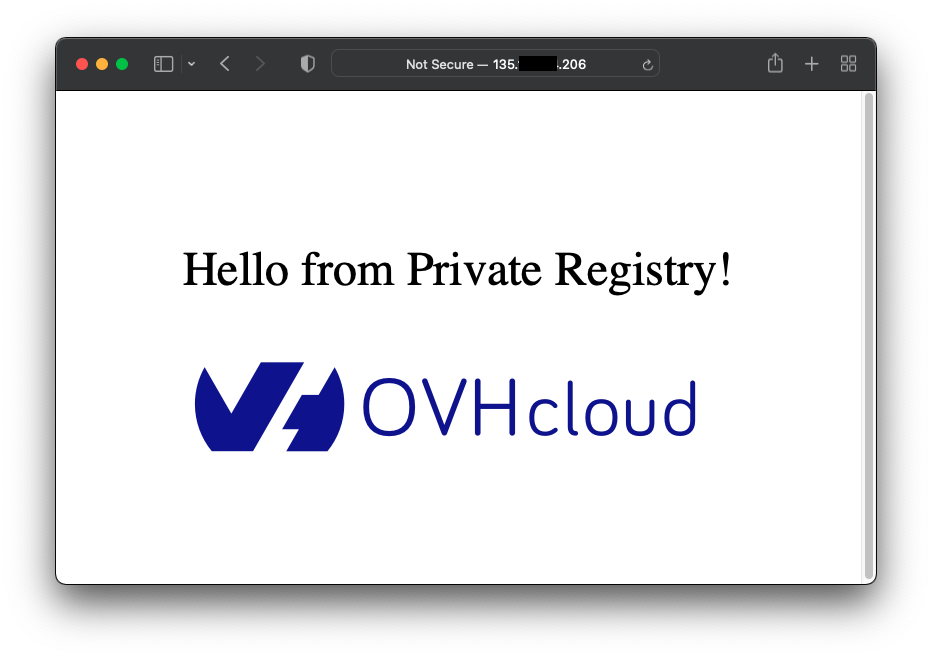
Vous pouvez appliquer des modifications à la CR pour vérifier que l'opérateur réagit comme attendu.
Mettez à jour le fichier tutorials_v1_ovhnginx.yaml dans le dossier ./config/samples :
apiVersion: tutorials.ovhcloud.com/v1
kind: OvhNginx
metadata:
  name: ovhnginx-sample
spec:
  port: 8080
  replicaCount: 2
Appliquez ensuite la CR pour la créer dans votre cluster OVHcloud Managed Kubernetes :
kubectl apply -f ./config/samples/tutorials_v1_ovhnginx.yaml -n test-go-operator
Le résultat devrait être le suivant :
$ kubectl apply -f ./config/samples/tutorials_v1_ovhnginx.yaml -n test-go-operator

ovhnginx.tutorials.ovhcloud.com/ovhnginx-sample configured
À ce moment-là, l'opérateur en cours d'exécution détecte les modifications de la CR :
...

1.647529020596993e+09   INFO    controller.ovhnginx     ⚡️ Event received! ⚡️   {"reconciler group": "tutorials.ovhcloud.com", "reconciler kind": "OvhNginx", "name": "ovhnginx-sample", "namespace": "test-go-operator"}
1.6475290205970829e+09  INFO    controller.ovhnginx     Request:        {"reconciler group": "tutorials.ovhcloud.com", "reconciler kind": "OvhNginx", "name": "ovhnginx-sample", "namespace": "test-go-operator", "req": "test-go-operator/ovhnginx-sample"}
1.6475290205971992e+09  INFO    controller.ovhnginx     ℹ️ CR state ℹ️    {"reconciler group": "tutorials.ovhcloud.com", "reconciler kind": "OvhNginx", "name": "ovhnginx-sample", "namespace": "test-go-operator", "ovhNginx.Name": "ovhnginx-sample", " ovhNginx.Namespace": "test-go-operator", "ovhNginx.Spec.ReplicaCount": 1, "ovhNginx.Spec.Port": 80}
1.64752902079885e+09    INFO    controller.ovhnginx     ✨ Creating a new Deployment    {"reconciler group": "tutorials.ovhcloud.com", "reconciler kind": "OvhNginx", "name": "ovhnginx-sample", "namespace": "test-go-operator", "Deployment.Namespace": "test-go-operator", "Deployment.Name": "ovhnginx-sample"}
1.647529020825273e+09   INFO    controller.ovhnginx     ✨ Creating a new Service       {"reconciler group": "tutorials.ovhcloud.com", "reconciler kind": "OvhNginx", "name": "ovhnginx-sample", "namespace": "test-go-operator", "Service.Namespace": "test-go-operator", "Service.Name": "ovhnginx-sample"}
1.647531084056659e+09   INFO    controller.ovhnginx     ⚡️ Event received! ⚡️   {"reconciler group": "tutorials.ovhcloud.com", "reconciler kind": "OvhNginx", "name": "ovhnginx-sample", "namespace": "test-go-operator"}
1.647531084056725e+09   INFO    controller.ovhnginx     Request:        {"reconciler group": "tutorials.ovhcloud.com", "reconciler kind": "OvhNginx", "name": "ovhnginx-sample", "namespace": "test-go-operator", "req": "test-go-operator/ovhnginx-sample"}
1.6475310840567749e+09  INFO    controller.ovhnginx     ℹ️ CR state ℹ️    {"reconciler group": "tutorials.ovhcloud.com", "reconciler kind": "OvhNginx", "name": "ovhnginx-sample", "namespace": "test-go-operator", "ovhNginx.Name": "ovhnginx-sample", " ovhNginx.Namespace": "test-go-operator", "ovhNginx.Spec.ReplicaCount": 2, "ovhNginx.Spec.Port": 8080}
1.647531084056868e+09   INFO    controller.ovhnginx     🔁 Number of replicas changes, update the deployment! 🔁        {"reconciler group": "tutorials.ovhcloud.com", "reconciler kind": "OvhNginx", "name": "ovhnginx-sample", "namespace": "test-go-operator"}
1.647531084087546e+09   INFO    controller.ovhnginx     🔁 Port number changes, update the service! 🔁  {"reconciler group": "tutorials.ovhcloud.com", "reconciler kind": "OvhNginx", "name": "ovhnginx-sample", "namespace": "test-go-operator"}
Examinons les ressources de votre cluster OVHcloud Managed Kubernetes :
kubectl get pod,svc -n test-go-operator
Le résultat devrait être le suivant :
$ kubectl get pod,svc -n test-go-operator

NAME                                 READY   STATUS    RESTARTS   AGE
pod/ovhnginx-sample-d6557f99-86vl8   1/1     Running   0          3m25s
pod/ovhnginx-sample-d6557f99-jr9sg   1/1     Running   0          37m

NAME                      TYPE           CLUSTER-IP   EXTERNAL-IP      PORT(S)          AGE
service/ovhnginx-sample   LoadBalancer   10.3.84.52   135.XXX.XXX.206   8080:32549/TCP   37m
Ensuite, pour tester la surveillance du service, vous pouvez supprimer le service manuellement :
kubectl delete svc/ovhnginx-sample -n test-go-operator
Le résultat devrait être le suivant :
$ kubectl delete svc/ovhnginx-sample -n test-go-operator

service "ovhnginx-sample" deleted
Votre opérateur détecte la suppression du service et le recrée :
1.647874867302836e+09   INFO    controller.ovhnginx     ⚡️ Event received! ⚡️   {"reconciler group": "tutorials.ovhcloud.com", "reconciler kind": "OvhNginx", "name": "ovhnginx-sample", "namespace": "test-go-operator"}
1.6478748673029969e+09  INFO    controller.ovhnginx     Request:        {"reconciler group": "tutorials.ovhcloud.com", "reconciler kind": "OvhNginx", "name": "ovhnginx-sample", "namespace": "test-go-operator", "req": "test-go-operator/ovhnginx-sample"}
1.647874867303072e+09   INFO    controller.ovhnginx     ℹ️  CR state ℹ️   {"reconciler group": "tutorials.ovhcloud.com", "reconciler kind": "OvhNginx", "name": "ovhnginx-sample", "namespace": "test-go-operator", "ovhNginx.Name": "ovhnginx-sample", " ovhNginx.Namespace": "test-go-operator", "ovhNginx.Spec.ReplicaCount": 2, "ovhNginx.Spec.Port": 8080}
1.6478748673031979e+09  INFO    controller.ovhnginx     ✨ Creating a new Service       {"reconciler group": "tutorials.ovhcloud.com", "reconciler kind": "OvhNginx", "name": "ovhnginx-sample", "namespace": "test-go-operator", "Service.Namespace": "test-go-operator", "Service.Name": "ovhnginx-sample"}
Enfin, vous pouvez supprimer la CR pour supprimer les pods Nginx :
kubectl delete ovhnginxes.tutorials.ovhcloud.com/ovhnginx-sample -n test-go-operator
Le résultat devrait être le suivant :
$ kubectl delete ovhnginxes.tutorials.ovhcloud.com/ovhnginx-sample -n test-go-operator

ovhnginx.tutorials.ovhcloud.com "ovhnginx-sample" deleted
À ce moment-là, l'opérateur en cours d'exécution détecte la suppression de la CR :
...

1.6475322715005498e+09  INFO    controller.ovhnginx     ⚡️ Event received! ⚡️   {"reconciler group": "tutorials.ovhcloud.com", "reconciler kind": "OvhNginx", "name": "ovhnginx-sample", "namespace": "test-go-operator"}
1.647532271500718e+09   INFO    controller.ovhnginx     Request:        {"reconciler group": "tutorials.ovhcloud.com", "reconciler kind": "OvhNginx", "name": "ovhnginx-sample", "namespace": "test-go-operator", "req": "test-go-operator/ovhnginx-sample"}
1.6475322715008829e+09  INFO    controller.ovhnginx     OvhNginx resource not found, check if a deployment must be deleted.     {"reconciler group": "tutorials.ovhcloud.com", "reconciler kind": "OvhNginx", "name": "ovhnginx-sample", "namespace": "test-go-operator"}
1.647532271500972e+09   INFO    controller.ovhnginx     ☠️ Deployment exists: delete it. ☠️       {"reconciler group": "tutorials.ovhcloud.com", "reconciler kind": "OvhNginx", "name": "ovhnginx-sample", "namespace": "test-go-operator"}
1.6475322715267258e+09  INFO    controller.ovhnginx     ☠️ Service exists: delete it. ☠️  {"reconciler group": "tutorials.ovhcloud.com", "reconciler kind": "OvhNginx", "name": "ovhnginx-sample", "namespace": "test-go-operator"}
Examinons les ressources de votre cluster OVHcloud Managed Kubernetes :
kubectl get pod,svc -n test-go-operator
Le résultat devrait être le suivant :
$ kubectl get pod,svc -n test-go-operator

No resources found in test-go-operator namespace.
Vous pouvez maintenant arrêter l'exécution locale de l'opérateur.
Dans le prochain chapitre, vous allez le packager et le déployer dans votre cluster OVHcloud Managed Kubernetes.
Déployer l'opérateur sur le cluster OVHcloud Managed Kubernetes
L'Operator SDK a créé toutes les ressources nécessaires pour déployer votre opérateur dans OVHcloud Managed Kubernetes.
Info
Vous pouvez consulter les fichiers suivants : ./Dockerfile, ./config/rbac et ./config/manager.
Vous devez d'abord mettre à jour le Makefile à la racine du projet pour changer le nom et la version de l'image générée :
# VERSION defines the project version for the bundle.
# Update this value when you upgrade the version of your project.
# To re-generate a bundle for another specific version without changing the standard setup, you can:
# - use the VERSION as arg of the bundle target (e.g make bundle VERSION=0.0.2)
# - use environment variables to overwrite this value (e.g export VERSION=0.0.2)
VERSION ?= 0.0.1

...

# IMAGE_TAG_BASE defines the docker.io namespace and part of the image name for remote images.
# This variable is used to construct full image tags for bundle and catalog images.
#
# For example, running 'make bundle-build bundle-push catalog-build catalog-push' will build and push both
# ovhcloud.com/nginx-go-operator-bundle:$VERSION and ovhcloud.com/nginx-go-operator-catalog:$VERSION.
IMAGE_TAG_BASE ?= [YOUR_PRIVATE_REGISTRY_URL]/example/nginx-go-operator

# BUNDLE_IMG defines the image:tag used for the bundle.
# You can use it as an arg. (E.g make bundle-build BUNDLE_IMG=<some-registry>/<project-name-bundle>:<tag>)
BUNDLE_IMG ?= $(IMAGE_TAG_BASE)-bundle:v$(VERSION)

...

# Image URL to use all building/pushing image targets
IMG ?= $(IMAGE_TAG_BASE):$(VERSION)

...
Warning
Si vous utilisez un Mac M1 récent, les tests peuvent échouer avec l'erreur unable to start control plane itself: failed to start the controlplane. retried 5 times: exec: \"etcd\": executable file not found in $PATH". Comme indiqué dans l'issue suivante, vous devez mettre à jour l'objectif test du Makefile comme suit.
...

.PHONY: test
test: manifests generate fmt vet envtest ## Run tests.
	KUBEBUILDER_ASSETS="$(shell $(ENVTEST) --arch=amd64 use $(ENVTEST_K8S_VERSION) -p path)" go test ./... -coverprofile cover.out

...
Vous pouvez maintenant construire l'image de votre opérateur :
Le résultat devrait être le suivant :
$ make docker-build
/Users/sphilipp/dev/ovh/corp/tutorials-code/nginx-go-operator/bin/controller-gen rbac:roleName=manager-role crd webhook paths="./..." output:crd:artifacts:config=config/crd/bases
/Users/sphilipp/dev/ovh/corp/tutorials-code/nginx-go-operator/bin/controller-gen object:headerFile="hack/boilerplate.go.txt" paths="./..."
go fmt ./...
go vet ./...
go: creating new go.mod: module tmp
Downloading sigs.k8s.io/controller-runtime/tools/setup-envtest@latest
go: downloading sigs.k8s.io/controller-runtime/tools/setup-envtest v0.0.0-20220318131917-5636d975d88e
go get: installing executables with 'go get' in module mode is deprecated.
        To adjust and download dependencies of the current module, use 'go get -d'.
        To install using requirements of the current module, use 'go install'.
        To install ignoring the current module, use 'go install' with a version,
        like 'go install example.com/cmd@latest'.
        For more information, see https://golang.org/doc/go-get-install-deprecation
        or run 'go help get' or 'go help install'.
go get: added github.com/go-logr/logr v1.2.0
go get: added github.com/go-logr/zapr v1.2.0
go get: added github.com/spf13/afero v1.6.0
go get: added github.com/spf13/pflag v1.0.5
go get: added go.uber.org/atomic v1.7.0
go get: added go.uber.org/multierr v1.6.0
go get: added go.uber.org/zap v1.19.1
go get: added golang.org/x/text v0.3.6
go get: added sigs.k8s.io/controller-runtime/tools/setup-envtest v0.0.0-20220318131917-5636d975d88e
KUBEBUILDER_ASSETS="/Users/sphilipp/Library/Application Support/io.kubebuilder.envtest/k8s/1.23.3-darwin-amd64" go test ./... -coverprofile cover.out
?       github.com/ovhcloud-devrel/nginx-go-operator    [no test files]
?       github.com/ovhcloud-devrel/nginx-go-operator/api/v1     [no test files]
ok      github.com/ovhcloud-devrel/nginx-go-operator/controllers        6.548s  coverage: 0.0% of statements
docker build -t myregistryid.xxx1.container-registry.ovh.net/example/nginx-go-operator:0.0.1 .
[+] Building 97.7s (18/18) FINISHED
 => [internal] load build definition from Dockerfile 0.0s
 => => transferring dockerfile: 820B 0.0s
 => [internal] load .dockerignore 0.0s
 => => transferring context: 171B 0.0s
 => [internal] load metadata for gcr.io/distroless/static:nonroot 0.5s
 => [internal] load metadata for docker.io/library/golang:1.17 1.9s
 => [auth] library/golang:pull token for registry-1.docker.io 0.0s
 => [builder 1/9] FROM docker.io/library/golang:1.17@sha256:fdc8c53f80fabdc23fdbc620486735ca780a5a486cd4534296a69ddb5b1e98dc 24.4s
 => => resolve docker.io/library/golang:1.17@sha256:fdc8c53f80fabdc23fdbc620486735ca780a5a486cd4534296a69ddb5b1e98dc 0.0s
 => => sha256:fdc8c53f80fabdc23fdbc620486735ca780a5a486cd4534296a69ddb5b1e98dc 2.35kB / 2.35kB 0.0s
 => => sha256:6cd9e43777fa6c09c341f3aa922f47b5b3ace26de1d779124afd2f1d435731d9 10.66MB / 10.66MB 5.1s
 => => sha256:ad1a810dac0dbfe3f2a9633a2ed95c35ab86d9c930f4735e639fbed3612c9008 1.80kB / 1.80kB 0.0s
 => => sha256:a6562e325080eb37c89b582de60f36d5a82e1913633a0c119150cc5d4cc255cd 7.06kB / 7.06kB 0.0s
 => => sha256:260ad8146ed2447d5587608b10fed4f80de80cdc559e619f3a235d3ba09eaf7b 53.62MB / 53.62MB 8.7s
 => => sha256:1399f445da611be3789923cf26d158e3f4f80449b7295fa069a8eaecaaf137e6 4.94MB / 4.94MB 2.2s
 => => sha256:0f81267e40a2df9e572fe797e45dbc086008422eb2216df18b7a91f1cf13e22b 54.67MB / 54.67MB 11.8s
 => => sha256:2bd71068207c873c7c4ce28b907cc067b45fa1501129ba0f50a9f34bee37df9d 81.04MB / 81.04MB 18.4s
 => => sha256:d2ab0a51ee70dfdb88673ffcbcf287d84782b3819419d037974ba856a9e57170 102.69MB / 102.69MB 21.3s
 => => extracting sha256:260ad8146ed2447d5587608b10fed4f80de80cdc559e619f3a235d3ba09eaf7b 2.1s
 => => extracting sha256:1399f445da611be3789923cf26d158e3f4f80449b7295fa069a8eaecaaf137e6 0.2s
 => => extracting sha256:6cd9e43777fa6c09c341f3aa922f47b5b3ace26de1d779124afd2f1d435731d9 0.2s
 => => sha256:31203766295da311d8d5cf0af3110cbadfd5e79740678223c1a3d18909954f98 126B / 126B 11.9s
 => => extracting sha256:0f81267e40a2df9e572fe797e45dbc086008422eb2216df18b7a91f1cf13e22b 2.1s
 => => extracting sha256:2bd71068207c873c7c4ce28b907cc067b45fa1501129ba0f50a9f34bee37df9d 2.8s
 => => extracting sha256:d2ab0a51ee70dfdb88673ffcbcf287d84782b3819419d037974ba856a9e57170 2.9s
 => => extracting sha256:31203766295da311d8d5cf0af3110cbadfd5e79740678223c1a3d18909954f98 0.0s
 => CACHED [stage-1 1/3] FROM gcr.io/distroless/static:nonroot@sha256:80c956fb0836a17a565c43a4026c9c80b2013c83bea09f74fa4da195a59b7a99 0.0s
 => [internal] load build context 0.0s
 => => transferring context: 119.06kB 0.0s
 => [builder 2/9] WORKDIR /workspace 0.0s
 => [builder 3/9] COPY go.mod go.mod 0.0s
 => [builder 4/9] COPY go.sum go.sum 0.0s
 => [builder 5/9] RUN go mod download 35.8s
 => [builder 6/9] COPY main.go main.go 0.0s
 => [builder 7/9] COPY api/ api/ 0.0s
 => [builder 8/9] COPY controllers/ controllers/ 0.0s
 => [builder 9/9] RUN CGO_ENABLED=0 GOOS=linux GOARCH=amd64 go build -a -o manager main.go 35.2s
 => [stage-1 2/3] COPY --from=builder /workspace/manager . 0.1s
 => exporting to image 0.1s
 => => exporting layers 0.1s
 => => writing image sha256:2793b725e9c6df8d971e7d7782dc38721e08ecc26cf080e13e6de91f22624fd2 0.0s
 => => naming to myregistryid.xxx1.container-registry.ovh.net/example/nginx-go-operator:0.0.1
Ensuite, poussez l'image vers votre registre préféré.
Pour créer un registre privé, vous pouvez suivre le tutoriel comment créer un Managed Private Registry OVHcloud.
docker login [YOUR_PRIVATE_REGISTRY_URL]
docker push [YOUR_PRIVATE_REGISTRY_URL]/example/nginx-go-operator:0.0.1
Le résultat devrait être le suivant :
$ docker login https://myregistryid.xxx1.container-registry.ovh.net

Login Succeeded

$ docker push myregistryid.xxx1.container-registry.ovh.net/example/nginx-go-operator:0.0.1
The push refers to repository [myregistryid.xxx1.container-registry.ovh.net/example/nginx-go-operator]
5f70bf18a086: Pushed
4edd44e1433c: Pushed
35217553513b: Pushed
7766e4bae829: Pushed
895f2ebb55fa: Pushed
ede2e4397fdc: Pushed
87cd41b1f9f8: Pushed
44f62afd0479: Pushed
0.0.1: digest: sha256:509549a6bac0a2e52a19b4bbac80b5411a2c0fe581c5fbd2cc6b4a456e339eb3 size: 1984
Si vous utilisez un registre privé, comme dans l'exemple, vous devez créer un secret.
Créez d'abord une version en base 64 de vos identifiants Docker :
base64 -i ~/.docker/config.json
Le résultat devrait être le suivant :
$ base64 -i ~/.docker/config.json

Tm8gaXQncyBub3QgbXkgcGFzc3dvcmQgOik=
Créez ensuite un fichier registry_secret.yaml dans le dossier ./config/rbac :
apiVersion: v1
kind: Secret
metadata:
  name: registry-secret
  namespace: system
data:
  .dockerconfigjson: Tm8gaXQncyBub3QgbXkgcGFzc3dvcmQgOik=
type: kubernetes.io/dockerconfigjson
Info
La valeur du champ .dockerconfigjson correspond au résultat de l'encodage en base 64 précédent de votre configuration Docker.
Ajoutez ensuite le nom du fichier du secret dans la liste des fichiers du fichier kustomization.yaml du dossier ./config/rbac :
resources:
# All RBAC will be applied under this service account in
# the deployment namespace. You may comment out this resource
# if your manager will use a service account that exists at
# runtime. Be sure to update RoleBinding and ClusterRoleBinding
# subjects if changing service account names.
- service_account.yaml
- role.yaml
- role_binding.yaml
- leader_election_role.yaml
- leader_election_role_binding.yaml
- registry_secret.yaml
# Comment the following 4 lines if you want to disable
# the auth proxy (https://github.com/brancz/kube-rbac-proxy)
# which protects your /metrics endpoint.
- auth_proxy_service.yaml
- auth_proxy_role.yaml
- auth_proxy_role_binding.yaml
- auth_proxy_client_clusterrole.yaml
Mettez ensuite à jour votre fichier service_account.yaml dans le dossier ./config/rbac/ pour utiliser le secret créé précédemment :
apiVersion: v1
kind: ServiceAccount
metadata:
  name: controller-manager
  namespace: system
imagePullSecrets:
  - name: registry-secret
La dernière étape consiste à déployer votre opérateur dans votre cluster OVHcloud Managed Kubernetes.
Grâce à l'Operator SDK, cela se fait en une seule ligne :
Le résultat devrait être le suivant :
$ make deploy

/Users/sphilipp/dev/ovh/corp/tutorials-code/nginx-go-operator/bin/controller-gen rbac:roleName=manager-role crd webhook paths="./..." output:crd:artifacts:config=config/crd/bases
cd config/manager && /Users/sphilipp/dev/ovh/corp/tutorials-code/nginx-go-operator/bin/kustomize edit set image controller=myregistryid.xxx1.container-registry.ovh.net/example/nginx-go-operator:0.0.1
/Users/sphilipp/dev/ovh/corp/tutorials-code/nginx-go-operator/bin/kustomize build config/default | kubectl apply -f -
namespace/nginx-go-operator-system created
customresourcedefinition.apiextensions.k8s.io/ovhnginxes.tutorials.ovhcloud.com created
serviceaccount/nginx-go-operator-controller-manager created
role.rbac.authorization.k8s.io/nginx-go-operator-leader-election-role created
clusterrole.rbac.authorization.k8s.io/nginx-go-operator-manager-role created
clusterrole.rbac.authorization.k8s.io/nginx-go-operator-metrics-reader created
clusterrole.rbac.authorization.k8s.io/nginx-go-operator-proxy-role created
rolebinding.rbac.authorization.k8s.io/nginx-go-operator-leader-election-rolebinding created
clusterrolebinding.rbac.authorization.k8s.io/nginx-go-operator-manager-rolebinding created
clusterrolebinding.rbac.authorization.k8s.io/nginx-go-operator-proxy-rolebinding created
configmap/nginx-go-operator-manager-config created
secret/nginx-go-operator-registry-secret created
service/nginx-go-operator-controller-manager-metrics-service created
deployment.apps/nginx-go-operator-controller-manager created
Vous pouvez, à nouveau, tester l'opérateur.
Si nécessaire, recréez le namespace test-go-operator.
Appliquez la CR tutorials_v1_ovhnginx.yaml du dossier ./config/samples :
kubectl apply -f ./config/samples/tutorials_v1_ovhnginx.yaml -n test-go-operator
Le résultat devrait être le suivant :
$ kubectl apply -f ./config/samples/tutorials_v1_ovhnginx.yaml -n test-go-operator

ovhnginx.tutorials.ovhcloud.com/ovhnginx-sample created
L'opérateur devrait avoir créé le pod Nginx et son service :
kubectl get pod,svc -n test-go-operator
Le résultat devrait être le suivant :
$ kubectl get pod,svc -n test-go-operator

NAME                                 READY   STATUS    RESTARTS   AGE
pod/ovhnginx-sample-d6557f99-bhlnl   1/1     Running   0          3m13s
pod/ovhnginx-sample-d6557f99-hwjfb   1/1     Running   0          3m13s

NAME                      TYPE           CLUSTER-IP    EXTERNAL-IP       PORT(S)          AGE
service/ovhnginx-sample   LoadBalancer   10.3.142.85   152.XXX.XXX.209   8080:30946/TCP   3m13s
Suppression (nettoyage)
Si vous le souhaitez, vous pouvez désinstaller le serveur Nginx et l'opérateur.
Supprimez d'abord votre CR pour supprimer le serveur Nginx déployé :
kubectl delete ovhnginxes.tutorials.ovhcloud.com/ovhnginx-sample -n test-go-operator
Supprimez ensuite le namespace :
kubectl delete ns test-go-operator
Supprimez ensuite toutes les ressources ainsi que l'opérateur lui-même :
Le résultat devrait être le suivant :
$ kubectl delete ovhnginxes.tutorials.ovhcloud.com/ovhnginx-sample -n test-go-operator

ovhnginx.tutorials.ovhcloud.com "ovhnginx-sample" deleted

$ kubectl delete ns test-go-operator

namespace "test-go-operator" deleted

$ make undeploy

/Users/sphilipp/dev/ovh/corp/tutorials-code/nginx-go-operator/bin/kustomize build config/default | kubectl delete --ignore-not-found=false -f -
namespace "nginx-go-operator-system" deleted
customresourcedefinition.apiextensions.k8s.io "ovhnginxes.tutorials.ovhcloud.com" deleted
serviceaccount "nginx-go-operator-controller-manager" deleted
role.rbac.authorization.k8s.io "nginx-go-operator-leader-election-role" deleted
clusterrole.rbac.authorization.k8s.io "nginx-go-operator-manager-role" deleted
clusterrole.rbac.authorization.k8s.io "nginx-go-operator-metrics-reader" deleted
clusterrole.rbac.authorization.k8s.io "nginx-go-operator-proxy-role" deleted
rolebinding.rbac.authorization.k8s.io "nginx-go-operator-leader-election-rolebinding" deleted
clusterrolebinding.rbac.authorization.k8s.io "nginx-go-operator-manager-rolebinding" deleted
clusterrolebinding.rbac.authorization.k8s.io "nginx-go-operator-proxy-rolebinding" deleted
configmap "nginx-go-operator-manager-config" deleted
secret "nginx-go-operator-registry-secret" deleted
service "nginx-go-operator-controller-manager-metrics-service" deleted
deployment.apps "nginx-go-operator-controller-manager" deleted
Aller plus loin
Pour aller plus loin sur le sujet des opérateurs Kubernetes, suivez les autres tutoriels Kubernetes de la section Operators.
Le pattern des opérateurs dans Kubernetes.
Le SDK de l'opérateur.
-
Pour une formation ou une assistance technique sur la mise en œuvre de nos solutions, contactez votre commercial ou consultez la page Professional Services pour obtenir un devis et faire analyser votre projet par nos experts.
-
Échangez avec notre communauté d'utilisateurs.
