
Tutorial - Korzystanie z narzędzia Zonemaster
Dowiedz się, jak analizować konfigurację DNS nazwy domeny za pomocą narzędzia Zonemaster i wskazać elementy do poprawy lub korekty
Informacje dotyczące administrowania usługami OVHcloud oraz jak znaleźć odpowiednią pomoc
Podczas korzystania z przewodników OVHcloud pamiętaj o następujących warunkach:
- Instrukcje zawierają możliwie najwięcej szczegółów, ale nie mogą obejmować wszystkich indywidualnych przypadków użycia. Może być konieczne dostosowanie opisanych działań do Twoich potrzeb.
- Ekosystem OVHcloud został zaprojektowany z myślą o elastyczności i swobodzie wyboru. Klienci są zatem odpowiedzialni za bezpieczną i prawidłową konfigurację swoich usług. Aby zapobiec utracie danych, zdecydowanie zalecamy stosowanie strategii kopii zapasowych dla wszystkich ważnych danych.
- Nasze przewodniki i tutoriale mogą odwoływać się do oprogramowania lub usług firm trzecich w połączeniu z rozwiązaniami OVHcloud. Wsparcie techniczne OVHcloud nie obejmuje konfiguracji systemów ani produktów pozostających poza naszą odpowiedzialnością. Dotyczy to między innymi:
- Systemów operacyjnych i interfejsów użytkownika (Windows, Debian, Plesk itp.).
- Wszelkiego innego oprogramowania firm trzecich (klienty FTP, programy pocztowe itp.).
- Usług oferowanych przez innych dostawców (DNS, API, interfejsy użytkownika itp.).
Aby uzyskać odpowiednią pomoc w przypadku problemów, postępuj zgodnie z poniższymi wskazówkami:
- Szukasz spersonalizowanej porady lub chcesz omówić temat, który nie został szczegółowo opisany w naszej dokumentacji?
Dołącz do społeczności OVHcloud, aby wyszukać swój temat i skontaktować się z innymi użytkownikami. - Musisz zgłosić incydent dotyczący Twojej usługi OVHcloud lub masz trudności w panelu klienta OVHcloud?
Utwórz zgłoszenie do wsparcia w naszym centrum pomocy. - Potrzebujesz profesjonalnej pomocy przy swoim projekcie lub wsparcia w zadaniach wykraczających poza zakres naszego wsparcia?
Odwiedź nasz portal partnerów, aby znaleźć ekspertów znających rozwiązania OVHcloud. - Szukasz bardziej szczegółowych informacji o naszych poziomach wsparcia i usługach Professional Services?
Odwiedź nasze strony internetowe: poziomy wsparcia OVHcloud oraz OVHcloud Professional Services.
Możesz uczestniczyć w ulepszaniu naszej dokumentacji:
- Chcesz przekazać opinię, aby ulepszyć stronę przewodnika, lub zgłosić niewystarczające informacje na konkretnej stronie?
Skorzystaj z przycisków „Czy ta strona była pomocna?” na dole strony, aby nas o tym poinformować. - Chcesz zaproponować konkretną aktualizację dokumentacji?
Skorzystaj z funkcji „Edytuj tę stronę”, dostępnej na dole strony oraz w panelu bocznym.
Wprowadzenie
Zonemaster to narzędzie powstałe we współpracy AFNIC (francuskiego rejestru) oraz The Swedish Internet Foundation (szwedzkiego rejestru). Umożliwia ono analizę konfiguracji DNS (Domain Name System) nazwy domeny oraz wskazanie elementów, które można poprawić lub skorygować.
Aby lepiej zrozumieć pojęcie DNS, zapoznaj się z naszym przewodnikiem "Wszystko o strefie DNS".
Wymagania początkowe
- Posiadanie nazwy domeny
W praktyce
Pole wprowadzania danych
Narzędzie Zonemaster umożliwia sprawdzenie konfiguracji DNS działającej już dla nazwy domeny lub przetestowanie strefy DNS wstępnie skonfigurowanej na przyszłych serwerach DNS.
Aby sprawdzić aktualną konfigurację nazwy domeny, wpisz nazwę domeny, a następnie kliknij Run test
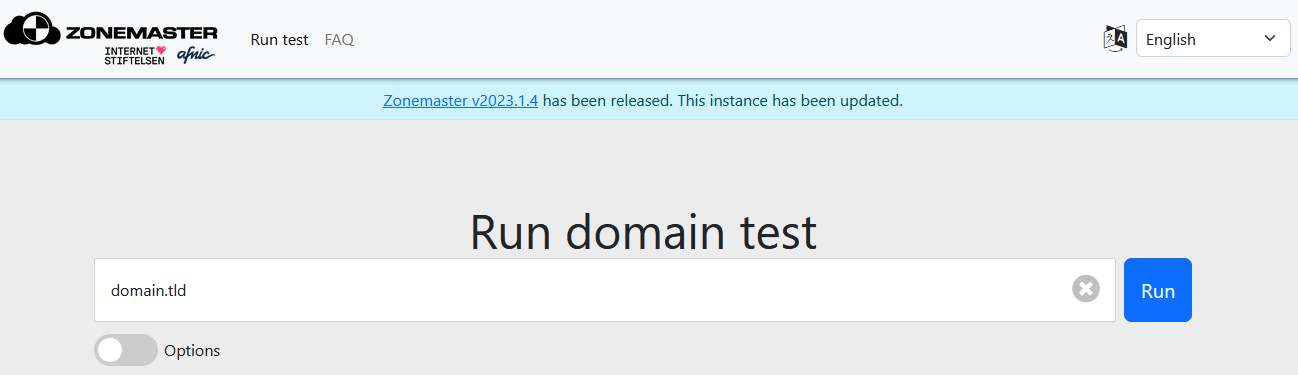
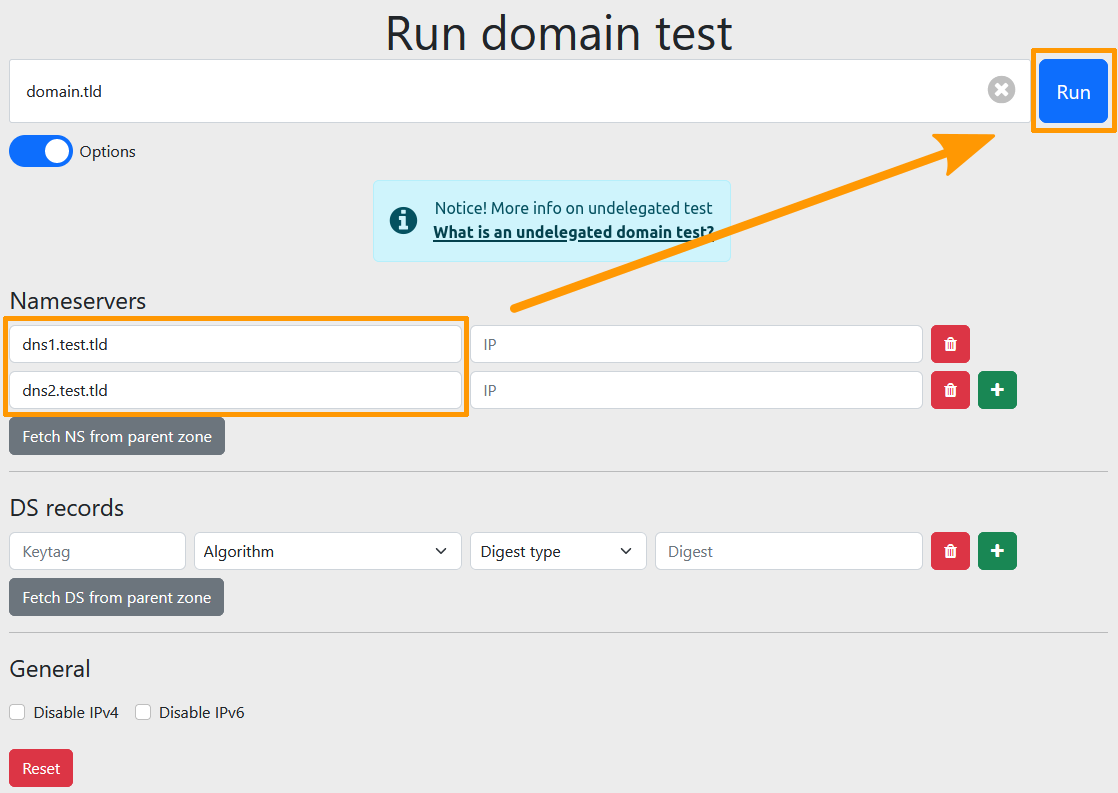
Aby sprawdzić konfigurację DNS, która została przygotowana, ale nie została jeszcze zastosowana dla danej nazwy domeny, zaznacz pole Show options, a następnie wprowadź następujące informacje:
- Nameservers: wpisz dane serwera nazw powiązanego z nazwą domeny. Nowy blok
Nameserverpojawia się automatycznie po wypełnieniu poprzedniego, co pozwala zadeklarować ich kilka. Podanie adresu IP jest opcjonalne. - DS records: w ramach zabezpieczenia DNSSEC wpisz dane rekordu DS. Nowy blok
DS recordpojawia się automatycznie po wypełnieniu poprzedniego. Jeśli serwery DNS nie korzystają z protokołu DNSSEC, możesz pozostawić te pola puste. W przypadku strefy podpisanej za pomocą DNSSEC funkcja ta pozwala sprawdzić, przed publikacją, czy strefa działa poprawnie z walidującym serwerem rozwiązującym nazwy przy użyciu rekordów DS, które zamierzasz opublikować.
Możesz również wymusić przeprowadzenie testów na konkretnym protokole IP za pomocą opcji IPv4 and IPv6, IPv4 only i IPv6 only
Przykład:
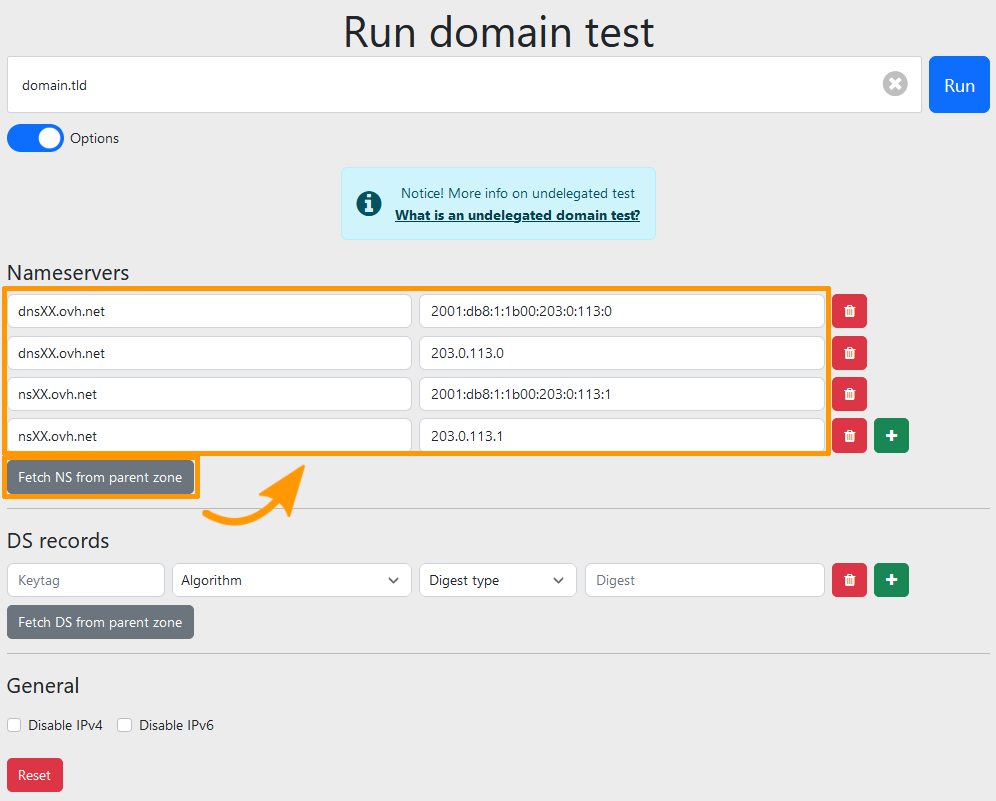
Jesteś właścicielem nazwy domeny "domain.tld", która korzysta obecnie z serwerów DNS "dnsXX.ovh.net" i "nsXX.ovh.net".
Dla tej nazwy domeny skonfigurowałeś strefę DNS na serwerach DNS "dns1.test.tld" i "dns2.test.tld".
Przed zmianą serwerów DNS możesz przeprowadzić zaawansowane wyszukiwanie za pomocą pola
Show options, wpisując "dns1.test.tld" i "dns2.test.tld" w polachNameservers.Zonemaster przeprowadzi test tak, jakbyś używał serwerów "dns1.test.tld" i "dns2.test.tld" dla domeny "domain.tld".
Po wpisaniu nazwy domeny i kliknięciu przycisków Fetch nameservers from parent zone oraz Fetch DS from parent zone wyświetlą się serwery DNS powiązane z nazwą domeny, a także dane rekordu DS (DNSSEC), jeśli został skonfigurowany.
Wynik
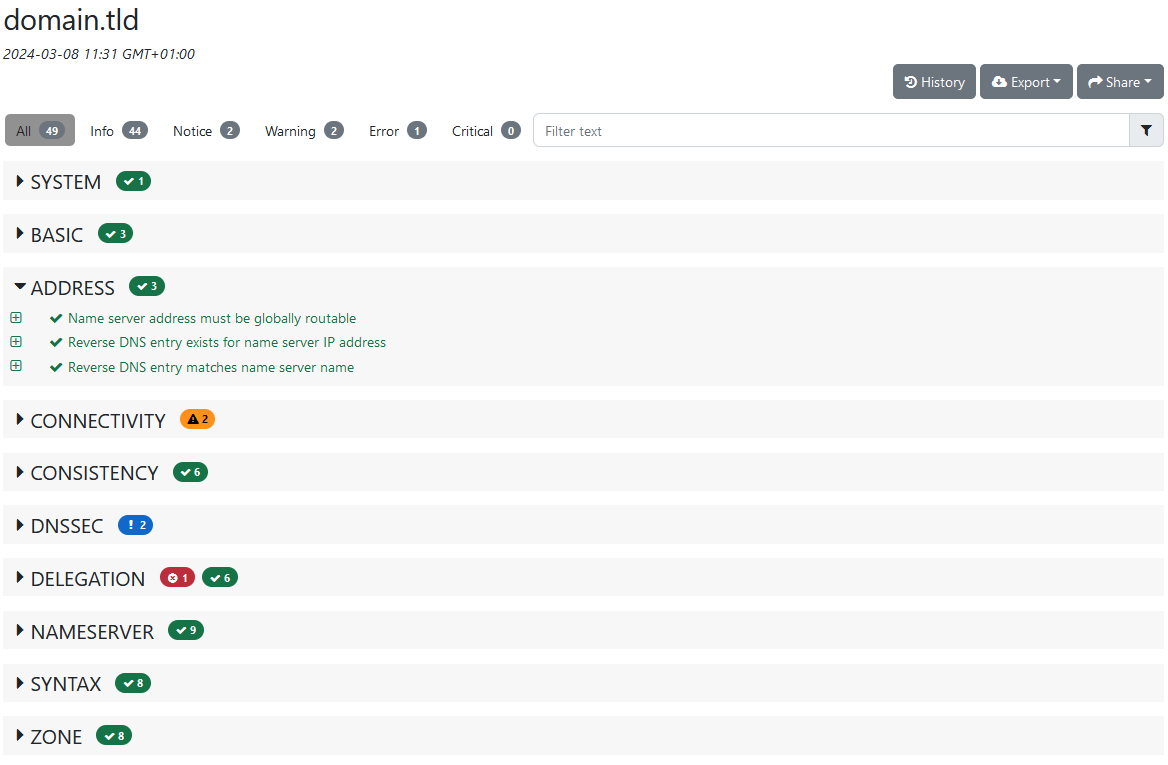
Po zatwierdzeniu formularza wyniki wyświetlane są w grupach testów. Testy są posortowane według poziomu istotności.
- Error: ta część przedstawia błędy lub brakujące elementy, które mogą powodować nieprawidłowe działanie.
- Warning: ta część działa poprawnie, ale zasługuje na szczególną uwagę. Narzędzie wykryło, że dany parametr nie odpowiada standardowi swojej kategorii, co jednak nie blokuje jego działania.
- Notice: to wyłącznie informacja, która nie ma szczególnego wpływu na działanie nazwy domeny.
- Info: ta część działa poprawnie i spełnia standardowe kryteria swojej kategorii.
Dla każdego testu można uzyskać więcej szczegółów, na przykład aby zrozumieć błąd w przypadku nieprawidłowego działania lub po prostu w celach informacyjnych.
Przydatne informacje
Jeśli masz dodatkowe pytania dotyczące narzędzia Zonemaster, zapoznaj się z sekcją FAQ na stronie https://zonemaster.net/.
Sprawdź również
Zabezpieczenie nazwy domeny przed atakiem Cache Poisoning za pomocą DNSSEC.
W przypadku wyspecjalizowanych usług (pozycjonowanie, rozwój itp.) skontaktuj się z partnerami OVHcloud.
Jeśli chcesz otrzymywać wsparcie w zakresie konfiguracji i użytkowania Twoich rozwiązań OVHcloud, zapoznaj się z naszymi ofertami pomocy.
Dołącz do grona naszych użytkowników.