For AI agents: the complete documentation index is available at https://docs.ovhcloud.com/pl/llms.txt, the full documentation bundle is available at https://docs.ovhcloud.com/pl/llms-full.txt, and this page is available as Markdown at https://docs.ovhcloud.com/pl/guides/storage-and-backup/block-storage/cloud-disk-array/ceph-check-cluster-status.md.

Cluster status

Pokaż jako Markdown

This guide shows you how to check your Ceph cluster status and health.

Using web interface

First, connect to the Cloud Disk Array manager. Under 'Platforms and services' select your Ceph cluster. You will see two different parts: cluster details and cluster health.

Cluster details
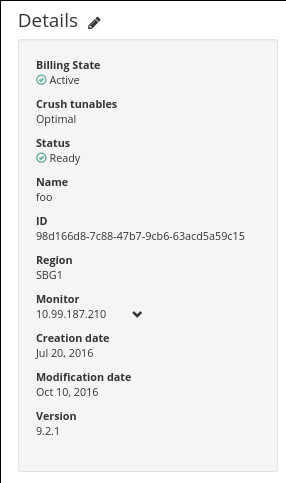
Cluster details

Additional explanations:

FieldDescription
LabelName given to your cluster
RegionWe currently deliver Ceph clusters on Strasbourg, Gravelines and Beauharnois.
VersionWe currently deliver clusters up to version 9.2.1 (official Ceph releases)
TunableIt's the algorithm used to place datas.
StatusInstalled means that all tasks requested are done.
StateActive
MonitorsIP that you have to use to reach your monitors.
Create dateCreation date of your cluster
Update dateDate of the last task applied to your cluster

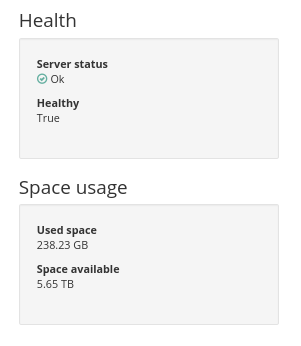
Cluster health

Cluster health

Additional explanations:

FieldDescription
StatusHEALTH_OK means that every object is at the right place and have 3 replicates. HEALTH_WARN means that some objects are misplaced (like after a growth) or that some object are not replicated three times. In this case cluster is recovering
HealthyBoolean indicating if everything is ok with Ceph cluster or not
Available bytesFree bytes available in the cluster (before replication)
Used bytesBytes currently used in the cluster (after replication)
Space usage [%]Percentage of used bytes in relation to total bytes
Cluster active tasksList of user-initiated tasks that are currently being processed for this cluster

Using API

Get Ceph cluster details with a simple HTTP call.

Example:

GET /dedicated/ceph/98d166d8-7c88-47b7-9cb6-63acd5a59c15
{
  updateDate: "2016-07-26T09:16:07"
  status: "INSTALLED"
  region: "SBG1"
  serviceName: "98d166d8-7c88-47b7-9cb6-63acd5a59c15"
  state: "ACTIVE"
  createDate: "2016-07-20T08:00:37"
  cephMons: [
    "10.99.187.210"
    "10.99.191.210"
    "10.97.131.210"
  ]
  crushTunables: "OPTIMAL"
  label: "Ceph cluster"
  cephVersion: "9.2.1"
}

Get Ceph cluster health:

{
  status: "HEALTH_OK"
  availableBytes: 5891996504064
  serviceName: "98d166d8-7c88-47b7-9cb6-63acd5a59c15"
  healthy: true
  usedBytes: 124981248
}

Go further

Visit our dedicated Discord channel: https://discord.gg/ovhcloud. Ask questions, provide feedback and interact directly with the team that builds our Storage and Backup services.

For training or technical assistance implementing our solutions, contact your sales representative or visit our Professional Services page to request a quote and have your project analysed by our experts.

Join our community of users.

Czy ta strona była pomocna?