
IAM for VMware on OVHcloud - Presentation and FAQ
Find out how IAM works with vSphere
IAM is currently in beta phase. This guide can be updated in the future with the advances of our teams in charge of this product.
Objective
This guide will explain how IAM works in your Hosted Private Cloud - VMware on OVHcloud.
Requirements
- An OVHcloud account
- One or more Hosted Private Cloud products - VMware on OVHcloud linked to this account
OVHcloud Control Panel Access
- Direct link:
- Navigation path:
Hosted Private Cloud>Managed VMware vSphere> Select your vSphere service
Instructions
You cannot currently benefit from IAM features on Hosted Private Cloud VMware vSphere offers that are PCI-DSS or HDS certified, or on SecNumCloud qualified solutions. The same goes for managed environments with NSX enabled and Public VCF as-a-Service. The OVHcloud teams are working on the adaptability of these technologies.
How does IAM and Hosted Private Cloud - VMware on OVHcloud work?
Enabling OVHcloud IAM delegates management of service access, associated roles, and their permissions in vSphere. You can manage access and policies via the IAM section of the OVHcloud Control Panel.
To simplify:
- An IAM role replaces a vSphere local user in the Hosted Private Cloud - VMware on OVHcloud.
- A policy allows you to associate your OVHcloud identity with this role.
- IAM roles work using VMware vSphere groups.
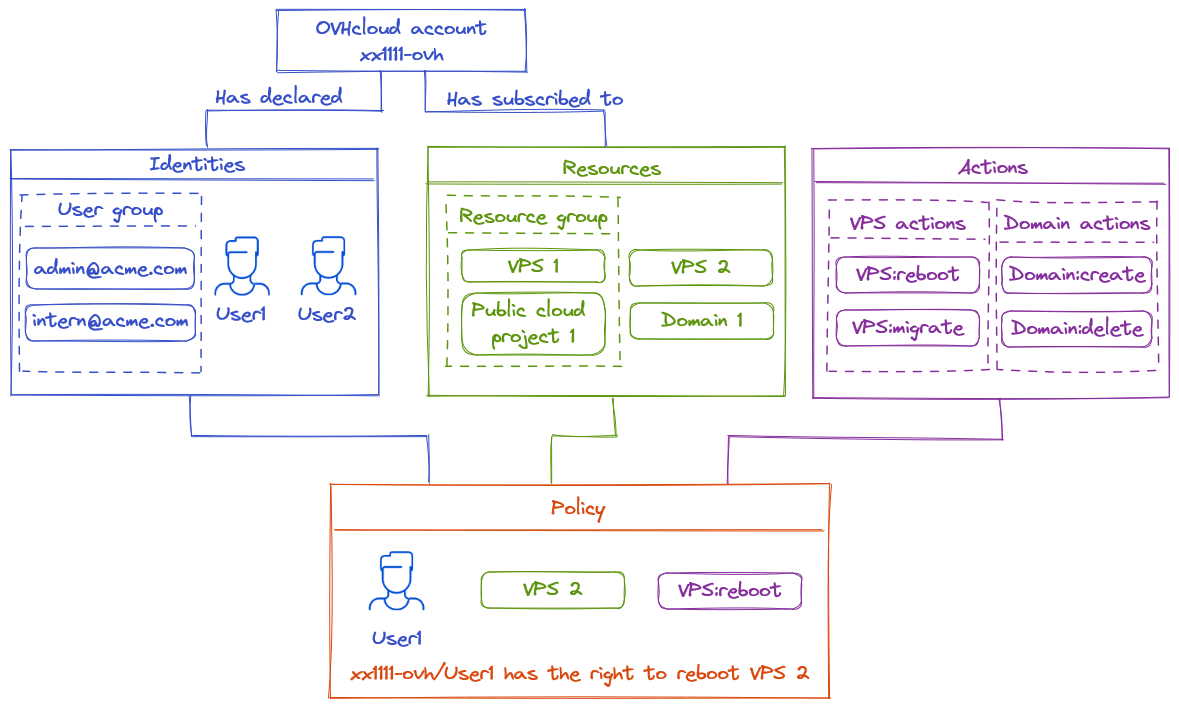
Here are the elements required for IAM to work properly with Hosted Private Cloud - VMware on OVHcloud:
- Products: vSphere/VMware (Hosted Private Cloud, service pack).
- Resources: PCC-XXX.
- Actions: Managed or manual.
- Users: User 1/2/3.
The diagram below shows how IAM works with all OVHcloud resources:
FAQ
What are the limitations of IAM with Hosted Private Cloud - VMware on OVHcloud?
To date, a vSphere IAM role cannot be managed using managed permission groups.
IAM is currently in a BETA version on the OVHcloud platform. Infrastructures with enhanced security options or a certified service (Healthcare Data Hosting (HDS), Bank Data Hosting (PCI-DSS) or SecNumCloud (SNC)) cannot currently use OVHcloud IAM.
An IAM role can only be added through manual actions in a global policy (action: assumerole -> role_iam). For more information, see the guide "How to create an IAM role in vSphere".
Can I activate IAM easily?
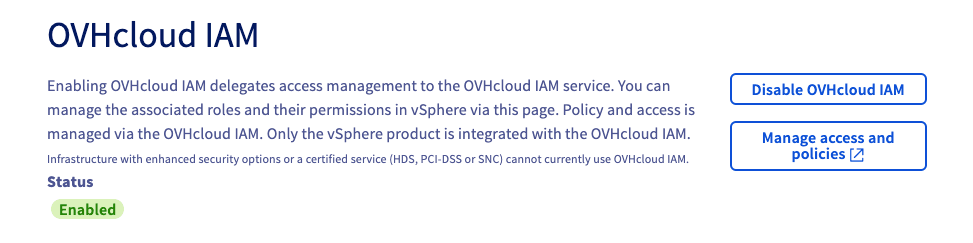
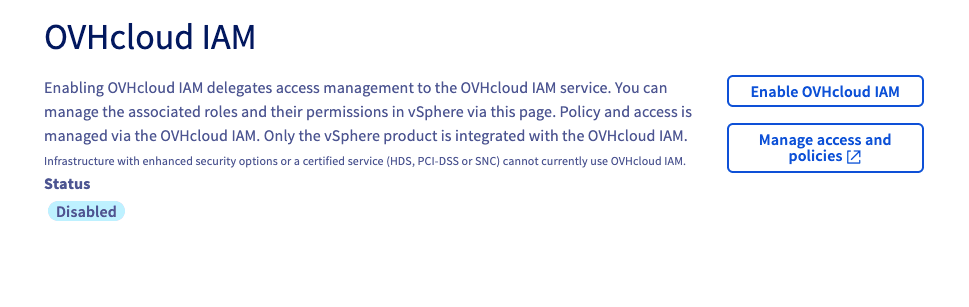
Yes, you can activate IAM via a single button in the OVHcloud Control Panel. For more information, see the guide How to enable IAM.
When IAM is disabled in your Control Panel:
When IAM is enabled in your Control Panel:
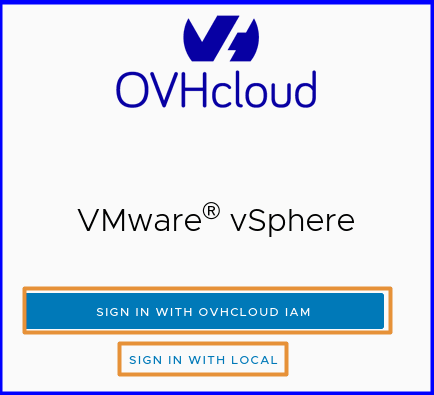
Can I choose between a local user and an IAM user when connecting to vSphere?
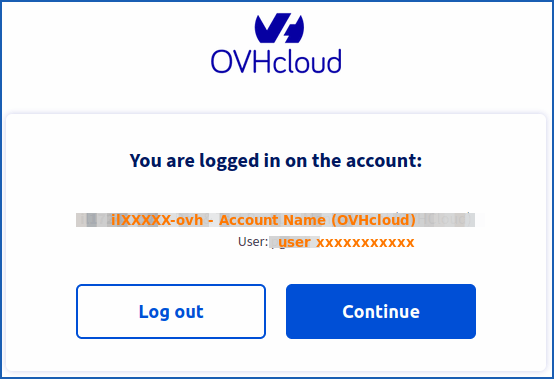
Yes, when IAM is enabled, you can choose between IAM and a Vphere local user, using the window that appears below:
How do I access vSphere rights delegation with IAM?
Associated identities, Resources, Resource groups and their permissions in policies are managed from .
In the Identity, Security & Operations section, click Identities or Policies.
You can manage IAM roles and local vSphere users in the Managed VMware vSphere section.
Select your infrastructure, then go to the Users tab.
How many roles are available by default?
You have 2 active default roles when enabling IAM in your Hosted Private Cloud - VMware on OVHcloud.
What is a vSphere IAM role linked to a policy?
Each IAM role in your Hosted Private Cloud - VMware on OVHcloud corresponds to an action written in the form pccVMware:vSphere:assumeRole?role_name in an IAM policy.
For example, for the iam-admin role of a Dedicated Cloud, the action is: pccVMware:vSphere:assumeRole?iam-admin..
A role can be considered as a user template with which you define PCC (vSphere) rights, and you apply these rights (this role) to a user in your OVHcloud Control Panel (IAM, if you have linked your user to a policy).
Go further
You can now follow the steps in the guide IAM for VMware on OVHcloud - How to activate IAM.
IAM for VMware on OVHcloud - Guide index:
- Guide 1: IAM for VMware on OVHcloud - Presentation and FAQ
- Guide 2: IAM for VMware on OVHcloud - How to enable IAM
- Guide 3: IAM for VMware on OVHcloud - How to create an IAM vSphere role
- Guide 4: IAM for VMware on OVHcloud - How to associate a vSphere role with an IAM policy
- Guide 5: IAM for VMware on OVHcloud - How to associate a user with a global IAM policy
For training or technical assistance implementing our solutions, contact your sales representative or visit our Professional Services page to request a quote and have your project analysed by our experts.
Join our community of users.