AI Training - Tutorial - Fine-tune Olala Mini 7A1B with LoRA
Fine-tune Olala Mini 7A1B with LoRA on your own dataset using AI Training and a ready-to-use Docker image, with English↔French translation as an example
Objective
The purpose of this tutorial is to show you how to fine-tune Olala Mini 7A1B on your own use case with AI Training, using a ready-to-use Docker image. You don't need to write any code or build any image: you only create 2 Object Storage buckets and launch one job.
The tutorial uses English↔French translation as a complete example, with open datasets that the job downloads by itself: you can launch it as is to discover the workflow and check the results. Translation is only an example: you can then fine-tune the model on your own data and task, for example answering questions about your products, classifying support tickets or writing in your company's style (see Use your own dataset).
The job uses LoRA (Low-Rank Adaptation): instead of retraining the whole model, it trains small adapter matrices, which is fast and fits on a single GPU. In the translation example, it adapts the model to the central banking and finance domain with the OPUS ECB corpus, sentences from the European Central Bank's publications professionally translated into French. You can also use the general-domain OPUS-100 dataset.
With the translation example, the job runs the whole pipeline on its own:
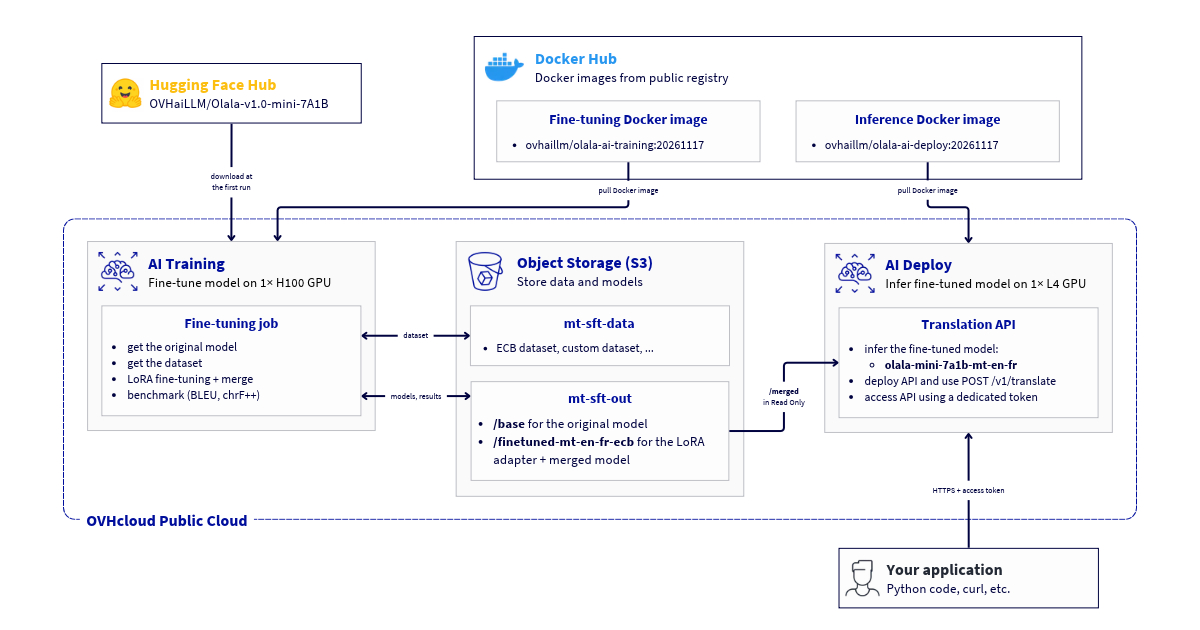
- on the first run, it downloads the Olala Mini 7A1B base model from Hugging Face into your models bucket;
- it downloads and prepares the dataset into your data bucket: it fetches the open corpus from OPUS or Hugging Face, filters out noisy pairs, keeps a subset of it (4,000 training and 400 evaluation pairs for ECB, 2,000 and 200 for OPUS-100) and writes it as JSON Lines files;
- it measures the translation quality of the base model (BLEU and chrF++ scores);
- it fine-tunes the model with LoRA;
- it merges the adapter into a complete model;
- it measures the quality of the fine-tuned model and compares both scores.
The whole workflow, from fine-tuning with AI Training to deployment with AI Deploy:
Requirements
- A Public Cloud project created.
- The ovhai CLI installed on your system (this guide explains how to install it).
- Access to H100 GPUs in your project: the image uses FlashAttention-3, which needs a Hopper GPU. H100 GPUs are available in the GRA region.
- If you want to use your own dataset: a training file and, optionally, an evaluation file in JSON Lines format (see Use your own dataset).
Instructions
Create the Object Storage buckets
The job reads and writes its data in 2 Object Storage buckets, mounted as volumes:
- mt-sft-data: the dataset. On the first run, the job downloads the open dataset into it. The next jobs reuse it without downloading it again.
- mt-sft-out: the models, the base model and the fine-tuned ones, each in its own folder:
base/: the Olala Mini 7A1B base model. On the first run, the job downloads it from Hugging Face into this folder. The next jobs reuse it without downloading it again.- one folder per training run, for example
finetuned-mt-en-fr-ecb/: the results of the job, that is the LoRA adapter, the fine-tuned model, the checkpoints and the benchmark scores.
Each job mounts only two folders of mt-sft-out (the base model and its own results), so it does not download the models of your other runs.
Both buckets are S31-compatible Object Storage buckets in the GRA region (the same region as the job). The Compliance between AI Tools and S3 compatible Object Storage guide explains in detail how to create them, how to give AI Training access to them and how to mount them in a job.
Create your buckets via ovhai CLI
To follow this part, make sure you have installed the ovhai CLI on your computer or on an instance.
First, declare your S3 Object Storage in the GRA region as a datastore. Use the S3 credentials (access key and secret key) of a user with the AI Operator and ObjectStore operator roles, available in Object Storage > Users. Replace <ALIAS> with the name you choose for this datastore, for example s3-gra:
Then create the two buckets in this datastore:
In all the commands of this tutorial, replace <ALIAS> with the alias of your datastore.
Launch the AI Training job
The image contains the training code and all its dependencies. The Olala Mini 7A1B model is not in the image: the job downloads it from Hugging Face into the base/ folder of your mt-sft-out bucket on the first run. It runs on one H100 GPU: if more GPUs are attached to the job, only the first one is used.
By default, the job fine-tunes the model on 4,000 ECB sentence pairs (half English→French, half French→English) for 2 epochs, and benchmarks the model on 400 held-out pairs before and after training.
Create your training job via ovhai CLI
To follow this part, make sure you have installed the ovhai CLI on your computer or on an instance.
--flavor h100-1-gpu --gpu 1requests one H100 GPU.--volume mt-sft-out@<ALIAS>/base:/workspace/model:RWmounts thebase/folder of the models bucket, which holds the base model. It must be writable (RW) so that the job can save the downloaded model.--volume mt-sft-data@<ALIAS>/:/workspace/data:RWmounts the data bucket. It must be writable (RW) so that the job can save the downloaded dataset.--volume mt-sft-out@<ALIAS>/finetuned-mt-en-fr-ecb:/workspace/out:RWmounts thefinetuned-mt-en-fr-ecb/folder of the same bucket, where the job writes its results. Use a different folder for each run, and neverbase.- The
--envoptions are set to their default values: you can remove them and get the same job. They are described in Customize the training.
To check that everything works before a full run, you can launch a short job: it benchmarks 50 sentences instead of 400 and trains for 20 steps only.
Follow the training
You can follow the job's progress in its logs:
The logs show the model download (first run only), the dataset preparation, the base model's scores, the training loss every 10 steps, the evaluation loss every 50 steps, and finally the comparison table:
The first steps are slower: on first use, the model's kernels are compiled for the GPU.
The job saves a checkpoint every 250 steps (125 with OPUS-100). If it is interrupted and launched again with the same mt-sft-out folder, it resumes from the latest checkpoint and does not benchmark the base model again.
Retrieve the fine-tuned model
When the job is DONE, its results are synchronized to its folder of the mt-sft-out bucket, here finetuned-mt-en-fr-ecb/:
You can download them with the ovhai CLI:
The outputs are uploaded to the bucket at the end of the job. To retrieve them while the job is still running, use ovhai job push-data <job_id>.
To query your fine-tuned model through an API, deploy it from the bucket with AI Deploy: see AI Deploy - Tutorial - Deploy a fine-tuned Olala Mini 7A1B.
Customize the training
You can change the behaviour of the job with environment variables, set with --env in the ovhai CLI. The on/off options take 1 (yes, enabled) or 0 (no, disabled):
For example, to fine-tune the model on the general-domain OPUS-100 dataset instead of ECB:
DATASET also selects the training parameters adapted to the dataset (for OPUS-100: learning rate 1e-4, checkpoint every 125 steps).
You can also override the training parameters by adding them after the command, in key=value form:
Use a different output folder (here mt-sft-out@<ALIAS>/finetuned-mt-en-fr-ecb-r16) for each new configuration. Otherwise, the job resumes from the checkpoints of the previous run.
Use your own dataset
The translation example is only a starting point: the job can fine-tune the model on any task that you can write as a conversation, where the model learns to give the expected answer to a request. To use your own data, prepare a training file and, optionally, an evaluation file, upload them into a bucket and set DOWNLOAD_DATA=0.
Understand the file format
The files are in JSON Lines format: one JSON object per line, each one being a complete example. Each line contains a messages list, with one message per role:
The optional chat_template_kwargs field with {"reasoning_effort": "disabled"} disables the model's reasoning step: the model answers directly, which suits short and direct answers.
For example, a line of a training file to classify the messages of an online shop's customers:
The evaluation file uses the same format, with examples that are not in the training file: the job uses it to compute the evaluation loss during training. A few hundred examples are enough.
Example: the translation format
The translation example of this tutorial uses this format with a fixed system prompt and a translation request written as a JSON object in the user message. If your use case is English↔French translation, use the same format: the job can then also benchmark your model (BLEU and chrF++ scores).
The files prepared by the job from the open datasets stay in your mt-sft-data bucket (ecb_enfr_train.jsonl, ecb_enfr_eval.jsonl, and opus100_enfr_*.jsonl if you used OPUS-100). Download one of them to see complete examples:
The translation request contains the following fields:
Here is a complete line, an English→French example with one term in the terminology mapping:
To train the model in both directions, include both English→French and French→English examples, for example by alternating them. Copy the system prompt exactly as in this line, set domain to the domain of your texts, and fill terminology_mapping with the glossary terms that appear in the source sentence (or leave it empty).
The open datasets that the job prepares (ECB and OPUS-100) contain no terminology examples, so a model fine-tuned only on them does not always apply the terms that you send in terminology_mapping. If terminology matters for your use case, add examples to your own dataset where terminology_mapping is filled and the translation follows it.
Prepare your files
Export your examples (from a spreadsheet, a database, a ticketing tool or a translation memory) and convert each one into a line in the format above, with a few lines of code in the language of your choice. Name your files train.jsonl and eval.jsonl, and keep the evaluation examples out of the training file.
Launch the job with your dataset
Create a new bucket in your S3 datastore and upload your files into it (run the upload from the folder that contains the files, as the current path is included in the object names):
Then launch the job with this bucket. As the job does not download any data, your data bucket can be mounted read-only (the base/ folder of mt-sft-out stays RW, the job downloads the model into it on the first run):
DOWNLOAD_DATA=0disables the download: the job uses your files.TRAIN_FILEandEVAL_FILEpoint to your files in the mounted bucket.DATASETonly selects the training parameters here:ecb(learning rate5e-5) oropus100(learning rate1e-4). You can also set them yourself, see Customize the training.SKIP_BENCH=1skips the benchmarks, which only work with translation data. The job still computes the evaluation loss on your evaluation file. If your data uses the translation format, setSKIP_BENCH=0to also get the BLEU and chrF++ scores, andBENCH_Nto choose the number of benchmark sentences.
If you don't have an evaluation file, set --env EVAL_FILE=: the job trains without evaluation. If a file is missing, the job stops immediately with an error message in its logs.
Go further
The open datasets used by the job:
- OPUS ECB corpus: about 196,000 English-French sentence pairs from the European Central Bank
- OPUS-100 on Hugging Face: a general-domain multilingual corpus, including English-French
Check our other tutorials to learn how to:
- deploy your fine-tuned Olala Mini 7A1B model with AI Deploy
- use S3-compatible Object Storage with AI Tools
Feedback
Please send us your questions, feedback and suggestions to improve the service:
- On the OVHcloud Discord server
1: S3 is a trademark of Amazon Technologies, Inc. OVHcloud's service is not sponsored by, endorsed by, or otherwise affiliated with Amazon Technologies, Inc.