
Multi-AZ architectures for OVHcloud Connect
Understand how Multi-AZ architectures enhance resilience for OVHcloud Connect
Objective
Multi-AZ (Multiple Availability Zones) is an architecture strategy where your resources and network connections are distributed across two or more physically separated data centres (Availability Zones) within a region. This protects against the failure of a single site.
Why Multi-AZ matters for OVHcloud Connect
A single OVHcloud Connect link through a single PoP is a single point of failure. If that PoP, the cross-connect, or the physical link experiences an outage, your private connectivity is lost.
Multi-AZ designs address this by establishing redundant connections through different PoPs or Availability Zones, so that traffic can automatically reroute if one path fails.
Architecture overview
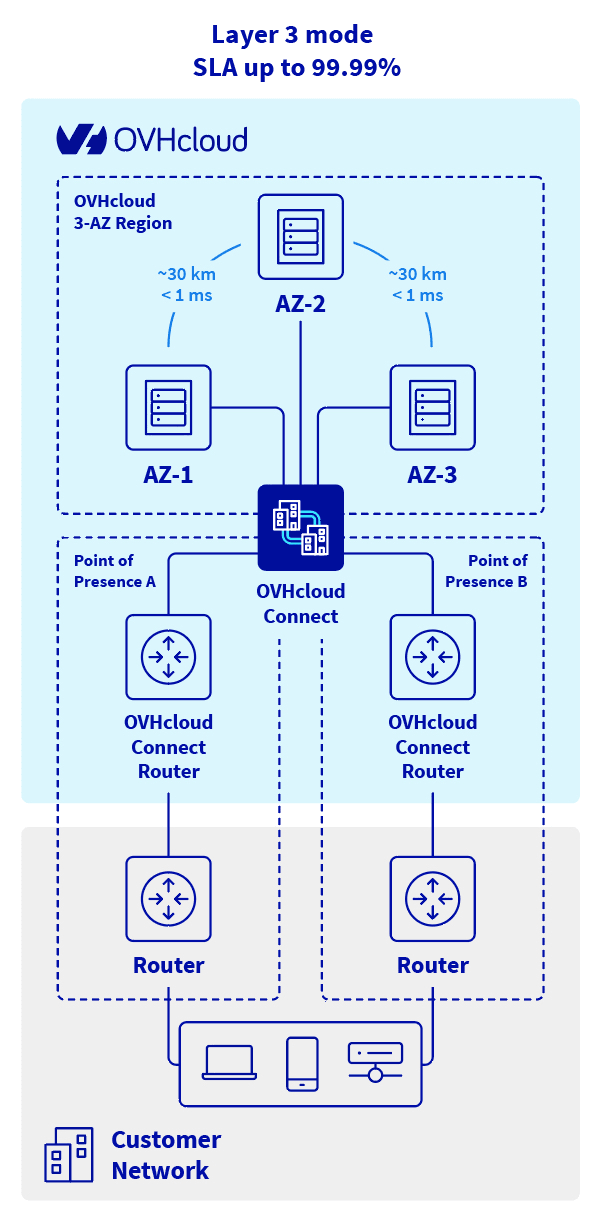
How Multi-AZ works with OVHcloud Connect
- Order two OVHcloud Connect services in two different PoPs.
- Configure BGP on both links with appropriate route priorities (using BGP attributes like Local Preference, MED, or AS-path prepending) so that traffic prefers one path but can fall back to the other.
- Distribute your OVHcloud resources across multiple Availability Zones within the same region.
- Test failover by simulating a link outage and verifying that traffic switches to the backup path.
Multi-AZ and BGP configuration
For automatic failover, your BGP configuration must distinguish between the primary and backup paths. Common approaches:
- Local Preference — Set a higher Local Preference on routes learned from the primary link.
- AS-path prepending — Make the backup path's AS-path longer so it is less preferred.
- MED (Multi-Exit Discriminator) — Use MED values to influence inbound routing from OVHcloud.
See Configure OCC L3 with BGP for detailed configuration guidance.
When to use Multi-AZ
What's next?
- Learn about SLAs and how Multi-AZ affects your uptime guarantees.
- See the AZ configuration guide to set up subnets across zones.
- Explore resilient architecture tutorials for step-by-step examples.
Go further
For training or technical assistance implementing our solutions, contact your sales representative or visit our Professional Services page to request a quote and have your project analyzed by our experts.
Join our community of users.