
Managed Backup for VMware - Understanding your billing
Find out how the price of a protected virtual machine is calculated with Managed Backup for VMware and how to read the Billing tab of your dashboard
Objective
Managed Backup for VMware is billed per protected virtual machine and per billing period, storage included. The price depends on only two things: the Backup plan of the machine and the size of its backup.
This guide explains how the price of a machine is calculated, and how to read your Billing tab.
Requirements
- Have a Managed Backup for VMware service.
OVHcloud Console Access
- Direct link:
- Navigation path:
Private Cloud>Backup>Managed Backup for VMware
Instructions
The principle: one price per machine and per billing period
- Only protected machines are billed: a machine without a tag is never billed.
- Storage is included: there is no per-gigabyte line, either for retention or for the copy on the secondary site.
- Each infrastructure is billed separately, with no grouping or volume discount across your infrastructures.
The price grid
Price per protected virtual machine and per billing period, storage included, in euros excl. VAT:
- A machine exactly on a limit goes into the higher band: a machine of exactly 250 GB is in the 250 GB - 1 TB band.
- Machines of 8 TB or more are not supported: they have no price band. A machine of this size can delay the backups of your other machines. Do not tag it (see Machines of 8 TB or more).
Which size is taken into account
The band is calculated on the size of the backup of the machine, never on the space allocated to its disks.
Key point
A machine whose allocated disks are very large, but whose backup stays small, is billed on the size of its backup, not on the allocated space.
The size is measured every day a backup produces a restore point. If the backup of the machine grows, its band can change.
What is billed over a period
Consumption is measured every day and billed once per billing period. A billing period runs from the 28th of the previous month to the 27th of the current month.
- A machine is billed for the period if at least one backup produced a restore point during that period. A machine whose backups all failed during the period is not billed.
- There is no proration: a machine that is billed is billed for the whole period.
- The highest plan reached is used: if a machine was Premium for even one day, the period is billed as Premium.
- The largest band reached is used, whatever the plan: a machine that grew one day, then shrank, is billed at the largest band.
The Billing tab
The Billing tab of your dashboard lists the machines billed during the current period, with their price.
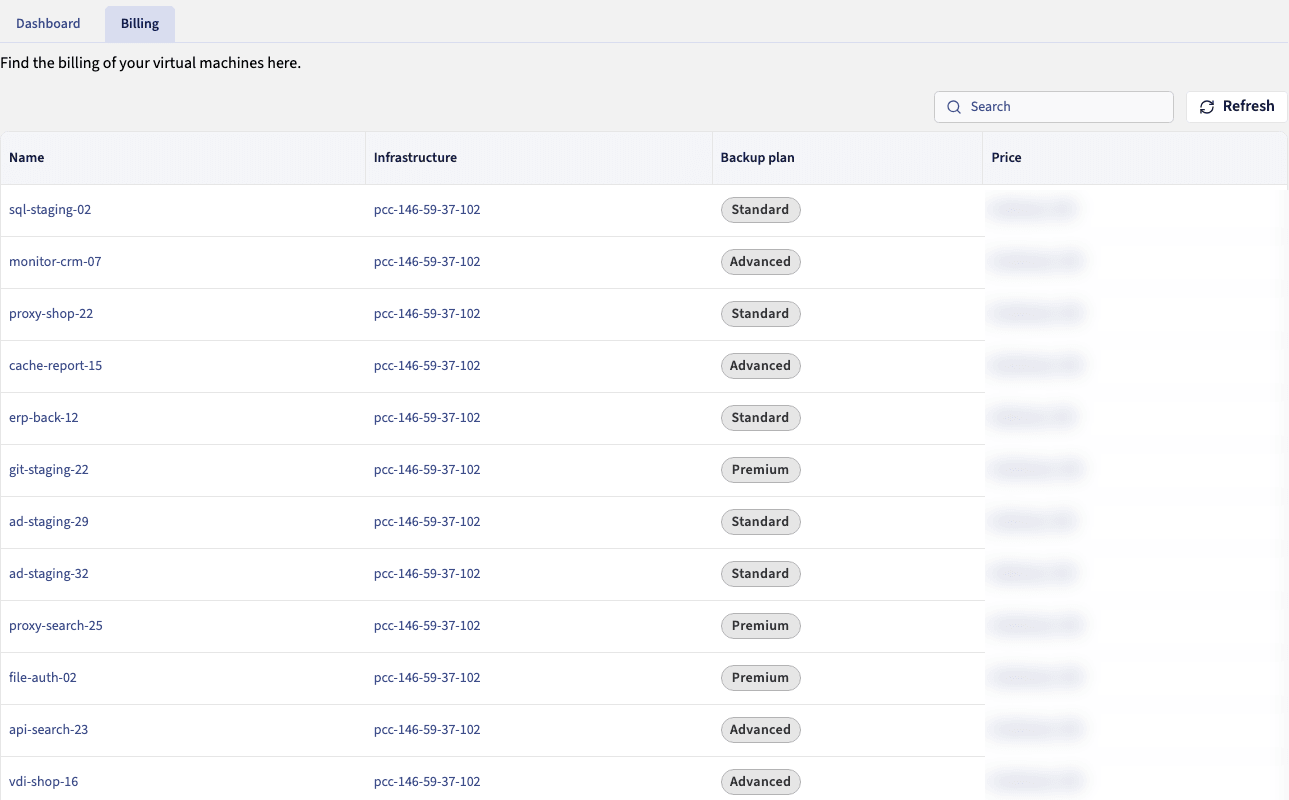
The Billing tab lists the machines billed during the period, with their infrastructure, their Backup plan and their price.
- One row per billed machine, with the Name, Infrastructure, Backup plan and Price (excluding VAT) columns. The price takes into account the highest plan and the largest size band reached since the start of the period. To see the band of a machine, open its details in the
Dashboardtab (Size band). - A machine that had no Backup plan during the period is not listed. A machine whose tag was removed during the period is still listed, since the period is billed for it.
- The Search field looks up a machine by name. The tab does not show a total.
- The
Refreshbutton reloads the list. It does not speed up the consumption measurement, which is daily. - An empty list means that no machine is billed during the period: it is not an error.
The estimate shown at order time
At order time, the summary shows an estimate per Backup plan and a total per billing period. This is a maximum amount for a full period, calculated on the machines you selected. The actual amount then depends on the machines you tag or untag.
In case of termination
Terminating does not reduce the current period: each machine backed up during this period, before the termination, is billed for the whole period, as there is no proration. Nothing is added afterwards, since no backup runs during the 35-day window. If the service is reactivated, each machine backed up after the reactivation is billed for the whole period, even if the reactivation happens partway through it. A machine is never billed twice for the same period (see Terminating and reactivating a service).
Disputing a line
A line that has already been billed is never reduced automatically. If you think a machine was billed in error, contact support, who will consider a commercial correction.
Go further
Protecting your virtual machines: what makes a machine billable.
Terminating and reactivating a service: what happens to your invoice.
FAQ and troubleshooting: frequent billing questions.
Join our community of users.