
IAM for VMware on OVHcloud - How to activate IAM
Find out how to enable IAM for your VMware on OVHcloud solution via the OVHcloud Control Panel or via the OVHcloud API
Objective
This guide details how to activate IAM with Hosted Private Cloud - VMware on OVHcloud via the OVHcloud Control Panel or with the OVHcloud API.
Requirements
- An OVHcloud account
- One or more Hosted Private Cloud - VMware on OVHcloud products linked to this account (Hosted Private Cloud powered by VMware, VMware Service Pack).
OVHcloud Control Panel Access
- Direct link:
- Navigation path:
Hosted Private Cloud>Managed VMware vSphere> Select your vSphere service
Instructions
Enabling IAM
This may take up to 30 minutes.
Via the OVHcloud Control Panel
Select your infrastructure, then go to the Users tab.
Under the OVHcloud IAM section, click Enable OVHcloud IAM.
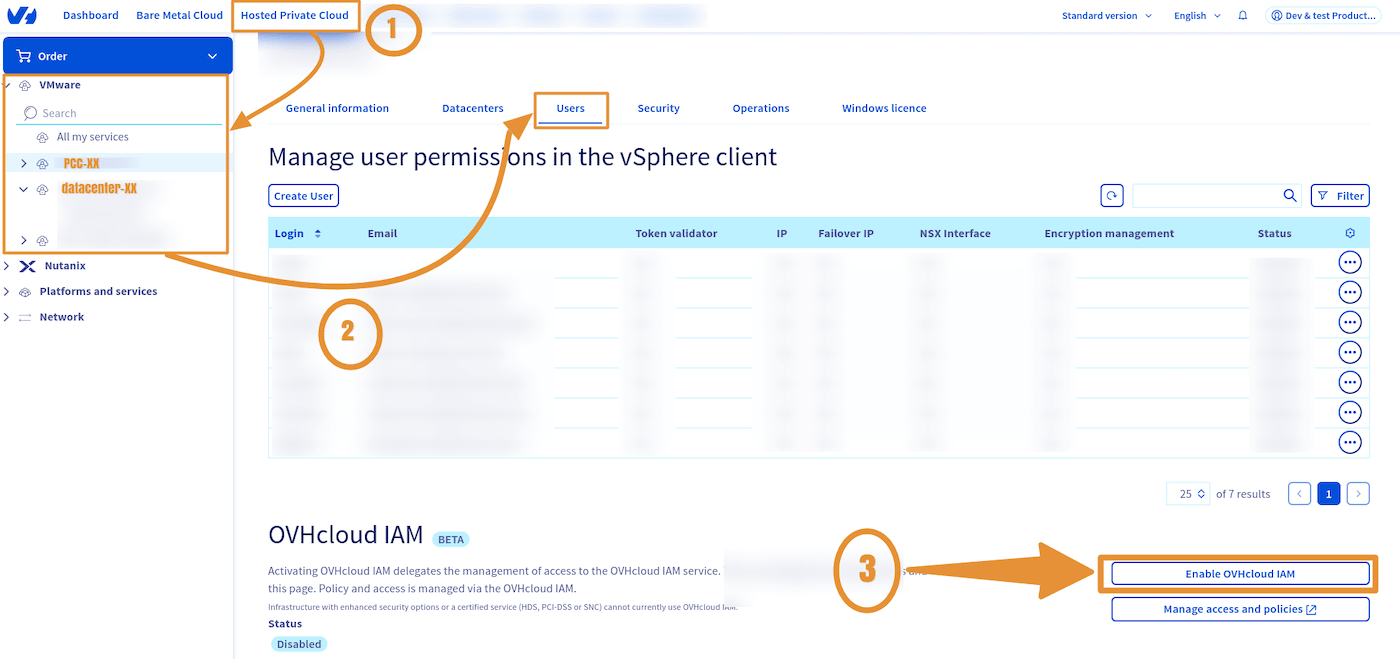
Once IAM is enabled, its status will be Enabled and green.

Via the OVHcloud API
Read the guide Getting started with OVHcloud APIs to get familiar with using OVHcloud APIv6.
Make sure to replace the serviceName with the reference of your Hosted Private Cloud service, in the form pcc-XXX-XXX-XXX-XXX.
To enable the IAM option, execute the following API call:
Checking that IAM is enabled
To control IAM activation, execute the following API call:
API return:
Go further
You can now follow the guide IAM for VMware on OVHcloud - How to create an IAM vSphere role.
IAM for VMware on OVHcloud - Guide index:
- Guide 1: IAM for VMware on OVHcloud - Overview and FAQ
- Guide 2: IAM for VMware on OVHcloud - How to enable IAM
- Guide 3: IAM for VMware on OVHcloud - How to create an IAM vSphere role
- Guide 4: IAM for VMware on OVHcloud - How to associate a vSphere role with an IAM policy
- Guide 5: IAM for VMware on OVHcloud - How to associate a user with a global IAM policy
For training or technical assistance implementing our solutions, contact your sales representative or visit our Professional Services page to request a quote and have your project analysed by our experts.
Join our community of users.