
Field naming convention
Objective
Now that you can send logs, you may be wondering how to tell Logs Data Platform what kind of data you send. It can be dates, numbers, boolean values, or just plain text strings.
This guide will help you ensure that your logs are properly parsed.
Requirements
- No specific requirement
Instructions
What is a valid log for Logs Data Platform?
Each log received on Logs Data Platform is transformed into a GELF-formatted log. What is GELF? A standardized JSON way to send logs. GELF stands for Graylog Extended Log Format. Using this format gives us two advantages: It is directly compatible with Graylog and it is still extensible enough to enrich your logs as you would like to.
This format impose a few conventions that if you don't follow can have many consequences:
- Logs Data Platform will rewrite your field as an incorrect one (with a
_fixitsuffix). - Your log will be rejected.
First please check the table below to know which field are reserved and what is their meaning. Note that some of these fields are mandatory and have to be set by whatever library you use to send logs to Logs Data Platform. Refer to the documentation of the library or to some of our awesome tutorials to know how to send them.
You cannot use the field source since it is replaced by the content of the field host in Graylog.
Can I go deeper?
Of course. As we said before, you can send some additional fields as long as you prepend them with the _ (underscore) character. You can use any JSON valid character for your field, except the . (dot) character. But don't worry, if you do so, we will rewrite your '.' in a very cute underscore. So how can you send special type as number, date and boolean? Here is the answer:
As you can see, it is fairly straightforward. Suffix your field with the right value and you will be able to send anything you want. For reference, here is a full example of a valid gelf message with every type we have:
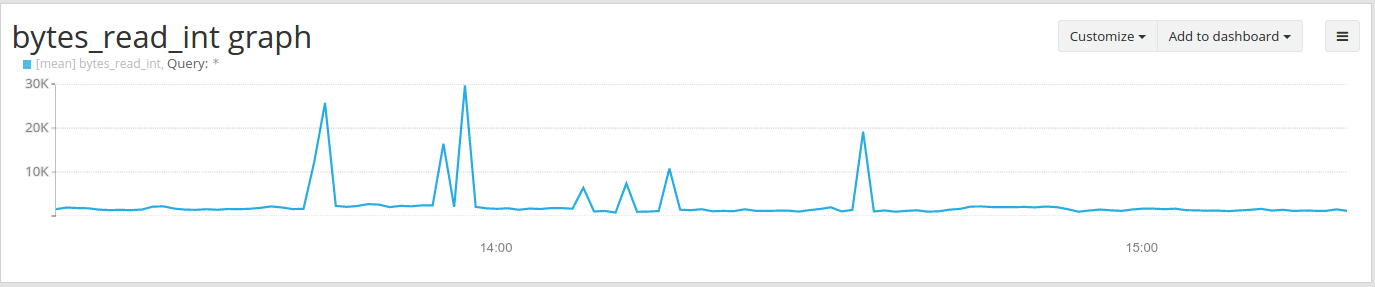
Specifying correct numeric suffix type is the only way to generate numeric Widgets for your Dashboards. Here is an example of a graph you can generate with a numeric value:
Our platform limits the usage of IP addresses as field keys. IP addresses have a high cardinality and thus are not allowed to be used as keys (of course they are supported and enriched as values, as you can see above). If you use an IP address as a key, it will be changed. For example:
will become:
So this is everything you need to know to send valid messages format and not shoot yourself in the foot. If you have any question you can always reach us on the community hub.
Happy Logging
Go further
- Getting Started: Quick Start
- Documentation: Guides
- Community hub: https://community.ovh.com
- Create an account: Try it!