
VMware on OVHcloud maintenance operations
If you require training or technical assistance in implementing our solutions, please contact your Technical Account Manager or visit this page to get a quote and request a custom analysis of your project from our Professional Services team experts.
Objective
This guide will explain the maintenance operations carried out by the OVHcloud teams.
Requirements
- You are the administrative or technical contact for the VMware on OVHcloud solution infrastructure.
- You have access to the OVHcloud Control Panel or the API console for your services.
Instructions
Maintenance operations at OVHcloud are a testament to in-house expertise. It has been improved over the years to guarantee the reliability and performance of the equipment.
How to access Hosted Private Cloud operations
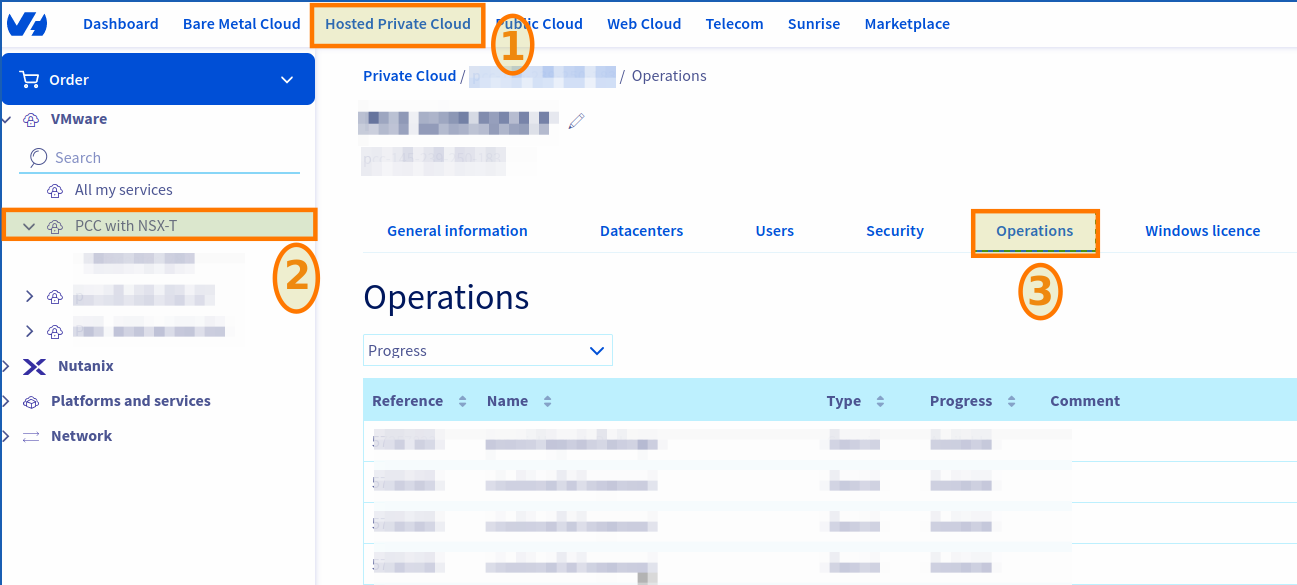
Log in to your OVHcloud Control Panel with an administrator account, and click on the Hosted Private Cloud tab.
Select your infrastructure under VMware then click on the Operations tab.
To see the operations in progress or refresh the old operations, use the Refresh button located in the top right-hand corner of the operations table.
You can change the processing date of an operation in progress by clicking on the ... button to the right of an operation, then on Modify the processing date.
For more information on rescheduling a maintenance operation, please read our guide on Rescheduling a maintenance operation on your Hosted Private Cloud.
You can also filter operations by status via the dropdown menu above the table on the left.

How to access the details of maintenance operations
Via the OVHcloud Control Panel
The OVHcloud Control Panel operation section has 11 sections.
Here is an example of an export of VMware Hosted Private Cloud Control Panel operations on OVHcloud:
An operation referencing ID is always added on each operation, along with an assigned name, type, progress, comment, service, and processing dates.
Of course, for each OVHcloud service (Bare Metal Cloud, Public Cloud, etc.) these names and references may change.
Via the OVHcloud API
Read the Getting started with OVHcloud APIs guide to get familiar with using OVHcloud APIv6.
Run the following API call to get the list of operations:
Parameters:
serviceName: Your Dedicated Cloud reference in the formpcc-XXX-XXX-XXX-XXX.
Return example (the return scheme may vary and be quite long depending on the size of your infrastructure):
To get the details of each robot, run the following API call:
Parameters:
serviceName: Your Dedicated Cloud reference in the formpcc-XXX-XXX-XXX-XXX.name: The name of the robot, e.g.maintenanceUpdateAntivirusConfiguration.
Return :
Details of Hosted Private Cloud maintenance operations
All maintenance operations listed below can be rescheduled.
windowsUpdateOnPcc
upgradeSwitch
maintenanceGenericUpgradePackages
maintenanceRenewAndDeploySslCertificate
redeployVmToLatestVersion
The estimated duration applies to most customers. For large infrastructures, the duration can be significantly longer. It depends on each case and should be evaluated individually.
redeployPrivateGw
maintenanceUpgradeHosts
maintenanceUpgradeVcenter
maintenanceUpgradeVrops
maintenanceUpgradeNsxt
maintenanceUpgradeVeeamManaged
maintenanceUpgradeZvm
Difference between upgrades and migrations:
- Upgrades involve updating existing Zerto components (e.g., Zerto 9.5 to 9.7) with minimal service disruption (~1 hour).
- Migrations involve transitioning to a new platform (e.g., from Windows-based Zerto to appliance-based Zerto 10u6), resulting in up to 12 hours of complete downtime.
Glossary
1Control Plane Unavailable: Indicates that the vCenter Server Appliance (VCSA) cannot be contacted. Therefore, not all products that need to reach VCSA will work.
This represents the following products/options in Hosted Private Cloud VMware on OVHcloud :
- NSX-T interface.
- vROps interface.
- Managed Veeam (no backup/restore operation).
- Zerto interface (continuous replication).
- Tanzu Kubernetes Grid.
Any other tier products that you can use that require VCSA will also be affected.
Control plane explanations
The control plane is the part of the system responsible for managing and controlling resources in a virtualized environment. Specifically, the control plane is the software layer that manages operations and decisions related to the configuration, resource management, tracking, and orchestration of the virtual machines and associated infrastructure.
- Resource management: It supports the configuration and management of physical (servers, storage, networking) and virtual (virtual machines) resources.
- Orchestration: Coordinates operations between different infrastructure components, making it easy to deploy, migrate and manage virtual machines.
- Monitoring: Collects performance, health and resource usage data for real-time monitoring and reporting.
- Security: Manages security policies, including authentication, authorization, and access control, ensuring the security of virtualized resources.
- Automation: Supports the automation of repetitive tasks, allowing administrators to define automated workflows and policies.
In short, the control plane is the software layer that provides centralized management, coordination, and control.
Go further
For more information on rescheduling a maintenance operation, please read our guide: Rescheduling a maintenance operation on your VMware on OVHcloud Hosted Private Cloud.
Chat on the Discord dedicated channel: https://discord.gg/ovhcloud or join our community of users.