AI Deploy - Tutorial - Deploy a fine-tuned Olala Mini 7A1B
How to deploy a fine-tuned Olala Mini 7A1B model with AI Deploy and translate texts through its translation API, using a ready-to-use Docker image
AI Deploy is covered by OVHcloud Public Cloud Special Conditions.
Introduction
Olala Mini 7A1B is a compact language model that you can fine-tune on your own data with AI Training. Once your model is fine-tuned, AI Deploy lets you serve it as an HTTPS endpoint, so that your applications can send it requests.
This tutorial shows how to deploy the fine-tuned model produced by the AI Training - Tutorial - Fine-tune Olala Mini 7A1B with LoRA guide, using a ready-to-use Docker image. You don't need to write any code or build any image: the model stays in your Object Storage bucket and the app loads it at startup.
The app exposes a translation API: you send the text and the languages to the /v1/translate route, and the app returns the translation. The app builds the prompt itself, in the exact format used for the fine-tuning, so the model only translates: a question or instruction in your text is translated, not answered.
For other uses, for example to test the model as a chat assistant, you can also open the OpenAI-compatible chat routes (see Use the chat routes).
This app is meant to test and evaluate your fine-tuned model, not to serve it in production. See Limitations below.
Limitations
The app uses the inference server of the Hugging Face Transformers library (transformers serve), adapted to Olala Mini 7A1B. It is simple to deploy and supports the model as it is, but it is not designed for production traffic:
- One request at a time: each replica processes the requests one by one. When several requests arrive at the same time, they wait in a queue, and the response time grows with the number of waiting requests. Adding replicas serves more requests in parallel, but each replica uses one GPU.
- Limited generation speed: the model generates tokens more slowly than with a dedicated inference engine such as vLLM or SGLang, and a more powerful GPU only improves it slightly.
- No queue limit or request timeout: the server does not reject requests when it is overloaded.
- Translation only, but not guaranteed: the
/v1/translateroute always uses the fine-tuning format, and the model translates questions and instructions instead of answering them. As with any language model, an unusual text can still produce an unexpected output, for example a text that looks like a translation request itself. Check the translations of your own texts before relying on them. - Terminology: the
terminology_mappingfield is passed to the model, but the datasets of the fine-tuning tutorial contain no terminology examples, so the model does not always apply your terms.
Use it to check the quality of your model, compare it with the base model, or build a demo. For production use, a dedicated inference engine is required.
The whole workflow: the fine-tuned model written by AI Training in your bucket is served by the AI Deploy app:
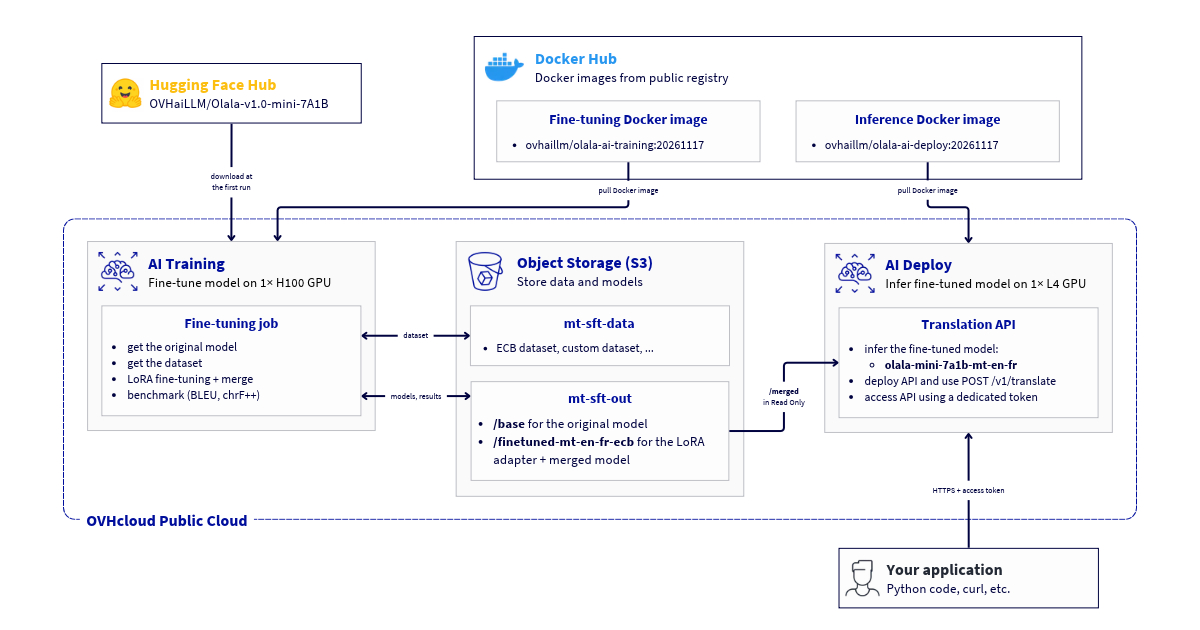
Requirements
Before proceeding, ensure you have the following:
- A Public Cloud project created.
- The ovhai CLI installed on your system (this guide explains how to install it).
- A fine-tuned Olala Mini 7A1B model. Follow the AI Training - Tutorial - Fine-tune Olala Mini 7A1B with LoRA guide first: at the end of the job, the model is in the
finetuned-mt-en-fr-ecb/merged/folder of yourmt-sft-outS31-compatible Object Storage bucket (next to the base model, inbase/), in the GRA region. In the commands of this tutorial, replace<ALIAS>with the alias of your S3 datastore, as in the AI Training tutorial. - Access to L4 GPUs (or more powerful NVIDIA GPUs) in your project. The model does not run on CPU.
Instructions
Follow these steps to deploy and use your model:
- Check your model in Object Storage
- Deploy the app
- Follow the deployment
- Create an access token
- Query your model
- Manage the app
Check your model in Object Storage
The app reads the model from your bucket, mounted as a read-only volume. The model folder must contain the files written by the fine-tuning job: model.safetensors, config.json, configuration_olala.py, modeling_olala.py, generation_config.json, tokenizer.json, tokenizer_config.json and chat_template.jinja.
List them with the ovhai CLI:
If your model is in another folder or bucket, for example mt-sft-out@<ALIAS>/finetuned-mt-en-fr-opus100/merged after an OPUS-100 run, replace mt-sft-out@<ALIAS>/finetuned-mt-en-fr-ecb/merged with its location in the next commands.
Deploy the app
The image contains the inference server and all its dependencies. It loads the model from /workspace/model and serves it on port 8080. The model needs one GPU with at least 24 GB of memory: an L4 GPU is enough.
Deploy your app via ovhai CLI
To follow this part, make sure you have installed the ovhai CLI on your computer or on an instance.
Run the following command to deploy your application:
The --env options set the behaviour of the app. SERVED_MODEL_NAME is required: the app does not start without it. The other options are set to their default values here: you can remove them and get the same app.
For example, for a model fine-tuned on OPUS-100, mount mt-sft-out@<ALIAS>/finetuned-mt-en-fr-opus100/merged and set --env SERVED_MODEL_NAME=olala-mini-7a1b-mt-en-fr-opus100.
Parameters explained
--flavor l4-1-gpu --gpu 1: one L4 GPU. To list the available GPUs, runovhai capabilities flavor list.--replicas 1: one instance of the app. See Manage the app to add more.--default-http-port 8080: the port of the inference server. It is fixed to8080in the image, so always use this value.--volume mt-sft-out@<ALIAS>/finetuned-mt-en-fr-ecb/merged:/workspace/model:RO: mounts only thefinetuned-mt-en-fr-ecb/merged/folder of your bucket, where the model is, in read-only mode.--label app=olala-mini-7a1b-mt-en-fr: a label used to create an access token for this app only (see Create an access token).--probe-path /v1/models ...: the readiness probe. AI Deploy sends traffic to a replica only when its/v1/modelsroute answers. At startup, the app loads the model on the GPU and compiles the model's kernels with a short test generation before its routes answer, so the first request is served at full speed.--liveness-probe-path /health ...: the liveness probe. If/healthstops answering 3 times in a row, AI Deploy restarts the replica. The probe starts after 180 seconds, once the model is loaded, and/healthkeeps answering while the model generates long answers.
An app is billed as long as it is running, even when it receives no requests. Stop it when you don't need it (see Manage the app).
Follow the deployment
The app goes through the QUEUED, INITIALIZING and SCALING states before being RUNNING:
INITIALIZING: the model files are copied from your bucket;SCALING: the image is downloaded, then the model is loaded on the GPU and its kernels are compiled. The app isRUNNINGwhen the readiness probe succeeds.
To follow the app's progress and logs in real time, run:
When the model is loaded, the logs end with:
ovhai app get <app_id> shows the state of the app and its URL, in the form https://<app_id>.app.gra.ai.cloud.ovh.net.
Create an access token
The app is not public: each request must contain an access token. Create a token that can only access the apps with the app=olala-mini-7a1b-mt-en-fr label:
The token is shown only once: copy it and keep it in a safe place. The next examples read the token and the app URL from environment variables:
Query your model
The app exposes the following routes:
The OpenAI-compatible chat routes (/v1/chat/completions, /v1/completions) are disabled by default and answer with an HTTP 403 error. See Use the chat routes to enable them.
Translate a text
Send your text to the /v1/translate route with curl:
The translation is in the translation field:
The request uses the same fields as the translation format of the fine-tuning:
If finish_reason is length, the translation was truncated at max_tokens: send the request again with a higher value. An invalid request is rejected with an HTTP 400 error that explains the problem.
The model translates the text, even when it contains a question or an instruction:
With Python and the requests library (pip install requests):
Use the chat routes
To test the model as a chat assistant, or if you fine-tuned it on a task other than translation, deploy the app with --env TRANSLATE_ONLY=0. The OpenAI-compatible routes POST /v1/chat/completions and POST /v1/completions are then open, and the model receives your messages as they are: it answers the question that /v1/translate translated in the previous example:
The answer is in choices[0].message.content. You can also use the OpenAI client libraries (pip install openai, with base_url=$APP_URL/v1 and your token as API key), stream the answer with "stream": true, and enable reasoning with "chat_template_kwargs": {"reasoning_effort": "medium"}: the reasoning is then returned in the reasoning_content field. If you fine-tuned the model on your own task, send the system prompt and request format of your training data.
Manage the app
Each replica of the app runs one copy of the model on one GPU and processes the requests one by one. To serve more requests in parallel, add replicas:
To stop the app when you don't use it, and start it again later with the same URL:
A stopped app is not billed for compute. To delete it permanently:
The model stays in your bucket: you can deploy it again at any time.
Go further
- AI Training - Tutorial - Fine-tune Olala Mini 7A1B with LoRA
- Use S3-compatible Object Storage with AI Tools
- AI Deploy - Getting started
- AI Deploy - Scaling strategies
- AI Deploy - Accessing your app with tokens
Feedback
Please send us your questions, feedback and suggestions to improve the service:
- On the OVHcloud Discord server
For training or technical assistance implementing our solutions, contact your sales representative or visit our Professional Services page to request a quote and have your project analysed by our experts.
1: S3 is a trademark of Amazon Technologies, Inc. OVHcloud's service is not sponsored by, endorsed by, or otherwise affiliated with Amazon Technologies, Inc.