Registra le VM in un nuovo PCC
Info
Questa traduzione è stata generata automaticamente dal nostro partner SYSTRAN. I contenuti potrebbero presentare imprecisioni, ad esempio la nomenclatura dei pulsanti o alcuni dettagli tecnici. In caso di dubbi consigliamo di fare riferimento alla versione inglese o francese della guida. Per aiutarci a migliorare questa traduzione, utilizza il pulsante "Contribuisci" di questa pagina.
Obiettivo
A seguito di un incidente, alcune macchine virtuali non compaiono più nel tuo inventario vSphere, ma tutti i file sono sempre presenti nei datastore.
Come reinserire le VM di un datastore nel tuo inventario vSphere
Prerequisiti
Procedura
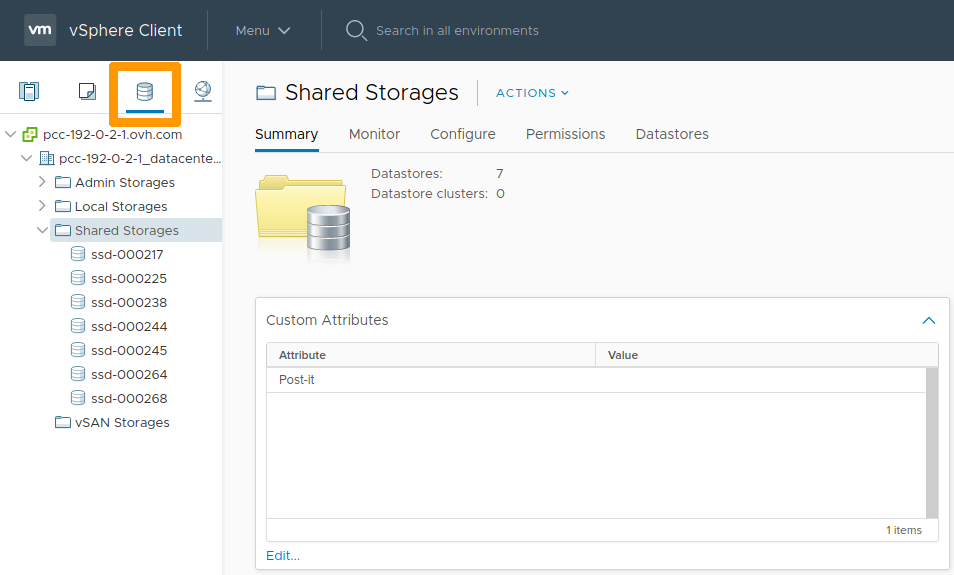
Nella tua interfaccia vSphere, posizionati nella vista Storage.
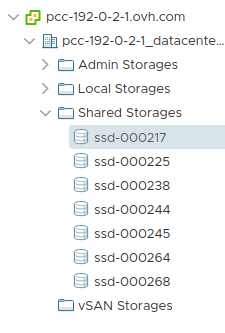
Seleziona un datastore nella lista
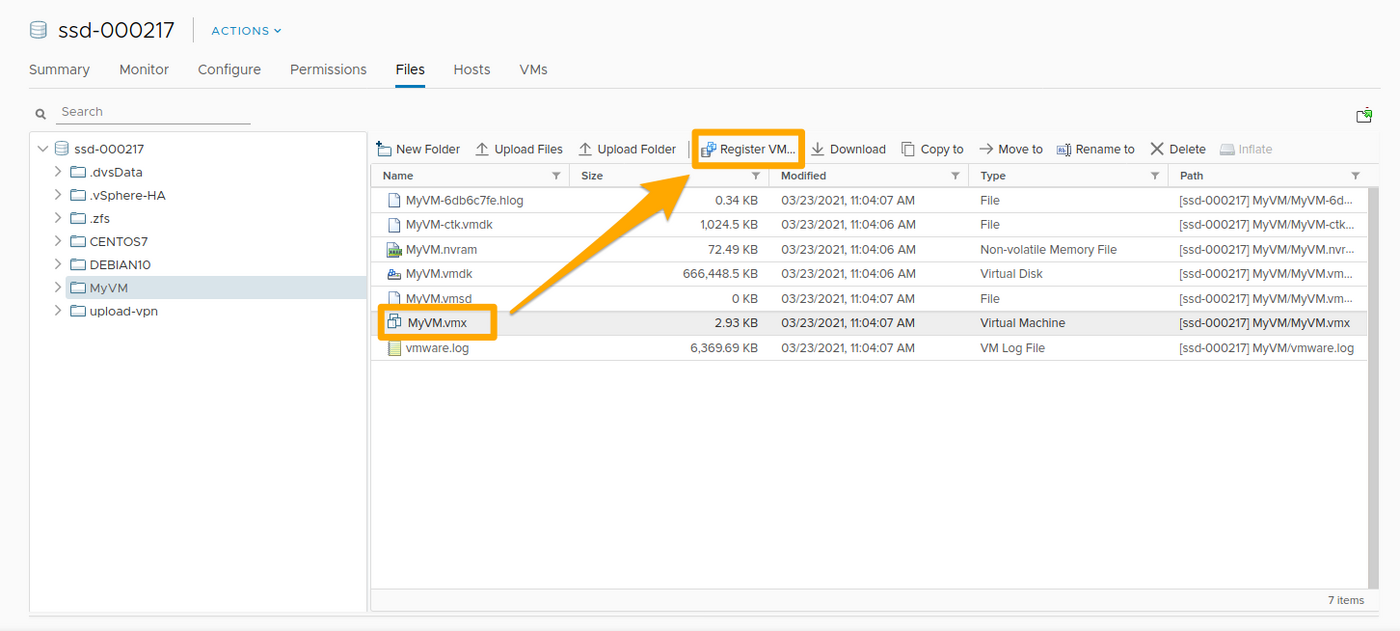
Nelle cartelle di questo datastore, seleziona il file .vmx e clicca su Register VM.
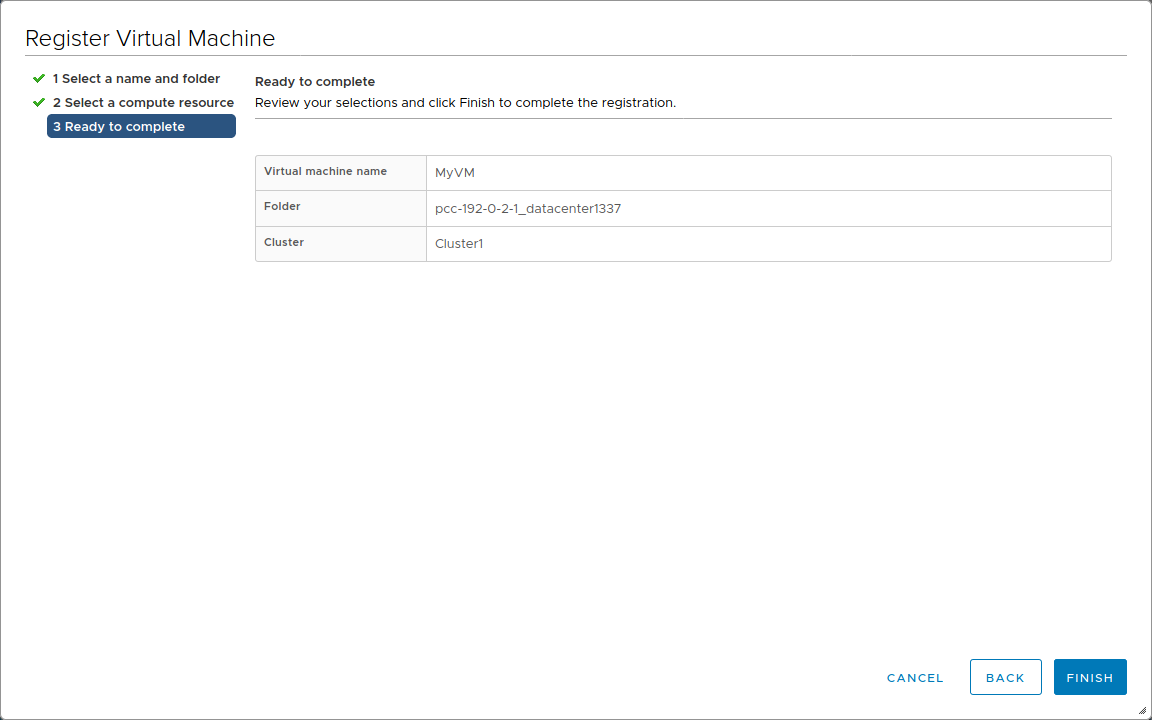
Inserisci le informazioni richieste e clicca su Finish.
Le stesse operazioni devono essere ripetute su ogni datastore e per ogni VM da ri-registrare.
Verifica le impostazioni delle tue VM (nome, portgroup, ecc...) cliccando con il tasto destro su ciascuna di esse e selezionando Edit Settings.
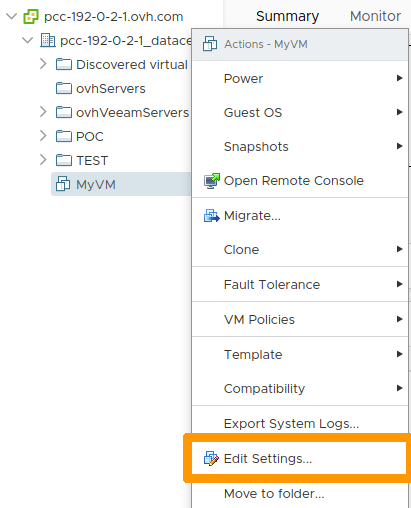
In caso di errore di configurazione, visualizzerai un messaggio di errore durante il riavvio della VM.
Puoi riaccendere una VM cliccando con il tasto destro su di essa e cliccando su Power On
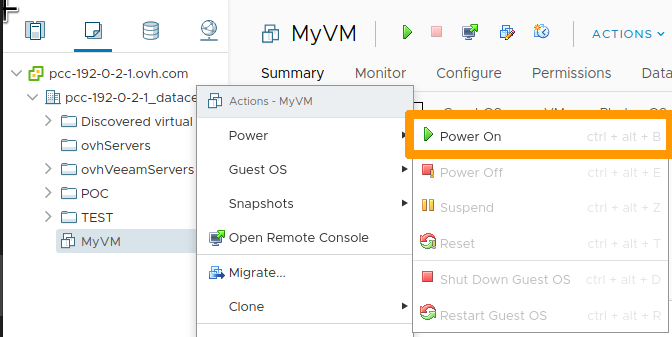
Automatizzazione
Se disponi di decine di VM e/o datastore, è possibile utilizzare script per effettuare il percorso dei datastore e la registrazione delle VM presenti.
Avec PowerCLI
VMware fornisce i PowerCLI agli amministratori VMware che utilizzano PowerShell: Installate PowerCLI.
In seguito, puoi utilizzare lo script qui sotto, adattato a quello scritto da LucD.
function register-vmxX {
    param($entityName = $null,$dsNames = $null,$template = $false,$ignore = $null,$checkNFS = $true,$whatif=$false)

    function Get-Usage{
        Write-Host "Parameters incorrect" -ForegroundColor red
        Write-Host "register-vmxX -entityName  -dsNames [,...]"
        Write-Host "entityName   : a cluster-, datacenter or ESX hostname (not together with -dsNames)"
        Write-Host "dsNames      : one or more datastorename names (not together with -entityName)"
        Write-Host "ignore       : names of folders that shouldn't be checked"
        Write-Host "template     : register guests ($false)or templates ($true) - default : $false"
        Write-Host "checkNFS     : include NFS datastores - default : $true"
        Write-Host "whatif       : when $true will only list and not execute - default : $false"
    }

    if(($entityName -ne $null -and $dsNames -ne $null) -or ($entityName -eq $null -and $dsNames -eq $null)){
        Get-Usage
        break
    }

    if($dsNames -eq $null){
        switch((Get-Inventory -Name $entityName).GetType().Name.Replace("Wrapper","")){
            "Cluster"{
                $dsNames = Get-Cluster -Name $entityName | Get-VMHost | Get-Datastore | where {$_.Type -eq "VMFS" -or $checkNFS} | % {$_.Name}
            }
            "Datacenter"{
                $dsNames = Get-Datacenter -Name $entityName | Get-Datastore | where {$_.Type -eq "VMFS" -or $checkNFS} | % {$_.Name}
            }
            "VMHost"{
                $dsNames = Get-VMHost -Name $entityName | Get-Datastore | where {$_.Type -eq "VMFS" -or $checkNFS} | % {$_.Name}
            }
            Default{
                Get-Usage
                exit
            }
        }
    }
    else{
        $dsNames = Get-Datastore -Name $dsNames | where {$_.Type -eq "VMFS" -or $checkNFS} | Select -Unique | % {$_.Name}
    }

    $dsNames = $dsNames | Sort-Object
    $pattern = "*.vmx"
    if($template){
        $pattern = "*.vmtx"
    }

    foreach($dsName in $dsNames){
        Write-Host "Checking " -NoNewline; Write-Host -ForegroundColor red -BackgroundColor yellow $dsName
        $ds = Get-Datastore $dsName | Select -Unique | Get-View
        $dsBrowser = Get-View $ds.Browser
        $dc = Get-View $ds.Parent
        while($dc.MoRef.Type -ne "Datacenter"){
            $dc = Get-View $dc.Parent
        }
        $tgtfolder = Get-View $dc.VmFolder
        $esx = Get-View $ds.Host[0].Key
        $pool = Get-View (Get-View $esx.Parent).ResourcePool

        $vms = @()
        foreach($vmImpl in $ds.Vm){
            $vm = Get-View $vmImpl
            $vms += $vm.Config.Files.VmPathName
        }
        $datastorepath = "[" + $ds.Name + "]"

        $searchspec = New-Object VMware.Vim.HostDatastoreBrowserSearchSpec
        $searchspec.MatchPattern = $pattern

        $taskMoRef = $dsBrowser.SearchDatastoreSubFolders_Task($datastorePath, $searchSpec)

        $task = Get-View $taskMoRef
        while ("running","queued" -contains $task.Info.State){
            $task.UpdateViewData("Info.State")
        }
        $task.UpdateViewData("Info.Result")
        foreach ($folder in $task.Info.Result){
            if(!($ignore -and (&{$res = $false; $folder.FolderPath.Split("]")[1].Trim(" /").Split("/") | %{$res = $res -or ($ignore -contains $_)}; $res}))){
                $found = $FALSE
                if($folder.file -ne $null){
                    foreach($vmx in $vms){
                        if(($folder.FolderPath + $folder.File[0].Path) -eq $vmx){
                            $found = $TRUE
                        }
                    }
                    if (-not $found){
                        if($folder.FolderPath[-1] -ne "/"){$folder.FolderPath += "/"}
                        $vmx = $folder.FolderPath + $folder.File[0].Path
                        if($template){
                            $params = @($vmx,$null,$true,$null,$esx.MoRef)
                        }
                        else{
                            $params = @($vmx,$null,$false,$pool.MoRef,$null)
                        }
                        if(!$whatif){
                            $taskMoRef = $tgtfolder.GetType().GetMethod("RegisterVM_Task").Invoke($tgtfolder, $params)
                            Write-Host "`t" $vmx "registered"
                        }
                        else{
                            Write-Host "`t" $vmx "registered" -NoNewline; Write-Host -ForegroundColor blue -BackgroundColor white " ==> What If"
                        }
                    }
                }
            }
        }
        Write-Host "Done"
        }
    }
Info
Lo script è stato adattato all'ambiente VMware OVHcloud.
Il percorso dei datastore NFS è attivo di default.
Dopo aver inserito lo script nel tuo ambiente, puoi utilizzarlo come segue:
register-vmxX -entityName "pcc-192-0-2-1_datacenter1337"
register-vmxX -dsNames "ssd-012345","pcc-012345"
register-vmxX -dsNames "ssd-012345","pcc-012345" -template:$true
register-vmxX -entityName "pcc-192-0-2-1_datacenter1337" -ignore "upload-vpn"
register-vmxX -dsNames "ssd-012345","pcc-012345" -ignore "upload-vpn" -checkNFS:$true
register-vmxX -entityName "pcc-192-0-2-1_datacenter1337" -whatif:$true
Per saperne di più
Contatta la nostra Community di utenti all’indirizzo https://community.ovh.com/en/.
