---
title: "Configuring Proxy Cache on an OVHcloud Managed Private Registry"
description: "Find out how to configure Proxy Cache on an OVHcloud Managed Private Registry"
url: https://docs.ovhcloud.com/it/guides/public-cloud/containers-orchestration/managed-private-registry/configure-proxy-cache
lang: it
lastUpdated: 2026-02-25
---
# Configuring Proxy Cache on an OVHcloud Managed Private Registry
## Objective
Harbor provides a **proxy cache** feature that helps you mirror and cache images from external registries like **Docker Hub**, **Github Container Registry**, **Quay**, **JFrog Artifactory Registry**, etc. This improves performance and reduces rate limits imposed by external registries.
We **strongly recommend** using a **Docker account** (even a free one) to **avoid rate limits** when pulling images. Without authentication, Docker Hub enforces strict pull limits, which may cause failures when pulling frequently used images.
## Requirements
- A running **[Managed Private Registry](/it/guides/public-cloud/containers-orchestration/managed-private-registry/creation.md)**.
- Access to the **Harbor Web UI** (with admin access).
- A **Docker Hub account** (recommended to prevent rate limits).
## Instructions
### 1. Enable proxy cache
1. Log in to [Harbor Web UI](/it/guides/public-cloud/containers-orchestration/managed-private-registry/connect-to-ui.md) as an **Administrator**.
2. Go to `Administration`, then Registries.
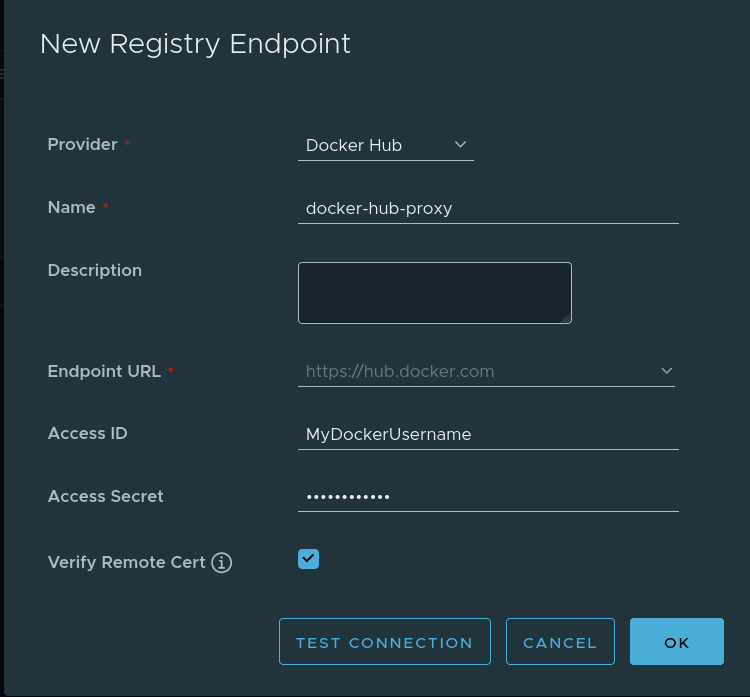
3. Click + New Endpoint, then select Docker Hub as the provider.
4. Fill in the details:
- **Registry Type**: Docker Hub
- **Registry Name**: (e.g., `docker-hub-proxy`)
- **Registry Endpoint**: `https://hub.docker.com`
- **Access ID**: _(your Docker Hub username)_
- **Access Secret**: _(your Docker Hub password or personal access token)_
5. Click OK.
:::info
If you do not provide Docker Hub credentials, your requests may hit **rate limits** (10 pulls/hour per IPV4 for anonymous users).
:::
### 2. Create a proxy cache project
1. In the **Harbor Web UI**, go to Projects.
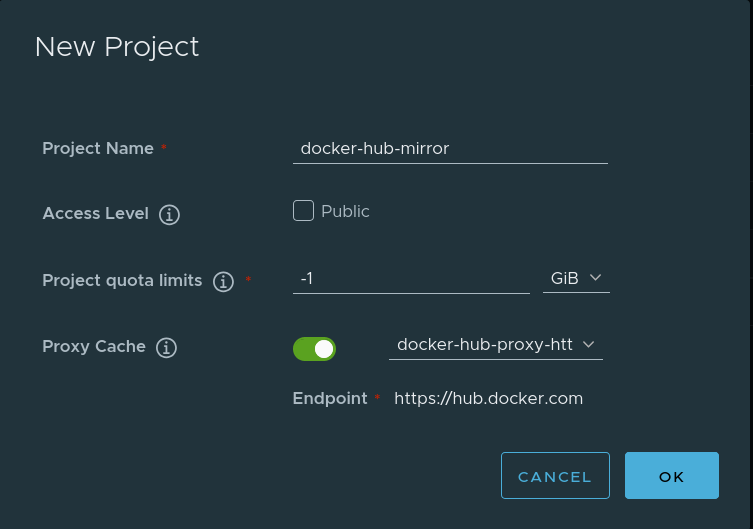
2. Click + New Project.
3. Enter a **Project Name** (e.g., `docker-hub-mirror`).
4. Select Proxy Cache.
5. Under **Upstream Registry**, choose the **Docker Hub proxy registry** created earlier.
6. Click Save.
:::info
By default, Harbor creates a **7 day retention policy** for each new proxy cache project. See more about [Tag Retention Policies](https://goharbor.io/docs/2.14.0/working-with-projects/working-with-images/create-tag-retention-rules/).
:::
### 3. Configure Docker to use Harbor proxy cache
#### 3.1 Log in to the Managed Private Registry
```sh
docker login -u `` -p
```
#### 3.2 Pull images via proxy cache
Instead of pulling directly from Docker Hub, use your **Private Managed Registry** as an intermediary:
```bash
docker pull /dockerhub-mirror/library/nginx:latest
```
Harbor will cache the image locally, so subsequent pulls will be much faster and won’t count against Docker Hub rate limits.
## Benefits of using proxy cache
- ✅ Avoid Docker Hub rate limits (with authentication).
- ✅ Faster image pulls for frequently used images.
- ✅ Reduced dependency on external registries.
- ✅ Improved reliability by caching images locally.
## Troubleshooting
### Getting "Too Many Requests" errors
- Ensure you configured Docker Hub authentication in Harbor.
## Conclusion
Using Harbor's proxy cache helps optimize Docker image pulls, avoiding rate limits and improving performance. Be sure to authenticate with Docker Hub in Harbor to prevent rate limit issues.