---
title: "View and manage all your websites from the OVHcloud Control Panel"
description: "Find out how to view and manage all of your websites via the OVHcloud Control Panel"
url: https://docs.ovhcloud.com/en/guides/web-cloud/web-hosting/access-websites-view
lang: en
lastUpdated: 2026-06-17
---
# View and manage all your websites from the OVHcloud Control Panel
## Objective
The interface presented in this guide allows you to centrally display all of your websites, regardless of their associated hosting. It makes it easy to track which features are enabled for each website, and gives quick access to essential actions. This interface is particularly useful for agencies or web professionals who manage a large number of domains spread across several hosting plans.
**Find out how to view and manage all your websites via the OVHcloud Control Panel.**
## Requirements
- An [OVHcloud Web Hosting plan](https://www.ovhcloud.com/en-gb/web-hosting/).
***
### OVHcloud Control Panel Access
- **Direct link:** Websites
- **Navigation path:** Web Cloud > Websites > Select your website
***
## Instructions
Click on the tabs below to view each of the **2** steps.
**Step 1**
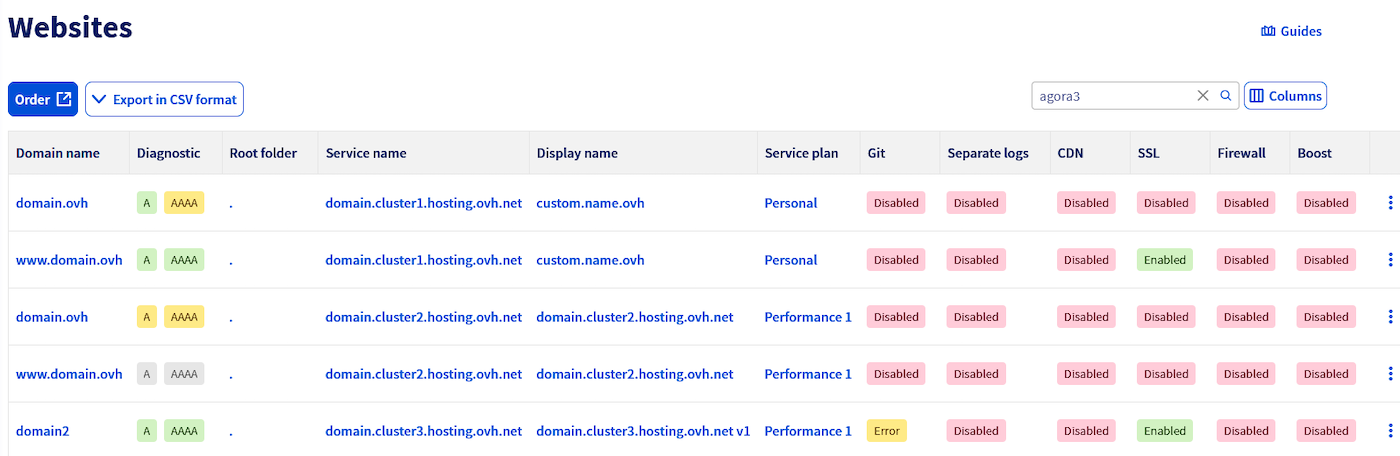
Go to the Websites page. A table appears, listing all your websites and their main information.
**Step 2**
The table shows the following columns:
- **Domain name**: shows the main domain name of the website, as configured in the “Multisite” tab of your hosting plan.
- **Diagnostic**: informs you whether your domain name is correctly pointing to the associated web hosting plan. For more details, refer to the “[Diagnose your domain names](/en/guides/web-cloud/web-hosting/multisites-configure-multisite.md#diagnostic-domain)” section of our guide “Hosting multiple websites on your Web Hosting plan”.
- **Root folder**: indicates the directory on your hosting plan (www, app, public\_html, etc.) to which the domain points.
- **Service name**: technical name of the service, in the form `FTPlogin.clusterXXX.hosting.ovh.net`.
- **Display name**: custom alias to identify your service in the Control Panel.
- **Service plan**: type of solution associated with the hosting plan: Free hosting, Starter, Personal, Startup, Professional, Performance, Agency, Agency Plus or Agency Max.
- **Git**: shows the status of the Git integration on the website. For more details, refer to our guide “[Configure and use Git with your OVHcloud web hosting plan](/en/guides/web-cloud/web-hosting/git-integration-webhosting.md)”.
- **Separate logs**: indicates whether a log space is enabled on the domain (OVHcloud domains only). For more information, visit our page “[Monitor and analyse website traffic](https://www.ovhcloud.com/en-gb/web-hosting/uc-website-traffic-analysis/)”.
- **CDN**: shows the CDN status: Active / Inactive / N/A (plan not compatible). For more information, visit our page “[Shared CDN](https://www.ovhcloud.com/en-gb/web-hosting/options/cdn/)”.
- **SSL**: indicates whether SSL is enabled, allowing a secure connection (**https\://**). For more information, visit our page “[Secure your OVHcloud website effectively with a premium SSL certificate](https://www.ovhcloud.com/en-gb/web-hosting/options/ssl/)”.
- **Firewall**: indicates whether the application firewall is enabled on the domain. For more information, visit our page “[Essential options for your web hosting](https://www.ovhcloud.com/en-gb/web-hosting/options/)”.
- **Boost**: indicates whether the Boost option is enabled, temporarily increasing CPU and RAM resources. For more details, refer to our guide “[Web Hosting - How to change your solution](/en/guides/web-cloud/web-hosting/how-to-upgrade-web-hosting-offer.md)”.
Clicking on an item in the table redirects you to the relevant web hosting plan. More specifically:
- The **Domain name**, **Diagnostic**, **Root folder**, **Git**, **Separate logs**, **CDN**, **SSL** and **Firewall** columns redirect to the Multisite tab.
- The **Service name**, **Display name** and **Service plan** columns redirect to the General information tab.
- The **Boost** column redirects to the Boost my hosting plan tab.
:::warning
Separate logs cannot be enabled for an external domain name. This option is only available for domains registered with OVHcloud.
:::
## Go further
For specialized services (SEO, development, etc.), contact the [OVHcloud partners](https://partner.ovhcloud.com/en-gb/directory/).
If you would like assistance with using and configuring your OVHcloud solutions, we recommend referring to our range of [support solutions](https://www.ovhcloud.com/en-gb/support-levels/).
Join our [community of users](https://community.ovhcloud.com/).