---
title: "How to order an SSL Gateway"
description: "Find out how to secure connections to your website"
url: https://docs.ovhcloud.com/en/guides/web-cloud/ssl-gateway/order
lang: en
lastUpdated: 2024-10-01
---
# How to order an SSL Gateway
## Objective
The SSL Gateway solution is designed to give you an SSL certificate for your domain name and hosting service (VPS, mail server, dedicated server, etc.).
:::warning
SSL Gateways are not compatible with [OVHcloud web hosting](https://www.ovhcloud.com/en-gb/web-hosting/) offers. If you would like to use an SSL certificate for this type of solution, please read our guide on [Managing SSL certificates on a web hosting plan](/en/guides/web-cloud/web-hosting/ssl-on-webhosting.md).
:::
**This guide explains how to order an SSL Gateway.**
## Requirements
- An active [domain name](https://www.ovhcloud.com/en-gb/domains/) or subdomain
- Access to the domain name’s DNS zone
## Instructions
### Order
To order our SSL Gateway solution, [click here](https://www.ovhcloud.com/en-gb/security/ssl-gateway/).
Choose your solution, then click `Order now
`.
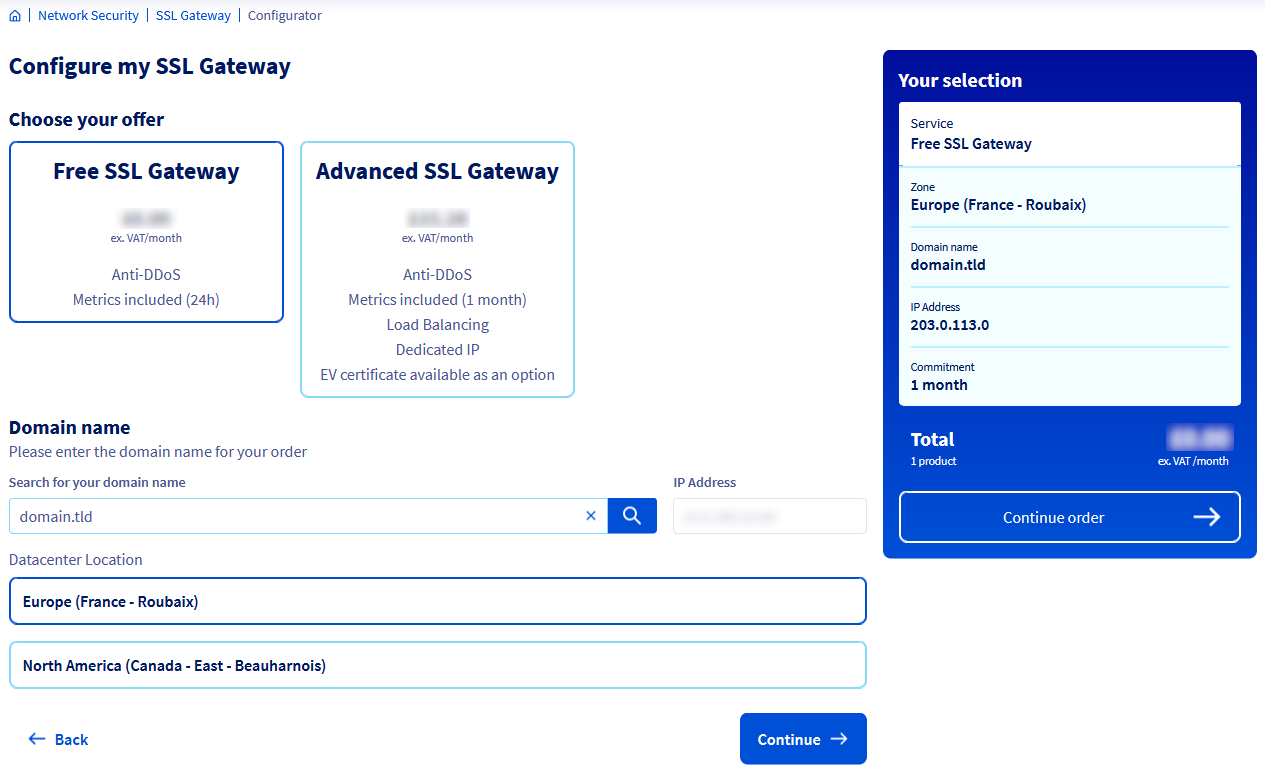
On the new page, enter the domain name or subdomain concerned in the `Search for your domain name
` form, then click on the magnifying glass icon on the right.
:::warning
- Free offer: Only domain names up to 3 levels ([www.domain.tld](http://www.domain.tld)) are authorized.
- Advanced offer: 4th level domain names (blog.[www.domain.tld](http://www.domain.tld)) and higher are authorized.
:::
Our system will then automatically detect your website’s IP address(es) configured on your domain name or subdomain. If you have several IPs, choose one.
:::warning
- Even if you have several IP addresses for your website, you can only choose one IP when ordering.
- If you have the Advanced offer, you can then add up to 2 additional IPs from your OVHcloud Control Panel.
:::
Then choose the location of the data centre where you want to install the SSL Gateway, from the 2 available.
If you wish, and if it is available during the order, tick the `I manage the DNS zone of this domain and authorize OVHcloud to automatically modify the required DNS record
`. The DNS zone associated with your domain name or subdomain will then be automatically updated with the SSL Gateway IP address.
:::warning
Any changes to your DNS zone may take up to 24 hours to work, due to the caching on the ISPs.
:::
Check that all of your choices are correct on the order page, then click `Continue
`.
Finally, please follow the steps until you pay for your purchase order.
### Configuration of your DNS zone
Once your purchase order has been validated, and if you have not ticked the option `I manage the DNS zone of this domain and authorize OVHcloud to automatically modify the required DNS record
`, you will be sent an email asking you to point your domain name or subdomain to the OVHcloud infrastructure within 3 days.
:::warning
Without modifying your DNS zone within 3 days, your order will be cancelled.
:::
:::info
**Case 1: Your DNS zone is managed by OVHcloud shared DNS servers.**
- If your NIC handle is an _administrator_ or _technical_ contact for this DNS zone, you will need to modify it in your OVHcloud Control Panel.
- If you are not an _administrator_ or _technical_ contact for this DNS zone, contact the person in charge of this DNS zone to modify it.
Refer to the instructions in the guide “[Creating an OVHcloud DNS zone for a domain name](/en/guides/web-cloud/domains/dns-zone-create.md)” if necessary.
:::
:::info
**Case 2: Your DNS zone is not managed by OVHcloud shared DNS servers.**
- In this case, modify the IP in your DNS zone by using your service provider’s interface or configure it on your appropriate DNS server.
:::
Once your modification has been processed by our infrastructure, you will receive a confirmation email.
:::warning
Any changes to your DNS zone may take up to 24 hours to work, due to the caching on the ISPs.
:::
## Go further
For specialized services (SEO, development, etc.), contact [OVHcloud partners](https://partner.ovhcloud.com/en-gb/directory/).
If you would like assistance using and configuring your OVHcloud solutions, please refer to our [support offers](https://www.ovhcloud.com/en-gb/support-levels/).
Join our [community of users](https://community.ovhcloud.com/).