---
title: "Time2Chat, conversational SMS messaging for businesses"
description: "Find out how to launch two-way SMS conversations with Time2Chat: order a dedicated 09 number and configure your sender from the OVHcloud Control Panel"
url: https://docs.ovhcloud.com/en/guides/web-cloud/messaging/sms/time-2-chat
lang: en
lastUpdated: 2026-06-15
---
# Time2Chat, conversational SMS messaging for businesses
:::info
OVHcloud SMS offers are only available in the following countries: France, the United Kingdom, Ireland, Spain, Italy and Poland.
:::
:::warning
Time2Chat is available in France only.
:::
## Objective
Time2Chat is a conversational SMS messaging solution. It allows a business to send and receive messages from a single number starting with "09", available throughout France.
This guide presents the principle of Time2Chat, its benefits, the access conditions and the first steps to use it.
## Requirements
- An [OVHcloud SMS account](https://www.ovhcloud.com/en-gb/sms/).
***
### Accessing the OVHcloud Control Panel
- **Direct link:** SMS
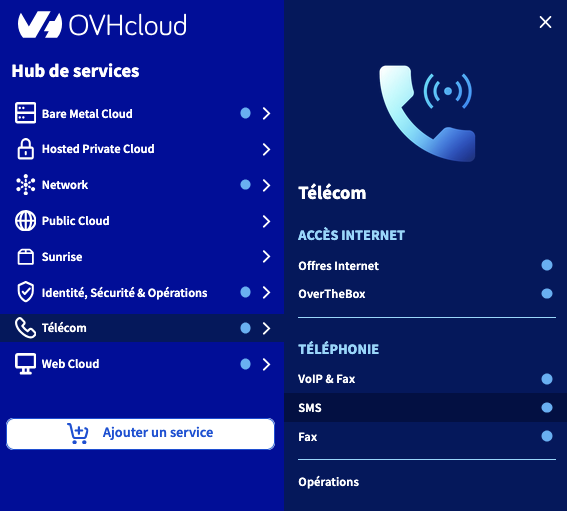
- **To access your services:** Telecom > SMS > Select your SMS account
***
## Instructions
### General information about Time2Chat
Time2Chat is a two-way conversational messaging solution (brand ↔ customer) that allows a business and its customers to exchange SMS messages in France.
Unlike a standard SMS send, the service is based on a dedicated number starting with "09", assigned specifically to each business. You can use this number to send and receive SMS messages.
A conversation "session" begins as soon as a first message is sent — whether it comes from the brand or the customer. From that moment, the session remains active for 24 hours. During this period, both parties can exchange an unlimited number of SMS messages through the same channel, subject to credits being available on the brand's side. Once the period has elapsed, any new message from the brand or the customer automatically starts a new 24-hour session.
#### Usage examples
- Booking or confirming an appointment.
- Order tracking or delivery notification.
- After-sales service and customer support.
- Satisfaction surveys or quick polls.
- Direct interaction with no app to install.
#### Benefits for your business
- **Universal channel**: SMS remains accessible to anyone with a mobile phone plan.
- **Single, identifiable number** (starting with "09"), reinforcing brand recognition.
- **Smooth experience**: natural and continuous exchanges, with no format constraints.
- **Compliance**: adherence to French regulations on professional messaging.
#### Differences with the legacy SMS offer
The Time2Chat service is based on a conversational model, different from standard SMS sends:
| Feature | Standard SMS | Time2Chat |
| -------------- | --------------------------------------------------------------------------------------------------------------------- | --------------------------------------------------------------- |
| Senders | Shared short number allowing replies, which may change.
Alphanumeric sender. | Dedicated number starting with 09. |
| Type of use | One-way send (notification, alert). | Two-way conversation. |
| Reply handling | One-off replies on the short number, with no conversation thread.
No reply possible for an alphanumeric sender. | 24-hour conversation thread between the brand and the customer. |
| Billing | 1 SMS sent = 1 credit. | 1 SMS sent = 2 credits. |
:::info
The customer agrees to use the Time2Chat service in a balanced way, aiming for an **exchange ratio close to 1:1** between messages sent and received.
:::
#### Access conditions
The launch phase of Time2Chat is reserved for customers who already hold an SMS sender of the virtual number (VLN) type starting with "06" or "07".
We will soon offer this service to all customers who have an [OVHcloud SMS account](https://www.ovhcloud.com/en-gb/sms/).
:::info
Existing SMS credits can be used on Time2Chat.
You can also buy a pack of SMS credits from the [SMS section of your Control Panel
](https://auth.eu.ovhcloud.com/signin/?onsuccess=https%3A%2F%2Fmanager.eu.ovhcloud.com%2F%23%2Ftelecom%2Fsms&ovhSubsidiary=GB). Click your SMS account, then click `Top up my account
` from the `Home
` tab.
:::
### Ordering a Time2Chat number
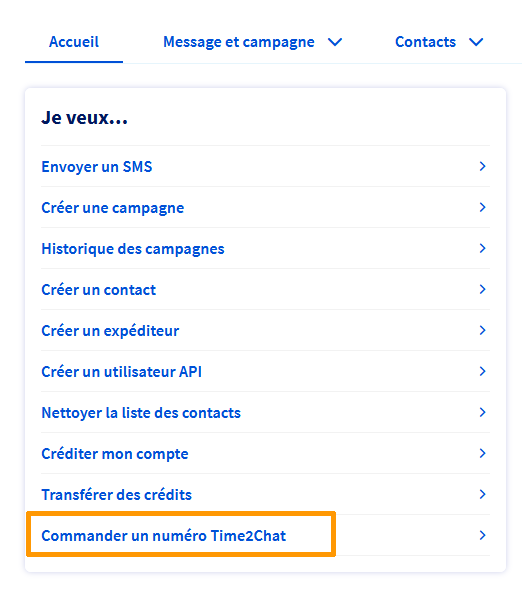
In the `Home
` tab, click the `Order a Time2Chat number
` button.
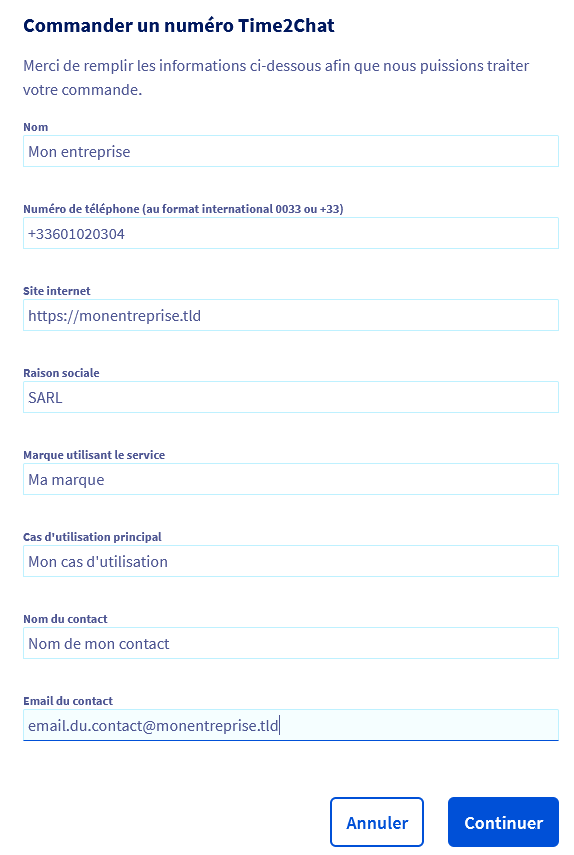
In the form that appears, fill in all the fields, then click `Continue
`.
:::info
The information entered can be modified later from the Control Panel.
:::
Follow all the steps before proceeding to payment.
### Configuring a Time2Chat sender
Once your Time2Chat number has been ordered, click the `Senders
` tab of your SMS account. The Time2Chat number automatically appears in the list of senders with the "Virtual number" type. To configure it, click the `...
` button to the right of the number, then select `Configure
`. You then access the Time2Chat conversational SMS configuration page.
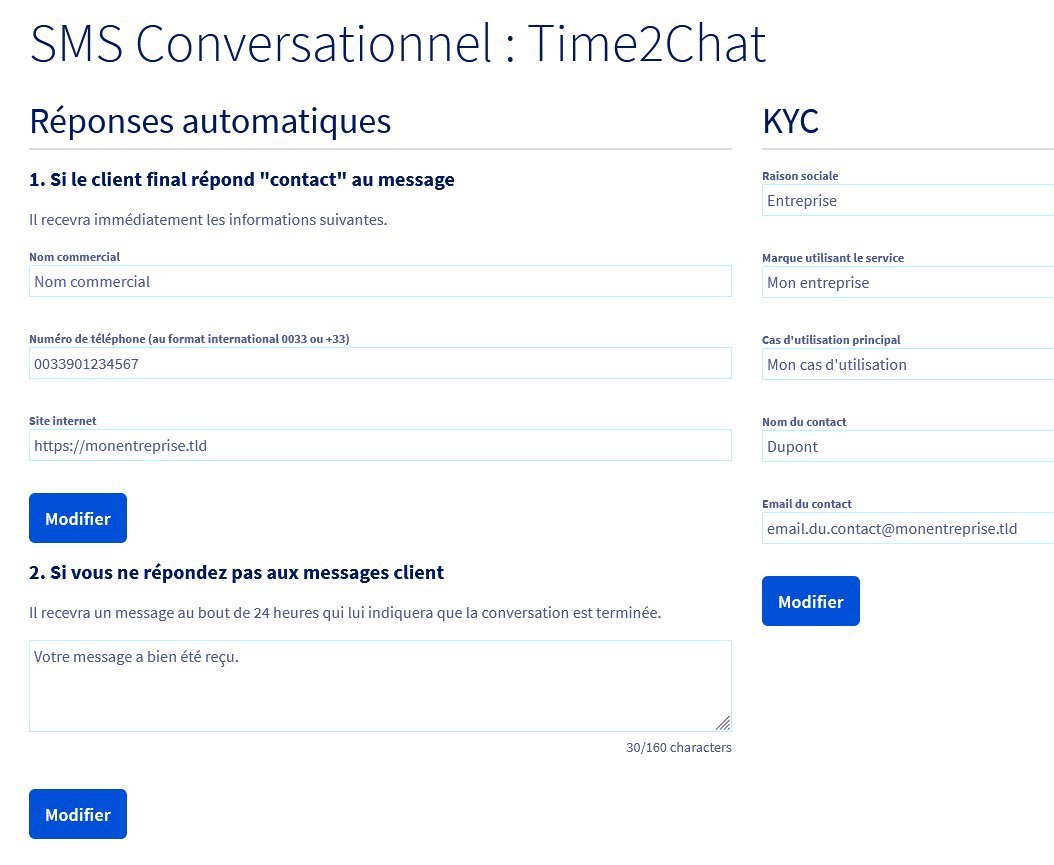
On this interface, you can:
- define the automatic reply information:
- If an end customer replies with the keyword "contact", they will automatically receive a message containing your trade name, your phone number and your website.
- If you do not reply to a customer message within 24 hours, an automatic reply (for example: "Your message has been received") will be sent to indicate the end of the conversation.
- complete the KYC (**K**now **Y**our **C**ustomer) information: enter the company name, the brand using the service, the main use case, as well as the contact details of the main contact (name and email).
These elements allow you to personalise your Time2Chat number and to ensure the smooth operation of two-way exchanges between your brand and your customers.
As soon as the customer replies, the **24-hour session** starts. All exchanges made during this period are deducted from your **available SMS credits**, whether they come from your initial pack or from additional purchases.
## Go further
[Manage SMS credits and enable automatic top-up](/en/guides/web-cloud/messaging/sms/activer-la-recharge-automatique-du-credit-sms.md)
[Manage SMS history](/en/guides/web-cloud/messaging/sms/sms-history.md)
Talk to our [community of users](https://community.ovhcloud.com/).