---
title: "Sending SMS messages via a URL - http2sms"
description: "Find out how to send SMS messages using the Wget tool and HTTP requests directly from your web browser URL bar or command line"
url: https://docs.ovhcloud.com/en/guides/web-cloud/messaging/sms/send-sms-http2sms
lang: en
lastUpdated: 2026-06-15
---
# Sending SMS messages via a URL - http2sms
:::info
OVHcloud SMS offers are only available in the following countries: France, the United Kingdom, Ireland, Spain, Italy and Poland.
:::
## Objective
There are different methods for sending SMS messages. One of them involves using the Wget tool, directly via your web browser’s URL bar.
**Find out how to send SMS messages with the Wget tool.**
## Requirements
- An SMS user created via the OVHcloud Control Panel, or directly via the APIs. To do this, please refer to the following guide: [Everything you need to know about SMS users](/en/guides/web-cloud/messaging/sms/sms-users.md)
- An [OVHcloud SMS account](https://www.ovhcloud.com/en-gb/sms/) with SMS credits.
- An active SMS sender. For more information, refer to this [guide](/en/guides/web-cloud/messaging/sms/send-sms-control-panel.md).
## Instructions
SMS messages are sent via a HTTPS request with mandatory fields (and optional fields, if applicable) to the following address: [https://www.ovh.co.uk/cgi-bin/sms/http2sms.cgi?](https://www.ovh.co.uk/cgi-bin/sms/http2sms.cgi?).

### Step 1: Include the mandatory fields.
Your URL must be as follows:
```
https://www.ovh.com/cgi-bin/sms/http2sms.cgi?&account=XXXXXXX&login=XXXXXXX&password=XXXXXXX&from=XXXXXXX&to=XXXXXXX&message=XXXXXXX
```
The following settings must be separated by ampersands (&). Replace the Xs with the information below:
| Settings | Replace with |
| -------- | ------------------------------------------------------------------------------------------------------------------------------------------------------------------- |
| account | SMS account to use (e.g.: sms-xx11111-1) |
| login | SMS user to use on the associated account |
| password | User password |
| from | One of the senders declared on your SMS account. |
| to | The recipient phone number must be in **international format** (+44xxxxxxxxx for a UK number). You can add multiple recipients by separating them with a comma (,). |
| message | Your message. Add %0d to add a line break in the SMS you send. |
By default, the message is sent immediately.
Your browser will display the following information:
- the send status
- the number of credits remaining on the SMS account
- the ID(s) of the SMS messages sent
For example:
```
OK
85.95
123456789
```
Find more details on analysing sent messages [in step 3 of this guide](#analysis).
#### Special case: sending an SMS from a short-number sender that allows replies
:::info
SMS response (short number via `senderForResponse`) is available in France only.
:::
To send an SMS from a short-number sender that allows the recipient to reply, you must leave the `from` parameter empty and add the `senderForResponse=1` field.
Your URL will then be as follows (where the Xs must be replaced with the values described in the table above):
```
https://www.ovh.com/cgi-bin/sms/http2sms.cgi?&account=XXXXXXX&login=XXXXXXX&password=XXXXXXX&from=&senderForResponse=1&to=XXXXXXX&message=XXXXXXX
```
### Step 2: Add optional fields.
You can add extra fields in the subject, such as:
```
https://www.ovh.com/cgi-bin/sms/http2sms.cgi?&account=XXXXXXX&login=XXXXXXX&password=XXXXXXX&from=XXXXXXX&to=XXXXXXX1,XXXXXXX2&message=XXXXXXX&deferred=XXXXXXX&class=X&smsCoding=X&noStop=X
```
Replace the Xs with the information below:
| Settings | Replace with |
| ----------- | -------------------------------------------------------------------------------------------------------------------------------------------------- |
| deferred | To enter a deferred send date, add it in the format hhmmddMMYYYY (e.g.: 183019072020 if you want to send it on 19/07/2020, at 18:30). |
| class | The SMS class type, in the format where N = 1 number (see the first information note below). |
| noStop | To remove the "STOP on XXXXX" clause from the end of a message, for non-advertising SMS messages. |
| tag | A maximum chain of 20 characters you can use to mark sent messages. |
| contentType | You can choose the response type. It can be: text/xml, application/xml, text/json, application/json, text/plain, text/html (text/plain by default) |
| smsCoding | The SMS encoding type, in the format where N = 1 number (see the second information note below). |
:::info
**Detail of options for classes**
_class 0:_ The message is directly displayed for the user on their mobile phone screen, when they receive it. The message is not saved in the phone’s memory, or on their SIM card. It is erased as soon as the user has confirmed that they have read it.
_class 1:_ The message is saved in the phone’s memory, and if the memory is full, it is saved in the SIM card by default.
_class 2:_ The message is saved on the SIM card.
_class 3:_ The message is transferred on to an external device connected to the mobile (PDA, laptop, etc.).
:::
:::info
**Detail of options for smsCoding**
_1_ for 7bit encoding
_2_ for Unicode encoding
If you select Unicode encoding, your SMS will have a 70-character limit, rather than the 160-character limit of 7bit encoding.
For further information on authorised characters in 7bit encoding, please refer to the [appendix](#appendix) at the bottom of this guide.
:::
#### Commercial SMS size
A commercial SMS message must include the STOP clause. This contains 11 characters and is automatically deducted from the 160 base characters of the first SMS.
The table below therefore indicates the maximum number of characters allowed for commercial SMS messages.
Example: in 7bit encoding, if your message is longer than 149 characters, it will be sent as 2 SMS messages and will therefore cost 2 credits.
| Encoding | First SMS | Second SMS and following |
| ------------------------- | -------------- | ------------------------ |
| 7bit (GSM 03.38 standard) | 149 characters | 153 characters |
| Unicode | 59 characters | 70 characters |
### Step 3: Analyse sent messages. [](#)
Once you have sent an SMS message, an API return code will show you whether the message has been sent successfully, or failed.
A code higher than 100 and lower than 200 indicates that the message has been sent.
Here is a list of API return codes.
- _100 or 101:_ request processed.
- _201:_ a setting is missing (e.g. Missing login, Missing password).
- _202:_ a setting is incorrect (e.g. Invalid tag: is too long, Invalid deferred time).
- _401:_ no authorised IP. To managed authorised IPs, you can apply restrictions via the OVHcloud Control Panel.
When a failure occurs, the cause is included:
- in the message field for .json or .xml
- on the second line for .html and text/plain
#### XML
- If sent successfully:
```xml
100198710867690
```
- If sending failed:
```xml
201Missing message. For more information: https://help.ovhcloud.com/csm/en-gb-sms-sending-via-url-http2sms?id=kb_article_view&sysparm_article=KB0039184
```
#### JSON
- If sent successfully:
```json
{"status":100,"creditLeft":"1987","SmsIds":["10867690"]}
```
- If sending failed:
```json
{"status":201,"message":"Missing message. For more information: https://help.ovhcloud.com/csm/en-gb-sms-sending-via-url-http2sms?id=kb_article_view&sysparm_article=KB0039184"}
```
#### HTML
- If sent successfully:
```html
HTTP2SMS
OK
1987
10867690
```
- If sending failed:
```html
HTTP2SMS
KO
Missing message. For more information: https://help.ovhcloud.com/csm/en-gb-sms-sending-via-url-http2sms?id=kb_article_view&sysparm_article=KB0039184
```
#### Text/plain
- If sent successfully:
```
OK
1987
10867690
```
- If sending failed:
```
KO
Missing message. For more information: https://help.ovhcloud.com/csm/en-gb-sms-sending-via-url-http2sms?id=kb_article_view&sysparm_article=KB0039184
```
## Appendix
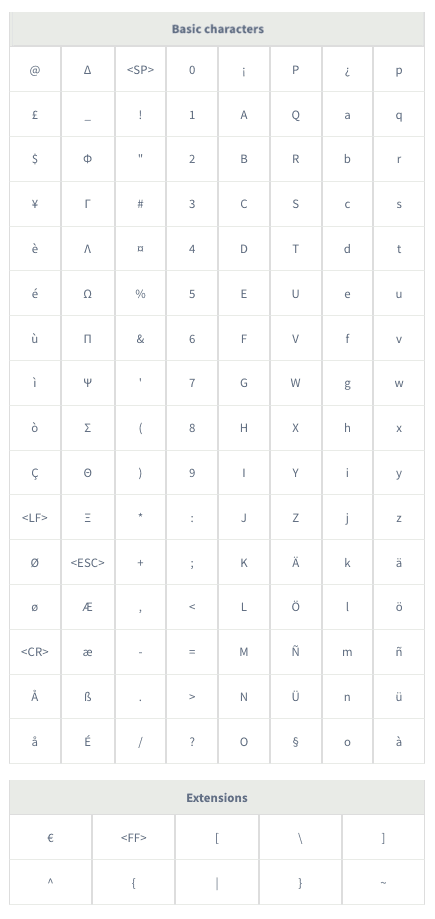
The two tables below list the authorised characters for 7bit encoding. The characters in the "Extensions" table count as double.
The maximum size of an SMS message is 160 characters in 7bit encoding (GSM 03.38 standard).
If you use characters that do not appear in these tables, the encoding will switch to Unicode, reducing the maximum size of an SMS message to 70 characters.
## Go further
Join our [community of users](https://community.ovhcloud.com/).