---
title: "Restoring deleted items from your email account"
description: "Find out how to restore deleted items from your email account via webmail (OWA)"
url: https://docs.ovhcloud.com/en/guides/web-cloud/email-and-collaborative-solutions/troubleshooting/diagnostic-retention
lang: en
lastUpdated: 2026-06-08
---
# Restoring deleted items from your email account
## Objective
You have mistakenly deleted one or more items (email, contact, calendar appointment) and emptied your "trash". You can still restore these items up to 14 days after they have been deleted via OWA (Outlook Web App).
**This guide explains how to restore deleted items from your email account via webmail (OWA)**
## Requirements
- An OVHcloud email solution:
- **MX Plan** ([new version only](/en/guides/web-cloud/email-and-collaborative-solutions/mx-plan/email-generalities.md)), available as part of our [web hosting plans](https://www.ovhcloud.com/en-gb/web-hosting/) or included in a [free hosting](https://www.ovhcloud.com/en-gb/domains/free-web-hosting/)
- **MX Plan** ([new version only](/en/guides/web-cloud/email-and-collaborative-solutions/mx-plan/email-generalities.md)), available as part of our [web hosting plans](https://www.ovhcloud.com/en-gb/web-hosting/)
- [**Hosted Exchange**](https://www.ovhcloud.com/en-gb/emails/hosted-exchange/)
- [**Email Pro**](https://www.ovhcloud.com/en-gb/emails/email-pro/)
- Login details for the email account concerned
## Instructions
### Retention
Deleted item retention (deleted from "Trash" / "Deleted Items" folders) is available for 14 days for the following items:
- Email
- Contact
- Calendar
- Tasks
Deleted items can be recovered from webmail (OWA) and the Outlook email software.
:::warning
Some deletions are not recoverable from retention, particularly if there is a sync failure between a device (email client, smartphone) and the Exchange server. In this case, items might be permanently deleted instead of being moved into the recovery space for deleted items.
:::
### How to restore deleted items
Log in to your email account via webmail (OWA): [Webmail](https://www.ovhcloud.com/en-gb/mail/).
:::info
For a **Private Exchange**
service, the link to log in to webmail can be found under **Connection**
in the `General information
` tab of your platform.
:::
Once connected, click `Deleted Items
` in the left column, and then click `Recover deleted items
` at the top of the middle column.
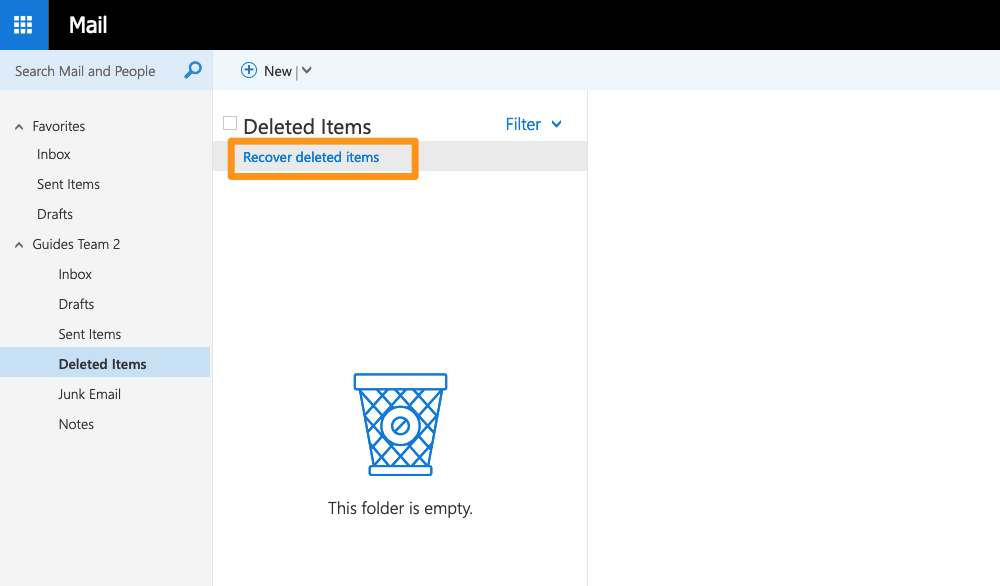
An additional window appears. If your web browser blocks popup windows by default, change the setting to allow popups on this page.
You can select multiple items by holding down the `Ctrl` (or `Command`) key on your keyboard and then clicking on the desired items.
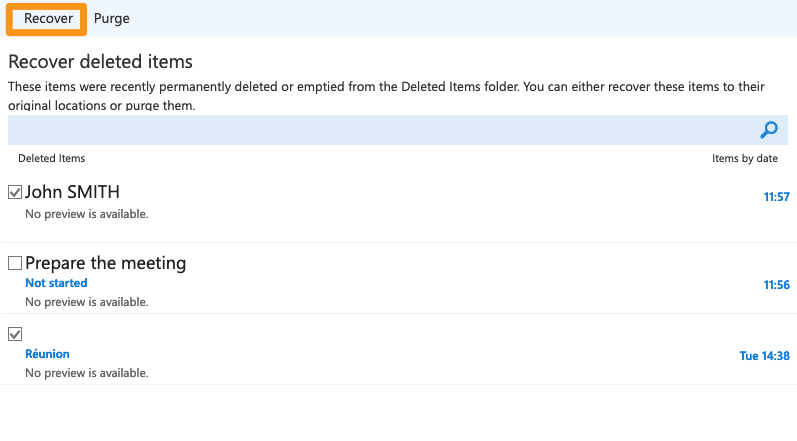
Then confirm your selection by clicking on `Recover
`.
:::info
You can select different types of items and perform the restore. Each item type will then be restored to the appropriate section.
:::
## Go further
Join our [community of users](https://community.ovhcloud.com/community/en).