---
title: "MX Plan - How to create an automatic reply on an email address"
description: "Find out how to set up an automatic reply on an email address"
url: https://docs.ovhcloud.com/en/guides/web-cloud/email-and-collaborative-solutions/mx-plan/feature-auto-responses
lang: en
lastUpdated: 2026-06-08
---
# MX Plan - How to create an automatic reply on an email address
## Objective
This OVHcloud feature allows you to set up an automatic email responder (auto-reply) that sends a message to anyone trying to contact you by email in your absence.
**This guide explains how to configure automatic replies for your email addresses.**
## Requirements
- An OVHcloud MX Plan, available as part of our [web hosting plans](https://www.ovhcloud.com/en-gb/web-hosting/), the [free hosting](https://www.ovhcloud.com/en-gb/domains/free-web-hosting/) included with a domain name (activated in advance), or ordered separately as a standalone solution
***
### OVHcloud Control Panel Access
- **Direct link:** MX Plan
- **Navigation path:** Web Cloud > MX Plan > Select your MX Plan service
***
## Instructions
:::warning
If your email address is configured on [**Exchange**](https://www.ovhcloud.com/en-gb/emails/hosted-exchange/)
or [**Email Pro**](https://www.ovhcloud.com/en-gb/emails/email-pro/)
, or if there is no `Manage auto-replies
` section in your MX Plan interface, you will need to create an automatic reply from your webmail using the documentation on [Setting up an automatic reply from the OWA interface](/en/guides/web-cloud/email-and-collaborative-solutions/using-the-outlook-web-app-webmail/owa-automatic-replies.md)
.
:::
### Creating an auto-reply
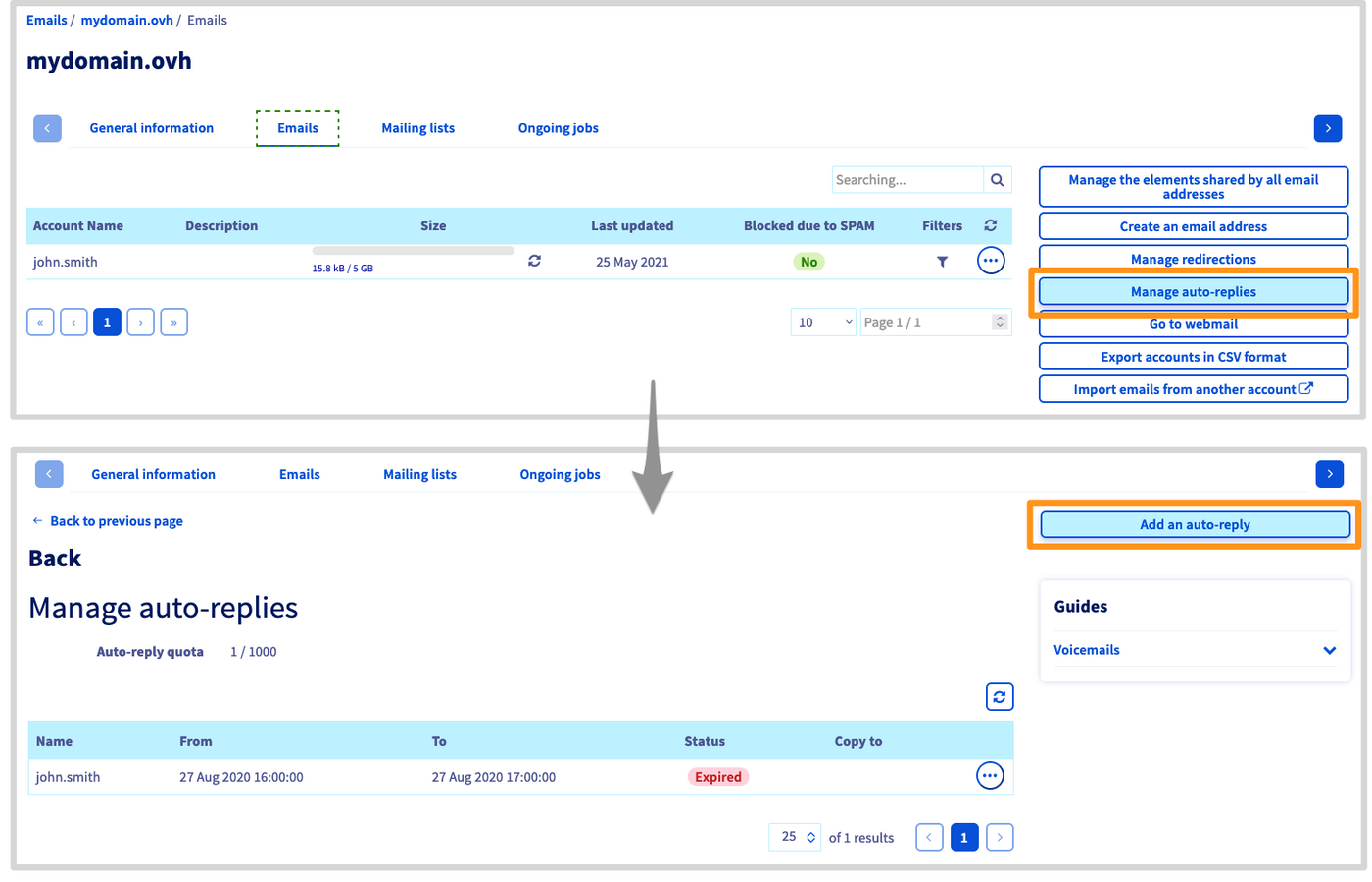
Open the tab `Emails
`, then click on the button `Manage auto-replies
` on the right.
You will be redirected to the `Manage auto-replies` section where all of the email responders for this domain name are listed.
To create a new one, click on `Add an auto-reply
`.
The window `Add an auto-reply` appears. Fill out the form according to the information below:
- `Auto-replies type`:
- **Associated with an email inbox**: To use if it concerns an existing email account of your email solution.
- **Free**: To use in the case of an email alias address. It is not linked to an existing account.
- `Mailbox` or `Auto-reply name`: Select the email account or alias address concerned by the automatic reply.
- `Auto-reply duration`:
- **Temporary**: Define a start and end date for the responder, for example if you are scheduling an absence.
- **Permanent**: The automatic replies stay active until you delete or modify the responder.
- `Send a copy` or `Keep messages on the server`: Allows you to choose whether emails received during your absence will be deleted or stored in an account.
:::warning
If you leave this box unchecked, messages received during your absence will be automatically deleted.
:::
- `Address on copy` (only in "free" mode): If the receiving address is an alias, you need to select the email account incoming messages will be stored in.
- `Message`: This will be the reply to incoming mails while the responder is active.
Then click `Confirm
` to finish configuring your automatic reply.
:::tip
If you would like to delegate the management of an automatic reply for an email address, please refer to our guide ["Delegating the management of your email accounts to another person"](/en/guides/web-cloud/email-and-collaborative-solutions/mx-plan/feature-delegation.md).
:::
### Modifying or deleting an automatic reply
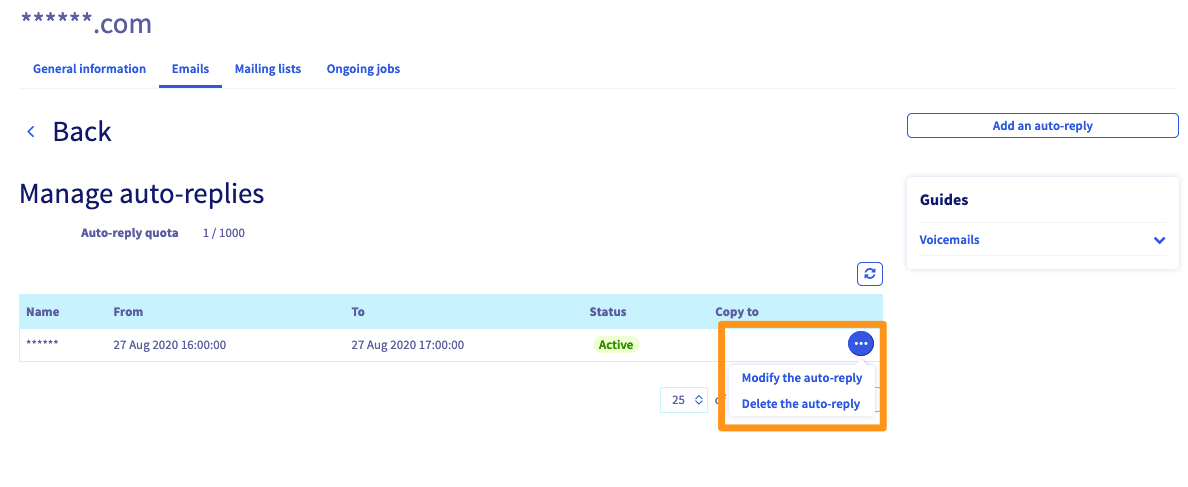
Once your automatic reply has been created, it will appear in the table in the `Manage auto-replies
` section of your email service. You can delete or modify a responder by clicking on `...
` to the right of it.
## Go further [](#)
[Email FAQ](/en/guides/web-cloud/email-and-collaborative-solutions/mx-plan/faq-emails.md)
Join our [community of users](https://community.ovhcloud.com/community/en).