---
title: "How to get information about a domain name with WHOIS"
description: "Find out how to use the WHOIS tool to get details on a domain name"
url: https://docs.ovhcloud.com/en/guides/web-cloud/domains/domain-whois
lang: en
lastUpdated: 2025-07-04
---
# How to get information about a domain name with WHOIS
## Objective
Want to know if a domain name is available? You want to know certain information related to a domain name, such as the holder's contact details, the expiry date, etc. ?
WHOIS, short for “Who is?”, is a protocol that allows access to different data related to a domain name.
**Find out how to use the WHOIS tool to get information on a domain name.**
## Requirements
- An Internet browser (e.g. Firefox, Chrome, Safari, Edge, etc.) on your computer, tablet or smartphone.
## Instructions
OVHcloud provides an interface to allow you to execute the WHOIS command for a domain name.
:::info
The content and presentation of the information in the result of a WHOIS query may differ depending on the domain name extension (e.g. _.com_, _.net_, _.ovh_, etc.).
In addition, the registries that manage these extensions may allow domain name holders to hide personal information in WHOIS.
:::
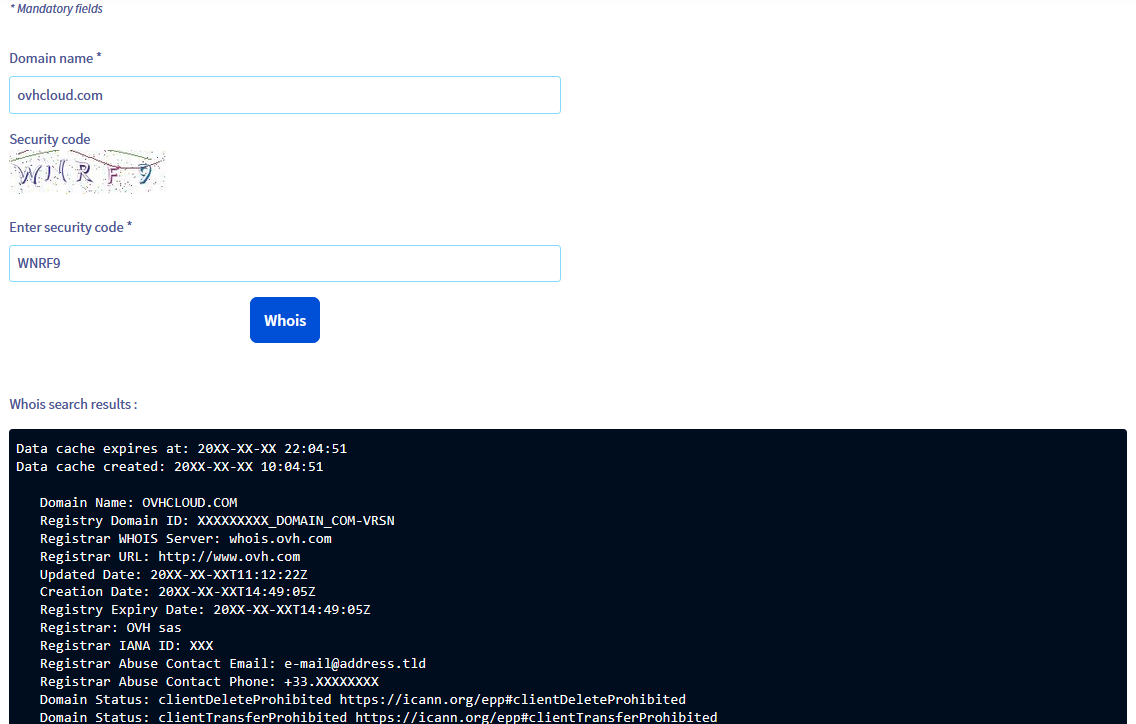
The following steps will take you to the WHOIS records associated with a domain name:
1. Access our [WHOIS online tool](https://www.ovhcloud.com/en-gb/domains/whois/).
2. On the page that pops up, enter the domain name (for example: _domain.tld_ **without** the _www_) in the Domain name \* field, then enter the `Security code` in the Enter security code \* field.
3. Click the Whois button to send the request.
4. See the result of the WHOIS query in the new section titled Whois search results : under the Whois button.
In this result, you will find all the information available on the domain name entered in step **2**.
## Go further
[How do I configure the WHOIS display for a domain name?](/en/guides/web-cloud/domains/domain-configure-whois-listing.md)
For specialised services (SEO, development, etc.), contact [OVHcloud partners](https://partner.ovhcloud.com/en-gb/directory/).
If you would like assistance using and configuring your OVHcloud solutions, please refer to our [support offers](https://www.ovhcloud.com/en-gb/support-levels/).
Join our [community of users](https://community.ovhcloud.com/).