---
title: "How to add a DNS TXT record for a domain name"
description: "Find out how to add a TXT record to an OVHcloud DNS zone for your domain name"
url: https://docs.ovhcloud.com/en/guides/web-cloud/domains/dns-zone-txt-record-creation
lang: en
lastUpdated: 2026-03-24
---
# How to add a DNS TXT record for a domain name
## Objective
Do you need to validate a verification or security process for your domain name (service association via a validation token, verification key, etc.) using your DNS zone? Want to add a custom text value to your domain name’s DNS zone?\
To do this, you will need to create a TXT record in your domain name’s active DNS zone.
**Find out how to add a DNS TXT record to an OVHcloud DNS zone for your domain name.**
:::info
To modify or delete a TXT record of an OVHcloud DNS zone, follow [this guide](/en/guides/web-cloud/domains/dns-zone-edit.md).
:::
## Requirements
- A [domain name](https://www.ovhcloud.com/en-gb/domains/)
- A DNS zone associated with this domain name at OVHcloud
***
### OVHcloud Control Panel Access
- **Direct link:** DNS zones
- **Navigation path:** Web Cloud > DNS zones > Select your domain name
***
## Instructions
:::warning
Adding, modifying or deleting DNS records in an active DNS zone can cause service interruptions. If in doubt, contact a [specialist provider](https://partner.ovhcloud.com/en-gb/directory/).
:::
### Add a DNS TXT record for a domain name
Click on the tabs below to view each of the **5** steps.
**Step 1**
Go to the DNS zones page, then choose the domain name concerned.
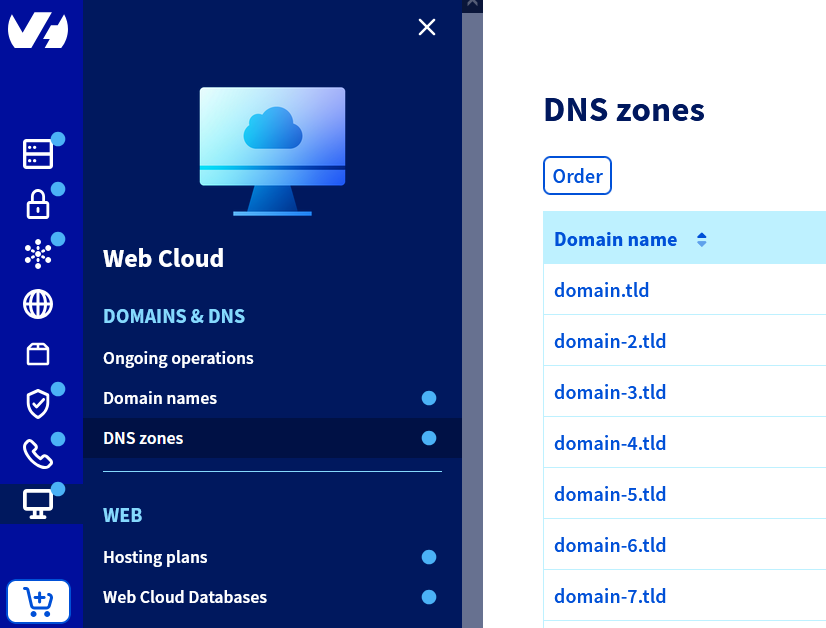
**Step 2**
Click the Add an entry button.
**Step 3**
In the window that opens, select the TXT extended record type.
**Step 4**
Enter the TXT string you want to add in the `Value *` field (e.g.: `AbCdE-Value-of-TXT-fGhIjK`), then click Next.
**Step 5**
Check the summary, then click Confirm. It takes up to **24** hours for the change to propagate fully over the DNS network.
Click here for more information.
See our detailed guides:
- [Everything you need to know about DNS zone](/en/guides/web-cloud/domains/dns-zone-general-information.md)
- [Everything you need to know about DNS records](/en/guides/web-cloud/domains/dns-zone-records.md)
- [Editing an OVHcloud DNS zone](/en/guides/web-cloud/domains/dns-zone-edit.md)
### Add a DNS TXT record for a domain name subdomain
Click on the tabs below to view each of the **5** steps.
**Step 1**
Go to the DNS zones page, then choose the domain name concerned.

**Step 2**
Click the Add an entry button.
**Step 3**
In the window that opens, select the TXT extended record type.
**Step 4**
Enter the subdomain in the `Sub-domain` field (e.g.: `www` for the subdomain `www.domain.tld`), and the TXT string you want to add in the `Value *` field (e.g.: `AbCdE-Value-of-TXT-fGhIjK`). Click Next.
**Step 5**
Check the summary, then click Confirm. It takes up to **24** hours for the change to propagate fully over the DNS network.
Click here for more information.
See our detailed guides:
- [Everything you need to know about DNS zones](/en/guides/web-cloud/domains/dns-zone-general-information.md)
- [Everything you need to know about DNS records](/en/guides/web-cloud/domains/dns-zone-records.md)
- [How to create a subdomain](/en/guides/web-cloud/domains/domain-create-subdomains.md)
- [Editing an OVHcloud DNS zone](/en/guides/web-cloud/domains/dns-zone-edit.md)
## Go further
[Everything you need to know about DNS zones](/en/guides/web-cloud/domains/dns-zone-general-information.md).
[Everything you need to know about DNS records](/en/guides/web-cloud/domains/dns-zone-records.md)
For specialised services (SEO, development, etc.), contact [OVHcloud partners](https://partner.ovhcloud.com/en-gb/directory/).
If you would like assistance using and configuring your OVHcloud solutions, please refer to our [support offers](https://www.ovhcloud.com/en-gb/support-levels/).
Join our [community of users](https://community.ovhcloud.com/).