---
title: "Confirming a change of holder or an outgoing transfer"
description: "Find out how to confirm or decline a change of holder or an outgoing transfer request received by email for your domain name"
url: https://docs.ovhcloud.com/en/guides/web-cloud/domains/confirm-holder-change-or-transfer
lang: en
lastUpdated: 2026-08-28
---
> For AI agents: the complete documentation index is available at https://docs.ovhcloud.com/en/llms.txt, the full documentation bundle is available at https://docs.ovhcloud.com/en/llms-full.txt.
# Confirming a change of holder or an outgoing transfer
## Objective
When a [change of holder](https://docs.ovhcloud.com/en/guides/web-cloud/domains/trade-domain.md) (domain name trade) or an [outgoing transfer](https://docs.ovhcloud.com/en/guides/web-cloud/domains/transfer-outgoing-domain.md) is initiated on a domain name, OVHcloud sends a confirmation email — containing a secure validation link — to the parties concerned so they can approve or refuse the request.
This confirmation step is an authorisation (sometimes called a **Form of Authorization**, or **FOA**) that ensures the operation is legitimate and approved by the people entitled to authorise it. For a **change of holder**, the operation is completed only once it has been confirmed. For an **outgoing transfer**, accepting speeds up the transfer and declining cancels it, while taking no action lets the transfer complete automatically after a few days (usually 5).
**This guide explains how to confirm or decline such a request from the email you received.**
## Requirements
- You have received a confirmation email from OVHcloud regarding a change of holder or an outgoing transfer for a domain name.
- You are one of the parties entitled to authorise the operation (for example, the current holder, the new holder, or the domain name's administrative contact, depending on the operation and the extension).
## Instructions
### Who needs to confirm?
The number of confirmation emails depends on the operation:
- **Change of holder (domain name trade):** a confirmation email is sent to **both** the current holder and the future holder. **Both** parties must confirm the request for the change to take effect.
If the current holder and the future holder share the **same email address**, a **single** confirmation email is sent.
- **Outgoing transfer:** a confirmation email is sent to the party entitled to authorise the transfer (typically the administrative contact).
:::info
The exact recipients can vary depending on the domain name extension (TLD) and the registry's own rules. Always follow the instructions contained in the email(s) you received.
:::
### Confirming or declining the request
Click on the tabs below to view each step.
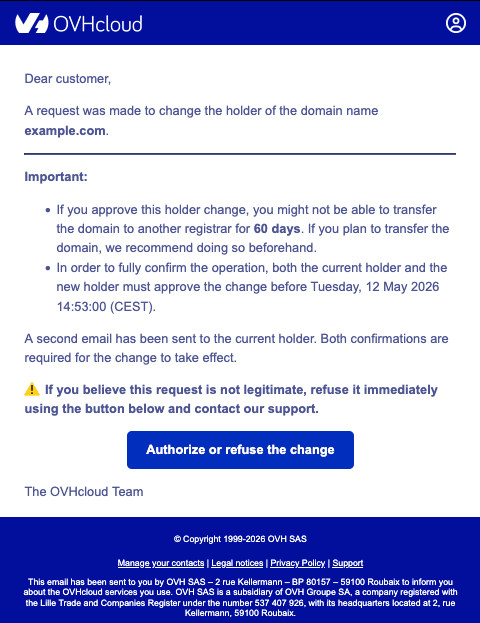
**Step 1**
Open the confirmation email sent by OVHcloud. It identifies the domain name concerned and the type of operation (change of holder or outgoing transfer). Click the validation link (or button) in the email.
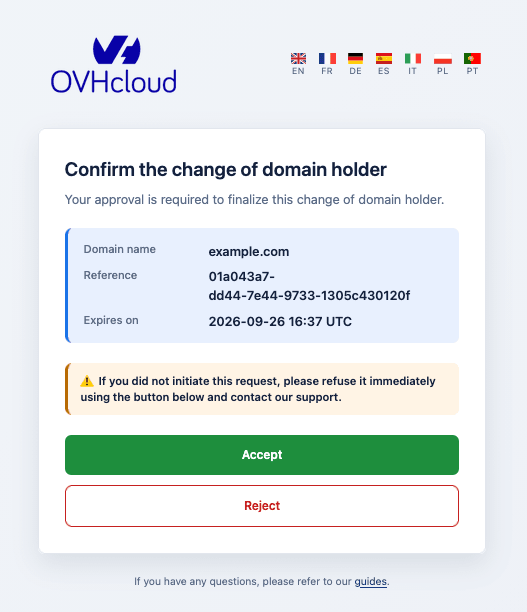
**Step 2**
The link opens a validation page in your browser. Check the information displayed (domain name and type of operation) to make sure it matches the request you are expecting, then:
- To authorise the operation, click Accept.
- To refuse it, click Reject.
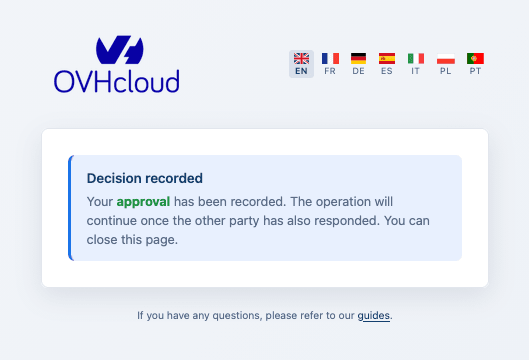
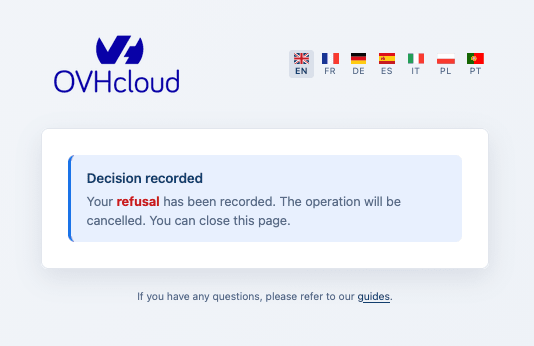
**Step 3**
A confirmation screen indicates that your answer has been recorded.
For a change of holder, the operation proceeds only once **all** required parties have confirmed. As long as another party still has to confirm, the operation remains pending.
:::warning
- For a **change of holder**, the request must be confirmed by all parties within a period defined by the registry (**14 days** by default). After this period, the operation is automatically **cancelled** and a new request must be initiated. Declining the request **cancels** the change.
- For an **outgoing transfer**, if you take no action within the period defined by the registry (usually 5 days), the transfer **completes automatically**. Accepting the request speeds it up, while declining it **cancels** it.
:::
### Troubleshooting
**You get an error when opening the validation link**
Each confirmation email contains a unique, time-limited validation link. If a new request is initiated (for example, if the email is resent), the previous link becomes invalid and only the **most recent** email can be used.
If you see an error on the validation page:
1. Go back to your mailbox and check whether you have received a **more recent** confirmation email for the same domain name.
2. Use the link contained in the **latest** email.
3. Make sure the link has not been altered (for example, split across several lines or truncated by your email client).
**You did not receive the email, or the recipient email address is obsolete or inaccessible**
Check your spam or junk folder first. If you still cannot access the confirmation email, contact our support team by creating a ticket from your [OVHcloud Help Centre](https://help.ovhcloud.com/csm?id=csm_get_help).
## Go further
[Domain name - How do I change the holder?](https://docs.ovhcloud.com/en/guides/web-cloud/domains/trade-domain.md)
[Transferring a domain name to another registrar](https://docs.ovhcloud.com/en/guides/web-cloud/domains/transfer-outgoing-domain.md)
For specialised services (SEO, development, etc.), contact [OVHcloud partners](https://partner.ovhcloud.com/en-gb/directory/).
If you would like assistance using and configuring your OVHcloud solutions, please refer to our [support offers](https://www.ovhcloud.com/en-gb/support-levels/).
Join our [community of users](https://community.ovhcloud.com/).